
Contents
- Project Description
- 1. Introduction
- 2. Main Functions
- 3. Hardware Requirements
- 4. Software Environment
- 5. File Structure
- 6. Description of Key Documents
- 7. Core Ideas of Software Design,
- 8. Instructions for Use
- 9. Sample Program
- 10. Notes
- 11. Version Record
- 12. Contact the Developer
- 13. Licensing Agreement
- Appendix 1: Project Source Code Download
- Appendix II: Reference Materials for hardware Modules
- Version Record
Project Description
1. Introduction
1.1 Project Background
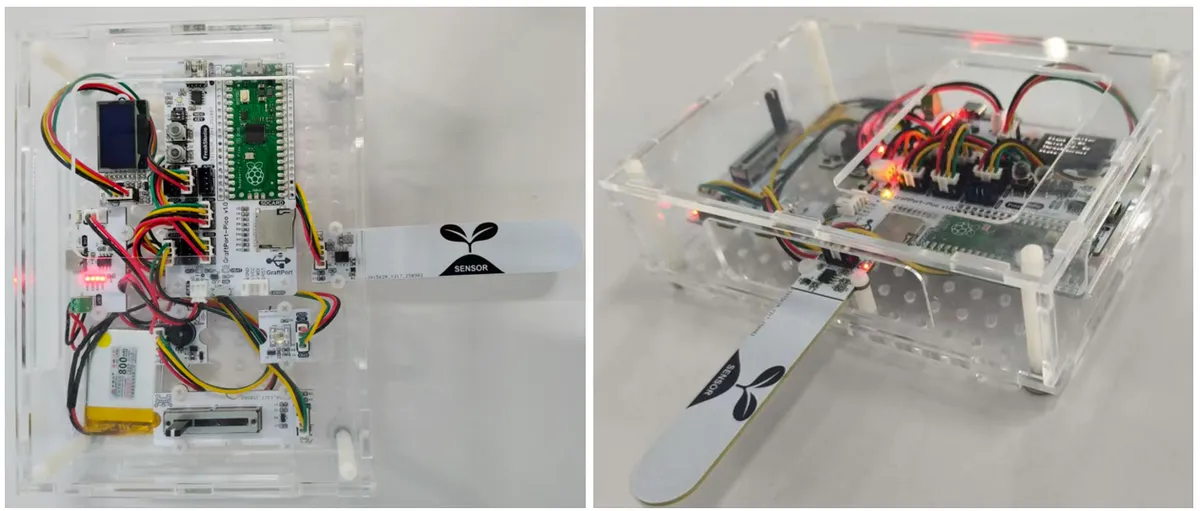
Traditional plant maintenance relies on manual experience to judge soil moisture, which has the problems of untimely or excessive watering, and lacks an intuitive status feedback mechanism. This project is based on GraftPort-RP2040 development board, and integrates NE555-based analog capacitive soil moisture sensor module, 0.96-inch SSD1306-OLED module, passive buzzer module and other alarm modules to realize the automated process of "moisture collection - threshold judgment - intelligent reminder", solving the subjectivity and lag problems of traditional maintenance methods.It also integrates MicroPython lightweight task scheduling and exception handling mechanisms to ensure the stable and reliable operation of the system in embedded environments.
1.2 Overview of the Main Functions of the Project
This project is developed based on MicroPython, whose core function is to collect real-time soil moisture data via the analog capacitive soil moisture sensor module based on NE555; after filtering processing, the data will be compared with an adjustable threshold (manually set via a sliding rheostat). When the humidity is lower than the threshold, it will trigger the passive buzzer module for alarm and LED flashing reminder, and meanwhile display the current humidity, threshold and alarm status on the OLED screen. It supports on-board key interrupt to control task start/stop and sensor calibration, has built-in automatic garbage collection (GC) to avoid memory leaks, and is equipped with an exception capture mechanism for convenient problem locating.
1.3 Applicable Scenarios or Application Area
- Home Gardening: provides precise watering reminders for potted plants to prevent them from wilting due to forgotten watering or misjudgment;
- Smart Greenhouse: serving as a small monitoring node to provide real-time feedback on the soil moisture conditions in a specific area;
- Teaching Demo: for
MicroPythonsensor interaction,PWMcontrol, 0.96-inch SSD1306-OLED module, task scheduling and other knowledge points in practical teaching; - Maker Project: As a lightweight environmental monitoring module, it can be quickly integrated into smart agriculture works.
2. Main Functions
- Real-time Humidity Acquisition and Filtering: Analog Capacitive Soil Moisture Sensor Module Based on NE555 It collects data once every 500ms, and adopts the "five-point mean filtering" mechanism to filter out instantaneous interference and ensure data stability;
- Flexible threshold adjustment: Users can manually set the humidity alarm threshold via a rheostat, with support for custom settings within the 0-100% range to adapt to the growth requirements of different plants.
- Multi-mode alarm reminder: when the humidity is lower than the threshold, the passive buzzer module emits intermittent alarm sounds, the piranha LED light module flashes synchronously, and at the same time the buzzer alarm screen displays the alarm indicator, providing multi-dimensional status feedback;
- Key Interrupt Interaction: The onboard key triggers a falling-edge interrupt: a short press toggles the task between "running/paused", while a long press of 2 seconds enters the sensor calibration mode, delivering intuitive and efficient operation.
- Visual Data Display: SSD1306 OLED Screen which displays the current soil moisture value, set threshold and system status (running/paused/calibrating) in real time, making the information clear at a glance;
- Automatic memory management: The system detects memory when idle, and automatically triggers GC if the memory is below the threshold (100000 bytes by default), preventing
MicroPythonfrom running abnormally due to memory fragmentation; - Multi-board adaptation: Based on
board.py, it implements decoupling of pin mapping, supports the subsequent expansion of other RP2040 development boards, and requires no modification to the core business logic.
3. Hardware Requirements
3.1 Hardware Required
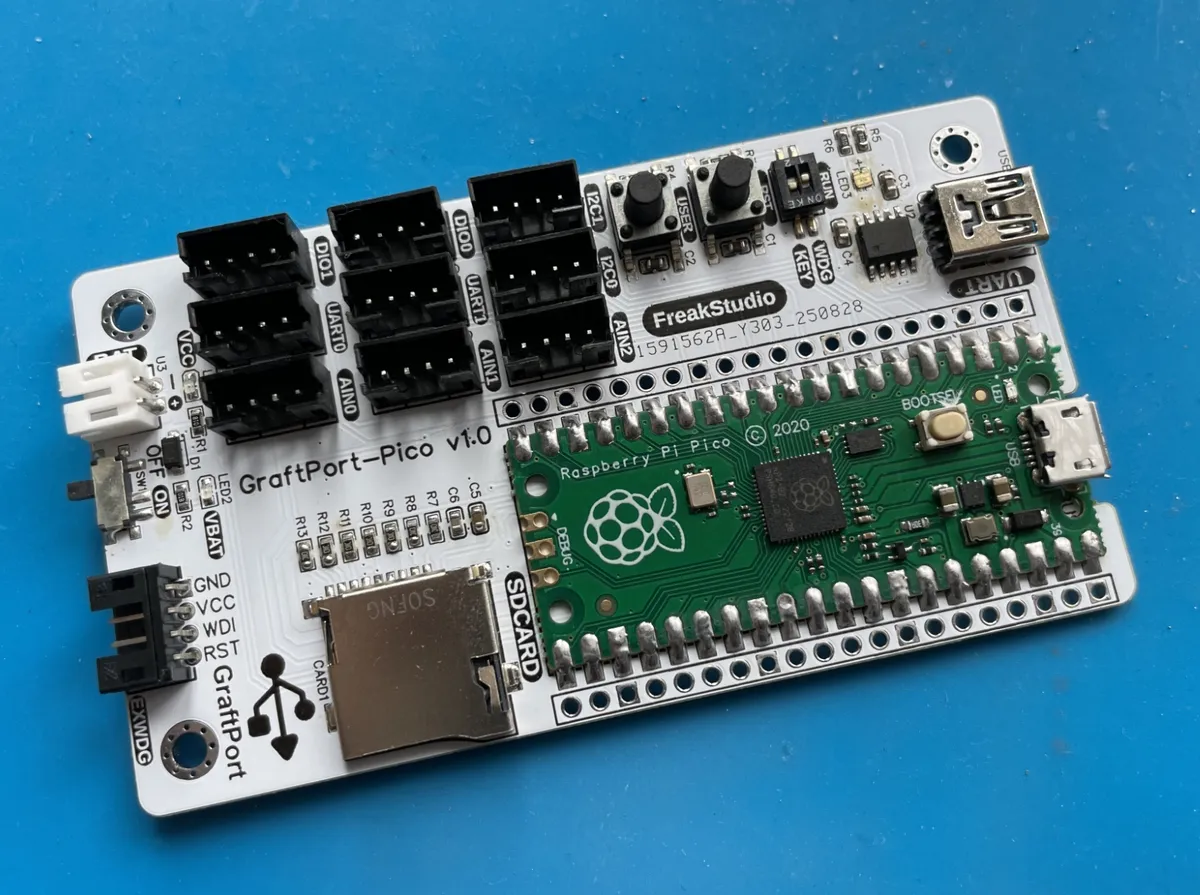
This project is based on the GraftPort-RP2040 development board as the main controller:
The other required modules include:
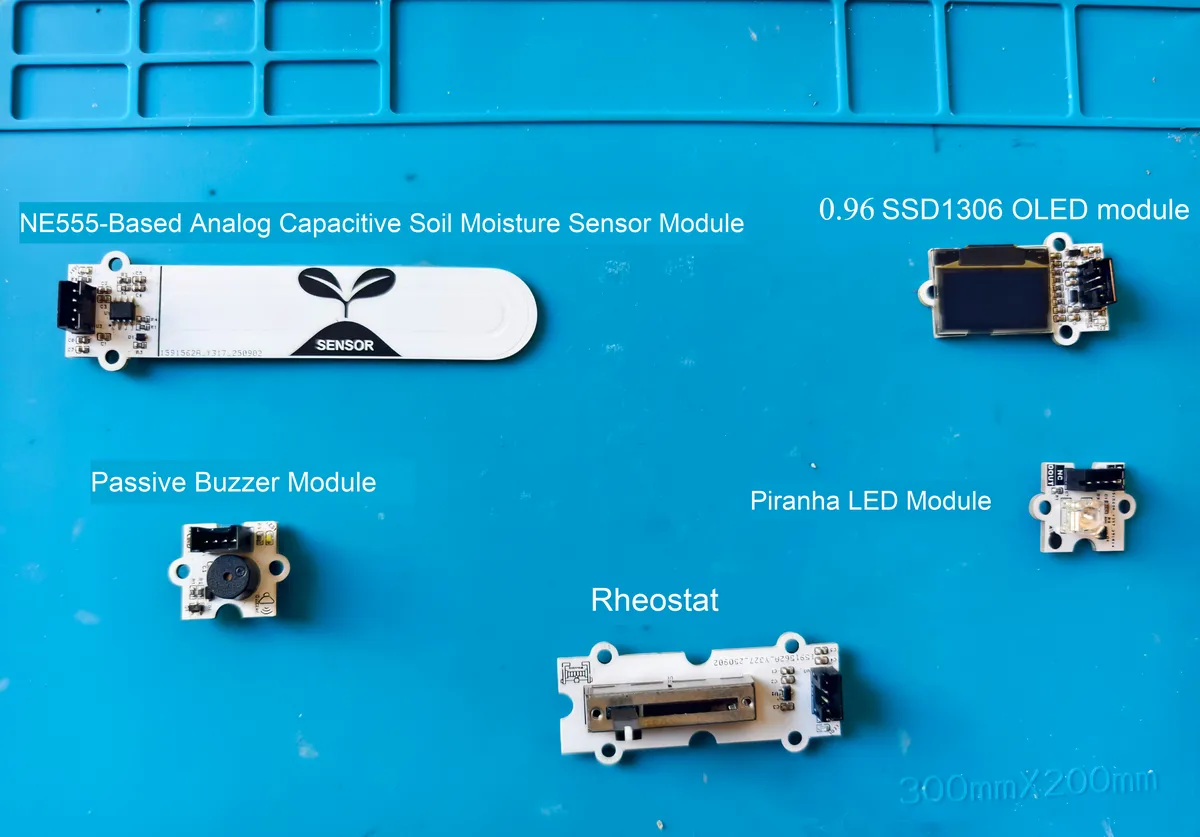
- GtaftSense - Analog Capacitive Soil Moisture Sensor Module Based on NE555:
ADC, collects voltage data corresponding to soil moisture; - GtaftSense - Slide Rheostat:
ADC, used to adjust the humidity alarm threshold; - GtaftSense 0.96-inch SSD1306 OLED module:(
I2Ccommunication, address0x3Cor0x3D) - GtaftSense-Piranha LED Light Module (supports
PWMdimming); - GtaftSense - Passive Buzzer Module:
PWM, alarm sounding;
3.2 Hardware Connection
- Analog capacitive soil moisture sensor module based on NE555: connect to the
AIN0interface;
- Slide rheostat: connect to
the AIN1interface;
- 0.96-inch SSD1306-OLED module: connected to
I2C0interface;
- Passive Buzzer Module: Connect
to the DIO1interface;
- Piranha LED light module: connect
the DIO0interface;
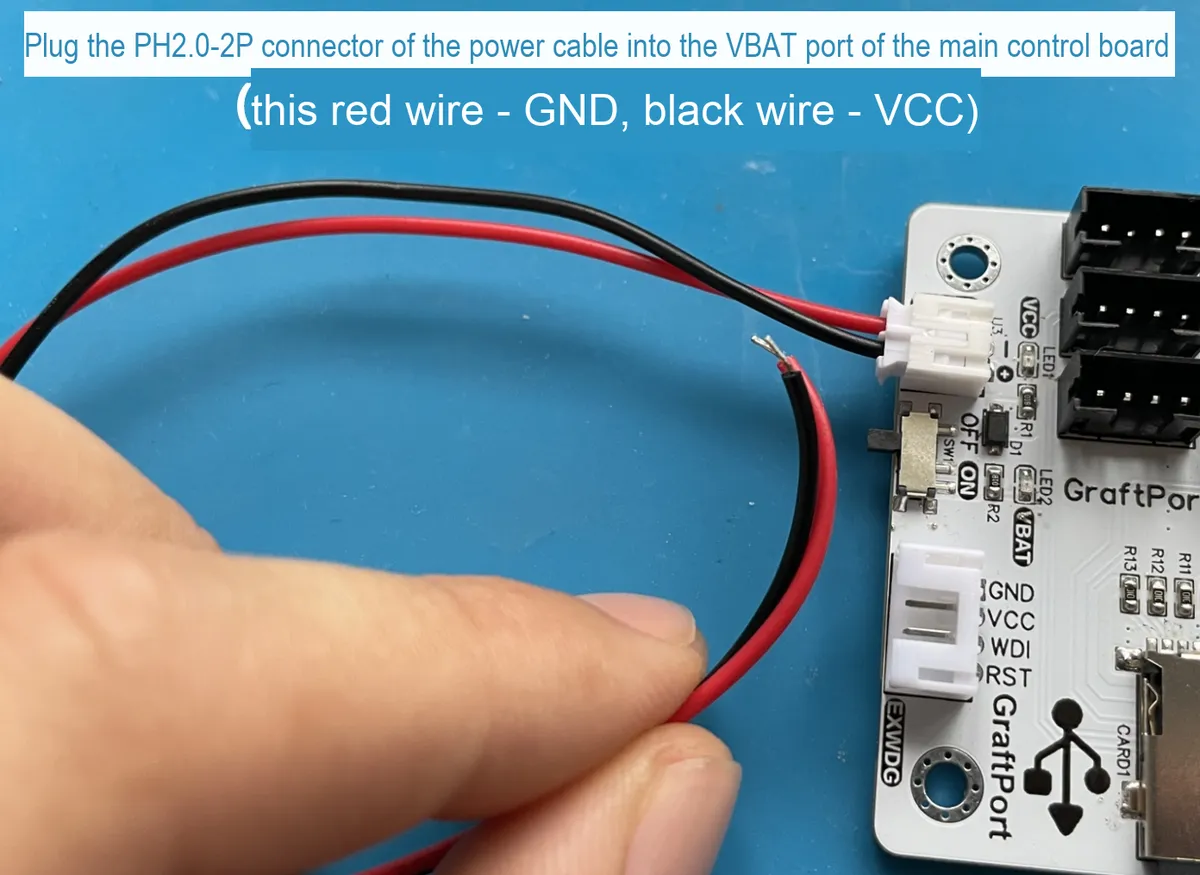
Lithium Battery Charge and Discharge Module: BAT interface connects to the lithium battery, and the OUT interface supplies power to the main control board via a PH2.0-2P connection cable.
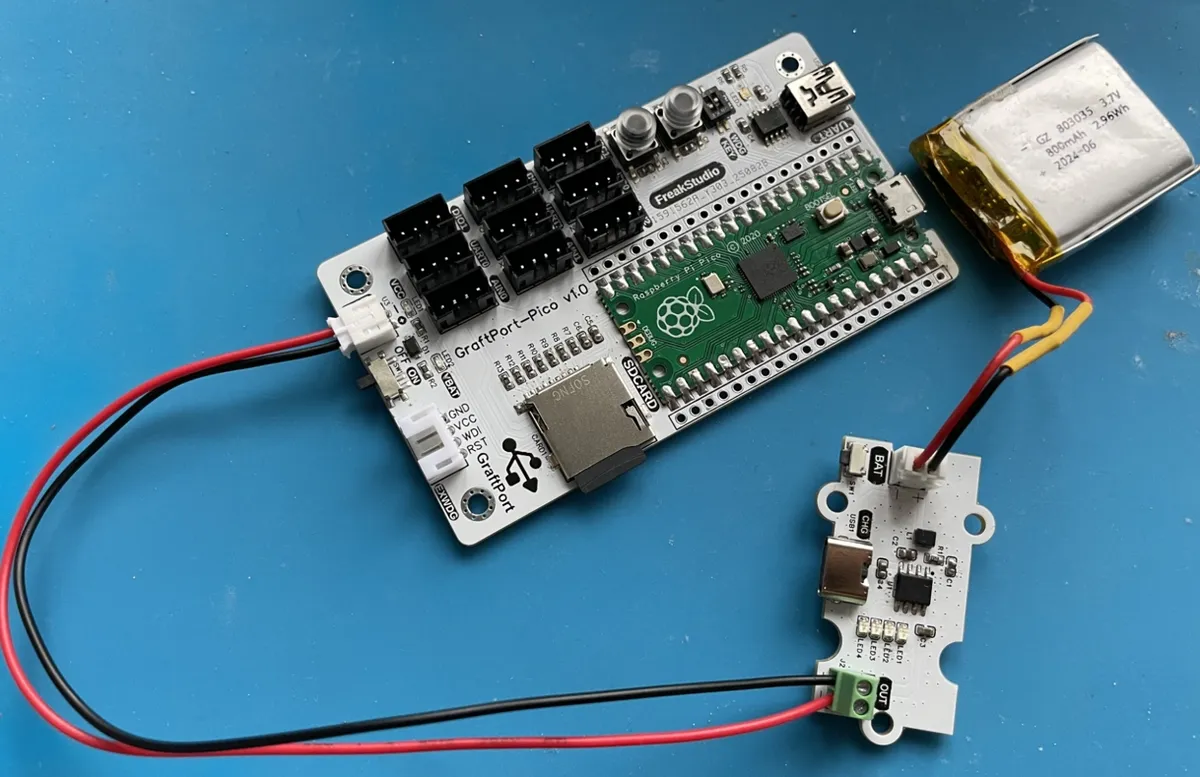
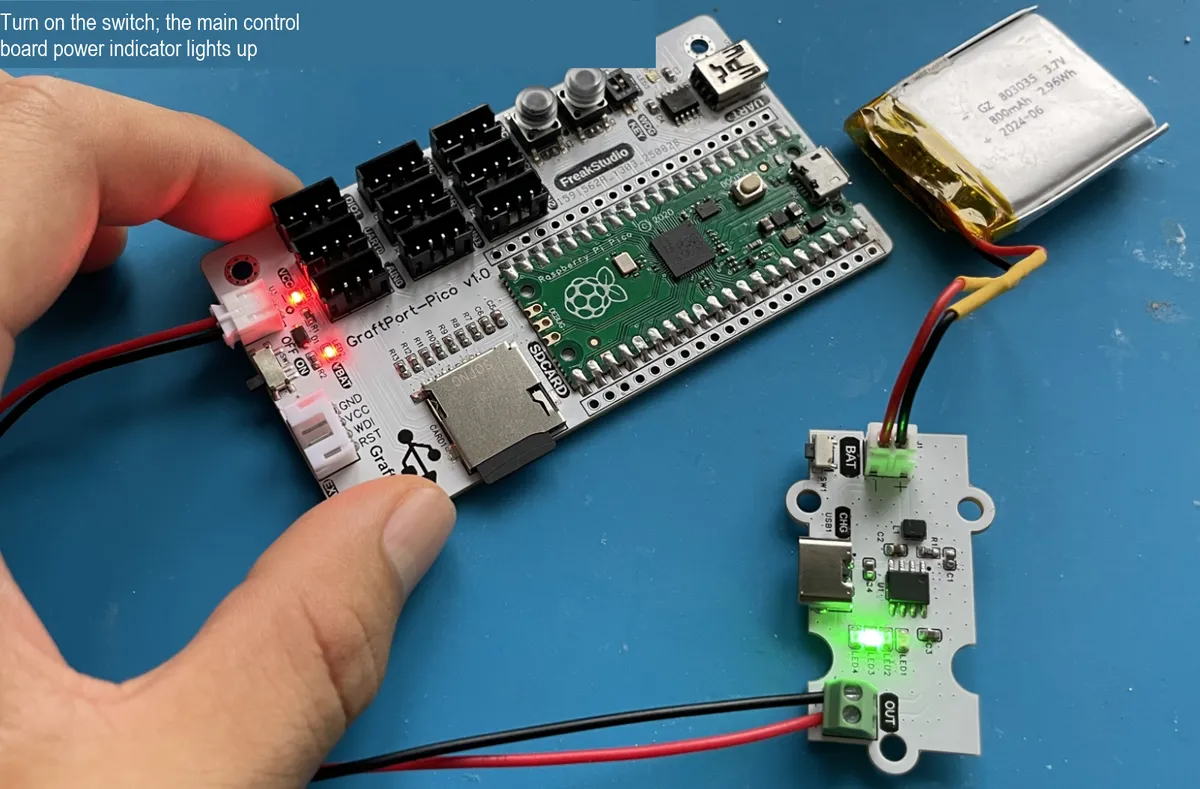
3.3 Structural Assembly
First, use M3 plastic pillars to fix each module and the main control board to the bottom plate of the housing (M3 screw holes are pre-drilled on both the main control board and the housing):
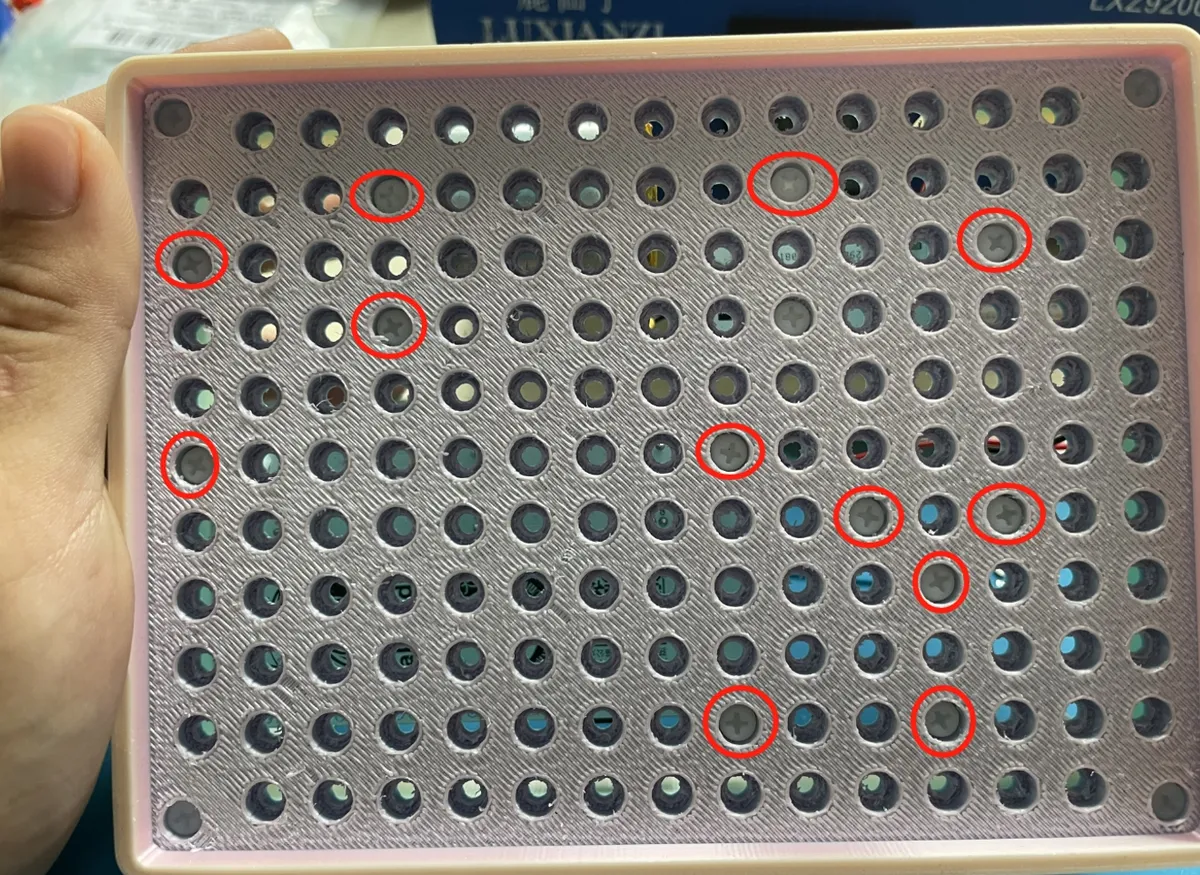
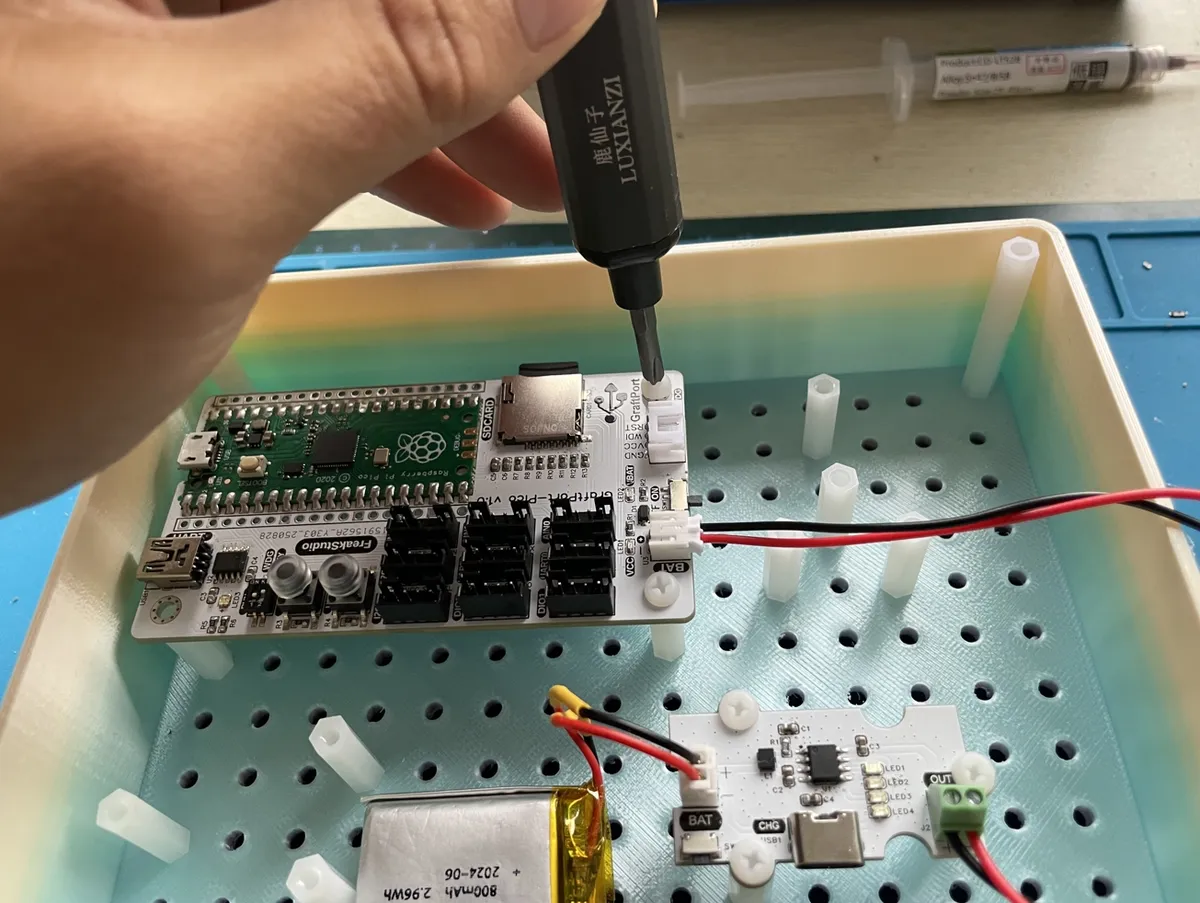
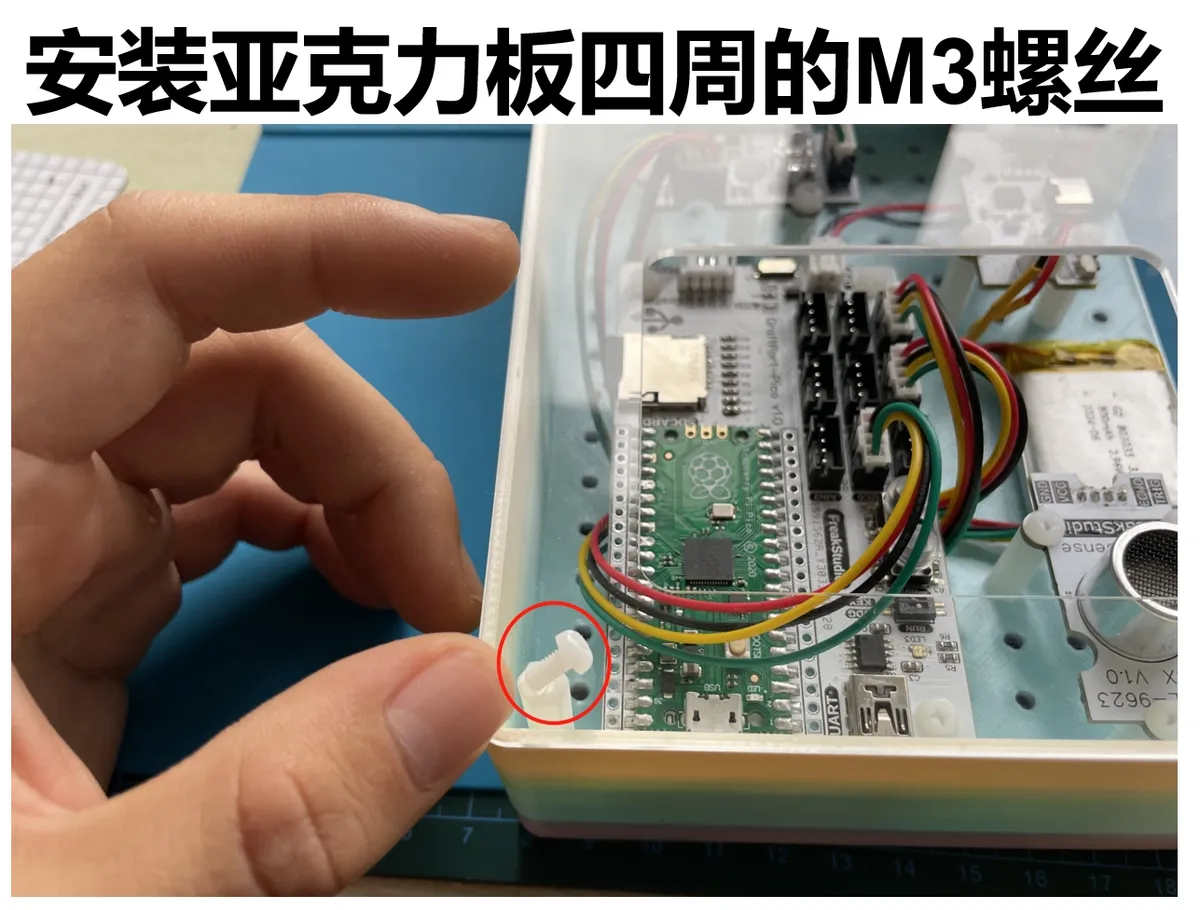
Next, secure the periphery of the housing with M3 plastic pillars, then screw in M3 screws at the corresponding positions to complete the assembly:
3.4 Notes
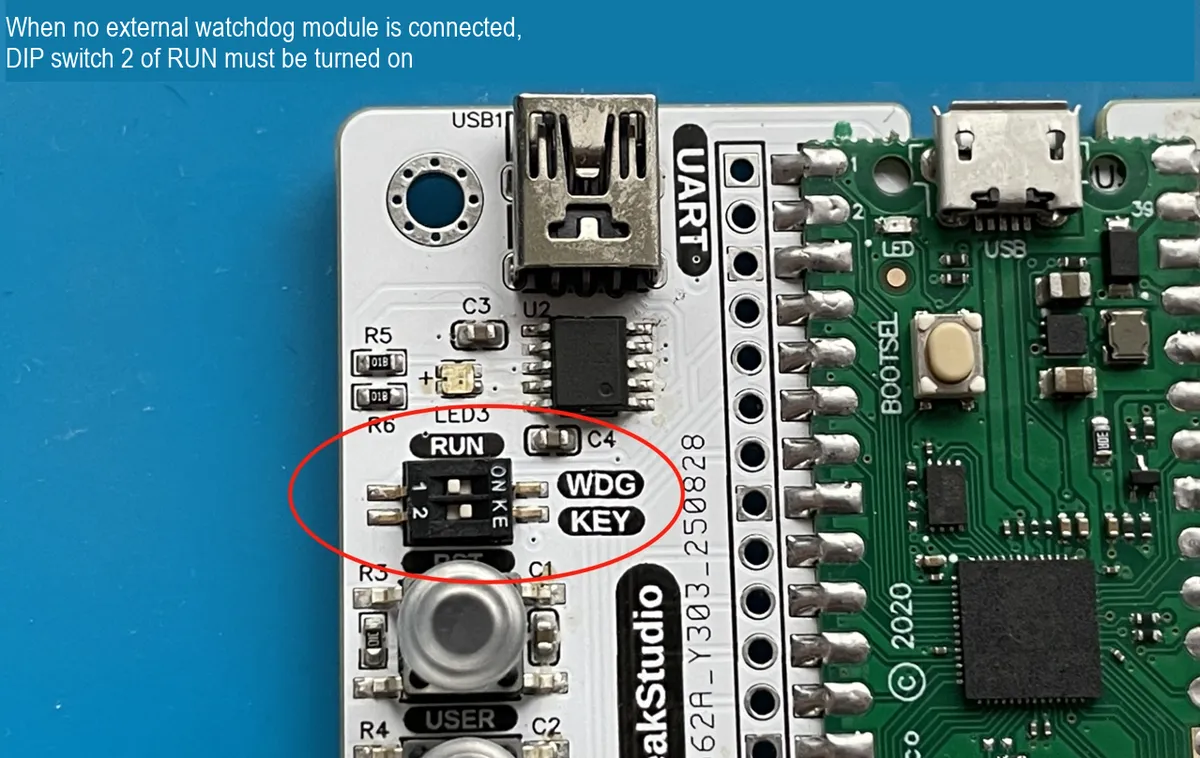
When the main control board is not connected to an external watchdog module, the RUN DIP switch 2 must be turned on:
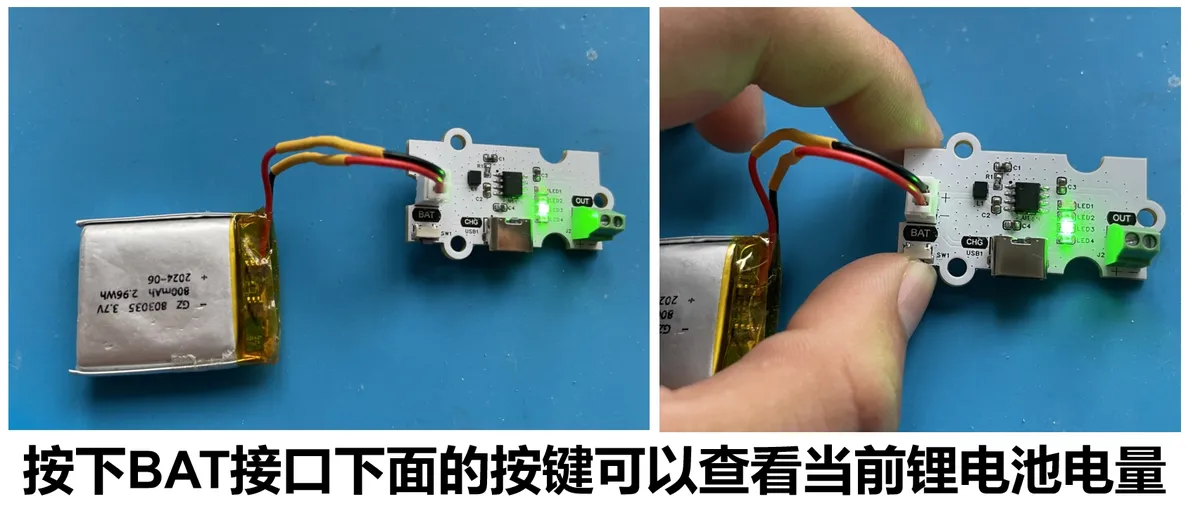
The lithium battery charge-discharge module supports power level display, and you can charge it via the Type-C interface below:
4. Software Environment
- Core firmware:
MicroPython v1.23.0(need to adapt toGraftPort-RP2040, supportmachine.Pin/I2C/Timermodule, soft timer scheduling); - Development IDE:
PyCharm(for code writing, uploading and debugging, supportsMicroPython REPLinteraction, and requires the installation of theMicroPythonplugin); - Accessory Tools:
Python 3.12+(optional, for running local helper scripts such as firmware flashing scripts);mpy-cross v1.23.0(used to. pyfiles compile to. mpyto reduce the memory usage of the development board, optional);mpremote v0.11.0+(replacesThonnyfor file upload, supports command-line operations, optional);
- Dependency Modules: No additional third-party libraries are required, and all drivers (including
passive_buzzer_driver.pyand others) are custom-implemented and provided along with the project files.
5. File Structure
soil_moisture_reminder
├─ .flake8
├─ LICENSE
├─ README.md
├─ tools
│  ├─ dependency_analyzer.py
│  ├─ mpy_compiler.py
│  ├─ mpy_uploader.py
│  └─ README.md
├─ firmware
│  ├─ board.py
│  ├─ boot.py
│  ├─ conf.py
│  ├─ main.py
│  ├─ tasks
│  │  ├─ maintenance.py
│  │  ├─ sensor_task.py
│  │  └─ __init__.py
│  ├─ libs
│  │  ├─ __init__.py
│  │  └─ scheduler
│  └─ drivers
│     ├─ __init__.py
│     ├─ ssd1306_driver
│     ├─ soil_moisture_driver
│     ├─ potentiometer_driver
│     ├─ piranha_led_driver
│     └─ passive_buzzer_driver
├─ examples
│  └─ README.md
└─ docs
6. Description of Key Documents
main.py: Project entry point, with core logic including:- Power on and delay for 3 seconds to wait for hardware stabilization, then initialize the pins of each module via
board.py(includingOLED, passive buzzer module,LED, buttons, etc.); - Initializes
the I2C busand the 0.96-inch SSD1306-OLED module as well as all sensor modules; multiple retries are supported, and upon failure, it invokesfatal_hangto block the system and report errors via flashing lights; - Create
SoilMonitorTaskinstance (pass the driver object and configuration parameters), and encapsulate it as a scheduler task with a period of 500ms; - Initialize the scheduler (soft timer, scheduling cycle 100ms), add core tasks and maintenance tasks, start scheduling and enter an infinite loop;
- Define a key interrupt callback function to realize task start-stop and calibration mode switching.
- Power on and delay for 3 seconds to wait for hardware stabilization, then initialize the pins of each module via
drivers/xxx_driver: hardware driver modules, all adopting the "instantiation + method call" pattern to shield underlying details:soil_moisture_driver.py:The SoilMoistureSensorclass reads sensor signals viaADC, and theread_humidity ()method returns the normalized humidity value (0-100%);potentiometer_driver.py:The Potentiometer classcollects the signal of the sliding rheostat via theADC, and theread_value ()method returns the threshold (0-100%);ssd1306_driver.py:The SSD1306OLEDclass controls the display viaI2C, and thedisplay_data ()function receives parameters such as humidity and threshold and displays them.passive_buzzer_driver.py:The Buzzerclass outputs signals viaPWM, and usesplay_tone (freq, duration)to control the frequency and duration of the alarm sound;piranha_led_driver.py:The PiranhaLEDclass controls brightness viaPWMand supports both steady-on and flashing modes.
tasks/: Task Logic Module:sensor_task.py:Key logic of the SoilMonitorTaskclass:__init__: Initialize the hardware instance, filter buffer (capacity: 5), and calibration parameters;tick: Executed once every 500ms, the process is "read humidity and threshold → mean filtering → threshold comparison → control alarm and display";calibrate_dry ()/calibrate_wet (): Complete calibration in dry and humid environments respectively to improve humidity detection accuracy;pause ()/resume (): Turn off alarms and LEDs when paused, and reset the filtering buffer when resumed to avoid data anomalies.
maintenance.py: system maintenance module.task_idle_callbacktriggers GC when the scheduler is idle, andtask_err_callbackcaptures task exceptions and rate-limits the printing of error messages.
board.py: A board-level pin mapping module that defines theBOARDSdictionary (including the fixed pins of GraftPort-RP2040 and the mapping of I2C/ADC/PWMinterfaces), and provides theget_pininterface. You only need to modify this file when expanding support for other development boards.conf.py: a user configuration file where parameters can be customized, including:AUTO_START(whether to automatically start the task),ENABLE_DEBUG(debug print switch),GC_THRESHOLD_BYTES(GC trigger threshold),ERROR_REPEAT_DELAY_S(error print interval), etc. Default values will be used if no configuration is provided. -
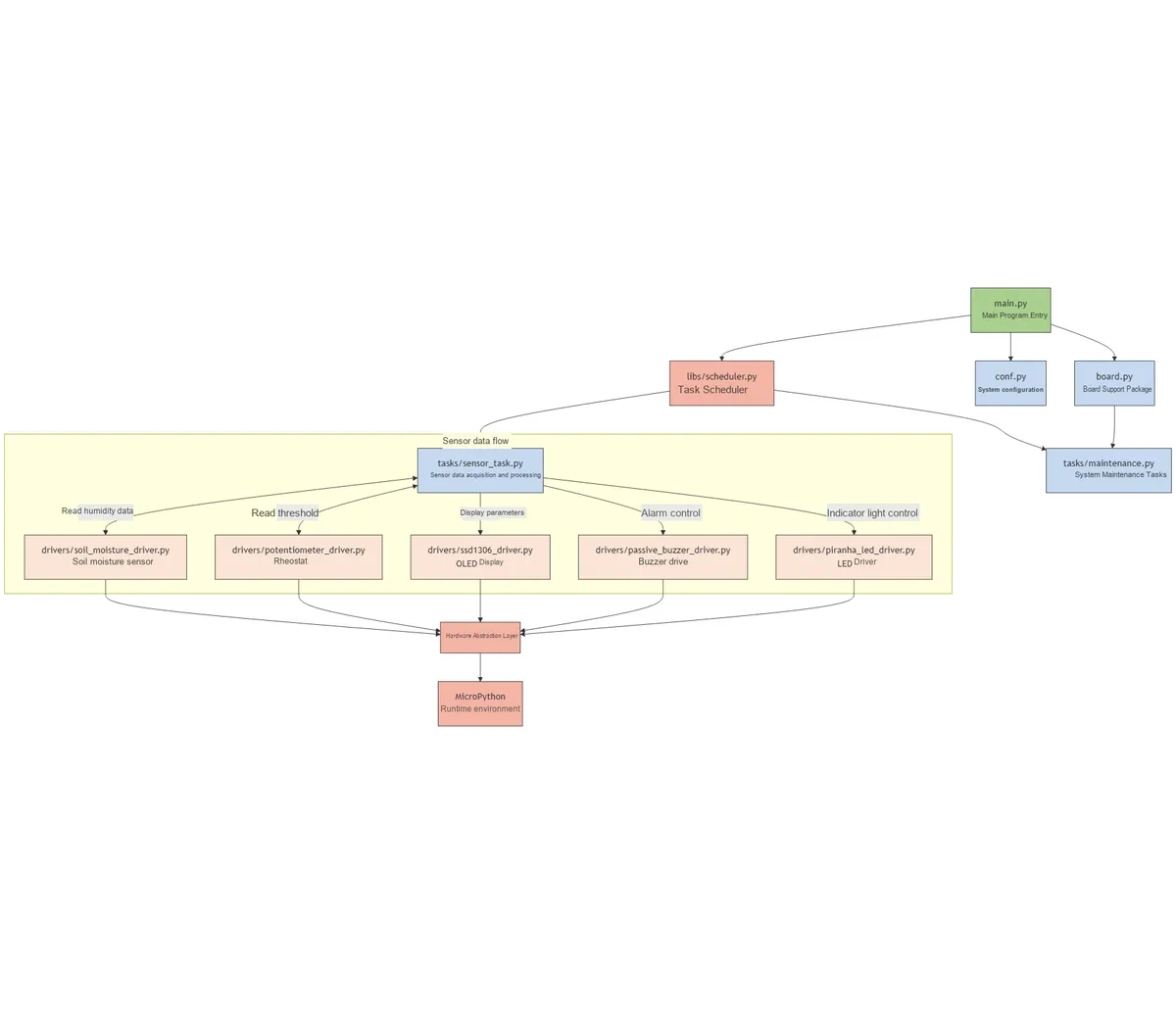
7. Core Ideas of Software Design,
- Hierarchical System Design: Decoupling and Reusability
- Hardware driver layer (
drivers/): only responsible for the underlying control of peripherals, and does not contain business logic. For example, theOLEDdriver only cares about "how to display data" and does not care about "what data to display"; - Task Logic Layer (
tasks/): Implements business processes based on the driver layer interface.SoilMonitorTaskcalls driver methods to complete monitoring and feedback, with no dependency on specific pin configurations. - Scheduling Control Layer (
libs/scheduler.py): Provides general task management capabilities, supports task periodic scheduling, pause/resume, and exception callbacks to adapt to multi-scenario requirements; - Entry Layer (
main.py): responsible for "assembling" various modules, initializing hardware → creating tasks → starting scheduling, to simplify the system setup process.
- Hardware driver layer (
- Principles for Module Division: High Cohesion, Low Coupling
- High cohesion: each module focuses on a single function. For example,
maintenance.pyonly handles system maintenance (GC, exceptions) and does not participate in monitoring logic; - Low coupling: Modules interact through interfaces. For example, the task logic obtains data via
read_humidity ()instead of directly operating the sensor's ADC registers; - Scalability: When adding new features (e. g., remote notifications), you only need to
add a new task under thetasks/ directory, without modifying the existing driver code.
- High cohesion: each module focuses on a single function. For example,
- Core Mechanism: Ensuring Stability and User Experience
- Data filtering mechanism: Five-point mean filtering is adopted to filter out sensor noise and avoid false alarms;
- Interactive feedback mechanism: Key operations get instant responses, and prompts are displayed on
OLEDduring the calibration process, which improves operational convenience; - Fault-tolerant mechanism: sensor initialization retry, hardware operation exception capture, to ensure that a single module failure will not cause the system to crash.
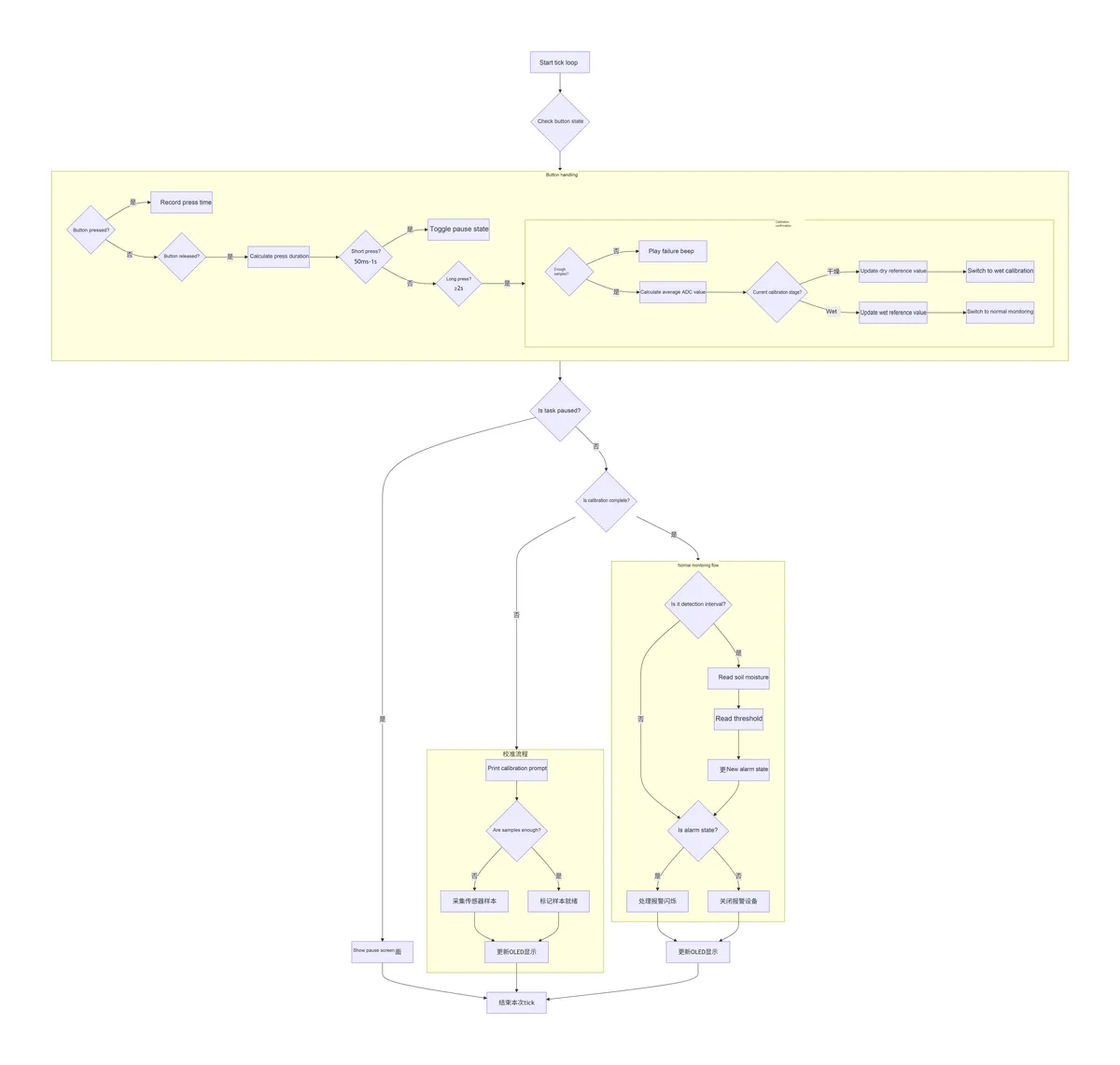
- Task Execution Process: The task execution process is as follows:
8. Instructions for Use
8.1 Hardware Connection
Connect the main control board, each sensor module and the battery according to the connection method specified in the "hardware requirements";
8.2 Run the Project (Using PyCharm + MicroPython Plugin)
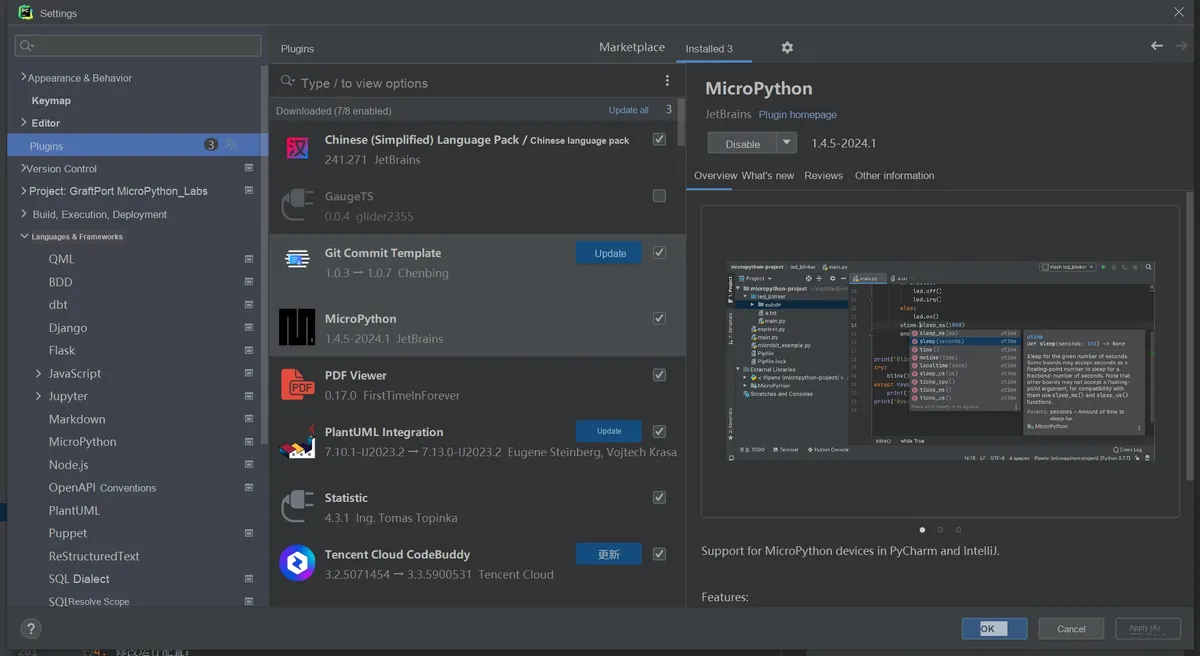
Open PyCharm and install the corresponding MicroPython plugin.
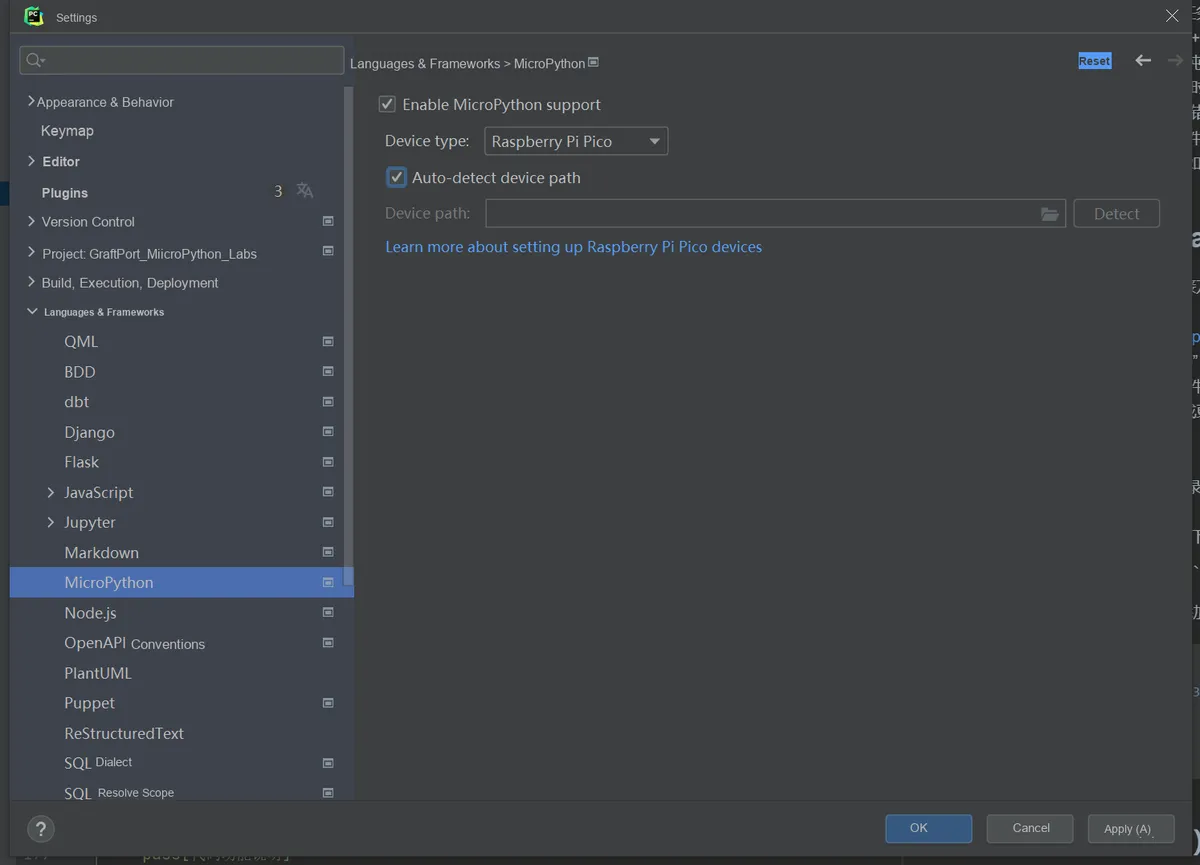
In the plugin, select Target Device as RP2040, and enable Auto-detect device path.
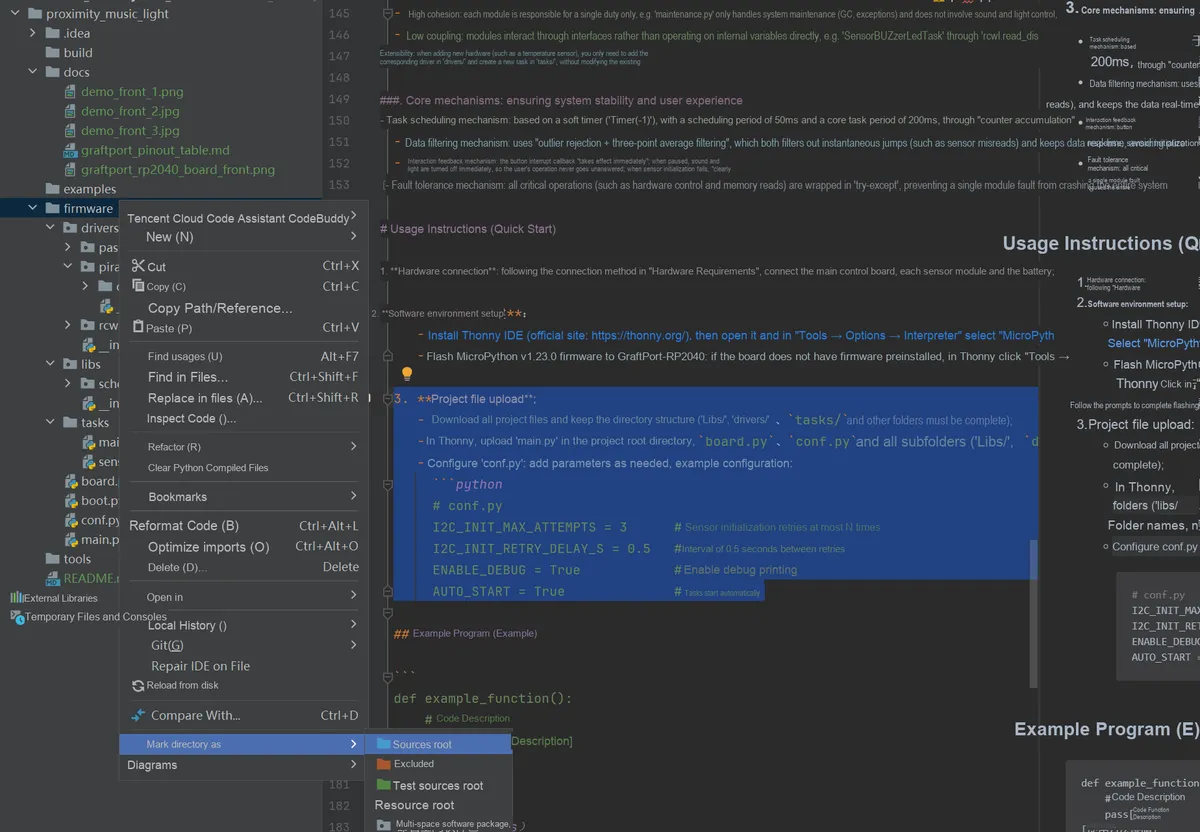
Set Project/firmware as the project root directory.
Modify runtime configuration:
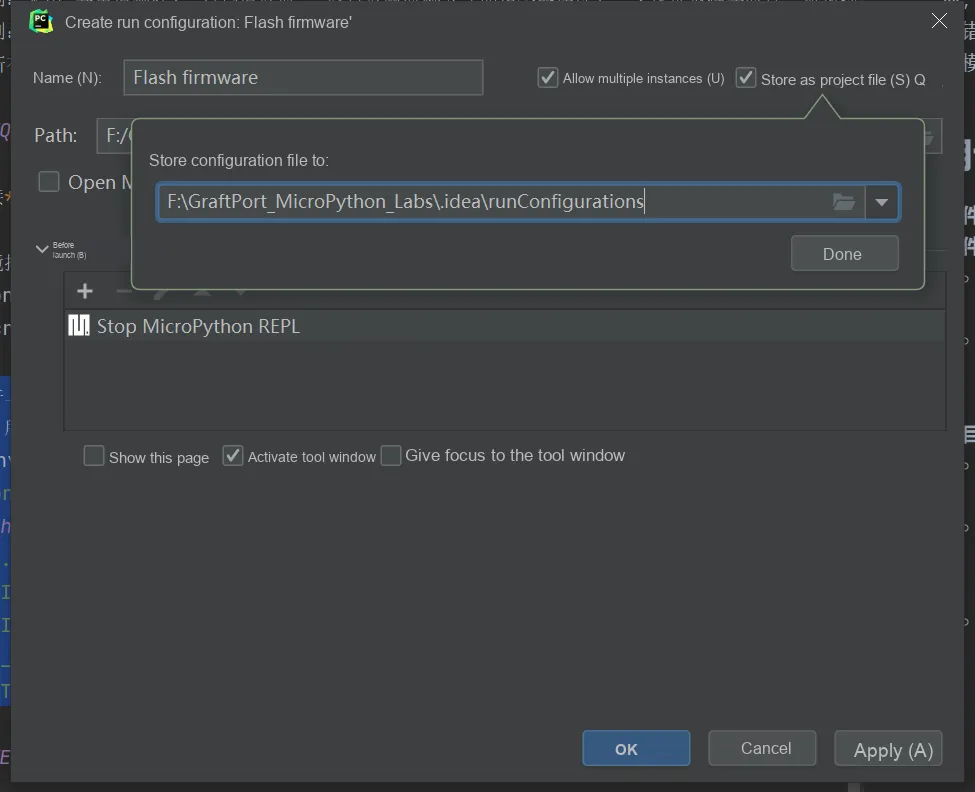
- Check
Allow multiple instances - Select
Store as project file - Click
OKto save the configuration.
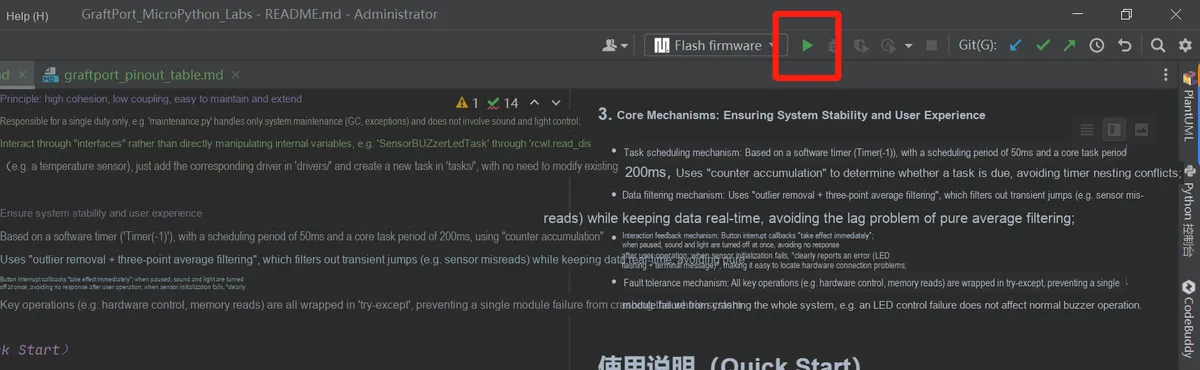
Click the IDE green triangle button in the upper right corner to run, and you can start uploading the firmware and executing the project.
8.3 Modification of Running Configuration
You can configure conf.py and modify or add parameters as needed, for example:
# conf.py example configuration
I2C_INIT_MAX_ATTEMPTS = 3      # Maximum number of sensor initialization retries
I2C_INIT_RETRY_DELAY_S = 0.5   # Interval between retries (seconds)
ENABLE_DEBUG = True            # Whether to enable debug printing
AUTO_START = True              # Whether to run tasks automatically at startup
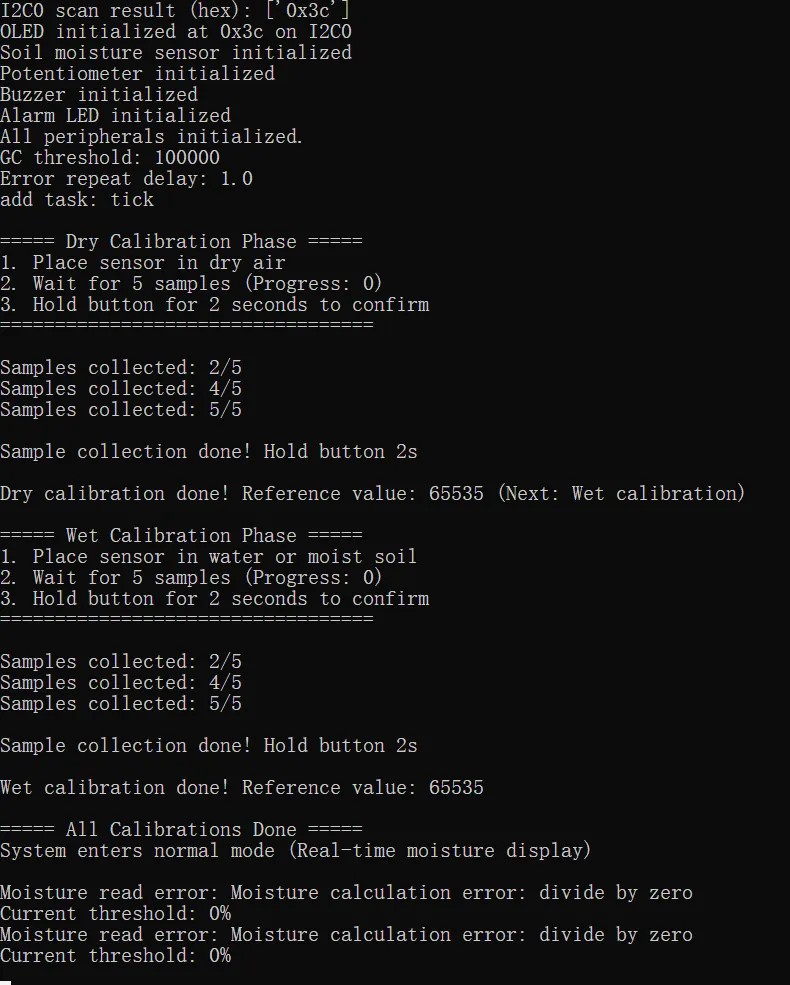
8.4 Functional Testing
- Soil moisture detection: place the analog capacitive soil moisture sensor module based on NE555 in dry and humid environments respectively, and observe whether the humidity percentage of the 0.96-inch SSD1306-OLED module changes accordingly;
- Threshold Setting: Rotate the sliding rheostat and observe the 0.96-inch SSD1306-OLED module to check whether the threshold percentage varies within the range of 0-100%;
- Alarm function: when the humidity is lower than the threshold, check whether the
LEDflashes and whether the passive buzzer module gives an alarm sound; - Calibration function: Perform calibration in accordance with the calibration procedures (dry calibration and wet calibration) to verify whether the humidity readings after calibration are accurate;
- Button Switch: Short press the onboard button to pause the task (stop Data Acquisition and display update, turn off the alarm), and press again to resume.
The terminal output is as follows:
8.5 Debugging and Troubleshooting
- If
OLEDdoes not display, check whether theI2Caddress is correct (0x3cor0x3d) and whether theI2Cbus is normal; - Humidity value display
0%or100%remains unchanged, verify theADCpin configuration and check the sensor wiring; - No alarm sound or
LEDdoes not flash, check the passive buzzer modulePWMpin configuration, and test the threshold comparison logic
9. Sample Program
There are no other reference sample codes for this project, you can directly make modifications in the firmware folder.
10. Notes
- Sensor Related
- Analog Capacitive Soil Moisture Sensor Module Based on NE555 The probe should be fully inserted into the soil, and avoid contact with debris such as stones and metals to prevent affecting the detection accuracy;
- The sensor may get oxidized after prolonged use. Clean the probe surface regularly to ensure measurement accuracy.
- Avoid immersing the sensor in water for a long period of time; non-waterproof models may be damaged due to water ingress.
- Sensor calibration shall be performed at a stable ambient temperature, as temperature fluctuations will affect the measurement results;
- Hardware Connection Related
- The power supply voltage of all modules must be strictly controlled at 3.3V; a voltage exceeding 3.6V may damage the main control chip.
I2Cbus requires proper connection of pull-up resistors (typically4.7kΩ), otherwise the communication will be unstable;- Passive Buzzer Module The positive and negative poles must be connected correctly; reverse connection will result in no sound or damage to the module.
- 0.96-inch SSD1306-OLED module has a conflicting
I2Caddress (default:0x3C), the address parameter in the driver needs to be modified; - NE555-based analog capacitive soil moisture sensor module and slide rheostat should be connected to separate
ADCpins to prevent signal interference;
- Software Version Related
- MicroPython v1.23.0
or a later version must be used; lower versions may not support soft timer scheduling. - Confirm firmware adaptation Based on the GraftPort-RP2040 development board, other
RP2040development boards require modification to the pin mapping inboard.py; - Debug logging (
ENABLE_DEBUG= True) consumes system resources, so it is recommended to disable it in production environments;
- MicroPython v1.23.0
- Function Usage Related
- Drying Calibration: Place the sensor in a well-ventilated and dry environment, avoiding direct sunlight and damp conditions.
- Moisture Calibration: Fully insert the sensor into pure water or fully moistened soil to ensure full contact of the probe;
- Key Points for Calibration Operation:
- 5 samples must be collected in full during each calibration phase; the calibration confirmation will fail if the number of samples is insufficient.
- Press and hold the button for more than 2 seconds, and release it only after you hear the confirmation beep;
- Avoid moving the sensor during the calibration process to ensure the consistency of sample data;
- If the calibration result is not satisfactory, you can power off and restart the system, and then perform calibration again following the procedure;
11. Version Record
- v1.0.0 (2025-11-04): Miao Guicheng completed the initial version and implemented the core functions:
- Real-time soil moisture acquisition and filtering processing;
- Rheostat adjusts the threshold, and supports multi-mode alarm reminders;
- Press the button to control the start/stop of the task and perform sensor calibration;
- Adapted based on the GraftPort-RP2040 development board, it provides complete drivers and task code.
12. Contact the Developer
If you have any questions or need assistance, please contact the developer via the following channels:
📧 Email: 10696531183@qq.com
💻 GitHub: https://github.com/FreakStudioCN
13. Licensing Agreement
In this project, except for machine and other MicroPython official modules (MIT License), all driver and extension codes written by the author are released under the Creative Commons Attribution-NonCommercial 4.0 International (CC BY-NC 4.0) Licensing Agreement.
You are free to:
- Share — copy, distribute the work in any medium or in any form
- Derivative Works — to modify, transform, or create based on the Work
Only the following conditions shall be complied with:
- Attribution — You must give appropriate credit, provide a link to the Licensing Agreement, and indicate if changes were made to the original work. You may do so in any reasonable manner, but not in any way that suggests the licensor endorses you or your use.
- Non-commercial Use — You may not use this work for commercial purposes.
- Proper Citation Method — You may clearly indicate the source in code comments, documentation, demo videos or project descriptions.
Copyright © FreakStudio. All rights reserved.
Appendix 1: Project Source Code Download
https://github.com/FreakStudioCN/GraftPort_MicroPython_Labs/tree/main/soil_moisture_reminder
Appendix II: Reference Materials for hardware Modules
GtaftSense - Analog Capacitive Soil Moisture Sensor Module Based on NE555
GtaftSense 0.96-inch SSD1306 OLED Module
GtaftSense-Piranha LED Light Module
GtaftSense - Passive Buzzer Module
GraftPort - Raspberry Pi Pico Expansion Board (Open Edition Template Files)
Version Record
Document Version | Date of Revision | Modifier | Revised Content |
V1.0.0 | 2025-11-04 | Hou Junhan | Draft the initial version of the document. |
V1.1.0 | 2026-01-04 | Li Zisheng | Final version. |