
Contents
- 1.Introduction to MicroPython
- 1.1 Development History of the MicroPython Language
- 1.2 Other Examples of Embedded Programming with Python
- 1.3 Differences between CircuitPython and MicroPython
- 1.4 Why Use MicroPython to Build Our Project
- 2. Introduction to MicroPython Project Architecture
- 3. Introduction to MicroPython Related Modules
- 3.1 System Architecture of MicroPython
- 3.2 machine module — hardware-related functions
- 3.3 rp2 module — RP2040-specific features
- 3.4 MicroPython Standard Micro-library
- 3.5 MicroPython-Specific Libraries
- 4. Implementation Features of MicroPython
- 4.1 Optimization Steps
- 4.2 Maximizing MicroPython Runtime Speed
- 4.3 Minimize MicroPython Memory Footprint
- 4.4 Distribution Packages, Package Management and Deployment Applications
- 5. MicroPython Kernel Development
- Appendix: Differences between CPython and MicroPython
- References
- Version Record
1.Introduction to MicroPython
We can compare standard Python (commonly referred to as CPython) to the full-featured office software installed on a computer: it comes with a complete set of functions and can handle complex tasks, yet it takes up large storage space, consumes heavy resources, and can only run on devices with strong computing power and large memory such as computers.MicroPython is a streamlined version tailored specifically for embedded microcontrollers. It strips out the "redundant features" in standard Python that are unnecessary for embedded devices, while retaining Python's core syntax and commonly used functionalities. Boasting a small footprint and low resource consumption, it can run on devices with limited computing power and memory such as microcontrollers and development boards.Just as you wouldn't use the full-fledged office software on a computer to operate a smartwatch, MicroPython is the "lightweight Python" that can run on smartwatches and development boards. It retains the advantages of Python, such as being easy to learn and having concise code, while also adapting to the hardware limitations of microcontrollers.
MicroPython is a streamlined version of Python that implements the full syntax of Python 3.4 (including exceptions, the with statement, yield from, etc. , plus the async/await keywords from Python 3.5 and a selection of features from later versions). MicroPython runs on a wide range of microcontrollers, as well as Unix-like systems (including Linux, BSD, macOS, and WSL) and Windows systems. Microcontroller targets can be as small as 256 kiB flash + 16 kiB RAM, though devices with at least 512 kiB flash + 128 kiB RAM deliver a more comprehensive feature set. The Unix and Windows ports enable development and testing of MicroPython itself, and provide a lightweight alternative to CPython on these platforms — particularly on embedded Linux systems.
MicroPython provides the following core data types: str (with basic Unicode support), bytes, bytearray, tuple, list, dict, set, frozenset, array.array, collections.namedtuple, classes and instances. Its built-in modules include os, sys, time, re, struct, and more.It also supports the _thread module (multithreading), socket sockets for networking, SSL, and asyncio coroutines.
However, not all chips support the modules provided above. In some cases, it is necessary to tailor them according to the specific conditions of different chips, similar to building a Linux kernel, by selectively incorporating some key C driver codes related to hardware.
To adapt to embedded microcontrollers, most of the standard libraries have been trimmed, and only some modules such as parts of the functions and classes of math and sys are retained. In addition, many standard modules such as json and re have become ujson and ure prefixed with u in MicroPython, indicating that these are standard libraries developed for MicroPython.Currently, in addition to running on the originally developed pyboard microcontroller, MicroPython can also operate on a large number of ARM-based embedded development boards and chips, such as Arduino UNO R3, Raspberry Pi Pico, STM32 series, etc. , which enables us to conveniently develop applications like automatic control and robotics using Python.
MicroPython-enabled hardware platform
MicroPython can run on a variety of embedded hardware platforms, including pyboard, STM32, Raspberry Pi Pico, ESP32, ESP8266, MSP430/432, etc. At present, many developers are also trying to port MicroPython to more hardware platforms. Below we will introduce several common hardware platforms that support MicroPython.
1.pyboard
The pyboard is the official microcontroller development board that supports the full feature set of the MicroPython software. It connects to a computer via USB, has a built-in USB flash drive for storing Python programs, and can run as soon as it is powered on. It is compatible with Windows, macOS and Linux. MicroPython can run on the pyboard, and the built-in pyb module provides functions and classes for controlling the peripherals available on the board, such as UART, I2C, SPI, ADC and DAC.
For more related introductions and pictures, please visit: https://pico.nxez.com/what-is-pyboard
2.ESP8266
The ESP8266 Wi-Fi module, a module capable of Wi-Fi transmission, integrates the industry-leading Tensilica L106 ultra-low-power 32-bit micro MCU, comes with a 16-bit Lite Mode, and has a maximum clock frequency of up to 160MHz.It supports the integration of Wi-Fi MAC/BB/RF/PA/LNA with RTOS (Real Time Operating System) and IEEE802.11 b/g/n protocols, is compatible with the complete TCP/IP protocol stack, and also supports three modes: STA (Station), AP (Access Point), and STA+ AP.
The ESP8266 can function as an auxiliary Wi-Fi/Bluetooth module for data transmission, or be directly used as a development board for development via the Arduino IDE or MicroPython.
For more related introductions and pictures, please visit: https://docs.ai-thinker.com/esp8266
3.ESP32
The ESP32 SoC chip supports the following functions: 2.4 GHz Wi-Fi, Bluetooth, high-performance Xtensa® 32-bit LX6 dual-core processor, ultra-low power co-processor, and a variety of peripherals.
The ESP32 is fabricated using a 40 nm process, delivering optimal power consumption performance, radio frequency performance, stability, versatility and reliability, making it suitable for a wide range of application scenarios and diverse power consumption requirements.
For more related introductions and pictures, please visit: https://www.espressif.com.cn/zh-hans/products/socs/esp32
4.micro:bit
micro: bit is a microcomputer development board designed specifically for teenagers' programming education, which was launched by the British Broadcasting Corporation (BBC).
Micro: bit has the following features:
- 25 independently programmable LEDs
- 2 programmable buttons
- Connect the pins
- Light Sensor and Temperature Sensor
- Motion Sensors (Accelerometer and Compass)
- Wireless communication via radio and Bluetooth
- USB interface
- The v2 version is equipped with a microphone and a buzzer
For more related introductions and pictures, please refer to: https://baike.baidu.com/item/micro:bit/22482911
5.STM32 DISCOVERY/NUCLEO/EVAL
ST officially offers NUCLEO boards, DISCOVERY boards, and EVAL boards, with configurations ranging from entry-level to high-end, and prices following the same gradient. NUCLEO boards generally only lead out the MCU pins and come with one serial port (virtualized via STLINK USB); DISCOVERY boards, compared to NUCLEO boards, additionally feature USB (for MCUs with USB support), audio decoding, and a headphone jack.The EVAL board is a complete demonstration and development platform designed for ARM Cortex STM32 MCUs, which is equipped with transceivers, sensors, memory interfaces, display devices and a variety of other external circuits.
For more related introductions and pictures, please refer to:
https://www.st.com.cn/zh/evaluation-tools/stm32-mcu-mpu-eval-tools.html
6. SensorTile
SensorTile is a tiny square IoT module featuring powerful processing capabilities, leveraging an 80 MHz STM32L476JGY microcontroller, Bluetooth low energy connectivity based on the BlueNRG-MS network processor, as well as a variety of motion and environmental MEMS sensors including a digital microphone. SensorTile can be tightly integrated into IoT hubs or sensor network nodes to serve as the core of a solution.
For more related introductions and pictures, please refer to:
https://www.st.com/en/evaluation-tools/steval-stlkt01v1.html
MicroPython can execute scripts in textual source form (. py files) or as pre-compiled bytecode (. mpy files), and in both cases the scripts can be loaded either from the device's filesystem or be "frozen" into the MicroPython executable.
Pre-compiled bytecode (. mpy files)
MicroPython defines the concept of. mpy files, which are binary container file formats containing pre-compiled code and can be imported just like regular. py modules. These. mpy files are usually generated by cross-compiling programs from Python source files (. py files). For some architectures, . mpy files can also contain native machine code, which can be generated in a variety of ways, most typically from C source code.
. mpy files are typically used in the following scenarios:
- When the RAM of the chip is insufficient to compile all modules, you can use precompiled modules to compile Python modules into bytecode, and the generated bytecode files carry the. mpy extension.
- Native machine code can be dynamically imported via. mpy scripts. Unlike external MicroPython C modules that need to be compiled into the main firmware image, . mpy files do not require rebuilding the main MicroPython firmware.
- If you want to protect your Python code, you can compile it into bytecode for execution
A given. mpy file may or may not be compatible with the given MicroPython system. For information on version control and compatibility of. mpy files, please refer to: http://www.86x.org/en/latet/reference/mpyfiles.html
Meanwhile, the. mpy file is a binary container format, with code objects stored internally in a nested hierarchy. To learn about the structure of mpy files and the specific information they contain, you can refer to: https://blog.csdn.net/Clover_pofu/article/details/137043894
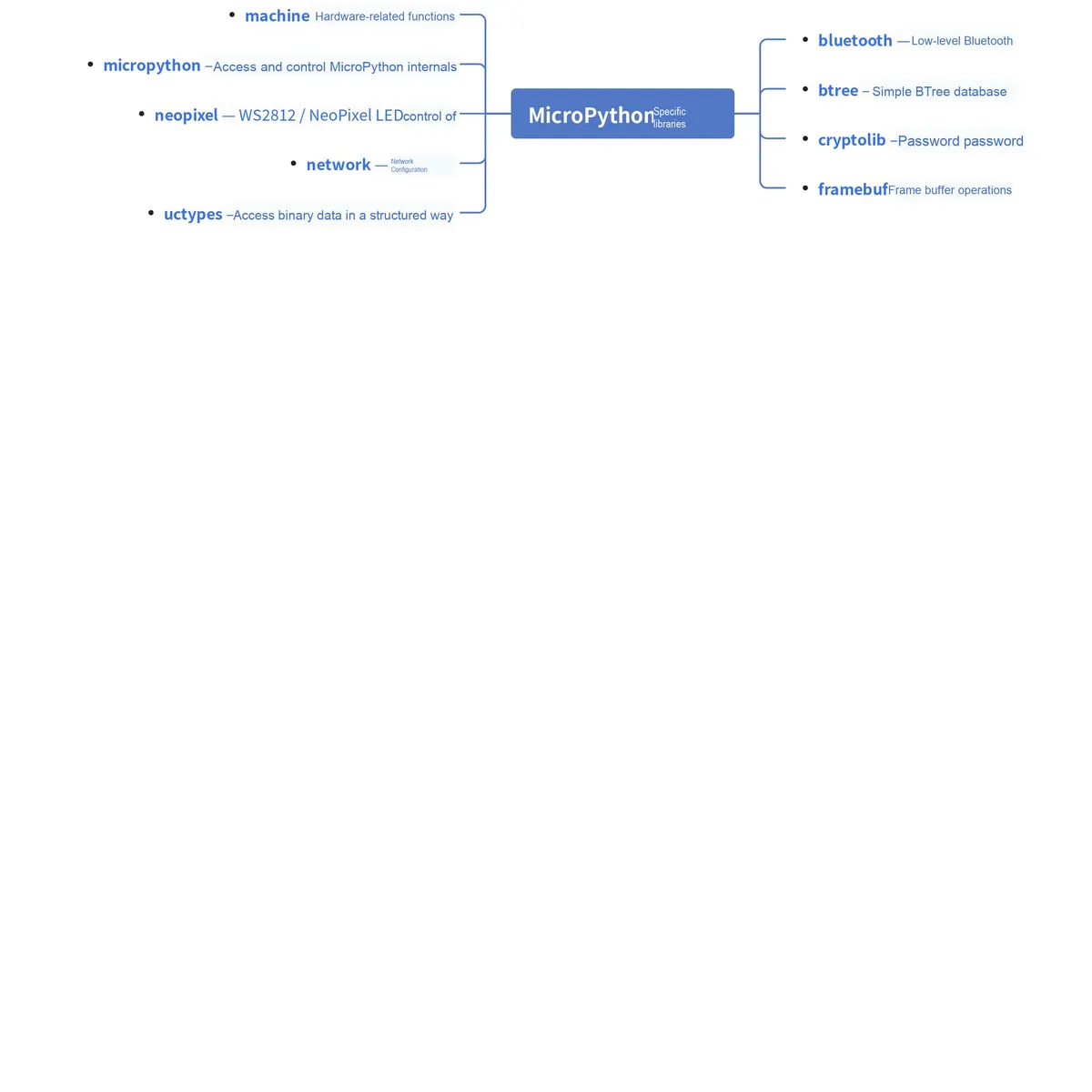
MicroPython also provides a set of MicroPython-specific modules for accessing hardware-specific functions and peripherals, such as GPIO, timers, ADC, DAC, PWM, SPI, I2C, CAN, Bluetooth and USB.
Scripting Language:
A scripting language is a computer programming language designed to differ from the traditional edit-compile-link-run process of compiled languages. Early scripting languages were often referred to as batch languages or job control languages. A script is typically executed by interpretation rather than being compiled. Scripting languages generally feature simplicity, ease of learning and use, with the aim of enabling programmers to complete program development quickly.
It has the following characteristics:
- Grammar and structures are usually relatively simple
- Learning and using it are usually relatively simple
- It usually adopts the "interpretation" execution mode that allows easy program modification, and does not require to "compile"
- The development productivity of the program takes precedence over its execution performance
Although many scripting languages, such as JavaScript, Perl, PHP, Python, Ruby and Tcl, have gone beyond the realm of simple computer task automation and matured to the point where they can be used to write sophisticated programs, they are still referred to as scripts. There is a scripting language at almost every level of computer systems, including the operating system layer, as seen in applications like computer games, network applications, word processing documents, and network software. In many respects, high-level programming languages and scripting languages overlap with each other, and there is no clear-cut boundary between the two.
1.1 Development History of the MicroPython Language
In recent years, the popularity of Python has skyrocketed. Today, it is used everywhere, ranging from DevOps and statistical analysis to even desktop software. However, for a long time, there was a noticeable absence of Python in the embedded field. This all changed in 2013, when Damien George launched a Kickstarter crowdfunding campaign. Damien was an undergraduate at the University of Cambridge and an avid robotics programmer.He wants to shift the Python world from machines that handle gigabytes of capacity to machines with kilobyte-level capacity. He tried to support his own development through a Kickstarter crowdfunding campaign, while turning the Proof of Concept into the final implementation.
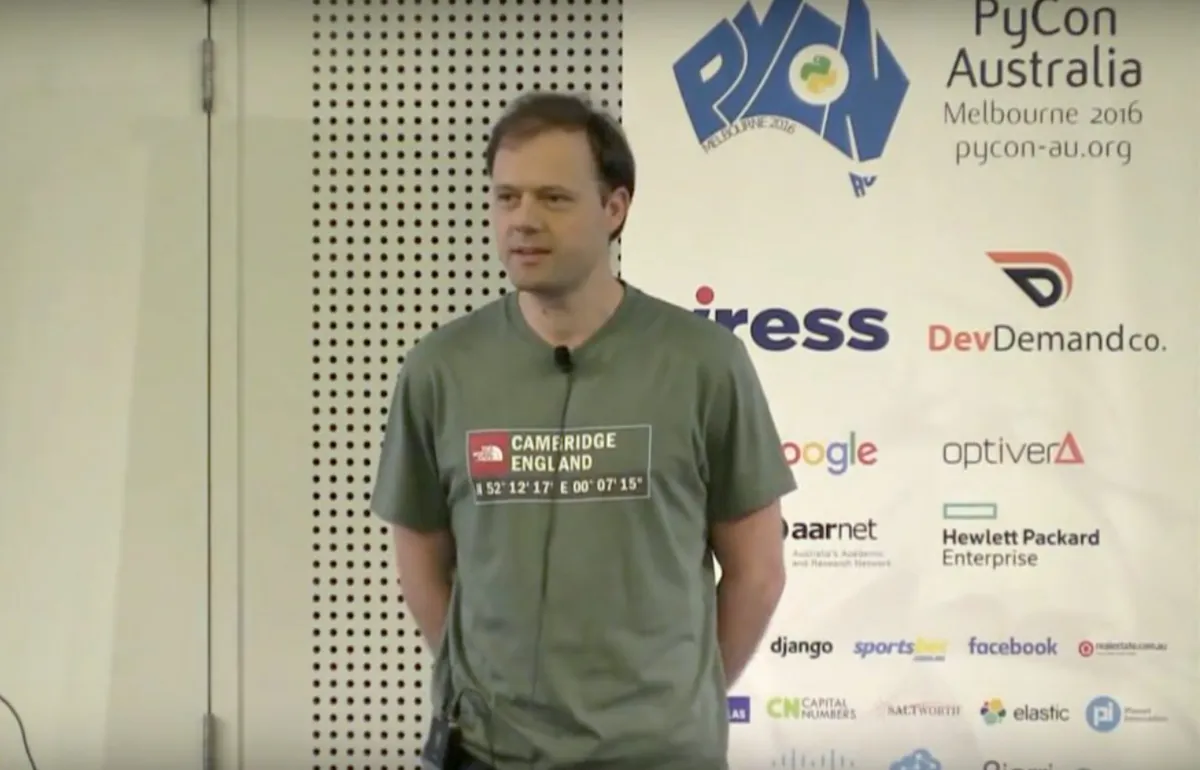
Damien spent six months developing MicroPython. MicroPython itself is developed using GNU C, implements the basic functions of Python 3 on STMicroelectronics' microcontrollers, and is equipped with a complete parser, compiler, virtual machine, class libraries and other components. While retaining the main features and basic functions of the Python language, he also encapsulated common embedded functions, and wrote dedicated driver libraries for some common hardware and sensors.
The original Kickstarter campaign released MicroPython for the "pyboard" development board driven by STM32F4, which is a purpose-built hardware development board that runs MicroPython as an operating system (OS). The board is equipped with 4 color-coded LED indicators, a 3-axis accelerometer, a microSD card slot, and supports user program downloading and firmware upgrading via USB.
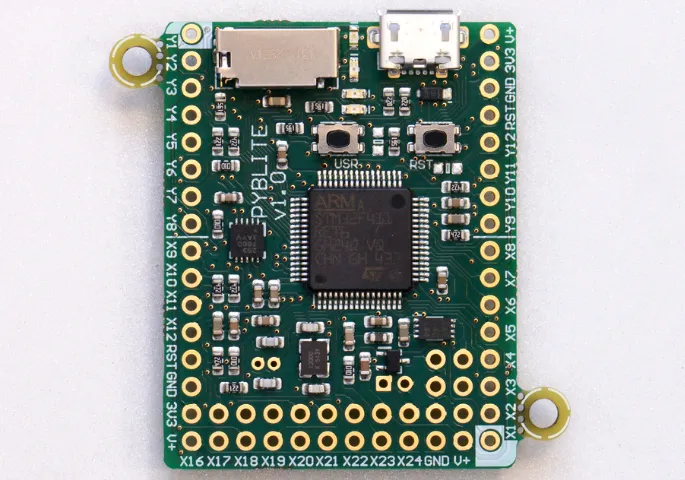
MicroPython supports embedded hardware platforms, and the chips supported in the mainline include ARM Cortex-M series chips (STM32, RP2040, TI CC3200), ESP8266, ESP32,16-bit PIC, etc.
In 2016, a MicroPython version was created for the BBC Micro Bit as part of the Python Software Foundation's contribution to the Micro Bit's partnership with the BBC.
In July 2017, MicroPython was forked to create CircuitPython, a version of MicroPython that emphasizes education and ease of use. MicroPython and CircuitPython support slightly different hardware sets (for example, CircuitPython supports Atmel SAM D21 and D51 boards but has dropped support for the ESP8266).Starting from version 4.0, CircuitPython is based on MicroPython version 1.9.4. [
In 2017, Microsemi developed a MicroPython port for the RISC-V (RV32 and RV64) architecture.
In April 2019, a MicroPython version for Lego Mindstorms EV3 was created.
In January 2021, the MicroPython port for the RP2040 (ARM Cortex-M0+) was created.
Apart from MicroPython, there are other scripting programming languages for embedded systems such as Lua, JavaScript and MMBasic. However, none of them boasts as complete functionality as MicroPython, nor do they match its performance; they also fall short of MicroPython in portability and ease of use, with far fewer available resources.
1.2 Other Examples of Embedded Programming with Python
1.2.1 PyMite
PyMite is a lightweight Python interpreter written from the ground up, designed to run on 8-bit and larger microcontrollers with limited resources: 64 KiB of program memory (flash) and 4 KiB of RAM. It supports a subset of Python 2.5 syntax and can execute a subset of Python 2.5 bytecode. PyMite can also be compiled, tested and run on desktop computers.
1.2.2 CircuitPython
CircuitPython is a programming language based on MicroPython, designed to simplify experimentation and learning through coding on low-cost microcontroller boards. Most CircuitPython libraries can also run on single-board computers (SBCs) such as the Raspberry Pi. Linux runs "desktop" Python (commonly referred to as CPython) rather than CircuitPython.
1.3 Differences between CircuitPython and MicroPython
CircuitPython is a beginner-friendly open-source version of Python. Built on MicroPython, it is designed for small, low-cost computers known as microcontrollers. Microcontrollers serve as the core processing unit of a wide range of electronic devices, including various development boards used for building hobbyist projects and prototypes.
CircuitPython in electronics is one of the best ways to learn coding, as it connects code to the real world. You can usually install CircuitPython on a supported USB board simply by dragging and dropping, then code.py edit the file on the CIRCUITPY drive. The code will reload automatically. No software needs to be installed other than a text editor (we recommend one for beginners).
Compared with MicroPython, the most intuitive differences of CircuitPython are as follows:
- CircuitPython treats the microcontroller as a USB flash drive; once connected to a computer, you can develop programs using the file manager and text editor that come built into the computer's operating system.
- CircuitPython simplifies many things: for instance, there are only two operations (Ctrl-C and Ctrl-D) in its REPL, whereas MicroPython has five; by default, saving a file in CircuitPython triggers it to run immediately.
- CircuitPython also removes the interrupt functionality from MicroPython, retaining only the asynchronous feature;
- CircuitPython emphasizes the universality of code and has created a unified hardware at the API level. As long as the hardware supports it, it strives to enable code written for Chip A to run on Chip B without any modification; while MicroPython features operations such as import esp and import pyb.
1.4 Why Use MicroPython to Build Our Project
1.4.1 Reduce Development Difficulty
MicroPython has built proven hardware systems and low-level driver libraries, allowing us to focus our programming efforts on application-layer development instead of building projects from the absolute bottom, which greatly reduces the time spent on low-level hardware design and software debugging while significantly lowering the technical threshold for embedded development.
1.4.2 High Portability
When programming with traditional C/C++, it is often necessary to use SDK packages or driver functions provided by chip vendors, such as ST's CubeIDE and NXP's PE. While these tools can greatly reduce the difficulty of development, the tools from different manufacturers vary, and their library functions are incompatible, making it very difficult to directly port programs developed with these tools.
However, the emergence of MicroPython enables us to complete the porting of the application layer without re-implementing the underlying functions. As a scripting language itself, MicroPython has low correlation with hardware, and coupled with the concise syntax of the Python language, it makes program porting and upgrading extremely easy.
1.4.3 Openness
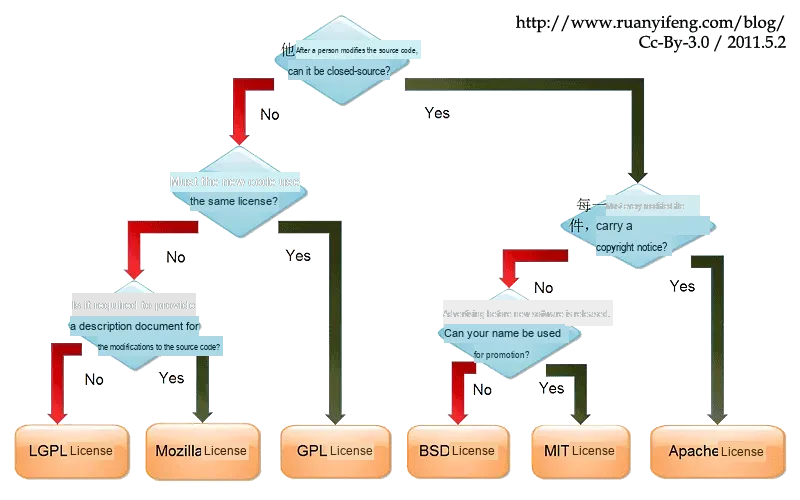
MicroPython and Pyboard adopt the permissive MIT license approach. The MIT license is a Licensing Agreement as permissive as BSD. The author only intends to retain the copyright without imposing any other restrictions. Anyone may use, modify, and distribute it, and may also incorporate it into commercial products free of charge.
You only need to include the statement of the original Licensing Agreement in your distribution, whether you are distributing it in binary form or source code form.
The open nature of MicroPython has enabled it to achieve tremendous growth in just a few years, and a large number of engineers and enthusiasts around the world are learning and using it.
2. Introduction to MicroPython Project Architecture
We can compare the project architecture of MicroPython to "a customizable set of embedded Python development building blocks": the core blocks are the general-purpose Python functions available for all devices, while the device-specific blocks are the platform code adapted to hardware. This design not only ensures the versatility of MicroPython but also enables flexible adaptation to various microcontrollers and systems. Before diving into the architecture, let's first understand several core concepts:
- A cross-compiler is simply a tool that "compiles code on Computer A that can run on Device B"(for example, compiling MicroPython bytecode that can run on the Raspberry Pi Pico on a Windows PC), which eliminates the hassle of compiling directly on a resource-constrained microcontroller.
- Port: Also referred to as "porting", it is the dedicated adaptation code written by MicroPython for different hardware platforms (such as ESP32, RP2040, STM32) — just as the same set of games needs to be adapted for mobile and PC versions, a port is the "hardware platform-specific version" of MicroPython.
- Bytecode: An intermediate code (not direct machine code) that Python code is converted into before execution, which can be run directly by the MicroPython virtual machine, featuring both light weight and cross-platform compatibility.
- RTOS (Real-Time Operating System): A compact operating system for embedded devices that manages hardware resources and handles multi-tasking (e. g., Zephyr RTOS).
The project code of MicroPython is divided into different directories according to the logic of "common core + platform adaptation + auxiliary tools", and each directory has a clear functional division. The specific architecture composition is as follows:
- py/ -- Core Python implementation, including compiler, runtime, and core libraries
- mpy-cross/ -- MicroPython cross compiler, used to compile scripts into pre-compiled bytecode
- ports/ -- Platform-specific code for the various ports and architectures that MicroPython runs on
- lib/ -- Submodules for external dependencies
- test/ -- Test frameworks and test scripts
- docs/ -- User documentation in Sphinx reStructuredText format, which is used to generate online documentation
- extmod/ -- Additional (non-core) modules implemented in C
- tools/ -- Various tools, including the pyboard.py module
- example/ -- Some sample Python scripts
- drivers/ -- Software-implemented hardware drivers, which are Python modules (C + Python) implemented in standard C based on the py architecture, slightly different from the SDKs provided by the chips themselves and featuring strong compatibility.
How MicroPython Code Runs
A piece of Python code enters the interpreter's cache via the REPL; the interpreter program will interpret this code (compile it into ByteCode), then execute it using the interpreted code, which is pushed onto the interpreter's function stack for execution during the process.
minimal port provides a very basic example of a MicroPython port that can be compiled as a standalone Linux binary as well as for ARM Cortex M4. If you want to port MicroPython to another microcontroller, start here. Additionally, the "bare-arm" port is an example of an absolute minimal configuration, used to track the code size of the core runtime and virtual machine.
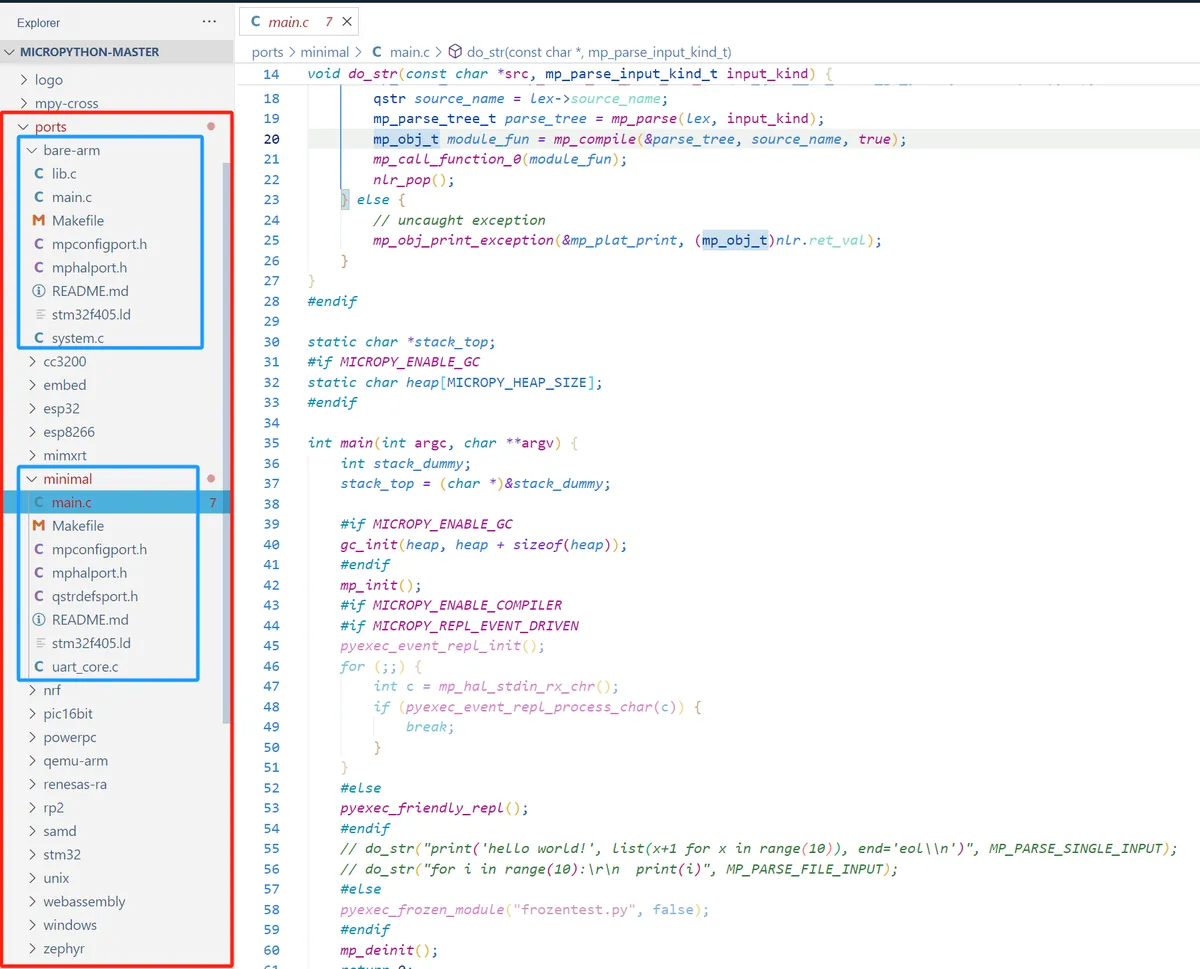
In addition, the following ports are also provided in this repository:
- cc3200 —— Texas Instruments CC3200 (including PyCom WiPy);
- esp32—— Espressif ESP32 SoC (including ESP32S2, ESP32S3, ESP32C3);
- esp8266 —— Espressif ESP8266 SoC;
- mimxrt——NXP m.iMX RT (including Teensy 4.x);
- nrf——Nordic Semiconductor nRF51 and nRF52;
- pic16bit——Microchip PIC 16-bit;
- powerpc——IBM PowerPC (including Microwatt);
- qemu-arm -- an emulation target based on QEMU for testing;
- Renesas-ra —— Renesas RA Series;
- rp2——Raspberry Pi RP2040 (including Pico and Pico W);
- samd —— Microchip (formerly Atmel) SAMD21 and SAMD51;
- STM32 —— STMicroelectronics STM32 series (including F0, F4, F7, G0, G4, H7, L0, L4, WB);
- webassemble——Emscripten port for browsers and NodeJS;
- zephyr - Zephyr RTOS.
3. Introduction to MicroPython Related Modules
We can compare the system architecture of MicroPython to the operating system of a smartphone: the smartphone hardware corresponds to the microcontroller hardware, the smartphone's operating system (such as Android/iOS) corresponds to the MicroPython firmware, and the apps we install correspond to the user-written MicroPython programs. Firmware is the core of the entire system, responsible for connecting hardware and user programs, just as the smartphone system connects hardware and apps. Before understanding the system architecture, let's first grasp several key basic concepts:
- Firmware: A pre-compiled package burned into the flash memory of a microcontroller, which contains the MicroPython interpreter, core libraries, and hardware drivers, serving as the equivalent of the "operating system kernel + runtime environment" for embedded devices.
- REPL (Interactive Interpreter): Its full name stands for "Read-Eval-Print-Loop". Simply put, it is the "real-time command line" of MicroPython — you enter a line of code, and it will be executed immediately with the result returned, which facilitates debugging and quick code testing.
- Bootloader: A small program that runs first after the microcontroller is powered on. It is responsible for loading the firmware from the flash memory into the RAM for execution, serving as the "power-on initiator" for the hardware.
- Garbage Collector (GC): A built-in memory management tool of MicroPython that automatically cleans up memory occupied by unused variables, objects and other data to prevent embedded devices from freezing due to insufficient memory. It is an optimized design tailored for the limited memory of microcontrollers.
3.1 System Architecture of MicroPython
The typical structure of a MicroPython system is as follows:
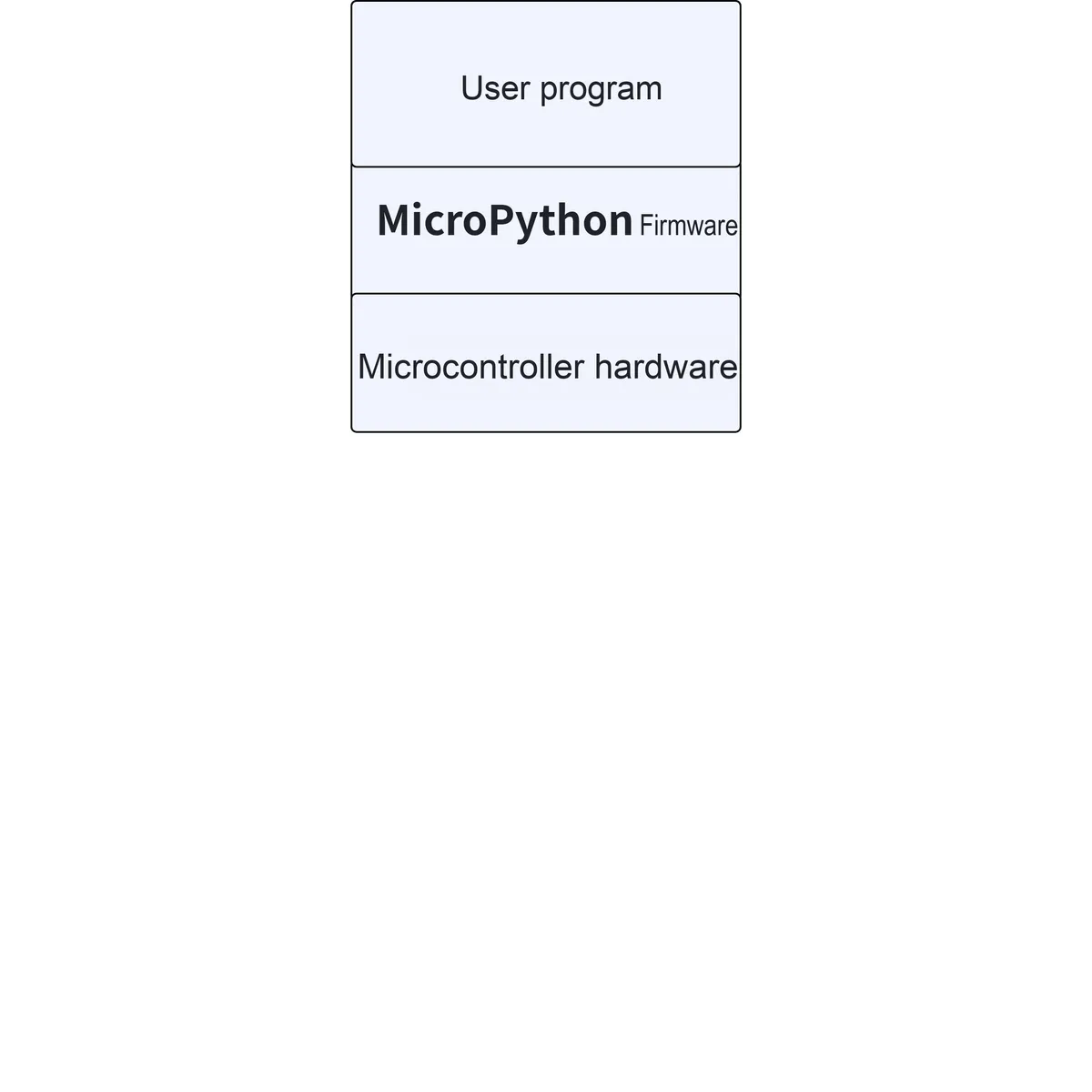
It consists of user programs, MicroPython firmware and microcontroller hardware. The firmware and hardware are the most fundamental and fixed components, and we can only write and modify the user programs. MicroPython firmware is similar to an embedded operating system, which is mainly used to run user programs and provide a REPL command interpreter.
- Dedicated MicroPython development boards, such as pyboard, Raspberry Pi Pico, etc. , can directly flash the firmware provided by the official to run the source code;
- For other types of development boards supported by MicroPython, you need to compile the source code by yourself to generate the firmware;
- If it is a MicroPython-compatible development board, you need to port the MicroPython system by yourself.
bare metal bare-metal approach
The bare metal framework refers to the role that MicroPython plays in the OS of the microcontroller it is installed on.
Unlike other OSes, MicroPython can access and control the machine code of microcontrollers, such as instantiating MicroPython to disable hardware interrupts, writing built-in assembly code, and so on.
Before programming an MCU with MicroPython, we first need to flash the MicroPython firmware corresponding to the specific MCU chip. Once the flashing is complete, upload the written MicroPython program to the microcontroller, and then restart the MCU:
- After the device is powered on, the bootloader is responsible for loading the MicroPython firmware from flash memory into RAM, and the firmware contains the interpreter and the basic Runtime Environment;
- Before MicroPython starts executing Python code, it initializes the necessary hardware and peripherals, including setting up clocks, initializing GPIOs, and configuring peripherals.
- MicroPython will locate and execute predefined startup scripts (such as main.py), which can contain user-defined initialization code or program logic. The MicroPython interpreter will first compile Python code into bytecode, a process that is completed dynamically on the device, eliminating the need for the complex pre-compilation process;
- The compiled bytecode is executed by the MicroPython interpreter, which converts the bytecode into specific operations and runs these operations on the hardware;
- MicroPython manages the stack and Memory Space in microcontrollers, and its built-in garbage collector (GC) also periodically cleans up unused objects to free up Memory Space;
- Once the startup script finishes executing, MicroPython enters the REPL mode and waits for the user to input commands or code.
3.2 machine module — hardware-related functions
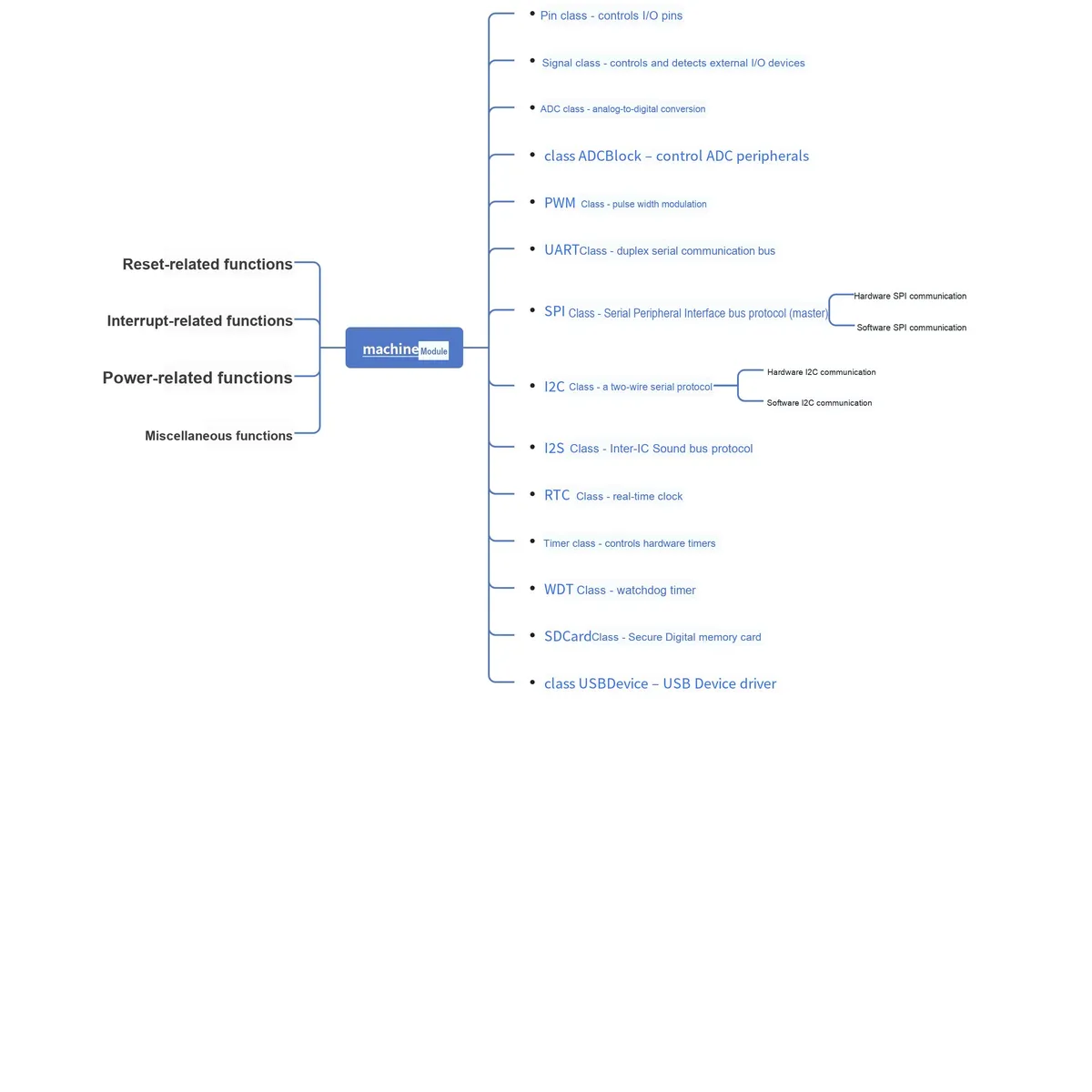
The machine module contains specific functions related to the hardware on a particular board. Most functions in this module allow to achieve direct and unrestricted access to and control of system hardware blocks such as CPU, timers, buses, etc. Improper use may lead to board failure, locking up, crashing, and in extreme cases, even hardware damage.
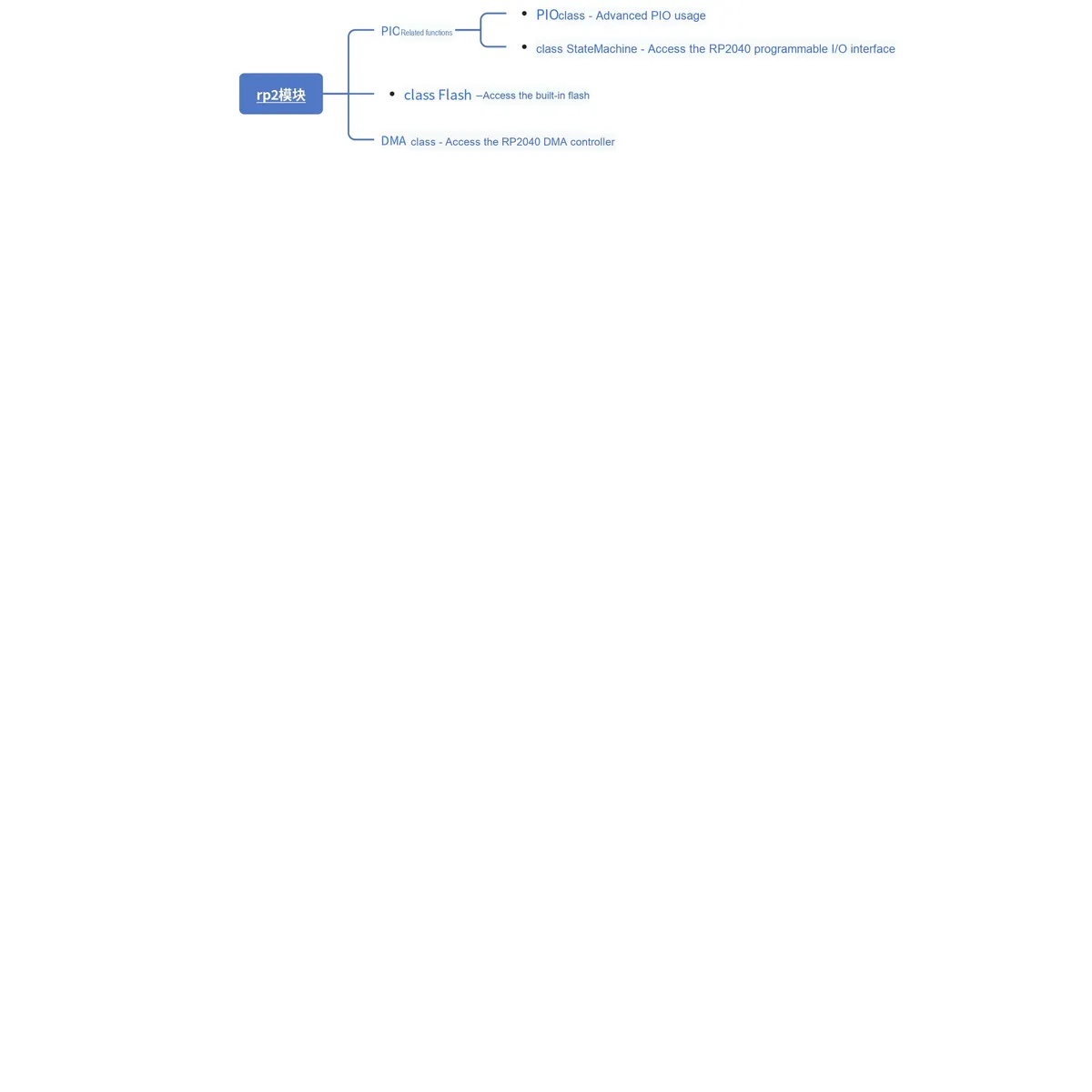
3.3 rp2 module — RP2040-specific features
This rp2 module contains functions and classes specific to the RP2040, such as those used in the Raspberry Pi Pico.
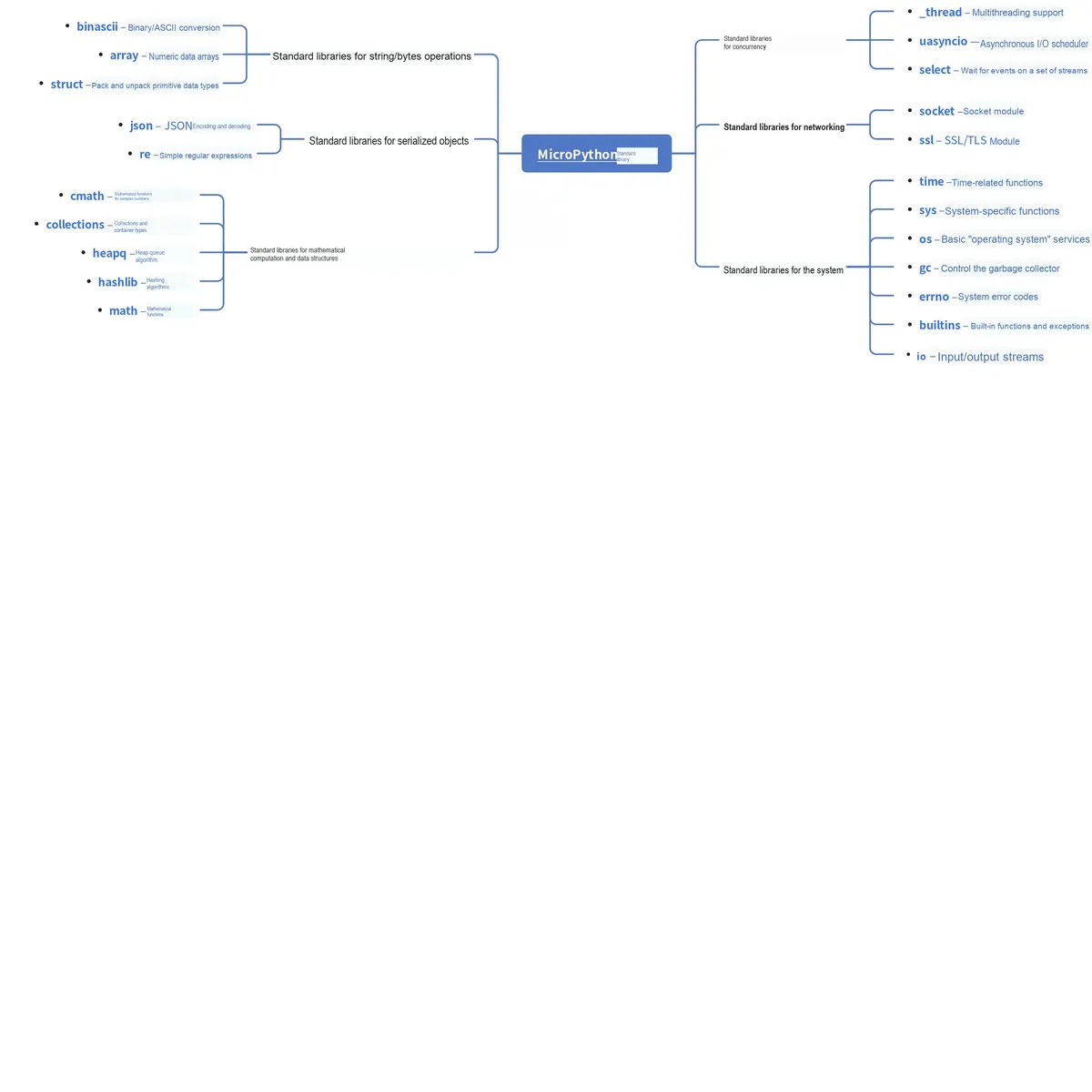
3.4 MicroPython Standard Micro-library
The following standard Python libraries have been "micro-optimized" to align with the philosophy of MicroPython. They provide the core functionality of the corresponding modules and are intended to replace the standard Python libraries.
3.5 MicroPython-Specific Libraries
4. Implementation Features of MicroPython
4.1 Optimization Steps
The process of developing high-performance code consists of the following phases, which shall be executed in the listed order:
- Identify the slowest parts in the code
- Improve the efficiency of Python code
- Use the native code emitter
- Use the viper code emitter
- Use hardware-specific optimizations
When identifying the slowest code segments, we can typically establish the function group utime recorded in ticks through the judicious use of timing. Code execution time can be measured in milliseconds, microseconds, or CPU cycles.
The following allows you to time any function or method by adding the @timed_function decorator:
def timed_function(f, *args, **kwargs):
    myname = str(f).split(' ')[1]
    def new_func(*args, **kwargs):
        t = time.ticks_us()
        result = f(*args, **kwargs)
        delta = time.ticks_diff(time.ticks_us(), t)
        print('Function {} Time = {:6.3f}ms'.format(myname, delta/1000))
        return result
    return new_func
4.2 Maximizing MicroPython Runtime Speed
Optimization Idea: Optimize in the order of "from simple to complex, from software to hardware", first locate the performance bottleneck, then make gradual adjustments to achieve the maximum performance improvement at low cost.
Core tools and methodologies include:
- Timing tool: Use the
timemodule (e. g.,time.ticks_us ()) for microsecond-level timing to facilitate bottleneck localization; - Decorator: It adds extra features (such as timing) to a function via the
@symbol to improve code reusability; - Code emitters:
nativeemitter compiles Python to native machine code (fast);viperemitter is more aggressive and supports operating hardware registers (speed close to C); - Cross compiler: Use
mpy-crosson a computer to pre-. pyfiles into. mpybytecode, so as to reduce the time consumed by compile on the device.
Optimization Direction:
- Code execution efficiency: using
constto declare constants, pre-compile bytecode, etc. ; - Memory and Objects: Allocate memory properly, use arrays instead of lists, etc. ;
- Computation and hardware: Replace floating-point operations with integer operations, and use hardware peripherals (such as DMA and hardware SPI) instead of software simulation operations, which delivers the most significant performance improvement.
For details, please refer to: How to Speed Up the Operation of MicroPython
4.3 Minimize MicroPython Memory Footprint
MicroPython is mainly used for microcontrollers (such as Raspberry Pi Pico, ESP32). Such devices have limited resources in terms of RAM (Random Access Memory, ranging from tens of KB to hundreds of KB, with fast read/write speed but data loss upon power-off) and Flash (storage memory, several MB, which retains data after power-off but has slow read/write speed), so memory optimization is the key to stable program operation.
Memory optimization methods include:
- Storage Expansion: Install an SD card to expand storage resources;
- Firmware integration: Use frozen modules / bytecode to integrate the code into the firmware;
- Code format: Use. mpy files (bytecode files) instead of. py source code;
- Constant declaration: Use the const keyword to declare constants to reduce memory usage;
- Object optimization: Reduce unnecessary object creation (e. g., optimize string operations, avoid temporary containers);
- Data storage: Optimize numerical storage via struct/bytearray;
- Execution Restrictions: Avoid runtime compile execution (e. g., eval/exec);
- Storage location: Store strings in flash memory;
- Reclamation Mechanism: Enable the garbage collection mechanism.
For details, please refer to: How to Minimize Memory Usage of MicroPython
4.4 Distribution Packages, Package Management and Deployment Applications
Taking Python on the host computer as an example, Python modules and packages can be packaged into archive files suitable for transmission between systems and stored on the Python Package Index (PyPI). Users who need to install these modules and packages only need to execute the corresponding pip installation command to complete the download and deployment.
Packaging refers to further encapsulating your source code and pre-configuring all project deployment tasks, so that users can get it up and running immediately without worrying about deployment issues; while distribution means uploading the packaged Python modules and packages to the Python Package Index, so that they can be used as an open-source library installed via the pip install command.
PyPI: Python Package Index
The Python Package Index (PyPI) is a software repository for the Python programming language. PyPI helps you find and install software developed and shared by the Python community, while package authors use PyPI to distribute their software.
Distribution of Python packages can be divided into two categories:
- Released in the form of source package: The installation process of a source package consists of decompression first, then compile, and finally installation, so it is cross-platform. Since compilation is required for each installation, its installation speed is relatively slower compared to the binary package installation method. Essentially, a source package is a Compressed Packet, and its common formats include: ZIP, tar, gztar, bztar.
- Released in the form of binary packages: The installation process of binary packages eliminates the need to compile, and you only need to decompress and install them directly, so the installation speed is faster than that of source packages. Since packages compiled on different platforms are not interoperable, it is necessary to compile packages for multiple platforms in advance before release. Common formats of binary packages include egg and wheel.
Just like the Python for host computers, MicroPython supports creating "third-party" packages, distributing them, and installing them easily in each user's environment.
The distribution package format of MicroPython is the well-known tar.gz format, where the Gzip compressor acts as an external wrapper for the TAR Compressed Packet, with a default dictionary size of 4KB.
4.4.1 Installation Package Process
The basic process of the installation package is as follows:
- Remote Installation (MIP Method):
- You can install packages/modules in either bytecode format (. mpy) or source code format (. py). For example, to install the source code module of random, you need to first delete the existing random.mpy file, then use the
mip.install (GitHub link of the corresponding file)command to complete the installation. - After installation, you need to add the /lib directory where the modules are stored to the Python system path (run
sys.path.append ('/lib')) before you can directly useimportto import modules.
- You can install packages/modules in either bytecode format (. mpy) or source code format (. py). For example, to install the source code module of random, you need to first delete the existing random.mpy file, then use the
- Manual Installation (mpremote Method):
- It is applicable to MicroPython development boards without local network functions, and is operated via the host PC with the help of the mpremote tool (which supports connecting devices via USB/UART).
- You can install packages, files at specified links, or install from repositories such as GitHub/GitLab, with the command format as
mpremote mip install <package name/link/repository address>. - Configurable during installation
--target-path(specify installation path),--no-mpy(do not compile to. mpy),--indexand other parameters.
For the specific process, please refer to: Overview and Installation Methods of MicroPython Packages and Modules
4.4.2 Creating and Distributing Your Own Packages and Modules
The process for creating and distributing your own packages and modules for MicroPython is briefly summarized as follows:
- Standard package structure: organize the file directory, including the core function. py file, the optional
__init__. py(marked as a package), README.md (documentation), LICENSE (open source license), examples folder (sample code), etc. - Code specification check: By means of the pre-commit hook, the tools black and Flake8 are automatically invoked to conduct code format specification and static check, so as to ensure that the code complies with the specifications.
- Compile / Optimization (Adaptation for Embedded Environments): Convert. py files into. mpy bytecode; for low-memory devices, packages can be "frozen" into firmware bytecode (pre-compiled and stored in ROM).
- Prepare for metadata distribution: Write files such as package.json and manifest.py, and specify information including the package name, version, and dependencies.
- Distribution and Deployment:
- Public distribution: upload to PyPI (for others to install via
upip), or publish to a GitHub repository for download. - Device deployment: Network-free devices can be cross-installed into the directory image via Unix ports and then transferred to the device; low-memory devices are directly flashed with firmware containing a frozen package.
- Public distribution: upload to PyPI (for others to install via
You can refer to the following link for the specific process: https://www.cnblogs.com/FreakEmbedded/p/18757480
5. MicroPython Kernel Development
Since this tutorial mainly focuses on using MicroPython to write driver programs for sensor modules and develop simple programs, as well as how to get started with MCU programming using the Raspberry Pi Pico, we will only provide a brief overview of the content in this section.
First of all, we need to understand the basic terms:
- Source Code: This refers to the program code of MicroPython itself (written in C and Python). We need to obtain this code first before we can conduct subsequent research and modifications;
- Build environment: The "toolkit" that needs to be installed on your computer, which is used to "translate" source code into programs (i. e., "firmware") that can run directly on hardware;
- Compiler: A tool that converts the Python code you write into an "intermediate code"(bytecode) which can be directly read by the MicroPython interpreter on the hardware;
- Memory Management: When MicroPython runs on hardware, how it "manages Memory Space"(e. g., for storing variables and program data) to avoid memory waste or overflow;
- C extension: Add new features to MicroPython using the C language (since C runs fast and is closer to hardware), for example, add a functional module that controls a specific sensor;
- Porting: "adapting" MicroPython to new hardware (such as a new microcontroller) so that this hardware can also run MicroPython.
For specific details about MicroPython kernel development, you can refer to: https://docs.micropython.org/en/latest/develop/index.html .
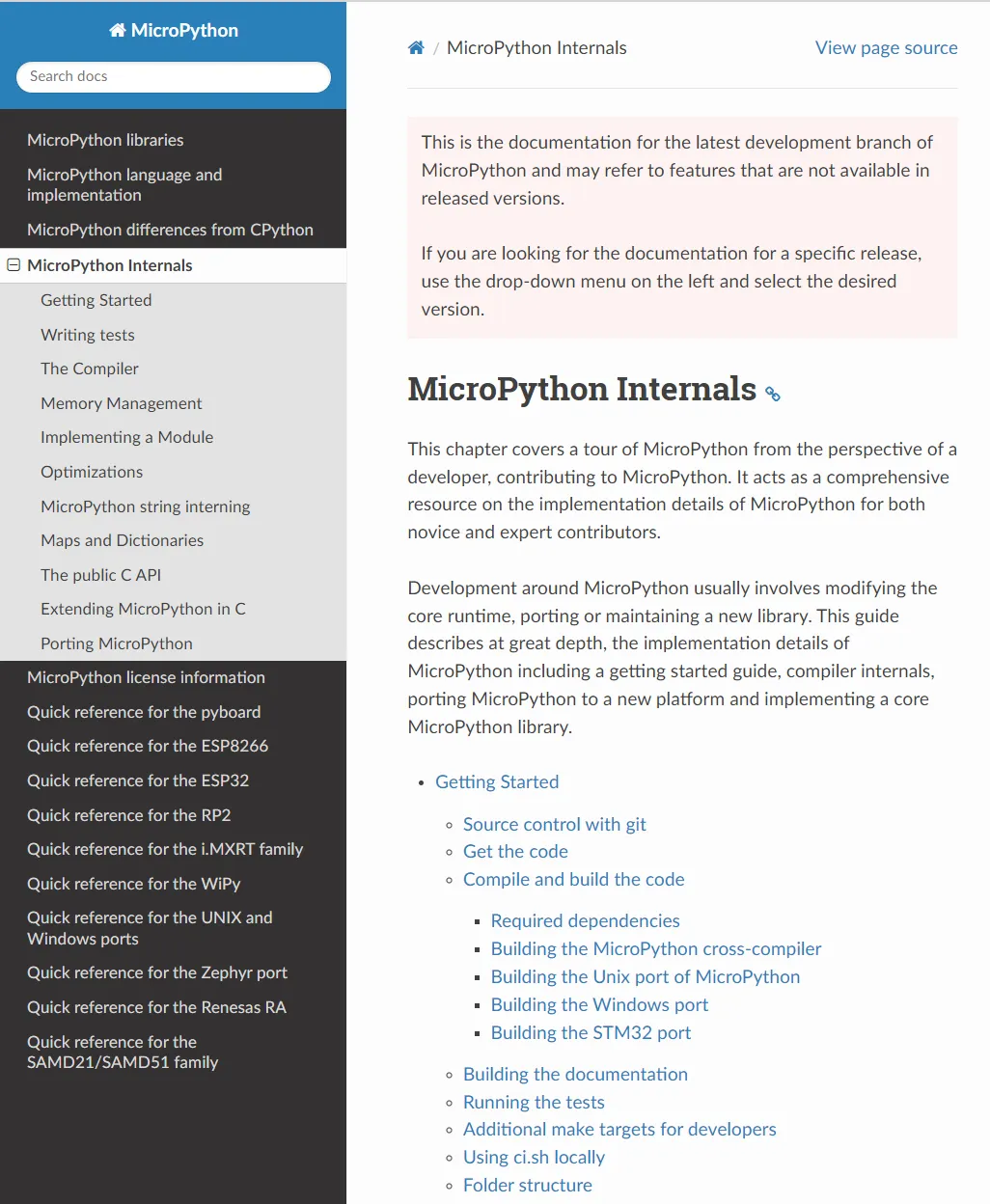
This chapter, MicroPython Internals, is a hands-on tutorial designed for developers who want to go from beginner level to being able to contribute code hands-on. It starts with the basics of obtaining source code and setting up the build environment, then gradually walks you through understanding how the compiler compiles Python code into bytecode, how the runtime manages objects and memory, and how to write extension modules in C or port MicroPython to a new hardware platform.
It mainly includes the following contents:
- Getting Started:
- Use Git to obtain the source code (Git is a code management tool, similar to a "code version of Baidu Cloud", which facilitates easy access to and updates of the source code);
- lists dependencies and build tools; how to build the cross-compiler (mpy-cross) — mpy-cross is a cross-compiler that can generate runnable code for other devices such as microcontrollers on your computer — and how to compile firmware on ports for different targets (Unix, Windows, STM32; different "ports" refer to different adaptation platforms).
- It also covers how to generate documentation, run the test suite (to verify that the modified code works properly), additional make targets (make is an automated build tool, and a "target" refers to a specific task to be completed), and use the local CI script (ci.sh, a script that automatically checks whether the code complies with specifications).
- Provide a description of the project directory/file structure (explaining the purpose of each file and folder in the source code directory) and a guide on how to write tests.
- The Compiler:
- It covers all stages ranging from lexicon (token, which splits Python code into the smallest "syntactic units" such as keywords and variable names), syntax (grammar, the writing rules for Python code), parsing (checking whether the code conforms to the syntax rules and generating an abstract syntax tree) to the entire compile process.
- Explain the multi-pass mechanism of the compiler (first/second/third/fourth passes, the multi-step process of the compiler processing code to gradually optimize and generate bytecode), how to emit bytecode (generate intermediate code), and the optional native code generation (directly generate machine code that can run on hardware for faster execution);
- It also covers how to add new syntax rules or lexical tokens, which facilitates extending Python's syntax or implementing new language features, such as adding a new keyword to Python.
- Memory Management and Object Model (Memory Management):
- Explains MicroPython's object model (everything in MicroPython, such as variables, lists, and functions, is essentially an "object", and this section covers the underlying structure of these objects), as well as the object allocation strategy and memory allocation details (how to allocate Memory Space for objects);
- Introduce the string interning (QSTR) mechanism: a memory optimization method that "caches" commonly used strings to avoid redundant storage, with generation approaches available both at compile time and at runtime;
- It also discusses the implementation details of maps/dictionaries (such as open addressing and linear probing; a dictionary is an Attribute–Value Pair structure in Python, and this part explains how MicroPython implements dictionaries efficiently).
- Modules and C Extensions (Implementing a Module / C API):
- How to implement the core modules (core modules, the basic modules that come with MicroPython such as math) as well as the steps for implementing general modules.
- How to use the public C API (the C-language interface for you to write code in C to extend MicroPython), how to extend MicroPython in C, and the structure and examples of external C modules.
- Discuss the mechanism, supported features and limitations of incorporating native machine code (local machine code, code that can be run directly by hardware) into
. mpyfiles; including how to define, compile and call native/C modules in MicroPython; - It covers the methods of using Picolibc when building modules and more examples (Picolibc is a lightweight C language library suitable for embedded devices).
- Optimizations and Special Features:
- Optimization methods such as frozen bytecode: package commonly used Python modules directly into the firmware, eliminating the need to reload them every time the program runs, thus reducing memory usage and speeding up startup;
- Other optimization strategies for code or runtime will also be covered in this section.
- Porting (Porting MicroPython):
- Starting from the minimum runnable firmware, explain how to build a MicroPython port for a new platform (the process of adapting to new hardware, including support for stdin/stdout, which refers to standard input and output, such as receiving and transmitting data via a serial port);
- Provide configuration instructions, build and run steps, and guidance on how to add the module to the target port (to enable the new hardware to use the added function module)
Appendix: Differences between CPython and MicroPython
For the specific content of this section, please refer to: https://docs.micropython.org/en/latest/genrst/index.html .
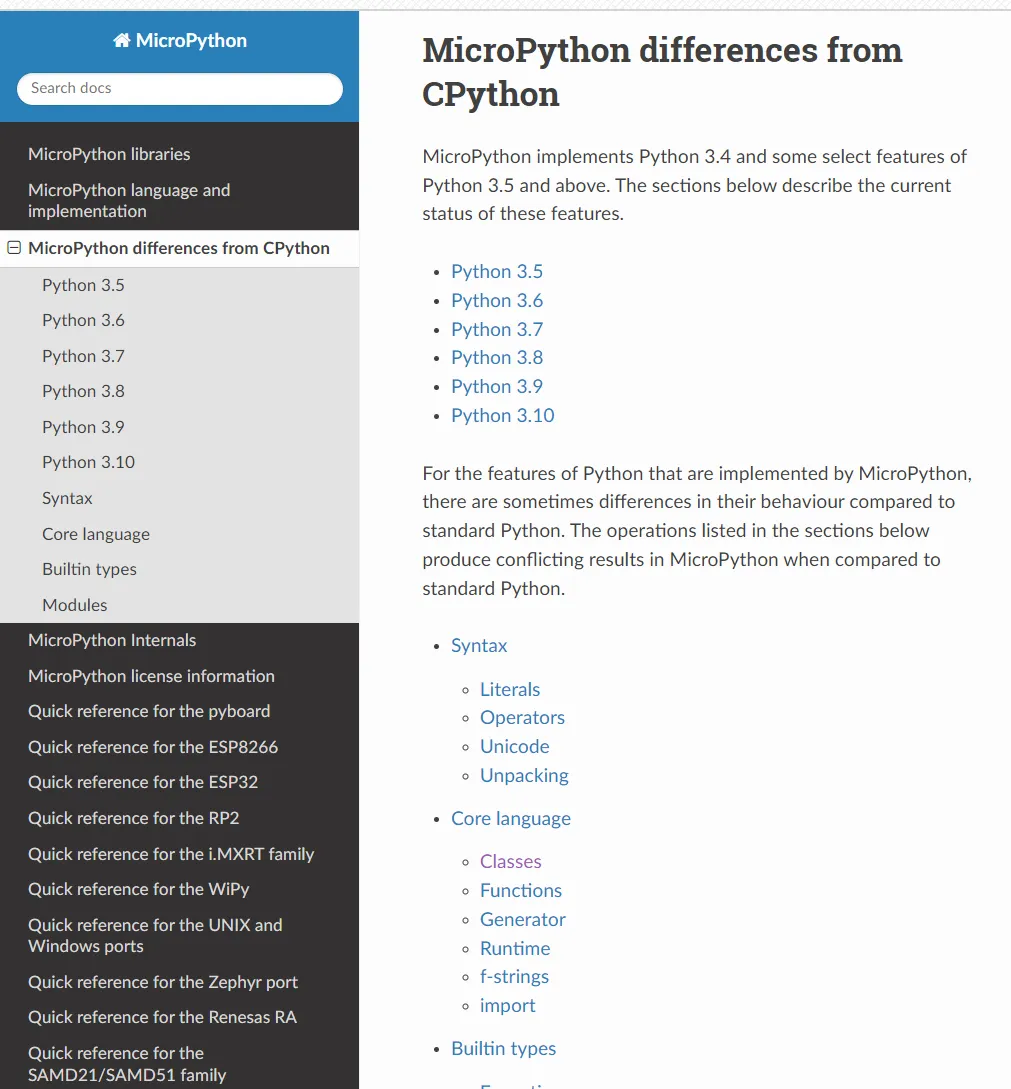
This section is specially designed for beginners who are new to MicroPython. Its core purpose is to help you quickly understand the differences between it and the CPython (the standard Python running on computers) that we commonly use — there's no need to get tangled up in complicated technical details. As long as you grasp the two key points of "version support scope" and "practical usage differences" first, you can avoid pitfalls when writing code later.
First, it is necessary to clarify MicroPython 's " Python version foundation": it does not support the latest Python version, but is implemented with Python 3.4 as the core, and additionally incorporates a number of selected features from Python 3.5 and later versions.For example, it supports some features from versions 3.5, 3.6 up to 3.10, but not all of them. The tutorial will clearly list exactly which "optional features" it supports in the order of versions from 3.5 to 3.10. You don't need to memorize all of them; it's enough to know that it is based on version 3.4 and comes with some features from higher versions.
More importantly, there are "practical behavioral differences": even if MicroPython implements a feature with the same name as CPython, its usage may still differ. These differences mainly concentrate in 5 areas commonly used by beginners, which you will most likely encounter when writing code on a regular basis:
- Syntax (
Syntax): for example, literals (the syntax for writing numbers, strings, etc.), operators (special operations beyond basic arithmetic like addition, subtraction, multiplication and division), Unicode character processing, as well as variable unpacking (operations likea, b =(1,2)), some details differ from CPython; - Core language features (
Core language): for example, the inheritance ofclasses, the parameter handling offunctions, and the execution logic ofgenerators — the actual behavior of these basic features may differ from what you are accustomed to inCPython; - Runtime (
Runtime): For example, commonly used features such asf-strings(formatted strings, e. g.,f"hello {name}"), and the rules forimporting modules — these high-frequency features you use in daily coding may have special restrictions or usage inMicroPython; - Built-in types (
Builtin types): Types that you use every day such as dictionaries (dict), lists (list), strings (str), and integers (int) may have some methods or functions that differ from those inCPython— for example, certain advanced usages ofdictand encoding handling ofstr; error types such as exceptions (Exception) andOSErrormay also have different trigger conditions and prompt messages; - Common Modules: for example, the
arraymodule for array processing, theosmodule related to the operating system, thejsonmodule for JSON processing, therandommodule for generating random numbers.The functions in MicroPythonare usually "stripped-down versions" — only the core functions are retained; some methods available inCPythonare not present here, or come with different parameters.
Finally, keep in mind that these differences do not mean that MicroPython is "incomplete"; rather, they are optimizations it has made to adapt to the "small memory and low performance" characteristics of embedded devices such as microcontrollers.
Here, we have briefly compiled a table to summarize these differences:
| Area | CPython Behavior | MicroPython Behavior | Quick Advice / Alternative |
|---|---|---|---|
| Underscores in numeric literals | Strict: consecutive or trailing underscores are not allowed | More lenient or different: sometimes accepted (the implementation ignores underscores) | Follow CPython syntax (no consecutive or trailing _) to stay compatible |
| Number followed by keyword/. | CPython separates the number from what follows (may emit a SyntaxWarning) | The lexer treats 1and as a single token → syntax error | Add a space between the number and the keyword/dot, or use parentheses (0x1).to_bytes() |
| Walrus operator := (nested comprehensions) | Rebinding the iteration variable inside a comprehension is prohibited | May not perform full checks, allowing some violations | Avoid using := to bind the outer iteration variable in nested comprehensions |
| Unicode name escape \N{...} | Supported | Not implemented (NotImplementedError) | Use \uXXXX or direct character literals |
| Argument unpacking limits | Any number (limited by memory) | Limited by the implementation flag bits (MP_SMALL_INT); too many raises "too many args" | Avoid passing a very large number of positional arguments at once; pass them in batches or use a sequence object |
| __del__ (user classes) | Is called (during garbage collection) | __del__ is usually not guaranteed to be called for user-defined classes | Do not rely on __del__ for critical cleanup; use try/finally or a context manager |
| __init_subclass__ / PEP487 | Called automatically; supports parameterization and cooperation | PEP 487 is not implemented: not called automatically, not implicitly a classmethod, no parameterization, no recursive call support | If needed, call A.__init_subclass__() manually or use class variables instead of parameterization |
| MRO / super() | Uses C3 (linearization); the multiple-inheritance call chain is complete | Uses a depth-first, non-complete algorithm; super() may call only some parent classes | Avoid complex multiple inheritance; call parent constructors explicitly or simplify the inheritance structure |
| Private names (name-mangling) | __name is automatically rewritten to _Class__name | No name-mangling; may conflict with a module-level name of the same name | Manually add a unique prefix or avoid double-underscore private names |
| Inheriting from built-in types (list/tuple) | Parent class methods can be used safely before __init__ | Calling built-in methods before super().__init__() may raise an error or crash | Call super().__init__() first, on the first line of the subclass __init__ |
| Function object attributes | Supports __module__; attributes can be attached dynamically | Minimal implementation: no __module__; attributes cannot be added to functions dynamically | Use an external dict FUNC_X[f]=... or a subclass/wrapper |
| locals() / eval() access to local variables | locals() returns a mapping of local names; eval can access local variables | Locals are implemented with a slot array; locals() does not keep local names, and eval uses only globals | Avoid relying on eval to access local variables; use explicit arguments or globals/closures instead |
| f-strings features | Supports complex expressions, !a, etc. | To save space: cannot concatenate literals containing braces, no !a, cannot handle unbalanced nesting | If complex, split into multiple steps or use +/format (note the slight differences) |
| Exception chaining | Displays context (During handling of the above...) | Exception chaining is not implemented | Do not rely on automatic chained display; manually include the original exception's information in the new exception |
| Exception attributes | Only some exceptions have value/errno | To save implementation space, many exceptions have both value and errno (behavior differs) | Use these fields only on StopIteration/OSError; or pass data through a subclass |
| OSError subclasses | Mapped to specific subclasses according to errno (FileNotFoundError, etc.) | Only plain OSError exists; use e.errno to distinguish | except OSError as e: handle_by_errno(e.errno) |
| bytes/bytearray behavior | Supports more methods/arguments (such as bytes(..., encoding=...), slicing, etc.) | Some methods/keywords are not supported; slice step≠1 is often not supported; bytearray slice assignment requires the RHS to be array/bytes | Use positional arguments, use explicit loops instead of stepped slicing, call list() first and then assign |
| Slice step ≠ 1 | Widely supported (str/bytes/list/tuple) | Most built-in types support only step=1; otherwise NotImplementedError | Use an explicit loop or build a new sequence first |
| memoryview safety | The underlying object is protected and cannot be resized while a view exists | Does not prevent resizing of the underlying object, which may cause use-after-free | Do not change the length of the underlying object while holding a memoryview; use with caution |
| array / struct | Stricter (type comparison, overflow checks, spaces in struct are ignored) | Some features are missing: type code comparison/deletion/some checks are not implemented; struct behaves differently with regard to argument count or spaces | Manually mask out-of-range values, avoid spaces in format strings, and do not rely on automatic argument checks |
| random | getrandbits(n) can return any n (limited by memory/implementation) | The PRNG has only 32-bit state, so getrandbits returns at most 32 bits; randint is limited by the native word size | If large random numbers with many bits are needed, use the enhanced implementation in micropython-lib |
| struct.pack checks | Checks the number of arguments and the format | Too many or too few arguments may not all raise an error, returning a partial pack | Manually validate the argument length and avoid spaces in format strings |
| Keyword arguments of module functions | Most CPython functions accept keyword arguments | Many functions accept only positional arguments (signature ends with /) | Use positional arguments (see the MicroPython documentation for signatures) |
| os / sys differences | os.environ, redirectable sys.stdin, etc. | os.environ may not exist; sys.stdin/out/err are often read-only or missing | Use getenv/putenv to manage the environment; do not try to rebind sys.stdin |
| range / big integer boundaries | Correctly handles very large ranges and raises appropriate errors | May overflow or return an incorrect len on extreme start/stop values | Avoid constructing very large ranges; check the sys.maxsize boundary |
| List slice-store with a non-iterable RHS | CPython supports storing any iterable into a slice | MicroPython requires the RHS to be a list/tuple, otherwise TypeError | Convert explicitly with list(iterable) before assigning |
References
- On the Overall Architecture of the MicroPython Project https://www.cnblogs.com/juwan/p/11447455.html
- The MicroPython project https://github.com/micropython/micropython?tab=readme-ov-file
- MicroPython Documentation http://www.micropython.com.cn/en/latest/library/index.html#
- What are scripts and scripting languages? https://blog.csdn.net/Scrat_Kong/article/details/82918786
- Getting Started with MicroPython
- MicroPython https://realpython.com/micropython/#everythings-coming-up-python
- MicroPython wiki https://en.wikipedia.org/wiki/MicroPython
- PyMite https://wiki.python.org/moin/PyMite
- CircuitPython http://www.circuitpython.cn/latest/README.html
- Differences Between CircuitPython and MicroPython [CircuitPython]https://juejin.cn/post/7166143599292203015
- The easiest way to program microcontrollers https://circuitpython.org/
- MicroPython typing.mpy Type Annotations https://micropython-stubs.readthedocs.io/en/stable/_typing_mpy.html
- Micropython-Stubs Subsite https://micropython-stubs.readthedocs.io/en/stable/10_intro_stubs.html
- Python: What is a frozen Python module
- https://geek-docs.com/python/python-ask-answer/805_python_what_is_a_frozen_python_module.html
- The 3 different code emitters: native code emitter and Viper code emitter
https://www.kickstarter.com/projects/214379695/micro-python-python-for-microcontrollers/posts/664832
- Detailed Explanation of Python3 Bytecode https://blog.csdn.net/weixin_46263782/article/details/120930191
- In-depth Dive into Python Bytecode https://www.cnblogs.com/yinguohai/p/11158492.html
- Differences between CPython and MicroPython http://www.86x.org/en/latet/genrst/index.html
- MicroPython Internals https://docs.micropython.org/en/latest/develop/index.html
Version Record
Version Number | Modifier | Time | Content |
v1.0.0 | Li Zisheng | 2025/09/16 | Initialize the document, based on MicroPython version V1.23.0. Added 5. MicroPython core development and supplementation: content on the differences between CPython and MicroPython. Here, the content related to MicroPython kernel development has not been supplemented yet, and a separate chapter needs to be dedicated to it. |
v1.1.0 | Li Zisheng | 2025/12/05 | Figure captions have been added, and please note that the content in section 4.3.5 needs to be elaborated on in detail. |