
Contents
I. Preliminary Concepts
The core application scenario of MicroPython is microcontrollers (such as Raspberry Pi Pico, ESP32, ESP8266); the hardware resources of such devices differ by orders of magnitude from those of computers/servers — typically, Random Access Memory (RAM) only ranges from tens of KB to hundreds of KB, and Flash (storage memory) is only a few MB. Given that Python code itself is dynamic and occupies certain memory resources during operation, memory optimization is the key to ensuring stable program operation when using MicroPython on microcontrollers.This article elaborates on the memory optimization methods for MicroPython, with annotations and explanations for technical terms that are hard to understand for beginners. Meanwhile, test codes that can be run in REPL (MicroPython interactive command line) are provided for core knowledge points to help you verify what you learn as you go.
Before learning specific optimization methods, first understanding the following core technical terms will make the subsequent content easier to comprehend:
- RAM (Random Access Memory): Also known as Random Access Memory, it is an area used by microcontrollers to temporarily store running code and data. It features fast read and write speeds, but data will be lost after power-off, and its capacity is extremely small (the RAM of Raspberry Pi Pico is 264KB).
- Flash (Flash Memory): Also known as storage memory, it is an area used by microcontrollers to permanently store firmware, user code and data. It features non-volatile data retention after power-off, a larger capacity than RAM, but a slower read-write speed (the Flash capacity of Raspberry Pi Pico is 2MB).
- Bytecode: MicroPython does not directly execute the source code (. py files) written by humans. Instead, it first compiles the source code into an intermediate code (i. e., bytecode) that lies between the source code and machine code, which is then executed by the MicroPython interpreter. Bytecode features a smaller size and higher execution efficiency.
- Firmware: Low-level software burned into the microcontroller's Flash, which integrates core functions including the MicroPython interpreter and hardware drivers, and serves as the foundation for MicroPython operation.
- REPL: short for Read-Eval-Print Loop, is an interactive command-line tool for MicroPython (such as the Shell panel in Thonny and the interactive window of serial port tools). It allows users to enter code line by line and execute it immediately, making it an essential tool for beginners to debug and test code.
- SPI bus: A serial peripheral interface, which is a common protocol for communication between microcontrollers and external devices (such as SD cards and sensors), featuring simple wiring and high transmission speed.
II. Optimization Methods
| Optimization Method | Core Principle | Key Points / Steps | REPL Test Code Description |
| Installing an SD Card for Extended Storage | Use an SD card to extend the microcontroller's storage capacity and avoid running out of internal Flash; communicate with the SD card over the SPI bus | 1. Format the SD card as FAT/FAT32; 2. Mount the SD card using the SPI bus; 3. To ignore the SD card at boot, create a SKIPSD file | Code that mounts the SD card and reads/writes a test file can be run directly to verify that the SD card has successfully extended the storage |
| Using frozen modules / bytecode | Precompile Python code to bytecode and embed it in the firmware, so it runs directly from Flash without using RAM | 1. Clone the MicroPython source; 2. Build the toolchain / cross-compiler; 3. Freeze the modules into the firmware and flash it to the device | No direct REPL test code (this is a firmware build-level operation); flash firmware containing the frozen modules, then verify with import |
| Using precompiled .mpy files | Precompile modules to .mpy bytecode to skip compilation on the board and reduce RAM usage | 1. Compile .py to .mpy with mpy-cross; 2. Upload the .mpy to the board; 3. Import the module directly with import | After uploading the .mpy file, run import your_module in the REPL to verify it loads |
| Using const constant declarations | Store constants in Flash instead of RAM, reducing bytecode / memory usage through compiler optimization | 1. Declare with from micropython import const; 2. Constants starting with an underscore are private (they do not use RAM) | Code that defines const constants and compares memory changes can be run to verify the difference in RAM usage |
| Reducing unnecessary object creation | Avoid generating temporary objects / reuse resources to lower the risk of memory fragmentation | 1. For strings, use direct concatenation / join instead of +; 2. For hardware operations, reuse preallocated buffers; 3. Avoid repeatedly creating containers | Code that combines string optimization and buffer reuse can be run to compare RAM usage across the different approaches |
2.1 Basic Concepts
Before learning specific optimization methods, first understanding the following core technical terms will make the subsequent content easier to comprehend:
- RAM (Random Access Memory): Also known as Random Access Memory, it is an area used by microcontrollers to temporarily store running code and data. It features fast read and write speeds, but data will be lost after power-off, and its capacity is extremely small (the RAM of Raspberry Pi Pico is 264KB).
- Flash: Also known as storage memory, it is an area used by microcontrollers to permanently store firmware, user code and data. It is characterized by non-volatile data after power-off, a larger capacity than RAM, but a slower read-write speed (the Flash of Raspberry Pi Pico is 2MB).
- Bytecode: MicroPython does not directly execute the source code (. py files) written by humans. Instead, it first compiles the source code into an intermediate code (i. e., bytecode) that lies between the source code and machine code, which is then executed by the MicroPython interpreter. Bytecode features a smaller size and higher execution efficiency.
- Firmware: Low-level software burned into the microcontroller's Flash, which integrates core functions including the MicroPython interpreter and hardware drivers, and serves as the foundation for MicroPython to run.
- REPL: short for Read-Eval-Print Loop, is an interactive command-line tool for MicroPython (such as the Shell panel in Thonny and the interactive window of serial port tools). It allows users to enter code line by line and execute it immediately, making it an essential tool for beginners to debug and test code.
- SPI Bus: A serial peripheral interface, which is a common protocol for communication between microcontrollers and external devices such as SD cards and sensors, featuring simple wiring and high transmission speed.
2.2 Install the SD card
MicroPython-enabled development boards can expand memory by inserting an SD card. First, the card needs to be formatted to FAT/FAT32 format (a universal file system format supported by the vast majority of devices, and also a necessary format for MicroPython to recognize SD cards). SD cards are usually connected via the SPI bus. After inserting the card, MicroPython will boot from the SD card; if there are boot.py and main.py files on the SD card, they will also be executed automatically during startup.
We can also boot from the internal flash while using an SD card to store data. In this case, you need to create a SKIPSD file in the root directory of the SD card. When the system detects this file on the SD card during boot, it will ignore the SD card and still boot from the internal Flash.
For the usage of MicroPython on SD cards, you can refer to the following tutorial:
08 SPI Serial Peripheral Interface - Document Tutorial Draft
For using an SD card with the Raspberry Pi Pico, you can refer to the tutorial:
- MicroPython SD Card Operations https://blog.csdn.net/gene8888/article/details/89599251
- Raspberry Pi Pico operates SD cards via SPI https://www.bilibili.com/video/av205357901/? vd_source= ccb41f7ce2bc22dbc99b62c49f7d8d0d
- Mount the SD card via SPI https://pico.nxez.com/2018/12/30/mount-the-sd-card-using-spi.html
- Interface Between Raspberry Pi Pico and MicroSD Card Module https://blog.csdn.net/yuanzywhu/article/details/131592815
- MicroPython settings to ignore SD card boot https://pico.nxez.com/2018/12/21/micropython-settings-ignore-sd-card-boot.html
2.3 Using the frozen Module and Frozen Bytecode
In actual development, we usually have multiple. py files to store different pieces of code. The main.py file runs the core business process, and it references other. py files, modules and packages (such as classes for other sensors) via import statements to complete the entire task. Both the main.py file and other related files are generally located in the root directory of the development board's file system.
Loading modules and packages from Python files on the file system to store and run code has some significant limitations: these Python codes must be loaded and processed by the MicroPython interpreter, a process that consumes time and memory, and in some cases, these code files are too large to be loaded into Flash memory and processed by the MicroPython interpreter.Frozen modules and Frozen bytecode can compile Python code into native code/bytecode and store it together with the firmware, which helps to compress memory usage. Once the code is frozen, MicroPython can load and interpret it quickly without consuming excessive memory and processing time.
2.3.1 Python Bytecode
MicroPython code is first compiled into bytecode, which is then executed by the interpreter. The bytecode of MicroPython is an intermediate language similar to assembly instructions: one MicroPython statement corresponds to several bytecode instructions, and the interpreter executes these bytecode instructions in sequence to complete the program execution.
The code is pre-compiled into bytecode, eliminating the need to compile MicroPython source code at load time. The bytecode can be executed directly from Flash without being copied to RAM. Similarly, any constant objects (such as strings, tuples, etc.) are also loaded from ROM. This frees up more memory for applications. On devices without a file system, this is the only way to load Python code.
2.3.2 Steps for Generating Frozen Modules and Bytecode
A typical process for generating a frozen module and bytecode is as follows:
- Clone the MicroPython source code repository
- Obtain the (platform-specific) toolchain to build the firmware
- Build a cross compiler
- Place the modules to be frozen in the specified directory (depending on whether the modules are to be frozen as source code or bytecode)
- Build the firmware. Specific commands may be required to build either type of Code Freezing
- Flash the firmware into the device
2.3.3 Main Features of MicroPython's Frozen Modules
The main features of MicroPython's frozen are as follows:
- It can use a "manifest" file to list the Python files to be frozen into the firmware. The manifest file is a Python file containing a series of function calls, which can be written in the board definition, or you can create a separate manifest file and use it together with the existing board definition.
- It can define dependencies on libraries from micropython-lib, Python files on the filesystem, as well as other manifest files.
- It allows users to create and manipulate various types of objects in Python, such as numbers, strings, lists, dictionaries, functions, modules, etc.
You can refer to the tutorial for using frozen modules and frozen bytecode:
- Freezing the byte-code of a module and include it in the firmware doesn't work https://github.com/bbcmicrobit/micropython/issues/555
- Frozen Modules https://learn.adafruit.com/micropython-basics-loading-modules/frozen-modules
- How to freeze module for ESP32 https://forum.micropython.org/viewtopic.php?t=12268
2.4 Using. mpy Files
Pre-compile the Python module into bytecode (also referred to as. mpy files, the pre-compiled bytecode file format for MicroPython, which is distinct from the. pyc files of standard Python), and then copy it to the development board. The advantage of this approach is that it can skip the pre-compile stage on the development board, thereby avoiding the lack of RAM resources during this process. Unfortunately, this method still requires the development board to load the module into RAM.
Convert Python modules into. c files, which are then compiled into the firmware itself. This retains the advantages of the aforementioned approach, plus the additional benefit of running modules directly from flash memory instead of loading them into RAM.
For the steps to generate and use. mpy files, please refer to: How to Speed Up the Operation of MicroPython
2.5 Use const Constants
2.5.1 MicroPython Namespace and Scope
In MicroPython, all modules loaded into RAM are stored in sys.modules, sys.modules is a global dictionary that is loaded into memory as soon as the Python program starts, and is used to store the names and objects of all currently imported (loaded) modules. In the module lookup process of MicroPython, it acts as a cache to avoid repeated loading of modules.
When a program imports a module, it first checks sys.modules to see if the module name exists. If it does, the program simply adds the module name to the current module's Local namespace; if not, it searches for the module file in the directories specified by sys.path by module name. Once found, the module is loaded into memory, added to the sys.modules dictionary, and finally the module name is added to the current module's Local namespace.
MicroPython Namespaces and Scopes
- Namespace
A namespace is a mapping from names to objects, and most namespaces are implemented via MicroPython dictionaries.
Namespaces provide a way to avoid name conflicts in projects. Since namespaces are independent and unrelated to one another, duplicate names are not allowed within a single namespace, while identical names can exist in different namespaces without any impact. To give an example from computer systems: a folder (directory) can contain multiple subfolders, and no two files in the same subfolder can share the same name, but files in different subfolders can have duplicate names without issues.
There are generally three types of namespaces:
- Built-in names: Names built into the MicroPython language, such as function names abs, char, and exception names BaseException, Exception, etc.
- Global names: Names defined in a module, which record the variables of the module, including functions, classes, other imported modules, module-level variables and constants.
- Local names: Names defined within a function, which record the variables of the function, including the function's parameters and locally defined variables (those defined within a class also fall into this category)
Namespace lookup order: local namespace -> global namespace -> built-in namespace
The lifecycle of a namespace depends on the scope of the object; when the object finishes execution, the lifecycle of the namespace comes to an end.
Therefore, we cannot access the objects of the inner namespace from the outer namespace.
- scope
A scope refers to the textual region of a MicroPython program where a namespace can be directly accessed. In a MicroPython program, when accessing a variable directly, the system will traverse all scopes from the innermost to the outermost in sequence until the variable is found; otherwise, an undefined error will be thrown. In MicroPython, variables in a program are not accessible from any arbitrary location, and access permissions are determined by where the variable is assigned. The scope of a variable determines which part of the program can access that specific variable name.
There are a total of 4 types of scopes in Python, which are as follows:
- L (Local) Local Scope: The innermost scope, which contains local variables, for example, inside a function/method
- E (Enclosing): In the function outside the closure function: It contains variables that are neither non-local nor global. For example, in two nested functions, if a function (or class) A contains another function B, then for the names in B, the scope in A is nonlocal.
- G (Global) Global Scope: The outermost layer of the current script, for example, the global variables of the current module
- B (Built-in) Built-in Scope: which contains built-in variables, keywords, etc. , and is the last to be searched
Rule order: L –> E –> G –> B. If a variable is not found in the local scope, it will be searched in the outer local scope (e. g. closure), if still not found, it will be searched in the global scope, and then in the built-in scope.
The built-in scope is implemented via a standard module named builtin, but the variable name itself is not placed in the built-in scope, so you have to import this module to use it.In MicroPython, only modules, classes, and functions (def, lambda) will introduce a new scope; other Code Blocks (such as if/elif/else/, try/except, for/while, etc.) will not introduce a new scope, which means that variables defined within these statements can also be accessed from outside.
Variables defined inside a function have a local scope, while those defined outside a function have a global scope. Local variables can only be accessed inside the function in which they are declared, whereas global variables can be accessed throughout the entire program. When a function is called, all variable names declared within the function are added to the scope.
When an inner scope attempts to modify a variable from an outer scope, the `global` and `nonlocal` keywords come into play:
- global keyword: used to modify global variables that need to be modified;
- The nonlocal keyword: is used to modify variables in a nested scope.
For more information, please refer to: https://www.runoob.com/python3/python3-namespace-scope.html
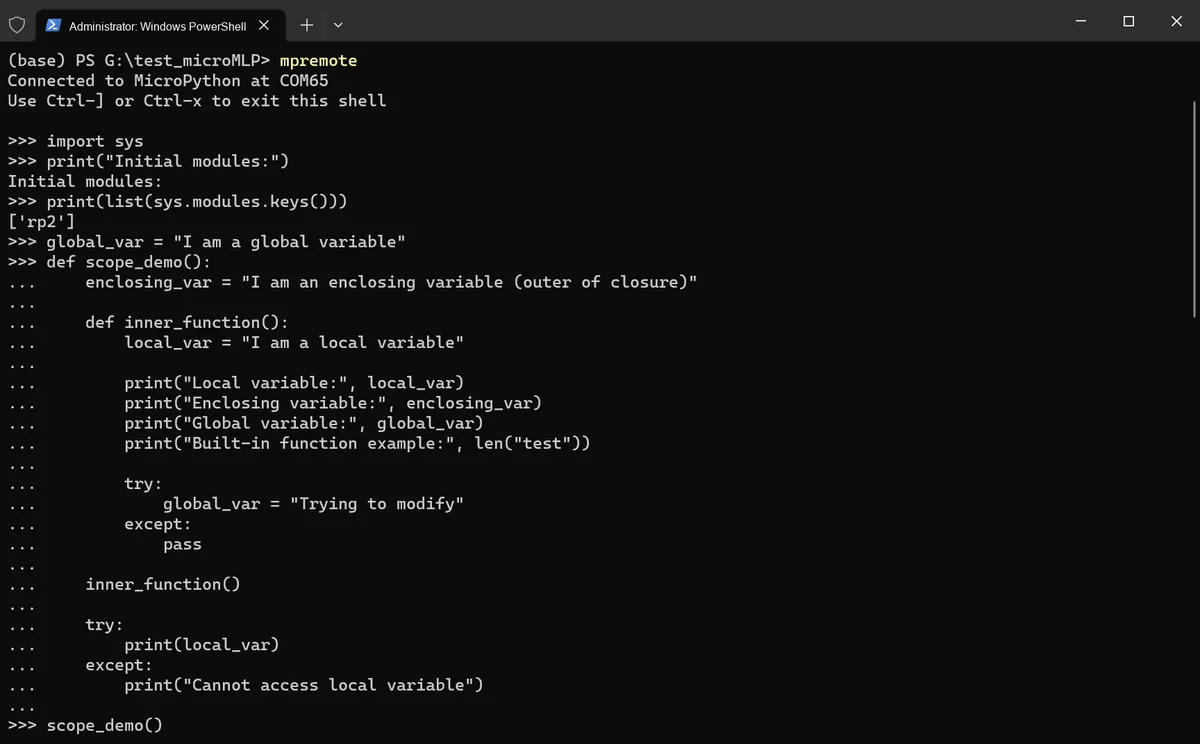
Next, we will test in the REPL of the terminal:
import sys

# sys.modules shows the names and module objects of all modules currently imported (loaded)
print("Initial modules:")
print(list(sys.modules.keys()))

# Define global variables
global_var = "I am a global variable"

# enclosing_var is the enclosing (closure outer) variable
# local_var is a local variable inside the function inner_function
# len is a built-in function
# Try to modify the global variable global_var (without global, a local variable is created)
# The closure's outer scope cannot access the inner local variable
def scope_demo():
    enclosing_var = "I am an enclosing variable (outer of closure)"

    def inner_function():
        local_var = "I am a local variable"

        print("Local variable:", local_var)
        print("Enclosing variable:", enclosing_var)
        print("Global variable:", global_var)
        print("Built-in function example:", len("test"))

        try:
            global_var = "Trying to modify"
        except:
            pass

    inner_function()

    try:
        print(local_var)
    except:
        print("Cannot access local variable")

# Use global to modify the global variable
def modify_global():
    global global_var
    global_var = "Modified global variable"
    print("Inside function:", global_var)

# Use of nonlocal in multiple levels of nesting
# Modify the variable outer_var in the enclosing scope from the inner middle() and inner() functions
def nonlocal_demo():
    outer_var = "Outer layer"

    def middle():
        nonlocal outer_var
        outer_var = "Modified by middle layer"

        def inner():
            nonlocal outer_var
            outer_var = "Modified by inner layer"

        inner()
        print("In middle:", outer_var)

    middle()
    print("In nonlocal_demo:", outer_var)

# Scope demonstration
print("\n=== Scope Demonstration ===")
scope_demo()
print("Access in global scope:", global_var)

# Modify the global variable
print("\n=== Modify Global Variable ===")
modify_global()
print("In global scope:", global_var)

# nonlocal demonstration
print("\n=== nonlocal Demonstration ===")
nonlocal_demo()

# Try to access the built-in scope
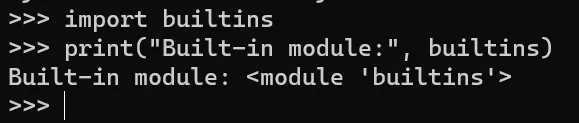
import builtins
print("Built-in module:", builtins)
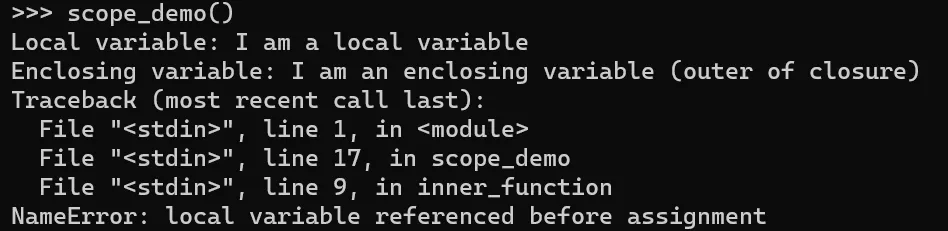
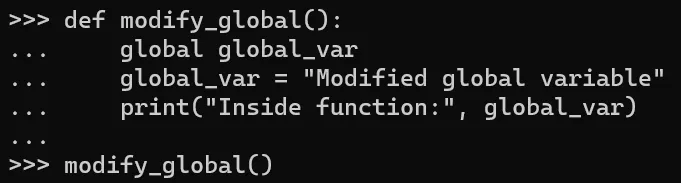
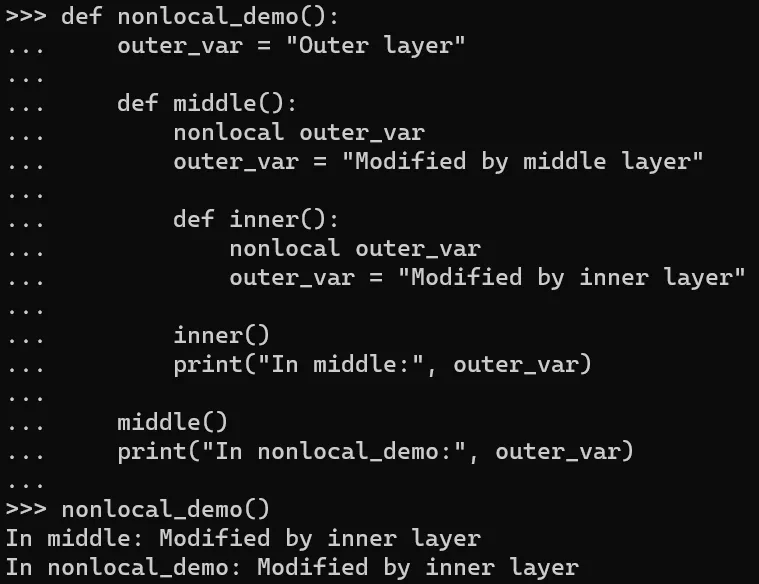
Run in the terminal, the output is as follows:
2.5.2 Definition and Optimization Principles of const Constants
A constant refers to a value that remains unchanged during the execution of a program, and is generally used to store unmodifiable data such as mathematical constants and configuration information. In a microcontroller, constants are stored in ROM/Flash memory, which can save RAM space.
The keyword const in MicroPython is used to declare that an expression is a constant so that the compiler can optimize it. In the two cases where a constant is assigned to a variable, the compiler will avoid generating a lookup for the constant name by substituting the literal value of the constant, which can save bytecode and thus save RAM.
However, it should be noted that when using the const keyword, you need to use the mpy-cross tool to compile it into an mpy file to make it function properly.
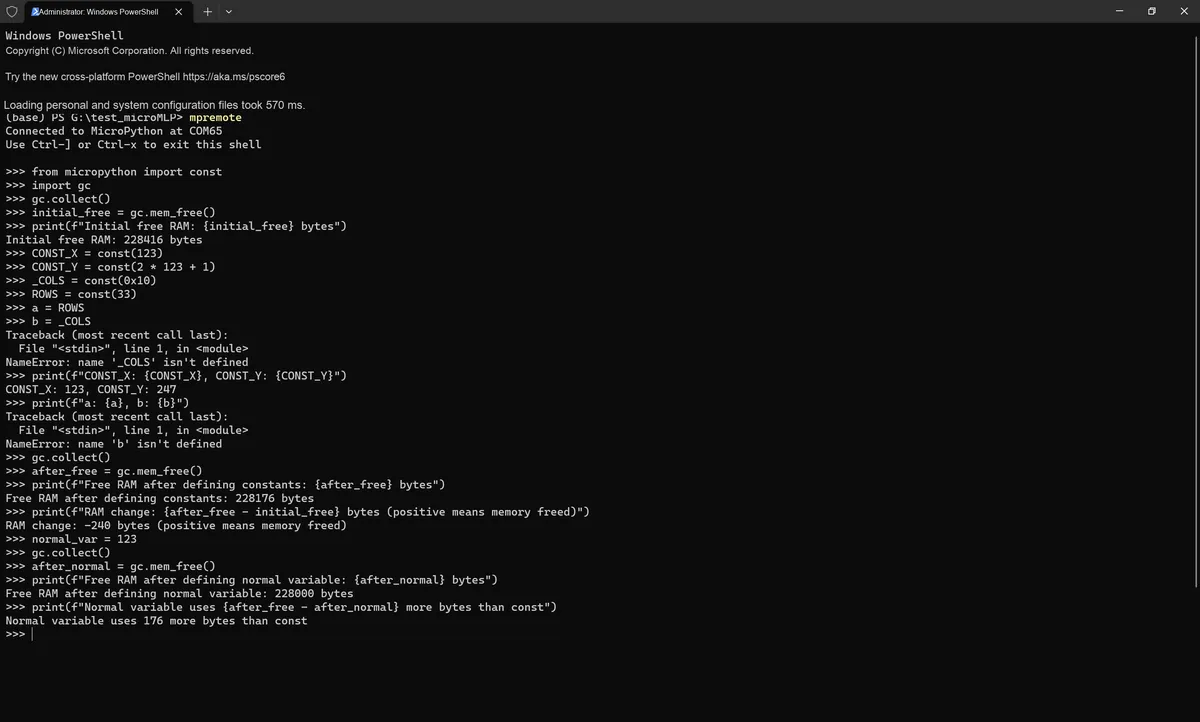
from micropython import const
# Garbage collection module, used to view memory usage
import gc

# Step 1: view the initial memory usage
# Force garbage collection to free unused memory
gc.collect()
initial_free = gc.mem_free()
print(f"Initial free RAM: {initial_free} bytes")

# Step 2: define const constants
# Public constant (accessible outside the module, takes very little RAM)
CONST_X = const(123)
CONST_Y = const(2 * 123 + 1)
# Private constant (starts with an underscore, not accessible outside the module, takes no RAM at all)
_COLS = const(0x10)
ROWS = const(33)

# Step 3: use the constants
a = ROWS
b = _COLS
print(f"CONST_X: {CONST_X}, CONST_Y: {CONST_Y}")
print(f"a: {a}, b: {b}")

# Step 4: view the memory usage after defining the constants
gc.collect()
after_free = gc.mem_free()
print(f"Free RAM after defining constants: {after_free} bytes")
print(f"RAM change: {after_free - initial_free} bytes (positive means memory freed)")

# Addendum: compare ordinary variables with const constants
# Ordinary variable, stored in RAM
normal_var = 123
gc.collect()
after_normal = gc.mem_free()
print(f"Free RAM after defining normal variable: {after_normal} bytes")
print(f"Normal variable uses {after_free - after_normal} more bytes than const")
The ROWS value will occupy at least two machine words, one each for the key and value in the global dictionary. The presence in the dictionary is necessary because another module might import or use it. This RAM can be saved by prefixing the name with an underscore, as shown for _COLS: this symbol is not visible outside the module and therefore does not occupy RAM.
The terminal execution result is as follows:
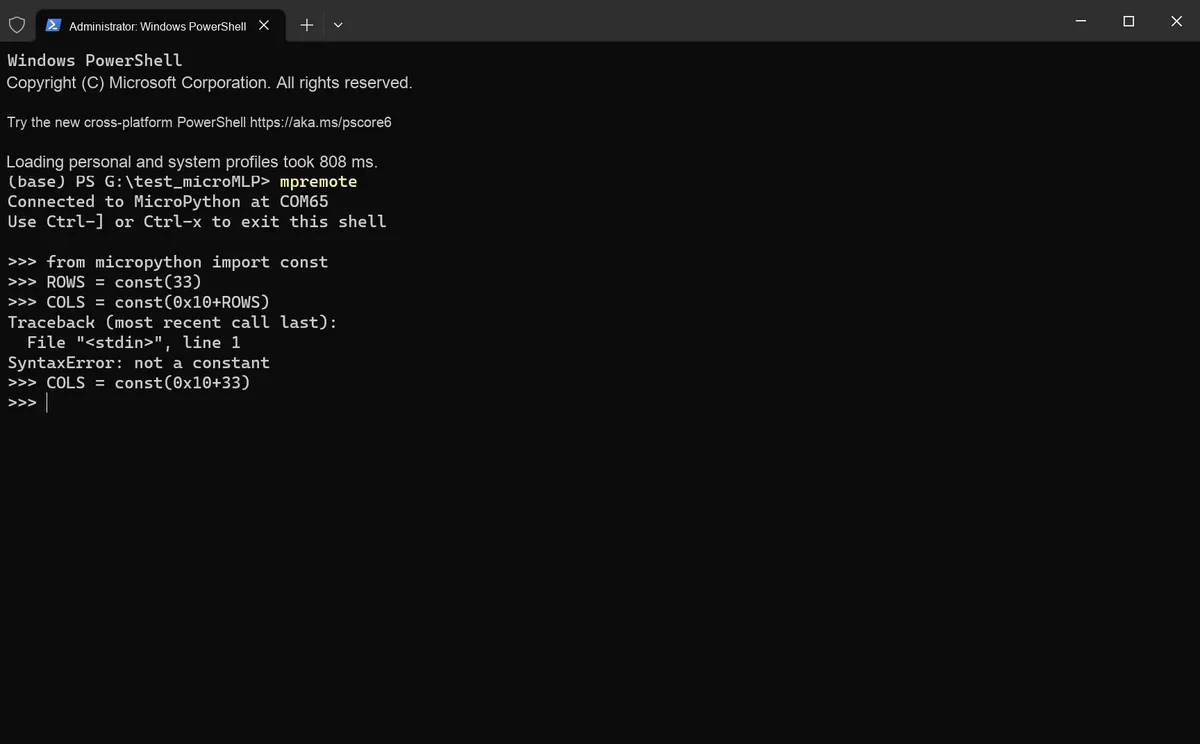
The parameter of const () must be any value that evaluates to an integer at compile time.
from micropython import const

ROWS = const(33)
# The following usage raises an error
COLS = const(0x10+ROWS)
# Correct usage
COLS = const(0x10+33)
The terminal output is as follows:
2.6 Reduce unnecessary object creation
In MicroPython, the creation of objects (such as strings, lists, dictionaries, byte arrays, numerical containers, etc.) consumes RAM resources. Since microcontrollers have extremely limited RAM capacity, frequent creation and destruction of objects not only directly depletes memory but also causes memory fragmentation — that is, a large number of small free memory blocks appear in the RAM that cannot be utilized by large objects — ultimately leading to insufficient memory issues.
A Layman’s Guide to Memory Fragmentation
First, let's use a vivid analogy: imagine the RAM of a microcontroller as a row of consecutive empty shelves, where each shelf compartment corresponds to a small segment of Memory Space. Creating an object is equivalent to allocating a consecutive section of shelves for this object to store its contents; destroying an object means clearing this section of shelves to turn it into free space. Essentially, memory fragmentation occurs when these free shelves are split into countless scattered, non-consecutive small compartments that can no longer hold items requiring a large consecutive section of shelves.
First of all, any object (such as a string, list, dictionary, etc.) requires a contiguous block of memory in RAM for storage. It's just like placing a long rectangular box: you have to occupy multiple consecutive slots on the shelf instead of scattering them around. For example, when you create a string that takes up 8 bytes "sensor1", the system will find 8 bytes of contiguous space in RAM and allocate it to this string.Then create another list that occupies 16 bytes[1,2,3,4,5], and the system will then look for a continuous 16-byte memory space. At this point, the RAM has a continuously occupied area consisting of "8 bytes (string) + 16 bytes (list)".
If you first deallocate the middle string (8 bytes), the RAM will end up with a situation of "8-byte free space + 16-byte (list)", and this 8-byte free space is isolated, not contiguous with any other free space. As another example, suppose you create three objects: A (4 bytes), B (6 bytes), and C (5 bytes), which are arranged contiguously as A+ B+ C in RAM.If B is deallocated, the memory layout will be A (allocated) + 6 bytes (free) + C (allocated), and this 6-byte free block, sandwiched between two allocated blocks, becomes an "isolated small block".
The RAM of a microcontroller is inherently very small (for example, only 64KB or even less). After frequent creation and destruction of objects of different sizes, the RAM will be split into many small free blocks of varying sizes scattered everywhere, such as free blocks of 2 bytes, 5 bytes, and 3 bytes. For instance:
- You need to create a 10-byte array to store sensor data. At this point, the total size of all free blocks in RAM adds up to 15 bytes (e. g., 5+ 3+ 7), but these free blocks are scattered and non-contiguous, and there is no single contiguous block that can reach 10 bytes. Therefore, the system cannot allocate the space and eventually throws an out-of-memory error (even though the total free memory is sufficient).
- For another example, in the loop tasks of IoT devices, a new string is created in each loop (for instance, when concatenating data:
"temp: 25℃, hum: 60%"), and the string is destroyed after the loop ends. After multiple loops, a large number of small free blocks generated by the creation and destruction of strings will remain in the RAM. When attempting to create a slightly larger list later (such as storing the historical data of 10 sensors), the operation will fail due to the lack of contiguous space.
MicroPython features a garbage collection mechanism that can reclaim the memory occupied by objects that are no longer in use (essentially clearing the shelves), but it cannot automatically move and merge scattered free memory blocks into a single contiguous large space — just as you cannot automatically piece together the scattered empty slots on a shelf. For example, after garbage collection, the RAM may still hold a cluster of scattered free blocks of 2 bytes, 4 bytes, and 6 bytes, rather than a single contiguous 12-byte free block, so the problem of memory fragmentation will continue to accumulate.
It should be noted that the sys.getsizeof () function in standard Python is not supported on most platforms in MicroPython (this is a feature of MicroPython designed to streamline firmware). Therefore, we can use the struct module to pack variables/data into a ByteFlow, then use the len () function to get the length of the ByteFlow, so as to test the byte size occupied by the data; at the same time, combined with the gc module (garbage collection), we can check the actual usage change of RAM to complete the comparison before and after optimization.
2.6.1 String Operation Optimization (Avoiding Temporary String Objects)
Strings in MicroPython are immutable objects. When using + to concatenate strings, each occurrence of + creates a temporary string object (for example, "a"+"b"+"c" first creates "ab", then creates "abc", resulting in a total of 2 temporary objects). These temporary objects consume extra RAM and are frequently cleaned up by the garbage collector, which degrades performance.
Optimization Approach:
- Use direct string concatenation (compile-time merging, no temporary objects);
- Use the
join ()method (only one final string object is created); - Use multi-line strings (
"""or''', which will be merged at compile time).
# Static string concatenation (merged at compile time, no temporary objects)
static_str = "MicroPython" "Memory" "Opt"
print("Static string:", static_str)

# Dynamic string (format recommended, fewer temporary objects)
temp = 25.5
press = 101325
dynamic_str = "Temp: {:.2f}, Press: {:d}".format(temp, press)
print("Dynamic string:", dynamic_str)
2.6.2 Buffer Reuse in hardware Operations (UART/SPI/I2C Scenarios)
In MicroPython hardware operations (such as reading sensor data via SPI or receiving data via UART), frequent creation of new byte buffers (bytearray / bytes) will consume a large amount of RAM. For example, if you create buf = bytearray (10) every time you read a sensor, 100 buffer objects will be created after 100 loops.
We can pre-allocate a buffer in advance, reuse it in loops or multiple operations, create the object only once, and completely avoid the creation of temporary buffers.
Next, we pre-allocate the serial port receive buffer and reuse it in a loop to avoid repeated creation of bytearray objects.
from machine import UART, Pin

# Initialize UART
uart = UART(0, baudrate=9600, tx=Pin(0), rx=Pin(1))
# Pre-allocate the buffer (created only once)
uart_buf = bytearray(16)

# Receive in a loop (reuse the buffer)
for _ in range(5):
    uart.readinto(uart_buf)
    print("UART data:", uart_buf)
Next, we pre-allocate the SPI read/write buffer to reduce memory overhead through reuse.
from machine import SPI, Pin

# Initialize SPI
spi = SPI(0, baudrate=1000000, sck=Pin(2), mosi=Pin(3), miso=Pin(4))
# Pre-allocate the buffer
spi_buf = bytearray(8)

# Read and write in a loop (reuse the buffer)
for _ in range(5):
    spi.readinto(spi_buf)
    print("SPI data:", spi_buf)
2.6.3 Numerical Storage Optimization (Replace Lists with struct/bytearray)
In MicroPython, storing numeric values in a list (such as[1,2, 3,255]) consumes a relatively large amount of RAM, since each integer object in the list incurs additional memory overhead (for instance, an int type occupies 4 bytes in MicroPython, and the list itself carries pointer overhead).
Optimization Idea:
- Use
the structmodule to pack multiple values into a ByteFlow (for example, pack 4 integers into a 4-byte ByteFlow); - Use
bytearray(a mutable byte array) to store small values (0-255); each element occupies only 1 byte, which is far less than the space taken by integers in a list; strandbytescan be converted viaencode ()/decode (), but such conversion creates new objects, so frequent operations should be avoided.
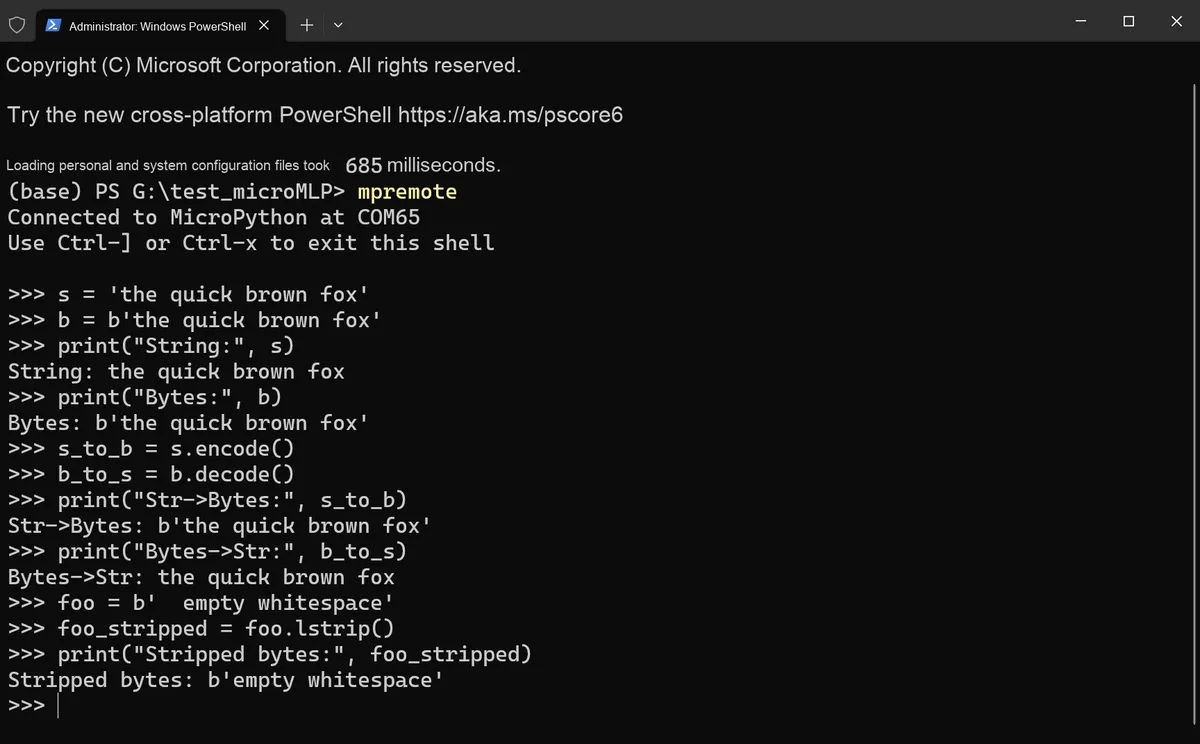
# 1. str vs bytes (same memory usage, ASCII case)
# String (ASCII)
s = 'the quick brown fox'
# Bytes (1 byte per char)
b = b'the quick brown fox'
print("String:", s)
print("Bytes:", b)

# 2. Conversion between string and bytes (note: conversion creates a new object)
# str -> bytes
s_to_b = s.encode()
# bytes -> str
b_to_s = b.decode()
print("Str->Bytes:", s_to_b)
print("Bytes->Str:", b_to_s)

# 3. bytes supports string methods (such as lstrip)
foo = b'  empty whitespace'
foo_stripped = foo.lstrip()
print("Stripped bytes:", foo_stripped)
Run in the terminal, the output is as follows:
2.6.4 Avoid Creating Temporary Containers in Loops
Frequently creating temporary containers inside a loop (e. g., for _ in range (100): temp = [1,2,3]) will generate a large number of temporary objects and consume RAM. The optimization idea is to move the temporary container outside the loop to reuse the object, or use a generator/iterator instead of the temporary list.
import gc
import struct

# Initialize garbage collection and establish a test baseline
gc.collect()
ram_init = gc.mem_free()

# Define the number of loop iterations (simulate a multi-iteration scenario)
loop_times = 100

# ---------------------- Inefficient implementation: create a temporary list inside the loop ----------------------
# A new list container is created on every iteration, producing many temporary objects
gc.collect()
ram_slow_before = gc.mem_free()
total_slow = 0

# Create a new list [1,2,3,4,5] on every iteration
# struct tests the byte size of the list data (packed as 5 integers, using the 'i' format)
for _ in range(loop_times):
    temp_list = [1, 2, 3, 4, 5]
    total_slow += sum(temp_list)

    size_slow = len(struct.pack("5i", *temp_list))
# Record the RAM after the inefficient implementation
ram_slow_after = gc.mem_free()

# ---------------------- Efficient implementation 1: create the list outside the loop and reuse the container ----------------------
# The list is created only once and reused inside the loop
gc.collect()
ram_fast1_before = gc.mem_free()
total_fast1 = 0

# Move the temporary list outside the loop (created only once)
# struct tests the byte size of the reused list (same as the inefficient implementation)
temp_list_reuse = [1, 2, 3, 4, 5]
for _ in range(loop_times):
    total_fast1 += sum(temp_list_reuse)

    size_fast1 = len(struct.pack("5i", *temp_list_reuse))
# Record the RAM after efficient implementation 1
ram_fast1_after = gc.mem_free()

# ---------------------- Efficient implementation 2: use a generator instead of a temporary list ----------------------
# Define the generator function (created only once, the iterator is reused inside the loop)
# Yield elements directly to avoid creating tuples
def num_generator():
    yield 1
    yield 2
    yield 3
    yield 4
    yield 5

# A generator does not create the full list, it only generates elements during iteration, with the lowest memory overhead
gc.collect()
ram_fast2_before = gc.mem_free()
total_fast2 = 0

# Generator expression (no temporary list object)
# struct tests the byte size of the generator data (packed as 5 integers)
for _ in range(loop_times):
    total_fast2 += sum(num_generator())
    size_fast2 = len(struct.pack("5i", 1, 2, 3, 4, 5))
# Record the RAM after efficient implementation 2
ram_fast2_after = gc.mem_free()

# Output the test results (no Chinese)
print("Slow total:", total_slow)
print("Slow RAM change:", ram_slow_before - ram_slow_after)
print("Slow data size:", size_slow)

print("Fast1 total:", total_fast1)
print("Fast1 RAM change:", ram_fast1_before - ram_fast1_after)
print("Fast1 data size:", size_fast1)

print("Fast2 total:", total_fast2)
print("Fast2 RAM change:", ram_fast2_before - ram_fast2_after)
print("Fast2 data size:", size_fast2)
The terminal execution result is as follows:
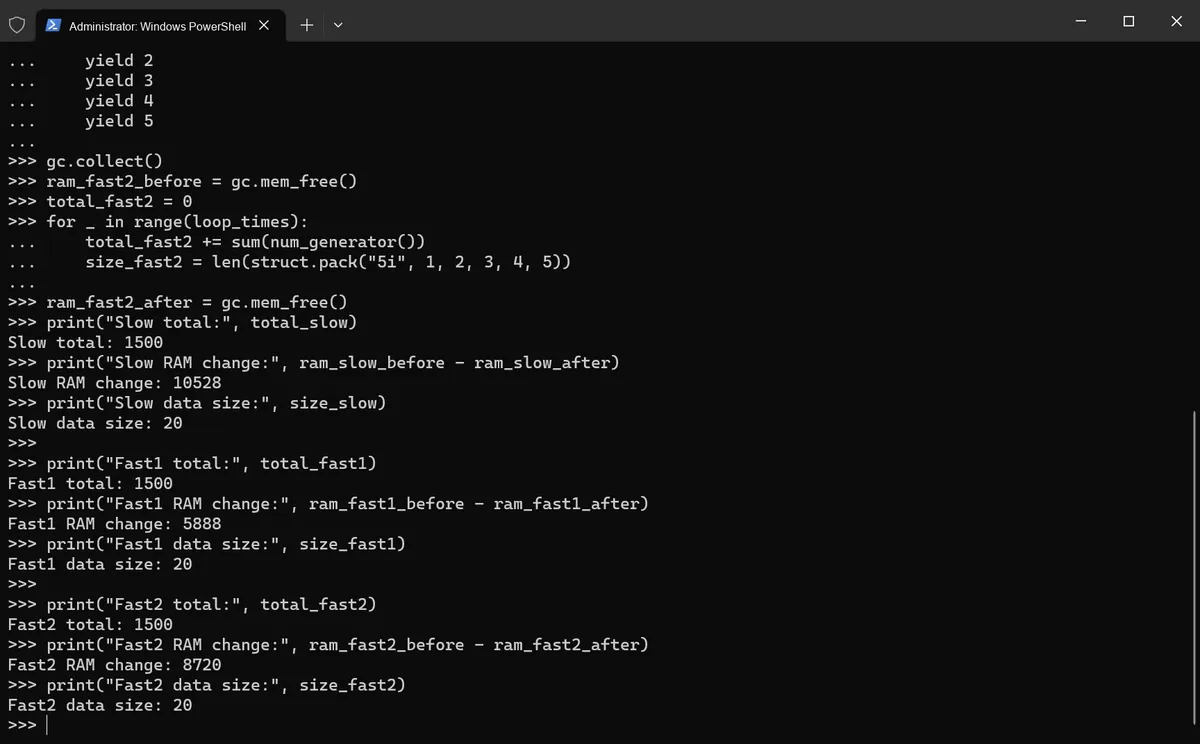
We can see that:
- A new list object is created in each loop: the memory consumption is 10528 bytes;
- Reusing a container by creating a list outside the loop: memory consumption is 5888 bytes;
- Using a generator: memory consumption is 8720 bytes.
In the scenario where a small dataset (5 fixed numbers) is repeated 100 times, reusing a list does consume less memory than using a generator; when it comes to processing large volumes of data or streaming data, generators avoid loading all the data at once.
2.6.5 Avoid Runtime Compiler Execution (eval / exec)
eval ()/ exec () will invoke the MicroPython compiler at runtime, creating a large number of temporary objects and consuming significant RAM; using direct computation or JSON serialization as an alternative can reduce memory overhead.
import gc
import struct
import json

# ---------------------- Inefficient: use eval ----------------------
gc.collect()
ram_eval_before = gc.mem_free()
# Avoid using eval, here only for comparison
res_eval = eval("1 + 2 * 3 + 4 / 2")
ram_eval_after = gc.mem_free()

# ---------------------- Efficient: direct calculation ----------------------
gc.collect()
ram_calc_before = gc.mem_free()
res_calc = 1 + 2 * 3 + 4 / 2
ram_calc_after = gc.mem_free()

# ---------------------- Efficient: ujson serialization ----------------------
gc.collect()
ram_json_before = gc.mem_free()
# Serialize
data = {"temp": 25.5, "press": 101325}
json_data = json.dumps(data)
# Deserialize
size_json = len(struct.pack(f"{len(json_data.encode())}s", json_data.encode()))
data_loaded = json.loads(json_data)
ram_json_after = gc.mem_free()

# Output the test results
print("Eval RAM change:", ram_eval_before - ram_eval_after)
print("Calc RAM change:", ram_calc_before - ram_calc_after)
print("JSON size:", size_json)
print("JSON RAM change:", ram_json_before - ram_json_after)
The terminal execution result is as follows:
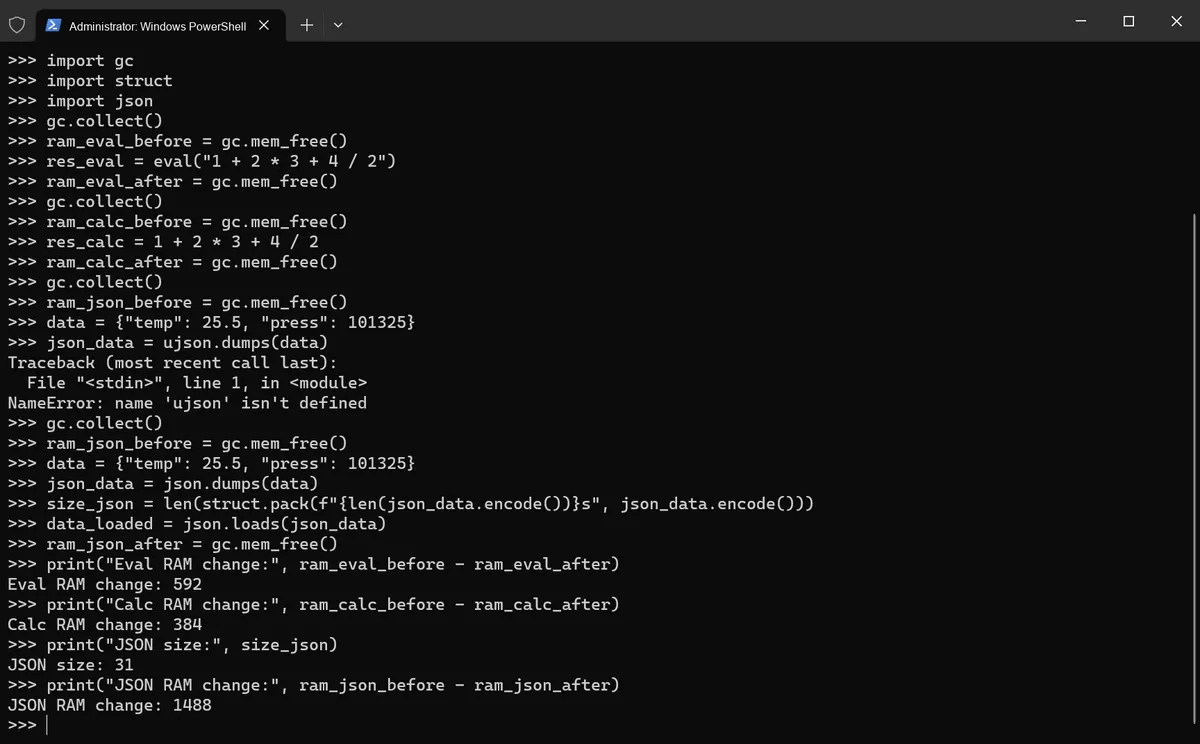
As we can see, dynamic parsing (eval ()) and JSON processing create a large number of hidden temporary objects:
eval ("1+ 2*3+ 4/2")Although the result is the same, it consumes 592 bytes of memory, which is 208 bytes more than direct calculation (384 bytes);- In contrast, JSON serialization of 31-byte data consumes 1488 bytes of memory, as each step such as string parsing, intermediate dictionary creation, and floating-point conversion generates fragmented allocations, resulting in an actual memory overhead that is 48 times the size of the data.
This is exactly a typical manifestation of memory fragmentation on microcontrollers — behind seemingly simple operations lies exponential memory consumption.
2.6.6 Storing Strings in Flash (qstr Mechanism)
MicroPython's qstr (quantized string) mechanism stores duplicate strings in flash memory instead of RAM, reducing RAM usage. We can use micropython.qstr_info () to check the string storage status, use struct to test the byte size of strings, and use gc to view RAM changes.
import gc
import struct
import micropython

# Initialize garbage collection
gc.collect()
ram_init = gc.mem_free()

# Define the test string (will be handled by the qstr mechanism)
s1 = "MicroPython"
# Repeat the string, reusing the qstr in flash
s2 = "MicroPython"

# struct tests the byte size of the string
size_s = len(struct.pack(f"{len(s1.encode())}s", s1.encode()))

# Print qstr information (1 means verbose output)
micropython.qstr_info(1)

# Record RAM
ram_after = gc.mem_free()

# Output the test results
print("String size:", size_s)
print("RAM free:", ram_after)
The terminal output is as follows:
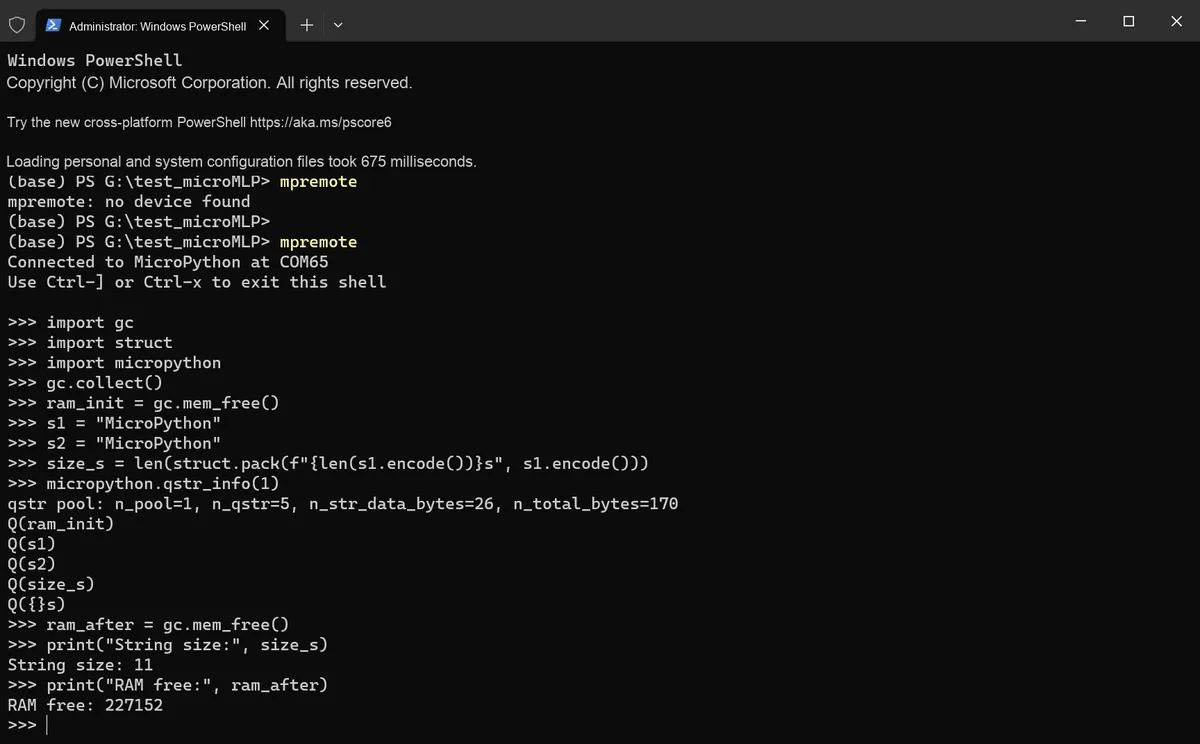
We can see that the two strings s1 and s2 have the same content, both being "MicroPython". The qstr mechanism of MicroPython reuses identical strings; in fact, s1 and s2 point to the same string object in memory, which saves the memory that would otherwise be wasted on storing duplicate copies of the same string.
qstr The information analysis is as follows:
>>> micropython.qstr_info(1)
qstr pool: n_pool=1, n_qstr=5, n_str_data_bytes=26, n_total_bytes=170
Q(ram_init)
Q(s1)
Q(s2)
Q(size_s)
Q({}s)
Analysis of Key Information:
n_pool= 1: there is 1 qstr pool;n_qstr= 5: There are currently 5 resident strings;n_str_data_bytes= 26: Total size of string data is 26 bytes;n_total_bytes= 170: The qstr system occupies a total of 170 bytes (the qstr management structure itself has an overhead of approximately 144 bytes).
and the 5 listed qstr:
ram_init: Variable name (8 characters);s1: Variable name (2 characters);s2: Variable name (2 characters);size_s: Variable name (5 characters);{}s: A part of the format string (3 characters).
However, "MicroPython" — this string is not present in the listed qstrs, because MicroPython stores it in Flash as read-only data rather than in RAM.
2.7 Heap and Garbage Collection Mechanism
The heap is a dynamically allocated memory region used to store object instances and dynamic data structures created during program execution (such as lists, dictionaries, and custom class instances in Python):
- The size of the heap is not fixed; it dynamically expands according to the program's needs (subject to the total system memory);
- In languages such as Python and Java, heap allocation is automatically handled by the language's virtual machine (VM), so developers do not need to manually request memory.
When you execute lst = [1,2,3], Python will:
- Allocate a block of memory in the heap to store the object data of the list
[1,2,3]; - Allocate a variable
lston the stack, which stores the memory address (reference) of the corresponding object in the heap. In other words, the variablelstis merely a "pointer" that points to the actual data in the heap.
An object in the heap becomes "garbage" if there are no references pointing to it (meaning the program can no longer access the object): for example, after executing lst = None, the original[1,2, 3]object in the heap loses its references and becomes garbage.
In MicroPython, GC (garbage collection) can automatically identify and reclaim garbage objects in the heap, release the occupied memory, and prevent memory leaks — a situation where memory is continuously occupied by useless objects, resulting in less and less available memory for the program and eventual crash.
Common Garbage Collection Algorithms
- Reference Counting (the default basic algorithm in Python): Each object maintains a "reference counter" that records how many references point to it. When the counter reaches 0, the object is reclaimed immediately.
- ✅ Advantages: High real-time performance; garbage will be reclaimed immediately after it is generated.
- ❌ Disadvantage: Cannot handle circular references (for example,
a = [1]; b = [a]; a.append (b), where the two reference each other, so the counter will never reach 0).
- Mark-and-Sweep (for resolving circular references): Python's GC module periodically scans objects, marks all reachable objects (those accessible by the program), then sweeps all unmarked objects (garbage). It is specifically designed to handle the problem of circular references.
- Generational Collection (Performance Optimization): Objects are categorized into Young Generation, Middle Generation, and Old Generation based on their lifecycle. Young Generation objects (newly created ones) are collected at a high frequency, while Old Generation objects (long-lived ones) are collected at a low frequency. This approach reduces GC overhead and improves program performance.
The trigger modes of garbage collection include the following two types:
- Automatic triggering: When the heap memory usage reaches a threshold or the reference count of an object drops to 0, the language engine automatically triggers garbage collection (GC).
- Manual triggering: Developers can proactively invoke GC via code (for example,
gc.collect ()in Python).
The gc module of MicroPython has the following commonly used core methods:
| Method | Description (plain-language version) | Differences from CPython |
|---|---|---|
| gc.enable() | Enable the automatic garbage collection mechanism | CPython also has this method, with the same function |
| gc.disable() | Disable the automatic garbage collection mechanism (GC can still be triggered manually, and heap memory can still be allocated normally) | CPython also has this method, with the same function |
| gc.collect() | Run garbage collection manually to clean up garbage objects in the heap | CPython also has this method; does it return no value in mpy? (Note: some mpy versions return the number of objects cleaned up; check against your actual environment) |
| gc.mem_alloc() | Return the number of heap memory bytes allocated by Python code | mpy-specific extension method, not in CPython |
| gc.mem_free() | Return the number of free heap memory bytes available to Python code (returns -1 if unknown) | mpy-specific extension method, not in CPython |
| gc.threshold([amount]) | 1. With amount: set the GC allocation threshold (GC is triggered after amount bytes are cumulatively allocated, to reclaim early and reduce fragmentation); 2. Without arguments: return the current threshold (-1 means the threshold is disabled) | mpy-specific extension method; CPython has set_threshold() but the signature and semantics differ |
| gc.isenabled() | Check whether automatic GC is enabled (returns a Boolean; supported in some mpy versions) | CPython has this method; in some mpy versions it is supported as an extension |
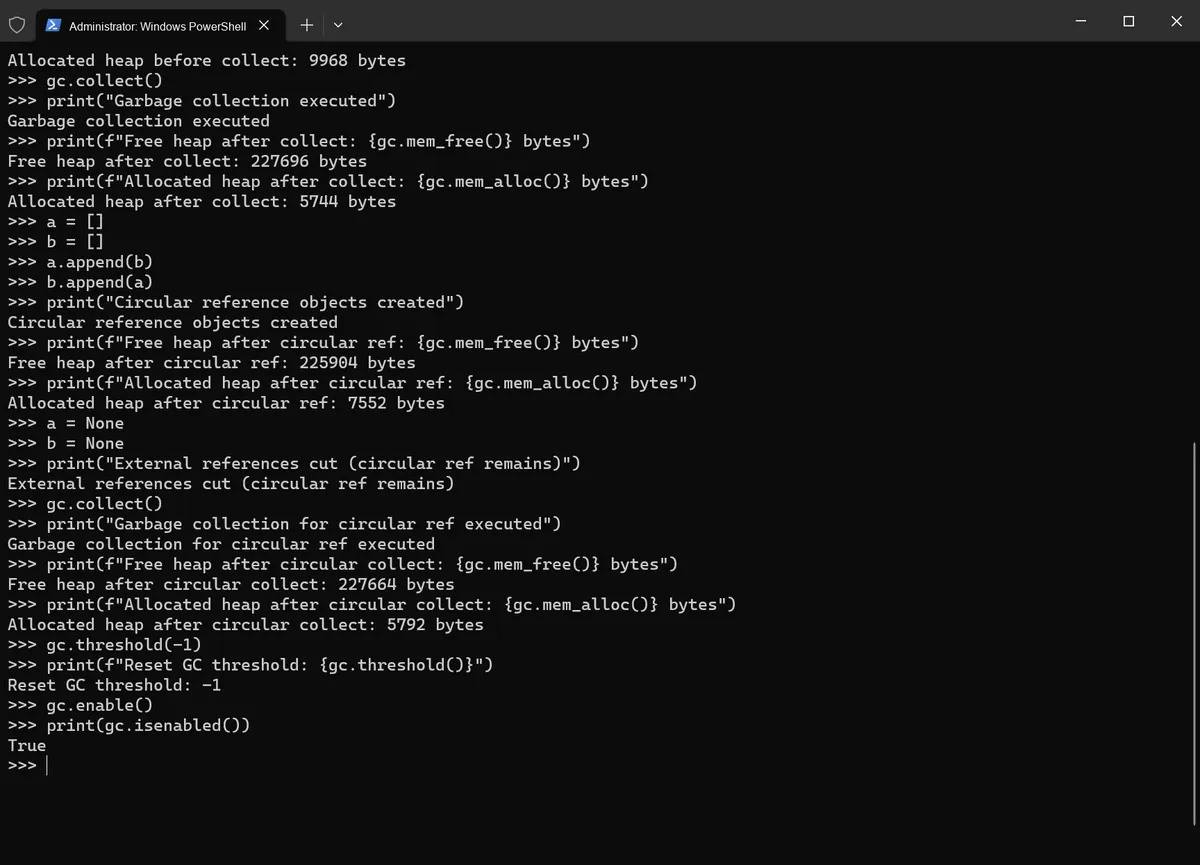
Here is our test code:
# Import the gc module, used to control garbage collection (mpy version)
import gc

# 1. Check whether automatic GC is enabled (supported by some mpy versions)
print(gc.isenabled())

# 2. Disable automatic GC to make it easier to control the test manually
gc.disable()
print(gc.isenabled())

# 3. View the initial free heap memory and allocated heap memory (mpy-specific methods)
print(f"Free heap: {gc.mem_free()} bytes")
print(f"Allocated heap: {gc.mem_alloc()} bytes")

# 4. Demonstrate the gc.threshold() method: set and query the GC allocation threshold (mpy-specific method)
# Set the threshold to 1024 bytes; GC is triggered after 1024 bytes are allocated cumulatively (collect early to reduce fragmentation)
gc.threshold(1024)
# With no argument, query the current threshold
current_threshold = gc.threshold()
print(f"Current GC threshold: {current_threshold} bytes")

# 5. Create ordinary objects that occupy heap memory (the variable is a reference on the stack pointing to the heap object)
# Create a larger list so the memory change is more obvious
obj1 = [1, 2, 3, 4, 5]
obj2 = {"name": "test", "age": 18}
print("Objects created")

# 6. View the memory change after creating the objects
print(f"Free heap after create: {gc.mem_free()} bytes")
print(f"Allocated heap after create: {gc.mem_alloc()} bytes")

# 7. Cut the references so the objects become garbage (no references point to the heap objects)
obj1 = None
obj2 = None
print("References cut, objects become garbage")

# 8. View the memory after cutting the references (no GC yet, memory not freed)
print(f"Free heap before collect: {gc.mem_free()} bytes")
print(f"Allocated heap before collect: {gc.mem_alloc()} bytes")

# 9. Manually trigger GC to clean up the garbage objects
# In some mpy versions there is no return value, so the receiving variable is removed
gc.collect()
print("Garbage collection executed")

# 10. View the memory change after GC (garbage cleaned up, free memory increased)
print(f"Free heap after collect: {gc.mem_free()} bytes")
print(f"Allocated heap after collect: {gc.mem_alloc()} bytes")

# 11. Demonstrate garbage collection of circular references (reference counting cannot handle them, gc.collect() is needed)
a = []
b = []
# a references b, b references a, forming a circular reference
a.append(b)
b.append(a)
print("Circular reference objects created")

# 12. View the memory after creating the circular-reference objects
print(f"Free heap after circular ref: {gc.mem_free()} bytes")
print(f"Allocated heap after circular ref: {gc.mem_alloc()} bytes")

# 13. Cut the external references; now a and b reference each other, so the reference count is not 0
a = None
b = None
print("External references cut (circular ref remains)")

# 14. Manually trigger GC to clean up the circular-reference garbage
gc.collect()
print("Garbage collection for circular ref executed")

# 15. View the memory after cleaning up the circular references
print(f"Free heap after circular collect: {gc.mem_free()} bytes")
print(f"Allocated heap after circular collect: {gc.mem_alloc()} bytes")

# 16. Restore automatic GC and reset the threshold to default (-1 means the threshold is disabled)
gc.threshold(-1)
print(f"Reset GC threshold: {gc.threshold()}")
gc.enable()
print(gc.isenabled())
Run the terminal, and the output is as follows:
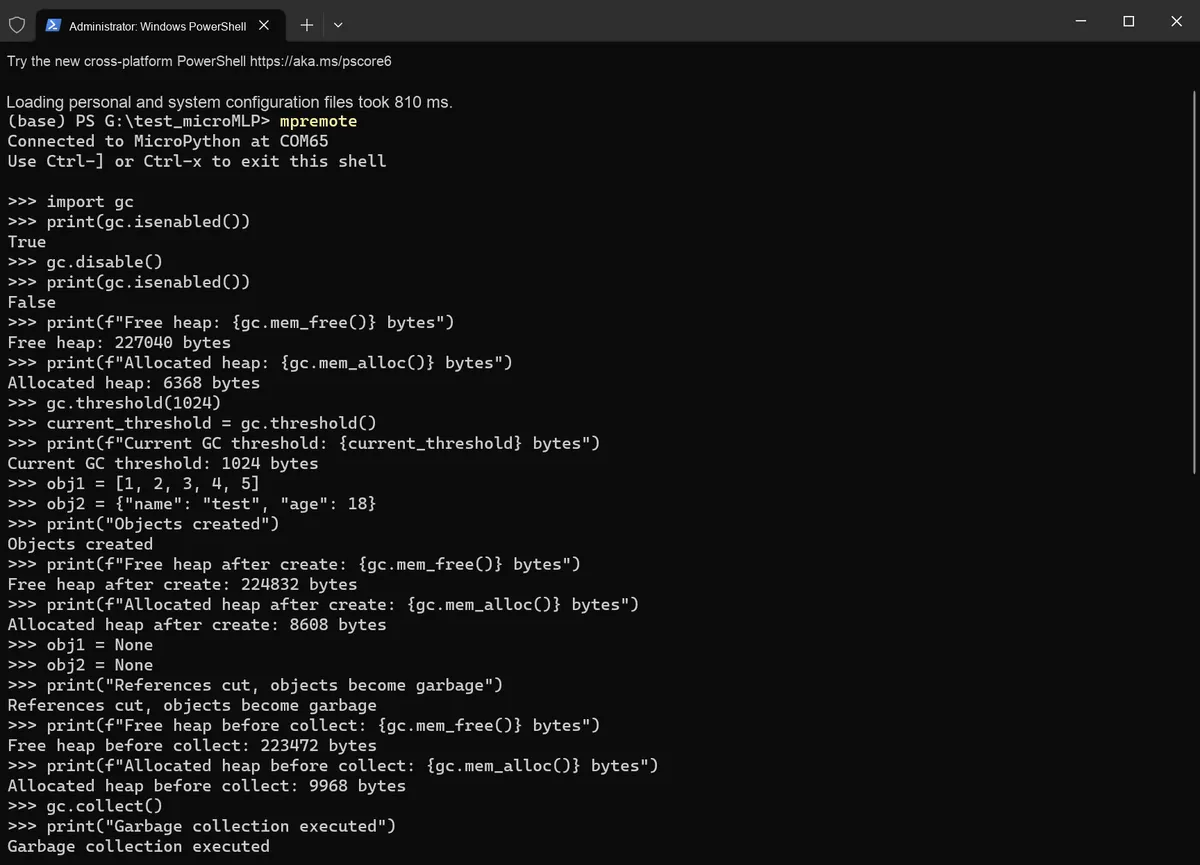
The overall process is shown in the following figure:
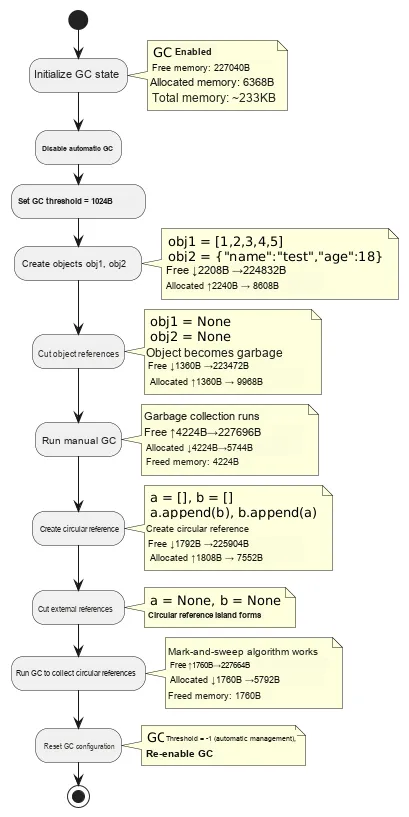
The memory changes are shown in the following table:
| Stage | Free Change | Allocated Change | Net Change | Description |
|---|---|---|---|---|
| Create object | -2208B | +2240B | +32B | Object allocation + alignment overhead |
| Becomes garbage | -1360B | +1360B | 0B | Memory used by the print temporary object |
| First GC | +4224B | -4224B | 0B | Reclaim garbage objects |
| Circular reference | -1792B | +1808B | +16B | Create two lists that reference each other |
| Second GC | +1760B | -1760B | 0B | Reclaim the circular-reference island |
We can also use the micropython.mem_info (1) method to view the heap utilization table:
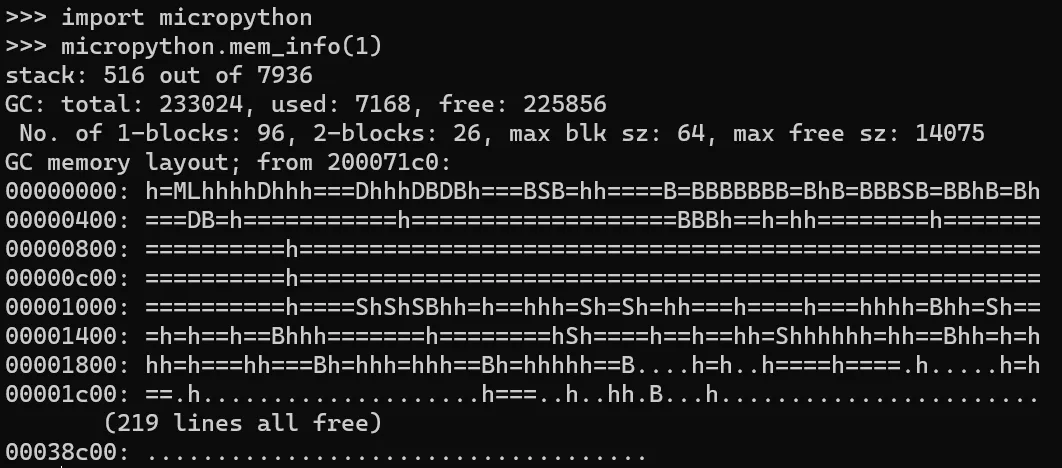
This is the detailed memory information output of MicroPython, which is used to check the overall status of the stack and heap and serves as the basis for memory analysis:
stack: 516 out of 7936
GC: total: 233024, used: 7168, free: 225856
 No. of 1-blocks: 96, 2-blocks: 26, max blk sz: 64, max free sz: 14075
... (memory layout omitted)
stack: 516 out of 7936: 516 bytes of stack memory have been used, with a total size of 7936 bytes. Stack memory is used to store local variables and function call contexts; the current stack usage is very low and in a safe state.GC: total: 233024, used: 7168, free: 225856: Core statistics of heap memory (unit: bytes):total: Total heap memory size (233024 bytes).used: Currently allocated heap memory (7168 bytes), which refers to the heap space occupied by objects in the program.free: The currently free heap memory (225856 bytes) that can be allocated for new objects.
- Block Information (1-blocks, 2-blocks, etc.): The heap memory of MicroPython is allocated in units of "blocks". This section displays the number of blocks of different sizes, the maximum block size, and the maximum free block size, which reflects the fragmentation level of the heap.
- Memory Layout: Displays the usage status of heap memory in character form (e. g.,
hdenotes used blocks,=denotes free blocks,D/B/Sare special markers), and the subsequent219 lines all freeindicates that most of the heap memory is idle.
References
https://docs.micropython.org/en/latest/reference/index.html