
Contents
- 1. Introduction to micropython-lib Library Modules
- 1.1 MicroPython Specific Modulesaioespnow: An asynchronous ESP-NOW library for MicroPython, used for wireless communication on ESP32.aiorepl: Provides asynchronous REPL (Read-Eval-Print Loop) support, enabling interactive programming in the MicroPython environment.bluetooth: The Bluetooth module of MicroPython, used for communicating with Bluetooth devices.bundles: A collection of software packages and modules that includes MicroPython.drivers: Contains driver programs for communicating with hardware devices.espflash: A tool for flash operations on ESP32 devices.lora: A library for LoRa (Long Range) wireless communication, suitable for low-power, long-distance data transmission.mip-cmdline: A MIP (MicroPython Package) tool for command line operations.mip: A package management tool for MicroPython, similar to pip but designed for the MicroPython environment.net: Network module, providing network connection and operation functions.senml: A library for processing SENML (Sensor Markup Language) data.uaiohttpclient: An asynchronous HTTP Client for MicroPython, used to handle HTTP requests.ucontextlib: A context management tool for MicroPython, providing functionality similar to that of contextlib in Python's standard library.udnspkt: A tool for processing DNS data packets.umqtt.robust: An MQTT Client library for MicroPython, which supports the MQTT protocol and provides a robust connection mechanism.umqtt.simple: A simple MQTT Client library for MicroPython, used for basic MQTT features.upysh: A library that provides Unix-like shell command support.urequests: An HTTP request library for MicroPython, similar to the requests module in Python.urllib.urequest: A library for handling HTTP requests, similar to the urllib module in Python.usb: A library that provides support for USB devices.xmltok: A library for processing XML data.
- 1.2 Python Standard Libraryaiohttp: Asynchronous HTTP Client/server library for processing HTTP requests and responses.cbor2: A library for processing data in the CBOR (Concise Binary Object Representation) format.iperf3: A utility library for network bandwidth testing.pyjwt: A library for generating and verifying JSON Web Tokens (JWT).requests: An HTTP request library for Python, used to handle HTTP requests and responses.
- 1.3 Python Standard Library Modulesfuture: Allows the use of functions and syntax from future versions of Python.abc: Provides support for abstract base classes.argparse: A library for parsing command-line arguments.base64: A tool for performing Base64 encoding and decoding.binascii: Provides functionality for converting between binary data and ASCII encoding.bisect: A tool for handling insertion points in ordered sequences.cmd: A tool for command-line interface processing.collections-defaultdict: A utility that provides the defaultdict type, belonging to Python's collections module.collections: provides special data structures, such as namedtuple, deque, Counter and more.contextlib: Provides utilities for context managers.copy: A tool that provides object copying functionality.curses.ascii: A utility that provides ASCII character processing functions, typically used for terminal interfaces.datetime: A tool that provides date and time processing functions.errno: Provides definitions for error codes.fnmatch: A tool that provides filename matching functionality.functools: Provides higher-order functions and tools for operating on callable objects.gzip: Provides support for compressed files in the GNU zip format.hashlib-core: A utility that provides core hashing algorithm functionalities.hashlib-sha224: A tool that provides support for the SHA-224 hash algorithm.hashlib-sha256: A tool that provides support for the SHA-256 hash algorithm.hashlib-sha384: A tool that provides support for the SHA-384 hashing algorithm.hashlib-sha512: A tool that provides support for the SHA-512 hashing algorithm.hashlib: A tool that provides hash algorithms such as SHA and MD5.heapq: A tool that provides heap sort and priority queue functionalities.hmac: Provides the function of key-based Hash-based Message Authentication Code.html: Provides tools for HTML encoding and decoding.inspect: Provides utilities for getting information about objects.io: Provides tools for handling streams, such as files, memory buffers, etc.itertools: Provides high-efficiency iterator functions, such as combinations, permutations, etc.keyword: Returns the list of Python keywords.locale: A tool for configuring Localization settings.logging: A tool that provides logging functionality.operator: A utility that provides operator functions.os-path: Provides support for path operations, and is usually used as an alternative module to os.path.OS: A tool that provides operating system functions, such as file operations, process management, etc.pathlib: Provides Object Oriented file path processing capabilities.pickle: A tool that provides object serialization and deserialization capabilities.pkg_resources: Provides access to Python packages and resources.pkgutil: Provides utilities for Python packages and modules.pprint: Provides a pretty-printing tool for outputting data structures in a formatted, readable way.quopri: A tool that provides quoted-printable encoding and decoding functionality.random: Provides tools for generating random numbers.shutil: Provides advanced utilities for file and directory operations.ssl: Provides support for SSL/TLS for secure network communication.stat: A tool for displaying file status and file permissions.string: A tool that provides string processing capabilities.struct: A tool that provides functions for packing and unpacking byte structures.tarfile-write: Provides write operation support for tar files.tarfile: Provides support for reading and writing tar files.tempfile: Provides the function of creating temporary files and directories.textwrap: A tool that provides text line-breaking and formatting functions.threading: A module that provides threading support utilities.time: A tool that provides time-related operations.traceback: Provides tools for tracing exceptions and errors.types: Provides definitions and operation functions for Python types.unittest-discover: A tool that provides automatic test discovery, typically used for unit test.unittest: A tool that provides a unit test framework.uu: A tool for uu encoding and decoding.venv: Provides tools for creating virtual environments.warnings: Provides functionality for issuing warnings.zlib: A tool that provides data compression and decompression functions.
- 2. Install packages and modules remotely
- 2.1 Basic Methods for MIP Installation
- 2.2 Demo Case for MIP Installation
- 3. Manually install packages and modules
- 4. Cross Installation Packages and Freezing
- Version Record
mip (mip installs packages) is a concept similar to Python 's pip tool, but it does not use the PyPI index; by default, it uses micropython-lib as its index, and can also install packages from third-party sites (including GitHub and GitLab). When downloading from micropython-lib, mip will automatically fetch. mpy files.This module can be installed as a package from micropython-lib and third-party sites (including GitHub).
1. Introduction to micropython-lib Library Modules
micropython-lib is a community-driven library collection that includes numerous modules for MicroPython, which can be used to extend the functionality of MicroPython. This library set covers a large number of standard library modules, third-party modules as well as some MicroPython-specific modules.
micropython-lib The address link is as follows:
https://github.com/micropython/micropython-lib
1.1 MicroPython Specific Modulesaioespnow: An asynchronous ESP-NOW library for MicroPython, used for wireless communication on ESP32.aiorepl: Provides asynchronous REPL (Read-Eval-Print Loop) support, enabling interactive programming in the MicroPython environment.bluetooth: The Bluetooth module of MicroPython, used for communicating with Bluetooth devices.bundles: A collection of software packages and modules that includes MicroPython.drivers: Contains driver programs for communicating with hardware devices.espflash: A tool for flash operations on ESP32 devices.lora: A library for LoRa (Long Range) wireless communication, suitable for low-power, long-distance data transmission.mip-cmdline: A MIP (MicroPython Package) tool for command line operations.mip: A package management tool for MicroPython, similar to pip but designed for the MicroPython environment.net: Network module, providing network connection and operation functions.senml: A library for processing SENML (Sensor Markup Language) data.uaiohttpclient: An asynchronous HTTP Client for MicroPython, used to handle HTTP requests.ucontextlib: A context management tool for MicroPython, providing functionality similar to that of contextlib in Python's standard library.udnspkt: A tool for processing DNS data packets.umqtt.robust: An MQTT Client library for MicroPython, which supports the MQTT protocol and provides a robust connection mechanism.umqtt.simple: A simple MQTT Client library for MicroPython, used for basic MQTT features.upysh: A library that provides Unix-like shell command support.urequests: An HTTP request library for MicroPython, similar to the requests module in Python.urllib.urequest: A library for handling HTTP requests, similar to the urllib module in Python.usb: A library that provides support for USB devices.xmltok: A library for processing XML data.
aioespnow: An asynchronous ESP-NOW library for MicroPython, used for wireless communication on ESP32.aiorepl: Provides asynchronous REPL (Read-Eval-Print Loop) support, enabling interactive programming in the MicroPython environment.bluetooth: The Bluetooth module of MicroPython, used for communicating with Bluetooth devices.bundles: A collection of software packages and modules that includes MicroPython.drivers: Contains driver programs for communicating with hardware devices.espflash: A tool for flash operations on ESP32 devices.lora: A library for LoRa (Long Range) wireless communication, suitable for low-power, long-distance data transmission.mip-cmdline: A MIP (MicroPython Package) tool for command line operations.mip: A package management tool for MicroPython, similar to pip but designed for the MicroPython environment.net: Network module, providing network connection and operation functions.senml: A library for processing SENML (Sensor Markup Language) data.uaiohttpclient: An asynchronous HTTP Client for MicroPython, used to handle HTTP requests.ucontextlib: A context management tool for MicroPython, providing functionality similar to that of contextlib in Python's standard library.udnspkt: A tool for processing DNS data packets.umqtt.robust: An MQTT Client library for MicroPython, which supports the MQTT protocol and provides a robust connection mechanism.umqtt.simple: A simple MQTT Client library for MicroPython, used for basic MQTT features.upysh: A library that provides Unix-like shell command support.urequests: An HTTP request library for MicroPython, similar to the requests module in Python.urllib.urequest: A library for handling HTTP requests, similar to the urllib module in Python.usb: A library that provides support for USB devices.xmltok: A library for processing XML data.1.2 Python Standard Libraryaiohttp: Asynchronous HTTP Client/server library for processing HTTP requests and responses.cbor2: A library for processing data in the CBOR (Concise Binary Object Representation) format.iperf3: A utility library for network bandwidth testing.pyjwt: A library for generating and verifying JSON Web Tokens (JWT).requests: An HTTP request library for Python, used to handle HTTP requests and responses.
aiohttp: Asynchronous HTTP Client/server library for processing HTTP requests and responses.cbor2: A library for processing data in the CBOR (Concise Binary Object Representation) format.iperf3: A utility library for network bandwidth testing.pyjwt: A library for generating and verifying JSON Web Tokens (JWT).requests: An HTTP request library for Python, used to handle HTTP requests and responses.1.3 Python Standard Library Modulesfuture: Allows the use of functions and syntax from future versions of Python.abc: Provides support for abstract base classes.argparse: A library for parsing command-line arguments.base64: A tool for performing Base64 encoding and decoding.binascii: Provides functionality for converting between binary data and ASCII encoding.bisect: A tool for handling insertion points in ordered sequences.cmd: A tool for command-line interface processing.collections-defaultdict: A utility that provides the defaultdict type, belonging to Python's collections module.collections: provides special data structures, such as namedtuple, deque, Counter and more.contextlib: Provides utilities for context managers.copy: A tool that provides object copying functionality.curses.ascii: A utility that provides ASCII character processing functions, typically used for terminal interfaces.datetime: A tool that provides date and time processing functions.errno: Provides definitions for error codes.fnmatch: A tool that provides filename matching functionality.functools: Provides higher-order functions and tools for operating on callable objects.gzip: Provides support for compressed files in the GNU zip format.hashlib-core: A utility that provides core hashing algorithm functionalities.hashlib-sha224: A tool that provides support for the SHA-224 hash algorithm.hashlib-sha256: A tool that provides support for the SHA-256 hash algorithm.hashlib-sha384: A tool that provides support for the SHA-384 hashing algorithm.hashlib-sha512: A tool that provides support for the SHA-512 hashing algorithm.hashlib: A tool that provides hash algorithms such as SHA and MD5.heapq: A tool that provides heap sort and priority queue functionalities.hmac: Provides the function of key-based Hash-based Message Authentication Code.html: Provides tools for HTML encoding and decoding.inspect: Provides utilities for getting information about objects.io: Provides tools for handling streams, such as files, memory buffers, etc.itertools: Provides high-efficiency iterator functions, such as combinations, permutations, etc.keyword: Returns the list of Python keywords.locale: A tool for configuring Localization settings.logging: A tool that provides logging functionality.operator: A utility that provides operator functions.os-path: Provides support for path operations, and is usually used as an alternative module to os.path.OS: A tool that provides operating system functions, such as file operations, process management, etc.pathlib: Provides Object Oriented file path processing capabilities.pickle: A tool that provides object serialization and deserialization capabilities.pkg_resources: Provides access to Python packages and resources.pkgutil: Provides utilities for Python packages and modules.pprint: Provides a pretty-printing tool for outputting data structures in a formatted, readable way.quopri: A tool that provides quoted-printable encoding and decoding functionality.random: Provides tools for generating random numbers.shutil: Provides advanced utilities for file and directory operations.ssl: Provides support for SSL/TLS for secure network communication.stat: A tool for displaying file status and file permissions.string: A tool that provides string processing capabilities.struct: A tool that provides functions for packing and unpacking byte structures.tarfile-write: Provides write operation support for tar files.tarfile: Provides support for reading and writing tar files.tempfile: Provides the function of creating temporary files and directories.textwrap: A tool that provides text line-breaking and formatting functions.threading: A module that provides threading support utilities.time: A tool that provides time-related operations.traceback: Provides tools for tracing exceptions and errors.types: Provides definitions and operation functions for Python types.unittest-discover: A tool that provides automatic test discovery, typically used for unit test.unittest: A tool that provides a unit test framework.uu: A tool for uu encoding and decoding.venv: Provides tools for creating virtual environments.warnings: Provides functionality for issuing warnings.zlib: A tool that provides data compression and decompression functions.
future: Allows the use of functions and syntax from future versions of Python.abc: Provides support for abstract base classes.argparse: A library for parsing command-line arguments.base64: A tool for performing Base64 encoding and decoding.binascii: Provides functionality for converting between binary data and ASCII encoding.bisect: A tool for handling insertion points in ordered sequences.cmd: A tool for command-line interface processing.collections-defaultdict: A utility that provides the defaultdict type, belonging to Python's collections module.collections: provides special data structures, such as namedtuple, deque, Counter and more.contextlib: Provides utilities for context managers.copy: A tool that provides object copying functionality.curses.ascii: A utility that provides ASCII character processing functions, typically used for terminal interfaces.datetime: A tool that provides date and time processing functions.errno: Provides definitions for error codes.fnmatch: A tool that provides filename matching functionality.functools: Provides higher-order functions and tools for operating on callable objects.gzip: Provides support for compressed files in the GNU zip format.hashlib-core: A utility that provides core hashing algorithm functionalities.hashlib-sha224: A tool that provides support for the SHA-224 hash algorithm.hashlib-sha256: A tool that provides support for the SHA-256 hash algorithm.hashlib-sha384: A tool that provides support for the SHA-384 hashing algorithm.hashlib-sha512: A tool that provides support for the SHA-512 hashing algorithm.hashlib: A tool that provides hash algorithms such as SHA and MD5.heapq: A tool that provides heap sort and priority queue functionalities.hmac: Provides the function of key-based Hash-based Message Authentication Code.html: Provides tools for HTML encoding and decoding.inspect: Provides utilities for getting information about objects.io: Provides tools for handling streams, such as files, memory buffers, etc.itertools: Provides high-efficiency iterator functions, such as combinations, permutations, etc.keyword: Returns the list of Python keywords.locale: A tool for configuring Localization settings.logging: A tool that provides logging functionality.operator: A utility that provides operator functions.os-path: Provides support for path operations, and is usually used as an alternative module to os.path.OS: A tool that provides operating system functions, such as file operations, process management, etc.pathlib: Provides Object Oriented file path processing capabilities.pickle: A tool that provides object serialization and deserialization capabilities.pkg_resources: Provides access to Python packages and resources.pkgutil: Provides utilities for Python packages and modules.pprint: Provides a pretty-printing tool for outputting data structures in a formatted, readable way.quopri: A tool that provides quoted-printable encoding and decoding functionality.random: Provides tools for generating random numbers.shutil: Provides advanced utilities for file and directory operations.ssl: Provides support for SSL/TLS for secure network communication.stat: A tool for displaying file status and file permissions.string: A tool that provides string processing capabilities.struct: A tool that provides functions for packing and unpacking byte structures.tarfile-write: Provides write operation support for tar files.tarfile: Provides support for reading and writing tar files.tempfile: Provides the function of creating temporary files and directories.textwrap: A tool that provides text line-breaking and formatting functions.threading: A module that provides threading support utilities.time: A tool that provides time-related operations.traceback: Provides tools for tracing exceptions and errors.types: Provides definitions and operation functions for Python types.unittest-discover: A tool that provides automatic test discovery, typically used for unit test.unittest: A tool that provides a unit test framework.uu: A tool for uu encoding and decoding.venv: Provides tools for creating virtual environments.warnings: Provides functionality for issuing warnings.zlib: A tool that provides data compression and decompression functions.2. Install packages and modules remotely
2.1 Basic Methods for MIP Installation
For MicroPython development boards with local network capabilities, mip is typically installed remotely via mpremote. The mpremote command-line tool provides a set of integrated utilities that enable remote interaction and automation with MicroPython devices over a serial connection, and mpremote itself can be installed and used via pip.
The most common way to use mip is from the REPL:
import mip
# Install the latest version of "pkgname" (including dependencies)
mip.install("pkgname")
# Install a specific version x.y of "pkgname"
mip.install("pkgname", version="x.y")
# Install the source version (i.e., .py files, not .mpy files)
mip.install("pkgname", mpy=False)
By default, mip installs packages in the (/lib) directory. If the target option is specified, packages will be installed to the specified directory. Note that you need to add this directory to the sys.path variable (using sys.path.append ("third-party")), otherwise import will fail to locate the package.
# Install "pkgname" into the specified target directory "third-party"
mip.install("pkgname", target="third-party")
# Add the target directory "third-party" to sys.path so packages in it can be imported
sys.path.append("third-party")
In addition to downloading packages from the micropython-lib index, mip can also install third-party libraries. The simplest way to do this is to download the file directly:
import mip
# Install the "foo.py" file from the specified URL; this is a source file (.py)
mip.install("http://example.com/x/y/foo.py")
# Install the "foo.mpy" file from the specified URL; this is a compiled MicroPython file (.mpy)
mip.install("http://example.com/x/y/foo.mpy")
When installing files directly, the target parameter is still supported to set the target path, but mpy and version will be ignored. URLs can also start with github: or gitlab: as a simple way to point to content hosted on GitHub or GitLab:
import mip
# Install the "foo.py" file from the default branch on GitHub
mip.install("github:org/repo/path/foo.py")  # Use the default branch
# Install the "foo.py" file from a specified branch or tag on GitHub
mip.install("github:org/repo/path/foo.py", version="branch-or-tag")  # Optionally specify a branch or tag
# Install the "foo.py" file from the default branch on GitLab
mip.install("gitlab:org/repo/path/foo.py")  # Use the default branch
# Install the "foo.py" file from a specified branch or tag on GitLab
mip.install("gitlab:org/repo/path/foo.py", version="branch-or-tag")  # Optionally specify a branch or tag
URL
Every web page on the Internet has a unique name identifier, commonly referred to as a URL (Uniform Resource Locator). It is the standardized resource locator marker for the World Wide Web; put simply, a URL is a web address, commonly known as a "website address".
You can download more complex packages (i. e., those with multiple files or dependencies) by specifying the path to package.json.
import mip
# Download and install the package.json file containing dependency information from the specified URL
mip.install("http://example.com/x/package.json")  # Install the package.json file from the specified URL
# Download and install the package.json file from the specified path in a GitHub repository
mip.install("github:org/user/path/package.json")  # Install the package.json file from GitHub
# Download and install the package.json file from the specified path in a GitLab repository
mip.install("gitlab:org/user/path/package.json")  # Install the package.json file from GitLab
If no json file is specified, "package.json" will be added implicitly:
import mip
# Download and install a package from the specified URL, where the URL is a directory
mip.install("http://example.com/x/")  # Install a package from the specified URL (the URL is a directory)
# Download and install a package from the default branch of a GitHub repository
mip.install("github:org/repo")  # Install a package from GitHub using the default branch
# Download and install a package from a specified branch or tag of a GitHub repository
mip.install("github:org/repo", version="branch-or-tag")  # Install a package from GitHub with a specified branch or tag
# Download and install a package from the default branch of a GitLab repository
mip.install("gitlab:org/repo")  # Install a package from GitLab using the default branch
# Download and install a package from a specified branch or tag of a GitLab repository
mip.install("gitlab:org/repo", version="branch-or-tag")  # Install a package from GitLab with a specified branch or tag
2.2 Demo Case for MIP Installation
Here, we demonstrate how to download a random random number generation module. First, we need to connect the development board to the network. For specific settings and the required development board, you can refer to the content in the Fengya No. 1 Board Tutorial - Ethernet (ETH) chapter.
The sample code is as follows:
# Python env   : MicroPython v1.23.0 on Wiznet W5500
# -*- coding: utf-8 -*-
# @Time    : 2024/8/11 11:37 AM
# @Author  : Li Qingshui
# @File    : main.py
# @Description : Ethernet experiments,

# ======================================== Import Modules ========================================

# Import hardware-related modules
from machine import Pin,SPI
# Import time-related modules
import time
# Import network-related modules
import network
# Import the socket module used to create and manage network connections
from usocket import socket
# Import the package manager module
import mip
# Import the system-related module
import sys
# Import the operating system services module
import os

# ======================================== Global Variables ============================================

# Device IP address
ip = '192.168.1.20'
sn = '255.255.255.0'
gw = '192.168.1.1'
dns= '8.8.8.8'
# Tuple object used for the network connection
netinfo=(ip, sn, gw, dns)

# ======================================== Functions ============================================

def w5x00_init():
    '''
    Initialize a network.WIZNET5K instance, set a static IP address in it, and connect
    :return nic[network.WIZNET5K]: network.WIZNET5K instance
    '''

    # Declare global variables
    global netinfo

    # Initialize the SPI object
    spi = SPI(0, 2_000_000, mosi=Pin(19), miso=Pin(16), sck=Pin(18))
    # Instantiate the network.WIZNET5K class, passing in the chip select pin CS and reset pin RST
    nic = network.WIZNET5K(spi, Pin(17), Pin(20))
    # Activate the network interface
    nic.active(True)
    # If DHCP fails, use the static IP address configuration
    nic.ifconfig(netinfo)

    # Loop while the network is not connected
    while not nic.isconnected():
        time.sleep(1)
        # Output register information
        print(nic.regs())

    # Print the configured IP address
    print('ip :', nic.ifconfig()[0])
    print('sn :', nic.ifconfig()[1])
    print('gw :', nic.ifconfig()[2])
    print('dns:', nic.ifconfig()[3])

    # Return the network.WIZNET5K instance
    return nic

# ======================================== Custom Classes ============================================

# ======================================== Initialization ==========================================

# Initialize the w5500 module
nic = w5x00_init()

# ========================================  Main Program  ===========================================

# Delay 3s, wait for the device to power up
time.sleep(3)
# Print debug information
print("WIZnet mip test")
To flash the code, connect to the Raspberry Pi Pico using the mpremote remote tool:
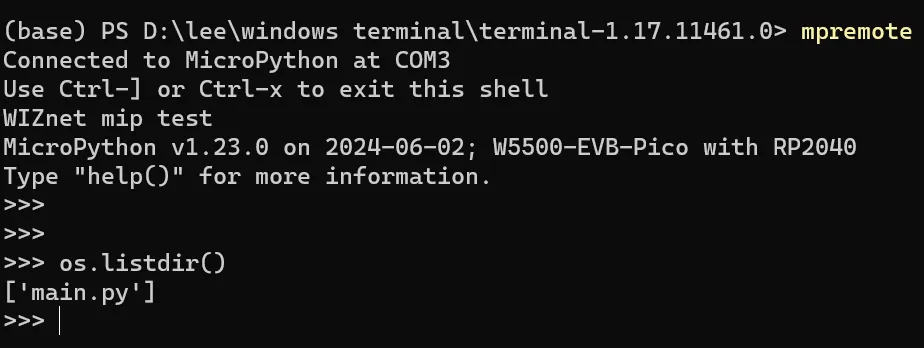
Here, we use os.listdir () to list all files and subdirectories in the root directory, and you can see that there is currently only the main.py file.
Then we use the mip.install ('random') command to install the random module;mip will download and install the https://micropython.org/pi/v2) module from the official MicroPython package repository (random).
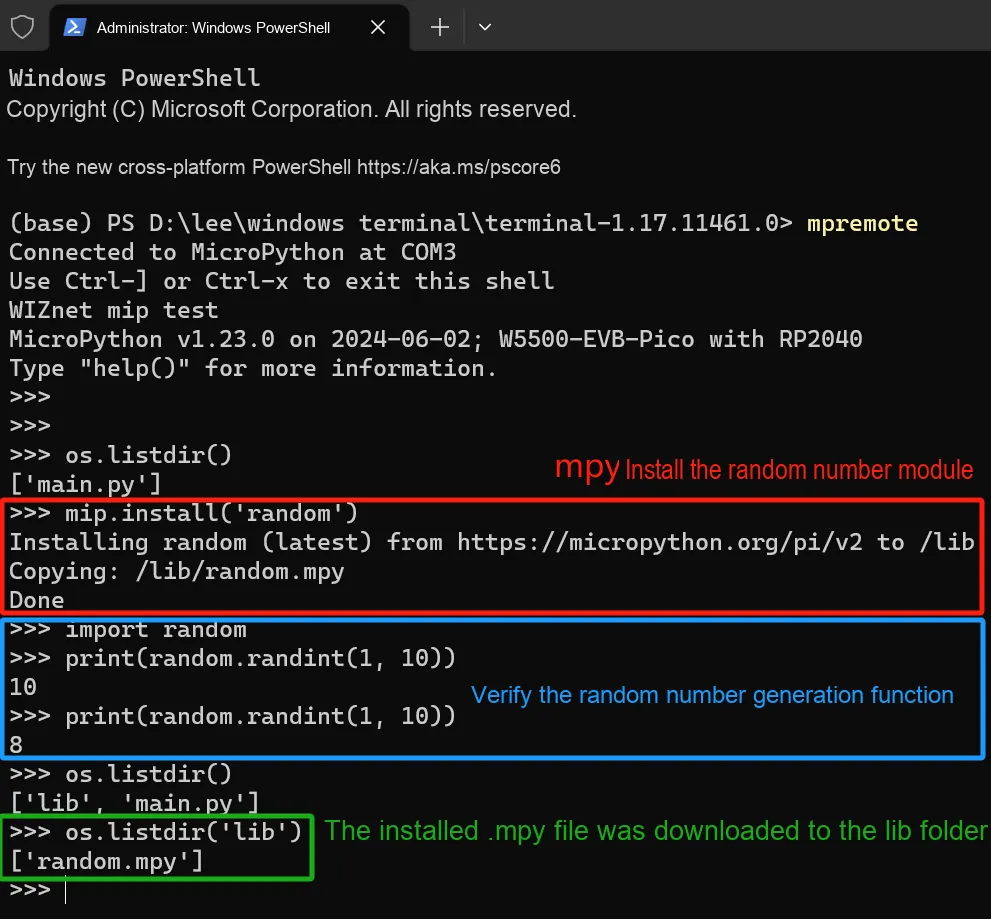
After installing the random random number generation module, you will see three prompt messages generated:
Installing random (latest) fromhttps://micropython.org/pi/v2to /lib- This is the output information during the installation process, indicating that the
randommodule is being downloaded and installed from the specified URL - The target installation path is
/lib, which is a standard library directory on MicroPython devices
- This is the output information during the installation process, indicating that the
Copying: /lib/random.mpy- This line of output indicates that the bytecode file
randommodulerandom.mpyhas been copied to the/libdirectory
- This line of output indicates that the bytecode file
Done- This line of output indicates that the installation of the
randommodule has been completed.
- This line of output indicates that the installation of the
Next, we import the just-installed random module, use the random module's randint () function to generate a random integer between 1 and 10 and print it out to test whether it works properly. We also use the os.listdir () function to list all files and directories in the current directory, and we can see that there is only one /lib directory containing the random.mpy file, which is the just-installed random module.
We can also specify to install the source code version (. py files). First, we can use the os.remove ('/lib/random.mpy') command to delete the random.mpy file we just installed, then use the following command to install the source code version from micropython-lib:
mip.install('https://github.com/micropython/micropython-lib/blob/master/python-stdlib/random/random.py')
Then, use the os.remove ('. /lib/random.mpy') statement to delete the previously installed random.mpy file to avoid import conflicts.
As you can see, we need to import the /lib directory's random.py module. In this case, we use the sys.path.append ('/lib') statement to add the /lib directory to Python's system path. This ensures that Python will also include the /lib directory when searching for modules, so we can directly use import random to import this module.
3. Manually install packages and modules
In addition to installing packages via networked mip, for MicroPython development boards without local network capabilities, you can also install packages manually using mpremote, with the option to source packages from GitHub or upload them locally. The mpremote tool not only includes the same functionality as mip, but also allows you to use it from a host PC to install packages to locally connected devices (e. g. via USB or UART):
mpremote mip install pkgname
mpremote mip install pkgname@x.y
mpremote mip install http://example.com/x/y/foo.py
mpremote mip install github:org/repo
mpremote mip install github:org/repo@branch-or-tag
mpremote mip install gitlab:org/repo
mpremote mip install gitlab:org/repo@branch-or-tag
You can set the following parameters: --target= path, --no-mpy and --index:
mpremote mip install --target=/flash/third-party pkgname
mpremote mip install --no-mpy pkgname
mpremote mip install --index https://host/pi pkgname
You can also install packages (in. py or. mpy format) by manually copying files to the device: simply place the required modules into the folder containing the main.py file, then flash all the modules to the Raspberry Pi Pico.
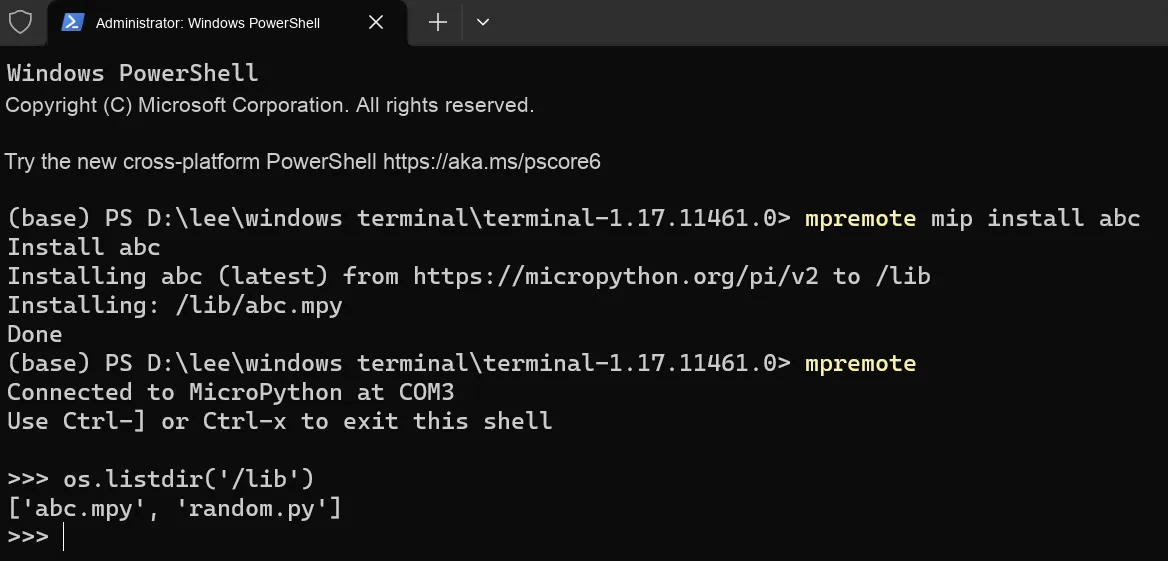
As you can see, we use the mpremote mip install abc command to download the abc abstract base class module to the Raspberry Pi Pico.
4. Cross Installation Packages and Freezing
For low-memory devices or large applications, it may be more advantageous to run bytecode directly from flash memory. This can be achieved by "freezing" the bytecode into the MicroPython firmware and then flashing the firmware to the device. The runtime performance remains the same (though the import speed is faster), but this approach frees up a significant amount of RAM for the program to use.
Bytecode freezing is a process that addresses all the aforementioned issues:
- The source code is pre-compiled into bytecode and stored as-is.
- Bytecode is stored in ROM rather than in RAM.
- Frozen packages do not require a file system.
Using frozen bytecode requires building an executable (firmware) from C source code for a given MicroPython port. Therefore, the process is as follows:
- Set up the toolchain and build the port according to the instructions for the specific port. For example, for the ESP8266 port, refer to
ports/esp8266/README.mdand follow the instructions therein. Before proceeding to the next step, make sure you can build the port and successfully deploy the generated executable/firmware. - Build the MicroPython Unix port and ensure it is in your PATH and that you can execute
micropython. - Switch to the port directory (e. g.
ports/esp8266/ ESP8266). - Run. This step will clear all previous modules installed for freezing (therefore, you need to skip this step if you want to add additional modules instead of starting from scratch). Execute the command:
make clean-frozen - Run to install the packages to be frozen. Execute the command:
micropython -m upip install -p modules <packages>. .. - Run. Execute the command:
make clean - Run. Execute the command:
make
Version Record
Version Number | Modifier | Time | Content |
v1.0.0 | Li Zisheng | 2025/10/12 | Initialize the document, based on MicroPython version V1.23.0. |