Contents
- I. Module Introduction
- II. Introduction to Main Chips
- 2.1 Chip Overview
- 2.2 Pin Definition
- 2.3 Functional Block Diagram
- 2.4 Performance Parameters
- 2.5 Reference Circuit
- 2.6 Chip Configuration
- 2.7 Communication Interfaces and Related Protocols
- 2.8 PCB Routing Notes
- III. Circuit Engineering
- 3.1 Circuit Source Engineering
- 3.2 Module Usage Instructions
- 3.3 Application Experiment
- IV. Drivers
- 5. BOM & Recommended Alternative Parts
- 6. Revision History
- VII. Relevant Materials
- 7.1 Chip Datasheet
- 7.2 Unique Icons for PCB Silk Screen
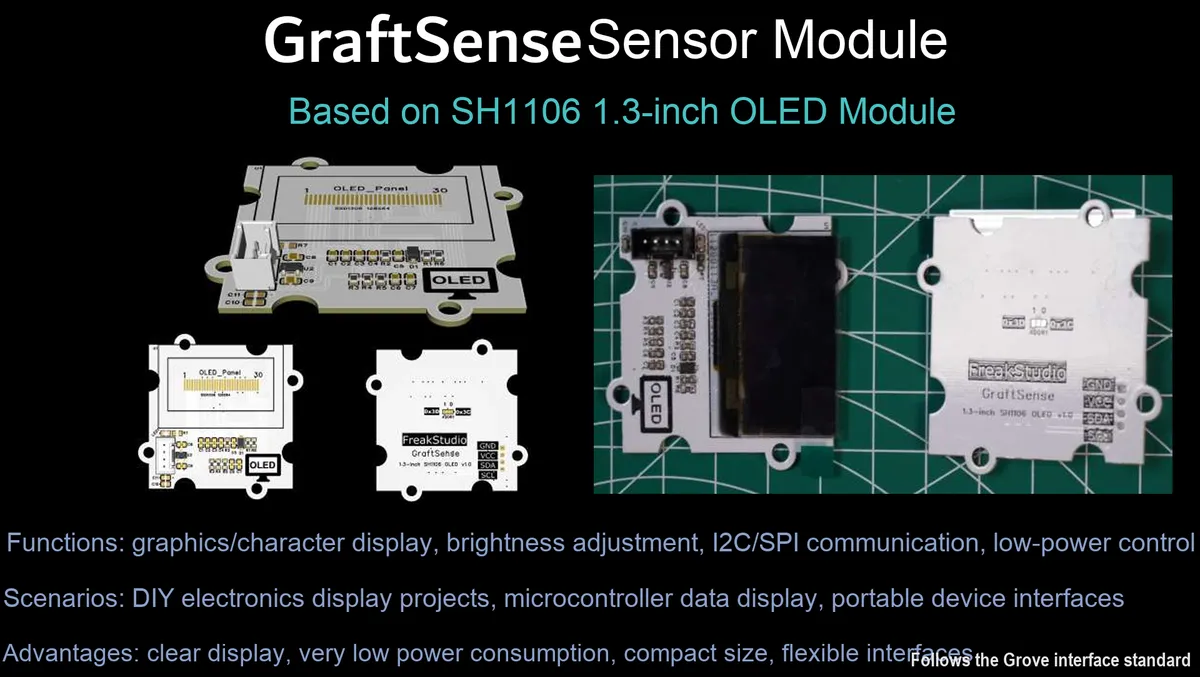
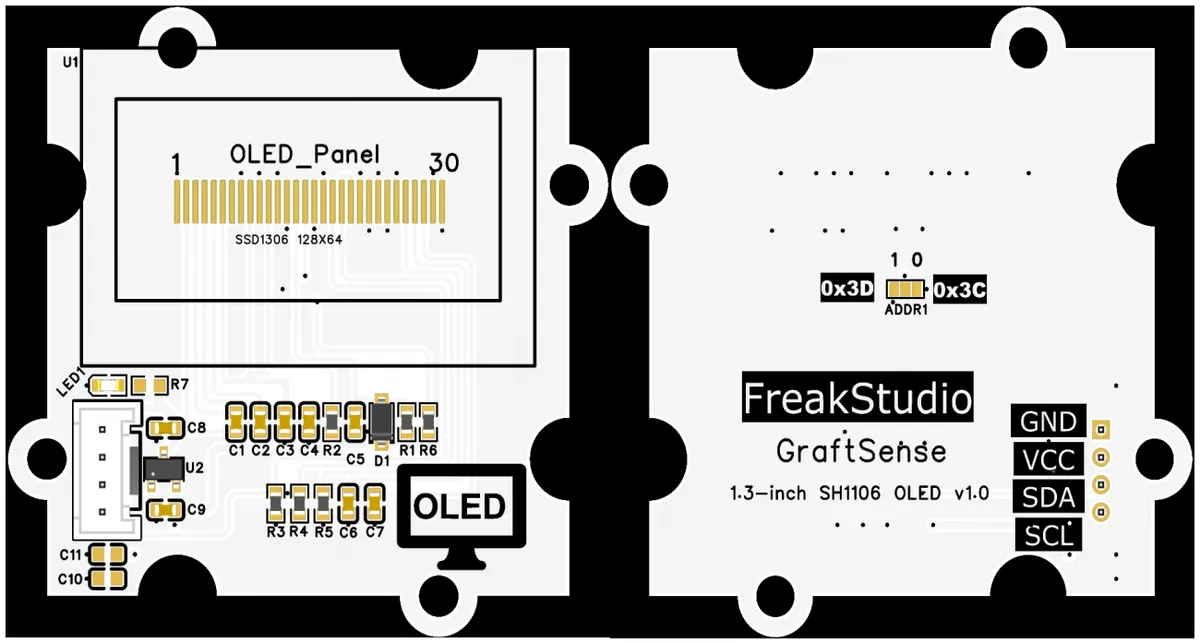
I. Module Introduction
1.3-inch OLED module based on SH1106, which adopts the SH1106 driver chip solution, is equipped with a 128×64 dot matrix monochrome white OLED screen, supports the standard I²C communication interface, and allows users to select between two slave addresses, 0x3C and 0x3D, via short-circuit points. Built with a 5V-to-3.3V DC-DC step-down circuit, power filtering circuit and indicator circuit, it is compatible with 3.3V/5V logic levels, features high contrast and full viewing angle display, and is suitable for scenarios requiring clear graphic and text display such as embedded development, maker projects and small instruments, providing systems with low-power-consumption and high-definition visual interaction capabilities.
II. Introduction to Main Chips
SH1106 is an I²C / SPI interface-compatible OLED driver chip that supports 128×64 dot matrix monochrome display, with built-in boost circuit and display RAM. Operating at a voltage of 2.7V~5.5V, it can drive passive matrix OLED panels and is widely used in small portable display devices.
2.1 Chip Overview
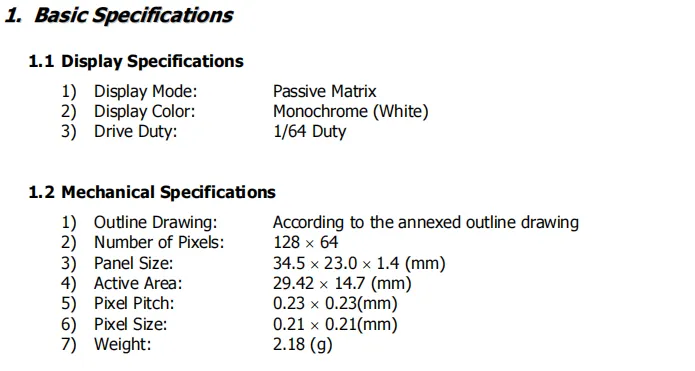
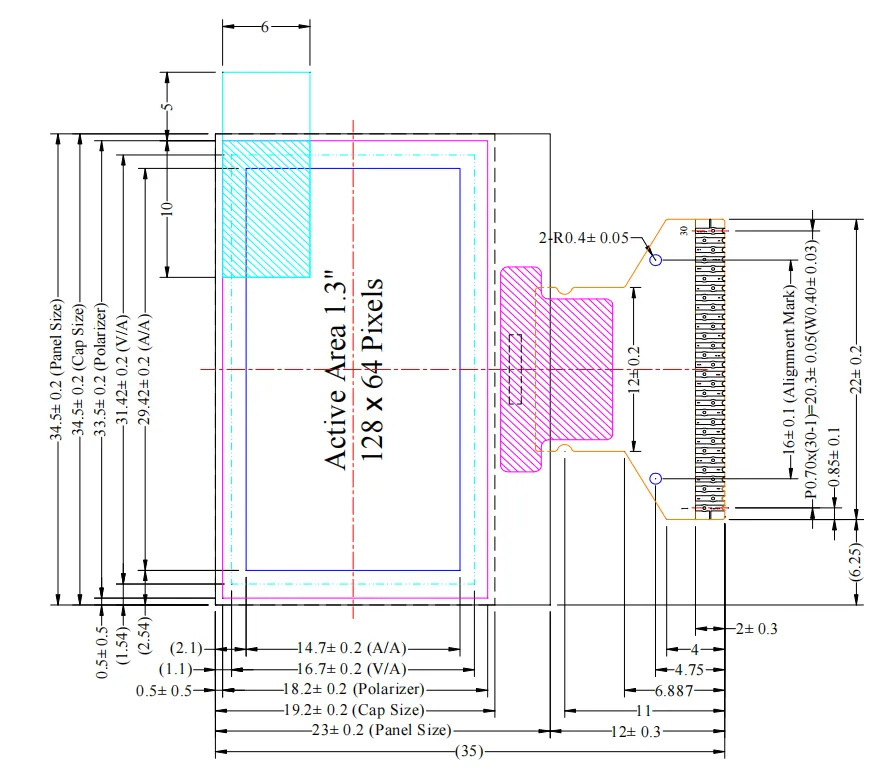
1.3-inch SH1106 OLED module's basic specification parameters, including display specifications (passive matrix, monochrome white light, 1/64 duty cycle drive) and mechanical specifications (128×64 resolution, panel dimensions 34.5×23.0×1.4mm, active display area 29.42×14.7mm, weight 2.18g, etc.).
2.2 Pin Definition
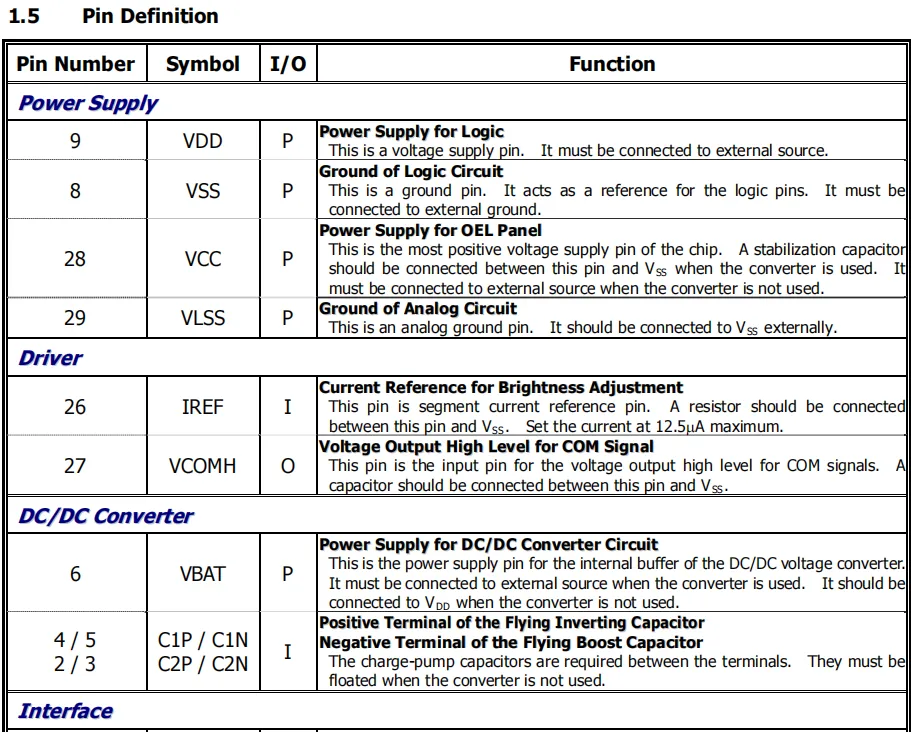
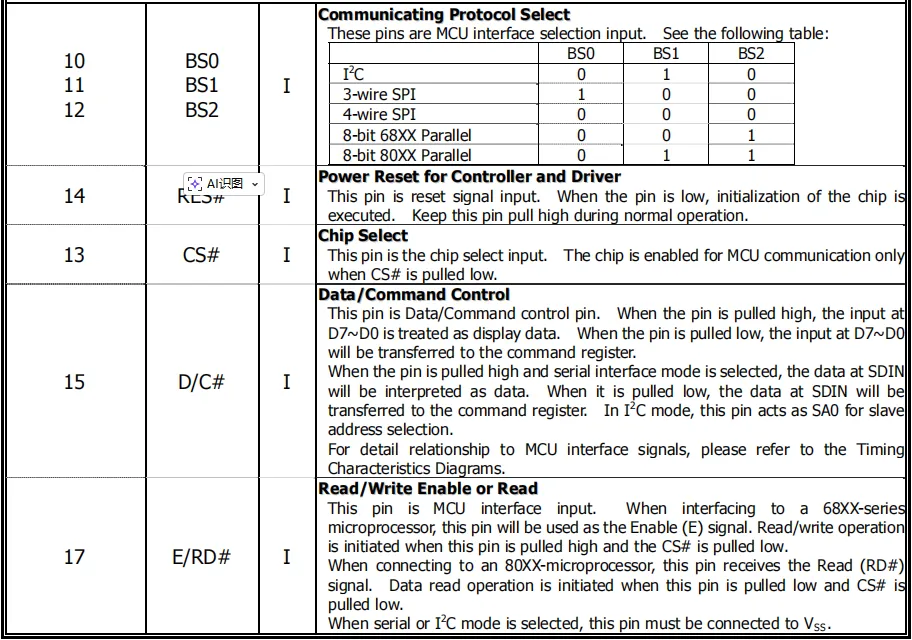
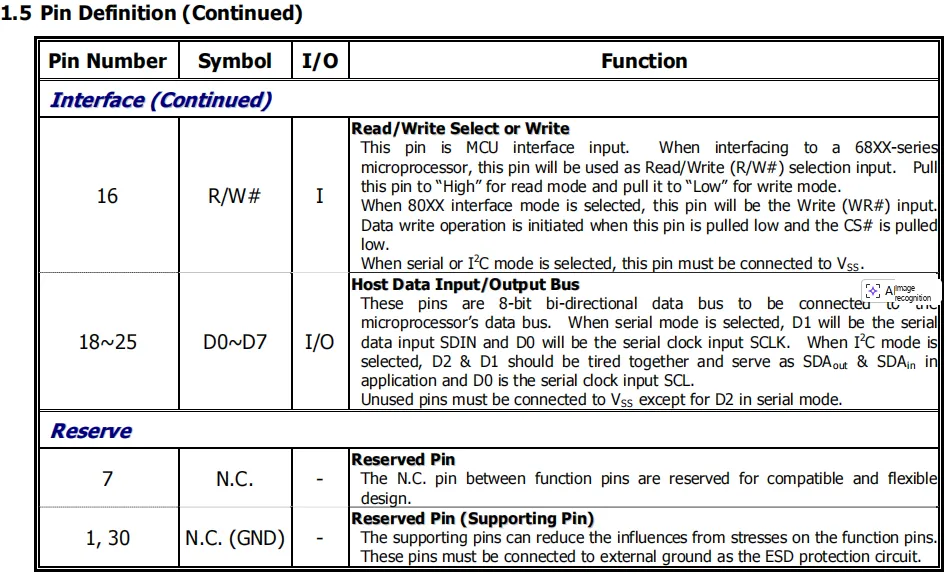
The pin definition table classifies the pins of the 1.3-inch SH1106 OLED module into five categories: power supply, driving, DC-DC conversion, interface and reserved pins: the power supply pins supply power for the logic circuit and the display panel; the driving pins are responsible for brightness adjustment and COM signal output; the DC-DC pins are used for charge pump capacitor connection; the interface pins can be configured via BS0 / BS1 / BS2 to support multiple communication modes including I²C / SPI / parallel, and also include functional pins for reset, chip select and data/command control; unused reserved pins must be grounded to ensure ESD protection and circuit stability.
2.3 Functional Block Diagram
None.
2.4 Performance Parameters
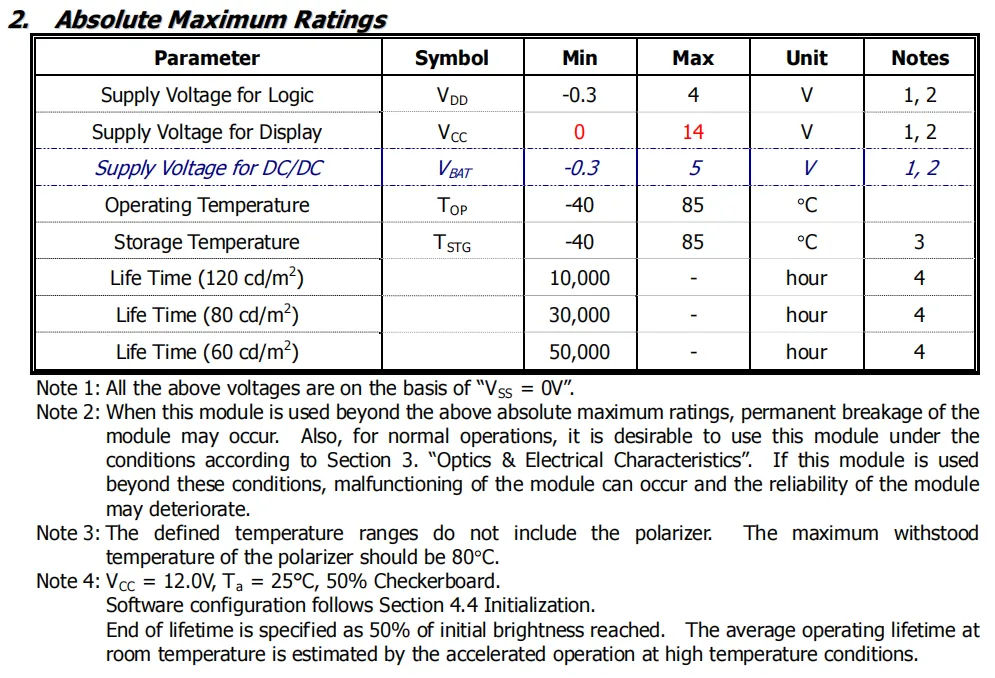
1.3-inch SH1106 OLED module's absolute maximum ratings table specifies that the logic supply VDD ranges from -0.3V to 4V, the display supply VCC ranges from 0V to 14V, the DC-DC supply VBAT ranges from -0.3V to 5V, and both operating and storage temperatures range from -40℃ to 85℃. It also provides lifetime specifications under different brightness levels; exceeding the specified ranges will result in permanent damage to the module or reduced reliability.
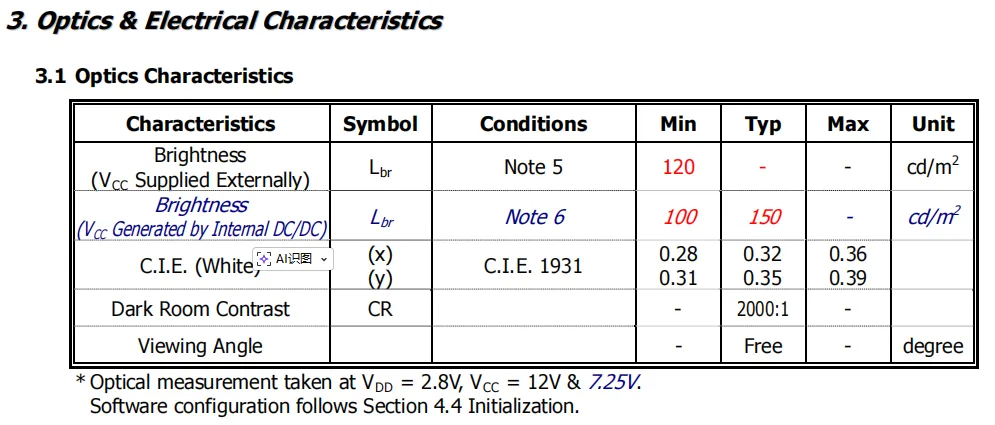
1.3-inch SH1106 OLED module's optical characteristic parameters: under test conditions such as VDD = 2.8V and VCC = 12V, the minimum brightness is 120cd/m² when powered by external supply, the brightness range is 100~150cd/m² when powered by internal DC-DC supply, the white light CIE coordinates are x: 0.28~0.36, y: 0.31~0.39, the contrast ratio in darkroom reaches 2000:1, and it features full viewing angle display capability.
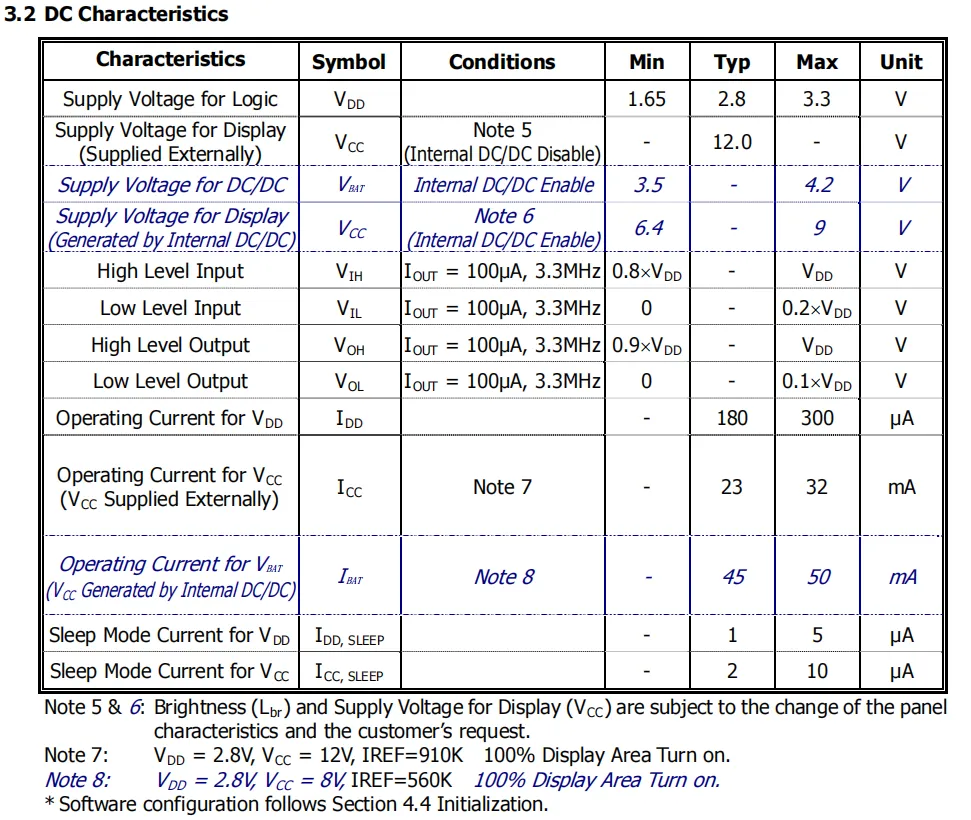
1.3-inch SH1106 OLED module's DC electrical characteristic table: the logic supply VDD ranges from 1.65V to 3.3V (typical 2.8V); the display supply VCC has a typical value of 12V when powered externally and a range of 6.4V to 9V when powered by the internal DC-DC converter. It is compatible with 3.3V logic level, features a low operating current down to 180μA (logic part), and a sleep mode current of only 1~2μA, delivering excellent low-power performance.
2.5 Reference Circuit
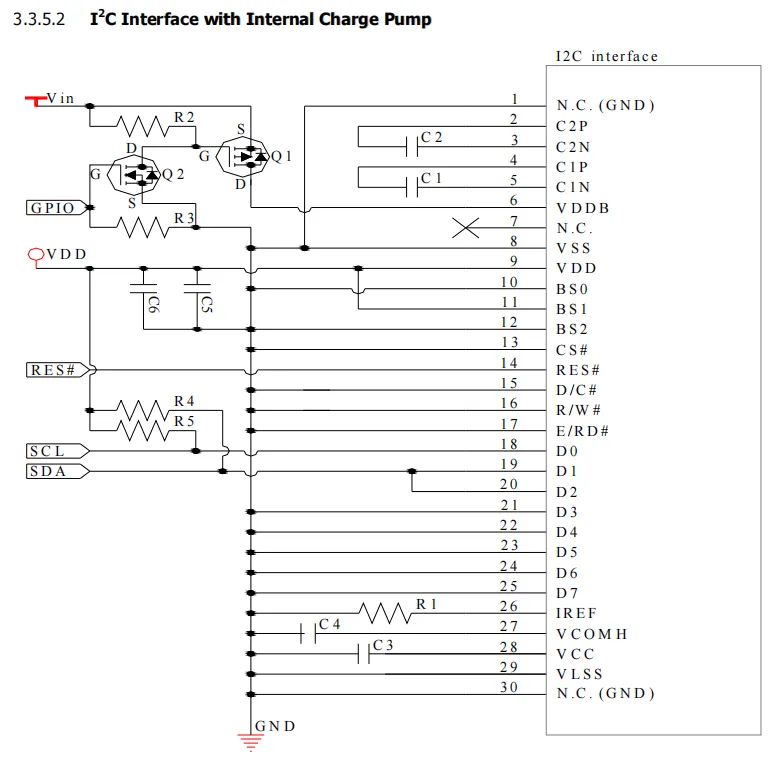
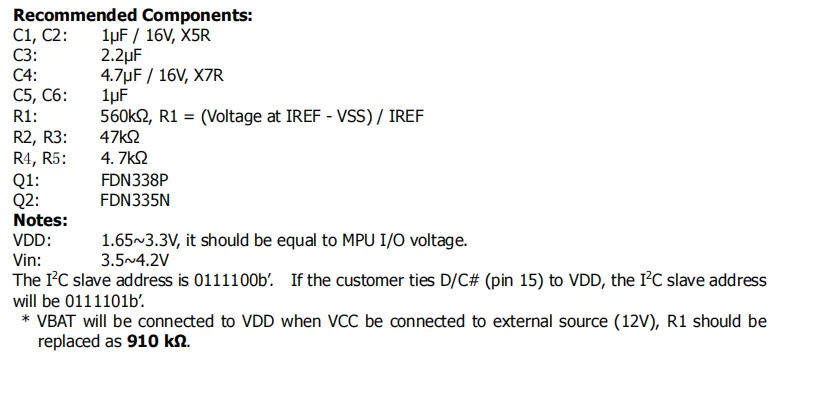
SH1106 features an I²C interface plus a built-in charge pump reference circuit. It adopts dual power supply with Vin at 3.5V~4.2V and VDD at 1.65V~3.3V, implements level shifting via MOS transistors, configures BS0 / BS1 / BS2 to I²C mode, and connects the SCL / SDA communication pins. Paired with the specified charge pump capacitors and brightness adjustment resistors, its I²C slave address can be set to 0x3C / 0x3D, making it suitable for driving 1.3-inch OLED displays.
2.6 Chip Configuration
None.
2.7 Communication Interfaces and Related Protocols
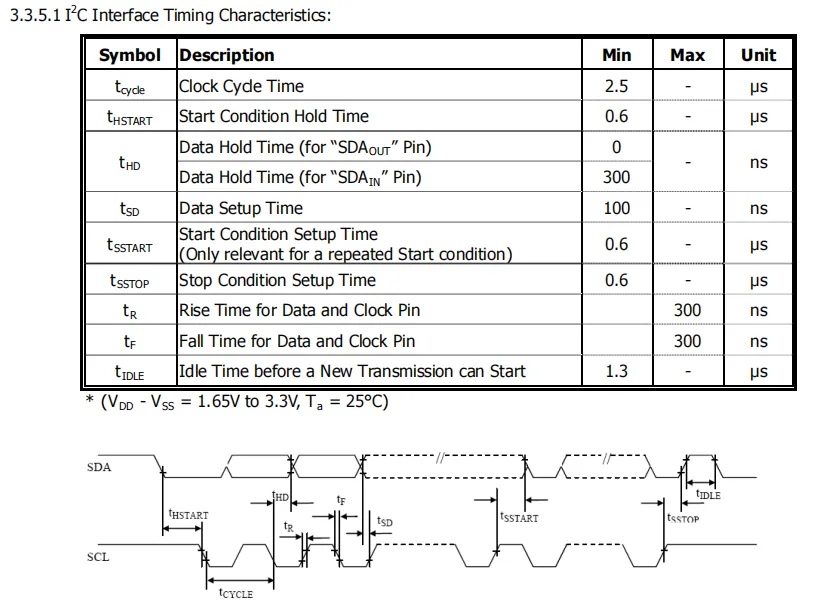
The timing characteristic table for the SH1106 's I²C interface specifies that the minimum clock cycle is 2.5μs, the setup/hold time for both the START / STOP conditions is 0.6μs, the data setup/hold time is 100ns/300ns respectively, the maximum signal rise/fall time is 300ns, and the bus idle time before a new transmission is at least 1.3μs; strict compliance with these timings is required to ensure reliable communication.
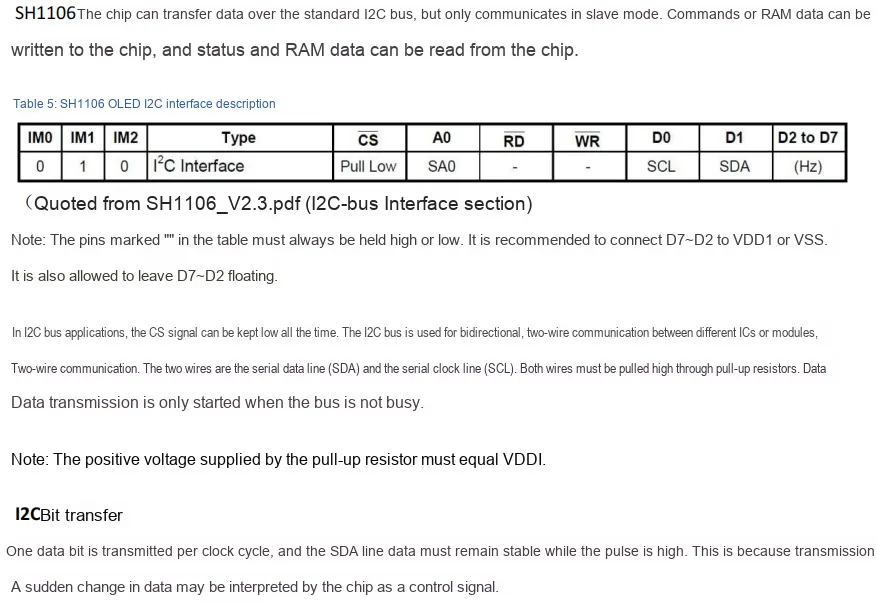
The SH1106 chip only supports I²C slave mode communication. To select the I²C interface, configure IM0 / IM1 / IM2 to 0/1/0. In this configuration, D0 / D1 serve as SCL / SDA respectively (pull-up resistors connected to the same potential as VDD are required), CS should be pulled low, A0 acts as the slave address bit SA0, and D7 ~ D2 can be left floating or connected to power/ground. The bit transmission rule that SDA data remains stable when SCL is at high level shall be followed.
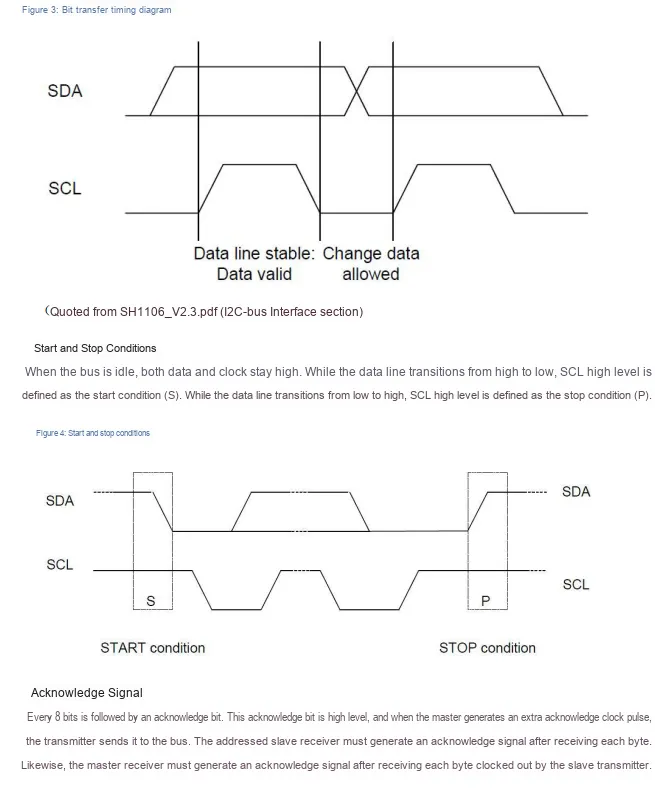
SH1106 I²C communication timing specification: When SCL is at high level, SDA data must remain stable; when SCL is at low level, SDA level transition is allowed. The SCL at high level with SDA transitioning from high to low is defined as the START start condition, and that with SDA transitioning from low to high is the STOP stop condition. An ACK acknowledge bit (the receiver pulls SDA low) follows every 8 bits to implement reliable bidirectional communication.
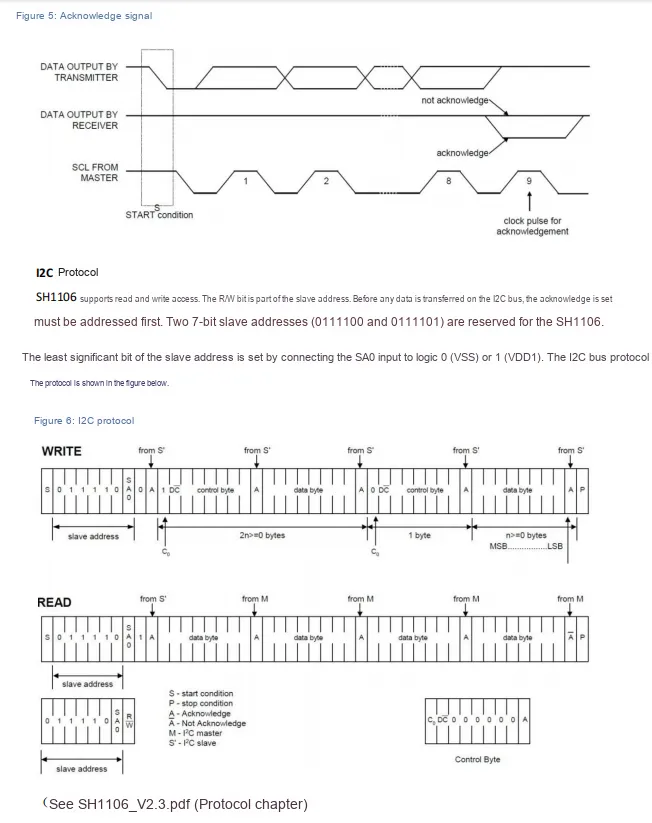
SH1106 adopts the I²C protocol specification, which supports read and write access; its fixed 7-bit slave address has the upper 5 bits as 01111, and the least significant bit SA0 is configurable to 0/1 to select the 0x3C / 0x3D address. Write operations are transmitted in the sequence of " START + slave address + control byte + data byte + STOP ", while read operations can continuously read multi-byte data, with an ACK acknowledge bit following each byte.
2.8 PCB Routing Notes
None.
III. Circuit Engineering
3.1 Circuit Source Engineering
To obtain the circuit source project, please follow the official account [Freak Embedded].
3.2 Module Usage Instructions
The schematic diagram of this module is shown below:
SCH_1.3-inch OLED Module Based on SH1106-V1.0.0_2026-03-27.pdf 2.9 MB
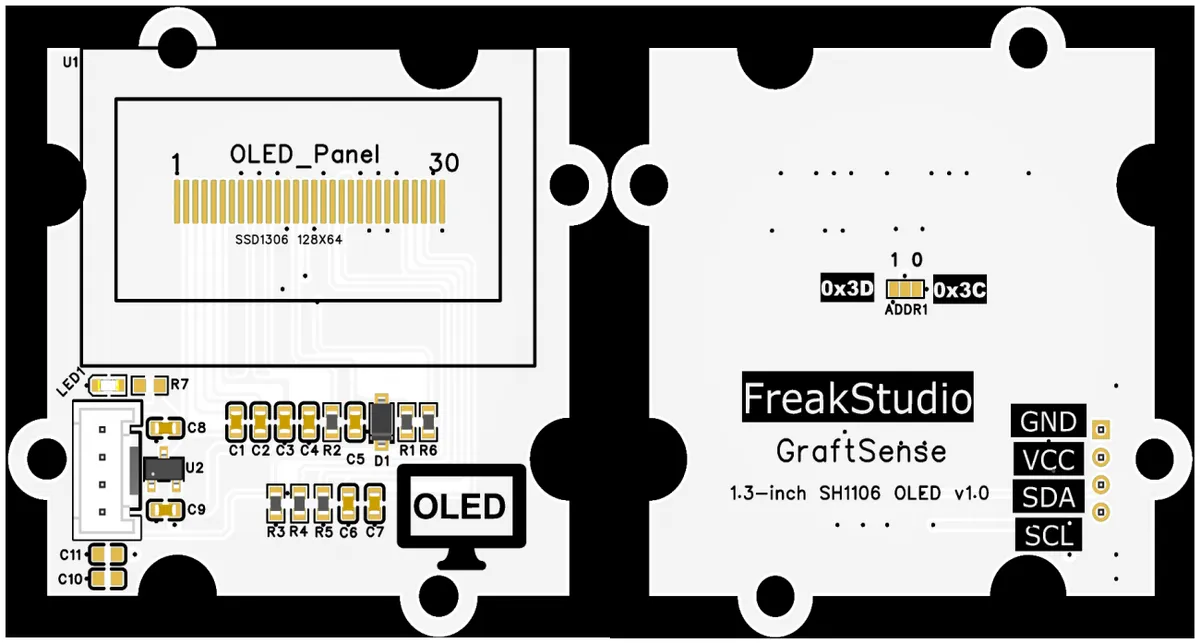
This module provides an IIC communication interface: it supports standard I²C communication baud rates, and allows selection between two slave addresses ADDR1 via the short-circuit jumper 0x3C / 0x3D. Built with a 5V-to-3.3V DC-DC step-down circuit, power filtering and indicator circuit, it is compatible with 3.3V/5V logic levels, and can stably drive a 128×64 dot-matrix monochrome white OLED screen. Featuring high contrast and full-view display performance, it is suitable for scenarios requiring clear graphics and text display such as embedded development, maker projects and small instruments, providing low-power, high-definition visual interaction capabilities for the system.
3.3 Application Experiment
Here, we use the GraftPort-RP2040 development board for testing, and the 1.3-inch OLED module based on SH1106 communicates with the main controller via the I2C interface.
Here, we first use the HY2.0-4P cable to connect the module to the GraftPort-RP2040 development board's I2C0 interface:
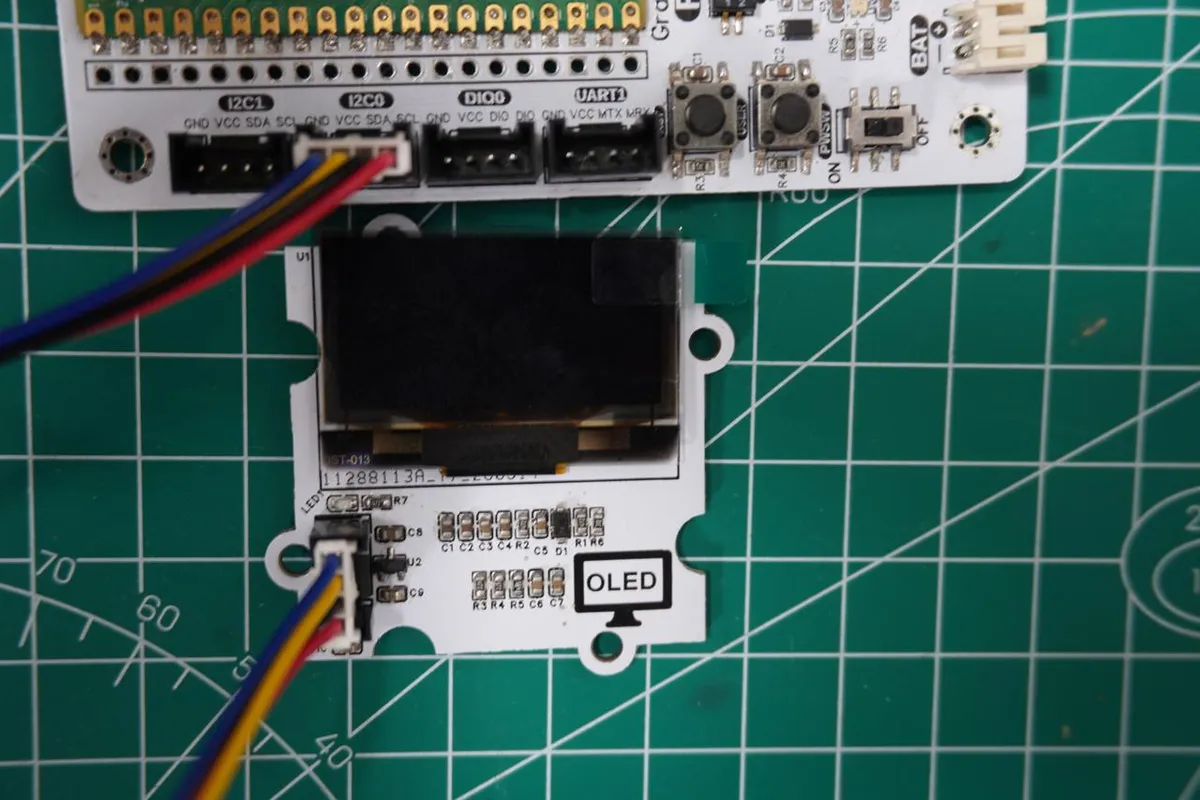
The module connections are shown in the following table:
Development Board Pins | Module Pins | Description |
Pin 4 |
|
|
Pin 5 |
|
|
Here, we need to search for the relevant driver packages on uPyPI: https://upypi.net/zh/
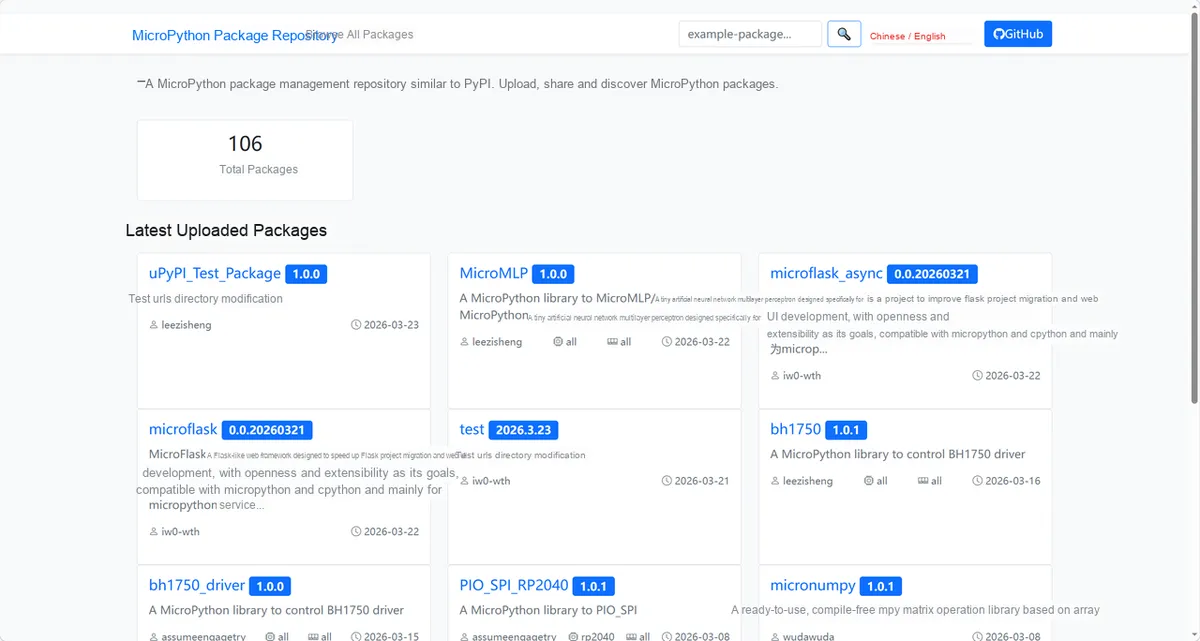
Enter sh1106_driver to search, and the following will be displayed:
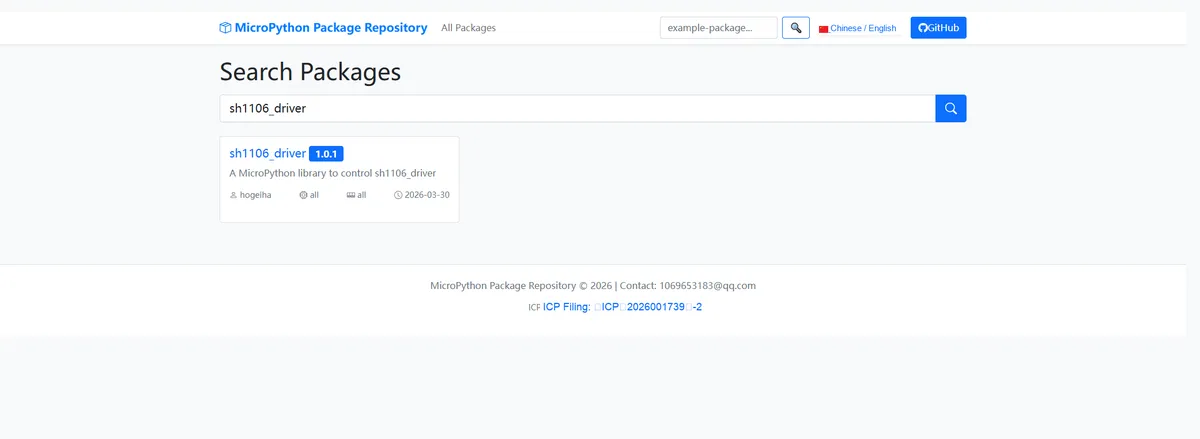
Click to copy the local installation command:
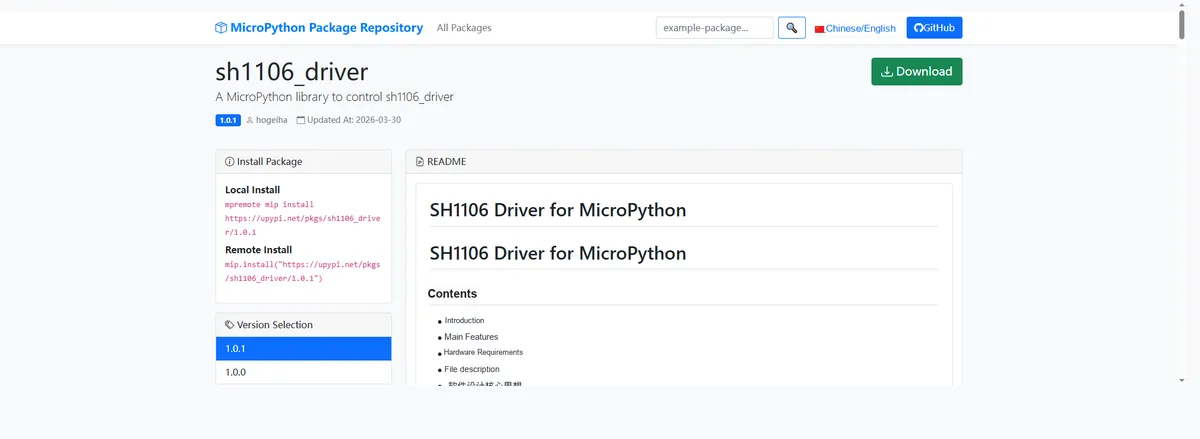
Import the module driver library code via the mip tool. Below are the usage commands for the mpremote tool:
mpremote mip install https://upypi.net/pkgs/sh1106_driver/1.0.0Import the 1.3-inch OLED module based on SH1106 - MicroPython driver code, then copy the following main.py code into our project:
# Python env   : MicroPython v1.23.0
# -*- coding: utf-8 -*-
# @Time    : 2026/3/13 5:00 PM
# @Author  : hogeiha
# @File    : main.py
# @Description : Drive the SH1106 128x64 OLED display with MicroPython, implementing text display, graphics drawing, contrast adjustment, display inversion, screen flipping, scrolling, and power on/off

# ======================================== Import Modules =========================================

# Import the SH1106 OLED display driver module
import sh1106

# Import the software I2C class from the machine module, used to emulate I2C communication
from machine import SoftI2C, Pin

# Import the time module, used to implement delays
import time

# ======================================== Global Variables ============================================

# I2C SCL pin number (for Raspberry Pi Pico)
I2C_SCL_PIN = 5
# I2C SDA pin number (for Raspberry Pi Pico)
I2C_SDA_PIN = 4
# I2C communication frequency (Hz)
I2C_FREQ = 400000
# Common I2C target addresses of the SH1106 OLED (decimal: 60=0x3c, 61=0x3d)
TARGET_OLED_ADDRS = [0x3C, 0x3D]

# ======================================== Functions ============================================

# ======================================== Custom Classes ============================================

# ======================================== Initialization configuration ===========================================

# Delay 3 seconds at program start to ensure the hardware finishes power-on initialization
time.sleep(3)
# Print a feature label describing the current program's function
print("FreakStudio: SH1106 OLED Display Demo")

# Initialize the software I2C bus
i2c_bus = SoftI2C(sda=Pin(I2C_SDA_PIN), scl=Pin(I2C_SCL_PIN), freq=I2C_FREQ)

# Start scanning for devices on the I2C bus
devices_list: list[int] = i2c_bus.scan()
print("START I2C SCANNER")

# Check the I2C device scan result
if len(devices_list) == 0:
    print("No i2c device !")
    raise SystemExit("I2C scan found no devices, program exited")
else:
    print("i2c devices found:", len(devices_list))
# Iterate through the address list to initialize the target SH1106 OLED
oled = None  # Placeholder for the OLED object
for device in devices_list:
    if device in TARGET_OLED_ADDRS:
        print("I2c hexadecimal address:", hex(device))
        try:
            # Target address found, initialize the SH1106 OLED object
            oled = sh1106.SH1106_I2C(128, 64, i2c_bus, addr=device, rotate=0)
            print("SH1106 OLED initialization successful")
            break
        except Exception as e:
            print(f"SH1106 OLED Initialization failed: {e}")
            continue
else:
    # All devices traversed without finding the target address, raise a clear exception
    raise Exception("No SH1106 OLED device found in I2C bus (target addresses: 0x3c/0x3d)")


# ========================================  Main Program  ============================================

# 1. Initial screen clear
# Fill the entire screen with black (0=black, 1=white), clearing all displayed content
oled.fill(0)
# Call the show() method to update the display so the clear operation takes effect
oled.show()
# Delay 0.5 seconds to hold the cleared state
time.sleep(0.5)

# 2. Display text (SH1106 supports only two colors, 0/1; 1 is white)
# Clear the screen, ready to display text content
oled.fill(0)
# Display the text "SH1106 Demo" at coordinates (8,8), in white
oled.text("SH1106 Demo", 8, 8, 1)
# Display the text "128x64 OLED" at coordinates (8,20), in white
oled.text("128x64 OLED", 8, 20, 1)
# Display the text "MicroPython" at coordinates (8,32), in white
oled.text("MicroPython", 8, 32, 1)
# Update the display to show the text content
oled.show()
# Delay 2 seconds to hold the text display
time.sleep(2)

# 3. Draw graphics: pixels + lines
# Clear the screen, ready to draw graphics
oled.fill(0)
# Loop to draw spaced pixels (at 8-pixel intervals, giving a gradient effect)
for x in range(0, 128, 8):
    for y in range(0, 64, 8):
        # Draw a white pixel at coordinates (x,y)
        oled.pixel(x, y, 1)

# Draw the diagonal, start (0,0), end (127,63), in white
oled.line(0, 0, 127, 63, 1)
# Draw the anti-diagonal, start (0,63), end (127,0), in white
oled.line(0, 63, 127, 0, 1)
# Draw a rectangle outline, top-left (10,40), width 108, height 20, in white
oled.rect(10, 40, 108, 20, 1)
# Display the text "Pixels & Lines" at position (8,45) inside the rectangle, in white
oled.text("Pixels & Lines", 8, 45, 1)
# Update the display to show the drawn graphics
oled.show()
# Delay 2 seconds to hold the graphics display
time.sleep(2)

# 4. Adjust contrast (0-255, higher value means higher contrast)
# Clear the screen, ready to display the contrast adjustment prompt
oled.fill(0)
# Display the text "Contrast: 255" at coordinates (8,8), in white
oled.text("Contrast: 255", 8, 8, 1)
# Update the display to show the prompt text
oled.show()
# Set the display contrast to the maximum value 255
oled.contrast(255)
# Delay 1 second to maintain maximum contrast state
time.sleep(1)

# Clear the screen, ready to display the low contrast prompt
oled.fill(0)
# Display the text "Contrast: 32" at coordinates (8,8), in white
oled.text("Contrast: 32", 8, 8, 1)
# Update the display to show the prompt text
oled.show()
# Set the display contrast to 32 (low contrast)
oled.contrast(32)
# Delay 1 second to hold the low contrast state
time.sleep(1)

# Restore the display's default contrast (127, i.e. hexadecimal 0x7F)
oled.contrast(0x7F)

# 5. Invert display (black/white inversion)
# Clear the screen, ready to display the normal mode prompt
oled.fill(0)
# Display the text "Normal" at coordinates (8,8), in white
oled.text("Normal", 8, 8, 1)
# Update the display to show normal mode
oled.show()
# Delay 1 second to hold the normal display state
time.sleep(1)

# Turn on display inversion (black becomes white, white becomes black)
oled.invert(True)
# Display the text "Inverted" at coordinates (8,20), in white
oled.text("Inverted", 8, 20, 1)
# Update the display to show the inversion effect
oled.show()
# Delay 1 second to hold the inverted display state
time.sleep(1)

# Turn off display inversion, restoring normal display mode
oled.invert(False)
# Delay 1 second to hold the restored state
time.sleep(1)

# 6. Flip/rotate display (SH1106 implements 180-degree flipping via flip)
# Clear the screen, ready to display the original orientation prompt
oled.fill(0)
# Display the text "Original" at coordinates (8,8), in white
oled.text("Original", 8, 8, 1)
# Update the display to show the original orientation
oled.show()
# Delay 1 second to hold the original display orientation
time.sleep(1)

# Turn on the 180-degree screen flip (rotate=180 can also be used at initialization)
oled.flip(True)
# Display the text "Flipped" at coordinates (8,20), in white
oled.text("Flipped", 8, 20, 1)
# Update the display to show the flipping effect
oled.show()
# Delay 1 second to hold the flipped display state
time.sleep(1)

# Turn off screen flip, restore original orientation
oled.flip(False)
# Delay 1 second to hold the restored state
time.sleep(1)

# 7. Software scrolling
# Clear the screen, prepare to show the scroll demo prompt
oled.fill(0)
# Display the text "Scroll Demo" at coordinates (8,32), in white
oled.text("Scroll Demo", 8, 32, 1)
# Update the display to show the scroll prompt
oled.show()
# Delay 1 second to keep the prompt text displayed
time.sleep(1)

# Scroll down: loop 20 times, offsetting 1 pixel vertically downward each time
for i in range(0, 20):
    # Set the scroll offset: 0 horizontal, 1 vertical downward
    oled.scroll(0, 1)
    # Update the display to show the scrolling effect
    oled.show()
    # Delay 0.05 seconds to control the scroll speed
    time.sleep(0.05)

# Scroll up: loop 20 times, offsetting 1 pixel vertically upward each time
for i in range(0, 20):
    # Set the scroll offset: 0 horizontal, 1 vertical upward
    oled.scroll(0, -1)
    # Update the display to show the scrolling effect
    oled.show()
    # Delay 0.05 seconds to control the scroll speed
    time.sleep(0.05)

# 8. Power off/on demo
# Clear the screen, prepare to show the power-off prompt
oled.fill(0)
# Display the text "Power Off..." at coordinates (8,32), in white
oled.text("Power Off...", 8, 32, 1)
# Update the display to show the power-off prompt
oled.show()
# Delay 1 second to keep the power-off prompt displayed
time.sleep(1)

# Turn off the screen, enter low-power mode
oled.poweroff()
# Delay 2 seconds to keep the powered-off state
time.sleep(2)

# Turn on the screen, exit low-power mode
oled.poweron()
# Clear the screen, prepare to show the power-on prompt
oled.fill(0)
# Display the text "Power On!" at coordinates (8,32), in white
oled.text("Power On!", 8, 32, 1)
# Update the display to show the power-on prompt
oled.show()
# Delay 2 seconds to keep the power-on prompt displayed
time.sleep(2)

# Final screen clear, erase all displayed content
oled.fill(0)
# Update the display to complete the screen clear
oled.show()
Burn the code, open the terminal, and the output is as follows:
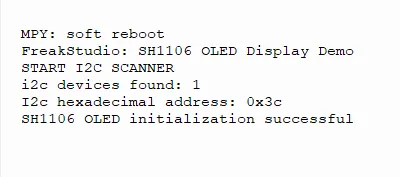
The following demonstrates display functions such as text, graphics, contrast, inversion, and scrolling:
IV. Drivers
sh1106_driver-1.0.1.zip 16 KB
5. BOM & Recommended Alternative Parts
None.
6. Revision History
Document Version | Date of Revision | Modifier | Modified Content |
v1.0 | 2026-03-27 | Ling Gaoxing | Initialize the document |
v1.0.1 | 2026-04-05 | Li Zisheng | The homepage photo has not been taken, the production files have not been exported yet, and all other items have been sorted out completely. |
v1.0.2 | 2026-04-14 | Li Zisheng | Modified main.py. |
v1.0.3 | 2026-04-21 | Li Zisheng | The production documents have not been exported yet, while all the others have been sorted out completely. |
v1.1 | 2026-04-23 | Xin Ruili | Create an open version of the document based on the internal document version v1.0.3. |
VII. Relevant Materials
7.1 Chip Datasheet
1.3inch-SH1106-OLED.pdf 1.2 MB
1.3inch_IIC_OLED_Module_MC130GX&MC130VX_User_Manual_CN.pdf 1.5 MB
1.3inch_OLED_UserManual.pdf 726 KB
7.2 Unique Icons for PCB Silk Screen