
It handles the underlying logic of graphics rendering, provides hardware acceleration and performance analysis tools, and balances feature richness with hardware resource consumption.
6.1 Drawing Mechanism (Drawing)
With VGL, you don’t need to draw anything manually. Simply create controls such as buttons, labels and arcs, adjust their positions and styles, and VGL will automatically refresh and redraw the parts that require updating.
- Refresh Logic: Manages the screen refresh process, only redrawing the changed areas to reduce unnecessary rendering overhead.
- Advanced Features: Supports masking to achieve partial display, and supports hook drawing to customize rendering logic.
6.1.1 Core Rendering Approach: Draw to the Buffer First, Then Update the Screen
LVGL does not draw directly on the screen; instead, it first renders content in an internal "drawing buffer", and once rendering is complete, it copies the buffer contents to the screen. This buffer can be smaller than the screen, and LVGL will divide the frame into small segments (tiles) to match the buffer size.
- Benefit 1: Avoid screen flickering (for example, when rendering elements like a background, buttons, and text, rendering directly to the screen will show the step-by-step drawing process, while using a buffer only displays the final result);
- Benefit 2: Faster speed (it modifies the buffer in memory and finally updates the screen all at once, which saves time compared with directly manipulating screen pixels);
- Difference from the traditional "double buffering" mechanism: it eliminates the need to store two full-screen buffers (which consume excessive memory) and only requires a small buffer, making it better adapted to embedded devices.
6.1.2 How to refresh the screen? Only update the areas that need to be changed
When there are changes in the UI (such as a button being clicked or an animation playing), LVGL will refresh according to the following steps:
- Mark the "invalidated region": record the area that needs to be redrawn; hidden content and content beyond the parent control will not be marked, which saves resources.
- Merging + tiled rendering: periodically merge adjacent invalid regions, render them directly if they fit into the buffer, otherwise render them in multiple passes;
- Screen refresh: Once a section is drawn, the screen driver is called to update that specific section, so only the parts that need modification are redrawn (for example, if the text on a button changes, only the text area is redrawn instead of the entire button);
- Buffer mode affects the refresh rhythm: with single buffering, you have to wait until one block is fully drawn and the screen is updated before drawing the next block; with double buffering, you can draw a new block and update the screen at the same time; with double frame buffering, you only need to switch the buffer address.
6.1.3 Mask: The Core of Creating Fancy Styles
Masking is the underlying logic for LVGL to draw graphics and text. You can use it without understanding the principle, but it is very useful when customizing styles:
- Function: For example, drawing rounded rectangles, arcs, and gradient text is all achieved by using a mask to "block out the unnecessary parts"(for instance, a rounded mask will cover the sharp corners of a rectangle);
- Built-in masks: support effects such as straight-line clipping, rounded corners, arcs, gradients, and bitmap masks, which can basically meet daily styling needs;
- Custom masks: You can also manually add or remove masks, for example, to add gradients to controls or adjust partial transparency.
6.1.4 Custom Drawing: Hook Events Help You Tweak Details
If you want to implement special styles (for example, changing the color of a single button in a matrix button independently), you can use LVGL's "draw hook event":
- Main drawing event: Modifies the drawing of the control itself (e. g., adding custom text/images to a button);
- Post-render event: Drawn on top of the child content of the control (e. g., drawing scrollbars);
- Widget drawing event: Modify a part of the control (e. g. the Progress Bar of the slider, the cell of the table);
- Auxiliary events: for example, checking whether a control blocks a certain area, and setting the drawing space outside the control (such as drawing values outside the slider).
6.2 Profiler
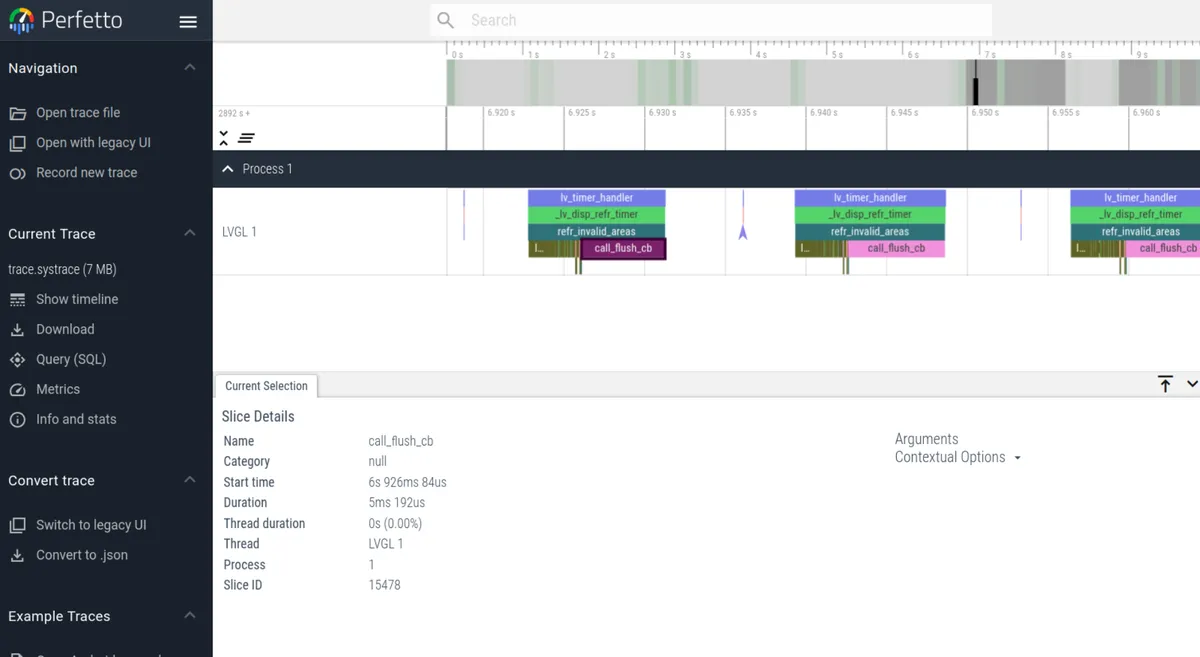
LVGL has a built-in profiler, which is specifically designed to troubleshoot performance issues such as low frame rate, laggy performance and cache invalidation that arise as projects grow more complex. It tracks the timestamps of key runtime events including rendering and user input, stores the data in a buffer of configurable size, outputs logs in the Android systrace format, and allows users to visualize and check time consumption via the Perfetto tool;When in use, you need to enable the feature in the configuration file, where you can set the buffer, high-precision timestamp, and custom log output mode. You can also manually add measurement points to the function, and it supports integration with the analyzer built into the operating system. Meanwhile, there are corresponding solutions for common issues such as log parsing failure, displayed time consumption of 0, laggy analysis, and no log output.
6.3 Rendering and GPU Acceleration
LVGL supports multiple rendering solutions, ranging from pure software rendering to hardware GPU acceleration, and is compatible with various platforms (including embedded MCUs, desktop simulators, etc.), with the core goal of improving UI rendering performance and reducing CPU usage.
- Renderer Type: Supports software rendering (pure CPU computing), SDL rendering (PC simulator), as well as hardware GPU acceleration such as Arm-2D and NXP PXP/DMA2D, and adapts to hardware platforms with different performances.
- Performance Analysis: Measure rendering time consumption via the Profiler to locate performance bottlenecks, with support for custom measurement points and profiler implementation.
The renderers / GPUs of LVGL fall into three categories:
- Pure software rendering: does not rely on any hardware, entirely relies on CPU computing, and features maximum compatibility;
- Desktop platform renderer: Used for PC emulator/debugging, accelerated by desktop GPU;
- Embedded hardware acceleration: A dedicated 2D/GPU module for different MCU/MPU platforms that provides hardware-level drawing acceleration.
The differences are as follows:
| Renderer / GPU | Supported platforms | Core characteristics | Required hardware / instruction set |
|---|---|---|---|
| Software renderer | All platforms (generic) | Pure CPU drawing, best compatibility, average performance | None (pure software) |
| SDL renderer | Desktop / simulator (PC, Mac, etc.) | Hardware-accelerated, smooth for development and debugging, suited to simulators | SDL library + desktop GPU |
| Arm-2D GPU | ARM Cortex-M, all series | 2D acceleration abstraction layer, with synchronous / asynchronous modes, requires hardware / instruction set | Cortex-M + Helium/ACI or DMAC-350, etc. |
| NXP PXP GPU | NXP i.MX RT and similar platforms | Hardware 2D acceleration, reduces CPU usage, optimized for NXP devices | NXP PXP hardware module |
| DMA2D GPU | STM32 (H7/F7, etc.) | Hardware 2D acceleration, memory copy / blending, frees the STM32 CPU | STM32 DMA2D hardware module |
| NXP VGLite GPU | High-end NXP i.MX RT and similar | Hardware 2D/3D acceleration, supports complex graphics, higher performance | NXP VGLite GPU hardware module |
Version Record
Version Number | Modifier | Time | Content |
v1.0 | Li Zisheng | 2026/03/23 | Initialize the document. |