
| API name | Purpose |
|---|---|
| init | Construct a calendar widget, bound to the parent container |
| set_today_date | Set today's date of the calendar |
| set_highlighted_dates | Set the dates to be highlighted in the calendar |
| set_day_names | Set the weekday names at the top of the calendar |
| get_btnmatrix | Get the internal button matrix object of the calendar |
| get_today_date | Get today's date set in the calendar |
| get_showed_date | Get the year and month currently displayed by the calendar |
| get_highlighted_dates | Get the list of highlighted dates of the calendar |
| get_highlighted_dates_num | Get the total number of highlighted dates |
| get_pressed_date | Get the date currently selected by clicking |
| header_dropdown_set_year_list | Set the year list of the drop-down in the calendar header |
The list of actually tested and available APIs is as follows:
| API name | Meaning | Input parameters | Return value |
|---|---|---|---|
| lv.calendar.__init__ | Construct a calendar widget, bound to the specified parent container | parent: lv.obj (e.g., the screen object scr) | lv.calendar (calendar widget object) |
| set_today_date | Set today's date of the calendar | Three int parameters: year, month, day | No return value |
| set_showed_date | Set the year and month currently displayed by the calendar | Two int parameters: year, month | No return value |
| set_highlighted_dates | Set the dates to be highlighted in the calendar | 1. Highlighted date list: list of lv_calendar_date_t objects (each object must have its year/month/day attributes configured); 2. date_num: int, the number of highlighted dates | No return value |
| get_btnmatrix | Get the internal button matrix object of the calendar | No input parameters | lv.buttonmatrix (button matrix object) |
| get_today_date | Get the today's date already set in the calendar | No input parameters | lv_calendar_date_t object (with year/month/day attributes) |
| get_showed_date | Get the year and month currently displayed by the calendar | No input parameters | lv_calendar_date_t object (with year/month attributes) |
| get_highlighted_dates | Get the highlighted dates of the calendar (environment limitation: only the first highlighted date is returned) | No input parameters | lv_calendar_date_t object (with year/month/day attributes) |
| get_highlighted_dates_num | Get the total number of highlighted dates in the calendar | No input parameters | int (number of highlighted dates) |
| header_dropdown_set_year_list | Set the year list of the drop-down in the calendar header | A single str parameter: year string (separate different years with the newline character \n, e.g., "2020\n2021\n2022") | No return value |
13.1 Basic Calendar Initialization
import display_driver
import lvgl as lv

# Initialize the environment
lv.init()
scr = lv.screen_active()
scr.set_style_bg_color(lv.color_hex(0x000000), 0)

#Create a calendar object
calendar = lv.calendar(scr)
#Set the size
calendar.set_size(250, 250)
#Center it
calendar.center()
# Set today's date (March 16, 2026)
calendar.set_today_date(2026, 03, 16)
 # Set the displayed year and month directly
calendar.set_showed_date(2026, 03)

# Load the screen
lv.screen_load(scr)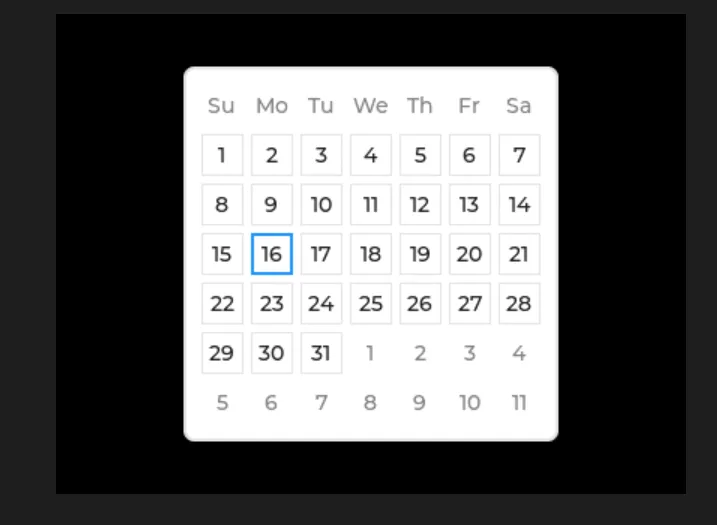
13.2 Highlighted Date Setting and Query
The following code simulates the actual scenario of "marking holidays / important schedules", which is the most commonly used business function of the calendar:
import display_driver
import lvgl as lv

# Initialize the environment
lv.init()
scr = lv.screen_active()
scr.set_style_bg_color(lv.color_hex(0x000000), 0)

calendar = lv.calendar(scr)
calendar.set_size(300, 300)
calendar.center()
calendar.set_today_date(2026, 3, 16)
# Set the displayed year and month directly
calendar.set_showed_date(2026, 03)

# ========== Core API calls ==========
# 1. Construct the highlighted date objects (must use lv_calendar_date_t, required by the environment)
# Highlight March 8 (Women's Day) and March 20 (important meeting)
highlight_date1 = lv.calendar_date_t()
highlight_date1.year, highlight_date1.month, highlight_date1.day = 2026, 3, 8

highlight_date2 = lv.calendar_date_t()
highlight_date2.year, highlight_date2.month, highlight_date2.day = 2026, 3, 20

# 2. set_highlighted_dates: set the highlighted dates (arguments: list of date objects + count int)
calendar.set_highlighted_dates([highlight_date1, highlight_date2], 2)

# 3. get_highlighted_dates_num: get the total number of highlighted dates (returns int)
highlight_count = calendar.get_highlighted_dates_num()
print(f"Total Highlighted Dates: {highlight_count}")

# 4. get_highlighted_dates: get the first highlighted date (environment limitation: only returns the first one)
first_highlight = calendar.get_highlighted_dates()
print(f"First Highlighted Date: {first_highlight.year}-{first_highlight.month}-{first_highlight.day}")

# Load the screen
lv.screen_load(scr)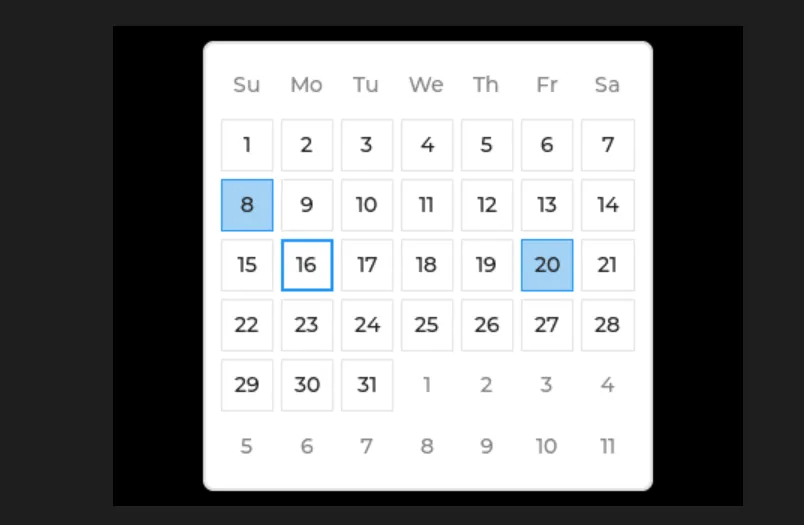
Version Record
Version Number | Modifier | Time | Content |
v1.0 | Li Zisheng | 2026/03/23 | Initialize the document. |