Contents
- Abstract:
- Original link:
- Previous Recommendations:
- For more exciting content, you can check out:
- Document Acquisition:
- Main Text
- 1. Basic Concepts of Asynchronous Programming
- 1.1 Difference between Concurrency and Parallelism
- 1.2 The Relationship Between Concurrency and Parallelism
- 1.3 Concept of Asynchronous Model
- 2. Key Implementation Approaches of Asynchronous Programming: Event Loop and Callback Mechanism
- 2.1 Event Loop Mechanism
- 2.2 Callback Mechanism
- 2.3 Specific Implementation
Abstract:
Asynchronous programming in Python builds coroutines based on async/await, which run within an event loop. Coroutines generate Tasks, suspend when encountering await, resume execution via callback triggers once I/O operations complete, and schedule concurrent tasks in a non-blocking manner through the event loop to achieve high concurrency in a single thread.

For more information about us, you can refer to the cloud document: Freak Embedded Studio Cloud Docs, or visit our wiki: https://github.com/leezisheng/Doc/wik
Original link:
Previous Recommendations:
You who study embedded systems still don't know Object Oriented? ?!
Master Python Parallel Computing in One Article: 00 Basic Concepts of Parallel Computing
A Quick Guide to Python Parallel Computing: 12 Python Multiprocessing Programming - Process Pool
For more exciting content, you can check out:
C Language 1.5 Programming Practice: Pure C Modularization × Inheritance × Polymorphism Framework
Speed Up Your Python: A Quick Guide to Python Parallel Computing
Mastering the Debugging Principles of CM3 Microcontrollers in One Article
The "Secret Martial Arts Manual" for Computer Science Competitions
Avnet ZUBoard 1CG Development Board — A New Choice for Deep learning
What? A motor drive module with customizable color schemes? !
What? Three new expansion boards just released for the XIAO main controller!
A Step-by-Step Guide to Publishing Third-Party Libraries for Arduino
Master the Optoelectronic Design Competition in One Read: A Must-See for Electronics Enthusiasts!
Charging over 6,000 yuan for a single conference shoot? Here are all the shooting tips and steps
Impressions of Chengdu: An Electronic Girl Created a Touch of Romance by Herself
POB: Programming Oriented to Boss — A Novel Reality-Driven Programming Paradigm
Document Acquisition:
You can download the document via the following link:
https://github.com/leezisheng/Doc
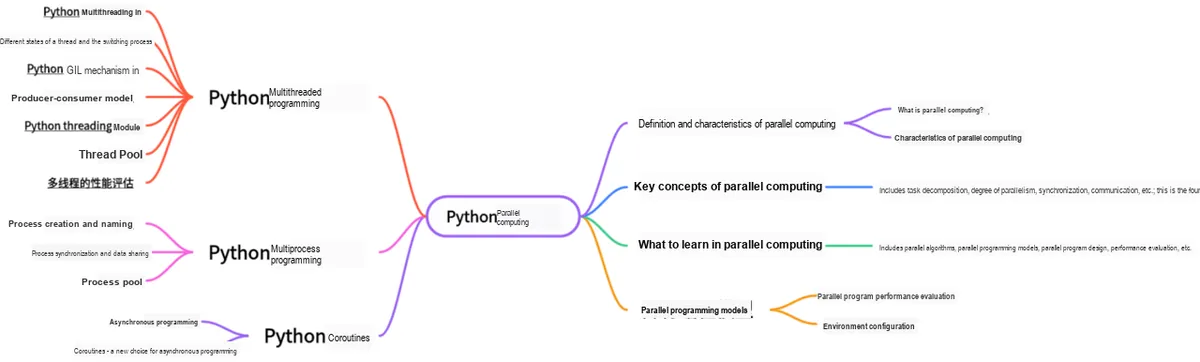
This document is a learning guide on parallel computing and Python concurrent programming, which covers the basic concepts of parallel computing, as well as the core knowledge points of Python multi-threaded programming, multi-process programming and coroutine programming:
Main Text
1. Basic Concepts of Asynchronous Programming
1.1 Difference between Concurrency and Parallelism
First, let's first get acquainted with the two basic concepts: sequence vs. concurrency, and serialization vs. parallelism.
- Sequential and concurrent execution refer to whether multiple tasks can be started simultaneously:
- ① Sequence: The current task can only start after the previous task that has started execution is completed;
- ② Concurrency: The current task can start executing regardless of whether the previous task that has started execution has been completed or not.
- Serial and parallel refer to whether multiple tasks can be executed simultaneously:
- ① Serial: There is only one task execution unit, which physically can only execute individual tasks sequentially one by one;
- ② Parallelism: There are multiple task execution units, which physically enables multiple tasks to be executed simultaneously.
- The difference between concurrency and parallelism lies in:
- ① The core of concurrency lies in the ability to handle multiple tasks — it does not necessarily require executing multiple tasks simultaneously, and what it focuses on is the abstract scheduling of tasks;
- ② The key to concurrency lies in your ability to handle multiple tasks simultaneously, which focuses on the actual execution of tasks.
1.2 The Relationship Between Concurrency and Parallelism
- (1) Both concurrency and parallelism can involve multiple threads. The key lies in whether these threads can be executed simultaneously by multiple CPUs: if yes, it is parallelism; by contrast, concurrency means multiple threads are executed by a single CPU in a time-division multiplexing manner.
- (2) Parallelism can only be achieved with a multi-core CPU, while concurrency can be realized with a single-core CPU (concurrency appears parallel at the macro level but is serial at the micro level).
- (3) Parallelism is a subset of concurrency; concurrency does not necessarily equate to parallelism, but parallelism definitely falls under the category of concurrency.
1.3 Concept of Asynchronous Model
Apart from the sequential execution model and the parallel execution model, there exists a third type of model called the asynchronous model. In an asynchronous model, multiple events are allowed to occur (be processed) simultaneously. When a program invokes a time-consuming function (method), it does not block the execution flow of the program, and the program continues to execute downward. When the function finishes execution, the program can receive a completion notification or access the execution result (if there is a return value or a return value is required).Simply put, asynchronous programming is a programming paradigm that allows a program to continue executing other tasks while waiting for an operation (such as an I/O operation) to complete.
Let's take an example to illustrate the difference between synchronous and asynchronous operations. In this example, the program retrieves two files over the network and then performs a merge operation on them:
1.3.1 Difference Between Concurrency and Parallelism
First, let's first understand the two basic concepts: sequence and concurrency, as well as serial and parallel.
(1) Sequential and concurrent refer to whether multiple tasks can be started simultaneously:
① Sequence: The current task can only start execution after the previous task that has started execution is completed;
② Concurrency: The current task can start executing regardless of whether the previous task that has started execution has been completed or not.
- Serial and parallel refer to whether multiple tasks can be executed simultaneously:
① Serial: There is only one task execution unit, which physically can only execute individual tasks sequentially one by one;
② Parallelism: There are multiple task execution units, so multiple tasks can be executed simultaneously from a physical perspective.
- The difference between concurrency and parallelism lies in:
① The core of concurrency lies in the ability to handle multiple tasks — it does not necessarily mean executing multiple tasks simultaneously, and the focus here is on the abstract scheduling of tasks;
② The key to parallelism lies in your ability to handle multiple tasks simultaneously, which focuses on the actual execution of tasks.
1.3.2 The Relationship Between Concurrency and Parallelism
(1) Both concurrency and parallelism can involve multiple threads. The key lies in whether these threads can be executed simultaneously by multiple CPUs: if yes, it is parallelism; concurrency, by contrast, means that multiple threads are executed by a single CPU in a time-sharing, round-robin manner.
(2) Parallelism requires a multi-core CPU to be achieved, while concurrency can be realized with a single-core CPU (concurrency appears parallel at the macro level but is serial at the micro level).
(3) Parallelism is a subset of concurrency; concurrency does not necessarily entail parallelism, but parallelism definitely falls under concurrency.
1.3.3 Concept of Asynchronous Model
Apart from the sequential execution model and the parallel execution model, there exists a third type, known as the asynchronous model. In an asynchronous model, multiple events are allowed to occur (be processed) simultaneously. When a program invokes a time-consuming function (method), it does not block the execution flow of the program, and the program continues to execute downward. When the function finishes execution, the program can receive a completion notification or access the execution result (if there is a return value or a return value is required).Simply put, asynchronous programming is a programming paradigm that allows a program to continue executing other tasks while waiting for an operation (such as an I/O operation) to complete.
Let's take an example to illustrate the difference between synchronous and asynchronous operations. In this example, the program retrieves two files over the network and then performs a merge operation on them:
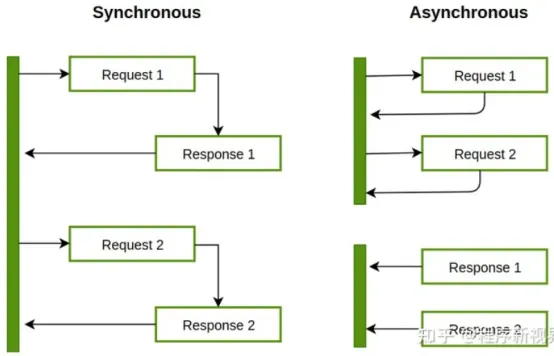
For the above example in an asynchronous system, the solution is to spin up an additional thread for processing: the first thread fetches the first file, the second thread fetches the second file, and the second thread does not need to wait for the first thread to finish executing before running. After both threads have obtained their corresponding results, we then synchronously process the operation of merging the results.
Let's look at another scenario: a single-threaded approach reads files from the OS (Operating System) and needs to perform mathematical operations. In an asynchronous system, the program initiates a request to read a file from the OS. Since the read operation takes a relatively long time, while waiting for the file reading to complete, the program returns control to the CPU to carry out the mathematical operations.
In asynchronous programming, a function is usually provided for relatively time-consuming functions, and an additional parameter for callback is included in the parameters of this function. This function is often called a callback function. When the relatively time-consuming function finishes executing, the result is returned through the callback function.
1.3.4 Relationship Between Asynchronous Programming Model and Processes & Threads
Here we take multithreading as an example: multithreading refers to the concurrent or parallel execution of multiple instructions (threads) at the same time.
- On single-core processors, multithreading often creates the illusion that a program is executing in parallel. In reality, the processor switches and schedules among multiple threads via scheduling algorithms, or performs thread switching based on a combination of external inputs (interrupts) and thread priorities.
- On multi-core processors, threads are what actually run in parallel. Multiple processors execute multiple threads simultaneously to achieve more efficient processing.
A simple example is opening two browser windows to download two files at the same time. Each window uses a separate thread to download the file, and there is no need for either to wait for the other to finish; instead, the downloads proceed in parallel.
The following diagram illustrates the process of concurrently executing a multi-threaded application:
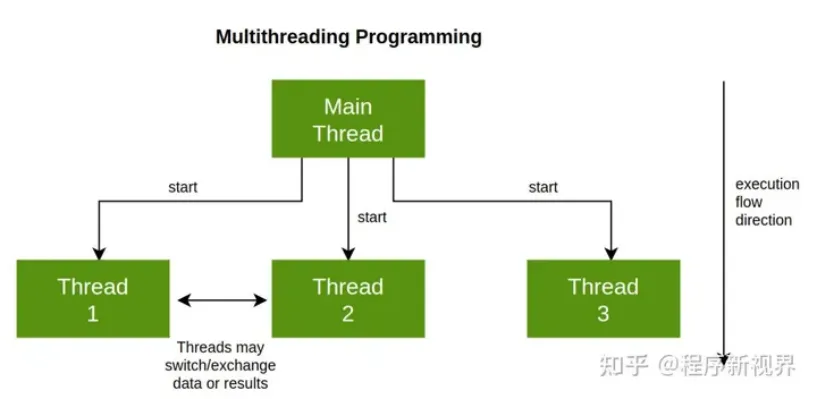
From the above introduction, we can see that multithreading is all about the concurrent execution of functionalities, while asynchronous programming is about the non-blocking execution between functions (which means the main thread that invokes a method does not need to wait synchronously for another thread to complete, so that the main thread can handle other tasks). We can apply asynchrony to both single-threaded and multi-threaded scenarios, so multithreading is just one implementation form of asynchronous programming.
A major difference between asynchronous programming and multithreaded programming models is that in multithreading, the operating system determines when to suspend or resume a certain activity on the timeline, whereas in the asynchronous concurrency model, programmers must assume that a thread may be suspended and replaced at any time.
Programmers can break down tasks into numerous small steps that can be executed at intervals, so that if one task requires the output of another, the dependent task must receive its corresponding input.
We can use thread pools or process pools to handle asynchronous tasks.
2. Key Implementation Approaches of Asynchronous Programming: Event Loop and Callback Mechanism
2.1 Event Loop Mechanism
The event loop is a core concept in asynchronous programming, which enables a program to remain responsive while processing I/O or other time-consuming operations. In psychology, this can be analogized to the human "autopilot mode", under which we can switch between different tasks without losing our focus.
In a computing system, an entity that can generate events is called an event source, and an entity that can process events is called an event handler. In addition, there are some third-party entities called event loops, whose role is to manage all events, run continuously in a loop throughout the entire program execution, track the sequence of event occurrences and place them in a queue, and invoke the corresponding event handler to process events when the main thread is idle. The event processing part is the only active part of the system; when one event is processed, the flow proceeds to handle the next event.For example, in a Graphical User Interface (GUI) application, the program can perform data processing tasks in the background while continuously detecting user click and input events.
The working process of the event loop can be divided into several steps:
(1) Registering events and callbacks: The program registers the events it is interested in and the corresponding callback functions with the event loop.
(2) Wait for events to occur: The event loop runs and waits for events to occur; during this process, the program continues to execute other tasks.
(3) Event triggering and callback execution: Once a registered event occurs, the event loop will invoke the corresponding callback function to process these events.
This process is similar to how the human brain handles sensory input: while our brain waits for important information, it is capable of processing other streams of information, and will respond immediately as soon as the important information arrives.
2.2 Callback Mechanism
Callback Mechanism is a common Design pattern in asynchronous programming, which allows a predetermined function to be executed automatically when a certain task is completed. This is analogous to conditioned reflex in psychology: when a specific condition (event) is met, the associated behavior (callback) is executed automatically.
At the technical level, a callback is a function pointer or reference that is invoked by an event handler when a specific event occurs. It allows developers to defer the execution of a certain part of the code (i. e., the callback function) until the specific event takes place. Callbacks provide a flexible way to handle asynchronous events, while decoupling the occurrence of events from the processing logic, making the code more Modularization.
2.3 Specific Implementation
Python's Asyncio module provides methods for managing events, coroutines, tasks and threads, as well as primitives for writing concurrent code. The main components and concepts of this module include:
- ① Event Loop: In the
Asynciomodule, every process has an event loop. - ② Coroutine: This is a generalized concept of subroutines. A coroutine can suspend its execution during runtime, so that it can resume execution from the point where it was previously suspended after waiting for external processing (such as I/O) to complete.
- ③
Futures: DefinesFutureobjects, which, just like those in theconcurrent.futuresmodule, represent computations that have not yet been completed. - ④
Tasks: This is a subclass ofAsyncio, used to encapsulate and manage coroutines in concurrent mode.

Asyncio provides the following methods for managing the event loop:
Methods | Function |
loop = get_event_loop() | Get the event loop of the current context |
loop.call_later (time_delay, callback, argument) | Delay the execution of the callback method by time_delay seconds |
loop.call_soon (callback, argument) | Call the callback as soon as possible, the call_soon () function ends, The main thread will call the callback immediately after returning to the event loop |
loop.time() | Returns the internal time of the current time loop as a float type |
asyncio.set_event_loop() | Set the event loop for the current context |
asyncio.new_event_loop() | Create a new time loop based on this strategy and return it |
loop.run_forever() | It will keep running until stop () is called |
Here, we have defined three asynchronous tasks that are executed sequentially in the order shown in the diagram below.
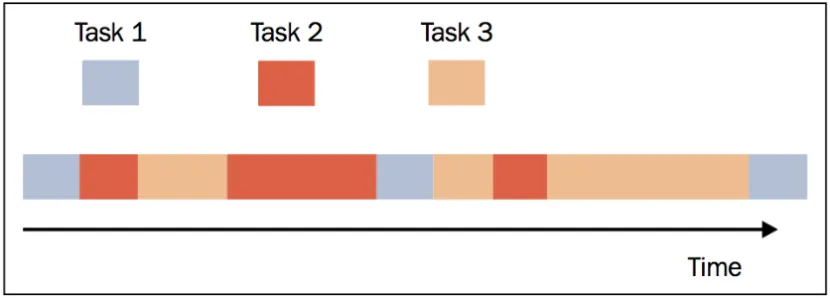
The code is as follows:
import asyncio
import random
import time

# end_time: defines the maximum time function_1() may run,
#           and is passed as an argument to function_2() via the call_later method
# loop:     the event loop obtained earlier through the get_event_loop() method

def function_1(end_time, loop):
    # Print the function name
    print ("function_1 called")
    # Delay 0 to 1 s
    time.sleep(random.randint(0, 1))
    if (loop.time() + 1.0) < end_time:
        loop.call_later(1, function_2, end_time, loop)
    else:
        loop.stop()

def function_2(end_time, loop):
    print ("function_2 called ")
    # Delay 0 to 1 s
    time.sleep(random.randint(0, 1))
    if (loop.time() + 1.0) < end_time:
        loop.call_later(1, function_3, end_time, loop)
    else:
        loop.stop()

def function_3(end_time, loop):
    print ("function_3 called")
    # Delay 0 to 1 s
    time.sleep(random.randint(0, 1))
    if (loop.time() + 1.0) < end_time:
        loop.call_later(1, function_1, end_time, loop)
    else:
        loop.stop()

# Get this event loop
loop = asyncio.new_event_loop()
asyncio.set_event_loop(loop)
# Define the end time
end_loop = loop.time() + 9
# Call the function_1() function via the call_soon method
loop.call_soon(function_1, end_loop, loop)
# Set a long period during which it keeps responding
loop.run_forever()
# If the running time exceeds the set limit, the event loop terminates
loop.close()
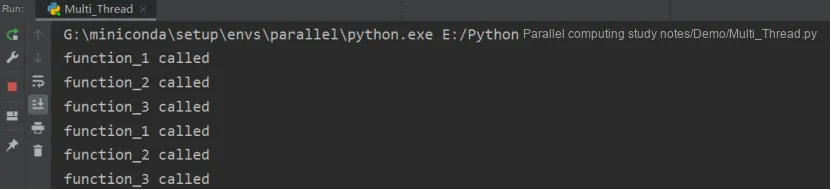
The running results are as follows: