Contents
- Abstract:
- Original link:
- Previous Recommendations:
- For more exciting content, you can check out:
- Document Acquisition:
- Main Text
- 1. Manage coroutines with Asyncio
- 2. Controlling Tasks with Asyncio
- 2.1 asyncio.create_task()
- 2.2 asyncio.gather()
- 2.3 asyncio.wait()
- 2.4 asyncio.as_completed()
- 3.Using Asyncio and Futures
Abstract:
This paper explains the coroutine management and task control of the Python Asyncio library, covering the creation and scheduling of coroutines, the lifecycle management of tasks, as well as the advanced application of asynchronous programming realized by the combination of Asyncio and Futures, helping developers efficiently master the core technologies of asynchronous programming.

For more information about us, you can refer to the cloud document: Freak Embedded Studio Cloud Docs, or visit our wiki: https://github.com/leezisheng/Doc/wik
Original link:
Previous Recommendations:
You who study embedded systems still don't know Object Oriented? ?!
Master Python Parallel Computing in One Article: 00 Basic Concepts of Parallel Computing
A Quick Guide to Python Parallel Computing: 12 Python Multiprocessing Programming - Process Pool
For more exciting content, you can check out:
C Language 1.5 Programming Practice: Pure C Modularization × Inheritance × Polymorphism Framework
Speed Up Your Python: A Quick Guide to Python Parallel Computing
Mastering the Debugging Principles of CM3 Microcontrollers in One Article
The "Secret Martial Arts Manual" for Computer Science Competitions
Avnet ZUBoard 1CG Development Board — A New Choice for Deep learning
What? A motor drive module with customizable color schemes? !
What? Three new expansion boards just released for the XIAO main controller!
A Step-by-Step Guide to Publishing Third-Party Libraries for Arduino
Master the Optoelectronic Design Competition in One Read: A Must-See for Electronics Enthusiasts!
Charging over 6,000 yuan for a single conference shoot? Here are all the shooting tips and steps
Impressions of Chengdu: An Electronic Girl Created a Touch of Romance by Herself
POB: Programming Oriented to Boss — A Novel Reality-Driven Programming Paradigm
Document Acquisition:
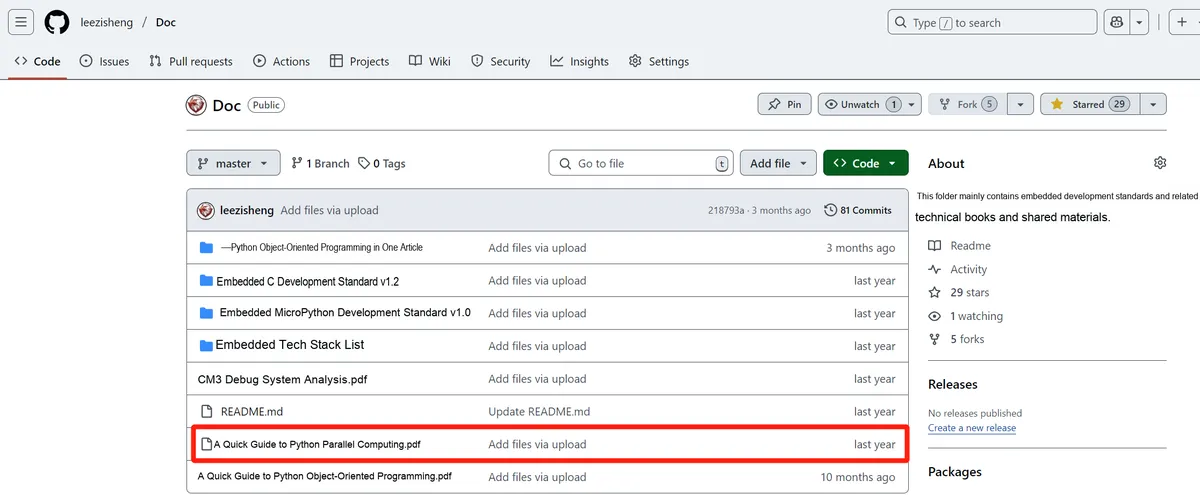
You can download the document via the following link:
https://github.com/leezisheng/Doc
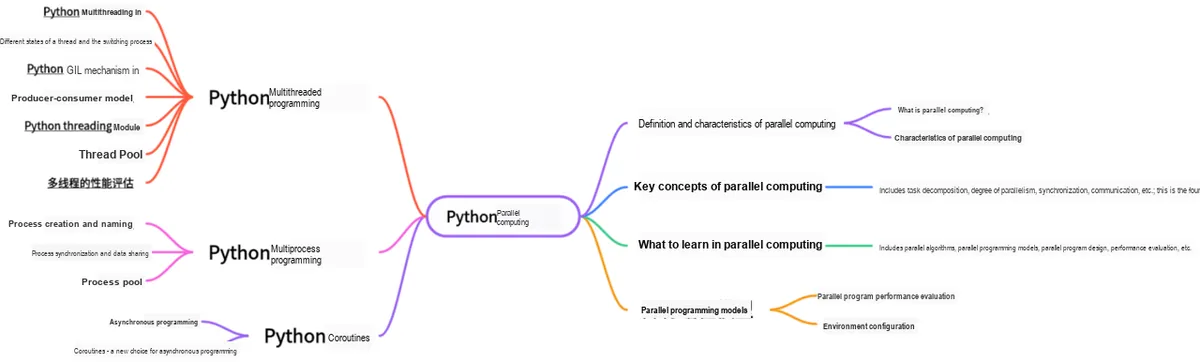
This document is a learning guide on parallel computing and Python concurrent programming, which covers the basic concepts of parallel computing, as well as the core knowledge points of Python multi-threaded programming, multi-process programming and coroutine programming:
Main Text
In the example mentioned above, we can see that when a program becomes large and complex, it is a good solution to divide it into subroutines, with each part implementing a specific task. Subroutines cannot be executed independently; they can only be executed upon the request of the main program, which is responsible for coordinating the use of each subroutine. Coroutines are a generalization of subroutines. Like subroutines, a coroutine is only responsible for one step of a computing task; unlike subroutines, there is no main program to schedule coroutines. This is because coroutines are connected together through pipes, and there is no monitoring function responsible for calling them in sequence.
For subroutines, calls are implemented via the stack: a subroutine call always has a single entry and a single return, and the call sequence is unambiguous. For example, if A calls B, and B calls C during its execution, C will return after finishing execution, then B will return after finishing execution, and finally A will finish execution. Coroutines also appear to be subroutines, but during execution, they can be interrupted inside the subroutine, then switch to execute another subroutine, and return to resume execution at an appropriate time.From a psychological perspective, coroutines are similar to humans' ability to "switch tasks": we can temporarily shift our attention from one task to another, and then return to resume the unfinished one.
Or rather, in a coroutine, the execution point can be suspended and then resumed from the exact point where it was previously suspended. With a coroutine pool, you can interleave computations: run the first task until it yields execution control, then run the next one, and continue this way sequentially. This interleaving control component is the event loop introduced earlier, which keeps track of all coroutines and executes them continuously.
Some other important features of coroutines are as follows:
- Coroutines can have multiple entry points and can yield multiple times;
- Coroutines can yield execution control to other coroutines.
yield means that the coroutine pauses at this point and yields execution control to other coroutines. Since coroutines can pass a value along with control to another coroutine, "yielding a value" means passing that value to the next coroutine to be executed.
Compared with traditional threads or processes, coroutines have several key differences:
(1) Lightweight: Coroutines are usually in User Mode. The subroutine switching (function) is not thread switching, which is controlled by the program itself, and its switching overhead is much smaller than that of system threads.
(2) Non-preemptive: The context switching of coroutines is cooperative, meaning that a coroutine needs to explicitly yield to relinquish control.
(3) Better control: Coroutines provide finer-grained control, and the programmer or the coroutine library decides how and when to perform the context switch.
Coroutines can address the efficiency issues of IO-intensive programs, but they are not good at handling CPU-intensive tasks; to fully leverage CPU utilization, you can combine multi-processing with coroutines.
1. Manage coroutines with Asyncio
Python 3. x provides the following methods to implement coroutines:
asyncio + yieldfrom (python3.4+):
asyncio is a standard library introduced in Python 3.4, with native support for asynchronous I/O built in. The asynchronous operations of asyncio need to be implemented within a coroutine via the yield from syntax.
import asyncio

@asyncio.coroutine
def test(i):
    print('test_1', i)
    r = yield from asyncio.sleep(1)
    print('test_2', i)

if __name__ == '__main__':
    loop = asyncio.get_event_loop()
    tasks = [test(i) for i in range(3)]
    loop.run_until_complete(asyncio.wait(tasks))
    loop.close()
asyncio.coroutine uses a decorator to define a coroutine. A decorator is a function that adds new minor features to an existing module; it can extend the functionality of the original function without modifying either the content of the original function or the way the original function is called.
The general method for defining coroutines using @asyncio.coroutine is as follows:
import asyncio

@asyncio.coroutine
def coroutine_function(function_arguments):
    # DO_SOMETHING
The above code defines test (i) as a coroutine, and then places this coroutine into the event loop for execution. test (i) first performs a print operation, where asyncio.sleep (1) is used to simulate an IO operation that takes 1 second. asyncio.sleep () is itself a coroutine; here the yield from syntax is used to call asyncio.sleep (), but note that the thread will not wait for asyncio.sleep (), instead it directly interrupts and proceeds to execute the next message loop.When asyncio.sleep () returns, the coroutine can retrieve the return value (which is yield from in this case) None, and then proceed to execute the next line of statement, thereby implementing asynchronous execution.
asyncio + async/await(python3.5+):
To simplify and better identify asynchronous I/O, Python 3.5 introduced the new `async` and `await` syntax, which makes coroutine code more concise and readable. Note that `async` and `await` are the new syntax for coroutines, and using the new syntax only requires two simple replacements:
- Replace @asyncio.coroutine with async;
- Replace `yield from` with `await`, which means yielding the current execution right; when the awaited object returns a result, the right to resume execution is regained, and only awaitable objects can be used with `await`.
Note that the @asyncio.coroutine decorator will be removed from Python 3.11, so the asyncio module no longer provides the @asyncio.coroutine decorator.
import asyncio
async def test(i):
    print('test_1', i)
    await asyncio.sleep(1)
    print('test_2', i)

if __name__ == '__main__':
    loop = asyncio.new_event_loop()
    asyncio.set_event_loop(loop)
    # Since Python 3.8, passing coroutine objects directly to asyncio.wait() no longer works,
    # they must be wrapped into task objects before being passed in
    tasks = [loop.create_task(test(1)),loop.create_task(test(2)),loop.create_task(test(3))]
    loop.run_until_complete(asyncio.wait(tasks))
    loop.close()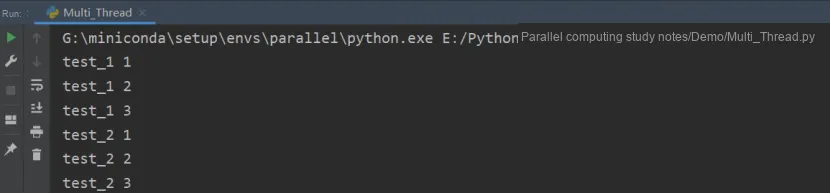
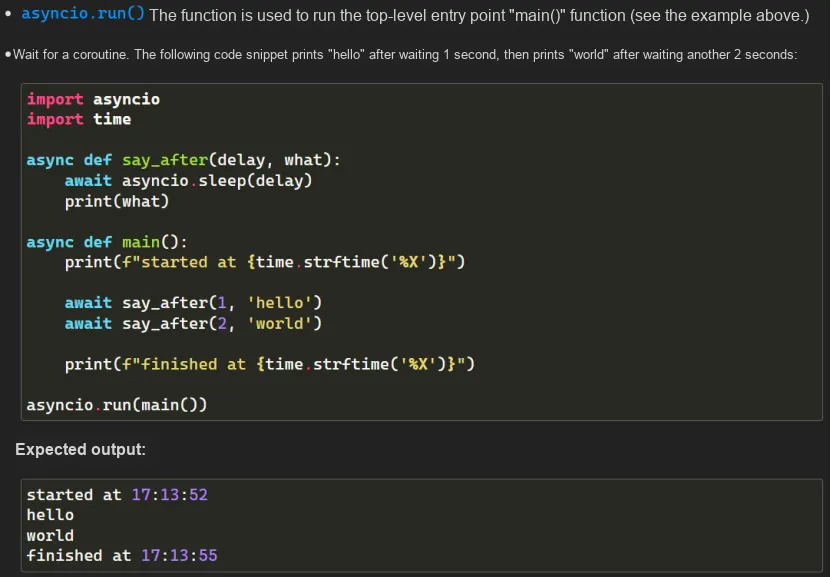
Besides the await method, asyncio provides asyncio.run () to execute coroutines:
run () function takes a coroutine object, and when executed, it always creates a new event loop and closes the loop after execution completes. Ideally, run () function should be used as the main entry point of the program and should only be called once. This method cannot be called if there is another event loop running in the same thread.
2. Controlling Tasks with Asyncio
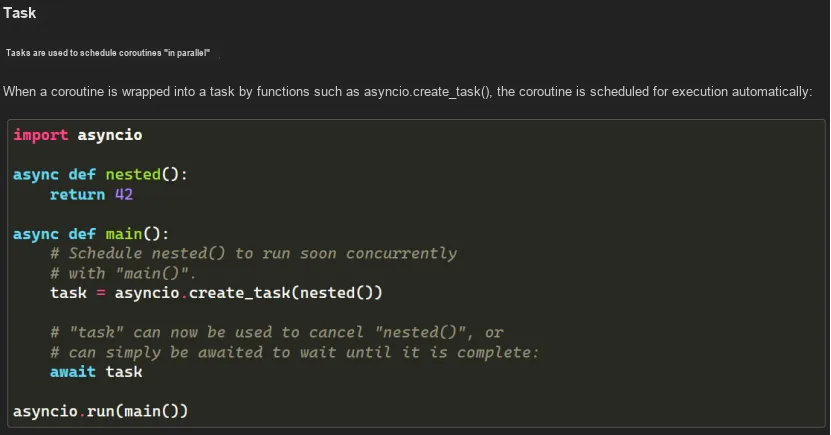
Asyncio is used to handle asynchronous processes and concurrent task execution in event loops. It also provides the asyncio.Task () class, which enables the use of coroutines in tasks. Its function is to, within the same event loop, run multiple tasks concurrently while a given task is executing. When a coroutine is wrapped in a task, it automatically connects the task to the event loop, and the task runs automatically once the event loop starts. This thus provides a mechanism that can automatically drive coroutines.
2.1 asyncio.create_task()
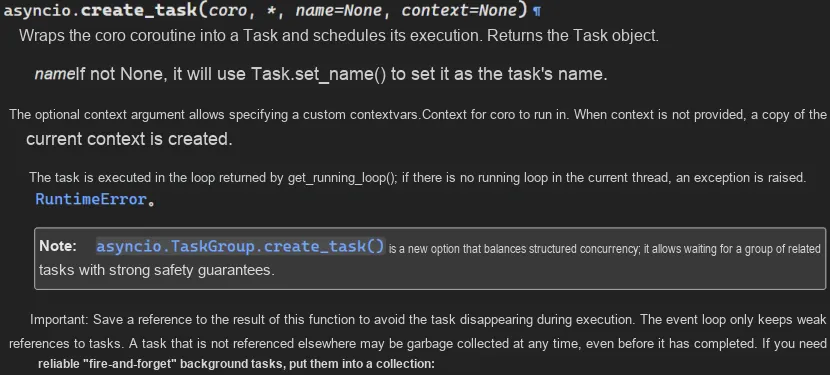
In the following example, we use asyncio.create_task () to create a Task. create_task () wraps a coroutine into a task (Task), and immediately schedules it for execution. The return value of this function is the wrapped Task object.
import asyncio
import time
async def foo(n):
    await asyncio.sleep(n)

async def main():
    task1 = asyncio.create_task(foo(1))
    task2 = asyncio.create_task(foo(2))
    t1 = time.time()
    print('hello')
    await task1
    await task2
    print('coroutine')
    t2 = time.time()
    print('cost:', t2 - t1)

asyncio.run(main())
The following are the operation results:
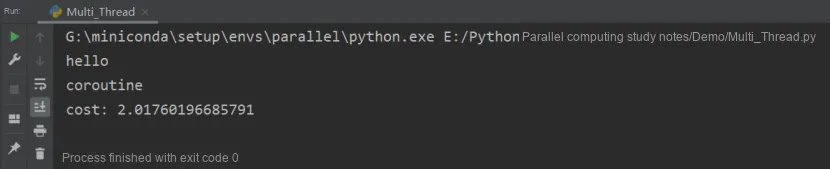
When using create_task (), the created task is immediately added to the event loop without blocking the current program. Therefore, after the above program prints out hello, it only needs to wait for 2 seconds before printing out coroutine.
2.2 asyncio.gather()
asyncio.gather () function allows callers to group multiple awaitable objects together. After grouping, the awaitable objects can be executed concurrently, waited for, and canceled. It is a useful utility function that can be used to group and execute multiple coroutines or multiple tasks.
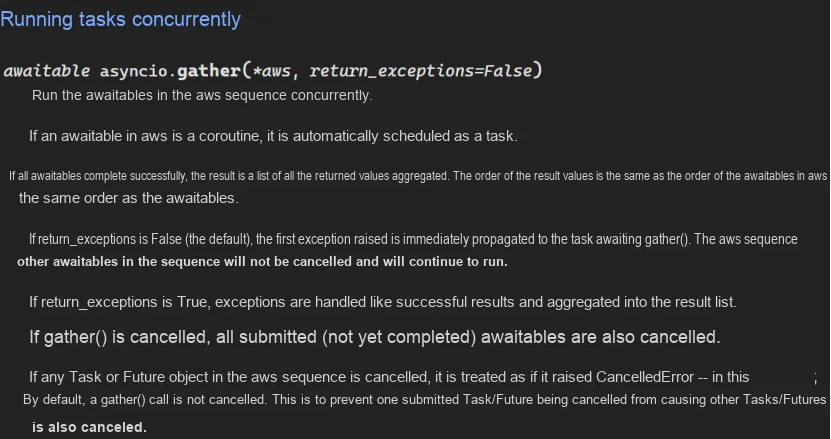
From a functional perspective, asyncio.wait and asyncio.gather achieve the same effect: both collect the results of all Task objects. The difference, however, is that asyncio.wait returns two values: done and pending. Here, done refers to the completed coroutine Task, while pending refers to the coroutine Task that has not finished upon timeout; you need to call the Task 's result via future.result.While asyncio.gather returns the result of all completed Task objects, so you can obtain all results directly without any additional calls or operations.
import asyncio

async def foo():
    return 'foo'
async def bar():
    raise RuntimeError('fake runtime error')
async def main():
    task1 = asyncio.create_task(foo())
    task2 = asyncio.create_task(bar())

    # return_exceptions=True
    # If return_exceptions is True,
    # exceptions are handled like successful results and aggregated into the result list
    results = await asyncio.gather(task1, task2, return_exceptions=True)
    print(results)
    # The order of the results matches the order of the arguments
    # The isinstance() function checks whether an object is of a known type
    # isinstance(object, classinfo)
    assert isinstance(results[1], RuntimeError)
    try:
        # If return_exceptions is False (the default),
        # the first exception raised propagates immediately to the task awaiting gather()
        results = await asyncio.gather(task1, task2, return_exceptions=False)
        # The print here will not be executed, and results is not assigned
        print(results)

    except RuntimeError as runtime_err:
        # Catch the exception and print: fake runtime error
        print(runtime_err)

asyncio.run(main())
The execution result is as follows:

2.3 asyncio.wait()
asyncio.wait () function can be used to wait for a set of asynchronous tasks to complete. Recall that asyncio tasks are instances of the asyncio.Task class that wrap coroutines. It enables independent scheduling and execution of coroutines, and Task instances provide task handles for querying status and retrieving results. The wait () function allows us to wait for a set of tasks to complete. The wait call can be configured to wait for different conditions, such as all tasks to complete, the first task to complete, and the first task to fail with an error.
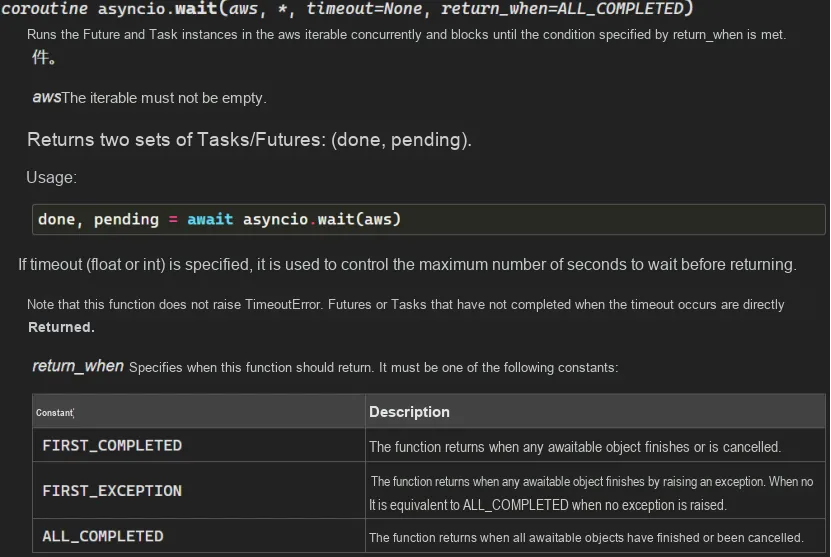
The most common syntax for asyncio.wait is: await asyncio.wait (task_list), which means running until all the given coroutines complete. A common usage pattern is:
...
# create many tasks
tasks = [asyncio.create_task(task_coro(i)) for i in range(10)]
The sample code is as follows:
import asyncio

async def foo():
    await asyncio.sleep(3)
    return 'foo'
async def bar():
    await asyncio.sleep(1)
    return 'bar'
async def main():
    task1 = asyncio.create_task(foo())
    task2 = asyncio.create_task(bar())
    # Returns as soon as one task completes, taking 1 second in total
    done, pending = await asyncio.gather(task1, task2, return_exceptions=True)
    # The done set contains bar() wrapped as a Task
    print(f'done: {done}')
    # The pending set contains foo() wrapped as a Task
    print(f'pending: {pending}')
    # Returns after all tasks complete, taking 3 seconds in total
    done, pending = await asyncio.gather(task1, task2, return_exceptions=True)
    # The done set contains foo() and bar() wrapped as Tasks
    print(f'done: {done}')
    # The pending set is empty
    print(f'pending: {pending}')
    # Returns when all tasks complete, but the running time cannot exceed 2 seconds, taking 2 seconds in total
    done, pending = await asyncio.gather(task1, task2, return_exceptions=True)
    # The done set contains bar() wrapped as a Task
    print(f'done: {done}')
    # The pending set contains foo() wrapped as a Task
    print(f'pending: {pending}')
asyncio.run(main())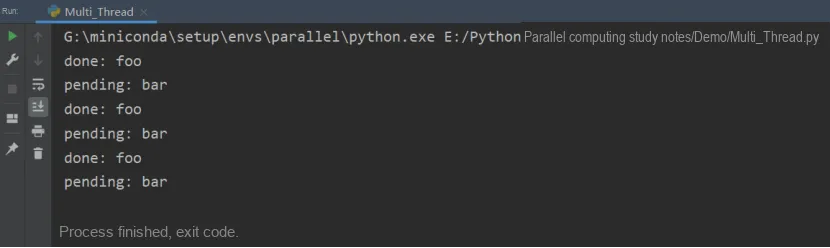
2.4 asyncio.as_completed()
Sometimes, we have to start the subsequent action immediately after completing a background task. For example, after we crawl some data, we immediately call a Machine Learning model for calculation, gather method cannot meet our requirements, but we can use the as_completed method.
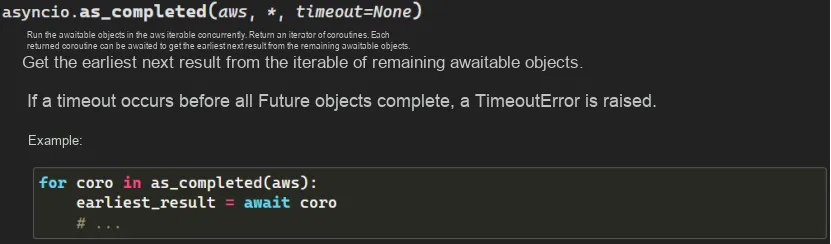
as_completed is not a concurrent method. It accepts a collection of awaitables and returns an iterator with yield statements. Therefore, we can directly iterate through each completed background task, and handle exceptions for each task individually without affecting the execution of other tasks:
The sample code is as follows:
import asyncio

async def foo():
    await asyncio.sleep(2)
    return 'foo'

async def bar():
    await asyncio.sleep(1)
    return 'bar'

async def main():
    for fut in asyncio.as_completed({foo(), bar()}):
        earliest_result = await fut
        # bar and foo will be printed in order, because bar() finishes earlier
        print(earliest_result)

asyncio.run(main())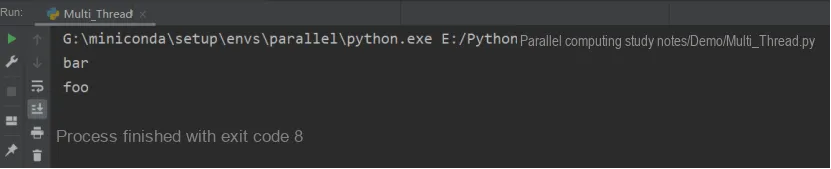
When introducing multitask concurrency above, we brought in the concept of timeout, which can also be applied to a single task by using the asyncio.wait_for (aw, timeout) function. This function accepts a task aw and a timeout period timeout; if the task completes within the specified time, it will return normally, otherwise it will be canceled and an asyncio.TimeoutError exception will be thrown.
To prevent a task from being cancelled, you can use asyncio.shield (aw) for protection. shield () masks external cancellation operations: if the outer task is cancelled, the task executing inside it will not be cancelled, and from the inner perspective, the cancellation never occurred. Since the inner task still runs normally, an exception will be triggered once it finishes executing. To ensure the program can ignore the exception and continue running, you need to use try-except externally to catch the exception. If the cancellation is triggered from inside the task, the task will be cancelled successfully.
The asyncio module provides us with the asyncio.Task (coroutine) method to handle computational tasks, which can schedule the execution of coroutines. Tasks are responsible for the execution of coroutine objects in the event loop. If the wrapped coroutine is to be scheduled from a Future (i. e., an instantiated object of a coroutine), then the task will be suspended and wait for the computation result of the Future.
When the future computation completes, the wrapped coroutine will resume execution with the result or exception returned by the future. Additionally, it should be noted that an event loop can only run one task at a time; a task can only potentially run in parallel with other tasks if there are other event loops running in parallel on different threads. While a task is waiting for the future to execute, the event loop will run a new task.
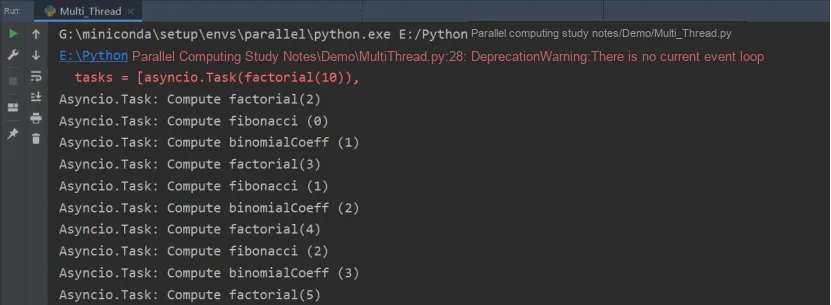
In the code below, we demonstrate three mathematical functions that can be executed concurrently by Asyncio.Task (). In this example, we define three coroutines: factorial, fibonacci and binomialCoeff. To execute these three tasks in parallel, we put them into a task list, obtain the event loop, run the tasks, and finally close the event loop.
import asyncio

async def factorial(number):
    f = 1
    for i in range(2, number + 1):
        print("Asyncio.Task: Compute factorial(%s)" % (i))
        await asyncio.sleep(1)
        f *= i
    print("Asyncio.Task - factorial(%s) = %s" % (number, f))

async def fibonacci(number):
    a, b = 0, 1
    for i in range(number):
        print("Asyncio.Task: Compute fibonacci (%s)" % (i))
        await asyncio.sleep(1)
        a, b = b, a + b
    print("Asyncio.Task - fibonacci(%s) = %s" % (number, a))

async def binomialCoeff(n, k):
    result = 1
    for i in range(1, k+1):
        result = result * (n-i+1) / i
        print("Asyncio.Task: Compute binomialCoeff (%s)" % (i))
        await asyncio.sleep(1)
    print("Asyncio.Task - binomialCoeff(%s , %s) = %s" % (n, k, result))


if __name__ == "__main__":
    tasks = [asyncio.Task(factorial(10)),
             asyncio.Task(fibonacci(10)),
             asyncio.Task(binomialCoeff(20, 10))]
    loop = asyncio.get_event_loop()
    loop.run_until_complete(asyncio.wait(tasks))
    loop.close()
The running results are as follows:
3.Using Asyncio and Futures
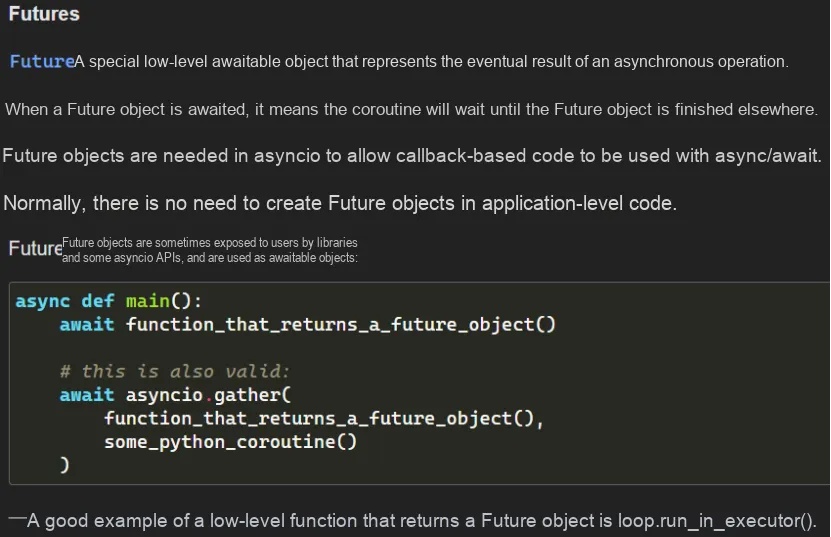
future is a Python object that holds a value you expect to obtain at some point in the future but does not yet exist. Normally, when a future is created, it has no value at all because it does not exist yet. In this state, it is considered incomplete, unresolved, or simply unfulfilled. Once you get a result, you can then set the value of the future, which will complete the future. At that point, we can consider it finished, and the result can be extracted from the future.
To operate Asyncio in Future, the following declaration is required:
import asyncio
future = asyncio.Future()
The basic methods are as follows:
Methods | Function |
cancel() | Cancel the execution of the future and schedule the callback function |
result() | Returns the result represented by the future |
exception() | Return the Exception in the future |
add_done_callback(fn) | Add a callback function, This callback function will be invoked when the future is executed. |
remove_done_callback(fn) | Remove all callback instances from the "call when done" list |
set_result(result) | Mark the future as execution completed and set the value of result |
set_exception(exception) | Mark the future as execution completed and set the Exception |
import asyncio

# asyncio has a class Future; instantiating it gives a future object
# asyncio also has a class Task; instantiating it gives a task object (that is, a task)
# Task is a subclass of Future, so what we mostly use are task objects, not future objects
# But the Future class is closely tied to the implementation of asyncio, so we must discuss it separately

future = asyncio.Future()
print(future)  # <Future pending>
print(future.__class__)  # <class '_asyncio.Future'>
print(f"future 是否完成: {future.done()}")  # Whether the future is done: False

# Set a value through set_result
future.set_result("古明地觉")
print(f"future 是否完成: {future.done()}")  # Whether the future is done: True
print(future)  # <Future finished result='古明地觉'>
print(f"future 的返回值: {future.result()}")  # future 的返回值: 古明地觉
A future can be created by calling its type object Future future; at this point, the future will have no result set, so calling its done method will return False. Afterwards, use the set_result method to set a value for the future, which will mark the future as completed. Alternatively, if you want to set an exception in the future, you can call set_exception.(You must call set_result (set the result) before calling result (get the result); additionally, set_result can only be called once, while result can be called multiple times)
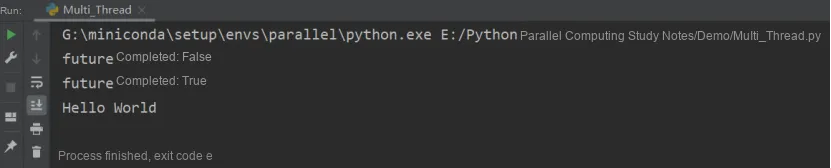
In the sample code below, we define a function make_request, inside which a future and a task are created; this task will asynchronously set the result of the future after 1 second. Then we call make_request in the main function, and when called, it will immediately return a future with no result. After that, await future will make the main coroutine enter a waiting state and yield the execution right.Once future has a value, then resume the main () coroutine and get the return value for processing.
import asyncio

async def set_future_value(future):
    await asyncio.sleep(1)
    future.set_result("Hello World")
def make_request():
    future = asyncio.Future()
    # Create a task to set the value of the future asynchronously
    asyncio.create_task(set_future_value(future))
    return future
async def main():
    # Note make_request here: it is an ordinary function, and calling it directly from outside would certainly raise an error
    # Because there is no event loop, an error is raised when set_future_value is executed
    # But calling it inside a coroutine is fine, because the event loop is already running while the coroutine runs
    # At this point, a task is started inside make_request
    future = make_request()
    print(f"future 是否完成: {future.done()}")
    # Block and wait until the future has a value. When will it have one?
    # Obviously when the coroutine set_future_value finishes executing future.set_result
    value = await future  # Suspend main() until the value of the future has been set
    print(f"future 是否完成: {future.done()}")
    print(value)
asyncio.run(main())