Labs / Python parallel computing

A Quick Guide to Python Parallel Computing: 11 Python Multiprocessing Programming — Secure Data Transmission Between Processes Based on Queues and Pipes

Author: Li Zisheng · Source: FreakStudio open documentation · License: CC BY 4.0

Contents
A Quick Guide to Python Parallel Computing: 11 Python Multiprocessing Programming — Secure Data Transmission Between Processes Based on Queues and Pipes

Abstract:

In Python multiprocessing, Queue and Pipe provide safe inter-process communication. Queue relies on locks and buffers to ensure data atomicity and order; Pipe implements point-to-point unidirectional/bidirectional data streams. Both have built-in serialization, simplifying the exchange process and efficiently ensuring consistency and security.

347622978

For more information about us, you can refer to the cloud document: Freak Embedded Studio Cloud Docs, or visit our wiki: https://github.com/leezisheng/Doc/wik

FreakStudio's Blog

Previous Recommendations:

You who study embedded systems still don't know Object Oriented? ?!

The Most Beginner-Friendly Object Oriented Programming Tutorial on the Whole Network: 00 Introduction to Object Oriented Design Methodology

The Most Beginner-Friendly Object Oriented Programming Tutorial on the Whole Network: 01 Basic Concepts of Object Oriented Programming

The Most Beginner-Friendly Object Oriented Programming Tutorial Across the Web: 02 Python Implementation of Classes and Objects - Creating Classes with Python

The Most Beginner-Friendly Object Oriented Programming Tutorial Across the Network: 03 Python Implementation of Classes and Objects – Adding Attributes to Custom Classes

The Most Beginner-Friendly Object Oriented Programming Tutorial on the Whole Network: 04 Python Implementation of Classes and Objects - Adding Methods to Custom Classes

The Most Beginner-Friendly Object Oriented Programming Tutorial on the Whole Network: 05 Python Implementation of Classes and Objects - PyCharm Code Tags

The most beginner-friendly Object Oriented programming tutorial on the entire network: 06 Python implementation of classes and objects - data encapsulation of custom classes

The Most Beginner-Friendly Object Oriented Programming Tutorial on the Whole Network: 07 Python Implementation of Classes and Objects - Type Annotations

The Most Beginner-Friendly Object Oriented Programming Tutorial on the Whole Network: 08 Python Implementation of Classes and Objects - @property Decorator

The Most Beginner-Friendly Object Oriented Programming Tutorial on the Whole Network: 09 Python Implementation of Classes and Objects - Relationships Between Classes

The Most Beginner-Friendly Object Oriented Programming Tutorial on the Whole Network: 10 Python Implementation of Classes and Objects - Class Inheritance and Liskov Substitution Principle

The Most Beginner-Friendly Object Oriented Programming Tutorial on the Whole Network: 11 Python Implementation of Classes and Objects - Subclass Calling Superclass Methods

The Most Beginner-Friendly Object Oriented Programming Tutorial Across the Network: 12 Python Implementation of Classes and Objects - Using Python's logging Module to Output Program Runtime Logs

The Best Beginner-Friendly Object Oriented Programming Tutorial on the Whole Network: 13 Python Implementation of Classes and Objects – Installation and Usage of Sourcetrail, a Visual Code Reading Tool

The Most Beginner-Friendly Object Oriented Programming Course on the Whole Network: The Most Beginner-Friendly Object Oriented Programming Course on the Whole Network: 14 Python Implementation of Classes and Objects - Static Methods and Class Methods of Classes

The most beginner-friendly Object Oriented programming tutorial on the entire network: 15 Python implementation of classes and objects - the __slots__ magic method

The Most Beginner-Friendly Object Oriented Programming Tutorial Across the Network: 16 Python Implementation of Classes and Objects - Polymorphism, Method Overriding and Open Closed Principle

The Most Beginner-Friendly Object Oriented Programming Tutorial on the Whole Network: 17 Python Implementation of Classes and Objects - Duck Typing and "file-like object"

The Most Beginner-Friendly Object Oriented Programming Course on the Whole Network: 18 Python Implementation of Classes and Objects - Multiple Inheritance and Serial Port Data Curve Plotting with PyQtGraph

The Most Beginner-Friendly Object Oriented Programming Tutorial on the Whole Network: 19 Python Implementation of Classes and Objects – Using PyCharm to Automatically Generate File Comments and function Comments

The Most Beginner-Friendly Object Oriented Programming Course on the Whole Network: 20 Python Implementation of Classes and Objects – Implementation of Composition Relationship and CSV File Saving

The Most Beginner-Friendly Object Oriented Programming Course on the Whole Network: 21 Python Implementation of Classes and Objects - Organization of Multiple Files: Modules and Packages

The Most Beginner-Friendly Object Oriented Programming Tutorial on the Whole Network: 22 Python Implementation of Classes and Objects - Exceptions and Syntax Errors

The Most Beginner-Friendly Object Oriented Programming Tutorial Across the Network: 23 Python Implementation of Classes and Objects - Throwing Exceptions

The Best Beginner-Friendly Object Oriented Programming Course on the Whole Network: 24 Python Implementation of Classes and Objects - Exception Catching and Handling

The Most Beginner-Friendly Object Oriented Programming Course on the Whole Network: 25 Python Implementation of Classes and Objects - Python Determines the Type of Input Data

The most beginner-friendly Object Oriented programming tutorial on the entire network: 26 Python implementation of classes and objects - context managers and the with statement

The Most Beginner-Friendly Object Oriented Programming Tutorial on the Whole Network: 27 Python Implementation of Classes and Objects - Implementation of Exception Hierarchy and Custom Exception Classes in Python

The Most Beginner-Friendly Object Oriented Programming Tutorial on the Whole Network: 28 Python Implementation of Classes and Objects - A Comprehensive Summary of Python Programming Principles, Philosophy and Specifications

The Most Beginner-Friendly Object Oriented Programming Tutorial Across the Network: 29 Python Implementation of Classes and Objects – Assertions, Defensive Programming and the Usage of the help function

The Most Beginner-Friendly Object Oriented Programming Tutorial on the Whole Network: 30 Python's Built-in Data Types - The object Root Class

The Most Beginner-Friendly Object Oriented Programming Tutorial on the Whole Network: 31 Python's Built-in Data Types - Object and Type

The Most Beginner-Friendly Object Oriented Programming Tutorial on the Whole Network: 32 Python's Built-in Data Types - Class and Instance

The Most Beginner-Friendly Object Oriented Programming Tutorial on the Whole Network: 33 Python's Built-in Data Types - The Relationship Between Object and Type

The Most Beginner-Friendly Object Oriented Programming Course on the Whole Network: 34 Python's Built-in Data Types - Commonly Used Composite Data Types in Python: Tuples and Named Tuples

The most beginner-friendly Object Oriented programming tutorial across the network: 35 Python's built-in data types - docstrings and the __doc__ attribute

The Most Beginner-Friendly Object Oriented Programming Tutorial on the Whole Network: 36 Python's Built-in Data Type - Dictionary

The Most Beginner-Friendly Object Oriented Programming Tutorial on the Whole Network: 37 Common Composite Data Types in Python - Lists and List Comprehensions

The Most Beginner-Friendly Object Oriented Programming Tutorial on the Whole Network: 38 Common Composite Data Types in Python - Implementing stack, Queues and Deques with Lists

The Most Beginner-Friendly Object Oriented Programming Tutorial on the Whole Network: 39 Common Composite Data Types in Python - Sets

The most beginner-friendly Object Oriented programming tutorial across the entire network: 40 Common composite data types in Python - enumerations and the usage of the enum module

The Most Beginner-Friendly Object Oriented Programming Tutorial on the Whole Network: 41 Common Composite Data Types in Python - Queues (FIFO, LIFO, Priority Queues, Deques and Circular Queues)

The most beginner-friendly Object Oriented programming tutorial on the entire network: 42 Commonly used composite data types in Python - collections container data types

The Most Beginner-Friendly Object Oriented Programming Tutorial Across the Network: 43 Common Composite Data Types in Python - Extending Built-in Data Types

The Most Beginner-Friendly Object Oriented Programming Tutorial on the Whole Network: 44 Python Built-in functions and Magic Methods – Overriding Magic Methods of Built-in Types

The Most Beginner-Friendly Object Oriented Programming Tutorial on the Whole Network: 45 Implementing Common Data Structures in Python - Linked List, Tree, Hash Table, Graph and Heap

The Most Beginner-Friendly Object Oriented Programming Course on the Whole Network: 46 Python function Methods and Interfaces - function and Event-Driven Frameworks

The Most Beginner-Friendly Object Oriented Programming Tutorial on the Whole Network: 47 Python function Methods and Interfaces - Callback Function

The Most Beginner-Friendly Object Oriented Programming Tutorial on the Whole Network: 48 Python function Methods and Interfaces - Positional Arguments, Default Arguments, Variable Arguments and Keyword Arguments

The Most Beginner-Friendly Object Oriented Programming Tutorial Across the Network: 49 Python function Methods and Interfaces - The Difference Between function and Methods and Lambda Anonymous function

The Most Beginner-Friendly Object Oriented Programming Tutorial on the Whole Network: 50 Python function Methods and Interfaces - Interfaces and Abstract Base Classes

The most beginner-friendly Object Oriented programming tutorial across the network: 51 Python function methods and interfaces - Implementing interfaces with Zope

The most beginner-friendly Object Oriented programming tutorial on the entire network: 52 Python function methods and interfaces - Protocol and interfaces

The most beginner-friendly Object Oriented programming tutorial across the entire network: 53 Python Strings and Serialization - Strings and Character Encodings

The Most Beginner-Friendly Object Oriented Programming Course on the Whole Network: 54 Python Strings and Serialization - String Formatting and the format Method

The most beginner-friendly Object Oriented programming tutorial on the entire network: 55 Python Strings and Serialization - Byte Sequence Types and Mutable Byte Strings

The most beginner-friendly Object Oriented programming tutorial on the entire network: 56 Python Strings and Serialization - Applications of Regular Expression and the re Module

The most beginner-friendly Object Oriented programming tutorial on the entire network: 57 Python Strings and Serialization - Serialization and Deserialization

The most beginner-friendly Object Oriented programming tutorial on the entire network: 58 Python Strings and Serialization – Definition and Implementation of Serialized Web Objects

The Most Beginner-Friendly Object Oriented Programming Course on the Entire Internet: 59 Python Parallelism and Concurrency – Parallelism, Concurrency, Threads and Processes

Master Python Parallel Computing in One Article: 00 Basic Concepts of Parallel Computing

A Quick Guide to Python Parallel Computing: 01 Python Multithreaded Programming – Basic Concepts, Switching Process, GIL Lock Mechanism, and Producer-Consumer Model

A Quick Guide to Python Parallel Computing: 02 Python Multithreaded Programming — the threading Module, Thread Creation & Query, and Daemon Threads

A Quick Guide to Python Parallel Computing: 03 Python Multithreaded Programming - Multithread Synchronization (Part 1) — Based on Mutex Locks, Recursion Locks and Semaphores

A Quick Guide to Python Parallel Computing: 04 Python Multithreaded Programming – Multithread Synchronization (Part 2) — Based on Condition Variables, Events and Barriers

A Quick Guide to Python Parallel Computing: 05 Python Multithreaded Programming – Scheduled Thread Execution

A Quick Guide to Python Parallel Computing: 06 Python Multithreaded Programming – Communication Based on Queues

A Quick Guide to Python Parallel Computing: 07 Python Multithreaded Programming – Using Thread Pools and Performance Evaluation of Multithreading

A Quick Guide to Python Parallel Computing: 08 Python Multiprocessing Programming – Process Creation & Naming, ID Retrieval, Daemon Process Setup and Process Termination

A Quick Guide to Python Parallel Computing: 09 Python Multiprocessing Programming – Data Synchronization Between Processes: Based on Mutex Locks, Recursion Locks, Semaphores, Condition Variables, Events and Barriers

Master Python Parallel Computing in One Read: 10 Python Multiprocessing Programming - Data Sharing Between Processes - Based on Shared Memory and Data Managers

For more exciting content, you can check out:

C Language 1.5 Programming Practice: Pure C Modularization × Inheritance × Polymorphism Framework

Speed Up Your Python: A Quick Guide to Python Parallel Computing

Mastering the Debugging Principles of CM3 Microcontrollers in One Article

After half a month of dedicated grinding, the ultimate roundup of embedded technology stack is now ready

The "Secret Martial Arts Manual" for Computer Science Competitions

An open-source project collection for MicroPython: awesome-micropython, which covers MicroPython tool libraries in various aspects

Avnet ZUBoard 1CG Development Board — A New Choice for Deep learning

Engineers should not blindly worship open-source code, but also pay attention to mastering basic skills

What? A motor drive module with customizable color schemes? !

What? Three new expansion boards just released for the XIAO main controller!

A Step-by-Step Guide to Publishing Third-Party Libraries for Arduino

A 10,000-Word Detailed Guide: Step-by-Step Tutorial on Publishing Third-Party Libraries for MicroPython/Python

【Electronic DIY Magic Tool】Compatible with All Kinds of 5-Wire Stepper Motors! Supports seeed XIAO Series Development Boards

Master the Electronic Design Contest in One Read: The Must-Know Winning Guide for Electronics Enthusiasts

Master the Optoelectronic Design Competition in One Read: A Must-See for Electronics Enthusiasts!

"Brainless" Operation Guide for Engineering Competitions: A Step-by-Step Roadmap from Knowledge Learning, hardware Selection, Code Debugging to Report Writing

How to Win the National Award of the Datang Cup with Zero Foundation? All the Senior's Competition Preparation Tips Are Here

【Extensively Compiled In-Depth Guide】College Student Competition Crash Course: Topic Selection × Team Formation × Roadshow, Get Competition-Ready in 48 Hours

Chaos in Contemporary College Students' Competitions: A Survival Guide from "Involution" to "Heirloom Projects"

Charging over 6,000 yuan for a single conference shoot? Here are all the shooting tips and steps

A female college student's on-site research on losing 5,000 yuan from a street stall: Where in Chengdu has the largest crowd and is easiest to make money? I'll tell you!

Making Money with Polaroid Cameras at Chengdu’s Popular Check-in Spots: A Super Practical Street-Vendor-Level Side Hustle Guide for Tourists

Impressions of Chengdu: An Electronic Girl Created a Touch of Romance by Herself

General Relays vs. Latching Relays vs. MOSFETs: A Complete Analysis of Working Principles and Circuit Design

Goodbye TP4056! Domestic SY3501D single chip integrates charging, discharging and boosting functions with only 7 components! Open source PCB files attached

POB: Programming Oriented to Boss — A Novel Reality-Driven Programming Paradigm

Document Acquisition:

You can download the document via the following link:

https://github.com/leezisheng/Doc

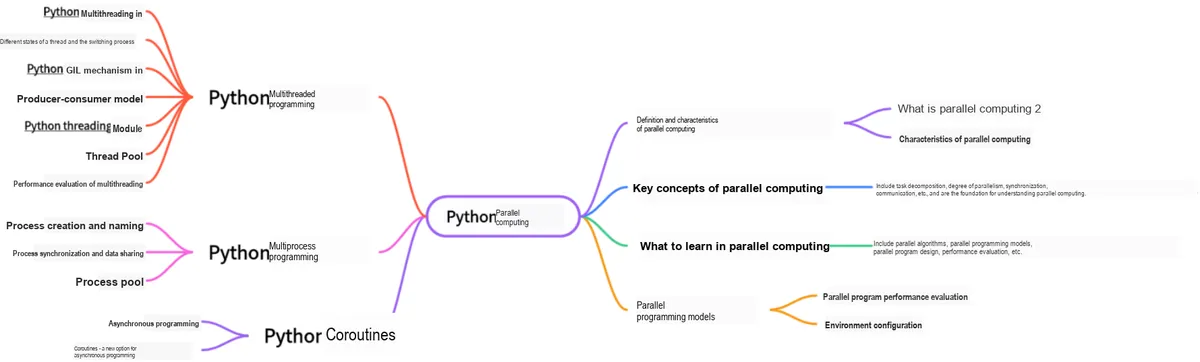
This document is a learning guide on parallel computing and Python concurrent programming, which covers the basic concepts of parallel computing, as well as the core knowledge points of Python multi-threaded programming, multi-process programming and coroutine programming:
10

Main Text

Processes are isolated from each other. To achieve Inter-Process Communication (IPC), the multiprocessing module supports two forms: queues and pipes.

1. Communicate using queues

Queue ([maxsize]) Returns a process-shared queue, which is both thread-safe and process-safe. Any serializable object (Python serializes objects via the pickle module) can be exchanged through it. (maxsize specifies the maximum number of items allowed in the queue; if omitted, there is no size limit.)

The main methods include:

Methods

Function

Put()

It is used to insert data into the queue, and the put method has two optional parameters: blocked and timeout.

① If blocked is True (the default value) and timeout is a positive value, this method will block for the time specified by timeout until there is remaining space in the queue; if the timeout elapses, a Queue.Full exception will be thrown.

② If blocked is False but the Queue is full, the Queue.Full exception will be thrown immediately.

get()

An element can be read from and removed from the queue. Similarly, the get method has two optional parameters: blocked and timeout.

① If blocked is True (the default value) and timeout is a positive value, the Queue.Empty exception will be thrown if no element is retrieved within the waiting period.

② If blocked is False, there are two possible cases: if a value is available in the Queue, this value will be returned immediately; otherwise, if the queue is empty, the Queue.Empty exception will be thrown immediately.

get_nowait()

Same as q.get(False)

put_nowait()

Same as q.put(False)

empty()

When this method is called, it returns True if q is empty, but this result is unreliable — for example, new items may be added to the queue while the True result is being returned.

full()

When this method is called, it returns True if the queue q is full; this result is not reliable, for example, an item in the queue may be removed while the True result is being returned.

qsize()

Returns the correct number of items currently in the queue, but the result is also unreliable for the same reasons as q.empty () and q.full ().

cancel_join_thread()

will not automatically connect to the background thread when the process exits, which can prevent the join_thread () method from blocking

close()

Closes the queue to prevent more data from being added to it. When this method is invoked, the background thread will continue to write the data that has already been enqueued but not yet written, but will close immediately once this method completes. This method will be called if q is garbage collected. Closing the queue will not generate any type of end-of-data signal or exception among queue users. For example, if a user is blocked on a get () operation, closing the queue in the producer will not cause the get () method to return an error.

join_thread()

A background thread for the connection queue. This method is used to wait for all queue items to be consumed after the q.close () method is called. By default, this method is called by all processes that are not the original creator of q. Calling the q.cancel_join_thread method can disable this behavior

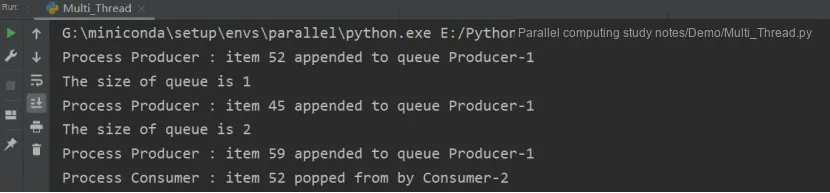
In the following example, the Producer class produces items and places them into a queue, after which the Consumer class removes those items from the queue.

import multiprocessing
import random
import time

class Producer(multiprocessing.Process):
    def __init__(self, queue):
        multiprocessing.Process.__init__(self)
        self.queue = queue

    def run(self):
        for i in range(10):
            item = random.randint(0, 256)
            self.queue.put(item)
            print("Process Producer : item %d appended to queue %s" % (item, self.name))
            time.sleep(1)
            print("The size of queue is %s" % self.queue.qsize())

class Consumer(multiprocessing.Process):
    def __init__(self, queue):
        multiprocessing.Process.__init__(self)
        self.queue = queue

    def run(self):
        while True:
            if self.queue.empty():
                print("the queue is empty")
                break
            else:
                time.sleep(2)
                item = self.queue.get()
                print('Process Consumer : item %d popped from by %s \n' % (item, self.name))
                time.sleep(1)

if __name__ == '__main__':
    queue = multiprocessing.Queue()
    process_producer = Producer(queue)
    process_consumer = Consumer(queue)
    process_producer.start()
    process_consumer.start()
    process_producer.join()
    process_consumer.join()
3 Producer-1 1 2 Consumer-2

The drawback of this code is that the main process will terminate prematurely in scenarios where production is slow but consumption is fast. One solution is to have the producer send an additional termination signal to the queue after it finishes production, so that the consumer can break out of the infinite loop upon receiving this termination signal.

However, a new problem arises: when there are multiple producers and multiple consumers, an end signal needs to be sent as many times as there are consumers, which is extremely cumbersome. In fact, our core idea is simply to send an end signal, and there is another type of queue that provides such a mechanism.

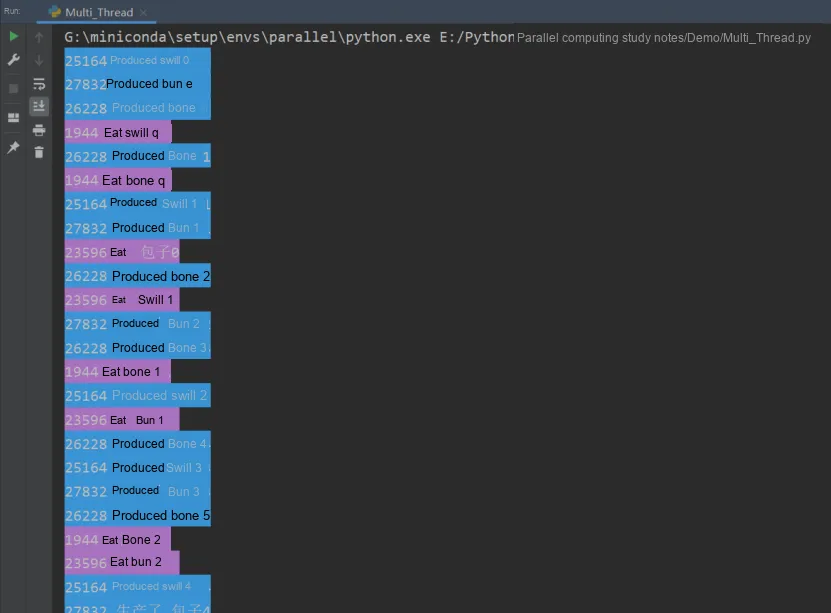
The queue also has a JoinableQueue subclass, which has the following two additional methods:

The sample code is as follows:

from multiprocessing import Process,JoinableQueue
import time,random,os
def consumer(q):
    while True:
        res=q.get()
        time.sleep(random.randint(1,3))
        print('\033[45m%s 吃 %s\033[0m' %(os.getpid(),res))
        # Send one signal to q.join(), showing that one item has been taken away
        q.task_done()

def producer(name,q):
    for i in range(10):
        time.sleep(random.randint(1,3))
        res='%s%s' %(name,i)
        q.put(res)
        print('\033[44m%s 生产了 %s\033[0m' %(os.getpid(),res))
    q.join()

if __name__ == '__main__':
    q=JoinableQueue()
    #Producers: i.e. the chefs
    p1=Process(target=producer,args=('包子',q))
    p2=Process(target=producer,args=('骨头',q))
    p3=Process(target=producer,args=('泔水',q))
    #Consumers: i.e. the foodies
    c1=Process(target=consumer,args=(q,))
    c2=Process(target=consumer,args=(q,))
    c1.daemon=True
    c2.daemon=True

    #Start
    p_l=[p1,p2,p3,c1,c2]
    for p in p_l:
        p.start()

    p1.join()
    p2.join()
    p3.join()
    print('主') 
25164 1 27832 1944

2. Communicate Using Pipes

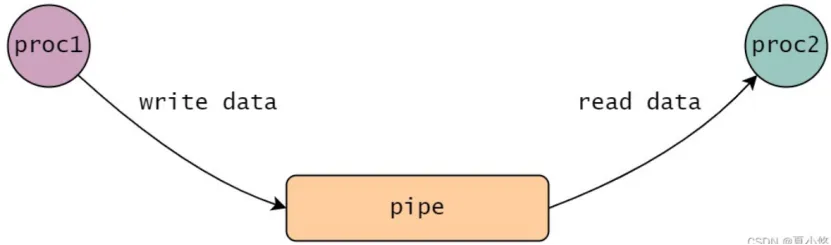
A pipe is one of the most fundamental Inter-Process Communication mechanisms. A data stream that connects one process to another is referred to as a "pipe", which is typically used to channel the output of one process via the pipe to the input of another. Essentially, a pipe is a block of cache in the kernel: the kernel maintains a buffer associated with the pipe file, and all operations performed on the pipe file are converted by the kernel into operations on this buffer memory.

The characteristics of pipe communication include:

proc1 proc2
conn1 conn2
A Quick Guide to Python Parallel Computing: 11 Python Multiprocessing Programming — Secure Data Transmission Between Processes Based on Queues and Pipes

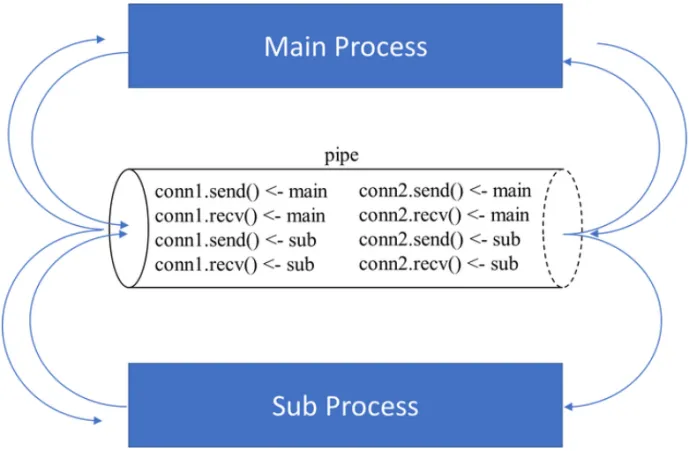
In the following sample program, we create a pipe in the main process, and the main process has the right to use both the conn1 and conn2 instances'. send () and. recv () methods.Next, we create a child process in the main process, and at the same time conn1 and conn2 are passed to the child process as parameters. At this point, both main and sub_process have access to conn1 and conn2, which means that both main and sub_process have the right to use the conn1 and conn2 instances, including the permission to call their. send () and. recv () methods.

The control relationship between the two processes and the two ports is shown in the following figure:
conn1 conn2
from multiprocessing import Process, Pipe
import time

# Create two pipe endpoint objects
# Pipe has the default parameter duplex=True, meaning each endpoint is full-duplex,
# i.e. both the .send() and .recv() methods are available
conn1, conn2 = Pipe(duplex=True)

def worker(x, pipe):
    conn1, conn2 = pipe
    # Verify that sub_process can control conn2's receiving
    msg = conn2.recv()
    time.sleep(1)
    if msg == "conn1s":
        print("conn2 receives msg in sub_p!")
        # Verify that sub_process can control conn2's sending
        conn2.send("conn2s")
    # Verify that sub_process can control conn1's receiving
    msg = conn1.recv()
    if msg == "conn2s":
        print("conn1 receives msg in sub_p!")
        # Verify that sub_process can control conn1's sending
        conn1.send("conn1s")
if __name__ == '__main__':
    conn1, conn2 = Pipe(True)

    sub_process = Process(target=worker, args=(100, (conn1, conn2)))
    sub_process.start()

    # Verify that main can control conn1's sending
    conn1.send("conn1s")
    msg = conn1.recv()
    time.sleep(1)
    if msg == "conn2s":
        # Verify that main can control conn1's receiving
        print("conn1 receives msg in main_p!")
        # Verify that main can control conn2's sending
        conn2.send("conn2s")
    msg = conn2.recv()
    time.sleep(2)
    if msg == "conn1s":
        # Verify that main can control conn2's receiving
        print("conn2 receives msg in main_p!")

Finally, note that when using the. close () method of a pipe port to revoke the current process's control permission over a port, you need to call conn in all processes that can control it conn.close ().

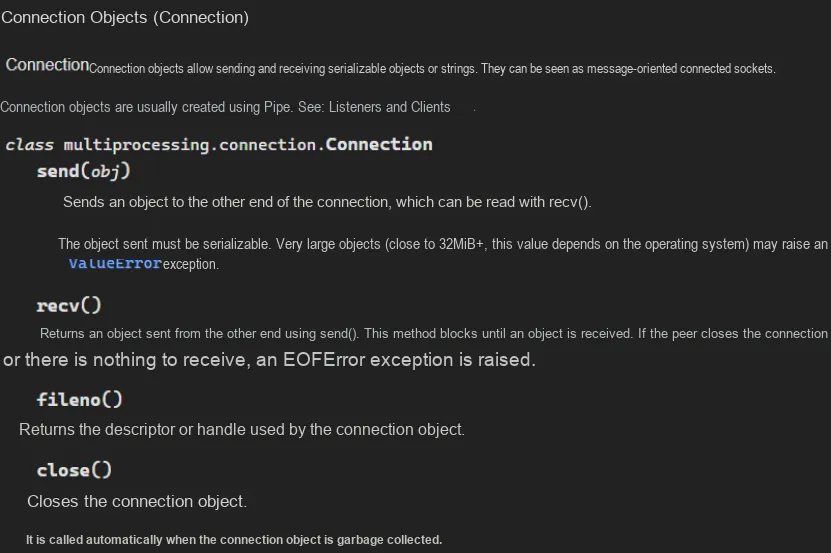
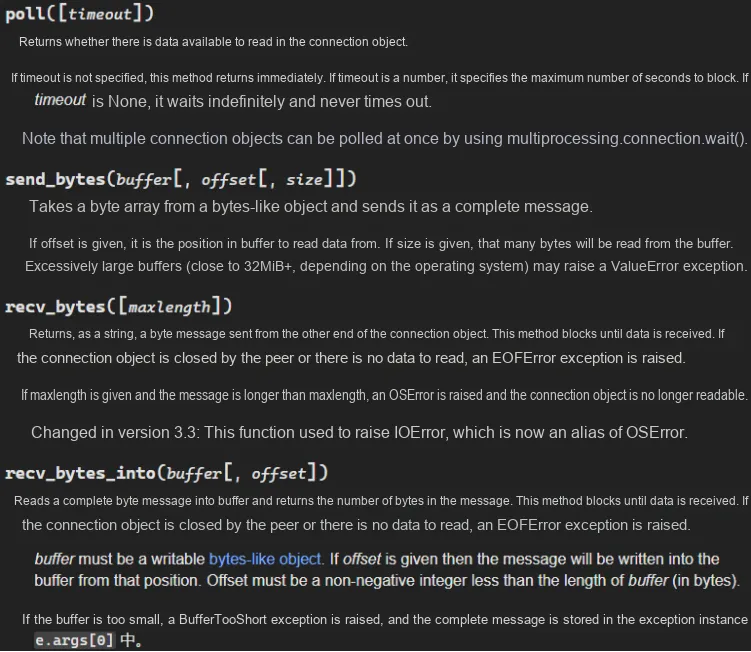
Other usage methods of the connection object include:
A Quick Guide to Python Parallel Computing: 11 Python Multiprocessing Programming — Secure Data Transmission Between Processes Based on Queues and Pipes