Master Python Parallel Computing in One Read: 10 Python Multiprocessing Programming - Data Sharing Between Processes - Based on Shared Memory and Data Managers
In Python inter-process communication, shared memory enables efficient data sharing via Value and Array: it directly manipulates physical memory to avoid data copying, requires synchronization locks for thread safety, and supports numeric values, arrays and custom structs (with the help of the ctypes module). By contrast, the Manager manages shared objects (such as dict and list) through a service process, which supports more data types but comes with lower performance. Shared memory is suitable for high-frequency small-data scenarios, while the Manager applies to complex data structures; both require a process synchronization mechanism to ensure data consistency, striking a balance between efficiency and flexibility.
For more information about us, you can refer to the cloud document: Freak Embedded Studio Cloud Docs, or visit our wiki:https://github.com/leezisheng/Doc/wik
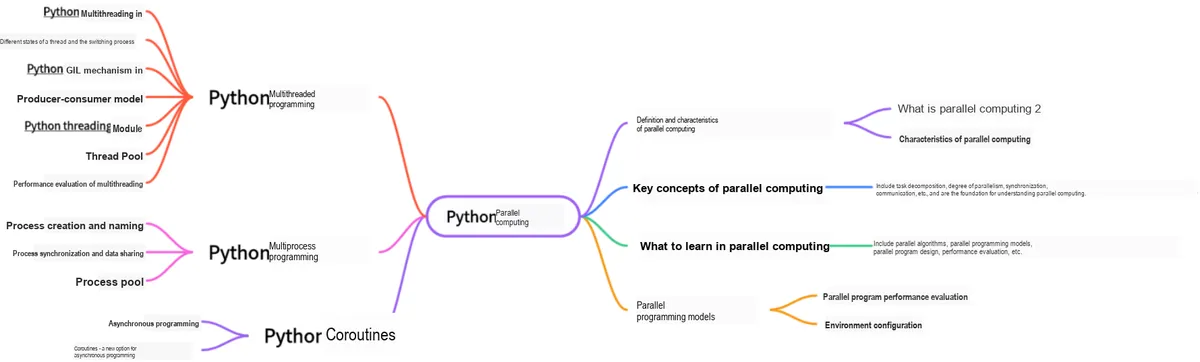
This document is a learning guide on parallel computing and Python concurrent programming, which covers the basic concepts of parallel computing, as well as the core knowledge points of Python multi-threaded programming, multi-process programming and coroutine programming:
Main Text
1. Shared Memory
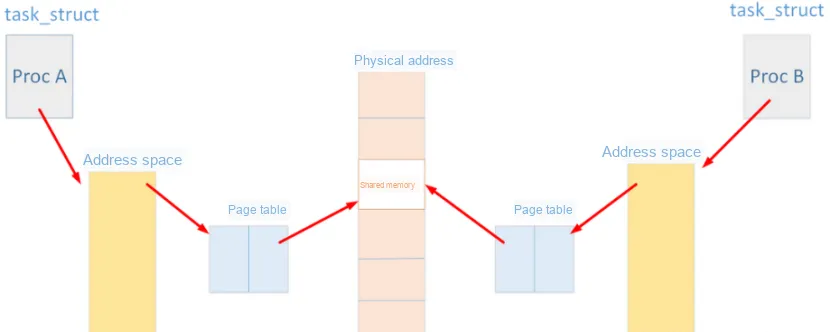
Shared memory, as the name suggests, allows two unrelated processes to access the same logical memory. It is a highly efficient way for two running processes to share and transfer data between each other. The memory shared between different processes usually refers to the same segment of physical memory. Processes can attach this same physical memory segment to their own address space, so that all processes can access the addresses within the shared memory. If a process writes data to the shared memory, the changes made will immediately affect any other process that has access to this same shared memory segment.
Its features include:
Shared memory is one of the most efficient Inter-Process Communication methods, through which processes can directly read and write memory without any data copying.
To exchange information among multiple processes, the kernel reserves a dedicated memory region that can be mapped to the private address space of any process that needs to access it. This allows processes to directly read from and write to this memory block without requiring data copying, thus significantly improving efficiency. (File Mapping)
Since multiple processes share a section of memory, some kind of synchronization mechanism is also required accordingly.
Although shared memory enables fast data transfer between processes, it has the drawback that the content in the memory may be overwritten or tampered with by other processes, so inter-process synchronization methods are required to ensure data security.
multiprocessing provides Value and Array, which allow data to be stored in a shared memory map for access by all processes.
1.1 Shared Memory - Numeric Type
First, let's take a look at the data format of value:
Value(typecode_or_type, *args, lock=True)
Function:
Obtain a shared memory object and store an initial value in it, method of multiprocessing
Return Returns a synchronized shared object (synchronized shared object)
typecode_or_type: defines the return type (converted to the storage type in C language), which is either a ctypes type or a code representing a ctypes type. ctypes is an external function library of Python, which provides C-compatible data types, can call functions in DLLs or shared libraries, and can be used to wrap these libraries in Python.
*args: Allocate a space and assign it a value of args; the type of the value is not restricted.
lock Default Auto-Lock (Synchronous Lock)
The sample code is shown below, and you can see that when the child process modifies the value, the value in the parent process changes accordingly:
import multiprocessing

def func(num):
    num.value = 11

if __name__ == "__main__":
    # i denotes an integer; the main process and child process share this value.
    num = multiprocessing.Value("i", 10)
    print(num.value)

    p = multiprocessing.Process(target=func, args=(num,))
    p.start()
    p.join()

    print(num.value)
It is basically similar to Value, Returns a synchronized shared array (which is an iterable object)
typecode_or_type: defines the storage type to be converted into C language;
size_or_initializer: Used to initialize the shared Memory Space. If it is an integer, it will be regarded as the length of the array, and the memory of the entire array will be initialized to 0; otherwise, it will be treated as a sequence to initialize each element in the array.
lock Default auto-lock (synchronous lock)
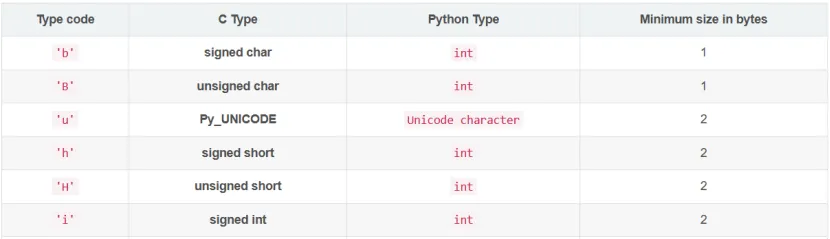
The parameters of the Value and Array data storage types are as follows (partial):
The sample code is as follows, from which you can see that when the child process modifies the elements of the array, the main process will also see the corresponding changes:
import multiprocessing

def func(num):
    num[2] = 9999  # The child process modifies the array, and the main process sees the change

if __name__ == "__main__":
    num = multiprocessing.Array("i", [1, 2, 3, 4, 5])  # The main process and child process share this array
    print(num[:])

    p = multiprocessing.Process(target=func, args=(num,))
    p.start()
    p.join()

    print(num[:])
1.3 Custom Data Structures
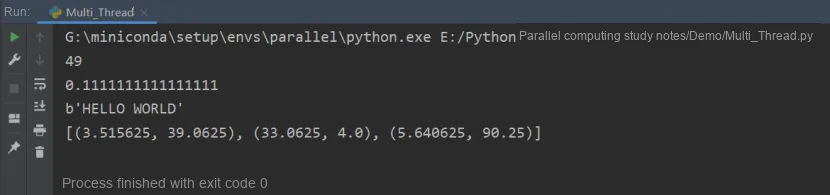
Here we use the classes in ctypes to define structures. The class used to define a structure needs to inherit from the ctypes base class Structure, and then the composition of the structure is defined by defining the _fields_ attribute of the class. The _fields_ attribute is generally defined as a two-dimensional tuple, and for each one-dimensional tuple in it, two values need to be defined: the first value is a string, which serves as the variable name inside the structure, and the second value is a ctypes type, which is used to define the data type of the current structure variable.Note that for structs defined in Python, their variable names, class names and the like can differ from those in C language, but the number, data types and order of struct variables must strictly correspond to the definitions in the C source code; otherwise, memory access errors may occur.
The code is as follows:
from multiprocessing import Process, Lock
from multiprocessing.sharedctypes import Value, Array
from ctypes import Structure, c_double

# Custom data structure
class Point(Structure):
    # Defines a structure type, equivalent to a struct declaration in C.
    # This structure defines two structure variables: x corresponds to an int type, y corresponds to a double type.
    _fields_ = [('x', c_double), ('y', c_double)]

def modify(n, x, s, A):
    n.value **= 2
    x.value **= 2
    s.value = s.value.upper()
    for a in A:
        a.x **= 2
        a.y **= 2

if __name__ == '__main__':
    lock = Lock()

    n = Value('i', 7)  # Define an int
    x = Value(c_double, 1.0/3.0, lock=False)  # Define a ctypes type
    s = Array('c', b'hello world', lock=lock)  # Define a string
    A = Array(Point, [(1.875, -6.25), (-5.75, 2.0), (2.375, 9.5)], lock=lock)
# Define an array of Point type

    p = Process(target=modify, args=(n, x, s, A))
    p.start()
    p.join()

    print(n.value)
    print(x.value)
    print(s.value)
    print([(a.x, a.y) for a in A])
2. Data Manager
Apart from the shared memory approach, another method for inter-process object sharing is to utilize a service process:
The manager object returned by Manager () controls a service process, which holds Python objects and allows other processes to manipulate them via proxies.(Note: Manual locking is required for Manager.)
Managers have the following characteristics:
It controls the service process that manages shared objects;
It ensures that when a process modifies a shared object, the shared objects obtained by all other processes are updated accordingly.
Manager () The types supported by the returned manager are as follows:
list, dict, Namespace, Lock, RLock, Semaphore, BoundedSemaphore, Condition, Event, Barrier, Queue, Value and Array.
The sample code is as follows: the main process defines a dictionary and a list. In the child process, you can add and modify the content of the dictionary, insert new data into the list, so as to realize data sharing between processes, that is, multiple processes can modify the same piece of data together.
from multiprocessing import Process, Manager

def fun1(dic,lis,index):
    dic[index] = 'a'
    dic['2'] = 'b'
    lis.append(index)

if __name__ == '__main__':
    with Manager() as manager:
        # Note how the dictionary is declared; it cannot be defined directly with {}
        dic = manager.dict()
        # [0,1,2,3,4]
        l = manager.list(range(5))

        process_list = []
        for i in range(10):
            p = Process(target=fun1, args=(dic,l,i))
            p.start()
            process_list.append(p)

        for res in process_list:
            res.join()
        print(dic)
        print(l)