Labs / Python parallel computing

A Quick Guide to Python Parallel Computing: 08 Python Multiprocessing Programming — multiprocessing Module, Process Creation & Naming, Process ID Retrieval, Daemon Process Creation and Process Termination

Author: Li Zisheng · Source: FreakStudio open documentation · License: CC BY 4.0

Contents
A Quick Guide to Python Parallel Computing: 08 Python Multiprocessing Programming — multiprocessing Module, Process Creation & Naming, Process ID Retrieval, Daemon Process Creation and Process Termination

Abstract:

This section describes the basic usage of the multiprocessing module in Python, covering how to create and name child processes, retrieve process IDs, set daemon processes, and terminate processes safely, to help implement multiprocess concurrent programming for improved program performance.

347622978

For more information about us, you can refer to the cloud document: Freak Embedded Studio Cloud Docs, or visit our wiki: https://github.com/leezisheng/Doc/wik

FreakStudio's Blog

Previous Recommendations:

You who are learning embedded systems, don’t you even know Object Oriented yet? ?!

The Most Beginner-Friendly Object Oriented Programming Tutorial on the Whole Network: 00 Introduction to Object Oriented Design Methodology

The Most Beginner-Friendly Object Oriented Programming Tutorial on the Whole Network: 01 Basic Concepts of Object Oriented Programming

The Most Beginner-Friendly Object Oriented Programming Course on the Whole Network: 02 Python Implementation of Classes and Objects - Creating Classes with Python

The Most Beginner-Friendly Object Oriented Programming Course on the Whole Network: 03 Python Implementation of Classes and Objects – Adding Attributes to Custom Classes

The Most Beginner-Friendly Object Oriented Programming Tutorial on the Whole Network: 04 Python Implementation of Classes and Objects - Adding Methods to Custom Classes

The Most Beginner-Friendly Object Oriented Programming Tutorial on the Whole Network: 05 Python Implementation of Classes and Objects - PyCharm Code Labels

The Most Beginner-Friendly Object Oriented Programming Tutorial on the Whole Network: 06 Python Implementation of Classes and Objects - Data Encapsulation of Custom Classes

The Most Beginner-Friendly Object Oriented Programming Tutorial on the Whole Network: 07 Python Implementation of Classes and Objects - Type Annotations

The Most Beginner-Friendly Object Oriented Programming Tutorial on the Whole Network: 08 Python Implementation of Classes and Objects - @property Decorator

The Most Beginner-Friendly Object Oriented Programming Tutorial on the Whole Network: 09 Python Implementation of Classes and Objects - Relationships Between Classes

The Most Beginner-Friendly Object Oriented Programming Tutorial on the Whole Network: 10 Python Implementation of Classes and Objects - Class Inheritance and Liskov Substitution Principle

The Most Beginner-Friendly Object Oriented Programming Tutorial Across the Network: 11 Python Implementation of Classes and Objects - Subclass Calling Parent Class Methods

The Most Beginner-Friendly Object Oriented Programming Tutorial on the Whole Network: 12 Python Implementation of Classes and Objects - Using Python's logging Module to Output Program Runtime Logs

The Most Beginner-Friendly Object Oriented Programming Tutorial on the Whole Network: 13 Python Implementation of Classes and Objects – Installation and Usage of Sourcetrail, a Visual Code Reading Tool

The Most Beginner-Friendly Object Oriented Programming Course on the Internet: The Most Beginner-Friendly Object Oriented Programming Course on the Internet: 14 Python Implementation of Classes and Objects - Static Methods and Class Methods of Classes

The most beginner-friendly Object Oriented programming tutorial across the entire network: 15 Python implementation of classes and objects - the __slots__ magic method

The Most Beginner-Friendly Object Oriented Programming Tutorial Across the Internet: 16 Python Implementation of Classes and Objects - Polymorphism, Method Overriding and Open Closed Principle

The most beginner-friendly Object Oriented programming tutorial across the network: 17 Python implementation of classes and objects - duck typing and "file-like object"

The Most Beginner-Friendly Object Oriented Programming Tutorial on the Whole Network: 18 Python Implementation of Classes and Objects - Multiple Inheritance and Drawing Curve Graphs of Serial Port Data with PyQtGraph

The Most Beginner-Friendly Object Oriented Programming Tutorial on the Whole Network: 19 Python Implementation of Classes and Objects – Automatically Generate File Comments and Function Comments with PyCharm

The Most Beginner-Friendly Object Oriented Programming Tutorial on the Whole Network: 20 Python Implementation of Classes and Objects - Implementation of Composition Relationship and CSV File Saving

The Most Beginner-Friendly Object Oriented Programming Tutorial Online: 21 Python Implementation of Classes and Objects - Multi-File Organization: Module and Package

The Most Beginner-Friendly Object Oriented Programming Tutorial Online: 22 Python Implementation of Classes and Objects - Exceptions and Syntax Errors

The Most Beginner-Friendly Object Oriented Programming Course on the Whole Network: 23 Python Implementation of Classes and Objects - Throwing Exceptions

The Most Beginner-Friendly Object Oriented Programming Tutorial Across the Network: 24 Python Implementation of Classes and Objects - Exception Capture and Handling

The Most Beginner-Friendly Object Oriented Programming Tutorial on the Whole Network: 25 Python Implementation of Classes and Objects - Python Determines Input Data Types

The Most Beginner-Friendly Object Oriented Programming Tutorial on the Whole Network: 26 Python Implementation of Classes and Objects - Context Managers and the with Statement

The Most Beginner-Friendly Object Oriented Programming Tutorial Across the Network: 27 Python Implementation of Classes and Objects - Implementation of Exception Hierarchy and Custom Exception Classes in Python

The Most Beginner-Friendly Object Oriented Programming Course on the Whole Network: 28 Python Implementation of Classes and Objects - A Comprehensive Summary of Python Programming Principles, Philosophy and Specifications

The Most Beginner-Friendly Object Oriented Programming Tutorial on the Whole Network: 29 Python Implementation of Classes and Objects – Assertions, Defensive Programming and the Usage of the help function

The Most Beginner-Friendly Object Oriented Programming Tutorial on the Whole Network: 30 Python's Built-in Data Types - The object Root Class

The Most Beginner-Friendly Object Oriented Programming Tutorial on the Whole Network: 31 Python's Built-in Data Types - Object and Type

The Most Beginner-Friendly Object Oriented Programming Tutorial on the Whole Network: 32 Python's Built-in Data Types - Class and Instance

The most beginner-friendly Object Oriented programming tutorial on the entire network: 33 Built-in data types in Python – the relationship between objects and types

The Most Beginner-Friendly Object Oriented Programming Tutorial on the Whole Network: 34 Python's Built-in Data Types - Commonly Used Composite Data Types in Python: Tuples and Named Tuples

The most beginner-friendly Object Oriented programming tutorial on the entire network: 35 Python's built-in data types - docstrings and the __doc__ attribute

The Most Beginner-Friendly Object Oriented Programming Tutorial on the Whole Network: 36 Python's Built-in Data Type - Dictionary

The Most Beginner-Friendly Object Oriented Programming Course on the Whole Network: 37 Common Composite Data Types in Python - Lists and List Comprehensions

The Most Beginner-Friendly Object Oriented Programming Tutorial on the Whole Network: 38 Common Composite Data Types in Python – Implementing stack, Queue and Deque with Lists

The Most Beginner-Friendly Object Oriented Programming Course on the Whole Network: 39 Common Composite Data Types in Python - Sets

The Most Beginner-Friendly Object Oriented Programming Tutorial on the Whole Network: 40 Common Composite Data Types in Python – Usage of Enumerations and the enum Module

The Most Beginner-Friendly Object Oriented Programming Tutorial Across the Network: 41 Common Composite Data Types in Python - Queues (FIFO, LIFO, Priority Queue, Deque and Circular Queue)

The most beginner-friendly Object Oriented programming tutorial across the network: 42 Commonly used composite data types in Python - collections container data types

The Most Beginner-Friendly Object Oriented Programming Tutorial Across the Network: 43 Common Composite Data Types in Python - Extending Built-in Data Types

The Most Beginner-Friendly Object Oriented Programming Tutorial on the Whole Network: 44 Python Built-in functions and Magic Methods - Overriding Magic Methods of Built-in Types

The Most Beginner-Friendly Object Oriented Programming Course on the Whole Network: 45 Implementing Common Data Structures in Python – Linked List, Tree, Hash Table, Graph and Heap

The most beginner-friendly Object Oriented programming tutorial across the network: 46 Python function methods and interfaces - functions and event-driven frameworks

The most beginner-friendly Object Oriented programming tutorial across the network: 47 Python function methods and interfaces - Callback function

The Most Beginner-Friendly Object Oriented Programming Tutorial on the Whole Network: 48 Python function Methods and Interfaces - Positional Arguments, Default Arguments, Variable Arguments and Keyword Arguments

The Most Beginner-Friendly Object Oriented Programming Tutorial Across the Network: 49 Python function Methods and Interfaces – The Difference Between function and Methods, and Lambda Anonymous Functions

The most beginner-friendly Object Oriented programming tutorial on the entire network: 50 Python function methods and interfaces - Interfaces and Abstract Base Classes

The most beginner-friendly Object Oriented programming tutorial on the entire network: 51 Python function methods and interfaces - Implementing interfaces with Zope

The most beginner-friendly Object Oriented programming tutorial across the network: 52 Python function methods and interfaces - Protocol and interfaces

The most beginner-friendly Object Oriented programming tutorial across the entire network: 53 Python Strings and Serialization - Strings and Character Encodings

The Most Beginner-Friendly Object Oriented Programming Tutorial on the Whole Network: 54 Python Strings and Serialization - String Formatting and the format Method

The most beginner-friendly Object Oriented programming tutorial on the entire network: 55 Python Strings and Serialization - Byte Sequence Types and Mutable Byte Strings

The Most Beginner-Friendly Object Oriented Programming Tutorial on the Whole Network: 56 Python Strings & Serialization - Regular Expression and re Module Application

The Most Beginner-Friendly Object Oriented Programming Tutorial on the Whole Network: 57 Python Strings and Serialization - Serialization and Deserialization

The Most Beginner-Friendly Object Oriented Programming Tutorial on the Whole Network: 58 Python Strings and Serialization – Definition and Implementation of Serialized Web Objects

The Most Beginner-Friendly Object Oriented Programming Tutorial on the Whole Network: 59 Python Parallelism and Concurrency - Parallelism & Concurrency and Threads & Processes

Master Python Parallel Computing in One Article: 00 Basic Concepts of Parallel Computing

A Quick Guide to Python Parallel Computing: 01 Python Multithreaded Programming – Basic Concepts, Switching Process, GIL Lock Mechanism, and Producer-Consumer Model

A Quick Guide to Python Parallel Computing: 02 Python Multithreaded Programming - threading Module, Thread Creation & Query, and Daemon Threads

A Quick Guide to Python Parallel Computing: 03 Python Multithreaded Programming - Multithread Synchronization (Part 1) — Based on Mutex Locks, Recursion Locks and Semaphores

A Quick Guide to Python Parallel Computing: 04 Python Multithreaded Programming - Multithread Synchronization (Part 2) — Based on Condition Variables, Events and Barriers

A Quick Guide to Python Parallel Computing: 05 Python Multithreaded Programming – Scheduled Execution of Threads

A Quick Guide to Python Parallel Computing: 06 Python Multithreaded Programming – Communication Based on Queues

A Quick Guide to Python Parallel Computing: 07 Python Multithreaded Programming – Usage of Thread Pools and Performance Evaluation of Multithreading

More exciting content can be found here:

Speed Up Your Python: A Quick Guide to Python Parallel Computing

Understand the Debugging Principle of CM3 Microcontroller in One Article

After half a month of dedicated work, the complete summary of embedded technology stack is now released

The "Secret Martial Arts Manual" for Computer Science Competitions

An open-source project collection for MicroPython: awesome-micropython, which covers MicroPython tool libraries in various aspects

Avnet ZUBoard 1CG Development Board — A New Choice for Deep learning

Engineers should not blindly worship open-source code; they also need to focus on mastering fundamental skills.

What? A motor drive module with customizable color schemes? !

What? Three brand-new expansion boards have just been released for the XIAO main controller!

A Step-by-Step Guide to Publishing Your Third-Party Library for Arduino

A 10,000-Word Comprehensive Guide: Step-by-Step Instructions to Publish Third-Party Libraries for MicroPython/Python

[Electronic DIY Essential] Works with All 5-Wire Stepper Motors! Compatible with Seeed XIAO Series Development Boards

Master the Electronic Design Competition in One Read: Award-Winning Tips Every Electronics Student Must See

Master the Optoelectronic Design Competition in One Read: A Must-See for Electronics Enthusiasts!

A Guide to Engineering Competitions: A Step-by-Step Roadmap from Knowledge Learning, hardware Selection, Code Debugging to Report Writing

Document Acquisition:

You can download the document via the following link:

https://github.com/leezisheng/Doc

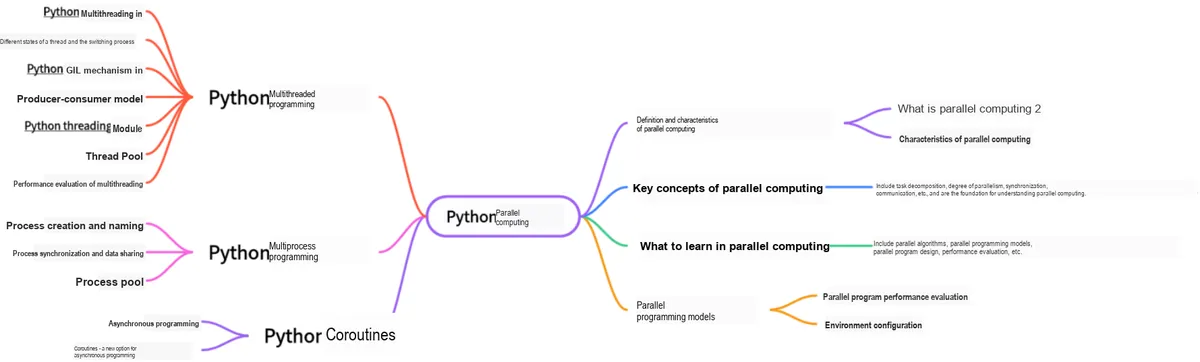
This document is a learning guide on parallel computing and Python concurrent programming, which covers the core knowledge points including the basic concepts of parallel computing, Python multi-threaded programming, multi-process programming and coroutine programming:

A Quick Guide to Python Parallel Computing: 08 Python Multiprocessing Programming — multiprocessing Module, Process Creation & Naming, Process ID Retrieval, Daemon Process Creation and Process Termination

Body Text

Multithreading in Python cannot take advantage of multi-core processors. If you want to fully utilize the resources of a multi-core CPU, in most cases you need to use multiprocessing in Python. Python provides the multiprocessing module to spawn child processes and execute our custom tasks (such as function) in these child processes, and the programming interface of this module is similar to that of the multithreading module threading.The multiprocessing module boasts a rich set of features: it supports subprocesses, inter-process communication and data sharing, as well as various forms of synchronization, and provides components including Process, Queue, Pipe, Lock and more.

1. Process Creation

First, let's take a look at the multiprocessing.Process object:

class multiprocessing.Process(group=None, target=None, name=None, args=(), kwargs={}, *, daemon=None)

Wherein:

 group: should always be None; it exists only for compatibility with threading.Thread.
target: the callable object invoked by the run() method. It defaults to None, meaning nothing is called.
name: the process name (see name for details).
args: the argument tuple for the target call. The args parameter defaults to (), and can be used to specify a list or tuple of arguments to pass to target.
Kwargs: the dictionary of keyword arguments for the target call.
daemon: sets the process daemon flag to True or False. If None (the default), the flag is inherited from the creating process.

1.1 Call the constructor of the Process class to create a process

The Process class provides the __init__() constructor, which can be used to create processes. Common methods for starting a process include:

A Quick Guide to Python Parallel Computing: 08 Python Multiprocessing Programming — multiprocessing Module, Process Creation & Naming, Process ID Retrieval, Daemon Process Creation and Process Termination

The attributes of a process include:

32

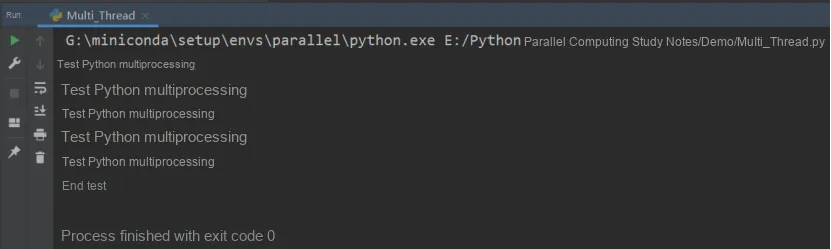
Here, we conduct tests on process creation and startup, with the code provided as follows:

from multiprocessing import  Process

def fun1(name):
    print('测试%s多进程' %name)

if __name__ == '__main__':
    process_list = []
    for i in range(5):  #Start 5 child processes to run the fun1 function
        p = Process(target=fun1,args=('Python',)) #Instantiate the process object
        p.start()
        process_list.append(p)

    for i in process_list:
        p.join()

    print('结束测试')

The above code spawns 5 child processes to execute the function. As we can observe from the output, the results are printed simultaneously, which implements true parallel operations where multiple CPUs execute tasks at the same time.

6 5

We know that a process is the smallest resource allocation unit in Python, meaning that data and memory are not shared between processes. Every time a process is started, resources need to be allocated independently and accessible data copied, so the cost of starting and destroying processes is relatively high. Note that you need to use the process object to call the join () method. Without join (), after the main process exits, child processes will remain in the idle state, and you have to kill them manually.

1.2 Create a process class by inheriting the Process class

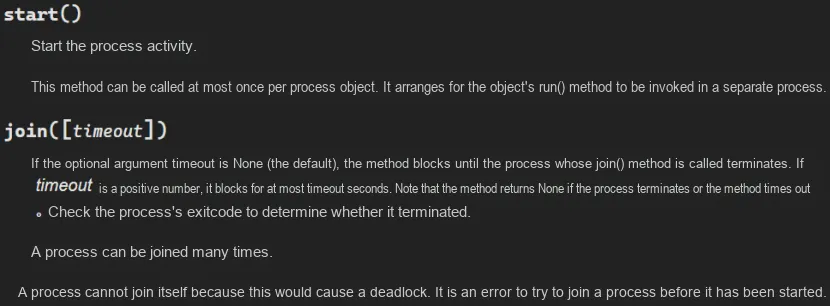
If a subclass overrides the constructor, it must ensure that it calls the base class constructor before performing any other operations on the process Process.__init__(); meanwhile, for the run () method, you can refer to the official documentation:

A Quick Guide to Python Parallel Computing: 08 Python Multiprocessing Programming — multiprocessing Module, Process Creation & Naming, Process ID Retrieval, Daemon Process Creation and Process Termination

Here, the test code is as follows:

from multiprocessing import  Process

class MyProcess(Process): #Inherit from the Process class
    def __init__(self,name):
        super(MyProcess,self).__init__()
        self.name = name
    def run(self):
        print('测试%s多进程' % self.name)

if __name__ == '__main__':
    process_list = []
    for i in range(5):  #Start 5 child processes to run the fun1 function
        p = MyProcess('Python') #Instantiate the process object
        p.start()
        process_list.append(p)

    for i in process_list:
        p.join()

    print('结束测试')

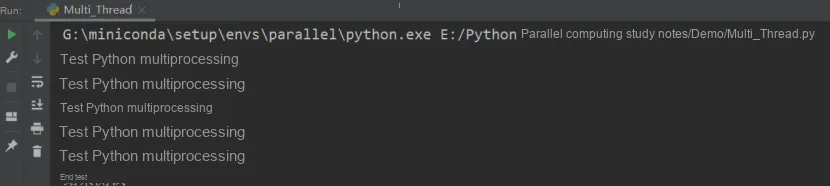
The results are as follows, and the effect is the same as that of the first method:

A Quick Guide to Python Parallel Computing: 08 Python Multiprocessing Programming — multiprocessing Module, Process Creation & Naming, Process ID Retrieval, Daemon Process Creation and Process Termination

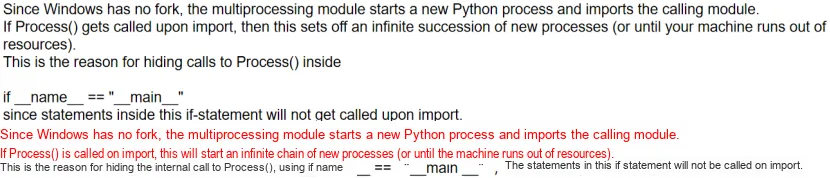
Note: On Windows, Process () must be placed under the if __name__ == '__main__': block

A Quick Guide to Python Parallel Computing: 08 Python Multiprocessing Programming — multiprocessing Module, Process Creation & Naming, Process ID Retrieval, Daemon Process Creation and Process Termination

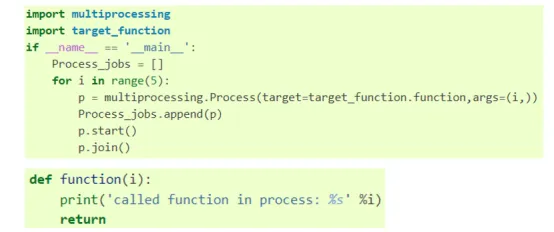
By instantiating a process object in the main Code Block, we can prevent infinite recursion calls. The best practice is to define the target function in a separate script file and then import it for use.

5

2. Naming of Processes

In the example from the previous section, we created a process and assigned the target function and function variables to it. However, if we can assign a name to the process, it will be more convenient for debugging.

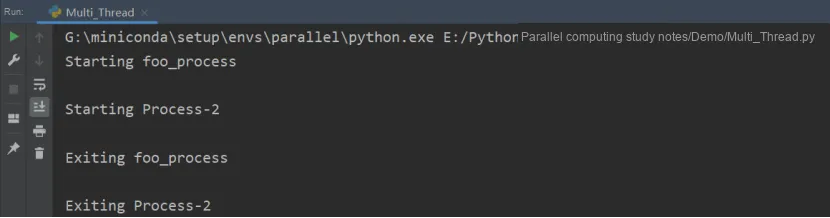
current_process () can return the Process object corresponding to the current process. The following code creates a named process and an unnamed process in the main program, both with the target function being foo () function.

import multiprocessing
import time

def foo():
    name = multiprocessing.current_process().name
    print("Starting %s \n" % name)
    time.sleep(3)
    print("Exiting %s \n" % name)

if __name__ == '__main__':
    process_with_name = multiprocessing.Process(name='foo_process', target=foo)
    process_with_default_name = multiprocessing.Process(target=foo)
    process_with_name.start()
    process_with_default_name.start()

The following are the operation results:

Process-2

3. Obtain the PID of the process

Process Identifier (PID), whose full English name is Process Identifier, is also commonly referred to as process ID. As the name suggests, it is the unique identity tag for each process: once a program starts running, the system will automatically assign a unique PID to the corresponding process. After the process terminates, the PID will be reclaimed by the system and may be reassigned to a newly launched program.

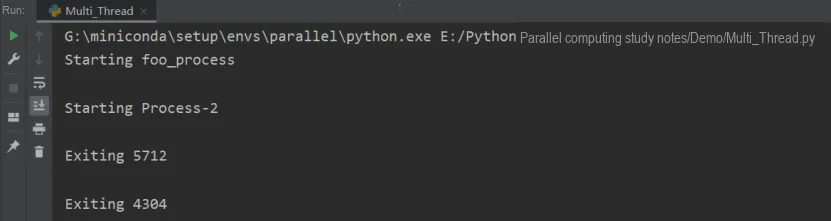
You can use current_process (). pid here to get the PID of the current process. If you change current_process (). name in the above code to current_process (). pid, you will get the following result:

Process-2 5712 4304

4. Daemon

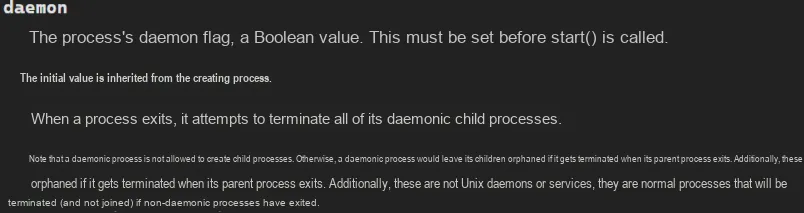
A daemon is a background process that resides in memory. It detaches from terminal control and is unaffected by terminal signals such as Ctrl+ C. Typically, daemons are used to periodically perform certain tasks or continuously wait to handle certain occurring events. When the parent process terminates, the daemon terminates along with it (essentially, the daemon ends before the parent process, which is responsible for reclaiming resources).

When you need to handle relatively large tasks without requiring manual intervention, executing them as background processes is a very common programming model. Such processes can run concurrently with other processes. Through the background process option of Python's multiprocessing module, we can make processes run in the background.

To run the process in the background, we set the daemon parameter to True:

A Quick Guide to Python Parallel Computing: 08 Python Multiprocessing Programming — multiprocessing Module, Process Creation & Naming, Process ID Retrieval, Daemon Process Creation and Process Termination

The code is as follows:

import multiprocessing
import time

def foo():
    name = multiprocessing.current_process().name
    print("Starting %s " % name)
    time.sleep(3)
    print("Exiting %s " % name)

if __name__ == '__main__':
    background_process = multiprocessing.Process(name='background_process', target=foo)
    background_process.daemon = True
    NO_background_process = multiprocessing.Process(name='NO_background_process', target=foo)
    NO_background_process.daemon = False
    background_process.start()
    NO_background_process.start()

The running results are as follows:

0

Processes not running in the background will produce output, while those running in the background will not; background processes will terminate automatically once the main process ends.

5. Process Termination

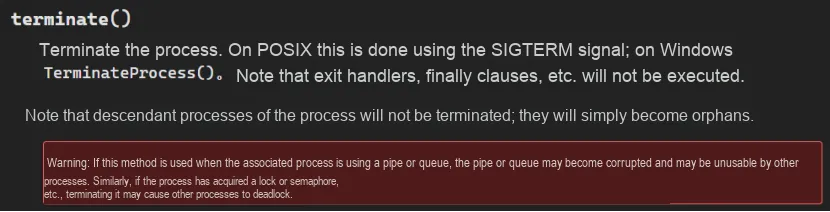
We can use the terminate () method to kill a process immediately. Additionally, we can use the is_alive () method to check whether a process is still running:

A Quick Guide to Python Parallel Computing: 08 Python Multiprocessing Programming — multiprocessing Module, Process Creation & Naming, Process ID Retrieval, Daemon Process Creation and Process Termination

In this example, create a process whose target function is foo (). After starting it, we kill it via the terminate () method.

import multiprocessing
import time

def foo():
        print('Starting function')
        time.sleep(0.1)
        print('Finished function')

if __name__ == '__main__':
        p = multiprocessing.Process(target=foo)
        print('Process before execution:', p, p.is_alive())
        p.start()
        print('Process running:', p, p.is_alive())
        p.terminate()
        print('Process terminated:', p, p.is_alive())
        p.join()
        print('Process joined:', p, p.is_alive())
        print('Process exit code:', p.exitcode)

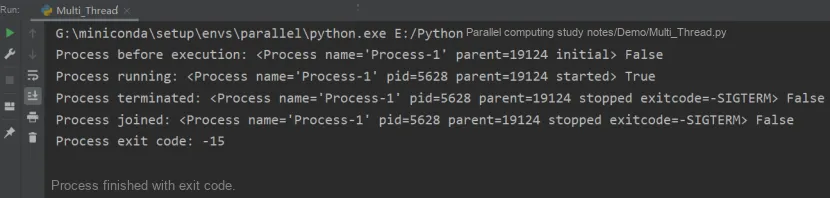
The running results are as follows:

15

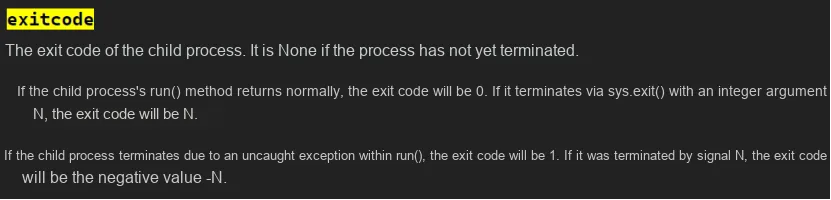
We create a thread, then use the is_alive () method to monitor its lifecycle. After that, we call the terminate () method to terminate the process. Finally, we verify that the process has ended by reading its ExitCode status code.

0 1
1