
Contents
Abstract:
This article introduces the usage of Python's ThreadPoolExecutor, covering the basic concepts of thread pools, Future objects, task submission methods (map/submit), tips for obtaining results, and the usage of VizTracer, a performance evaluation tool for multithreading.

For more information about us, you can refer to the cloud document: Freak Embedded Studio Cloud Docs, or visit our wiki: https://github.com/leezisheng/Doc/wik
Original Link:
Previous Recommendations:
You who are learning embedded systems, don’t you even know Object Oriented yet? ?!
Master Python Parallel Computing in One Article: 00 Basic Concepts of Parallel Computing
More exciting content can be found here:
Speed Up Your Python: A Quick Guide to Python Parallel Computing
Understand the Debugging Principle of CM3 Microcontroller in One Article
The "Martial Arts Manual" for Computer Science Competitions
Avnet ZUBoard 1CG Development Board — A New Choice for Deep learning
What? A motor drive module with customizable color schemes? !
What? Three brand-new expansion boards have just been released for the XIAO main controller!
A Step-by-Step Guide to Publishing Your Third-Party Library for Arduino
Master the Optoelectronic Design Competition in One Read: A Must-See for Electronics Enthusiasts!
Document Acquisition:
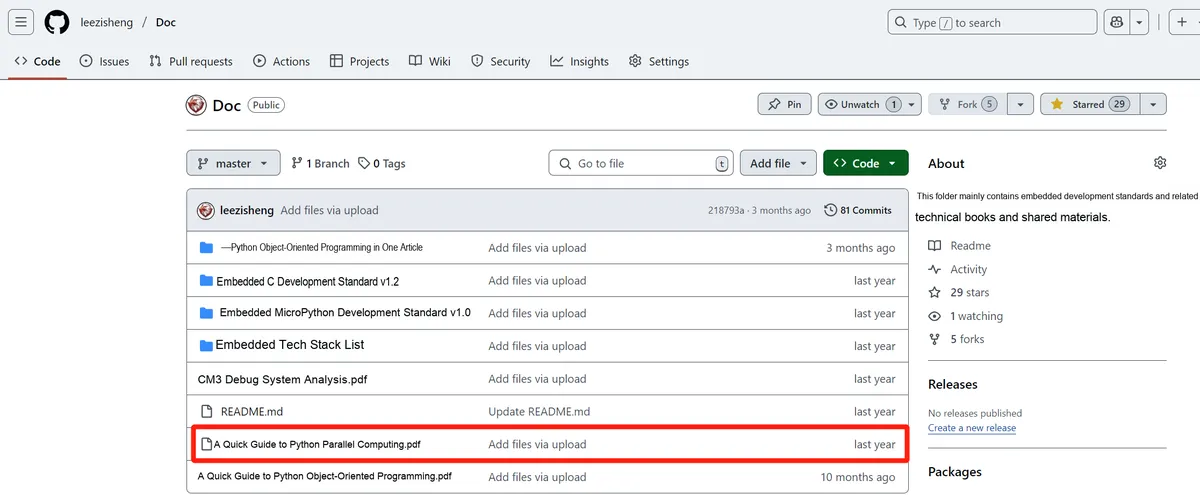
You can download the document via the following link:
https://github.com/leezisheng/Doc
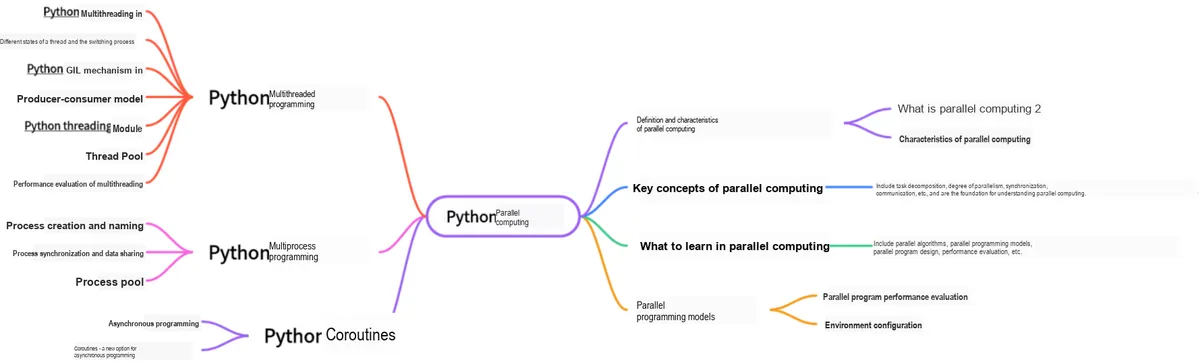
This document is a learning guide on parallel computing and Python concurrent programming, which covers the core knowledge points including the basic concepts of parallel computing, Python multi-threaded programming, multi-process programming and coroutine programming:
Body Text
1. Basic Concepts and Usage of Thread Pools
The cost of the system starting a new thread is relatively high, as it involves interaction with the operating system. In this case, using a thread pool can effectively improve performance, and it is especially advisable to consider using a thread pool when the program needs to create a large number of threads with very short lifecycles.
The thread pool creates a large number of idle threads as soon as the system starts. As long as a program submits a function to the thread pool, the thread pool will start an idle thread to execute it. After the function finishes executing, the thread will not die; instead, it will return to the thread pool to be idle again, waiting to execute the next function.
Furthermore, using a thread pool can effectively control the number of concurrent threads in the system. When a system contains a large number of concurrent threads, the system performance will drop sharply, and even cause the Python interpreter to crash, while the maximum thread count parameter of the thread pool can control the number of concurrent threads in the system to not exceed this value.
1.1 ThreadPoolExecutor Class
The base class of thread pools is concurrent.futures module's Executor, Executor provides two subclasses, namely ThreadPoolExecutor and ProcessPoolExecutor, where ThreadPoolExecutor is used to create thread pools, while ProcessPoolExecutor is used to create process pools.
If you use a thread pool to manage concurrent programming, you only need to submit the corresponding task function to the thread pool, and the thread pool will handle the rest.
Executor provides the following common methods:
submit (fn, *args, **kwargs): Submit thefnfunction to the thread pool.*argsrepresents the parameters passed to the fn function,*kwargsrepresents passing parameters to thefnfunction in the form of keyword arguments.map (func, *iterables, timeout= None, chunksize= 1): This function is similar to the global functionmap (func, *iterables), except that this function will start multiple threads to immediately perform map processing on iterables asynchronously.shutdown (wait= True): Shuts down the thread pool.
1.2 Future Object
After the program submits the task function (via submit) to the thread pool, the submit method will return a Future object. The Future class is mainly used to obtain the return value of the thread task function. Since thread tasks are executed asynchronously in a new thread, the function executed by the thread is equivalent to a "to be completed" task, which is why Python uses Future to represent it.
Future provides the following methods:
cancel (): Cancels the thread task represented by thisFuture. If the task is being executed and cannot be canceled, this method returnsFalse; otherwise, the program cancels the task and returnsTrue.cancelled (): Returnswhether the thread task represented by Futurehas been successfully cancelled.running (): If the thread task represented by thisFutureis being executed and cannot be canceled, this method returnsTrue.done (): If the thread task represented by thisFutureis successfully cancelled or has been executed to completion, this method will returnTrue.result (timeout= None): Gets the final result returned by the thread task represented by thisFuture. If the thread task represented by the Future has not completed yet, this method will block the current thread, and thetimeoutparameter specifies the maximum number of seconds to block.exception (timeout= None): Get the exception raised by the thread task represented by thisFuture. If the task completes successfully without any exception, this method returnsNone.add_done_callback (fn): Register a "callback function" for the thread task represented by thisFuture. When the task completes successfully, the program will automatically trigger thisfnfunction.
After you finish using a thread pool, you should call the shutdown () method of this thread pool, which will initiate the shutdown sequence of the thread pool. A thread pool that has had the shutdown () method called will no longer accept new tasks, but will complete execution of all previously submitted tasks. When all tasks in the thread pool have finished executing, all threads in the thread pool will die.
1.3 Steps for Using Thread Pool
The steps to use a thread pool to execute thread tasks are as follows:
- Call
ThreadPoolExecutorclass constructor to create a thread pool; - Define an ordinary function as a thread task;
- Call
ThreadPoolExecutorobject'ssubmit ()method to submit thread tasks; - When you do not want to submit any tasks, call the
ThreadPoolExecutorobject'sshutdown ()method to shut down the thread pool.
1.3.1 Submit Tasks to the Thread Pool
In the following example, we define a task function task_function, which takes a task as a parameter and prints the task information. We also create a thread pool and use the submit () method to submit each task to the thread pool for execution. By using a thread pool, we can process multiple tasks in the queue concurrently and improve the execution efficiency of the program. Note that the size of the thread pool defaults to the number of CPU cores of the system, but you can also specify the size of the thread pool by passing the max_workers parameter.
import concurrent.futures

# Simulated task function
def task_function(task):
    print(f"Processing task: {task}")

# Create a thread pool
with concurrent.futures.ThreadPoolExecutor() as executor:
    # Create a task queue
    task_queue = ["Task 1", "Task 2", "Task 3", "Task 4", "Task 5"]

    # Submit tasks to the thread pool
    for task in task_queue:
        executor.submit(task_function, task)

    # Wait for all tasks to complete
    executor.shutdown()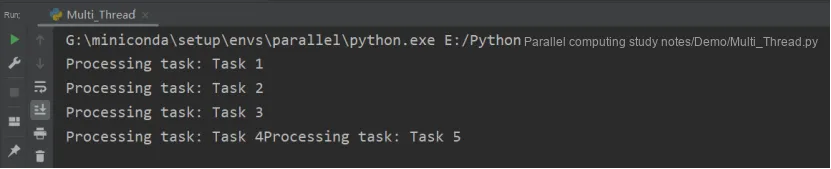
1.3.2 Obtain Thread Execution Result
The following code calls the Future 's result () method to obtain the return value of the thread task:
from concurrent.futures import ThreadPoolExecutor
import threading,time

def test(value1, value2=None):
    print("%s threading is printed %s, %s"%(threading.current_thread().name, value1, value2))
    time.sleep(2)
    return 'finished'
def test_result(future):
    print(future.result())

if __name__ == "__main__":
    threadPool = ThreadPoolExecutor(max_workers=4, thread_name_prefix="test_")
    for i in range(0,10):
        future = threadPool.submit(test, i,i+1)
        print(future.result())

    threadPool.shutdown(wait=True)
    print('main finished')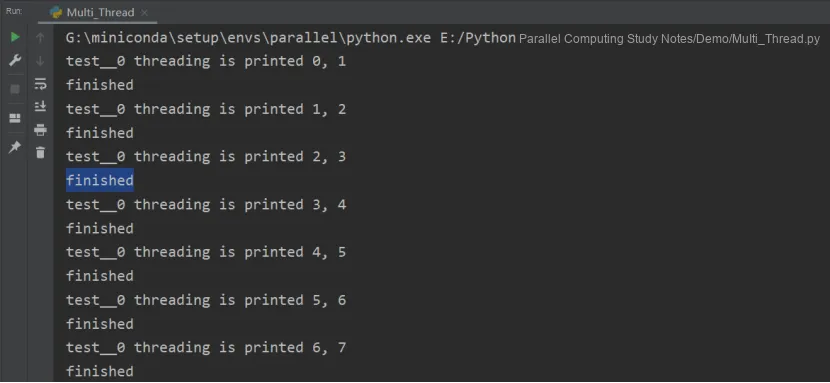
However, this method will block the current main thread, and the blocking will not be released until the subtask is completed. result () If the program does not want to directly call the result () method to block the thread, it can use the Future 's add_done_callback () method to add a callback function, which takes the form of fn (future). When the thread task is completed, the program will automatically trigger this callback function and pass the corresponding Future object as a parameter to this callback function.
from concurrent.futures import ThreadPoolExecutor
import threading,time

def test(value1, value2=None):
    print("%s threading is printed %s, %s"%(threading.current_thread().name, value1, value2))
    time.sleep(2)
    return 'finished'

def test_result(future):
    future.add_done_callback(test_result)

if __name__ == "__main__":
    threadPool = ThreadPoolExecutor(max_workers=4, thread_name_prefix="test_")
    for i in range(0,10):
        future = threadPool.submit(test, i,i+1)
        print(future.result())

    threadPool.shutdown(wait=True)
    print('main finished')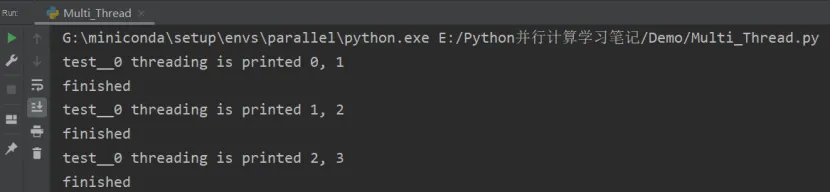
Additionally, since the thread pool implements the Context Manager Protocol, programs can use the with statement to manage the thread pool, which eliminates the need to manually close it.
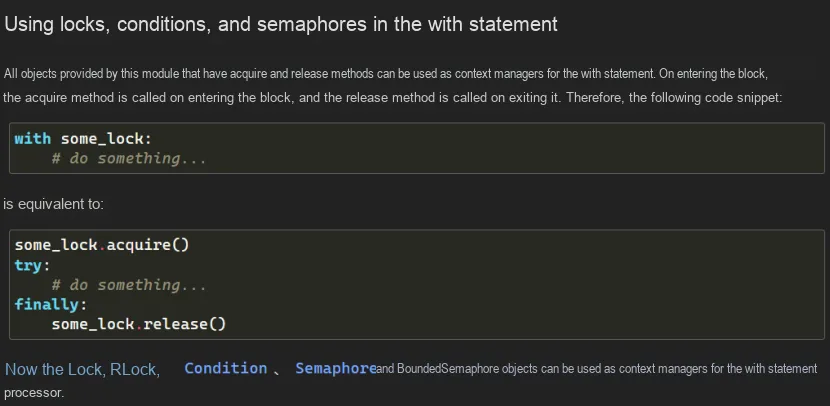
1.3.3 Using the map method of ThreadPoolExecutor
Exectuor also provides a map (func, *iterables, timeout= None, chunksize= 1) method, whose function is similar to that of the built-in function map (); the difference is that the map () method of the thread pool will start a thread for each element in iterables to execute the func function concurrently. This approach is equivalent to starting len (iterables) threads and collecting the execution results of each thread.
Below is an example demonstrating how to use the ThreadPoolExecutor map method to process multiple tasks in a queue:
import concurrent.futures

# Simulated task function
def task_function(task):
    print(f"Processing task: {task}")
    return task.upper()

# Create a thread pool
with concurrent.futures.ThreadPoolExecutor() as executor:

    # Create a task queue
    task_queue = ["Task 1", "Task 2", "Task 3", "Task 4", "Task 5"]

    # Use the map method to process the task queue
    results = executor.map(task_function, task_queue)

    # Get the execution results of the tasks
    for result in results:
        print(f"Task result: {result}")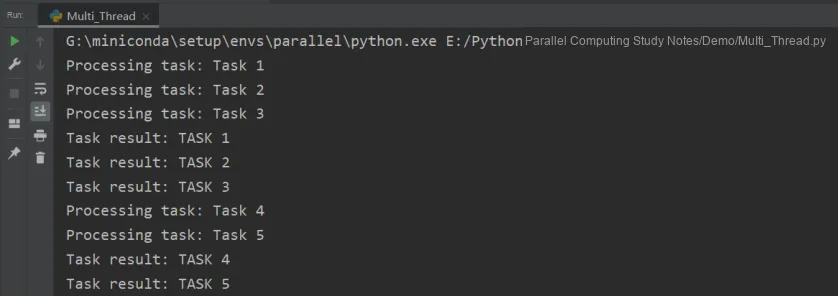
In the example above, we defined a simulated task function task_function that takes a task as a parameter and prints the task's information. In this function, we convert the task to uppercase and return it.
Then, we use ThreadPoolExecutor to create a thread pool. After that, we create a task queue task_queue which contains multiple tasks.
Then, we use the executor.map () method to pass the task function and the task queue as parameters to the map method. The map method will automatically assign tasks to threads in the thread pool for concurrent execution, and return an iterator of results results.
Finally, we use a for loop to iterate over the results iterator, retrieve the execution result of each task, and print them out.
By using the map method, multiple tasks in the queue can be handled more concisely, and the execution results of the tasks can be obtained conveniently. Please note that the map method will return results in the order of the tasks in the task queue, even if the execution order of the tasks may vary.
2. Performance Evaluation of Multithreading
As introduced earlier, the GIL is a lock introduced by the CPython interpreter, which prevents true parallel execution at the interpreter level. Before executing any thread, the interpreter must wait for the currently running thread to release the GIL. In fact, the interpreter enforces that any thread intending to run must acquire the GIL before accessing any of the interpreter's resources, such as stacks or Python objects. This is precisely the purpose of the GIL — to prevent concurrent access to Python objects from different threads. In this way, the GIL can protect the interpreter's memory and ensure the proper functioning of garbage collection.But in reality, this prevents programmers from improving program performance by executing multiple threads in parallel. If we remove the GIL of CPython, multithreading can truly run in parallel. The GIL does not actually affect threads running in parallel on multiple processors; it merely restricts an interpreter to running only one thread at a time.
Here, we use VizTracer to perform performance evaluation on multi-threading.
First, proceed with the installation: pip install viztracer
Here, we use the code of the LIFO queue for testing:
viztracer Multi_Thread.py
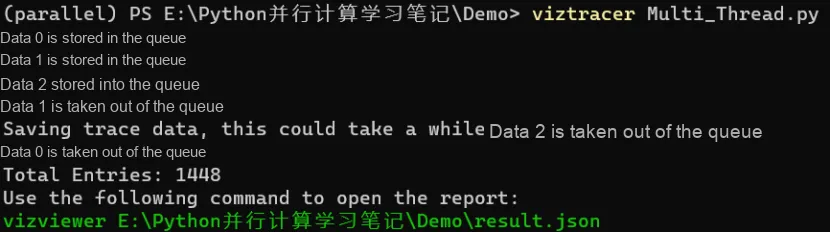
Follow the prompts and enter the command: vizviewer E:\Python并行计算学习笔记\Demo\result.json
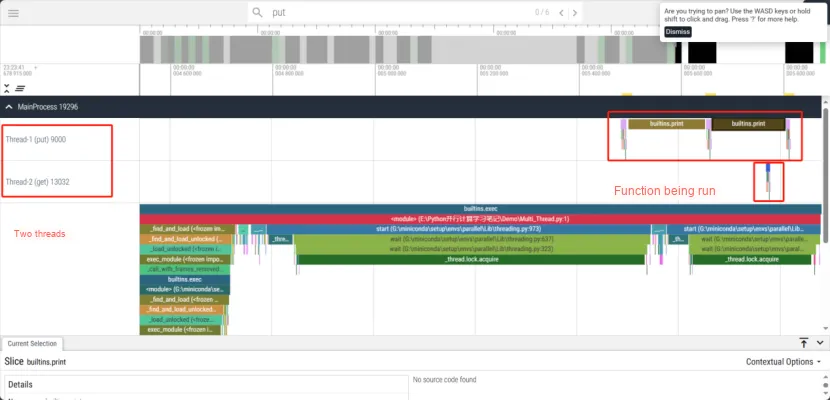
Open the analysis result page, and you can view the function call status and running time of the two threads:
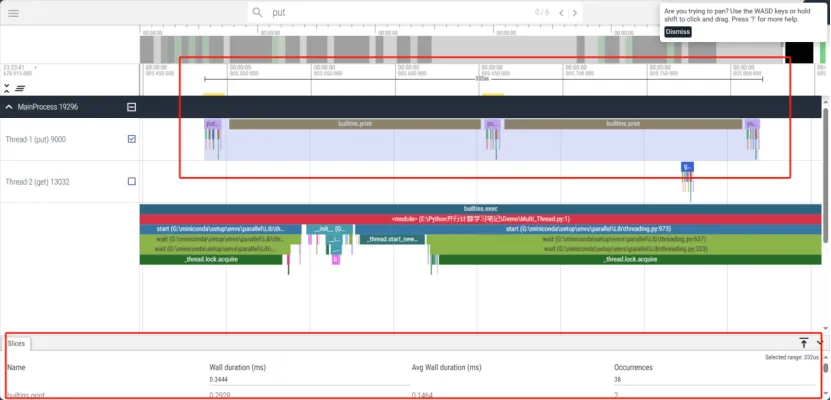
Adjust the cursor, and we can see more details:
For detailed usage instructions, please visit: https://viztracer.readthedocs.io/en/latest/index.html
Or watch the video: https://www.bilibili.com/video/BV1d34y1C78W/