Contents
Abstract:
This article introduces three mechanisms for multithreading synchronization in Python: Condition, Event, and Barrier. A Condition refers to a thread that executes only after a specific condition is met, which is applicable to the producer-consumer model; an Event enables thread synchronization via event flags, suitable for simple inter-thread communication; a Barrier is used when multiple threads need to synchronize at the same stage, fitting the phased execution of parallel tasks.

For more information about us, you can refer to the cloud document: Freak Embedded Studio Cloud Docs, or visit our wiki: https://github.com/leezisheng/Doc/wik
Original Link:
Previous Recommendations:
You who are learning embedded systems, don’t you even know Object Oriented yet? ?!
Master Python Parallel Computing in One Article: 00 Basic Concepts of Parallel Computing
More exciting content can be found here:
Speed Up Your Python: A Quick Guide to Python Parallel Computing
Understand the Debugging Principle of CM3 Microcontroller in One Article
The "Martial Arts Manual" for Computer Science Competitions
Avnet ZUBoard 1CG Development Board — A New Choice for Deep learning
What? A motor drive module with customizable color schemes? !
What? Three brand-new expansion boards have just been released for the XIAO main controller!
A Step-by-Step Guide to Publishing Your Third-Party Library for Arduino
Document Acquisition:
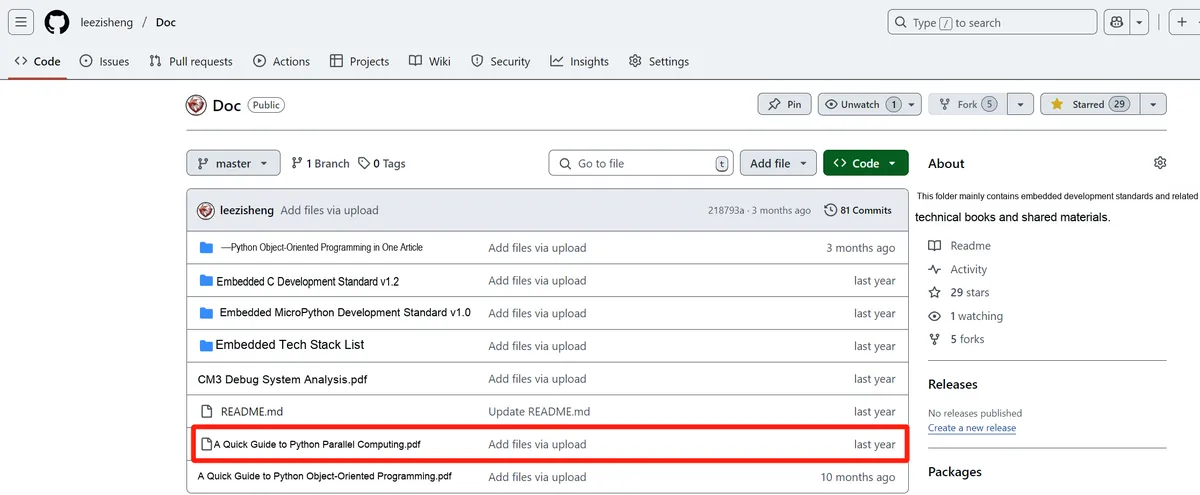
You can download the document via the following link:
https://github.com/leezisheng/Doc
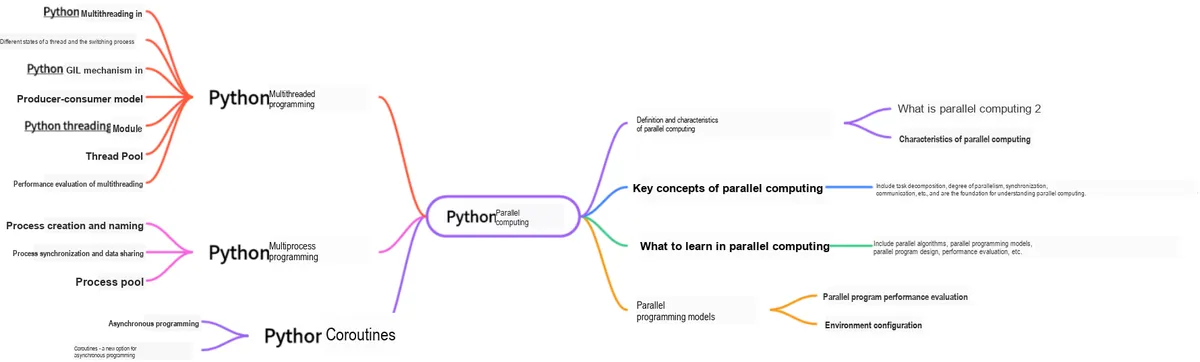
This document is a learning guide on parallel computing and Python concurrent programming, which covers the core knowledge points including the basic concepts of parallel computing, Python multi-threaded programming, multi-process programming and coroutine programming:
Body Text
1. Thread synchronization based on condition variables
Python provides Condition objects that offer support for complex thread synchronization issues. Condition is known as a condition variable; unlike mutual exclusion locks, condition variables are designed for waiting rather than locking. A condition variable automatically blocks a thread until a specific circumstance occurs. A condition variable is a synchronization mechanism that leverages global variables shared among threads, and it primarily involves two operations:
- A thread is suspended while waiting for "the condition of the condition variable to be satisfied";
- Another thread makes the condition hold (sends a signal indicating that the condition is satisfied).
The main way to use Condition is as follows: a thread first acquires a condition variable, then checks certain conditions. If the conditions are not met, it will wait; if the conditions are met, after performing some processing to change the conditions, it notifies other threads via the notify method. Other threads in the wait state will recheck the conditions upon receiving the notification. By continuously repeating this process, complex synchronization problems can be resolved.
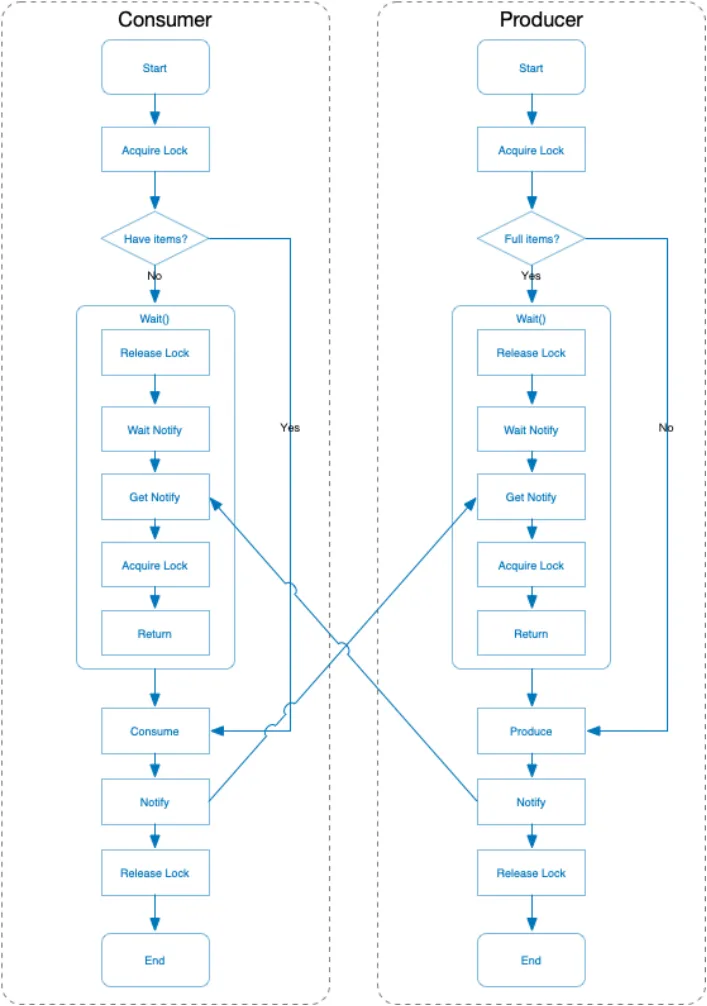
The best example to illustrate the condition variable mechanism remains the producer-consumer problem: in this scenario, producers keep producing data into the buffer as long as it is not full, while consumers keep fetching (and subsequently destroying) data from the buffer as long as it is not empty. When the buffer queue is not empty, producers will notify consumers; when the buffer is not full, consumers will notify producers.
import threading
import time

condition = threading.Condition()
products = 0

class Producer(threading.Thread):
    def __init__(self):
        threading.Thread.__init__(self)

    def run(self):
        global condition, products
        while True:
            # The consumer modifies the shared resource by acquiring the lock
            if condition.acquire():
            # The thread first acquires a condition variable, then checks whether production is saturated.
                if products < 10:
                    # If the number of products is less than 10, continue producing and notify the consumers via the notify method
                    # As long as the cache is not full, the producer keeps producing into the cache;
                    products += 1;
                    print("Producer(%s):deliver one, now products:%s" % (self.name, products))
                    # When the buffer queue is not empty, the producer will notify the consumers
                    condition.notify()
                # If it is full, the producer enters a waiting state until it is woken up
                else:
                    print("Producer(%s):already 10, stop deliver, now products:%s" % (self.name, products))
                    condition.wait()
                # If the queue is not full, produce 1 item, notify the state and release the resource
                condition.release()
                time.sleep(2)

class Consumer(threading.Thread):
    def __init__(self):
        threading.Thread.__init__(self)

    def run(self):
        global condition, products
        while True:
            if condition.acquire():
                if products > 1:
                    # As long as the cache is not empty, the consumer keeps taking items from the cache (and then destroying them).
                    products -= 1
                    print("Consumer(%s):consume one, now products:%s" % (self.name, products))
                    # When the buffer queue is not full, the consumer will notify the producer.
                    condition.notify()
                else:
                    print("Consumer(%s):only 1, stop consume, products:%s" % (self.name, products))
                    # The cache is empty, the consumer thread waits
                    condition.wait()
                condition.release()
                time.sleep(2)

if __name__ == "__main__":
    # First, 2 producers produce products
    for p in range(0, 2):
        p = Producer()
        p.start()
    # Next, 10 consumers will consume the products
    for c in range(0, 10):
        c = Consumer()
        c.start()
The running results are as follows:

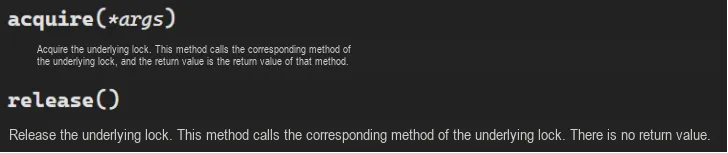
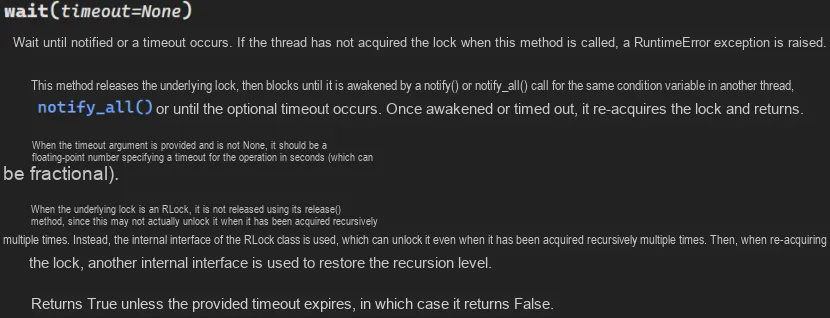
At first glance, this code seems to cause a deadlock, because condition.acquire () is immediately followed by wait (), which appears to hold the lock indefinitely. In fact, wait () will release the lock, then wait for another thread to call notify () before attempting to acquire the lock again. Note, however, that notify () does not automatically release the lock, which is why there are two lines in the code: first call notify (), then call release ().
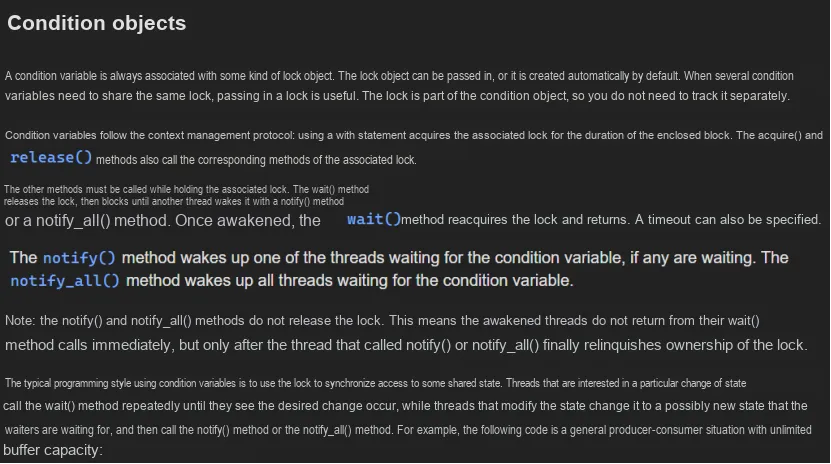
Actually, the detection of a condition is performed under the protection of a mutex. A thread must lock the mutex first before modifying the state of the condition. If a condition evaluates to false, a thread automatically blocks and releases the mutex that is waiting for a state change. If another thread modifies the condition, it signals the associated condition variable to wake up one or more threads waiting on it, which then reacquire the mutex and re-evaluate the condition. If two processes share read-write memory, condition variables can be used to implement thread synchronization between these two processes.
Additionally: Condition object's constructor function can accept a Lock/RLock object as a parameter; if none is specified, the Condition object will internally create an RLock on its own;in addition to the notify method, the Condition object also provides the notifyAll method, which can notify all threads in the waiting pool to attempt to acquire the internal lock.Due to the aforementioned mechanism, threads in the waiting state can only be woken up via the notify method, hence notifyAll serves to prevent threads from remaining in a silent state indefinitely.
If conditional variables are not used, it is also possible to continuously loop to check whether the cache is greater than 0, but this method will cause a waste of CPU resources. This problem can be easily solved by using conditional variables! A conditional variable allows a thread to sleep (block and wait) until it receives a notification (a signal) from another thread before it proceeds to execute its own operations.
The process of the aforementioned consumer-producer model is as follows:
Here is another interesting example about condition variables:
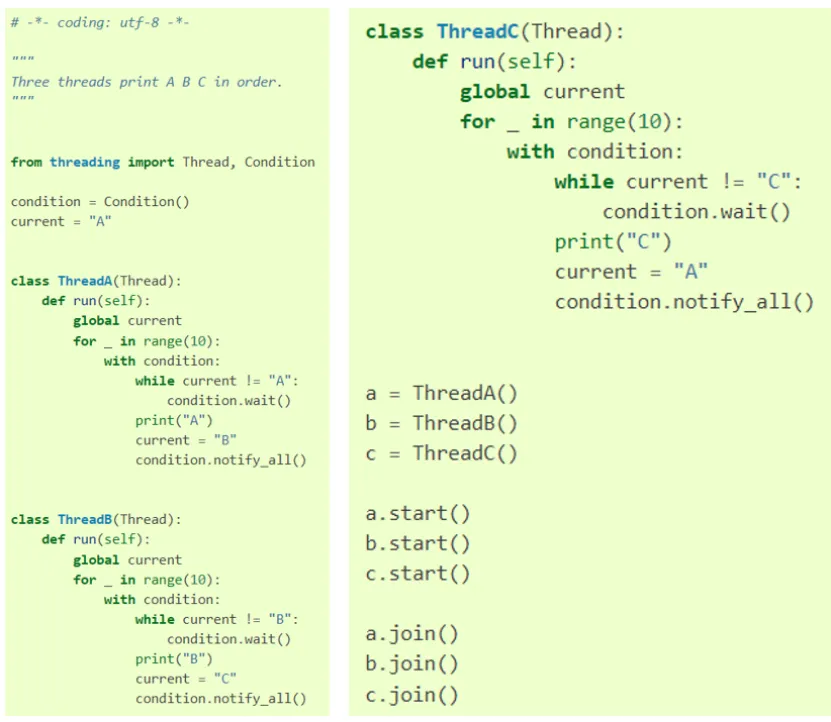
The principle is straightforward: once a thread acquires the lock, it first checks whether the current state matches the one it expects. For instance, the thread responsible for printing "B" expects the state current = 'B', then it prints B and updates the state to C, which becomes the expected state for the thread that prints "C". However, since we cannot wake up a specific thread here, we have to wake up all threads and let them recheck the state themselves.
2. Event-based thread synchronization
Imagine such a scenario: you have started multiple threads, all of which need to access a certain resource. However, there is a small issue here — the resource to be accessed is not yet ready to accept access requests. In this case, if multiple threads attempt to access it at this point, they will inevitably get no response, and you will have to handle such unresponsive situations. In this kind of scenario, is it possible to first perform a probe in the main thread, confirm that the resource is accessible, and then let the already started multi-threads access it? Let's consider how to use Event to handle such a problem.
- Create an
Eventobject. Now, the internal identifier of the event isFalse; - Start multithreading, and call the
waitmethod within the thread, which will cause blocking at this point; - The main thread probes and, after confirming that the resource is accessible, calls the
setmethod to set the built-in flag toTrue; - This
Eventwill notify all threads in the waiting state to resume running: threads that have calledwaitwill receive the event information and access the resource.
The following is the sample code:
import threading
from threading import Event


def worker(event_obj, i):
    print('{i}号线程等待事件信号'.format(i=i))
    event_obj.wait()
    print('{i}号线程收到事件信号'.format(i=i))


event = Event()

for i in range(5):
    t = threading.Thread(target=worker, args=(event, i))
    t.start()

print('确认资源可用')
event.set()
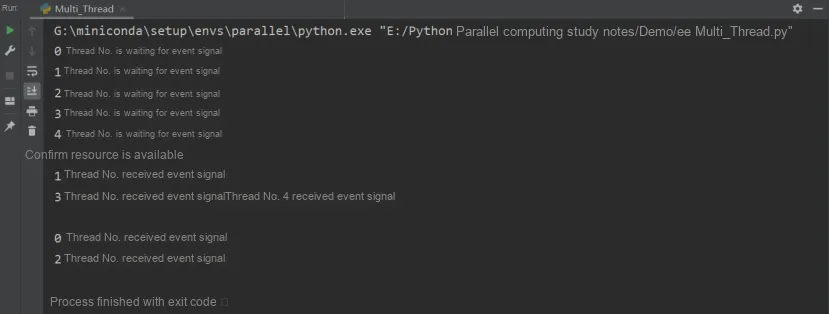
The following is the code output, and you can see that after event.set (), all threads resume running:
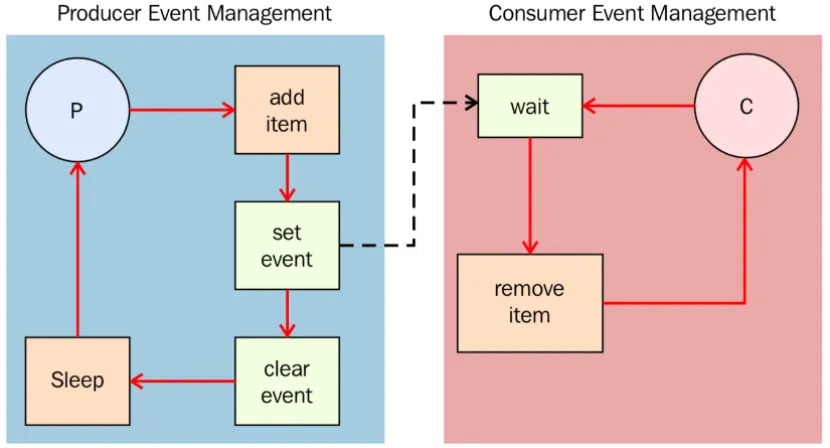
Let's go back to the producer-consumer problem again. To ensure that the producer will not generate new data when the buffer is full, and the consumer will not look for data when the buffer is empty, how to implement it with the event mechanism? The code is as follows:
import time
from threading import Thread, Event
import random

items = []
event = Event()

class consumer(Thread):
    def __init__(self, items, event):
        #  The producer class defines the item list and Event on initialization,
        # Unlike the example with the condition object, the list here is not global but is passed in as an argument
        Thread.__init__(self)
        self.items = items
        self.event = event

    def run(self):
        while True:
            time.sleep(2)
            # Wait for an element to arrive
            # When an element arrives, the consumer gives up this lock
            # This allows other producers or consumers to enter and acquire this lock
            self.event.wait()

            # If the consumer is woken up after giving up this lock, it reacquires the lock
            # When an element arrives, it is popped from the items list
            item = self.items.pop()
            print('Consumer notify : %d popped from list by %s' % (item, self.name))

class producer(Thread):
    def __init__(self, items, event):
        Thread.__init__(self)
        self.items = items
        self.event = event

    def run(self):
        global item
        for i in range(100):
            time.sleep(2)
            item = random.randint(0, 256)
            self.items.append(item)
            print('Producer notify : item N° %d appended to list by %s' % (item, self.name))
            print('Producer notify : event set by %s' % self.name)
            # Notify the event after adding an element
            # Set the internal flag to true. All threads waiting for this event will be woken up.
            # When the flag is true, a thread calling the wait() method will not be blocked.
            self.event.set()
            print('Produce notify : event cleared by %s '% self.name)
            # Set the internal flag to false. Threads that call the wait() method afterwards will be blocked,
            # until the set() method is called to set the internal flag to true again.
            self.event.clear()

if __name__ == '__main__':
    t1 = producer(items, event)
    t2 = consumer(items, event)
    t1.start()
    t2.start()
    t1.join()
    t2.join()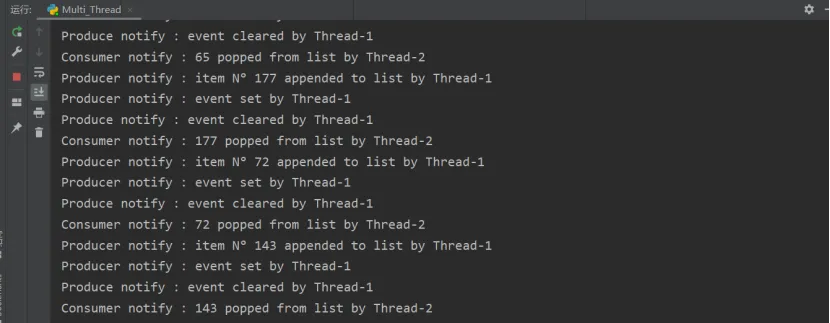
The figure above shows the running result when the program is executed: the thread t1 appends a value to the end of the list, then sets the event to notify the consumer. The consumer is blocked via wait (), and will not fetch the element from the list for consumption until it receives the signal.
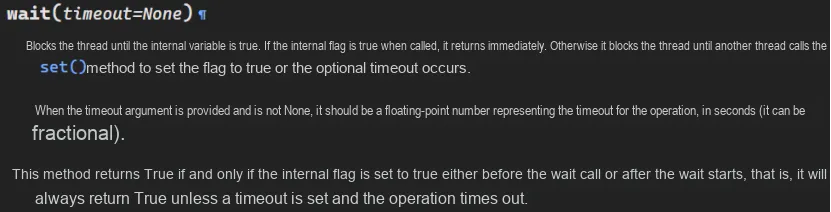
Additionally, the wait () method:
3. Barrier-based thread synchronization
Barrier is used to deal with the situation where a fixed number of threads need to wait for each other. Unlike the previous introduction of mutual exclusion Lock/Event/Timer , multi-threaded Barrier will set a thread barrier number parties . If the number of waiting threads does not reach the number of obstacles pa r ties, all threads will be blocked. When the waiting threads reach this number, all waiting threads will be awakened.
Take the player as an example:
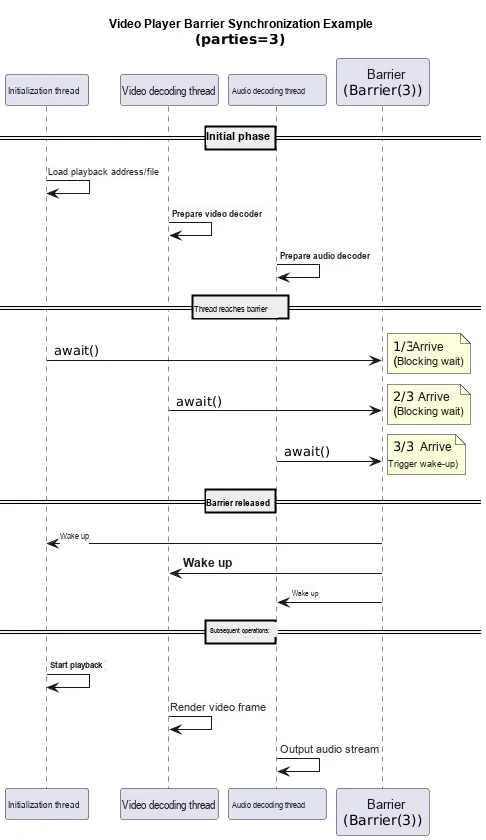
First, one thread performs the player initialization work (loading local files or obtaining the playback address), then one thread fetches video frames, and another thread fetches video audio. The player will not start playing until the initialization work, video frame acquisition and video audio acquisition are all completed. If any of the threads fails to finish its task, the player will be in a blocked state until all three tasks are completed.
class threading.Barrier(parties, action=None, timeout=None)Creates a barrier object that requires parties threads. If a callable action argument is provided, it will be invoked automatically in one of the threads when all threads are released. timeout serves as the default timeout period if no timeout is specified in the wait () method.
The usage methods include:
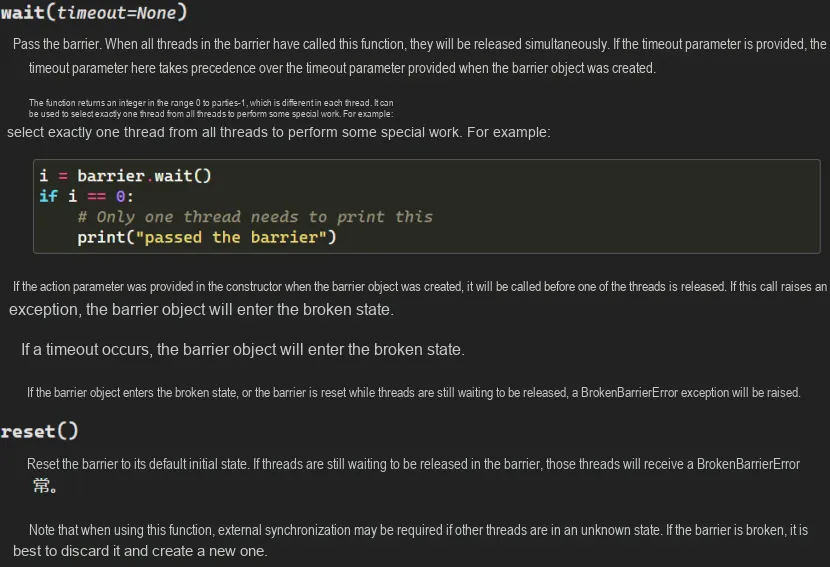
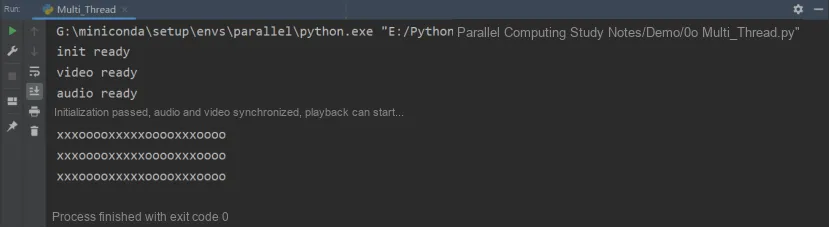
The following is sample code that creates three threads: initialization preparation, audio preparation, and video preparation. Music playback can only be started if and only when all three initializations are completed.
# Import the threading module
import threading

def plyer_display():
    print('初始化通过完成,音视频同步完成,可以开始播放....')

# Set 3 barrier objects
barrier = threading.Barrier(3, action=plyer_display, timeout=None)
def player_init(statu):
    print(statu)
    try:
        # Set the timeout; if the number of barrier threads is not reached within 2 seconds,
        # it enters the broken state and raises a BrokenBarrierError
        barrier.wait(2)
    except Exception as e:
    # Broken state, raises a BrokenBarrierError
            print("等待超时了... ")
    else:
        print("xxxooooxxxxxooooxxxoooo")

if __name__ == '__main__':
    statu_list = ["init ready", "video ready", "audio ready"]
    thread_list = list()
    # Create three threads: initialization preparation, audio preparation, video preparation
    # Music playback can start only when all three initializations are complete
    for i in range(0, 3):
        t = threading.Thread(target=player_init, args=(statu_list[i],))
        t.start()
        thread_list.append(t)
    for t in thread_list:
        t.join()
The following is the code execution result. Note: If barrier.wait (timeout= None) times out while waiting, it will enter a broken state and trigger a BrokenBarrierError exception. For the robustness of the program, it is recommended to add exception handling.