
Contents
- Abstract:
- Original Link:
- Previous Recommendations:
- For more exciting content, you can check out:
- Document Acquisition:
- Body Text
- 1.Python threading module
- 2. Thread Creation
- 2.1 Create a thread by calling the constructor of the Thread class
- 2.2 Creating a Thread Class by Inheriting the Thread Class
- 3. Identify the current thread
- 4. Check whether the query thread is still running
- 5. Creation of Daemon Threads
Abstract:
This paper introduces the core functions of the Python threading module, including thread creation and management, thread status monitoring, and the special application of daemon threads. It focuses on explaining the instantiation method of the Thread class, how to obtain current thread information, detect thread alive status, and how to implement background threads.

For more information about us, you can refer to the cloud document: Freak Embedded Studio Cloud Docs, or visit our wiki: https://github.com/leezisheng/Doc/wik
Original Link:
Previous Recommendations:
You who are learning embedded systems, don’t you even know Object Oriented yet? ?!
Master Python Parallel Computing in One Article: 00 Basic Concepts of Parallel Computing
For more exciting content, you can check out:
Speed Up Your Python: A Quick Guide to Python Parallel Computing
Understand the Debugging Principle of CM3 Microcontroller in One Article
The "Martial Arts Manual" for Computer Science Competitions
Avnet ZUBoard 1CG Development Board — A New Choice for Deep learning
What? A motor drive module with customizable color schemes? !
What? Three brand-new expansion boards have just been released for the XIAO main controller!
A Step-by-Step Guide to Publishing Your Third-Party Library for Arduino
Document Acquisition:
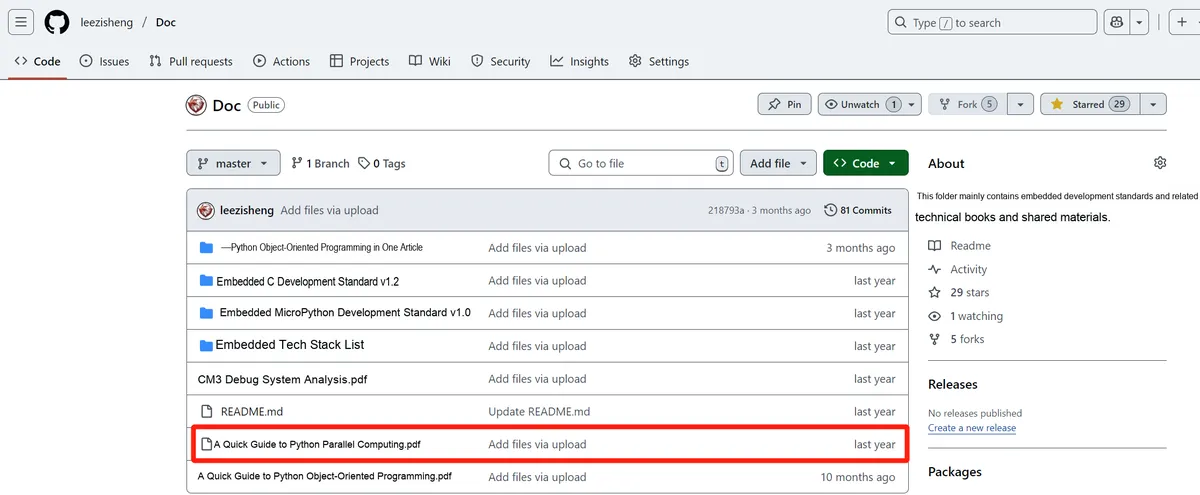
You can download the document via the following link:
https://github.com/leezisheng/Doc
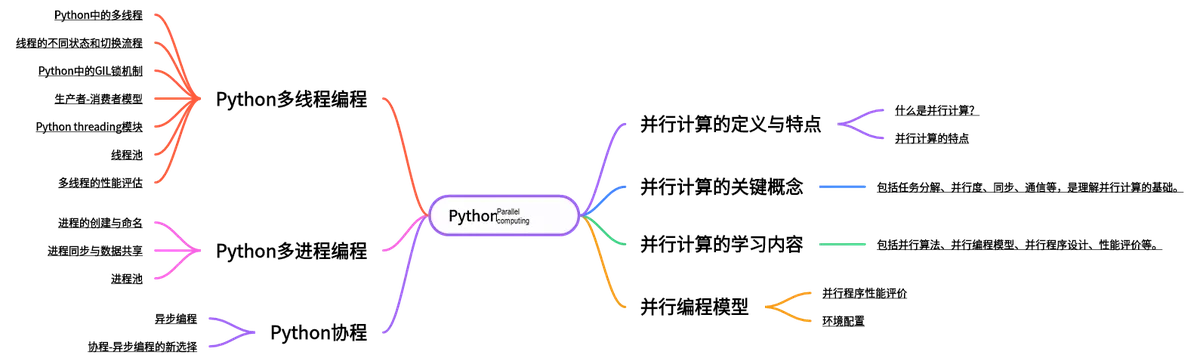
This document is a learning guide on parallel computing and Python concurrent programming, which covers the core knowledge points including the basic concepts of parallel computing, Python multi-threaded programming, multi-process programming and coroutine programming:
Body Text
1.Python threading module
Implementing multi-threaded programming in Python 3 requires the threading module, which is a module in Python's standard library that provides a high-level Object Oriented interface for thread programming. Using the threading module makes it more convenient to create and manage threads, including functions such as thread synchronization, thread communication, and thread priority.(In Python 2, there is also a thread module that provides some basic thread operation functions. For example, the start_new_thread () function is used to create a new thread, and the exit () function is used to exit a thread, etc. The thread module can only be used in Python 2.)
The threading module includes the following components:
- (1) The Thread class, which is the most frequently used class for us, you can either specify a thread function to execute or inherit from it to implement the functionality of a child thread;
- (2) Timer is similar to Thread, but it will not start running until after waiting for a period of time;
- (3) Lock, which we can use for mutual exclusion of global variables;
- (4) RLock is a reentrant lock, which allows a single thread to acquire a lock that it has already obtained again;
- (5) Condition: a condition variable, which enables a thread to pause and wait for a certain "condition" to be satisfied by other threads;
- (6) Event: a generic condition variable. Multiple threads can wait for a certain event to occur, and all threads will be activated once the event happens;
- (7) Semaphore provides a structure similar to a "waiting room" for threads waiting for a lock;
- (8) BoundedSemaphore is similar to a semaphore, but it does not allow the count to exceed the initial value;
- (9) Queue: A queue that implements multi-producer and multi-consumer models, supports locking primitives, and can provide excellent synchronization support among multiple threads.
2. Thread Creation
One of the simplest ways to use threads is to instantiate a Thread with a target function and then call the start () method to launch it. Python's threading module provides the Thread () method to run functions, processes, and the like in separate threads.
The Thread class represents an activity that runs in a separate thread of control. The functions provided by this class include:
function name | Function |
getName(self) | Returns the name of the thread |
isAlive(self) | A Boolean flag indicating whether this thread is still running |
isDaemon(self) | Returns the daemon flag of the thread |
join(self, timeout=None) | The program is suspended until the thread terminates. If a timeout is specified, it will block for at most timeout seconds. |
run(self) | Define the function of the thread |
setDaemon(self, daemonic) | Used to set whether a thread is a daemon thread |
setName(self, name) | Set the name of the thread |
start(self) | Start thread execution |
Generally speaking, there are two modes for creating a new thread: one is to create the function to be executed by the thread, pass this function into the Thread object for it to execute; the other is to directly inherit from Thread, create a new class, and put the code to be executed by the thread into this new class.
2.1 Create a thread by calling the constructor of the Thread class
The Thread class provides the following __init__() constructor, which can be used to create threads:
__init__(self, group=None, target=None, name=None, args=(), kwargs=None, *,daemon=None)In this constructor, all the parameters listed above are optional, meaning they can be used or omitted as needed. The meaning of each parameter is as follows:
group: specifies which thread group the created thread belongs to;target: the function to be executed when the thread starts;name: The name of the thread. By default, a unique name in the format Thread-N will be assigned;args: Pass parameters to the method specified by target in the form of a tuple;kwargs: Pass parameters to the method specified by target in the form of a dictionary;daemon: Specifies whether the created thread is a daemon thread.
The following program demonstrates how to create a thread using the constructor of the Thread class:
import threading
import time

def test():
    for i in range(5):
        print('test ',i)
        time.sleep(1)
thread = threading.Thread(target=test)
thread.start()
for i in range(5):
    print('main ', i)
    time.sleep(1)
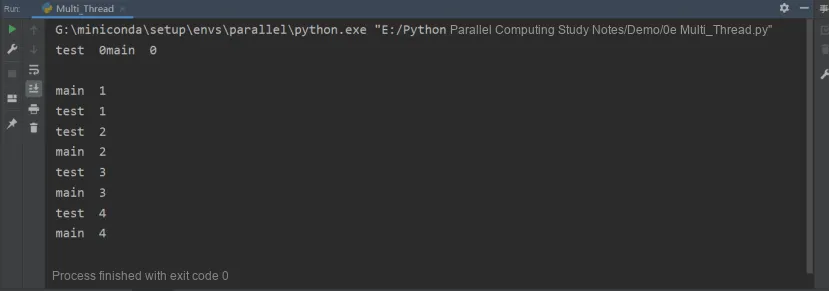
The above code is very simple: it prints 5 times on the main thread, and another 5 times on a child thread.
The following is the code output, from which you can see that the main thread and the child thread execute alternately:
2.2 Creating a Thread Class by Inheriting the Thread Class
By inheriting the Thread class, we can define a custom thread class, instantiate objects of this class, and obtain child threads. It should be noted that when creating a subclass of the Thread class, you must override the run () method inherited from the parent class.
import threading

# Create a child thread class that inherits from the Thread class
class MyThread(threading.Thread):
    def __init__(self):
        threading.Thread.__init__(self);
    # Override the run() method
    def run(self):
        print("I am %s" % self.name)

if __name__ == "__main__":
    for thread in range(0, 5):
        t = MyThread()
        t.start()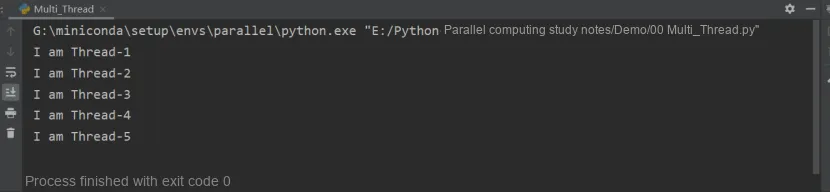
Here, there are start () and join () two methods for starting a thread. When you use the start () method to start a thread, true multithreaded execution is realized, and at this point you can directly continue to execute the subsequent code without waiting for the code in the run method body to finish running.
A thread is started by calling the start () method of the Thread class. At this point, the thread is in the ready (runnable) state and not actually running; once it obtains a CPU time slice, it will start executing the run () method;join () causes the thread that calls it to wait until it finishes execution (i. e., it blocks the calling main thread, and the main thread will not resume execution until the child thread t completes).
In many scenarios, when the main thread creates and starts a child thread, if the child thread needs to perform a large number of time-consuming operations, the main thread will often finish before the child thread. However, if the main thread, after handling other tasks, needs to use the processing result of the child thread — that is, the main thread has to wait for the child thread to complete execution before terminating — the join () method should be used in this case.
Here, let's take a look at starting a thread using the join () method:
import threading
# Define the method the thread will call; *add can receive multiple arguments passed in as non-keyword arguments
def action(*add):
    for arc in add:
        # Call the getName() method to get the name of the thread currently running this program
        print(threading.current_thread().name +" "+ arc)
# Define the arguments passed to the thread method
my_tuple = ("http://c.biancheng.net/python/",\
            "http://c.biancheng.net/shell/",\
            "http://c.biancheng.net/java/")
# Create the thread
thread = threading.Thread(target = action,args =my_tuple)
# Start the thread
thread.start()
# The main thread executes the following statements
for i in range(5):
    print(threading.current_thread().name)
The program execution result is (non-unique):
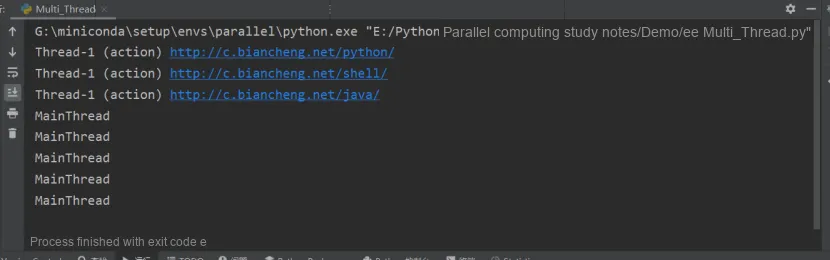
As we can see, we created a thread (named Thread-1) using the Thread class, whose task is to execute the action () function. Meanwhile, we also assigned a loop task to the main thread MainThread (lines 16 and 17). As we learned earlier, the main thread MainThread and the child thread Thread-1 will take turns to obtain CPU resources, which is why the output result of this program is as shown above.
However, if we want the child thread Thread-1 to execute first, and then let MainThread execute the code on lines 16 and 17, how can we achieve this? It's very simple, just call the join () method of the thread object.
The join () method is designed to prioritize the caller of this method for CPU resources at the specified position in the program. The syntax format of this method is as follows: thread.join ([timeout])
Here, thread refers to an instantiated object of the Thread class or its subclass; the timeout parameter is optional, and its function is to specify the maximum time (in seconds) that the thread corresponding to thread can occupy CPU resources. If this parameter is omitted, by default the CPU resources will not be released until the thread corresponding to thread finishes execution (enters the terminated state).
3. Identify the current thread
Every Thread has a name attribute, which represents the name of the thread and can be assigned a value in the constructor. If no value is assigned to the name in the constructor, it defaults to the form of "Thread-N", where N is a number. You can use the thread.current_thread () method to return the thread itself, and then access its name attribute.
import threading
import time

def test():
    for i in range(5):
        print(threading.current_thread().name+' test ',i)
        time.sleep(1)

thread = threading.Thread(target=test)
thread.start()

for i in range(5):
    print(threading.current_thread().name+' main ', i)
    time.sleep(1)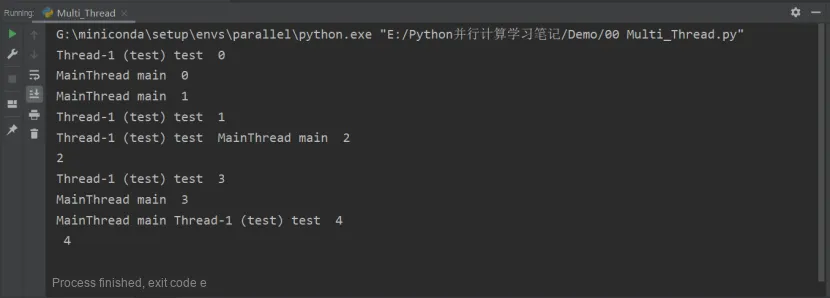
If we assign a value inside the constructor when creating a Thread object:
thread = threading.Thread(target=test,name='TestThread')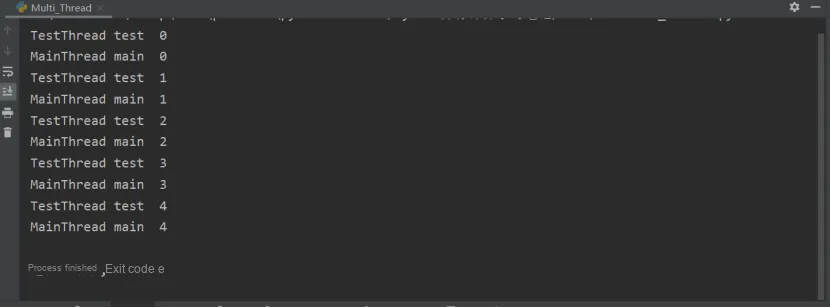
4. Check whether the query thread is still running
A Thread has a lifecycle: when an object is created, it means the Thread is initialized internally; after the start () method is called, the thread will start running; when the thread code finishes running normally or encounters an exception, the thread will terminate.
You can use the `is_alive ()` method of a Thread to check whether the thread is still running. It is worth noting that `is_alive ()` returns True when the Thread object has been properly initialized, the `start ()` method has been called, and the code of the thread is still executing normally.
import threading
import time

def test():
    for i in range(5):
        print(threading.current_thread().name+' test ',i)
        time.sleep(0.5)

thread = threading.Thread(target=test,name='TestThread')
# thread = threading.Thread(target=test)
thread.start()

for i in range(5):
    print(threading.current_thread().name+' main ', i)
    print(thread.name+' is alive ', thread.is_alive())
    time.sleep(1)
In the code above, we make TestThread finish a little earlier than MainThread, and the code running result is as follows.
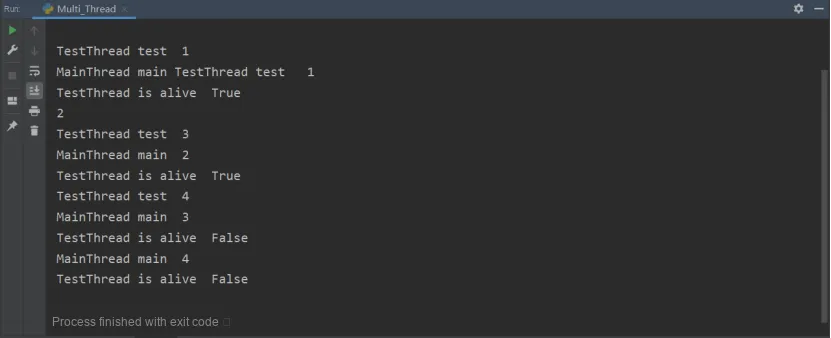
We can see that the main thread accurately queries the alive status of TestThread by calling its isAlive () method.
5. Creation of Daemon Threads
The constructor of Thread has a daemon parameter, which defaults to None. So what exactly does the daemon parameter do? Let's first look at a sample code snippet.
import threading
import time

def test():
    for i in range(5):
        print(threading.current_thread().name+' test ',i)
        time.sleep(2)

thread = threading.Thread(target=test,name='TestThread')
# thread = threading.Thread(target=test,name='TestThread',daemon=True)
thread.start()

for i in range(5):
    print(threading.current_thread().name+' main ', i)
    print(thread.name+' is alive ', thread.is_alive())
    time.sleep(1)
We made the main thread execute the code for a shorter duration than TestThread, and the program running result is as follows:
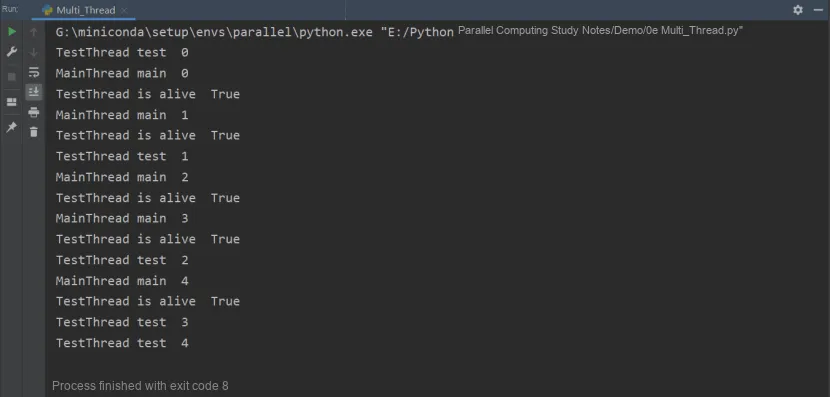
When there is no code running in the MainThread, the TestThread is still running. This is because the MainThread is waiting for other threads to finish. In TestThread, the daemon attribute defaults to False, which means the MainThread has to wait for it to finish before it can terminate itself.
If you want the child thread to terminate immediately as soon as the MainThread finishes, how can you achieve that? Actually, it's very simple: just set the daemon property for the child thread before calling its start () method. Alternatively, you can also pass True as the value of the daemon parameter in the child thread's constructor.
Edit
thread = threading.Thread(target=test,name='TestThread')For
thread = threading.Thread(target=test,name='TestThread',daemon=True)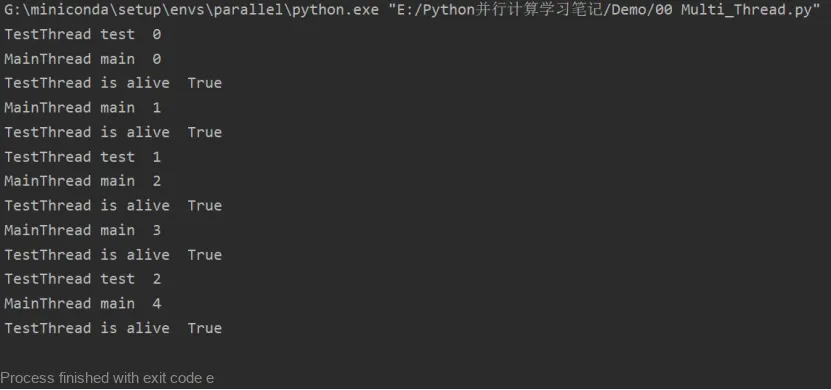
It can be seen that the MainThread has finished, and the TestThread has also finished. You can also use the setDaemon method so that once the main thread completes, regardless of whether the child thread has finished executing, it will exit together with the main thread.