
Contents
Abstract:
Multithreading enables a program to execute multiple tasks concurrently, improving efficiency and responsiveness. Threads fall into five states: new, ready, running, blocked, and terminated. The GIL lock in Python restricts the parallel execution of multithreads, making it suitable for I/O-bound tasks. The producer-consumer model implements thread collaboration via a shared buffer and condition variables to address data sharing issues.

For more information about us, you can refer to the cloud document: Freak Embedded Studio Cloud Docs, or visit our wiki: https://github.com/leezisheng/Doc/wik
Original Link:
Previous Recommendations:
You who are learning embedded systems, don’t you even know Object Oriented yet? ?!
Master Python Parallel Computing in One Article: 00 Basic Concepts of Parallel Computing
For more exciting content, you can check out:
Speed Up Your Python: A Quick Guide to Python Parallel Computing
Understand the Debugging Principle of CM3 Microcontroller in One Article
The "Martial Arts Manual" for Computer Science Competitions
Avnet ZUBoard 1CG Development Board — A New Choice for Deep learning
What? A motor drive module with customizable color schemes? !
What? Three brand-new expansion boards have just been released for the XIAO main controller!
A Step-by-Step Guide to Publishing Your Third-Party Library for Arduino
Document Acquisition:
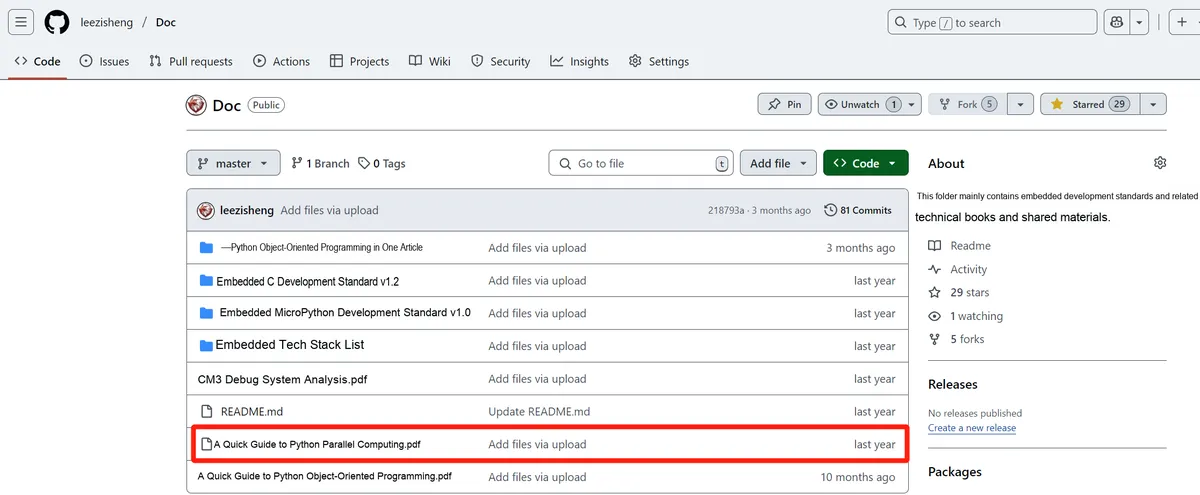
You can download the document via the following link:
https://github.com/leezisheng/Doc
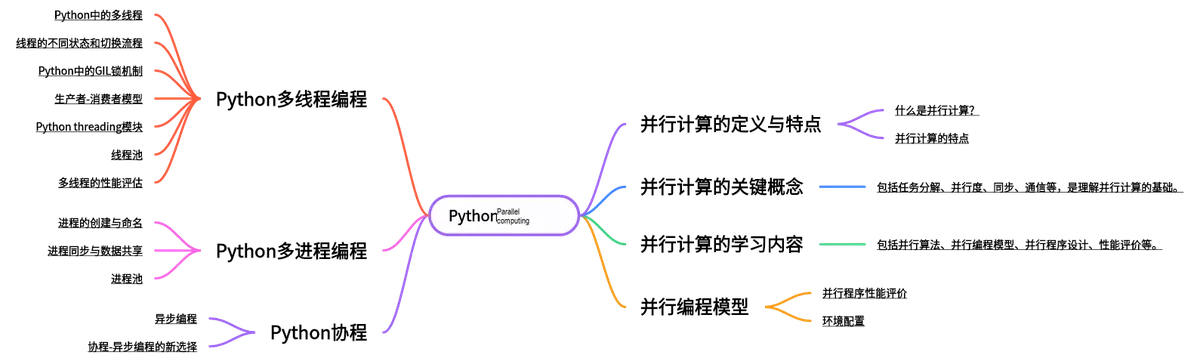
This document is a learning guide on parallel computing and Python concurrent programming, which covers the core knowledge points including the basic concepts of parallel computing, Python multi-threaded programming, multi-process programming and coroutine programming:
Body Text
1. Basic Concepts of Multithreading
Multithreading is similar to running multiple distinct programs simultaneously, and the operation of multithreading has the following advantages:
(1) Using threads allows tasks in programs that take a long time to be processed in the background;
(2) The User Interface can be more attractive. For example, when a user clicks a button to trigger the processing of certain events, a Progress Bar can pop up to display the processing progress;
(3) The running speed of the program may be increased.
Threads are quite useful when implementing certain waiting tasks, such as user input, file read/write operations, and network data transmission and reception. In such cases, we can free up some valuable resources like memory usage and the like.
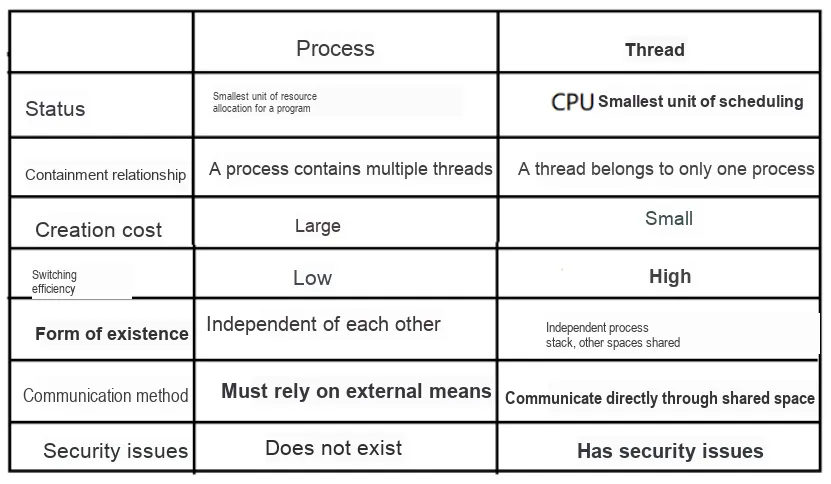
There are still differences between threads and processes during execution. Each independent process has an entry point for program running, a sequential execution sequence and an exit point for the program. However, threads cannot execute independently; they must rely on the application, which provides the control for the execution of multiple threads.
2. Multithreading in Python
2.1 Basic Concepts
A thread, sometimes referred to as a lightweight process, is the smallest unit of program execution flow. A standard thread consists of a thread ID, a current instruction pointer (PC), a set of registers, and a stack. A thread is an entity within a process and is the basic unit independently scheduled and dispatched by the system. A thread does not own private system resources, but it can share all the resources owned by the process with other threads belonging to the same process. One thread can create or terminate another thread, and multiple threads within the same process can execute concurrently.
A thread is a single sequential control flow within a program. It is a relatively independent, schedulable execution unit within a process, serving as the basic unit for the system to independently schedule and allocate CPU, as well as the scheduling unit for a program during instruction execution. Running multiple threads simultaneously in a single program to complete different tasks is called multithreading. Python multithreading is applicable to I/O-intensive tasks, such as SocketServer network concurrency and web crawlers.
2.2 Different States and Switching Process of Threads
When a program contains multiple threads, the CPU is not continuously occupied by a specific thread; instead, it executes each thread in turn. Then, during the process of the CPU switching to execute threads, that is, throughout the entire lifecycle from creation to termination, a thread may go through 5 states, namely New, Ready, Running, Blocked, and Terminated.
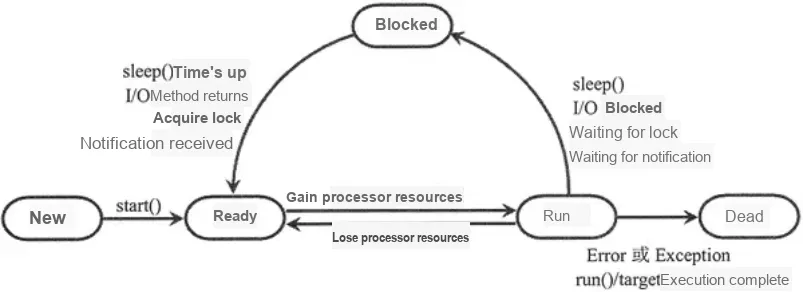
- New state of a thread: whether a thread is created by directly instantiating an object through the Thread class, or by instantiating a subclass that inherits from the Thread class, a newly created thread will not be executed until the start () method is called, and the thread at this stage is in the new state.
- Ready state of a thread: When a thread in the newly created state calls the start () method, it transitions to the ready state. The term "ready" means that the thread signals to the CPU that it is eligible for execution, but the exact timing of its execution depends on when the CPU schedules it. In other words, if a thread is in the ready state, it only indicates that the thread is fully prepared and waiting at any time for the CPU to schedule it for execution, not that the thread will be executed immediately just because the start () method has been invoked.
- Thread running status: When a thread in the ready state obtains the CPU and starts executing the target function specified by the target parameter or the run () method, it indicates that the current thread is in the running state. However, if multiple threads are in the ready state (waiting for CPU scheduling) at the same time, the thread in the running state cannot monopolize CPU resources all the time. To give other threads a chance to execute, the CPU will force the currently running thread to release CPU resources for other threads to use after a certain period of time.
- Thread blocking state: When the CPU schedules multiple threads, a thread that has obtained CPU scheduling but has not finished executing will enter the blocking state. Almost all current desktop and server operating systems adopt the preemptive priority scheduling policy. That is, the CPU allocates a fixed period of time for each ready thread to process tasks; when this time expires, the system will prevent the thread from continuing to use CPU resources and give other threads the opportunity to execute.Regarding which specific thread the CPU is assigned to run on, different platforms adopt different scheduling algorithms, such as First-In-First-Out (FIFO), round-robin scheduling, priority scheduling, etc. Each algorithm has its own advantages and disadvantages and is applicable to different scenarios.
Besides, if a thread in the running state encounters any of the following situations, it will also transition from the running state to the blocked state:
- ① The thread has called the sleep () method;
- ② The thread waits to receive the data input by the user;
- ③ When a thread attempts to acquire the synchronization lock of an object, if the lock is already held by another thread, the current thread enters a blocked state;
- ④ The thread calls the wait () method to wait for a specific condition to be satisfied.
All the above situations will lead to thread blocking. Only after the problems encountered by the thread are resolved, the thread will transition from the blocked state to the ready state and continue to wait for CPU scheduling.
The solutions to the above 4 situations where thread blocking may occur are as follows respectively:
- ①The time specified by the sleep () method has elapsed;
- ② The thread has received the data input by the user;
- ③ Another thread releases the synchronization lock, and the lock is acquired by this thread;
- ④ Call the set () method to send a notification.
- Thread Dead State: For a thread that has been granted CPU scheduling but has not finished execution, it will enter the blocked state and then transition back to the ready state once the conditions are met, repeatedly competing for CPU resources until its execution is complete. A thread that has finished execution will be in the dead state. A thread may finish execution not only through normal completion, but also enters the dead state if an Exception or Error occurs during program execution.
For threads in the dead state, there are the following two points to note:
- ① The death of the main thread does not mean that all threads have died. In other words, the termination of the main thread will not affect the continued execution of child threads, and vice versa.
- ② For a thread that has died, the start () method can no longer be called to restart it; otherwise, the Python interpreter will throw a RuntimeError exception.
2.3 GIL Lock Mechanism in Python
GIL, whose full name is Global Interpreter Lock, is also known as the global interpreter lock. For CPython, all Python threads need to run in the interpreter, which acts as a virtual machine, and must acquire the GIL lock before execution. After executing every 100 bytecodes, the interpreter automatically releases the GIL lock to give other threads a chance to run. Therefore, even if you have multiple CPU cores, multiple threads in the same Python virtual machine should still execute alternately.
This means that only one thread can be in an executing state at any given time. The GIL has no impact on single-threaded programs, but it becomes a performance bottleneck for CPU-intensive and multi-threaded code. Even in code with a multi-threaded structure, the GIL only allows one thread to be in the executing state at the same time, making the GIL an unpopular feature of Python.
CPU-bound programs refer to those where the CPU serves as the performance bottleneck during execution, and such programs involve a large number of mathematical computations, such as matrix multiplication, searching, and image processing. I/O-bound programs refer to those where most of the execution time is spent waiting for I/O events, which may come from user operations, files, databases, networks, and other sources. Before obtaining a file from a data source, an I/O-bound program needs to wait for a long time; this is because the data source has to go through its own processing procedure before the I/O event is ready.For example, the time a user spends thinking about what to enter at the input prompt (which takes time), or the time a database spends running its own program after receiving a retrieval request (which also takes time).
Solutions to the GIL include using multiprocessing, using alternative Python interpreters, or leveraging C extension modules, among others.
2.4 Producer-Consumer Model
The producer-consumer pattern is a classic multithread Design pattern, which is used to solve the problems of data sharing and collaboration among multiple threads. In the producer-consumer pattern, there are two types of threads: producer threads and consumer threads. They collaborate by sharing a buffer (or queue): producers put data into the buffer, and consumers take data out of the buffer for processing.
The producer-consumer pattern consists of the following basic elements:
- (1) Buffer (or queue): It is used to store the data generated by producers and the data to be processed by consumers. A buffer can be either bounded (with a fixed capacity) or unbounded (with a dynamically growing capacity).
- (2) Producer: Responsible for generating data and placing it into the buffer. A producer thread usually waits; if the buffer is full, it will wait until the consumer has taken the data before proceeding with production.
- (3) Consumer: Responsible for fetching data from the buffer and processing it. A consumer thread usually waits; if the buffer is empty, it will wait for the producer to put data into the buffer before proceeding with consumption.
- (4) Mutex Lock: It is used to protect access to the buffer, ensuring that only one thread can access the buffer at a time.
- (5) Condition variable: It is used to implement the waiting and waking mechanism of threads: producer threads can wait for the buffer to be not full, while consumer threads can wait for the buffer to be not empty.
In the next section, we will explain the various concepts and application methods in Python multithreading through the producer-consumer model.