Contents
Abstract:
Python's re module provides powerful Regular Expression manipulation functions for searching, matching, replacing, etc. in strings. A Regular Expression is a pattern for matching strings. With Regular Expressions, you can easily find string fragments of specific patterns, such as matching email addresses, phone numbers, dates in specific formats, and so on.
Original Link:
Previous Recommendations:
You who are learning embedded systems still don't know Object Oriented? ?!
More exciting content can be found here:
Speed Up Your Python: A Quick Guide to Python Parallel Computing
A Complete Guide to Debugging Principles of CM3 Microcontrollers
The "Secret Martial Arts Manual" for Computer Science Competitions
Avnet ZUBoard 1CG Development Board — A New Choice for Deep learning
Deploy SenseCraft Model to Grove Vision AI V2 Image Processing Module
Document and Code Access:
You can download the document via the following link:
https://github.com/leezisheng/Doc
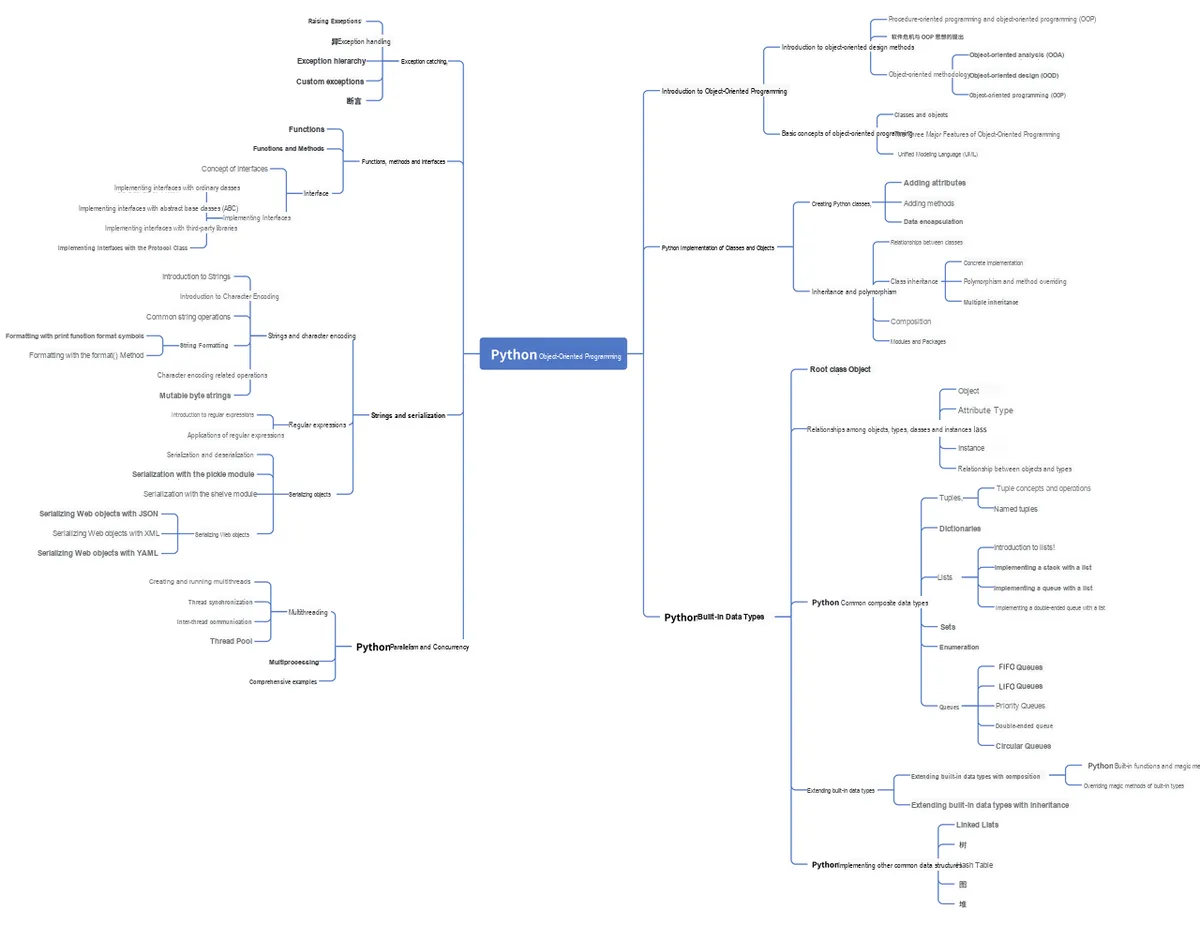
This document mainly introduces how to use Python for Object Oriented programming, and requires readers to have a basic understanding of Python syntax and microcontroller development. Compared with other blogs or books that explain Python Object Oriented programming, this document is more detailed and focuses on embedded host computer applications, taking the common serial port data transmission and reception, data processing, dynamic graph drawing and other functions between the host computer and the slave computer as application examples. Meanwhile, it uses the Sourcetrail code software to visualize the code for reading, so as to facilitate readers' understanding.
The link to obtain the relevant sample code is as follows:
https://github.com/leezisheng/Python-OOP-Demo
Body Text
Introduction to Regular Expression
We often need to determine the validity of a given string, such as whether a sequence of digits constitutes a valid phone number, whether a string of characters forms a legitimate URL or email address, and whether a user-entered password meets the required complexity criteria.
If we define a judgment function for each format, first of all, such a definition may be very complex: for example, a phone number can be a landline number in the form of 010-12345678, or 0510-12345678, or a mobile phone number like 13800000000. In this case, the logical complexity of the code will increase linearly. Secondly, the functions we define are difficult to reuse, and the one that matches A cannot match B. Is there a universal function that can realize our specific character matching requirements as long as we pass specific parameters? The answer is yes.
In the real world, most programming languages use Regular Expression to handle string parsing. A Regular Expression is a tool used to retrieve text that conforms to certain specific patterns from a text, and they rely on special symbols to match unknown strings. It can be used to solve a common problem: given a string, determine whether it can match a given pattern, and collect substrings that contain relevant information.
There are two concepts in Regular Expression: a string consists of several characters, each of which has a corresponding binary encoding in memory, and there are positions formed by the sequence of characters. For example, the start position and end position of a string are represented as ps and pe as shown in the figure. A string containing N characters has N+ 1 positions, and these positions do not occupy memory and are only used for matching and positioning.
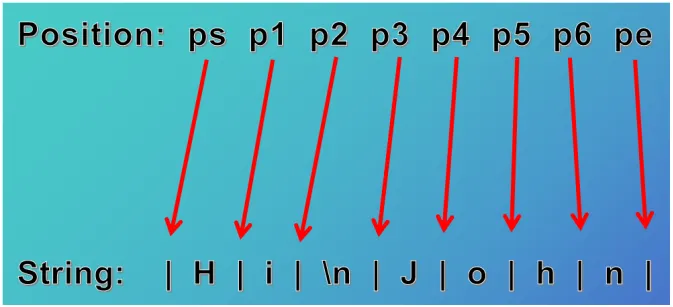
Regular Expression s use some special characters (usually starting with \, which is an Escape Character) to represent a specific type of character set (such as digits 0-9) and character positions (such as the start of a string). These are called metacharacters. An expression composed of metacharacters and other control characters is called a matching pattern.During the matching process, there is a position pointer that initially always points to position ps. After each successful match according to the matching pattern, the pointer is moved to the position immediately following the matched characters, and pattern matching is attempted at each subsequent position until the position pe has been tested, at which point the matching process ends. In Regular Expression, '. ' denotes a match for any character except the newline character \n; to match the '. ' character itself, you need to use the form '\. '. Since Python strings themselves also use \ as an escape character, an r should be prefixed to a Regular Expression string to indicate raw input, so as to avoid escape conflicts.
In a Regular Expression, if you specify characters directly, it means exact matching. '\d' can match a digit, and '\w' can match a letter or a number, so:
'00\d' can match '007' but cannot match '00A';
'\d\d\d' can match '010';
'\w\w\d' can match 'py3';
The '. ' character can match any character, so:
'py.' can match 'pyc', 'pyo', 'py!', and so on.To match variable-length characters, in Regular Expression, use '*' to represent any number of characters (including 0), use '+' to represent at least one character, use '? ' to represent 0 or 1 character, use '{n}' to represent n characters, and use '{n, m}' to represent n to m characters:
\d{3}\s+\d{3,8}
1. \d{3} matches 3 digits, e.g. '010';
2. \s can match a space (including whitespace such as Tab), so \s+ means at least one space, e.g. it matches ' ', '  ', etc.;
3. \d{3,8} means 3 to 8 digits, e.g. '1234567'.
Taken together, the regular expression above can match phone numbers with an area code separated by any number of spaces.
What if we want to match a number like '010-12345'? Since '-' is a special character in Regular Expression, it needs to be escaped with '\', so the Regular Expression in this case is \d{3}\-\d{3,8}.
To achieve more precise matching, you can use square brackets `[]` to specify a range, for example:
[0-9a-zA-Z\_] can match one digit, letter, or underscore;
[0-9a-zA-Z\_]+ can match a string of at least one digit, letter, or underscore, such as 'a100', '0_Z', 'Py3000', and so on;
[a-zA-Z\_][0-9a-zA-Z\_]* can match a string that starts with a letter or underscore, followed by any number of digits, letters, or underscores, which is a valid Python variable name;
[a-zA-Z\_][0-9a-zA-Z\_]{0, 19} limits the variable length more precisely to 1-20 characters (1 leading character + at most 19 following characters).
'A | B 'can match A or B.
(P|p)ython can match 'Python' or 'python'.Other special symbols include:
^ means the start of a line, and ^\d means it must start with a digit.
$ means the end of a line, and \d$ means it must end with a digit.
? matches 0 to 1 repetitions of the preceding regular expression; ab? matches 'a' or 'ab'.
For more information on how to use related expressions, please refer to the following link:
https://tool.oschina.net/uploads/apidocs/jquery/regexp.html
https://docs.python.org/zh-cn/3/howto/regex.html
https://pythonhowto.readthedocs.io/zh-cn/latest/regular.html
https://www.runoob.com/regexp/regexp-syntax.html
Application of Regular Expression and the re Module
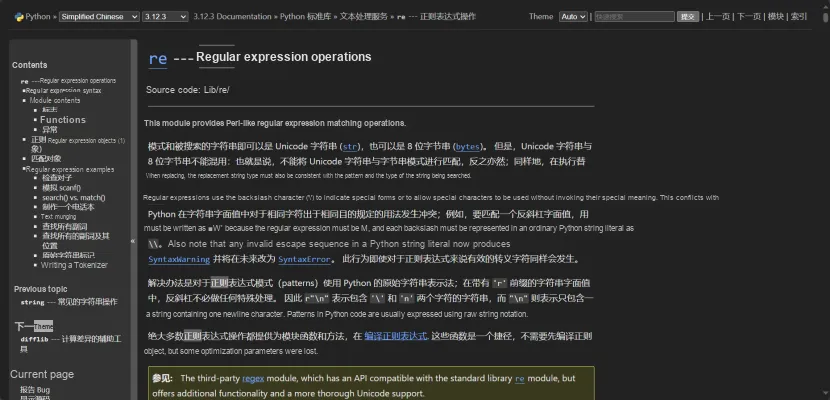
The Regular Expression module in the Python standard library is called re. After importing it, we create a search string and the pattern to be searched for.
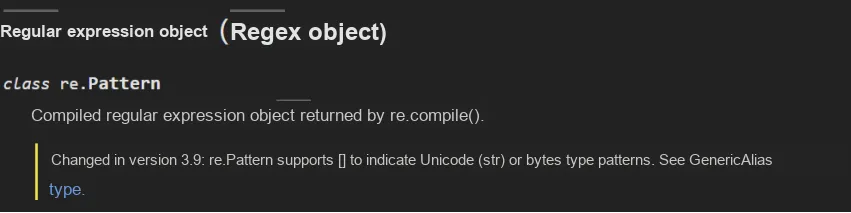
In the following example, we use re.compile () to create a compiled Regular Expression object re.Pattern, and use the Pattern.match (string[, pos[, endpos]]) method: if zero or more characters at the start of the string match this Regular Expression, the corresponding Match is returned. If the string does not match the pattern, None is returned.
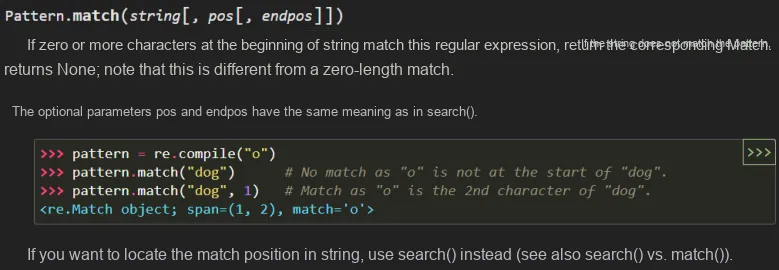
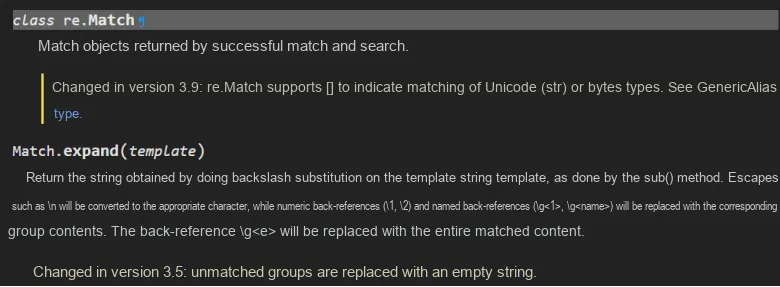
Since the string to be searched matches the pattern, the conditional check will pass and the print statement will be executed. The sample code is as follows:
import re
search_string = "hello world"
pattern = re.compile("hello world")
match = re.match(pattern, search_string)
if match:
    print("regex matches")
    print(match)
    print(match.__doc__)
The running results are as follows:
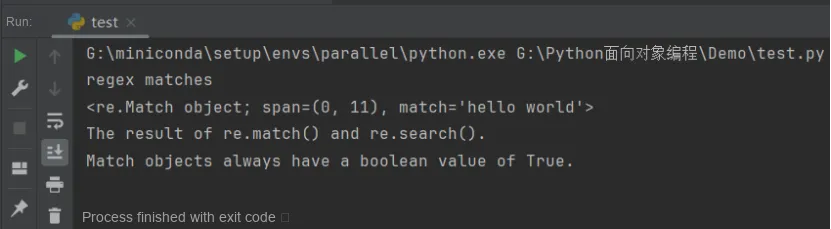
Since the match function matches the pattern starting from the beginning of the string, if the pattern is changed to "ello world", no match will be found.
import re
search_string = "hello world"
pattern = re.compile("ello world")
match = re.match(pattern, search_string)
if match:
    print("regex matches")
    print(match)
    print(match.__doc__)
else:
    print("no match")
The running results are as follows:
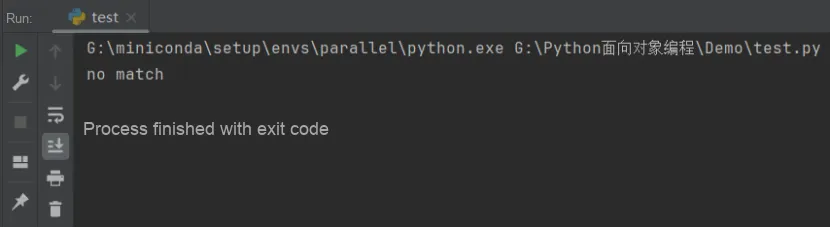
The difference is that once a match is found, the parser will stop searching immediately, so the pattern "hello wo" will also match successfully. If we only want a few specific characters to be matched, we can put several characters in a pair of square brackets to match any one of them. Therefore, if we encounter a Regular Expression pattern string of [abc], we will know that these 5 characters (including the two square brackets) will only match one character in the search string, and this character can only be one of a, b, and c. The sample code is as follows:
import re

search_string = "hello world"
pattern = re.compile("hell[lpo] world")
match = re.match(pattern, search_string)

if match:
    print("regex matches")
    print(match)
The running results are as follows. In fact, these square brackets should be named character sets, though they are more commonly referred to as character classes.
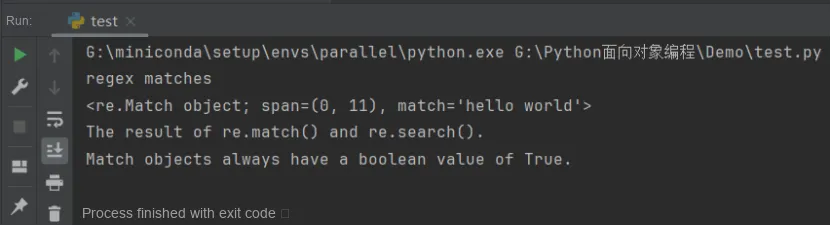
Typically, we want to use a larger set of characters, but typing them one by one is both tedious and error-prone. Fortunately, the designers of Regular Expression took this into account and provided shorthand notations. The hyphen symbol can represent a range, which is extremely useful when you want to match "all lowercase letters" or "all digits", for example:
import re
search_string = "hello world"
pattern = re.compile("hell[a-z] world")
match = re.match(pattern, search_string)
if match:
    print("regex matches")
    print(match)
    print(match.__doc__)
else:
    print("no match")
The running results are as follows:
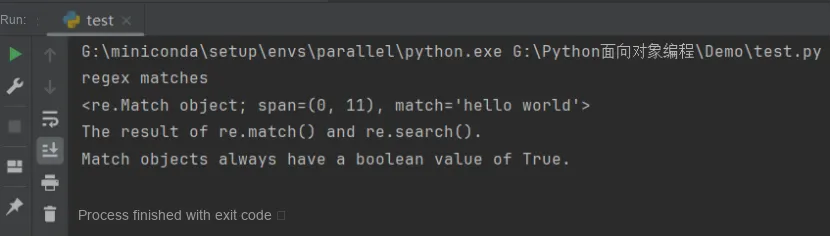
As we mentioned earlier, we can also use the backslash Escape Character to match some special symbols, such as '. ', '(', etc. The sample code is as follows:
import re

search_string = "0.05"
pattern = re.compile("0\\.[0-9][0-9]")
match = re.match(pattern, search_string)
if match:
    print("regex matches")
    print(match)
    print(match.__doc__)
The running results are as follows:
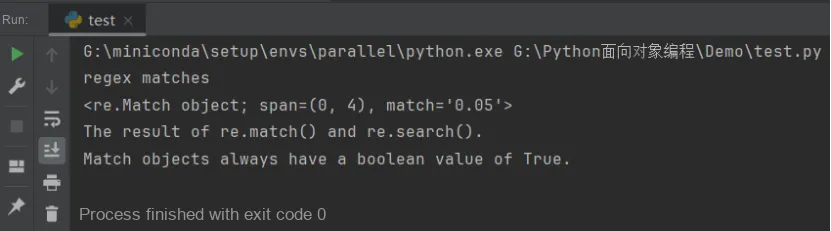
Here, it should be noted that the result string we pass to re.compile () must have two escaped backslashes "\\section"; if you want to match the relevant characters with two backslashes "\\section", you need to use four backslashes '\\\\'. You can also add an r before a Python Regular Expression to denote a raw string — the r character declares that the content inside the quotes retains its original meaning, avoiding the backslash confusion caused by multiple levels of escaping.
The re.Pattern class in the re module also has the following methods, which we will try out next:
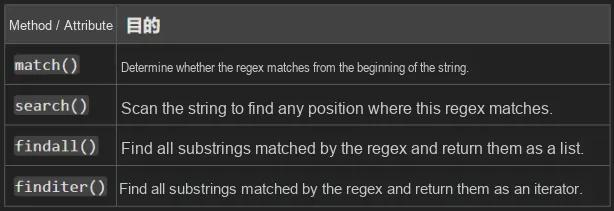
We can use the search method to search for a Regular Expression in a string, which will return the first position that matches the Regular Expression. The specific usage is as follows:
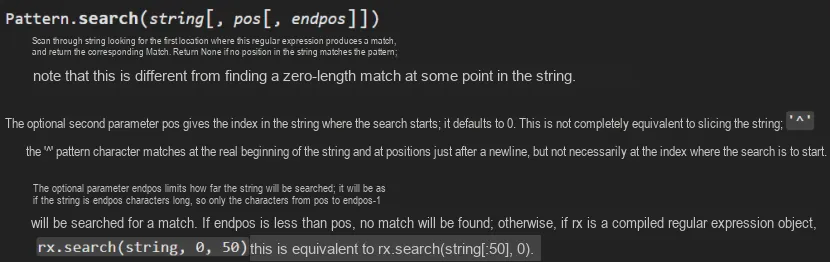
The sample code is as follows:
import re

pattern = re.compile("o")
locate = pattern.search("dog")
print(locate)
In the first example of Regular Expression, we are matching the entire Regular Expression against a string, and in practice we should use the fullmatch function instead of the match function:


import re

pattern = re.compile("o[gh]")
# Pattern.fullmatch(string[, pos[, endpos]])
# The second parameter pos gives the index in the string at which to start searching
# The third parameter endpos limits where the string search ends
# Characters from pos to endpos - 1 are matched; in this example, 'ogg'
match = pattern.fullmatch("doggie", 1, 3)

print(match)
# Print the matched substring
print(match.group())
# Print the start position of the matched characters
print(match.pos)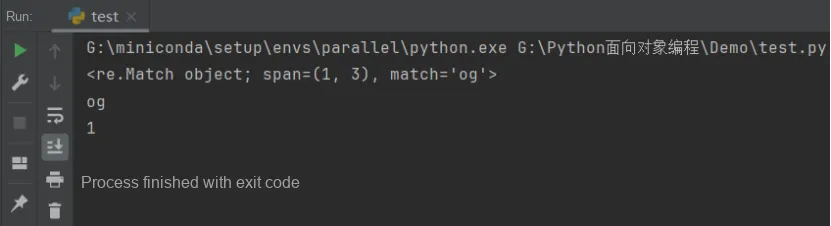
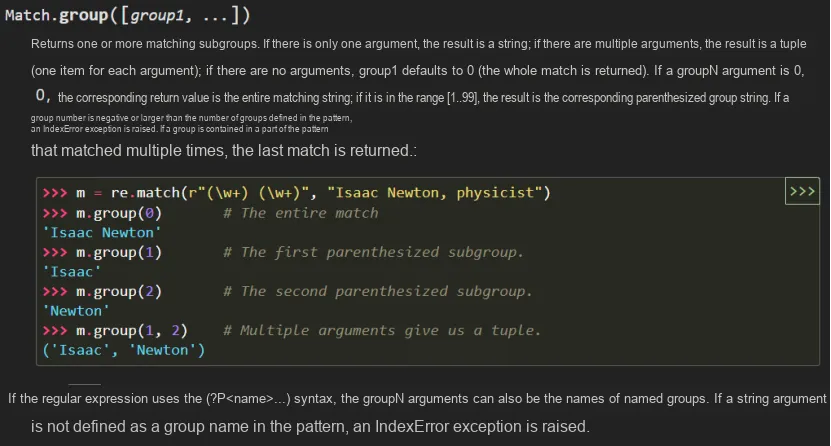
You can see that in this example, we use the group method to extract substrings. group (0) is the string that matches the entire Regular Expression, and group (1), group (2), . .. represent the 1st, 2nd, . .. substrings respectively.
We can also use Regular Expression to split strings, and this method is more flexible than using fixed characters.

The sample code is as follows:
import re

str       = 'a b   c'
# Split the string with the ordinary split method
str_split = str.split(' ')
# Outputs ['a', 'b', '', '', 'c']
# Cannot recognize consecutive spaces
print(str_split)

# Use the split method from the re library
str_re_split = re.split(r'\s+', str)
print(str_re_split)
The running results are as follows:
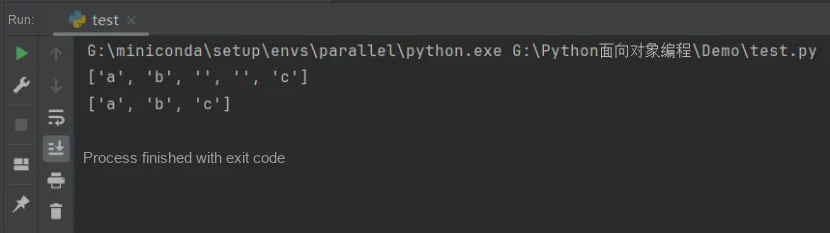
Among them, \s means matching any whitespace character, and + means matching the preceding character one or more times. This Regular Expression can match one or more whitespace characters, including spaces, tabs, newlines, etc.
So far, we have successfully matched strings of most known lengths. However, in most practical scenarios, we do not know the exact number of characters that need to be matched. This is where Regular Expression can play a huge role. We can fine-tune the pattern and add one or more punctuation marks to achieve effective matching of multiple characters. This flexibility gives Regular Expression significant advantages when dealing with complex string matching problems.
The asterisk (*) means that the former pattern can appear zero or more times. Combining the asterisk with other symbols that match multiple characters will result in more interesting results. For example, '. *' will match any string, while '[a-z] *' will match any number of lowercase letters, including empty strings. The plus sign (+) behaves similarly to the asterisk, except that it requires the previous pattern to appear one or more times, unlike the asterisk, which is optional. The question mark (?) requires that the former pattern can only appear zero or one time, not more.
Common examples are as follows:
'0.4' matches pattern '\d+\.\d+'
'1.002' matches pattern '\d+\.\d+'
'1.' does not match pattern '\d+\.\d+'
'1%' matches pattern '\d?\d%'
'99%' matches pattern '\d?\d%'
'999%' does not match pattern '\d?\d%'
Next, we will apply the relevant knowledge points explained earlier in greater depth with an example. Generally speaking, both the username and the domain name of an email address must contain at least two characters, and can only use letters, numbers, dots, underscores, percent signs, plus signs or hyphens as valid characters. There is an @ symbol between the username and the domain name, and the format of the domain name is: xxx.com .
In the following example, we will write a Regular Expression to match valid email addresses:
^[a-zA-Z0-9._%+-]+@[a-zA-Z0-9.-]+\.[a-zA-Z]{2,}$Wherein:
- (1) ^ denotes the start of a string;
- (2) [a-zA-Z0-9._%+-]+ matches one or more letters, digits, dots, underscores, percent signs, plus signs or hyphens, which commonly appear in the username part of email addresses;
- (3) @ matches the @ symbol;
- (4) [a-zA-Z0-9.-]+ matches one or more letters, digits, dots, or hyphens, which are characters typically found in the domain part of an email address;
- (5) \. Matches a dot character;
- (6) [a-zA-Z]{2,} matches two or more letters, which typically appear in the top-level domain of an email address (e. g., . com, . org, etc.);
- (7) The $ symbol denotes the end of a string.
This Regular Expression can match email addresses such as " example@example.com "
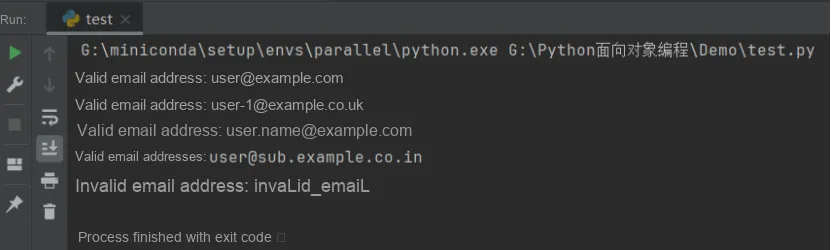
In the following code, we define a complex Regular Expression to match valid email addresses. Then we define a list named emails which contains several email addresses, use the search () method to match each email address one by one and output the results. The sample code is as follows:
import re

# Define the regular expression
pattern = r'^[a-zA-Z0-9._%+-]+@[a-zA-Z0-9.-]+\.[a-zA-Z]{2,}$'

# Define the target string
emails = [
    "user@example.com",
    "user-1@example.co.uk",
    "user.name@example.com",
    "user@sub.example.co.in",
    "invalid_email"
]


# Use the search() method to match a valid email address
for email in emails:
    match = re.search(pattern, email)
    if match:
        print("有效的邮箱地址:", match.group())
    else:
        print("无效的邮箱地址:",email)
The running results are as follows:
We can also use the findall function to query all non-overlapping matches of the pattern, instead of only getting the first match like the search function does. Basically, it first finds the first match, then resets the string starting from the end of that result, and proceeds with the next search.
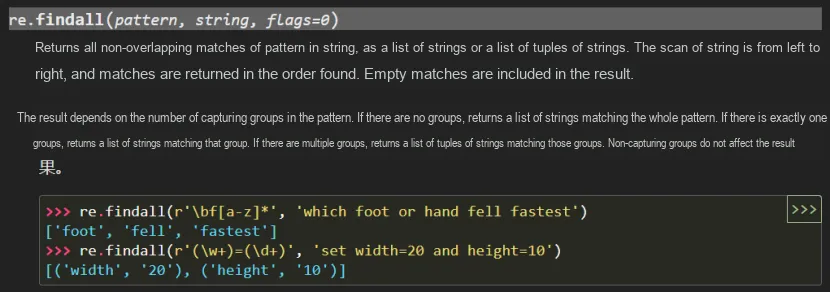
It does not return a match object, but a list of matching strings or tuples. The type of the returned result depends on the number of parenthesized groups in the regular expression: if there are no groups in the pattern, findall will return a list of strings, where each value is a substring in the source string that matches the pattern; if there is exactly one group in the pattern, findall will return a list of strings, where each value is the content of that group;If there are multiple groups in the pattern, findall will return a list of tuples, where each tuple sequentially contains the matching results from one group.
import re
# \b indicates a word boundary, [a-z] indicates any lowercase letter
# Can match strings that start with f followed by zero or more lowercase letters.
print(re.findall(r'\bf[a-z]*', 'which foot or hand fell fastest'))
The running results are as follows:

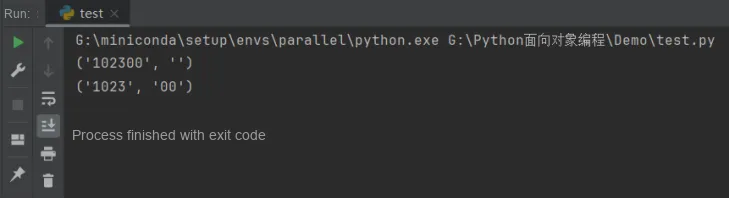
Finally, it is particularly worth noting that regular expression matching is greedy by default, meaning it matches as many characters as possible. For example, here is how to match the zeros following a number:
import re
# Because \d+ matches greedily, it consumes all the following 0s, so 0* can only match an empty string
print(re.match(r'^(\d+)(0*)$', '102300').groups())
# Adding ? makes \d+ match non-greedily:
print(re.match(r'^(\d+?)(0*)$', '102300').groups())
The running results are as follows: