Contents
Abstract:
In Python, character encoding refers to the process of mapping characters to bytes, while a byte sequence (bytes) is the actual data structure that stores these bytes. The main differences between a byte sequence and a mutable byte string lie in their mutability and intended use cases; bytearray is a mutable byte sequence that allows modifications to its content.
Original Link:
Previous Recommendations:
You who are learning embedded systems, don’t you even know Object Oriented yet? ?!
More exciting content can be found here:
Speed Up Your Python: A Quick Guide to Python Parallel Computing
Understand the Debugging Principle of CM3 Microcontroller in One Article
The "Martial Arts Manual" for Computer Science Competitions
Avnet ZUBoard 1CG Development Board — A New Choice for Deep learning
Deploy SenseCraft Model to Grove Vision AI V2 Image Processing Module
Document and Code Access:
You can download the document via the following link:
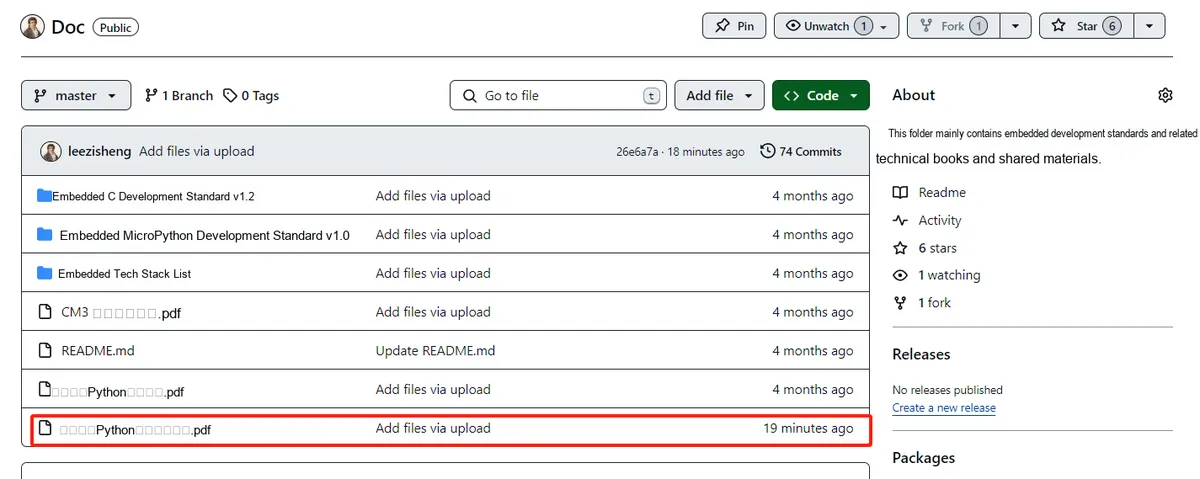
https://github.com/leezisheng/Doc
This document mainly introduces how to use Python for Object Oriented programming, and requires readers to have a basic understanding of Python syntax and microcontroller development. Compared with other blogs or books that explain Python Object Oriented programming, this document is more detailed and focuses on embedded host computer applications, taking the common serial port data transmission and reception, data processing, dynamic graph drawing and other functions between the host computer and the slave computer as application examples. Meanwhile, it uses the Sourcetrail code software to visualize the code for reading, so as to facilitate readers' understanding.
The link to obtain the relevant sample code is as follows:
https://github.com/leezisheng/Python-OOP-Demo
Body Text
Character Encoding and Byte Sequence bytes
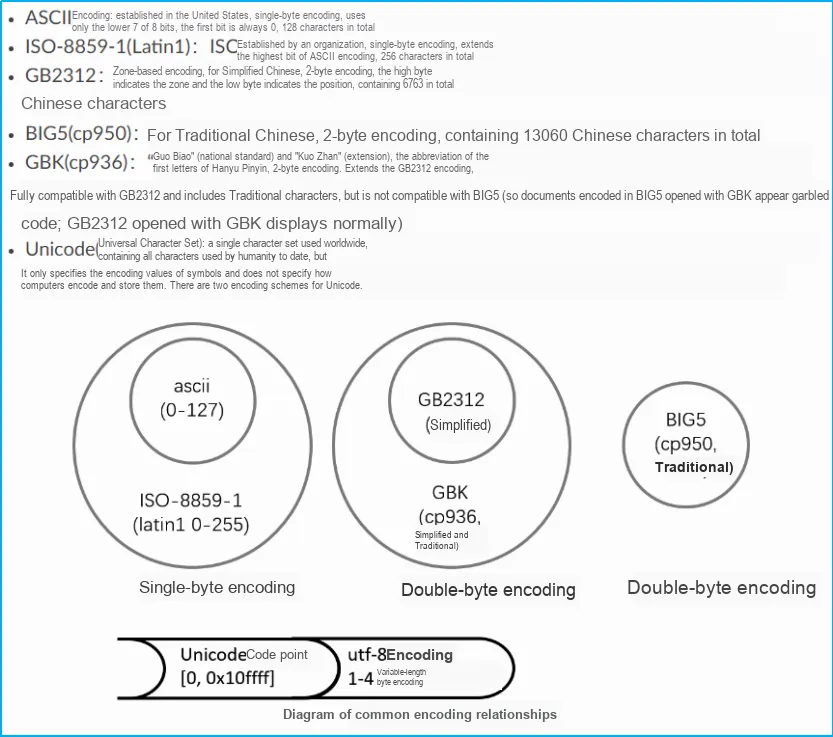
In computer memory, we follow standardized encoding principles and universally adopt the Unicode encoding system. However, when data needs to be persistently stored to a hard disk or transmitted over a network, we convert it to UTF-8 encoding. For example, when we use Notepad to edit a document, the UTF-8 characters read from the file will be converted to Unicode characters to adapt to memory processing. After the editing work is completed, the system converts these Unicode characters back to UTF-8 encoding to ensure the accuracy and compatibility of file saving.This process ensures the smooth exchange of data between different platforms and systems, and meets the diverse requirements for data encoding in modern computing environments.
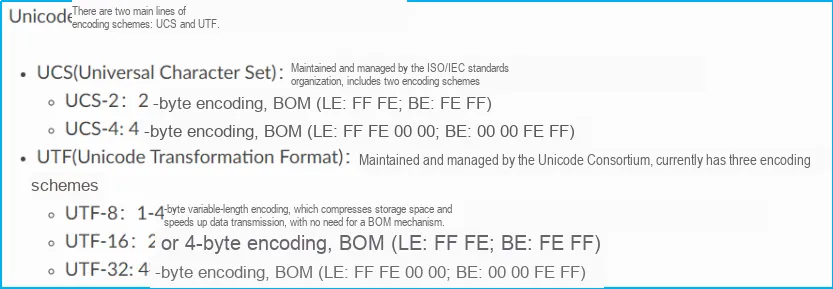
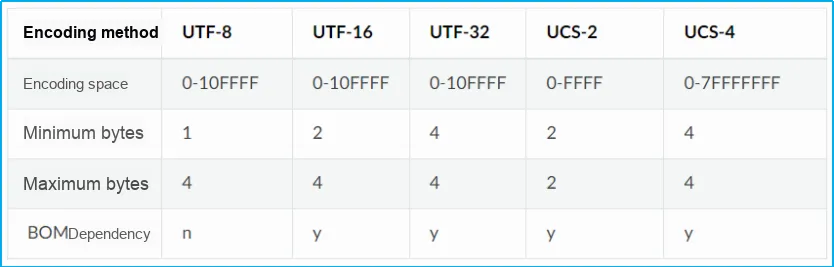
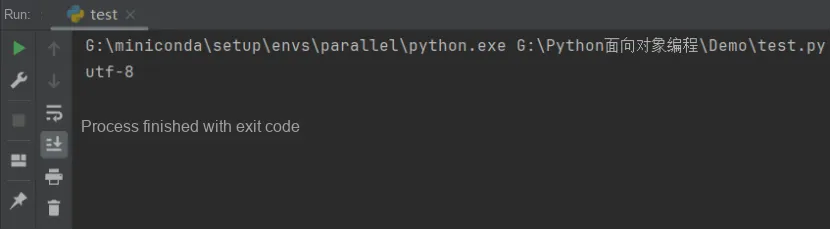
We can obtain the default encoding method of our own computer through the following code:
import sys
print(sys.getdefaultencoding())
Let's take a look at the running result, which shows that the system uses UTF-8 encoding by default:
In Python 3, the string type (str) and the byte sequence type (bytes), also known as ByteFlow, are clearly distinguished. Data is stored in the form of ByteFlow both in memory and on disk, which is composed of bytes (each being 8 bits) in sequential order. As mentioned earlier, a byte is the most fundamental storage format in computing processes, so a string is actually a built-in bytes type. However, people are not accustomed to using bytes directly, as they are neither readable nor easy to manipulate; what people can easily understand is strings.Therefore, conversion between strings and ByteFlow is required. The process of converting ByteFlow into human-readable content is called decoding; conversely, the process of converting strings into ByteFlow is called encoding. In the following example, we first declare a bytes array, then use the. decode method of the bytes class to convert it into a Unicode string that we can understand. This method accepts different character encoding schemes as parameters, and the sample code is as follows:
# Represents cliché in Latin-1 encoding
# b indicates a bytes object is being defined
# The \x characters indicate each byte is represented by hexadecimal digits
bytestr = b'\x63\x6c\x69\x63\x68\xe9'
# Output the ASCII symbols of these bytes themselves
# For characters unknown to ASCII, the original hexadecimal format is kept
# The output contains the b character, indicating this is a bytes object, not a string
print(bytestr)
# Decode the string with Latin-1 encoding; the decode method returns a normal string
print(bytestr.decode("latin-1"))
# Decode the string with iso8859-5 encoding
print(bytestr.decode("iso8859-5"))
# Decode the string with CP437 encoding
print(bytestr.decode("CP437"))
The running results are as follows:

We can also use encode to convert a string into a bytes array, the sample code is as follows:
str = "cliché"
# The first 3 encodings create different byte sets for accented characters
print(str.encode("UTF-8"))
print(str.encode("latin-1"))
print(str.encode("CP437"))
# The 4th cannot handle this case and has unknown characters
print(str.encode("ascii"))
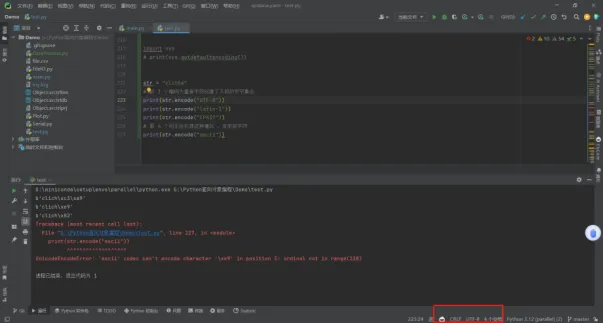
The running results are as follows:
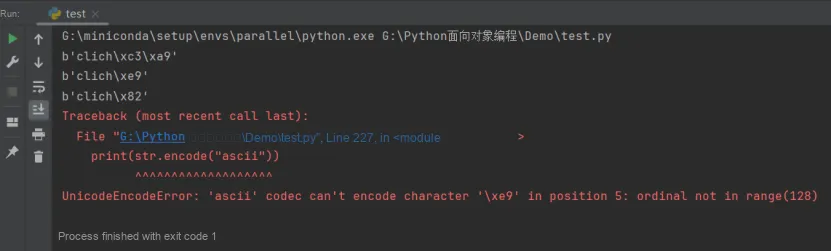
As you can see, an exception is thrown in the last case due to the presence of unknown characters. Sometimes we want those unknown characters to be handled in different ways. The encode method also accepts an optional string parameter named errors, which is used to define how such characters should be handled. The optional values are as follows:
- strict: The strict replacement rule is the default one, and an exception will be thrown when a byte sequence cannot represent a certain character in the encoding we are using;
- replace: When the replace strategy is adopted, this character will be replaced with another character;
- ignore: The ignore strategy will directly skip unrecognized characters;
- xmlcharrefreplace: The xmlcharrefreplace policy creates XML entity representations for Unicode characters, enabling the string to be converted in compliance with XML document specifications.
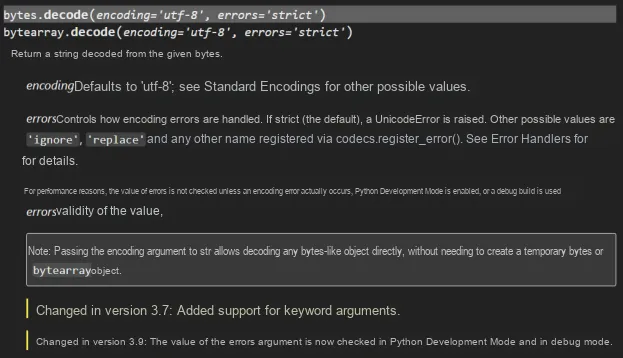
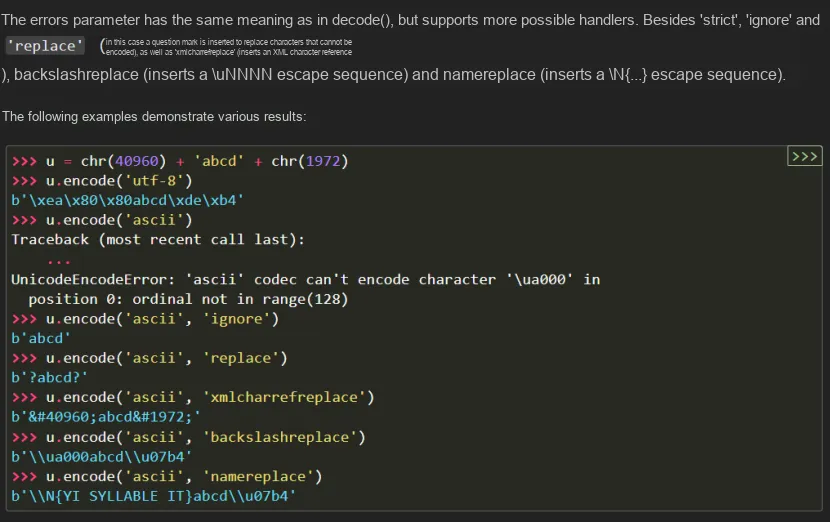
Python has approximately 100 different encoding formats. For details, please refer to the following link:
https://docs.python.org/zh-cn/3/library/codecs.html#standard-encodings
Some encoding formats have multiple names. For example, 'latin-1', 'iso_8859_1' and '8859' all refer to the same encoding. When processing encoded files, choosing the correct encoding is crucial. I strongly recommend using UTF-8 encoding. UTF-8 not only has the ability to represent any Unicode character, but also has become a widely accepted standard in the field of modern software.
Python source code is essentially a text file, so if your source code contains Chinese characters, you must explicitly specify UTF-8 as the encoding when saving the source file. To ensure that the Python interpreter reads the source code in UTF-8 encoding, we usually add the following two lines at the very beginning of the file:
#!/usr/bin/env python3
# -*- coding: utf-8 -*-
The first line of comment is intended to inform Linux/OS X systems that this is an executable Python program, and Windows systems will ignore this comment;
The comment on the second line is to tell the Python interpreter to read the source code in UTF-8 encoding; otherwise, the Chinese characters you write in the source code may be output as garbled characters.
Stating that UTF-8 encoding is specified does not mean that your. py file is actually encoded in UTF-8; you must ensure that your IDE is using UTF-8 encoding. Take the PyCharm IDE as an example:
mutable byte string bytearray
The bytes type is similar to str in that both are immutable. This means that once a bytes object is created, we cannot extend or modify it. Despite this, we can still perform indexing or slicing operations on bytes objects, and even search for specific byte sequences. However, this immutability can cause some inconvenience when dealing with I/O operations, as we often need to buffer bytes until they are ready to be sent during input/output operations.
For example, when receiving data from a socket, it may be necessary to call the recv function multiple times to receive the complete message. In this case, we can use the built-in bytearray type to solve this problem. A bytearray behaves like a list, but its elements are bytes. Its constructor can accept a bytes object as a parameter for initialization.In addition, bytearray also provides the extend method, which allows us to add more bytes objects to the array. For example, when more data is received from a socket or other I/O channel, this flexibility makes bytearray extremely useful in scenarios that require dynamic modification of byte sequences.
The usage of bytearray is as follows:
Syntax: bytearray(source, encoding, errors)
Parameters:
-source[optional]: Initializes the array of bytes
-encoding[optional]: Encoding of the string
-errors[optional]: Takes action when encoding fails
Returns:
Returns an array of bytes of the given size.
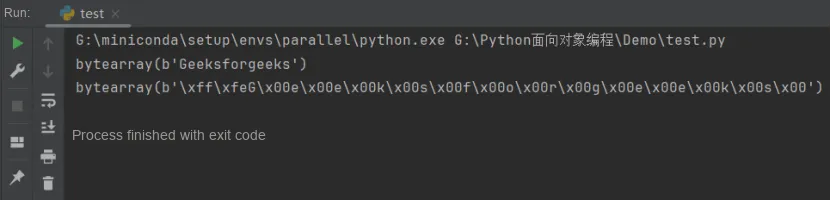
In the following example, we create two bytearray arrays and use the bytearray () function to encode a string:
str = "Geeksforgeeks"

# encoding the string with unicode 8 and 16
array1 = bytearray(str, 'utf-8')
array2 = bytearray(str, 'utf-16')

print(array1)
print(array2)
The code output is as follows:
We can also directly modify a bytearray via slicing operations:
array2[4:6] = b"\x15\xa3"
print(array2)
The running results are as follows:
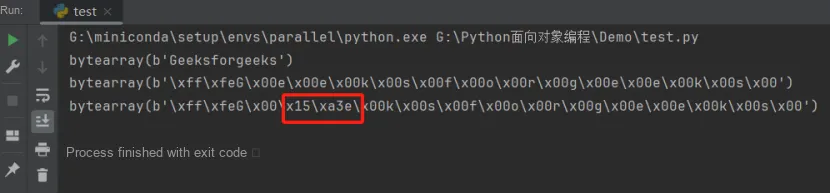
It should be noted that if we want to manipulate a single element in a bytearray, we need to pass an integer value ranging from 0 to 255. This integer represents a specific byte. If we use a character or a bytes object, an exception will be thrown.
A single-byte character can be converted to an integer via the ord function (short for ordinal). This function returns an integer representing a single character. The sample code is as follows:
b = bytearray(b'abcdef')
b[3] = ord(b'g')
b[4] = 68
print(b)
The running results are as follows:
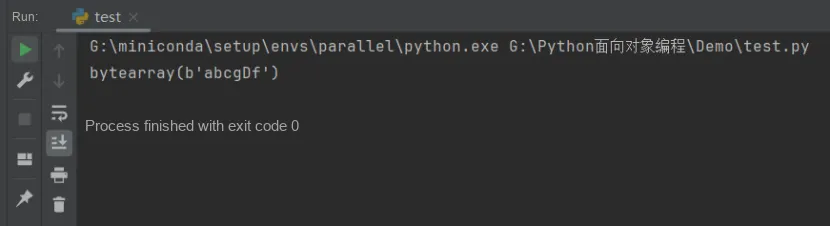
Here, after we finish constructing the variable byte string, we replace the character at index 3 (the 4th character, since indices start at 0 just like in lists) with 103, which is the number corresponding to the lowercase letter 'g' in ASCII characters returned by the ord function. For illustration, we also replace the next character with the byte value 68, which corresponds to the uppercase letter 'D' in ASCII characters.
Some methods of the bytearray type allow it to be manipulated like a list; we can also iterate over it, get its length, and use methods such as count and find, just as we would with bytes or str objects. The difference is that bytearray is a mutable type, which can be used to construct complex sequences from specific input sources.
# Create a bytearray
array = bytearray(b"acbcdc")
# Iterate
for value in array:
    print(value)
# Use the count method on element b'c'
print("Count of c is:", array.count(b"c"))
# Use the find method on element b'c'
print("Count of c is:", array.find(b"c"))
# Use the len method on element b'c'
print("Count of bytes:", len(array))