Contents
Abstract:
A dictionary is an extremely useful container that can be used to directly map one object to another. An empty object with properties is, to some extent, a dictionary, where property names are mapped to property values. Internally, objects represent properties via dictionaries, with the corresponding values being either the property values or the methods of the object.
Original Link:
Previous Recommendations:
You who are learning embedded systems, don’t you still know Object Oriented yet? ?!
For more exciting content, please check out:
Speed Up Your Python: A Quick Guide to Python Parallel Computing
Understand the Debugging Principle of CM3 Microcontrollers in One Article
The "Secret Martial Arts Manual" for Computer Science Competitions
Avnet ZUBoard 1CG Development Board — A New Choice for Deep learning
Document and Code Access:
You can download the document via the following link:
https://github.com/leezisheng/Doc

This document mainly introduces how to conduct Object Oriented programming with Python, and it requires readers to have a basic understanding of Python syntax and single-chip microcomputer development. Compared with other blogs or books that explain Python Object Oriented programming, this document is more detailed and focuses on embedded host computer applications. It takes the common serial port data transmission and reception, data processing, dynamic graph drawing and other functions between the host computer and the slave computer as application examples, and uses the Sourcetrail code software to visually read the code to facilitate readers' understanding.
The link to obtain the relevant sample code is as follows:
https://github.com/leezisheng/Python-OOP-Demo
Body Text
Dictionaries are extremely useful containers that can be used to directly map one object to another. An empty object with properties is, to some extent, a dictionary, where property names are mapped to property values. In fact, the relationship between them is even closer: internally, objects represent properties via dictionaries, with the corresponding values being either the property values or the methods of the object. Even the attributes of modules are stored in the form of dictionaries. In the following code, we access the __dict__ attribute of s, an instance of the SensorClass, and the __dict__ attribute of the FileIO module:
    s = SensorClass()
    # Access the __dict__ attribute of the SensorClass class
    print(SensorClass.__dict__)
    # Access the __dict__ attribute of instance s of the SensorClass class
    print(s.__dict__)
    # Access the __dict__ attribute of the FileIO module
    print(FileIO.__dict__)
It should be noted that: when __dict__ is called directly using a class name, it will output a dictionary composed of all class attributes in the class; when __dict__ is called using an instance object of the class, it will output a dictionary composed of all instance attributes of the class.

Unlike sequences, which are indexed by a range of consecutive integers, dictionaries are indexed by keys, which can be of any immutable type, typically strings or numbers. Looking up a value in a dictionary is extremely efficient, because a given key object is mapped directly to its corresponding value. If you need to find one object via another, you should use a dictionary. The stored objects are called values, and the objects used as indices are called keys.
Dictionaries can be created using the dict () constructor function or the {} syntax. When constructing a dictionary, we use a colon to separate keys and values, and commas to separate key-value pairs. For example, when defining the operating mode of SensorClass, we use the following statement:
class SensorClass(SerialClass):
    # Class variables:
    #   RESPOND_MODE - respond mode - 0
    #   LOOP_MODE    - loop mode - 1
    RESPOND_MODE,LOOP_MODE = (0,1)
If created using a dictionary, it will be as shown below:
class SensorClass(SerialClass):
    # Class variables:
    #   RESPOND_MODE - respond mode - 0
    #   LOOP_MODE    - loop mode - 1
    # RESPOND_MODE,LOOP_MODE = (0,1)
    # Create using a dictionary
    WORK_MODE = {"RESPOND_MODE":0,"LOOP_MODE":1}
You can use square brackets to query the value corresponding to a specific key in a dictionary:
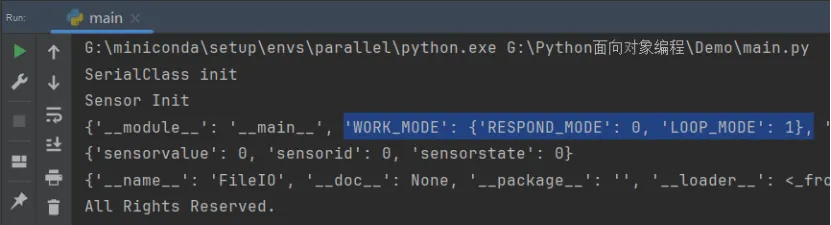
def __init__(self,port:str = "COM11",id:int = 0,state:int = WORK_MODE["RESPOND_MODE"])Meanwhile, when accessing the __dict__ attribute of SensorClass, we can see that WORK_MODE is indeed in the form of a dictionary:
The best way to understand a dictionary is to think of it as an unordered collection of Attribute–Value Pairs. Within the same dictionary, the keys must be unique. In fact, dictionaries are objects, even though their primary purpose is to store other objects. They themselves also have some associated behaviors. One of the most commonly used methods is the get method, whose first argument is the key name, and another optional argument is the default value to be returned when the key name does not exist:
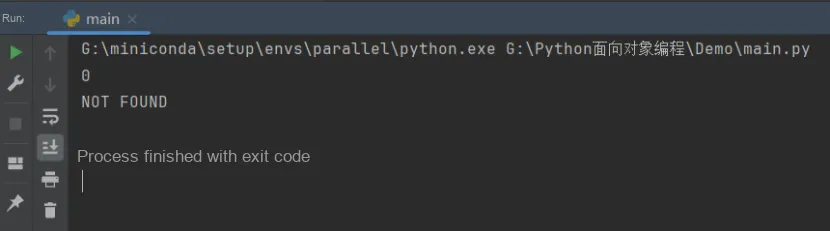
     # Access the "RESPOND_MODE" key in SensorClass.WORK_MODE
    print(SensorClass.WORK_MODE.get("RESPOND_MODE"))
    # Access a key that does not exist in SensorClass.WORK_MODE; "NOT FOUND" is returned when the key does not exist
    print(SensorClass.WORK_MODE.get("RESET_MODE","NOT FOUND"))
The following figure shows the operation result:
For further control, you can use the `setdefault` method. If the key exists in the dictionary, this method behaves just like `get` and returns the corresponding value for that key. Conversely, if the key does not exist, it not only returns the default value provided in the method call (just like the `get` method) but also sets the value of the key to this default value:
    # Access the "RESPOND_MODE" key in SensorClass.WORK_MODE
    print(SensorClass.WORK_MODE.setdefault("RESPOND_MODE"))
    # Access the non-existent key RESET_MODE in SensorClass.WORK_MODE
    # If RESET_MODE does not exist, set the key-value pair: RESET_MODE-2
    print(SensorClass.WORK_MODE.setdefault("RESET_MODE",2))
    # Access the "RESET_MODE" key in SensorClass.WORK_MODE set in the previous line
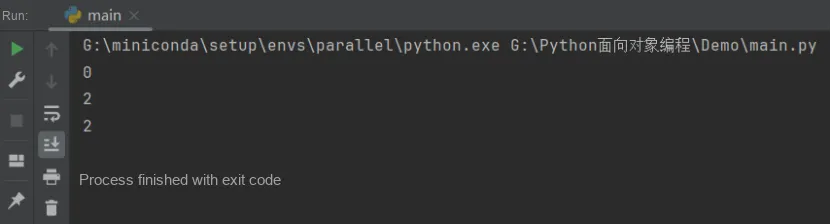
    print(SensorClass.WORK_MODE.get("RESET_MODE"))
The following are the operation results:
The other three useful dictionary methods are keys (), values (), and items (). The first two return iterators consisting of all the keys and all the values in the dictionary respectively. If you want to process these keys or values, you can treat them like a list or use a for loop statement. The items () method is probably the most useful one, as it returns an iterator made up of (key, value) tuples. Combined with the tuple unpacking feature, this method works perfectly in for loops for iterating over the corresponding keys and values.The following sample code prints all the keys and values in the SensorClass.WORK_MODE dictionary:
    for mode, value in SensorClass.WORK_MODE.items():
        print("{} value is {}".format(mode, value))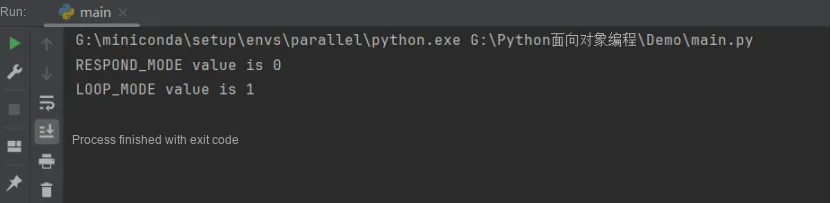
It should be noted that these Attribute–Value Pairs are not printed in the order they were previously inserted. The efficient algorithm (hashing algorithm) used to improve query speed makes the dictionary data structure inherently unordered. An object that can compute a hash value can be converted into a unique integer through a specific algorithm, which is used for fast lookup. This hash value is used for fast value lookup in dictionaries. For example, a string is mapped to an integer based on the characters it contains, while a tuple computes its hash value by combining its elements.Any two objects that are considered identical (such as strings with the same characters or tuples with identical values) should have the same hash value, and the hash value of an object must never change. However, the content of a list is mutable, which means its hash value will also change (two lists are equal only if all their contents are exactly the same). For this reason, lists cannot be used as dictionary keys. Similarly, dictionaries themselves cannot be used as keys for other dictionaries. In contrast, there are no restrictions on the object types for the values in a dictionary. We can map a string key to a list value, or nest other dictionaries inside a dictionary.
Simply put, a hash value is like the DNA or ID card of a piece of data (such as a file or a string). Through a certain hash algorithm (typically MD5, SHA-1, etc.), it maps a longer piece of data to a shorter one, and this shorter data is the hash value of the Big data. It has a characteristic: it is unique. Once the Big data changes, even if it is just a tiny change, its hash value will also change. On the other hand, just like DNA, it guarantees that no two pieces of data will have completely identical hash values.
For a detailed explanation, please refer to: https://www.zhihu.com/question/21801702