In Python, a docstring is a string used to document modules, classes, methods, or functions. It is typically placed at the beginning of a definition, immediately following the declaration. Docstrings are enclosed in triple quotes (""" or ''') and can span multiple lines.
This document mainly introduces how to conduct Object Oriented programming with Python, and it requires readers to have a basic understanding of Python syntax and single-chip microcomputer development. Compared with other blogs or books that explain Python Object Oriented programming, this document is more detailed and focuses on embedded host computer applications. It takes the common serial port data transmission and reception, data processing, dynamic graph drawing and other functions between the host computer and the slave computer as application examples, and uses the Sourcetrail code software to visually read the code to facilitate readers' understanding.
The link to obtain the relevant sample code is as follows:
https://github.com/leezisheng/Python-OOP-Demo
Body Text
In Python, we can add docstrings to methods, classes and modules, and these docstrings can be accessed via a special attribute __ doc__. A docstring is a string used to describe a class, function, module or method, usually placed at the top of the corresponding definition to provide information about its functionality and usage. Docstrings are typically enclosed in triple quotes (''' or """) and positioned at the top of the definition of a class, function, module or method.
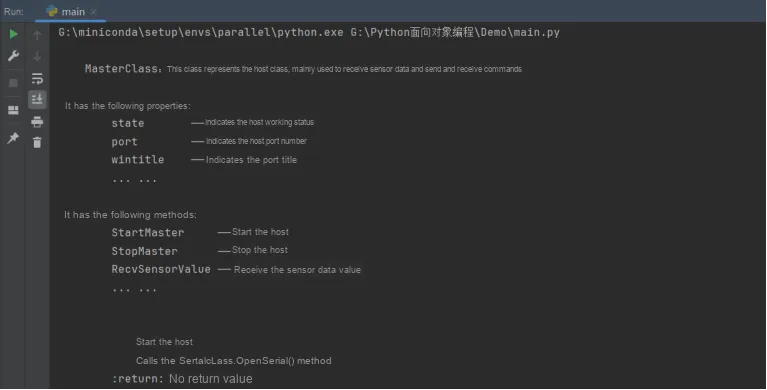
For example, in the following example, we add the necessary comments to the host method enabled for the MasterClass host class and its StartMaster, and access it via the following statement:
# Access the __doc__ attribute of the MasterClass class
    print(MasterClass.__doc__)
    # Access the __doc__ attribute of the StartMaster method in the MasterClass class
    print(MasterClass.StartMaster.__doc__)
The sample code is as follows:
class MasterClass(SerialClass,PlotClass):
    '''
    MasterClass: This class represents the master, mainly used to receive sensor data, send and receive commands, etc.

    It has the following attributes:
        state       —— indicates the master's working state
        port        —— indicates the master's port number
        wintitle    —— indicates the window title
        ... ...

    It has the following methods:
        StartMaster     —— start the master
        StopMaster      —— stop the master
        RecvSensorValue —— receive the sensor data value
        ... ...
    '''
    ...
    # Class initialization
    def __init__(self,state:int = IDLE_STATE,port:str = "COM17",wintitle:str="Basic plotting examples",plottitle:str="Updating plot",width:int=1000,height:int=600):
        pass
    # Start the host
    def StartMaster(self):
        '''
            StartMaster method —— start the master
            Call the SerialClass.OpenSerial() method
        :return: No return value
        '''
        pass
The following are the operation results:
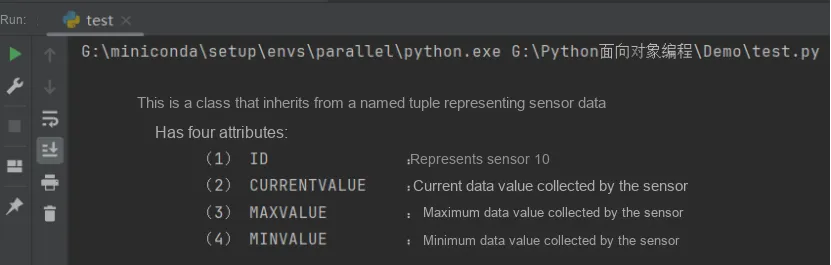
Meanwhile, we can also add a docstring to a named tuple by creating a class that inherits from the corresponding named tuple and adding a doc comment within the class; the sample code is as follows:
from collections import namedtuple

_Sensor = namedtuple("Sensor","ID CURRENTVALUE MAXVALUE MINVALUE")

class Sensor(_Sensor):
    '''
        This is a class that inherits from a named tuple representing sensor data
        It has four attributes:
            (1) ID              : indicates the sensor ID
            (2) CURRENTVALUE    : the current data value collected by the sensor
            (3) MAXVALUE        : the maximum data value collected by the sensor
            (4) MINVALUE        : the minimum data value collected by the sensor
    '''
sensor_tuple=Sensor(ID="16",CURRENTVALUE=32,MAXVALUE=62,MINVALUE=2)
print(sensor_tuple.__doc__)