Labs / Python OOP

The Most Beginner-Friendly Object Oriented Programming Course on the Whole Network: 34 Python's Built-in Data Types - Common Composite Data Types in Python: Tuples and Named Tuples

Author: Li Zisheng · Source: FreakStudio open documentation · License: CC BY 4.0

Contents
The Most Beginner-Friendly Object Oriented Programming Course on the Whole Network: 34 Python's Built-in Data Types - Common Composite Data Types in Python: Tuples and Named Tuples

Abstract:

Tuples are immutable sequence types that can contain elements of different types. Named tuples are subclasses of tuples, which allow you to assign names to the positions in a tuple, thus making the code more readable. This article mainly introduces the usage and application scenarios of these two types of tuples.

FreakStudio's Blog

Previous Recommendations:

You who are learning embedded systems, don’t you still know Object Oriented yet? ?!

The Most Beginner-Friendly Object Oriented Programming Tutorial on the Whole Network: 00 Introduction to Object Oriented Design Methodology

The Most Beginner-Friendly Object Oriented Programming Tutorial on the Whole Network: 01 Basic Concepts of Object Oriented Programming

The Most Beginner-Friendly Object Oriented Programming Tutorial on the Whole Network: 02 Python Implementation of Classes and Objects - Creating Classes with Python

The Most Beginner-Friendly Object Oriented Programming Course on the Whole Network: 03 Python Implementation of Classes and Objects – Adding Attributes to Custom Classes

The Most Beginner-Friendly Object Oriented Programming Tutorial on the Whole Network: 04 Python Implementation of Classes and Objects – Adding Methods to Custom Classes

The Most Beginner-Friendly Object Oriented Programming Tutorial on the Whole Network: 05 Python Implementation of Classes and Objects - PyCharm Code Tab

The Most Beginner-Friendly Object Oriented Programming Tutorial on the Whole Network: 06 Python Implementation of Classes and Objects - Data Encapsulation of Custom Classes

The Most Beginner-Friendly Object Oriented Programming Tutorial on the Whole Network: 07 Python Implementation of Classes and Objects - Type Annotations

The Most Beginner-Friendly Object Oriented Programming Tutorial on the Whole Network: 08 Python Implementation of Classes and Objects - @property Decorator

The Most Beginner-Friendly Object Oriented Programming Tutorial Across the Network: 09 Python Implementation of Classes and Objects - Relationships Between Classes

The Most Beginner-Friendly Object Oriented Programming Tutorial on the Whole Network: 10 Python Implementation of Classes and Objects - Class Inheritance and Liskov Substitution Principle

The Most Beginner-Friendly Object Oriented Programming Tutorial on the Whole Network: 11 Python Implementation of Classes and Objects - Subclass Calling Superclass Methods

The Most Beginner-Friendly Object Oriented Programming Tutorial Across the Network: 12 Python Implementation of Classes and Objects – Using Python's logging Module to Output Program Runtime Logs

The Most Beginner-Friendly Object Oriented Programming Tutorial on the Whole Network: 13 Python Implementation of Classes and Objects - Installation and Usage of Sourcetrail, a Visual Code Reading Tool

The Most Beginner-Friendly Object Oriented Programming Course on the Whole Network: 14 Python Implementation of Classes and Objects – Static Methods and Class Methods of Classes

The Most Beginner-Friendly Object Oriented Programming Tutorial on the Whole Network: 15 Python Implementation of Classes and Objects - The __slots__ Magic Method

The Most Beginner-Friendly Object Oriented Programming Tutorial on the Whole Network: 16 Python Implementation of Classes and Objects - Polymorphism, Method Overriding and Open Closed Principle

The most beginner-friendly Object Oriented programming tutorial across the network: 17 Python implementation of classes and objects - duck typing and "file-like object"

The Most Beginner-Friendly Object Oriented Programming Tutorial Across the Network: 18 Python Implementation of Classes and Objects - Multiple Inheritance and Serial Port Data Curve Plotting with PyQtGraph

The Most Beginner-Friendly Object Oriented Programming Tutorial on the Whole Network: 19 Python Implementation of Classes and Objects – Automatically Generate File Comments and function Comments with PyCharm

The Most Beginner-Friendly Object Oriented Programming Course on the Whole Network: 20 Python Implementation of Classes and Objects – Implementation of Composition Relationship and CSV File Saving

The Most Beginner-Friendly Object Oriented Programming Course on the Whole Network: 21 Python Implementation of Classes and Objects - Multi-File Organization: Module and Package

The Most Beginner-Friendly Object Oriented Programming Course on the Whole Network: 22 Python Implementation of Classes and Objects - Exceptions and Syntax Errors

The Most Beginner-Friendly Object Oriented Programming Tutorial Across the Network: 23 Python Implementation of Classes and Objects - Throwing Exceptions

The Most Beginner-Friendly Object Oriented Programming Tutorial on the Whole Network: 24 Python Implementation of Classes and Objects - Exception Catching and Handling

The Most Beginner-Friendly Object Oriented Programming Tutorial on the Whole Network: 25 Python Implementation of Classes and Objects - Python Determines Input Data Types

The Most Beginner-Friendly Object Oriented Programming Tutorial on the Whole Network: 26 Python Implementation of Classes and Objects - Context Managers and the with Statement

The Most Beginner-Friendly Object Oriented Programming Tutorial on the Whole Network: 27 Python Implementation of Classes and Objects - Implementation of Exception Hierarchy and Custom Exception Classes in Python

The Most Beginner-Friendly Object Oriented Programming Tutorial on the Whole Network: 28 Python Implementation of Classes and Objects - A Comprehensive Summary of Python Programming Principles, Philosophy and Specifications

The Most Beginner-Friendly Object Oriented Programming Tutorial Across the Network: 29 Python Implementation of Classes and Objects – Assertions, Defensive Programming and the Usage of the help function

The Best Entry-Level Object Oriented Programming Tutorial Across the Network: 30 Built-in Data Types in Python - The object Root Class

The Most Beginner-Friendly Object Oriented Programming Course on the Whole Network: 31 Python's Built-in Data Types - Object and Type

The Most Beginner-Friendly Object Oriented Programming Tutorial on the Whole Network: 32 Python's Built-in Data Types - Class and Instance

The Most Beginner-Friendly Object Oriented Programming Tutorial on the Whole Network: 33 Python's Built-in Data Types – The Relationship Between Object and Type

For more exciting content, please check out:

Speed Up Your Python: A Quick Guide to Python Parallel Computing

Understand the Debugging Principle of CM3 Microcontrollers in One Article

After half a month of dedicated grinding, the ultimate summary of embedded technology stack is now released

The "Secret Martial Arts Manual" for Computer Science Competitions

Document and Code Access:

You can download the document via the following link:

https://github.com/leezisheng/Doc

19

This document mainly introduces how to conduct Object Oriented programming with Python, and it requires readers to have a basic understanding of Python syntax and single-chip microcomputer development. Compared with other blogs or books that explain Python Object Oriented programming, this document is more detailed and focuses on embedded host computer applications. It takes the common serial port data transmission and reception, data processing, dynamic graph drawing and other functions between the host computer and the slave computer as application examples, and uses the Sourcetrail code software to visually read the code to facilitate readers' understanding.

The link to obtain the relevant sample code is as follows:

https://github.com/leezisheng/Python-OOP-Demo

Body Text

Tuple

A tuple is an object that can store a certain number of other objects in a defined order. They are immutable, which means that we cannot add, remove, or replace the objects within them during runtime. The biggest advantage of the immutability of tuple types is that they can be used as keys for dictionary types, as well as in other contexts where an object is required to have a hash value.

Tuples are used to store data and cannot store behaviors. If you need a certain behavior to manipulate a tuple, you must pass the tuple to a function (or a method of another object) to perform this operation.

Generally speaking, tuples are intended to store distinct values; for instance, you would not typically put the IDs of three sensors into a single tuple, but rather group a sensor's ID, its current reading, and its maximum and minimum recorded readings into one tuple. The core purpose of a tuple is to aggregate disparate pieces of data into a single container, which makes it the simplest tool for replacing "data-only objects" that carry no associated methods.

We can create a tuple using comma-separated values; parentheses are typically used for better readability and to distinguish the tuple from other statements, though they are not mandatory.

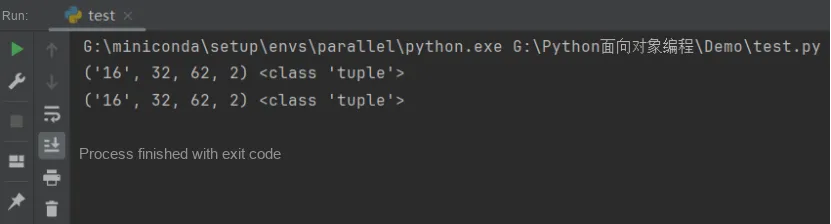
# The following two assignment syntaxes are equivalent (record a sensor's ID, current data value, maximum value and minimum value):
sensor_tuple = ("16",32,62,2)
print(sensor_tuple, type(sensor_tuple))
sensor_tuple = "16",32,62,2
print(sensor_tuple, type(sensor_tuple))
16 32 62 2 4

If tuples are used inside other constructs such as function calls, list comprehensions, or generators, parentheses are required. Otherwise, the interpreter has no way to tell whether it is a tuple or the next function argument. Meanwhile, tuple unpacking occurs when receiving the return value of a function: when a function returns data, it often combines variables together for simple storage and transfer, and when receiving the return value of the function, these variables can be unpacked into multiple separate variables.

Namedtuple

Since accessing tuple elements must be done via indices, it is often confusing to figure out the specific meaning corresponding to each subscript when a tuple contains too many elements. Meanwhile, when writing a required function for another developer, that developer is highly likely to encounter errors due to incorrect order or incorrect number of the returned values they receive.

If you neither need to add behaviors to an object nor know in advance what data to store, you can use a named tuple. A named tuple is a tuple with attributes, and it is an excellent way to combine read-only data. Compared with a regular tuple, constructing a named tuple requires slightly more work. First, you need to import namedtuple, as it is not in the default namespace. Then define a named tuple by specifying its name and attributes, which will return a class-like object that you can instantiate with the required values.

The constructor function of a named tuple accepts two parameters: typename and field_names. typename specifies the name of the tuple, while field_names specifies the names of each element in the tuple, i. e., the attribute names (a string of attributes separated by spaces).

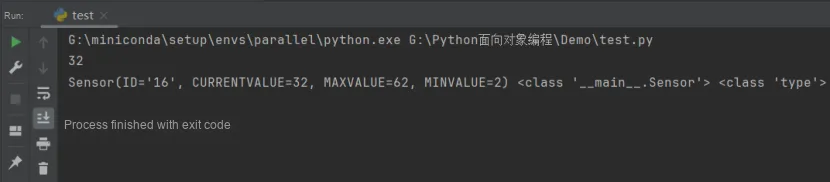
from collections import namedtuple
Sensor = namedtuple("Sensor","ID CURRENTVALUE MAXVALUE MINVALUE")
sensor_tuple = Sensor(ID = "16",CURRENTVALUE = 32,MAXVALUE = 62,MINVALUE = 2)
# The attributes of a tuple can be accessed like the attributes of an object
print(sensor_tuple.CURRENTVALUE)
print(sensor_tuple,type(sensor_tuple),type(Sensor))
0 32 16 62 2

Named tuples are well-suited for representing "data-only" scenarios, but they are not ideal for every use case. Like tuples and strings, named tuples are immutable, meaning that once a value is assigned to an attribute, it cannot be modified. If you need to modify stored data, a dictionary type may be a more appropriate choice.

347622978