The Most Beginner-Friendly Object Oriented Programming Tutorial on the Whole Network: 37 Common Composite Data Types in Python - Lists and List Comprehensions
In Python, a list is a highly flexible and commonly used composite data type. It allows storing multiple items, which can be of any data type, including other lists. List comprehensions provide a concise way to create and manipulate lists.
This document mainly introduces how to conduct Object Oriented programming with Python, and it requires readers to have a basic understanding of Python syntax and single-chip microcomputer development. Compared with other blogs or books that explain Python Object Oriented programming, this document is more detailed and focuses on embedded host computer applications. It takes the common serial port data transmission and reception, data processing, dynamic graph drawing and other functions between the host computer and the slave computer as application examples, and uses the Sourcetrail code software to visually read the code to facilitate readers' understanding.
The link to obtain the relevant sample code is as follows:
https://github.com/leezisheng/Python-OOP-Demo
Body Text
List Introduction
A list is the most basic data structure in Python. Each value in the sequence has a corresponding position value, called an index; the first index is 0, the second is 1, and so on. In Python, lists are usually used to store instances of objects of the "same" type; for example, lists of strings or numbers (but the data items in a list do not need to be of the same type). More commonly, lists consist of objects we define ourselves. If you want to store a set of items in a certain order, a list is the right choice.They are usually ordered according to the sequence in which these elements are inserted, but they can also be sorted based on certain criteria. Common operations applicable to all lists include indexing, slicing, addition, multiplication, and membership checking.
Although the data items in a list do not need to be of the same type, do not use a list to collect different attributes of a single item. For example, we may need a list of all attributes of a specific shape. In such cases, tuples, named tuples, dictionaries, and objects are all more appropriate choices.
The common methods for lists are as follows:
Method
Description
list.append(x)
Add an element to the end of a list; this is equivalent to a[len (a):] = [x].
list.extend(L)
Extend the list by appending all the elements from the given list, which is equivalent to a[len (a):] = L.
list.insert(i, x)
Inserts an element at the specified position. The first argument is the index of the element before which to insert: for example, a.insert (0, x) inserts at the front of the entire list, and a.insert (len (a), x) is equivalent to a.append (x).
list.remove(x)
Remove the first element in the list whose value is x.
list.pop([i])
Removes the element at the specified position in the list and returns it.
list.clear()
Remove all items from the list, which is equivalent to del a[:].
list.index(x)
Returns the index of the first element in the list with a value equal to x.
list.count(x)
Returns the number of times x appears in the list.
list.sort()
Sort the elements in the list.
list.reverse()
Elements in the inverted list.
list.copy()
Return a shallow copy of the list, equivalent to a[:].
List Comprehension
List comprehensions provide a concise way to create lists from sequences. Typically, applications apply some operation to each element of a sequence, use the results of these operations as the elements for generating a new list, or create a subsequence based on specified conditional criteria.
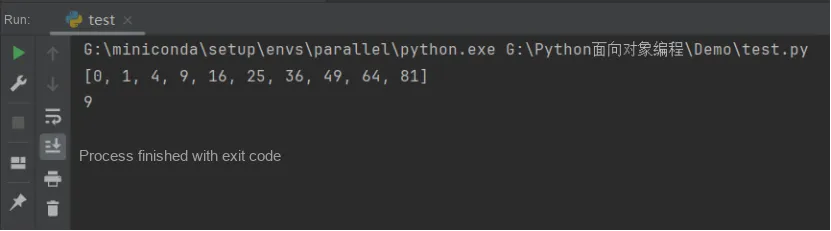
For example, create a list of squared values:
squares = []
for x in range(10):
    squares.append(x**2)
print(squares)
print(x)
Note that this code creates (or overwrites) the variable x, which will still exist after the loop finishes. The following method can compute the list of squares without side effects:
squares = [x**2 for x in range(10)]
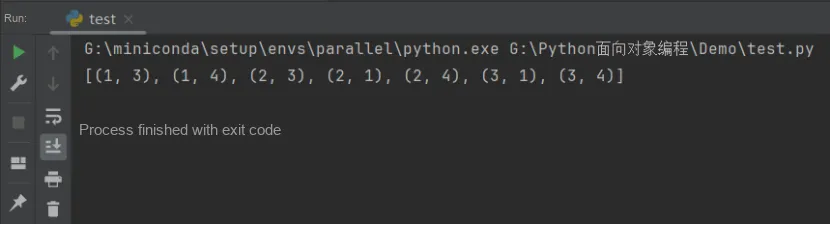
Each list comprehension follows an expression after the for keyword, then includes zero or more for or if clauses. The returned result is a list generated from the subsequent for and if context environments based on the expression. If you want the expression to derive a tuple, you must enclose it in parentheses.
list = [(x, y) for x in [1,2,3] for y in [3,1,4] if x != y]
print(list)
Equivalent to:
list = []
for x in [1,2,3]:
    for y in [3,1,4]:
        if x != y:
            list.append((x, y))
print(list)