Contents
Abstract:
In this lesson, we mainly explained how subclasses perform initialization and call the attributes and methods of the parent class in Python class inheritance. Meanwhile, we also elaborated on the specific implementation of the simulated serial port sensor and host classes, and demonstrated the serial communication with these two classes using the xcom serial port assistant.
Original Link:
Previous Recommendations:
You who are learning embedded systems still don't know Object Oriented? ?!
More exciting content can be found here:
Speed Up Your Python: A Quick Guide to Python Parallel Computing
Understand the Debugging Principle of CM3 Microcontroller in One Article
The "Secret Martial Arts Manual" for Computer Science Competitions
Document and Code Acquisition:
You can download the document via the following link:
https://github.com/leezisheng/Doc
This document mainly introduces how to use Python for Object Oriented programming, and requires readers to have a basic understanding of Python syntax and single-chip microcomputer development. Compared with other blogs or books that explain Python Object Oriented programming, this document is more detailed and focuses on embedded host computer applications, taking the common serial port data transmission and reception, data processing, dynamic graph drawing and other functions between the host computer and the lower computer as application examples. Meanwhile, Sourcetrail code software is used for visual reading of the code to facilitate readers' understanding.
The link to obtain the relevant sample code is as follows: https://github.com/leezisheng/Python-OOP-Demo
Main Text
Specific implementation of the analog serial port sensor and host classes:
Next, let's take a look at the specific implementation of the two newly added class methods. It is clear that both SensorClass and MasterClass need to call the methods related to serial port transmission and reception in the SerialClass class, which means that subclasses call the methods of the parent class, and there are three ways for a subclass to call the methods of its parent class:
- ParentClassName. methodName (self): In this case, you need to add the class name prefix of the parent class and include the self parameter variable. This method is applicable to both single inheritance and multiple inheritance.
- super (Subclass Name, self). Parent Class Method Name ()/super (). Parent Class Method Name: Use the super () function; however, when it comes to multiple inheritance, this function can only invoke the constructor method of the first direct parent class.
Implementation of the SensorClass Class
(1) First, we set the corresponding character representations of the working status and the commands in SensorClass as class attributes. What does this mean? Let's look at the following code:
class SensorClass(SerialClass):
    # Class variables:
    #   RESPOND_MODE - respond mode - 0
    #   LOOP_MODE   - loop mode - 1
    RESPOND_MODE,LOOP_MODE = (0,1)
    # Class variables:
    #   START_CMD       - start command      -0
    #   STOP_CMD        - stop command      -1
    #   SENDID_CMD      - send ID command    -2
    #   SENDVALUE_CMD   - send data command   -3
    START_CMD,STOP_CMD,SENDID_CMD,SENDVALUE_CMD = (0,1,2,3)
Class attributes belong to the class as a whole, which is different from the instance attributes mentioned earlier. Class attributes are equivalent to global variables — they are attributes shared by all instance objects, and a class attribute affects all objects of the class. By contrast, the attributes of an instance object are private to that instance itself, and an instance attribute only affects the current object. Class attributes are commonly used to store constants, define default values, or construct a cache accessible to all objects.
Here, we define two types of class attributes:
RESPOND_MODE,LOOP_MODE = (0,1)Used to indicate the different operating modes of SensorClass.
START_CMD,STOP_CMD,SENDID_CMD,SENDVALUE_CMD = (0,1,2,3)Used to represent different commands.
(2) In the initialization process, we invoke the initialization method of the parent class; meanwhile, three parameters, namely id, state and port, can be specified when initializing the SensorClass.
    def __init__(self,id:int = 0,state:int = RESPOND_MODE,port:str = "COM11"):
        # Call the parent class initialization method; the super() function connects the parent class and the child class
        super().__init__(port)
        self.sensorvalue = 0
        self.sensorid    = id
        self.sensorstate = state
Here, as a matter of fact, the initialization parameters of the SensorClass should include other parameters related to serial port configuration, such as baud rate, parity bit, data bit and stop bit. Since these parameters are configured identically on both sides of the serial communication, they are simplified here for the convenience of explanation.
(3) Simulate the power-on initialization of the sensor: during the actual power-on process of a sensor, operations such as calibration and self-test will be completed, and here we simply output the sensor status and ID number:
    # Sensor power-on initialization
    def InitSensor(self):
        # Sensor power-on initialization
        # Output the ID and the state at the same time
        print("Sensor %d Init complete : %d"%(self.sensorid,self.sensorstate))
(4) In the sensor enabling and disabling method, we enable or disable the serial port and print the relevant information:
    # Start the sensor
    def StartSensor(self):
        super().OpenSerial()
        print("Sensor %d start serial %s "%(self.sensorid,self.dev.port))

    # Stop the sensor
    def StopSensor(self):
        super().CloseSerial()
        print("Sensor %d close serial %s " % (self.sensorid, self.dev.port))
(5) In the method for the sensor to send the ID number, we called the WriteSerial method of the parent class:
    # Send the sensor ID
    def SendSensorID(self):
        super().WriteSerial(str(self.sensorid))
        print("Sensor %d send id "%self.sensorid)
(6) In the method for sensors to transmit data, we use the following statement to generate a random number:
        # Generate a random integer in [1, 10]
        data = random.randint(1, 10)
Note: This method requires importing the random library using the `import random` statement.
Meanwhile, call the WriteSerial method of the parent class to implement the transmission of sensor data:
    # Send the sensor data
    def SendSensorValue(self):
        # Generate a random integer in [1, 10]
        data = random.randint(1, 10)
        super().WriteSerial(str(data))
        print("Sensor %d send data  %d" % (self.sensorid,data))
(7) In the method for the sensor to receive commands, we call the ReadSerial of the parent class to receive commands:
    # Receive host commands
    def RecvMasterCMD(self):
        cmd = super().ReadSerial()
        print("Sensor %d recv cmd %d " % (self.sensorid,cmd))
        return cmd
Implementation of the MasterClass Class
(1) First, define the class attributes related to operation modes and commands:
class MasterClass(SerialClass):
    # Class variables:
    #   BUSY_STATE  - busy state - 0
    #   IDLE_STATE  - idle state - 1
    BUSY_STATE, IDLE_STATE = (0, 1)
    # Class variables:
    #   START_CMD       - start command      -0
    #   STOP_CMD        - stop command      -1
    #   SENDID_CMD      - send ID command    -2
    #   SENDVALUE_CMD   - send data command   -3
    START_CMD, STOP_CMD, SENDID_CMD, SENDVALUE_CMD = (0, 1, 2, 3)
(2) Call the initialization method of the parent class in the initialization function, and define the valuequeue and __masterstatue attributes:
    # Class initialization
    def __init__(self,state:int = IDLE_STATE,port:str = "COM17"):
        # Call the parent class initialization method; the super() function connects the parent class and the child class
        super().__init__(port)
        self.valuequeue   = queue.Queue(10)
        self.__masterstatue = state
(3) In the StartMaster method, we open the serial port and use logging.info () method to output debug information:
    # Start the host
    def StartMaster(self):
        super().OpenSerial()
        logging.info("START MASTER :"+self.dev.port)
Here, you need to import the logging library and set the log output level:
import logging
# Set the log output level
logging.basicConfig(level=logging.DEBUG)
(4) Call the CloseSerial method of the parent class in the host shutdown method:
    # Stop the host
    def StopMaster(self):
        super().CloseSerial()
        logging.info("CLOSE MASTER :" + self.dev.port)
(5) Call the ReadSerial method of the parent class as follows to receive the ID number and data:
    # Receive the sensor ID
    def RecvSensorID(self):
        sensorid = super().ReadSerial()
        logging.info("MASTER RECIEVE ID : " + str(sensorid))
        return sensorid

    # Receive the sensor data
    def RecvSensorValue(self):
        data = super().ReadSerial()
        logging.info("MASTER RECIEVE DATA : " + str(data))
        self.valuequeue.put(data)
        return data
(6) Call the WriteSerial method of the parent class to send the instruction:
    # Host sends a command
    def SendSensorCMD(self,cmd):
        super().WriteSerial(str(cmd))
        logging.info("MASTER SEND CMD : " + str(cmd))
(7) The host status is obtained via the RetMasterStatue method as follows:
    # Host returns its working state -
    def RetMasterStatue(self):
        return self.__masterstatue
Complete Code
The following is the complete code for the two classes:
 class SensorClass(SerialClass):
    # Class variables:
    #   RESPOND_MODE - respond mode - 0
    #   LOOP_MODE    - loop mode - 1
    RESPOND_MODE,LOOP_MODE = (0,1)
    # Class variables:
    #   START_CMD       - start command      -0
    #   STOP_CMD        - stop command      -1
    #   SENDID_CMD      - send ID command    -2
    #   SENDVALUE_CMD   - send data command   -3
    START_CMD,STOP_CMD,SENDID_CMD,SENDVALUE_CMD = (0,1,2,3)

    # Class initialization
    def __init__(self,port:str = "COM11",id:int = 0,state:int = RESPOND_MODE):
        # Call the parent class initialization method; the super() function connects the parent class and the child class
        super().__init__(port)
        self.sensorvalue = 0
        self.sensorid    = id
        self.sensorstate = state
    # Sensor power-on initialization
    def InitSensor(self):
        # Sensor power-on initialization
        # Output the ID and the state at the same time
        print("Sensor %d Init complete : %d"%(self.sensorid,self.sensorstate))
    # Start the sensor
    def StartSensor(self):
        super().OpenSerial()
        print("Sensor %d start serial %s "%(self.sensorid,self.dev.port))
    # Stop the sensor
    def StopSensor(self):
        super().CloseSerial()
        print("Sensor %d close serial %s " % (self.sensorid, self.dev.port))
    # Send the sensor ID
    def SendSensorID(self):
        super().WriteSerial(str(self.sensorid))
        print("Sensor %d send id "%self.sensorid)
    # Send the sensor data
    def SendSensorValue(self):
        # Generate a random integer in [1, 10]
        data = random.randint(1, 10)
        super().WriteSerial(str(data))
        print("Sensor %d send data  %d" % (self.sensorid,data))
    # Receive host commands
    def RecvMasterCMD(self):
        cmd = super().ReadSerial()
        print("Sensor %d recv cmd %d " % (self.sensorid,cmd))
        return cmd

class MasterClass(SerialClass):
    # Class variables:
    #   BUSY_STATE  - busy state - 0
    #   IDLE_STATE  - idle state - 1
    BUSY_STATE, IDLE_STATE = (0, 1)
    START_CMD, STOP_CMD, SENDID_CMD, SENDVALUE_CMD = (0, 1, 2, 3)

    # Class initialization
    def __init__(self,state:int = IDLE_STATE,port:str = "COM17"):
        # Call the parent class initialization method; the super() function connects the parent class and the child class
        super().__init__(port)
        self.valuequeue   = queue.Queue(10)
        self.__masterstatue = state
    # Start the host
    def StartMaster(self):
        super().OpenSerial()
        logging.info("START MASTER :"+self.dev.port)
    # Stop the host
    def StopMaster(self):
        super().CloseSerial()
        logging.info("CLOSE MASTER :" + self.dev.port)
    # Receive the sensor ID
    def RecvSensorID(self):
        sensorid = super().ReadSerial()
        logging.info("MASTER RECIEVE ID : " + str(sensorid))
        return sensorid
    # Receive the sensor data
    def RecvSensorValue(self):
        data = super().ReadSerial()
        logging.info("MASTER RECIEVE DATA : " + str(data))
        self.valuequeue.put(data)
        return data
    # Host sends a command
    def SendSensorCMD(self,cmd):
        super().WriteSerial(str(cmd))
        logging.info("MASTER SEND CMD : " + str(cmd))
    # Host returns its working state -
    def RetMasterStatue(self):
        return self.__masterstatue
Simulation Example
Here, we use the XCOM software to interact with our Python program.
Sensor Experiment Simulation
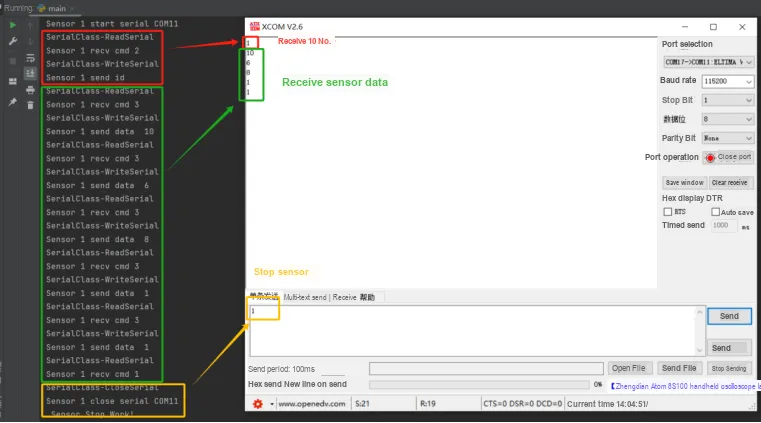
Here, we first create a sensor object in the main function, enable the serial port module in the sensor after completing initialization, set up a loop, and perform polling to read commands and execute corresponding operations. The sample code is as follows:
if __name__ == "__main__":
    # Create a sensor object
    s = SensorClass(port="COM11", id=1, state=SensorClass.RESPOND_MODE)
    # Initialize the sensor
    s.InitSensor()
    # Turn on the sensor
    s.StartSensor()

    while True:
        # Perform different operations according to different commands
        cmd = s.RecvMasterCMD()
        # START_CMD, STOP_CMD, SENDID_CMD, SENDVALUE_CMD = (0, 1, 2, 3)
        if cmd == SensorClass.SENDID_CMD:
            s.SendSensorID()
        elif cmd == SensorClass.SENDVALUE_CMD:
            s.SendSensorValue()
        elif cmd == SensorClass.STOP_CMD:
            s.StopSensor()
            break
    print(" Sensor Stop Work!")
Let's take a look at the actual verification results:
Host Experiment Simulation
Here, we first create and start the host object, our xcom simulated sensor, in the main function. The host sends and receives data commands during polling, adds the received data to the queue of the host class, and finally sends a shutdown command and shuts down the host.
if __name__ == "__main__":
    m = MasterClass(state=MasterClass.IDLE_STATE, port="COM17")
    m.StartMaster()

    # START_CMD, STOP_CMD, SENDID_CMD, SENDVALUE_CMD = (0, 1, 2, 3)
    # Send a command to get the sensor ID
    m.SendSensorCMD(MasterClass.SENDID_CMD)
    m.RecvSensorID()

    for i in range(3):
        # Send a command to get the sensor data
        m.SendSensorCMD(MasterClass.SENDVALUE_CMD)
        m.RecvSensorValue()

    m.SendSensorCMD(MasterClass.STOP_CMD)
    m.StopMaster()

    print("Master Stop Work!")
Here we print the host logs to a file:
# Configure the log output target file and the log format
LOG_FORMAT = "%(asctime)s - %(levelname)s - %(message)s"
logging.basicConfig(filename='my.log', level=logging.DEBUG, format=LOG_FORMAT)
Let's take a look at the actual verification results:
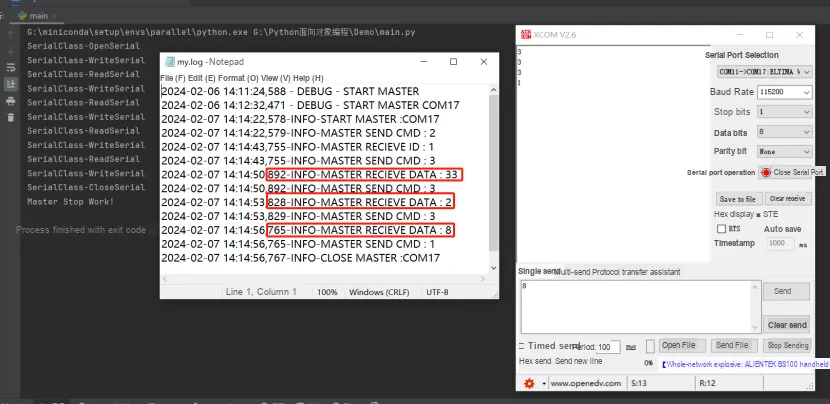
It can be seen that both experiments can run completely, and we will talk about the interactive work of these two classes in the subsequent multi-threading section.