Contents
Abstract:
This article mainly introduces the basic concepts of class inheritance and the Liskov Substitution Principle, taking simulated sensor data serial port output - host computer serial port reception as an example to explain the workflow, working modes and basic concepts. Meanwhile, it creates the host class and sensor class, and defines attributes and abstract methods.
Source Link:
Previous Recommendations:
You who are learning embedded systems still don't know Object Oriented? ?!
More exciting content can be found here:
Speed Up Your Python: A Quick Guide to Python Parallel Computing
Understand the Debugging Principle of CM3 Microcontroller in One Article
The "Secret Martial Arts Manual" for Computer Science Competitions
Access to Documents and Code
You can download the document via the following link:
https://github.com/leezisheng/Doc
This document mainly introduces how to use Python for Object Oriented programming, and requires readers to have a basic understanding of Python syntax and single-chip microcomputer development. Compared with other blogs or books that explain Python Object Oriented programming, this document is more detailed and focuses on embedded host computer applications, taking the common serial port data transmission and reception, data processing, dynamic graph drawing and other functions between the host computer and the lower computer as application examples. Meanwhile, Sourcetrail code software is used for visual reading of the code to facilitate readers' understanding.
The link to obtain the relevant sample code is as follows: https://github.com/leezisheng/Python-OOP-Demo
Body Text
Basic Concepts of Class Inheritance
As we mentioned earlier, we can create new classes based on existing ones, and one of the approaches to do this is to allow a class to directly inherit attributes and methods from another class, thereby reducing the need to write duplicate code. The class that provides the inheritance information is called a parent class, also known as a superclass or base class; the class that receives the inheritance information is called a subclass, also known as a derived class or extended class.Subclasses not only inherit the attributes and methods provided by the superclass, but can also define their own unique attributes and methods, so subclasses have more capabilities than their superclasses. In practical development, we often use subclass objects to replace a superclass object, which is a common practice in Object Oriented programming, and the corresponding principle is called Liskov Substitution Principle.
Liskov Substitution Principle
The so-called Liskov Substitution Principle is, in layman's terms, that subclasses can extend the functions of the parent class, but cannot alter the original functions of the parent class. It has the following extended implications:
- (1) A subclass can implement the abstract methods of its parent class, but cannot override the non-abstract methods of the parent class.
- (2) Subclasses can add their own unique methods.
- (3) When a subclass method overloads a superclass method, the preconditions of the method (i. e., the method's inputs and parameters) shall be more lenient than those of the superclass method.
- (4) When a subclass implements a method of its parent class (via overriding, overloading, or implementing an abstract method), the postcondition of the method (including outputs and return values) must be stricter than or equivalent to that of the parent class.
For more related information, please refer to: https://www.jyt0532.com/2020/03/22/lsp/
Abstract Implementation of Application Examples
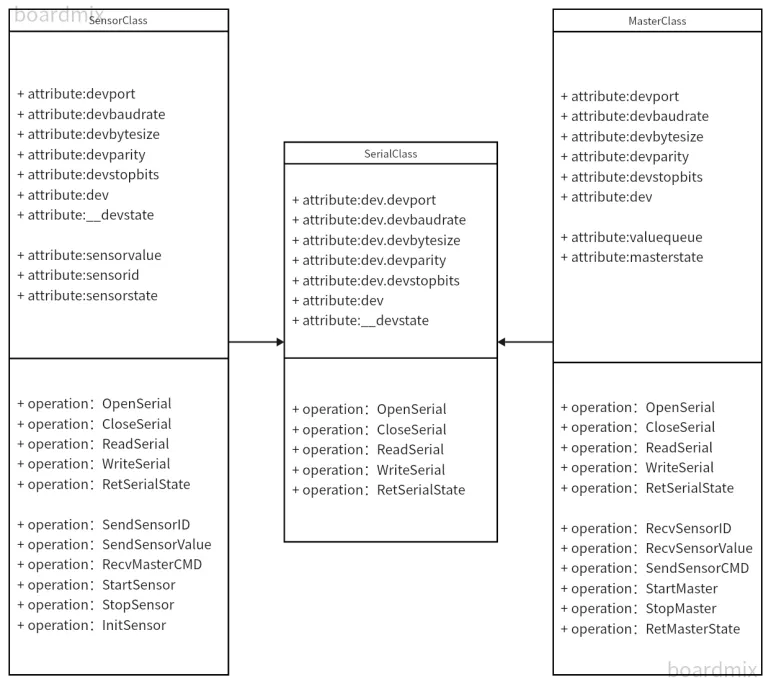
Here, we take the serial port output of simulated sensor data and the serial port reception of the host computer as an example for explanation: In current development, many sensors integrate ADC and MCU chips internally, which can convert the voltage corresponding to the measured physical quantity collected by the sensor, perform filtering and other processing, and then output more accurate sensor data through the serial port. Here, the part related to serial communication between the sensor and the host computer can be abstracted as a serial port class, and both of them have the serial port transceiving function. However, the sensor class, the host computer receiving class and the serial port class are different:
SensorClass Class | |
Class members | Function |
Attribute: sensorvalue | Data collected by sensors |
Attribute: sensorid | Sensor ID, which is used to identify which sensor it is |
attribute:sensorstate | The operating status of the sensor includes: ① Passive response mode (default): After the host sends a query data command, the sensor transmits the data; ② Polling mode: Send a sensor data every 100ms and work in polling mode; |
operation: SendSensorID | Send the sensor ID number |
operation: SendSensorValue | Transmit the data collected by the sensor |
operation: RecvMasterCMD | Receive host commands |
operation: StartSensor | Start sensor operation |
operation: StopSensor | Stop the sensor from working |
operation: InitSensor | Initialize the sensor |
Simply put, the workflow is as follows: the sensor starts operating after initialization, continuously collects data, and transmits the sensor data upon receiving the query data command sent by the host; correspondingly, it executes the corresponding operation after receiving different instructions sent by the host.
Let's look at the sample code below; the implementation of specific methods in the SensorClass class is omitted for now:
class SensorClass(SerialClass):
    # Class initialization
    def __init__(self,id,state):
        # Call the parent class initialization method; the super() function connects the parent class and the child class
        super().__init__()
        self.sensorvalue = 0
        self.sensorid    = id
        self.sensorstate = state

    # Sensor power-on initialization
    def InitSensor(self):
        pass
    # Start the sensor
    def StartSensor(self):
        pass
    # Stop the sensor
    def StopSensor(self):
        pass
    # Send the sensor ID
    def SendSensorID(self):
        pass
    # Send the sensor data
    def SendSensorValue(self):
        pass
Here, the inheritance syntax is as follows:
class 派生类名(基类名)
    ...
In the initialization method of the SensorClass class, we first call the following statement:
super().__init__()Here, super () is used to call the method of the parent class (base class). __init__() is the constructor method of a class, so super (). __init__() calls the init method of the parent class; similarly, you can also use super () to call other methods of the parent class. At this point, you may wonder: why don't we use the following statement to initialize the parent class SerialClass?
SerialClass.__init__()It seems so clear and convenient. In fact, super () is designed to solve multiple inheritance issues. While calling a parent class method directly via the class name works fine under single inheritance, problems such as Method Resolution Order (MRO) and duplicate calls (diamond inheritance) will arise when it comes to multiple inheritance. We won’t go into too much detail about the diamond inheritance problem here; just know that the super () method must be called during subclass initialization.
For issues related to diamond inheritance, you can refer to the following link:
https://blog.csdn.net/qq_41556318/article/details/84521836
For the MasterClass class of the host, in addition to the properties and methods inherited from its parent class SerialClass, it also includes other properties and methods, which are explained as follows:
MasterClass class | |
Class members | Function |
Attribute: valuequeue | The buffer queue for data collected by sensors in the host machine |
attribute:masterstate | Host status, including: ① Idle state (default): The host is idle and available to receive data; ② Busy status: The host is busy with operations and temporarily stops receiving data. |
Method operation: RecvSensorID | Receive sensor ID number |
operation: RecvSensorValue | Receive the data collected by the sensor |
operation: SendSensorCMD | Send host command |
operation: StartMaster | Start the host operation |
operation: StopMaster | Stop the host machine |
operation: RetMasterState | Return host status |
Simply put, the workflow is as follows: when the host is idle, it sends a data query command and receives data from the sensors; when it is busy, it does not receive data.
Let's look at the following sample code; the specific method implementations of the MasterClass class are omitted for now:
class MasterClass(SerialClass):
    # Class initialization
    def __init__(self,state):
        # Call the parent class initialization method; the super() function connects the parent class and the child class
        super().__init__()
        self.valuequeue  = queue.Queue(5)
        self.masterstatue = state
    # Start the host
    def StartMaster(self):
        pass
    # Stop the host
    def StopMaster(self):
        pass
    # Receive the sensor ID
    def RecvSensorID(self):
        pass
    # Receive the sensor data
    def RecvSensorValue(self):
        pass
    # Host sends a command
    def SendSensorCMD(self):
        pass
    # Host returns its working state
    def RetMasterStatue(self):
        pass
Here, we use a queue to create a sensor data buffer:
self.valuequeue = queue.Queue(5)We use the `import queue` statement to import the queue library. A queue is analogous to a pipe, following the first-in, first-out principle for elements: we use the `put ()` method to add elements to the queue, and the `get ()` method to retrieve elements from it. For the specific implementation of the two newly defined class methods, please refer to the next section.