Contents
Abstract:
In this paper, we mainly introduce the basic concepts and features of data encapsulation, how to set private attributes and private methods of custom classes, as well as the concept and characteristics of protected attributes.
Source Link:
Previous Recommendations:
You who are learning embedded systems still don't know Object Oriented? ?!
More exciting content can be found here:
Speed Up Your Python: A Quick Guide to Python Parallel Computing
Understand the Debugging Principle of CM3 Microcontroller in One Article
The "Secret Martial Arts Manual" for Computer Science Competitions
Access to Documents and Code
You can access the following link to download the document:
https://github.com/leezisheng/Doc

This document mainly introduces how to use Python for Object Oriented programming, and requires readers to have a basic understanding of Python syntax and microcontroller development. Compared with other blogs or books that explain Python Object Oriented programming, this document is more detailed and focuses on embedded host computer applications. It takes the common serial port data transmission and reception, data processing, dynamic graph drawing and other functions between the host computer and the lower computer as application examples, and uses the Sourcetrail code software to visually read the code to facilitate readers' understanding.
The link to obtain the relevant sample code is as follows: https://github.com/leezisheng/Python-OOP-Demo
Body Text
An important feature of Object Oriented programming is data encapsulation. In the SerialClass class above, there are multiple attributes such as serial port baud rate and device name. During the process of writing code, we often do not want other modules to directly access the data of this module, but only access the data by calling our interface function, which is the principle of high cohesion and low coupling.
In Python, we can modify the access permissions of attributes and methods by prefixing their names with two underscores when defining them. In Python, there are only two types of access permissions for attributes and methods: public and private, and private attributes or methods are not allowed to be accessed from outside the class.
- (1) Format of private attributes of a class: __private_attrs, which starts with two underscores, declares that the attribute is private and cannot be used or directly accessed outside the class. When used in methods inside the class, it is written as __private_attrs.
- (2) Format of a private method of a class: __private_method: starting with two underscores, this declares the method as a private method, which cannot be called outside the class. To call it within the class, use self.__private_methods.
Here, referring to the relevant methods for serial port transmission and reception in the previous section, we can find that when using these methods, we do not check the current status of the serial port — if the serial port is in the closed state, it will not work properly. Therefore, we add a private attribute __devstate to identify the serial port status, and meanwhile add the RetSerialState () method for external access to the serial port status. The sample code is as follows:
import serial
import serial.tools.list_ports

class SerialClass:
    # Initialization
    # Use default parameters
    def __init__(self,
                 devport = "COM17",
                 devbaudrate = 115200,
                 devbytesize = serial.EIGHTBITS,
                 devparity = serial.PARITY_NONE,
                 devstopbits = serial.STOPBITS_ONE):
        # Pass in the serial.Serial() class directly
        self.dev             = serial.Serial()
        self.dev.port        = devport
        self.dev.baudrate    = devbaudrate
        self.dev.bytesize    = devbytesize
        self.dev.parity      = devparity
        self.dev.stopbits    = devstopbits
        # Indicates the state of the serial device - open or closed
        # Closed at initialization
        self.__devstate      = False

    # Open the serial port
    def OpenSerial(self):
        self.dev.open()
        self.__devstate = True
    # Close the serial port
    def CloseSerial(self):
        self.dev.close()
      self.__devstate = False
    # Serial port read
    def ReadSerial(self):
        if self.__devstate:
            # Read in non-blocking mode
            # Read by line
            data = self.dev.readline()
            # The received data is binary
            # Decode the binary data into a unicode string using utf-8
            # Convert the string to int
            data = int(data.decode('utf-8', 'replace'))
            return data

    # Serial port write
    def WriteSerial(self,write_data):
        if self.__devstate:
            # Write in non-blocking mode
            self.dev.write(write_data.encode())
            # Output a newline character
            # The input parameter of write must be in bytes format
            # String data needs to be encoded into binary data with the encode() function before it can be sent successfully
            # \r\n means carriage return and line feed
            self.dev.write('\r\n'.encode())

    def RetSerialState(self):
        if self.dev.isOpen():
            self.__devstate = True
            return True
        else:
            self.__devstate = False
            return False

# Create an instance of the serial port class
serdev = SerialClass()

print("serdev state :",serdev.RetSerialState())
serdev.OpenSerial()
print("serdev state :",serdev.RetSerialState())
serdev.CloseSerial()
print("serdev state :",serdev.RetSerialState())
print(serdev.__devstate)
Here we use default parameters in the initialization method, that is, directly assign a default value to the formal parameter when defining the method. In this way, even if no argument is passed to the formal parameter with a default value during initialization, this parameter can directly use the default value set when defining the function.
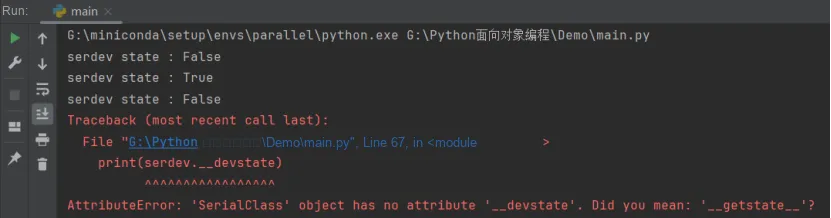
The code running result is as follows. It can be seen that when the serial port device is opened or closed, the RetSerialState () method can normally obtain the serial port status, but when we access the private attributes inside the class, the program reports an error:
Okay, now we can finally breathe a sigh of relief: after declaring __devstate as a private property, external code can no longer access our data. But is that really the case?
Try the following:
print(serdev.__devstate)Revised as:
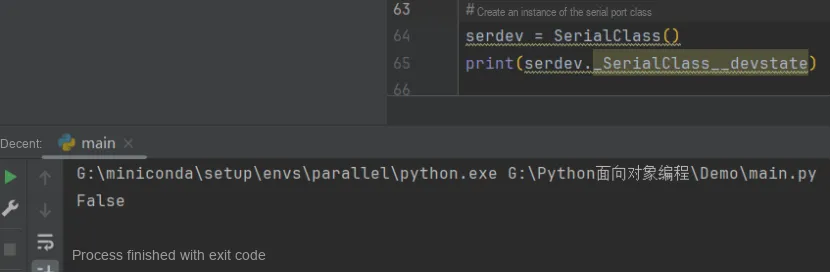
print(serdev._SerialClass__devstate)At this point, when we run the program, we find that the code outputs the following:
Oh no, how can external code still access the private attributes inside our class? What kind of trickery is this?
This is Python's name mangling at work. Python does not allow an instantiated class to access private data, but you can use object._className__attrName (object name. _class name__private attribute name) to access the attribute.
From this, we can see that private attributes in Python are actually pseudo-private. Then why doesn't the syntax enforce the true privacy of private fields? To put it in the simplest terms: We are all consenting adults here. This aligns with the Python programmer's philosophy: openness is always preferable to encapsulation.
Through the above explanation, we have actually gained some understanding of the encapsulation feature of classes. Encapsulation refers to the following:
"Hide all implementable implementation details and only expose (provide) simple programming interfaces to the outside world. " The methods we define in a class essentially encapsulate data and the operations on that data; once we have created an object, we only need to send a message to the object (i. e., call the method) to execute the code inside the method. In other words, we only need to know the method's name and the parameters to be passed (the external view of the method), without needing to understand the internal implementation details of the method (the internal view of the method).
For private attributes of a class, subclasses cannot access them; private variables can only be directly called within the class itself. In this case, we can use the protected attribute for modification: adding an underscore before an attribute or method marks it as a protected type. The protected attributes of a class can be inherited by subclasses, and both instance objects and class objects can directly call these protected attributes and methods.
Protected attributes are visible outside the class but not recommended for direct access, and their naming convention indicates that they are part of the internal implementation and should not be accessed directly. In general, Python emphasizes encapsulation, encouraging the use of public methods to access and modify attributes rather than accessing them directly from outside. This practice helps improve code maintainability, prevents accidental modifications, and increases code flexibility.