
Contents
Abstract:
This article mainly introduces how to add attributes to custom classes when creating them with Python, including adding attributes to classes and instances respectively, as well as how to obtain custom attributes and other related content.
Source Link:
Previous Recommendations:
You who are learning embedded systems still don't know Object Oriented? ?!
More exciting content can be found here:
Speed Up Your Python: A Quick Guide to Python Parallel Computing
Understand the Debugging Principle of CM3 Microcontroller in One Article
The "Secret Martial Arts Manual" for Computer Science Competitions
Access to Documents and Code
You can access the following link to download the document:
https://github.com/leezisheng/Doc

This document mainly introduces how to use Python for Object Oriented programming, and requires readers to have a basic understanding of Python syntax and microcontroller development. Compared with other blogs or books that explain Python Object Oriented programming, this document is more detailed and focuses on embedded host computer applications. It takes the common serial port data transmission and reception, data processing, dynamic graph drawing and other functions between the host computer and the lower computer as application examples, and uses the Sourcetrail code software to visually read the code to facilitate readers' understanding.
The link to obtain the relevant sample code is as follows: https://github.com/leezisheng/Python-OOP-Demo
Body Text
A class itself can have its own attributes, which are called class attributes or class member variables. We can use dot notation to set arbitrary attributes for an instance object without modifying the class definition:
# Create a serial port class
class SerialClass:
    pass

# Create an instance of the serial port class
serdev = SerialClass()
# Add attribute - serial device name
serdev.devport      = "COM17"
# Add attribute - baud rate
serdev.devbaudrate  = 115200
# Add attribute - data bits
serdev.devbytesize  = 8
# Add attribute - parity bit
serdev.devparity    = 0
# Add attribute - stop bits
serdev.devstopbits  = 1
# __dict__ can dynamically get all attributes of an object
print(serdev.__dict__)
The above code creates an empty SerialClass class with no data or behaviors. Then it instantiates two objects of this class, and assigns serial port-related attributes such as serial device name, baud rate, and data bits to them respectively.
The syntax for assigning a value to an object property is <object>. <property> = <value>
This approach is called dot notation. The value here can be of any type: Python's basic types, built-in data types or other objects, and even a function or another class!
Finally, you can dynamically obtain all attributes of an object via __dict__, which returns a dictionary where the attribute names serve as the keys and the corresponding attribute values serve as the values.
We can also assign values to class attributes using the same method as above; the code is as follows:
# Create a serial port class
class SerialClass:
    pass

# Add attribute - serial device name
SerialClass.devport      = "COM17"
# Add attribute - baud rate
SerialClass.devbaudrate  = 115200
# Add attribute - data bits
SerialClass.devbytesize  = 8
# Add attribute - parity bit
SerialClass.devparity    = 0
# Add attribute - stop bits
SerialClass.devstopbits  = 1
# __dict__ can dynamically get all attributes of an object
print(SerialClass.__dict__)

# Create an instance of the serial port class
serdev = SerialClass()
print(serdev.devport)
print(serdev.devbaudrate)
print(serdev.devbytesize)
print(serdev.devparity)
print(serdev.devstopbits)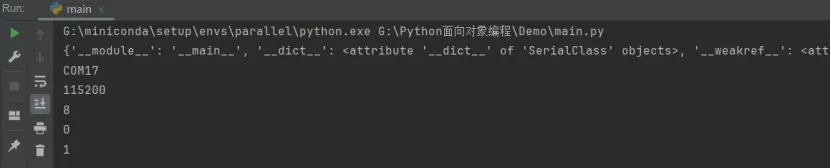
As can be seen, when a new value is assigned to a class attribute, the class attributes of all its instances will also be updated accordingly. In fact, class attributes are not created separately when instances are instantiated; instead, all instances reference the attributes of the class, meaning there is only one copy of the class attributes in memory.
Similarly, we can modify a class attribute through an instance, which will trigger a copy operation;at this point, the class attribute of this instance will be decoupled from the class's attribute, achieving attribute unbinding and overriding the original class attribute. This attribute then becomes a private attribute of the instance, and other instances will not be affected.
serdev.devport = "COM15"
print(serdev.devport)
print(SerialClass.devport)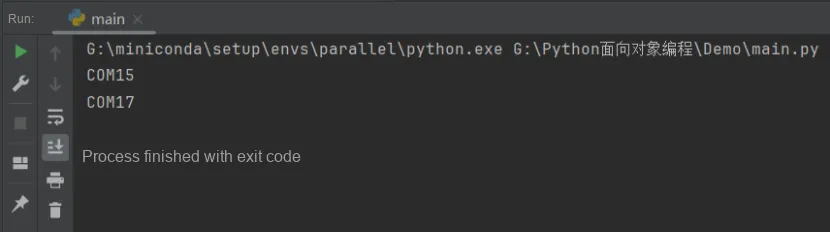
In practical use, class attributes should only be used for class-related descriptions; class instances can access and use them, but should not modify them.
Since classes act as templates, we can force users to fill in certain attributes that we deem mandatory when creating instances. By defining a special __init__ method, we can bind attributes such as devport and devbaudrate during instance creation:
# Create a serial port class
class SerialClass:
    # Note: the special method "__init__" has two underscores before and after it!!!
    def __init__(self,port,baudrate,bytesize,parity,stopbits):
        self.devport        = port
        self.devbaudrate    = baudrate
        self.devbytesize    = bytesize
        self.devparity      = parity
        self.devstopbits    = stopbits

# Create an instance of the serial port class
serdev = SerialClass(port     = "COM17",
                     baudrate = 115200,
                     bytesize = 8,
                     parity   = 0,
                     stopbits = 1
                    )
The first parameter of the init method is always self, which refers to the created instance itself. Therefore, inside the init method, you can bind various attributes to self, because self points to the created instance itself. With the init method, when creating an instance, you can no longer pass empty parameters; you must pass parameters that match the init method, but you do not need to pass self — the Python interpreter will pass the instance variable in automatically.