Contents
Source Link:
Previous Recommendations:
More exciting content can be found here:
You who are learning embedded systems still don't know Object Oriented? ?!
Speed Up Your Python: A Quick Guide to Python Parallel Computing
Understand the Debugging Principle of CM3 Microcontroller in One Article
The "Secret Martial Arts Manual" for Computer Science Competitions
Abstract
This paper mainly introduces the basic concept of the serial port Communication Protocol, the basic process of serial port communication, and how to create a class using the Python language as well as the definition of attributes and methods within the class members.
Body Text
Starting from here, we will take the UART Communication Protocol commonly used in embedded systems as an example to explain the following knowledge:
① How to create classes and objects in Python;
② How to add attributes and behaviors to Python objects;
③ How to organize classes into packages and modules;
④ How to restrict external access to private data.
Before programming in Python, let's first recall how we normally use the serial port. To sum up, it simply involves the following steps:
① First, we need to determine the serial port number to be used.
② Secondly, configure the baud rate, data bits, parity bit, stop bits, DTR/DSR, RTS/CTS and XON/XOFF.
③ Third, open the serial port.
Fourth, transmit and receive data.
⑤ Fifth, close the serial port.
Next, let's explore how to implement object-oriented serial port operations with Python.
In most programming languages, a class is a block of code that describes how to create an object. Since Python is a dynamic language, classes are generated dynamically. We can define a new type using the `class` keyword, which is followed by the class name and ends with a colon:
# Class names must follow the standard Python variable naming rules
# Must start with a letter or underscore, and may contain only letters, underscores, or digits
# PEP 8 recommends class names use CamelCase:
#   Start with an uppercase letter, and every following word also starts with an uppercase letter
class ClassName:
    pass
Following the class definition line comes the class body block. Just like other Python code structures, classes use indentation rather than the curly braces or square brackets common in other languages as delimiters. In Python, it is recommended to use 4 spaces for indentation. Any decent code editor supports replacing Tab key input with 4 spaces. Since the first class in the example effectively does nothing, we simply use the `pass` keyword on line 2 to indicate that there are no further actions to follow.
class ClassName:
    pass

c = ClassName()
print(id(ClassName), type(ClassName), ClassName)
print(id(c), type(c), c)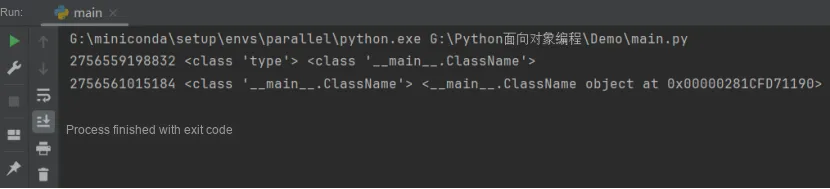
Here, we use the printf function to output information related to classes and instances. It should be noted that in Python, all basic operable units such as data types, values, variables, functions, classes, instances and everything else are represented by Objects. Every object has three basic properties: ID, type and value. That is to say, when an object is stored in a block of memory, this block of memory definitely stores these three properties.In the output above, we can see that defining a new class in Python is equivalent to creating an object of a new type; all objects in the interpreter are stored in the PyObject structure.
In this example, we define a custom type named ClassName, and c is an instance of it whose type is __main__.ClassName. Both Class and Type refer to types: Class generally denotes types defined by ordinary users via the `class` keyword, while Type usually refers to the built-in types of the Python interpreter CPython.
<__main__.ClassName object at 0x00000281CFD71190>It specifies that the Memory Space where the current instance c is located is 0x00000281CFD71190.
Here, we first create a serial port class named SerialClass:
# Create a serial port class
class SerialClass:
    pass
However, as you can see, we haven't defined anything inside the class yet. So how should we proceed now, and how can we implement the serial port's transmit and receive functions? Generally speaking, a class has two types of members: attributes and methods. Attributes are used to describe the characteristics of a specific object, which are static — for example, some parameters that need to be configured for serial communication, such as the baud rate, the number of data bits, and so on. Each object has its own behaviors or the methods through which they are used; for instance, sending data via the serial port, receiving data, configuring communication parameters, etc. We refer to these behaviors as methods, which are dynamic, and we can use these methods to manipulate an object.
As for how to add properties and methods to the serial port class we just created, we will cover that in the next section.
Access to Documents and Code
You can access the following link to download the document:
https://github.com/leezisheng/Doc
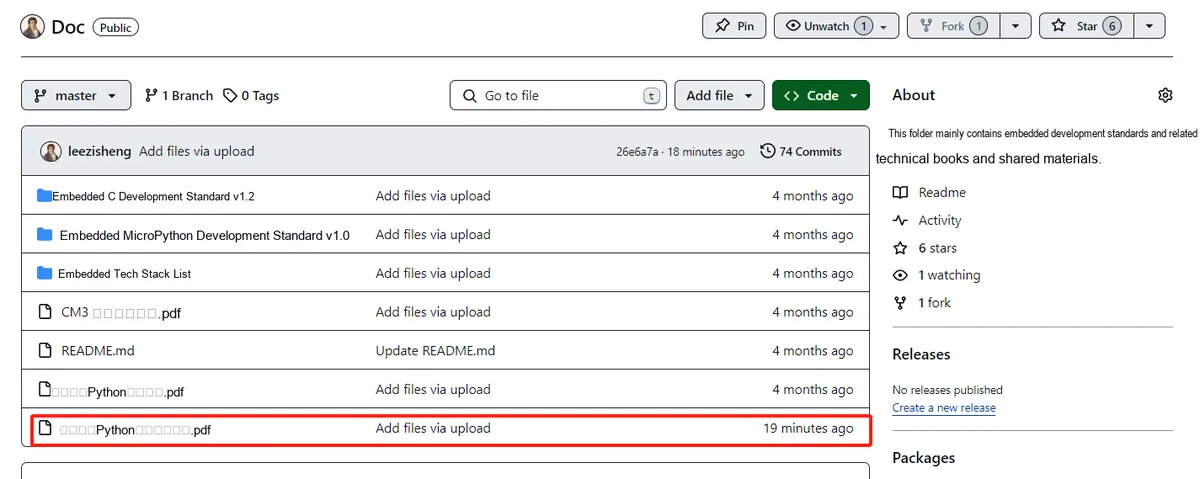
This document mainly introduces how to use Python for Object Oriented programming, and requires readers to have a basic understanding of Python syntax and microcontroller development. Compared with other blogs or books that explain Python Object Oriented programming, this document is more detailed and focuses on embedded host computer applications. It takes the common serial port data transmission and reception, data processing, dynamic graph drawing and other functions between the host computer and the lower computer as application examples, and uses the Sourcetrail code software to visually read the code to facilitate readers' understanding.
The link to obtain the relevant sample code is as follows: https://github.com/leezisheng/Python-OOP-Demo