
Contents
- I. Module Introduction
- II. Introduction to Major Chips
- 2.1 Chip Overview
- 2.2 Pin Definition
- 2.3 Functional Block Diagram
- 2.4 Performance Parameters
- 2.5 Reference Circuit
- 2.6 Chip Configuration
- 2.7 Communication Interfaces and Related Protocols
- 2.8 PCB Routing Precautions
- III. Instructions for Circuit Engineering and Module Usage
- 3.1 Circuit Source Engineering
- 3.2 Module Usage Instructions
- 3.3 Application Experiment
- IV. Drivers
- 5. BOM & Recommended Alternative Parts
- VI. Revision History
- VII. Relevant Materials
- 7.1 Chip Datasheet
- 7.2 Unique Icons for PCB Silkscreen
- 7.3 Hardware Packaging
- 7.4 Related Software
I. Module Introduction
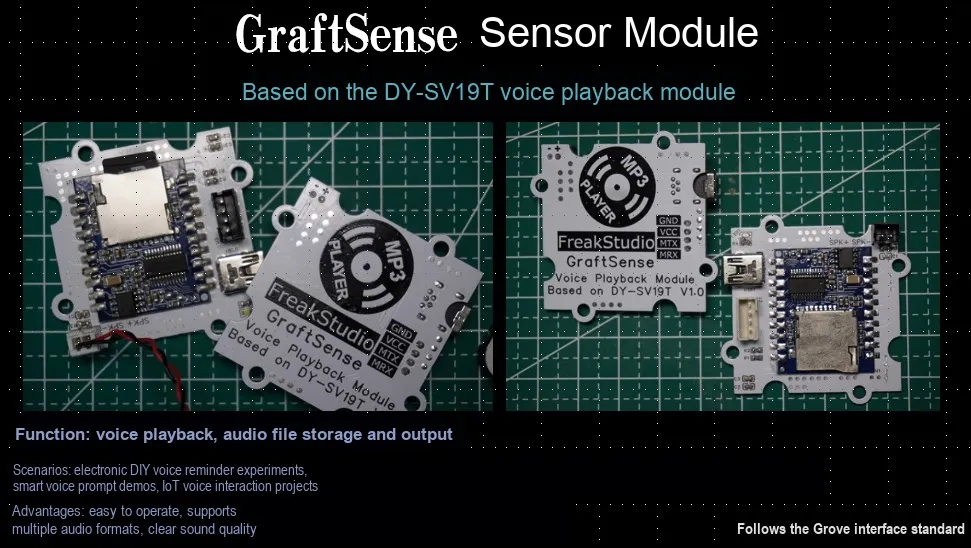
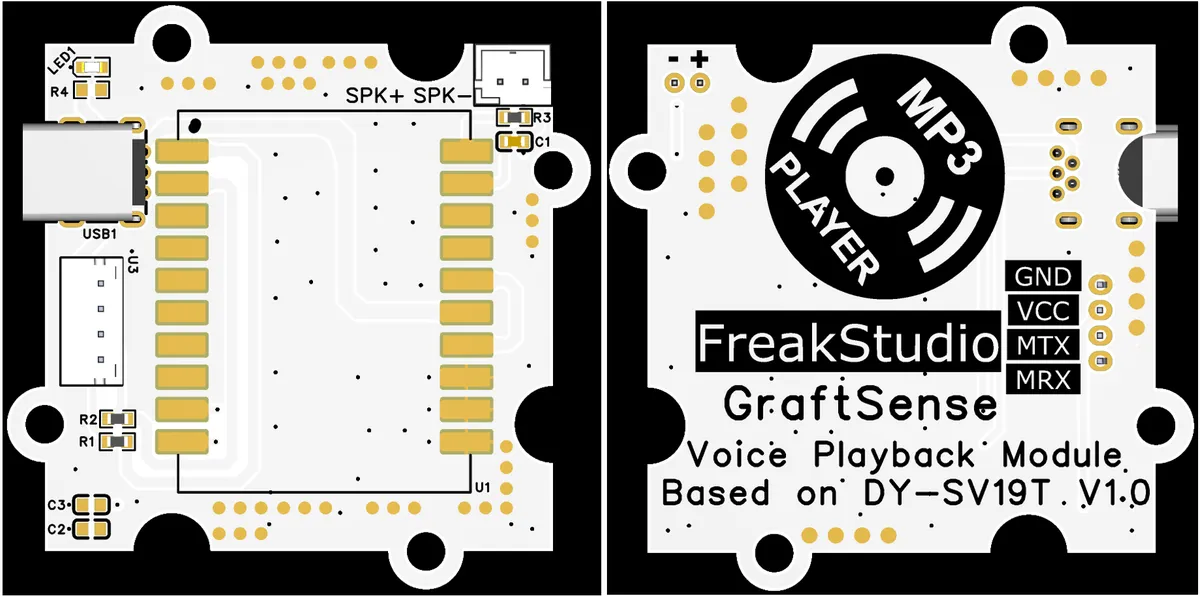
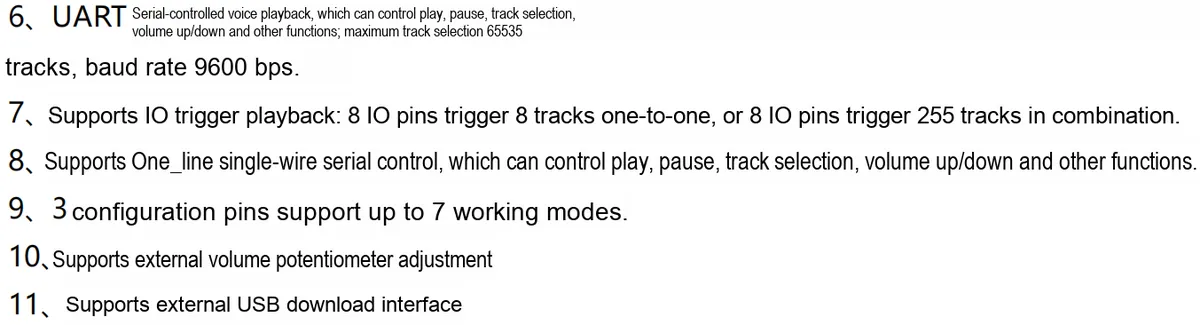
Voice Playback Module Based on DY-SV19T Designed based on the DY-SV19T chip module, it supports MP3 and WAV audio decoding. The onboard 5W Class D amplifier can directly drive 4Ω 3~5W speakers; it integrates a USB download interface (for importing voice files), an MCU serial port control interface (MTX / MRX), a speaker interface (SPK+/-), as well as power filtering and indicator light circuits.Supports a maximum of 32GB TF card storage, and can flexibly control functions such as playback, track selection, and volume adjustment through serial port commands, adapting to the voice interaction needs in multiple fields including maker education, voice prompts for IoT devices, and voice feedback in industrial scenarios.
II. Introduction to Major Chips
2.1 Chip Overview


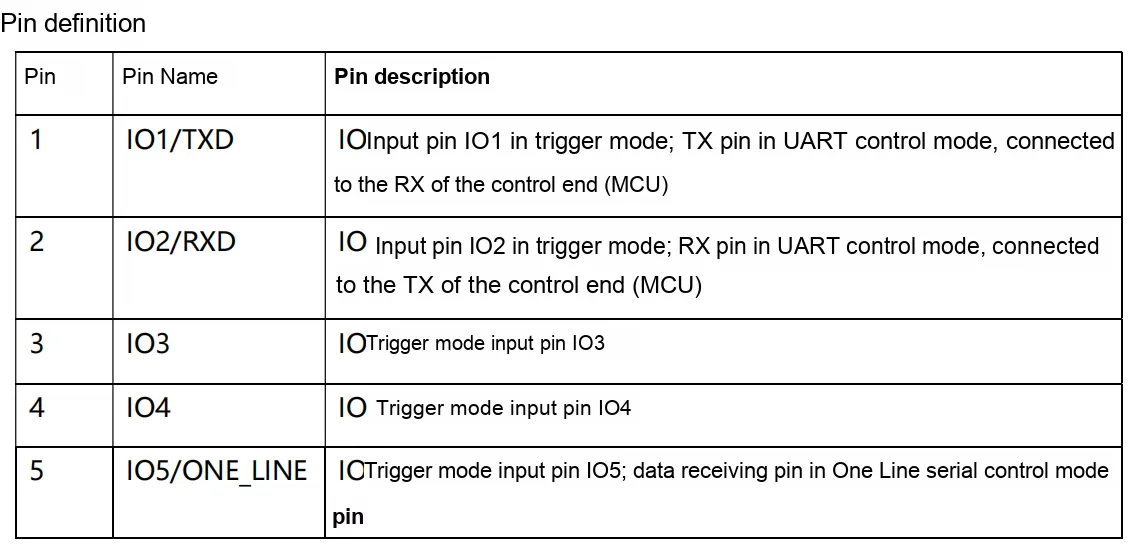
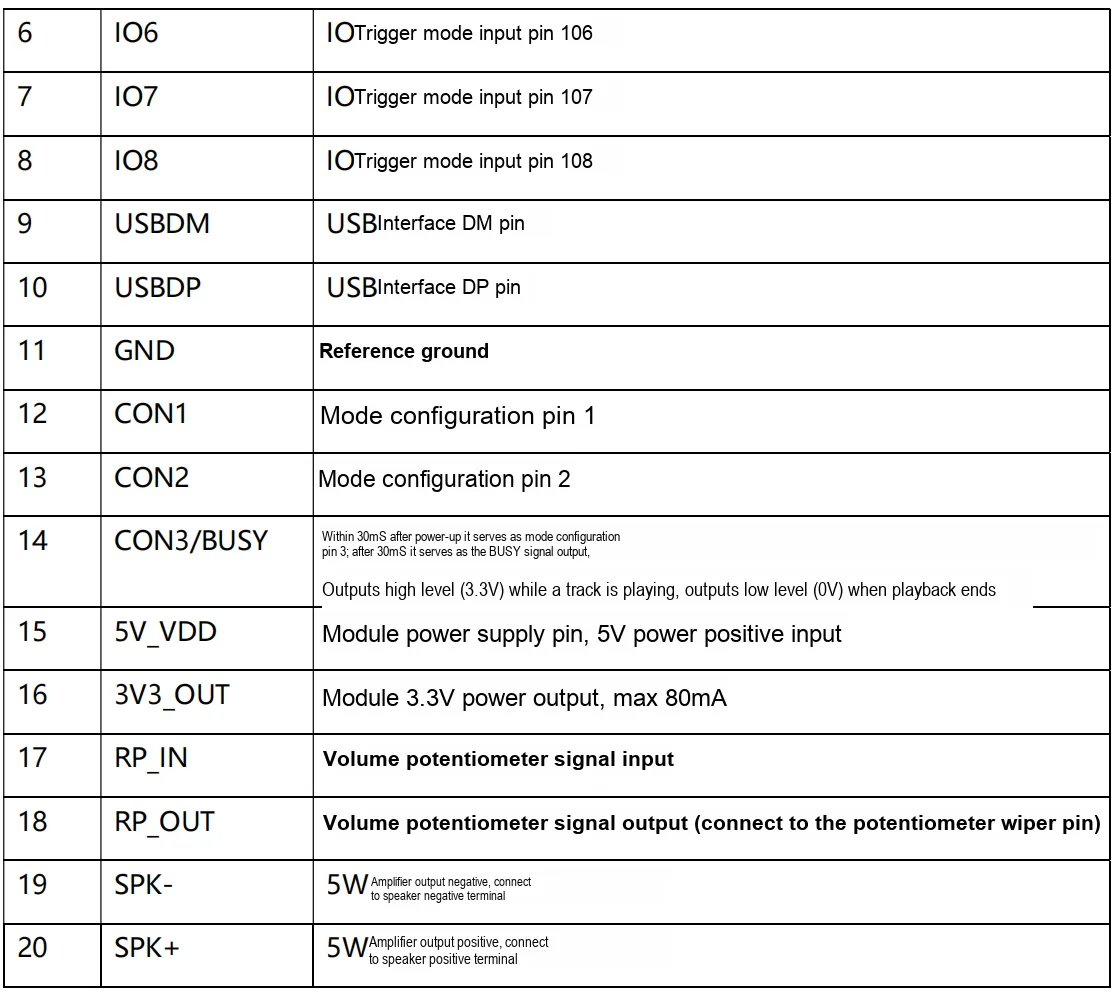
2.2 Pin Definition
2.3 Functional Block Diagram
None.
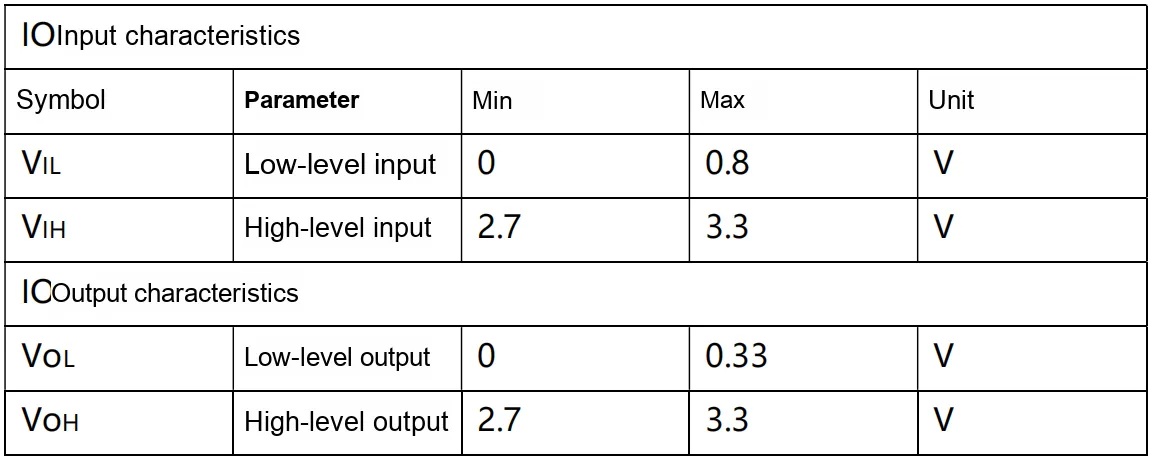
2.4 Performance Parameters
2.5 Reference Circuit
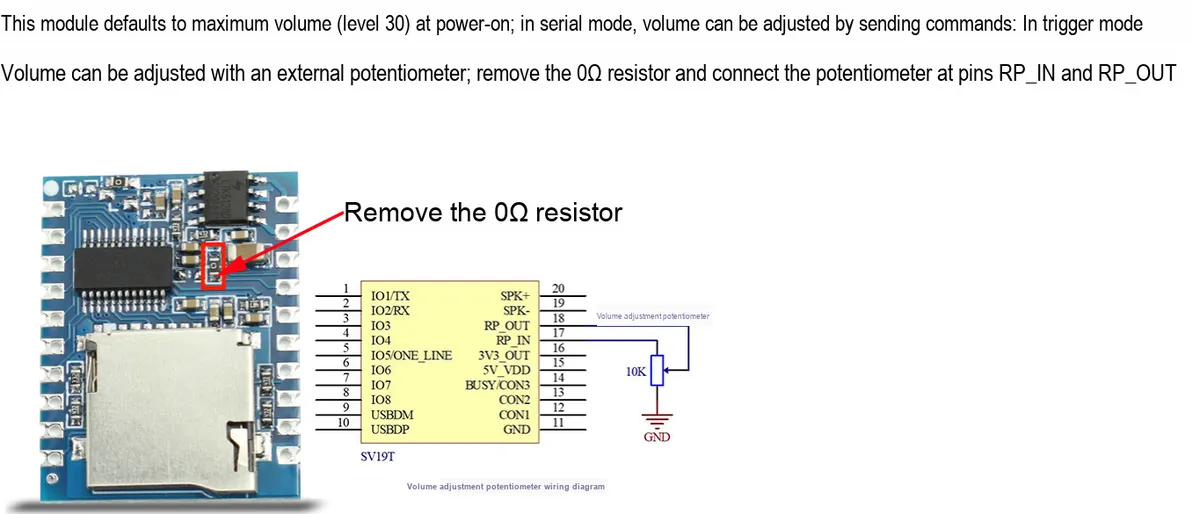
2.5.1 External Volume Adjustment Potentiometer
2.5.2 Reference Circuits for Different Operating Modes
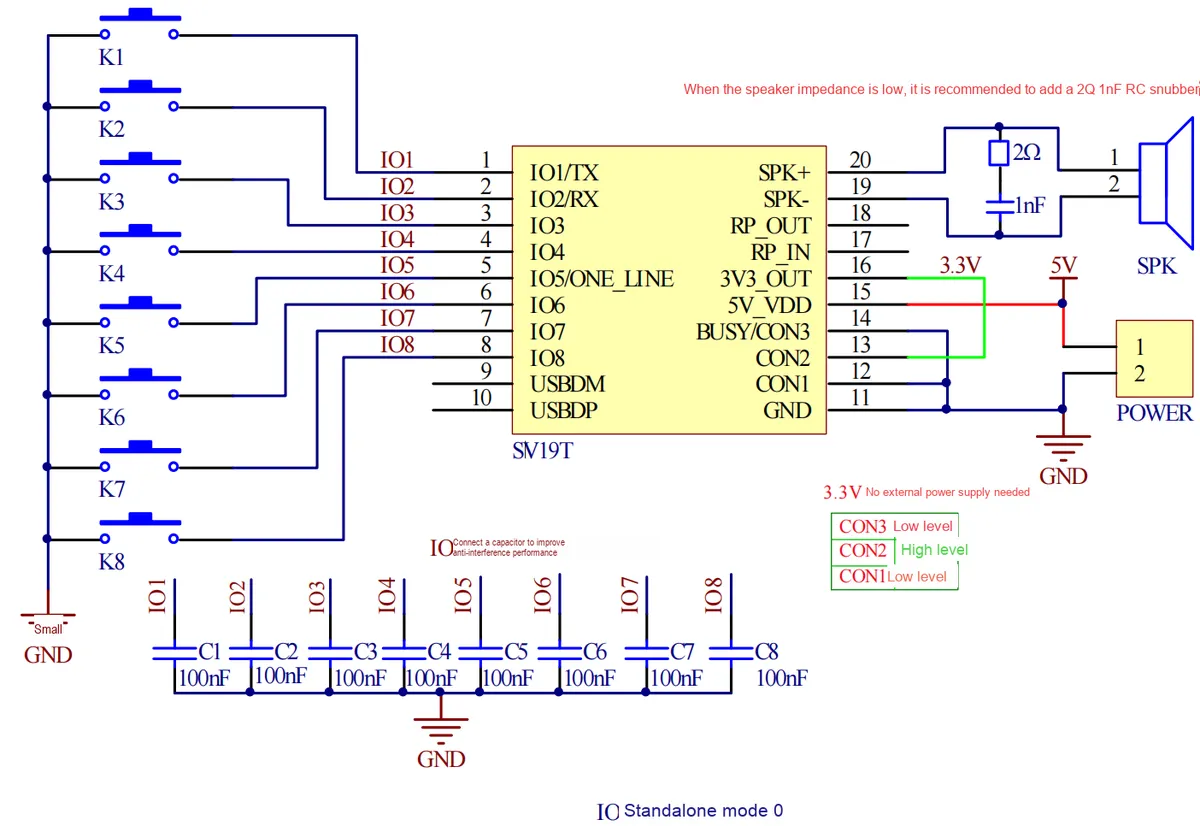
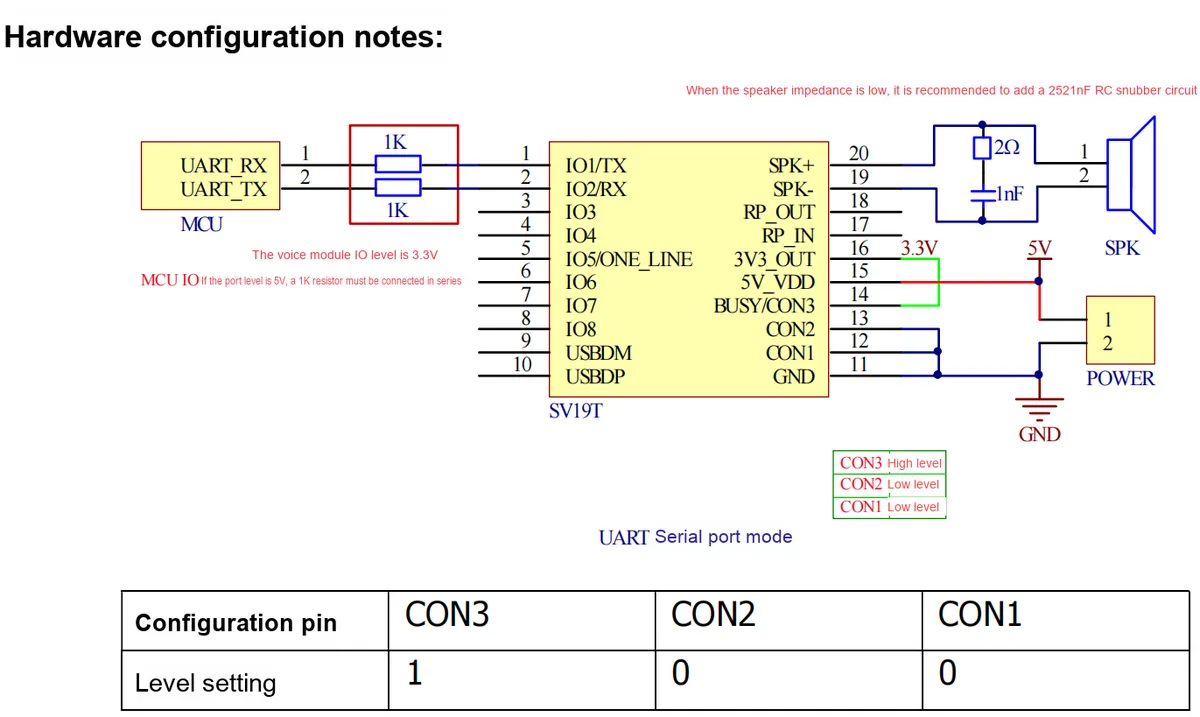
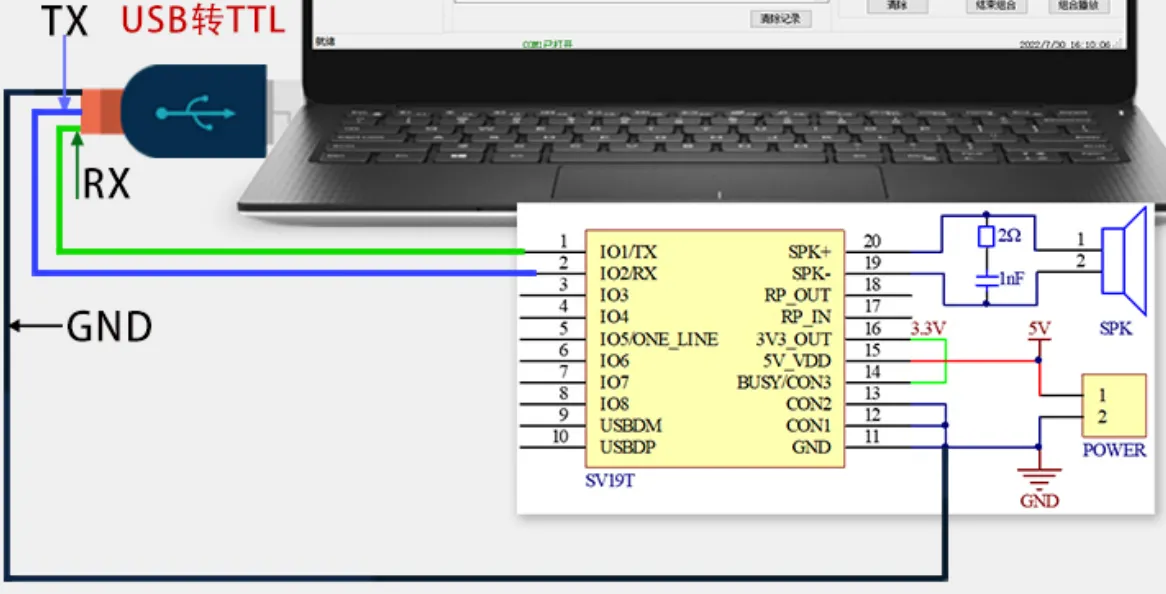
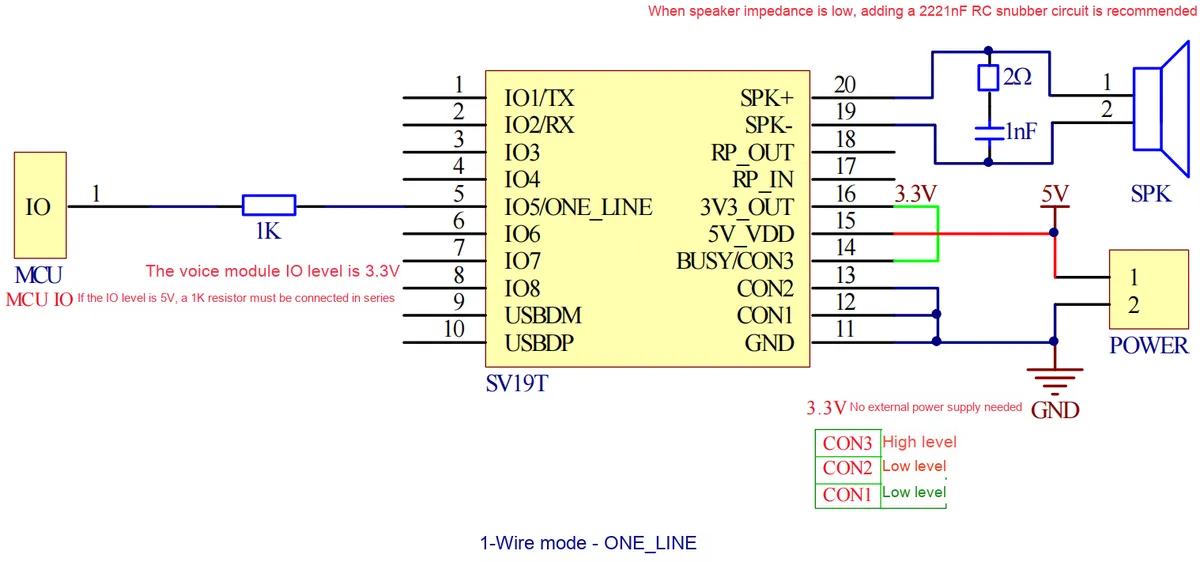
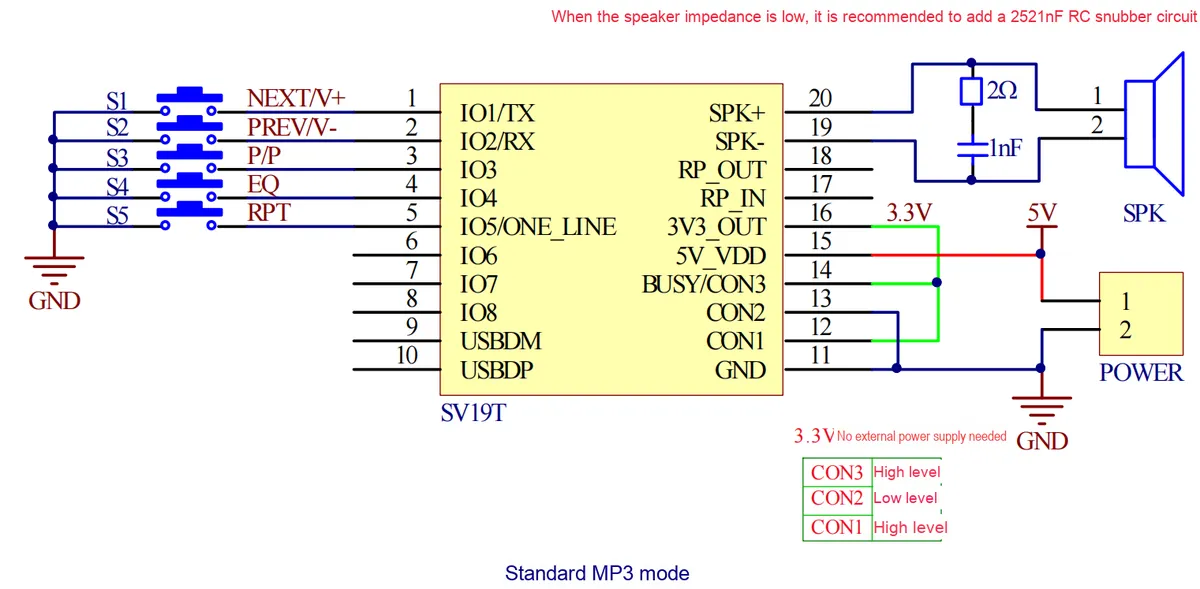
2.6 Chip Configuration
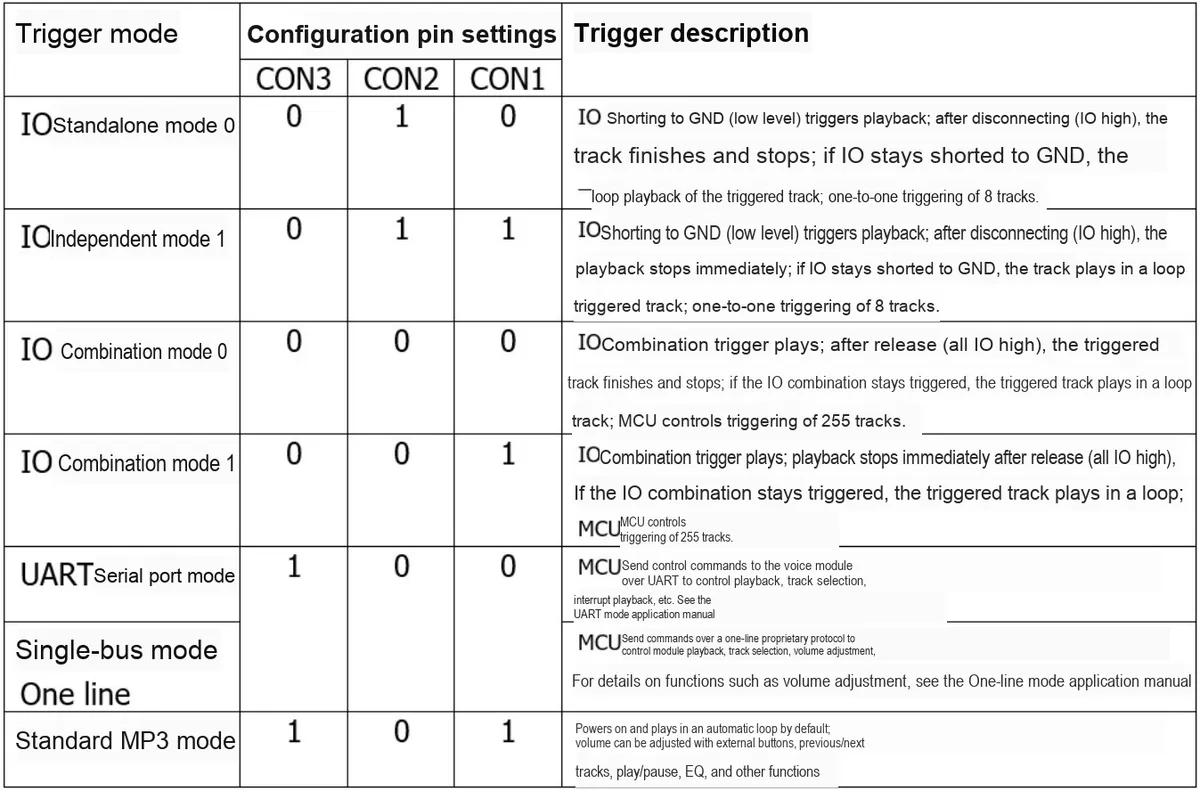
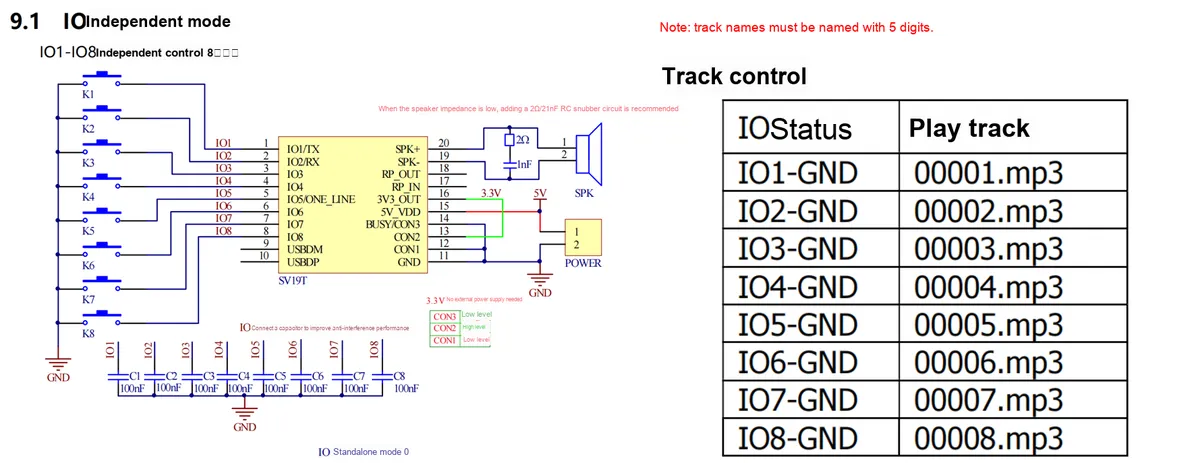
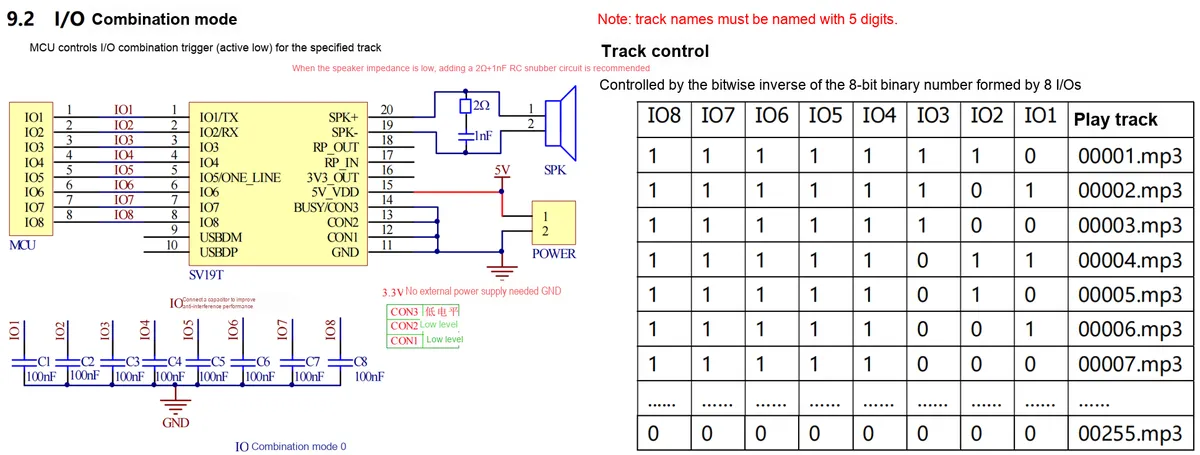
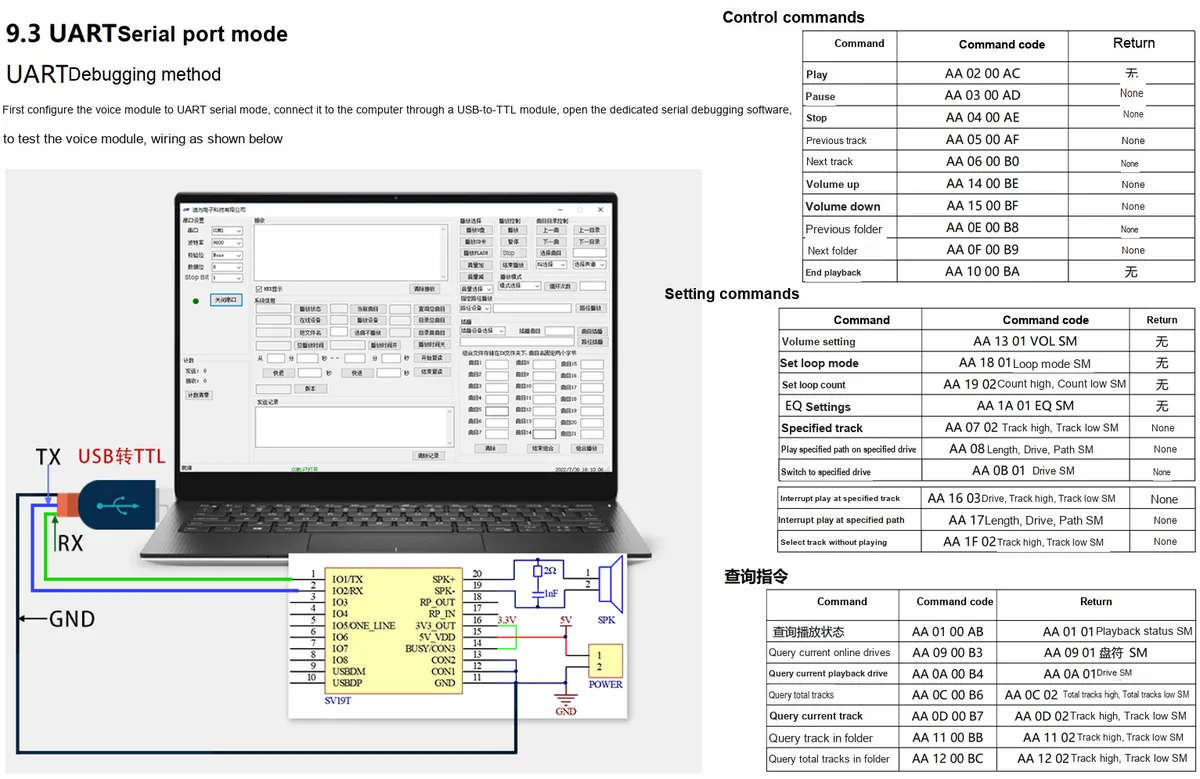
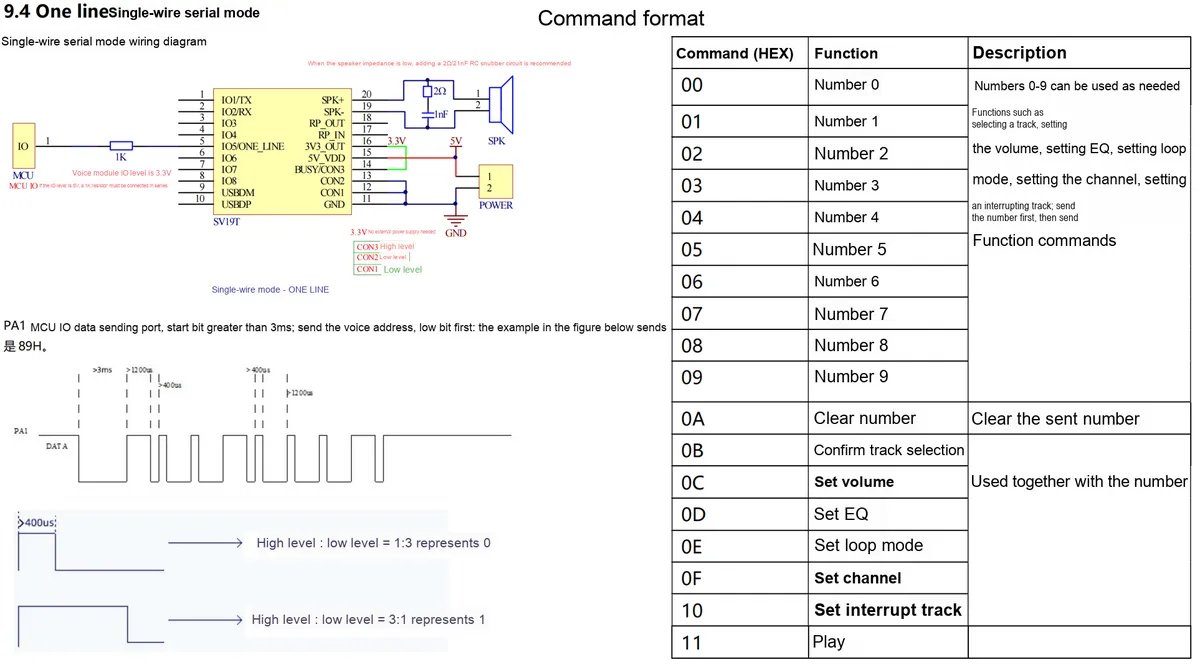
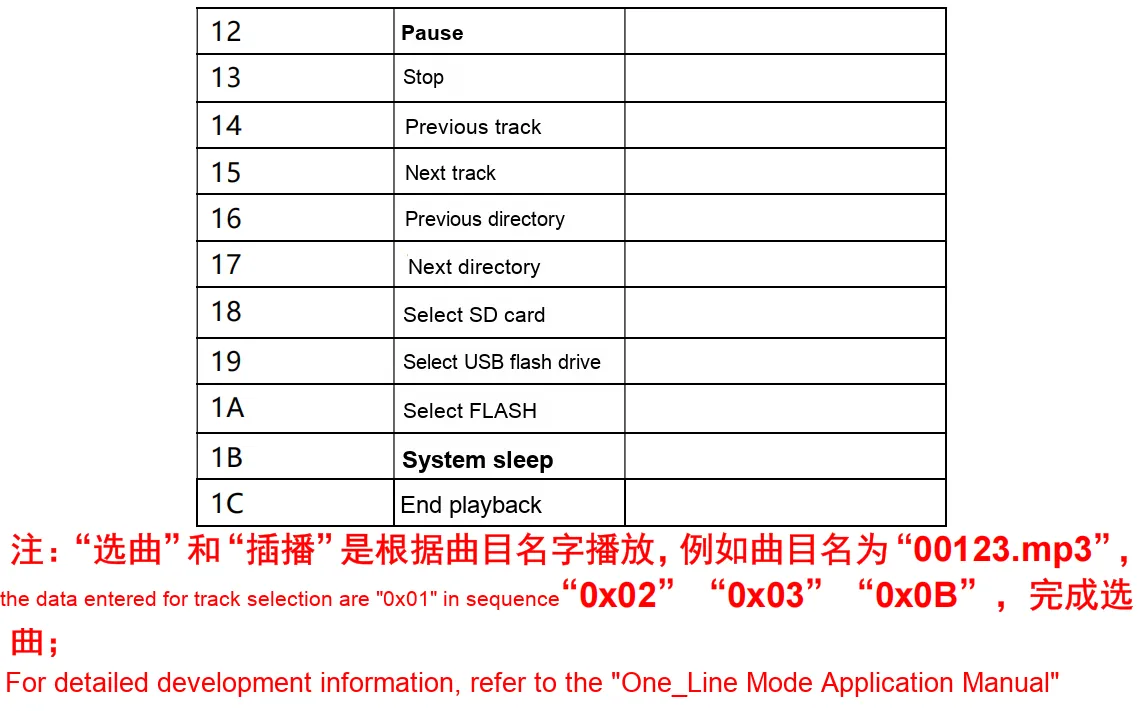
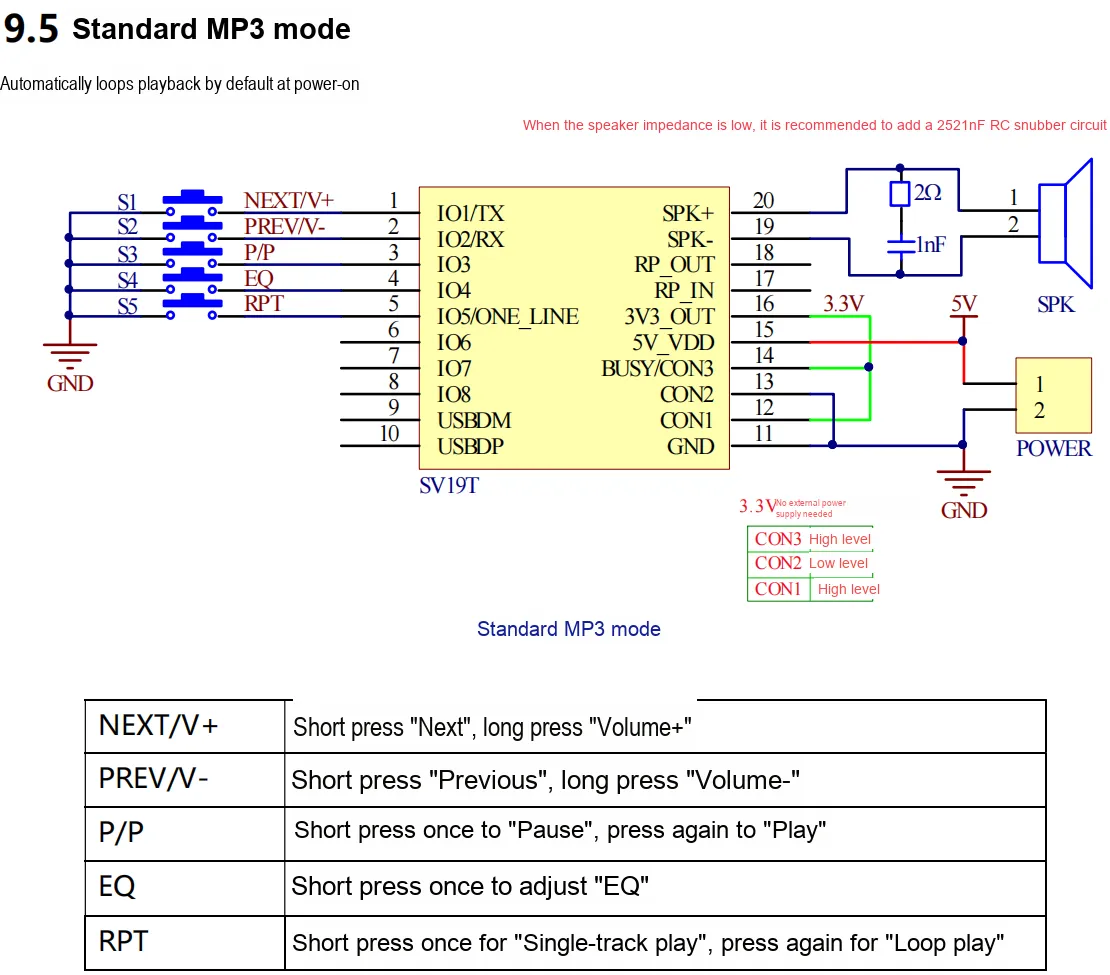
2.7 Communication Interfaces and Related Protocols
Here, we mainly introduce the serial port Communication Protocol of the serial port control mode:
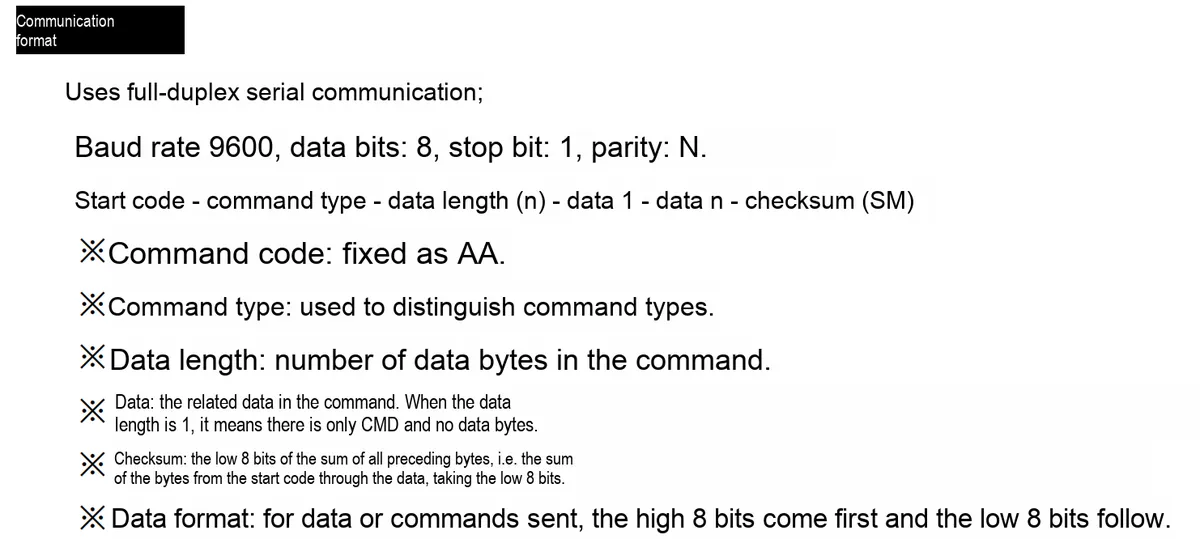
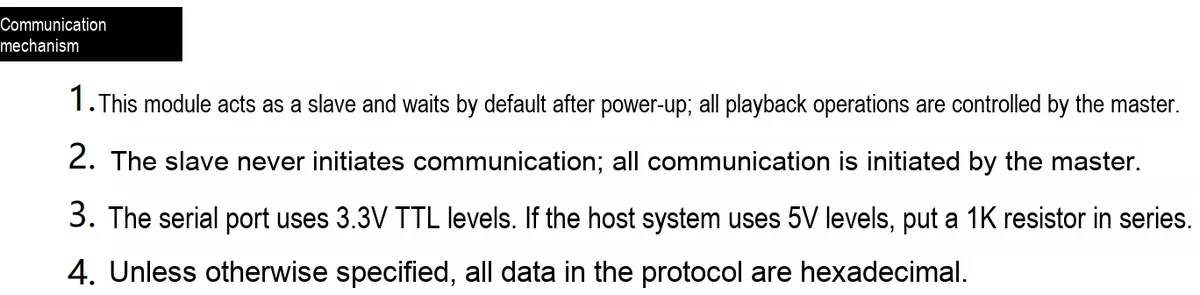
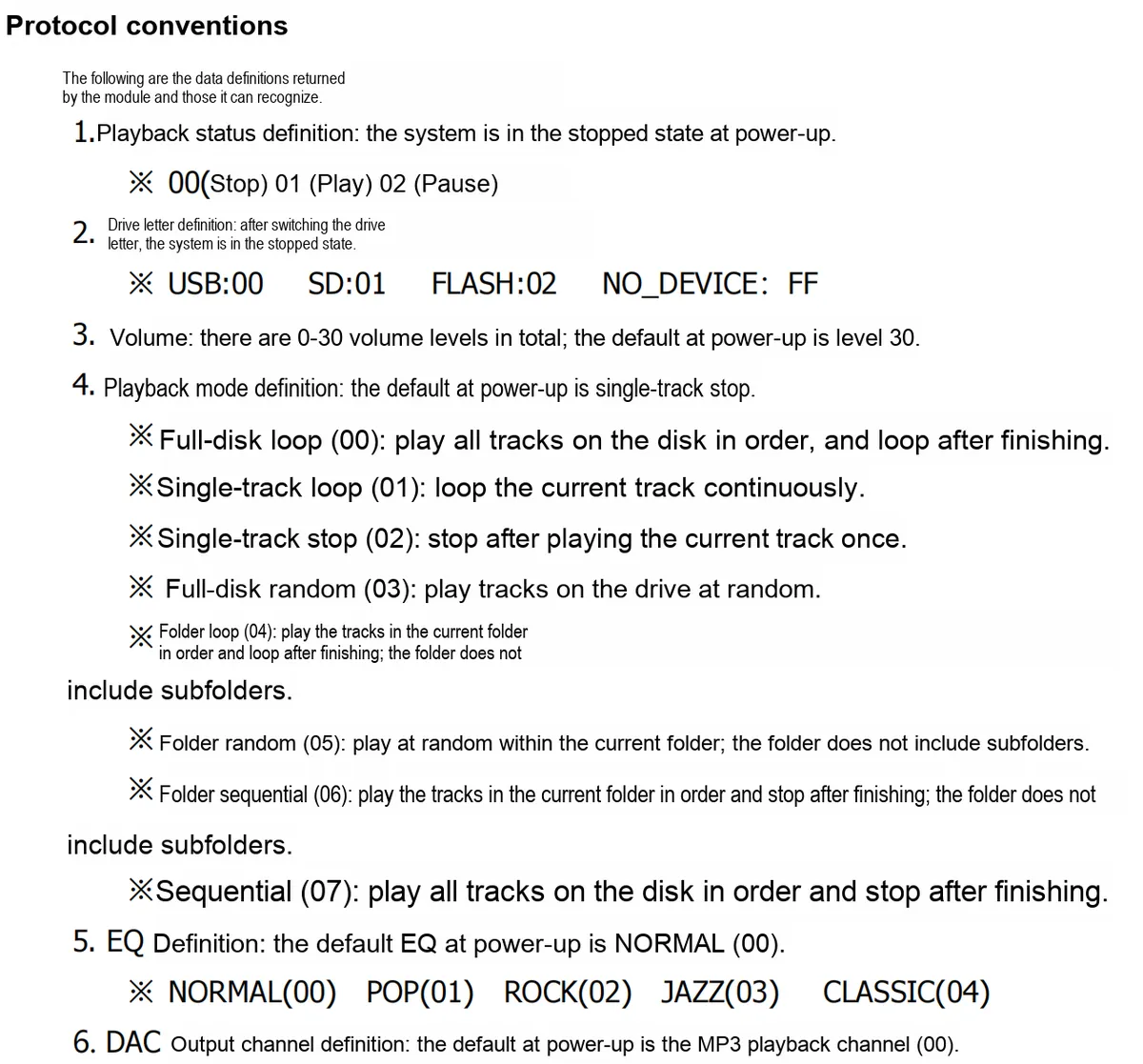
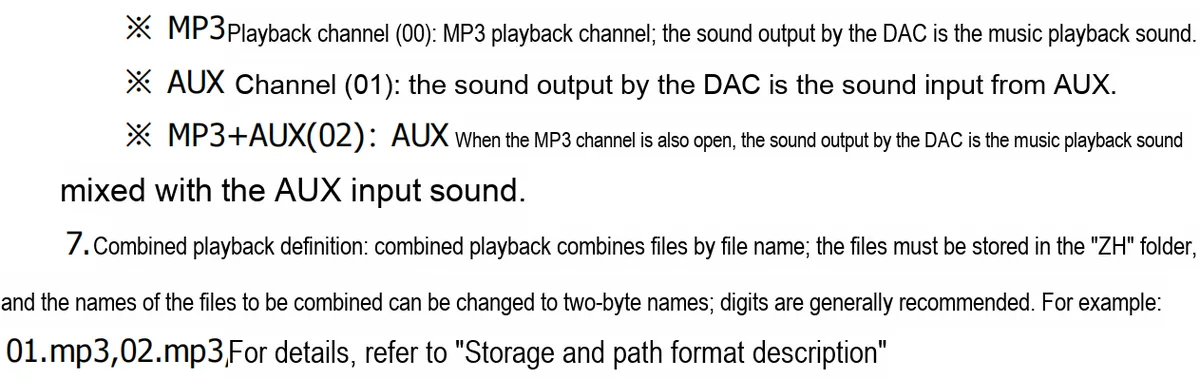
| Command | Command frame template | n | Data field | Return | Description / Example |
|---|---|---|---|---|---|
| Query playback status | AA 01 00 AB | 0 | — | AA 01 01 playback status SM | Returns: 00/01/02 |
| Play | AA 02 00 AC | 0 | — | None | Each send plays the current track from the beginning |
| Pause | AA 03 00 AD | 0 | — | None | Pause current playback |
| Stop | AA 04 00 AE | 0 | — | None | Stop playback |
| Previous track | AA 05 00 AF | 0 | — | None | Play the previous track |
| Next track | AA 06 00 B0 | 0 | — | None | Play the next track |
| Play specified track | AA 07 02 <track H> <track L> <SM> | 2 | Track high, track low (1..65535) | None | Example: AA 07 02 00 08 BB means track 8 |
| Play by drive letter + path | AA 08 <length> <drive> <path bytes...> SM | Variable length | Length = 1 + path length, drive, path | None | See path format below |
| Query online drives | AA 09 00 B3 | 0 | — | AA 09 01 drive bitmap SM | Bit0=USB, Bit1=SD, Bit2=FLASH |
| Query current playback drive | AA 0A 00 B4 | 0 | — | AA 0A 01 drive SM | Returns 00/01/02/FF |
| Switch drive | AA 0B 01 <drive> SM | 1 | Drive | None | Stopped after switching (e.g., AA 0B 01 00 B6 switches to USB) |
| Query total number of tracks | AA 0C 00 B6 | 0 | — | AA 0C 02 total tracks H total tracks L SM | Merged across different drives? (depends on module implementation) |
| Query current track number | AA 0D 00 B7 | 0 | — | AA 0D 02 track H track L SM | Returns current track number |
| Previous folder | AA 0E 00 B8 | 0 | — | None | Switch to the previous folder and play its last track |
| Next folder | AA 0F 00 B9 | 0 | — | None | Switch to the next folder and play its first track |
| End playback / end interrupt play | AA 10 00 BA | 0 | — | None | End the current operation early (interrupt play can also be ended) |
| Query first track of folder | AA 11 00 BB | 0 | — | AA 11 02 track H track L SM | Number of the first track in the current folder |
| Query total tracks in folder | AA 12 00 BC | 0 | — | AA 12 02 total H total L SM | Excluding subfolders |
| Volume setting | AA 13 01 <VOL> SM | 1 | VOL (0~30) | None | Example: AA 13 01 14 D2 -> set to 20 |
| Volume up | AA 14 00 BE | 0 | — | None | Volume +1 |
| Volume down | AA 15 00 BF | 0 | — | None | Volume -1 |
| Interrupt play specified track | AA 16 03 <drive> <track H> <track L> SM | 3 | Drive, track high, track low | None | Consecutive interrupt plays are played in interrupt order; after the interrupt ends, playback returns to the breakpoint |
| Interrupt play specified path | AA 17 <length> <drive> <path...> SM | Variable length | Length = 1 + path Len | None | Path format same as 08; interrupt play has only 1 level, and consecutive interrupt plays overwrite the previous one (but playback order follows interrupt order) |
| Set loop mode | AA 18 01 <mode> SM | 1 | Mode (see above) | None | Example: single track stop AA 18 01 02 C5 |
| Set loop count | AA 19 02 <count H> <count L> SM | 2 | Count high, low | None | Valid only in applicable modes (all-drive loop / single-track loop / folder loop / sequential play), example: loop 6 times AA 19 02 00 06 CB |
| EQ setting | AA 1A 01 <EQ> SM | 1 | EQ value | None | Example: AA 1A 01 02 C7 -> ROCK |
| Combined play (by short name) | AA 1B <length> <name1 H> <name1 L> ... <namen H> <namen L> SM | Variable length | Length = 2 * number of files (2-byte short name per file) | None | Each file name is two bytes (e.g., "01" -> 0x30 0x31); files must be placed in the ZH folder, and the short name length must be 2 bytes (each file name takes 2 bytes) |
| End combined play | AA 1C 00 C6 | 0 | — | None | End the combination and resume the previous playback state |
| Set channel | AA 1D 01 <channel> SM | 1 | Channel (00 MP3, 01 AUX, 02 MP3+AUX) | None | Switch DAC output channel |
| Query short file name | AA 1E 00 C8 | 0 | — | AA 1E <length> <short name...> SM | Returns the short file name length and content of the current track |
| Select track without playing | AA 1F 02 <track H> <track L> SM | 2 | Track high, low | None | Select a track but do not play it immediately (for pre-selection) |
| Repeat control | AA 20 04 <start min> <start sec> <end min> <end sec> SM | 4 | Start min/sec, end min/sec | None | Repeat within a specified interval |
| End repeat | AA 21 00 CB | 0 | — | None | End repeat mode |
| Rewind by a specified time | AA 22 02 <TimeH> <TimeL> SM | 2 | Time (seconds, high byte, low byte) | None | Unit: seconds |
| Fast-forward by a specified time | AA 23 02 <TimeH> <TimeL> SM | 2 | Time (seconds) | None | Unit: seconds |
| Get total time of current track | AA 24 00 CE | 0 | — | AA 24 03 Hour Minute Second SM | Returns total duration of current track |
| Enable playback time reporting | AA 25 00 CF | 0 | — | AA 25 03 Hour Minute Second SM (sent automatically on update) | When enabled, time changes are returned automatically |
| Disable playback time reporting | AA 26 00 D0 | 0 | — | None | Disable automatic time reporting |
Key Implementation Details / Notes:
- Checksum (SM) Calculation: Add up byte by byte from
AA(inclusive) to the last data byte (inclusive) in the frame, and take the lower 8 bits asSM. Ensure the calculation is correct during transmission. - Byte order: For 16-bit numbers (e. g. track number, count, time), the high byte is sent first, followed by the low byte.
- Path/String Encoding: Paths are primarily composed of
ASCIIuppercase letters; the first up to 8 bytes of a folder or file name are used for differentiation (uppercase letters and digits are recommended for both), and paths start with/. - Interruption behavior: For specified track interruptions, consecutive interruptions are supported (played in the order of insertion). After the interruption ends, playback resumes from the breakpoint before the first interruption. During consecutive interruptions, a newly inserted interruption overwrites the previous interruption queue (interruptions that take effect immediately are still played in order).
- Drive letter judgment: Before switching the drive letter, it is recommended to first use
AA 09to query the online drive letter bitmap, and useAA 0Bto switch only after confirming that the target drive is online. - Folder Query:
AA 11/AA 12returns the first track and the total number of tracks in the current folder (excluding subdirectories). - Volume range limit: 0~30, out-of-range commands may be ignored or truncated to the boundary.
- Playback Mode and Loop Count:
AA 19only takes effect in modes that support looping (see above).
Path Format (Quick Reference): Paths start with /. Three common usages are supported:
- A specific file in the specified folder:
/XXX*/00001*. MP3(XXX is the folder identifier, with a length ≤ 8) - Root directory files:
/00001*MP3 - Files in the specified subdirectory:
/XXX*/YYY*00001*MP3(example format)
Note: There is a one-to-one correspondence between bytes and characters (one letter = one byte); it is recommended that all letters be in uppercase. If there are similar names, take the first few distinguishable letters (≤8 bytes).
2.8 PCB Routing Precautions
None.
III. Instructions for Circuit Engineering and Module Usage
3.1 Circuit Source Engineering
To obtain the source project of the circuit, please follow the official account [Freak Embedded]
3.2 Module Usage Instructions
The schematic diagram of this module is shown below:
SCH_Voice Playback Module Based on DY-SV19T_v1.0_2025-11-22.pdf 2.2 MB
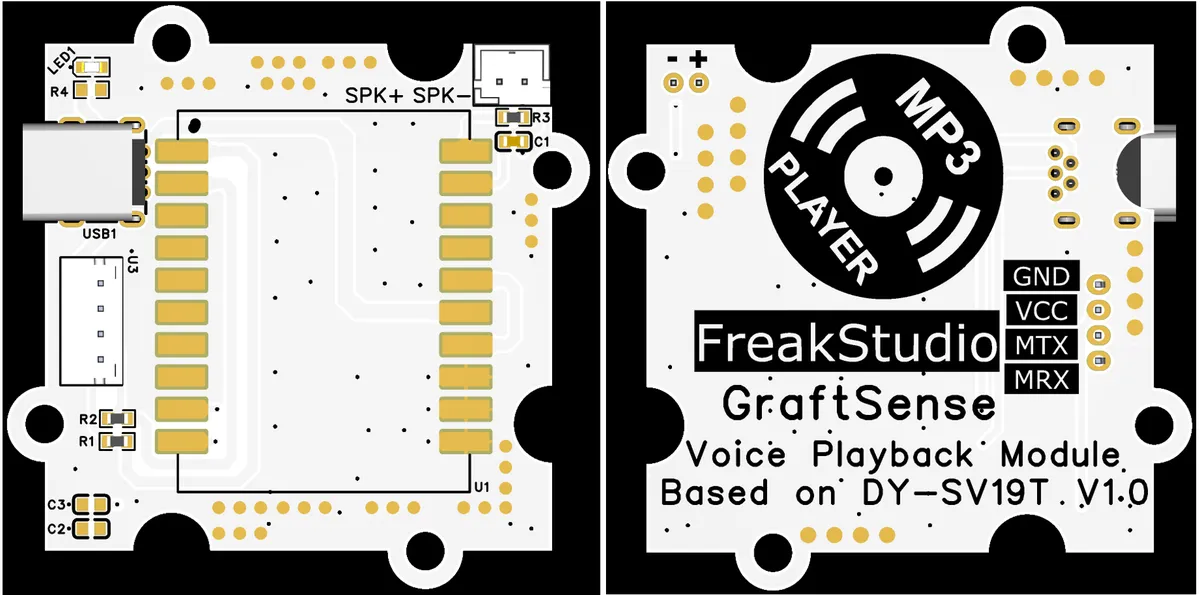
This module provides a UART interface: the MRX (corresponding to the UART MCU serial port RXD) of this module is actually connected to the module's TXD pin, and the MTX (corresponding to the MCU serial port TX) is actually connected to the module's RXD pin. Do not connect them crosswise.
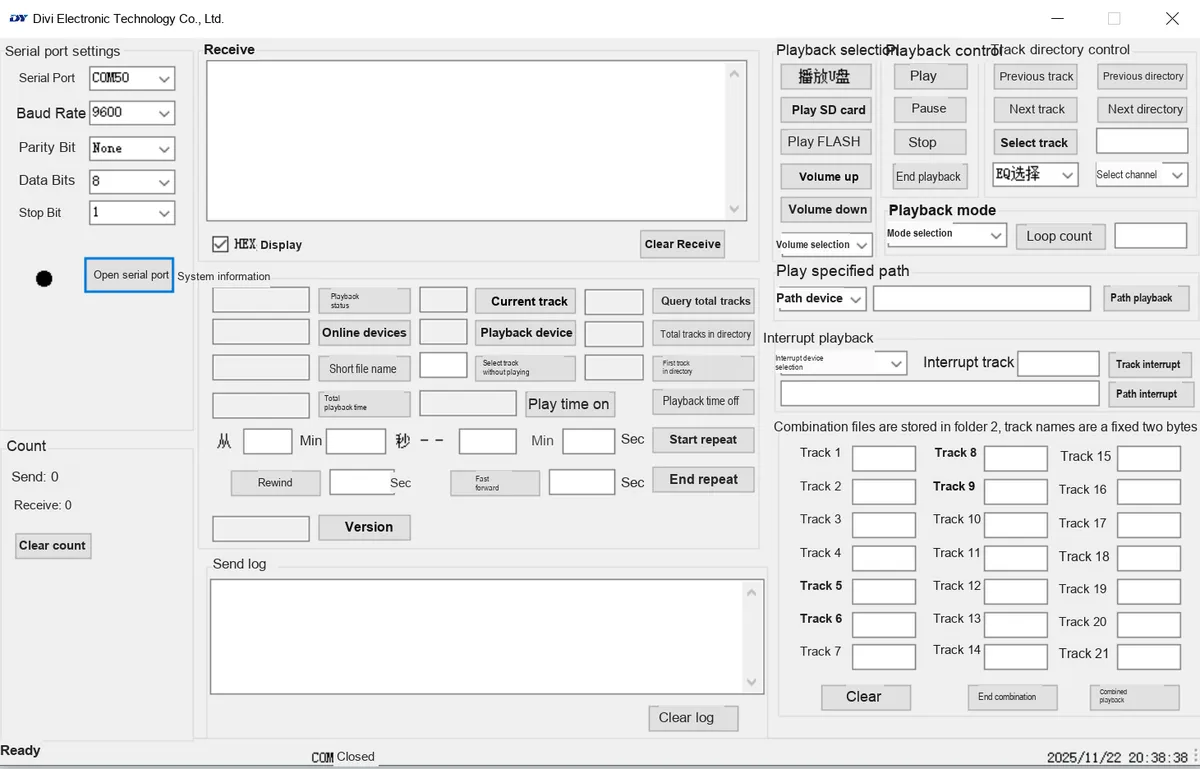
Meanwhile, before using the module for the first time, you need to first use the Mini-USB cable to connect the module to the host computer for initialization:
3.3 Application Experiment
Here, we use the GraftPort-RP2040 development board for testing, and connect the DY-SV19T-based voice playback module to communicate with the main controller via the UART interface.
Here, we first use the HY2.0-4P cable to connect the module to the GraftPort-RP2040 development board's UART0 interface:
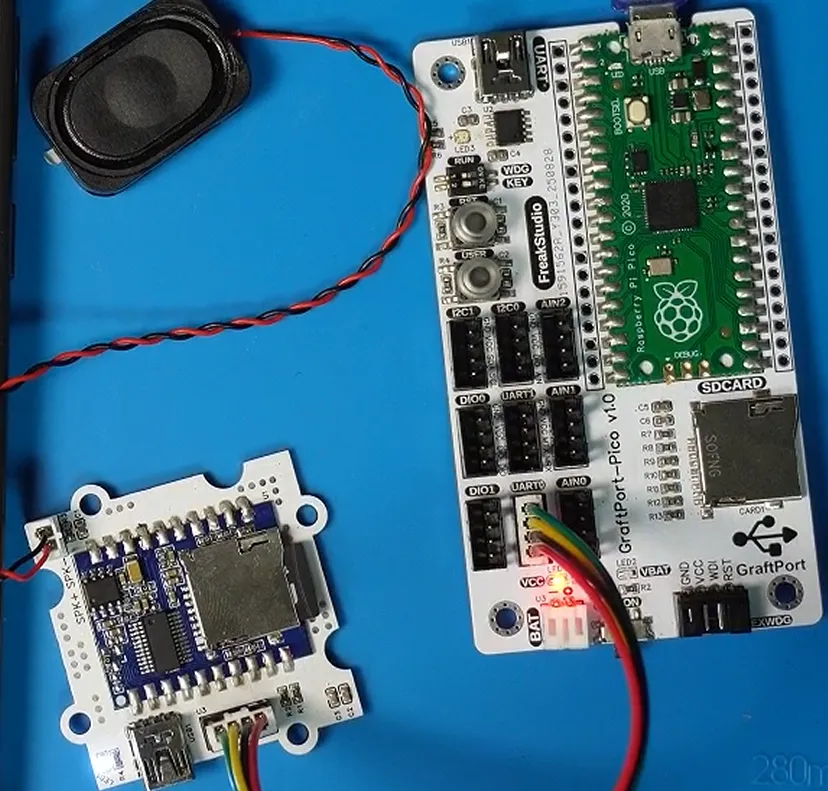
The module connections are shown in the following table:
Development Board Pins | Module Pins | Description |
Pin 16 |
|
|
Pin 17 |
|
|
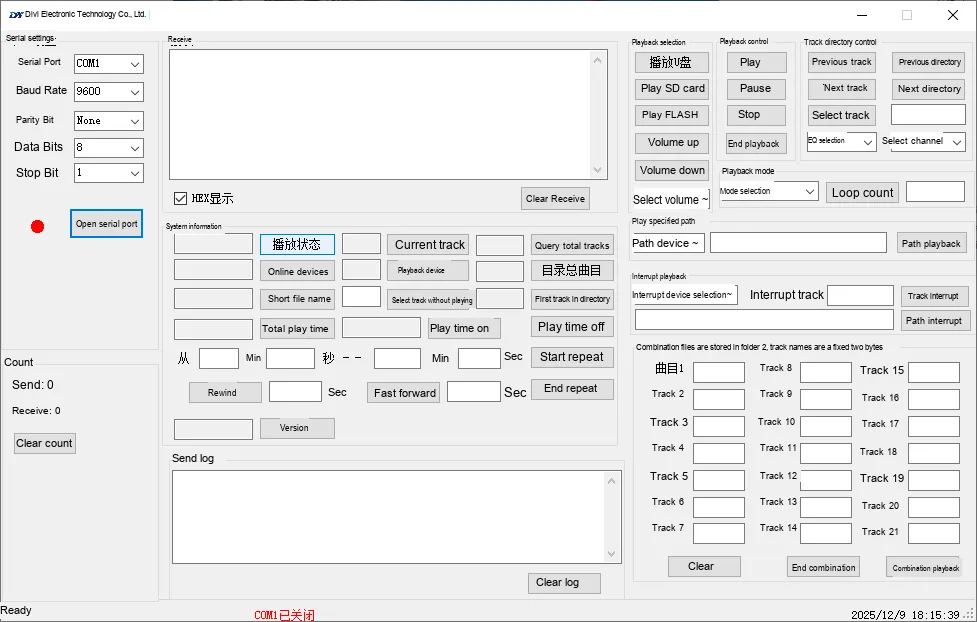
Here, it should be noted that when using the module for the first time, you need to first insert the SD card and use a MiniUSB cable to connect to the USB port on the module, then open the supporting host computer for initialization:
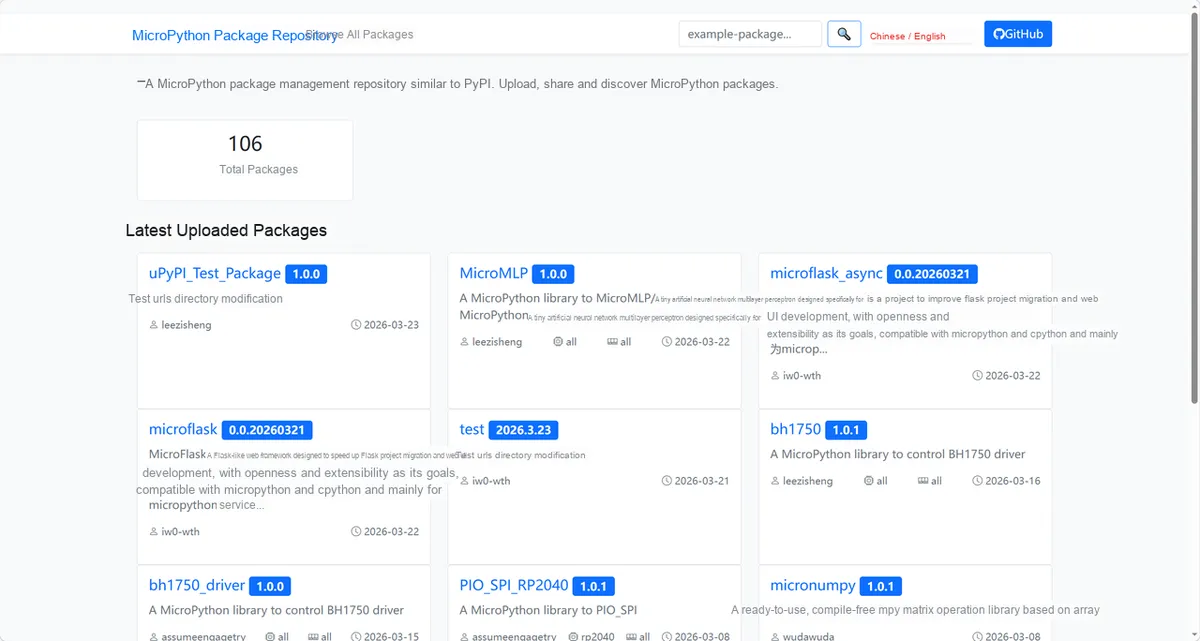
Here, we need to search for the relevant driver packages on uPyPI: https://upypi.net/zh/
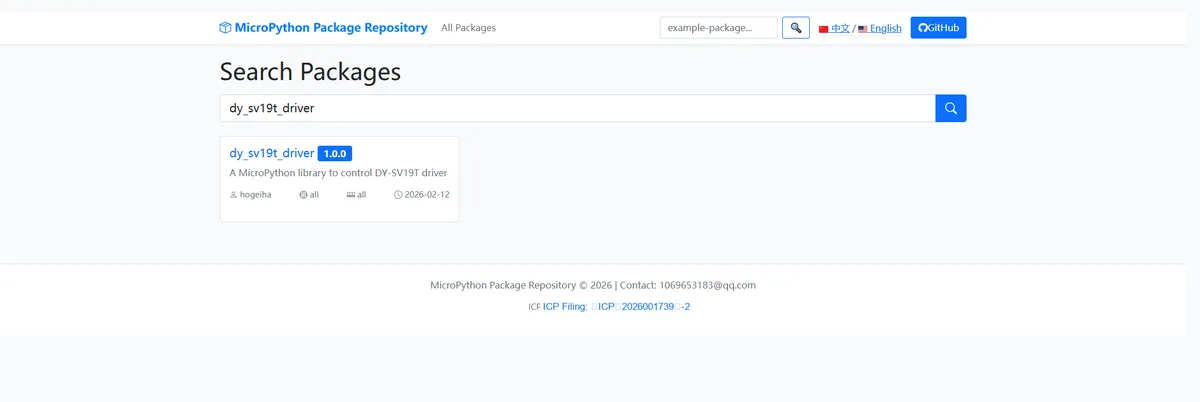
Enter dy_sv19t_driver to search, and the following will be displayed:
Click to copy the local installation command:
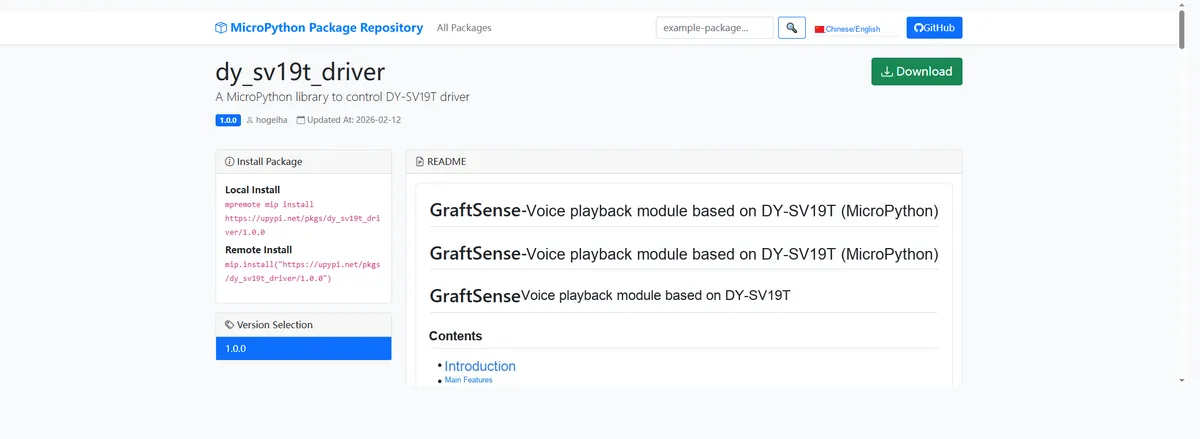
Here, we can use the mip tool to import module driver library code. Below are the usage commands for the mpremote tool:
mpremote mip install github:FreakStudioCN/GraftSense-Drivers-MicroPython/misc/dy-sv19t_driverBefore burning the code, please note that we need to first place songs on the SD card of the plug-in module, with the structure as follows:
The file structure that accompanies this code is as follows (the USB on the module can read and write the TF card on the module):
  TF:
  ├─ 01.mp3
  ├─ 02.mp3
  ├─ 03.mp3
  ├─ 04.mp3
  ├─ ZH
  │  ├─ Z1.mp3
  │  ├─ Z2.mp3
  │  └─ Z3.mp3
  ├─ AA
  │  ├─ 01.mp3
  │  ├─ 02.mp3
  │  ├─ 03.mp3
  │  └─ BB
  │     └─ D1.mp3
  ├─ CC
  │  └─ CC.mp3
  └─ BB
  └─ BB.mp3
After importing the DY-SV19T-based voice playback module - MicroPython driver code, copy the following main.py code into our project:
# Python env   : MicroPython v1.23.0
# -*- coding: utf-8 -*-
# @Time    : 2025/09/17 16:35
# @Author  : 侯钧瀚
# @File    : main.py
# @Description : DY-SV19T example
# @License : CC BY-NC 4.0

# ======================================== Import Modules =========================================

# Import UART and Pin for hardware serial port and pin configuration
from machine import UART, Pin, Timer
# Import time to provide delay and timing control
import time
# Import the driver and constants (DYSV19T, VOLUME_MAX, DISK_*, MODE_*, CH_*, etc.)
from dy_sv19t import *

# ======================================== Global Variables ============================================

# ======================================== Functions ============================================

def tick(timer):
    """
    Timer callback function
    Args:
        timer: Timer used to monitor the playback progress bar
    Raises:
        TypeError: The timer must be an instance of Timer

    ============================================================

    Args:
        timer: a timer used to monitor the playback progress bar
     Raises:
         TypeError:timer must be an instance of Timer
    """
    if not isinstance(timer, Timer):
        raise TypeError("timer must be an instance of Timer")
    # Method to view the playback progress
    hms = player.check_play_time_send()
    if hms:
        h, m, s = hms
        print("[auto time] h:m:s =", h, m, s)

def play_track_demo():
    """

    Play an audio clip directly by file path, monitor the playback progress, and wait for playback to finish.

    ==========================================================

    Use the combined playback function to play multiple track combinations
    and end the combined playback after a specified time.

    """
    # Select immediate playback by file path
    player.play_disk_path(DYSV19T.DISK_SD, "/AA./01.MP3")
    # Start monitoring the playback progress
    player.enable_play_time_send()
    print("Enable automatic reporting of playback time, monitoring 3 times...")
    # Stop monitoring the playback progress
    # player.disable_play_time_send()

    # Wait for the end
    while player.query_status():
        pass
    print("play_track_demo ends")

def select_and_play_demo():

    """
    Select a track without playing it immediately, and demonstrate how to pause, resume, and switch tracks.

    ==========================================================

    Select a track without playing it immediately, and demonstrate the usage of pause,
    resume, and track switching.
    """
    # Select by file path without playing: the track number is determined by storage order!
    player.select_track(1, play=False)
    print("Select track 1 no play")
    # Play track 1 after 5 seconds
    time.sleep(5)
    # Start playing the currently selected track
    player.play()

    # Pause the current playback
    # player.pause()
    # time.sleep(4)

    # Resume playback to the "playing" state
    # player.play()
    # time.sleep(2)

    # Jump to the next track
    # player.next_track()
    # time.sleep(4)

    # Return to the previous track
    # player.prev_track()
    # time.sleep(4)

    # Stop playback
    # player.stop()
    # Wait for the end
    while player.query_status():
        pass
    print("play_track_demo ends")

def repeat_area_demo():
    """
    Set A-B section repeat, and turn off the repeat after a period of time.

    ==========================================================
    Set the A-B interval for repeated reading and turn off the repeated reading after a period of time.

    """
    print("repeat_area_demo")
    # Set the A-B repeat section (start minutes:seconds, end minutes:seconds)
    player.select_track(4, play=False)
    # Play
    player.play()
    # Set the repeat to cut from 0 min 20 s to 0 min 25 s
    player.repeat_area(0, 20, 0, 25)
    # Wait for the repeat effect
    time.sleep(20)
    # Turn off the repeat effect
    player.end_repeat()
    # Wait for the effect after the repeat is turned off
    time.sleep(20)
    # Stop playback
    player.stop()
    print("repeat_area_demo ends")

def loop_mode_demo():
    """
    Set the loop playback mode and specify the number of loops.

    ==========================================================
    Set the loop playback mode and specify the number of loops.

    """
    # Set the play mode to one that supports a loop count setting
    player.set_play_mode(DYSV19T.MODE_SINGLE_LOOP)
    # Set the loop count to 3 (note that some modes do not support it; if unsupported, the driver layer raises a parameter error)
    player.set_loop_count(3)
    # Play the first audio clip, immediately
    player.select_track(1, play=True)
    time.sleep(10)
    # Set the play mode to single-track stop
    player.set_play_mode(DYSV19T.MODE_SINGLE_STOP)

def insert_track_demo():
    """
    Insert another audio clip during playback.

    ==========================================================
    Insert another audio segment during playback.

    """
    print("insert_track_demo")
    # Play the fourth audio clip, immediately
    player.select_track(4, play=True)
    # Wait for normal playback
    time.sleep(10)
    # Insert the first audio clip
    player.insert_track(DYSV19T.DISK_SD, 1)
    # Wait for the end
    while player.query_status():
        pass
    print("insert_track_demo ends")

def combination_playlist_demo():
    """

    Play a combination of multiple tracks, and end the combined playback after the specified time.

    =========================================================
    Use the combined playback function to play multiple
    track combinations and end the combined playback after a specified time.

    """
    print("combination_playlist_demo")
    player.start_combination_playlist(['Z1', 'Z2'])
    # Leave 2 seconds for the combined playback to start
    time.sleep(10)
    # End the combined playback
    player.end_combination_playlist()
    print("combination_playlist_demo ends")

# ======================================== Custom Classes ============================================

# ======================================== Initialization ==========================================

# Delay 3 s to wait for the device to finish powering up
time.sleep(3)
# Print debug message
print("FreakStudio:  DY-SV19T Play Test ")

# Initialize the hardware serial port: select UART0, baud rate 9600, TX=GP16, RX=GP17 (must match the module wiring)
uart = UART(0, baudrate=9600, tx=Pin(16), rx=Pin(17))

# Create timer
tim = Timer(-1)
# Initialize timer: trigger every 1000 ms (1 second)
tim.init(period=1000, mode=Timer.PERIODIC, callback=tick)

# Create player instance: set default volume/drive/mode/channel and read timeout
player = DYSV19T(
    # Pass in the configured UART instance
    uart,
    # Default volume set to maximum (0~30)
    default_volume=DYSV19T.VOLUME_MAX,
    # Default working drive: SD card
    default_disk=DYSV19T.DISK_SD,
    # Default play mode set to "play single track then stop"
    default_play_mode=DYSV19T.MODE_SINGLE_STOP,
    # Default output channel set to MP3 channel
    default_dac_channel=DYSV19T.CH_MP3,
    # UART read timeout 600 ms
    timeout_ms=600,
)

# ========================================  Main Program  ===========================================

# Set volume to 20 (range 0~30)
player.set_volume(20)
# Set equalizer to rock EQ_ROCK
player.set_eq(player.EQ_ROCK)
# Set loop mode to play directory in sequence then stop MODE_DIR_SEQUENCE
player.set_play_mode(player.MODE_SINGLE_STOP)
# Select output channel as MP3 digital channel
player.set_dac_channel(player.CH_MP3)
# Play an audio clip directly by track number, monitor playback progress and wait for playback to finish.

player.query_status()
# Query current drive: returns DISK_USB/DISK_SD/DISK_FLASH or None, and updates internal current_disk
player.query_current_disk()
# Query current track number: returns 1..65535 or None
player.query_current_track()
# Query total playback time of current track: returns (h,m,s) or None
player.query_current_track_time()
# Query current short file name (8.3): returns ASCII short name or None
player.query_short_filename()
# Query total number of tracks on the device: returns an integer or None
player.query_total_tracks()
# Query first track of current folder: returns track number or None
player.query_folder_first_track()
# Query total number of tracks in current folder: returns an integer or None
player.query_folder_total_tracks()
# Query online drive bitmap: bit0=USB, bit1=SD, bit2=FLASH
player.query_online_disks()
player.enable_play_time_send()
player.play()

# Play an audio clip directly by track number, monitor playback progress and wait for playback to finish.
# play_track_demo()

# Select a track without playing immediately, and demonstrate pause, resume and track switching
# select_and_play_demo()

# Set A-B section repeat, and turn off repeat after a period of time.
# repeat_area_demo()

# Insert another audio clip during playback.
# insert_track_demo()

# Play a combination of multiple tracks, and end the combination playback after the specified time.
# combination_playlist_demo()

# Set loop play mode and specify the number of loops.
# loop_mode_demo()
Burn the code, open a terminal, and use the mpremote tool to connect to the main controller; the output is as follows:
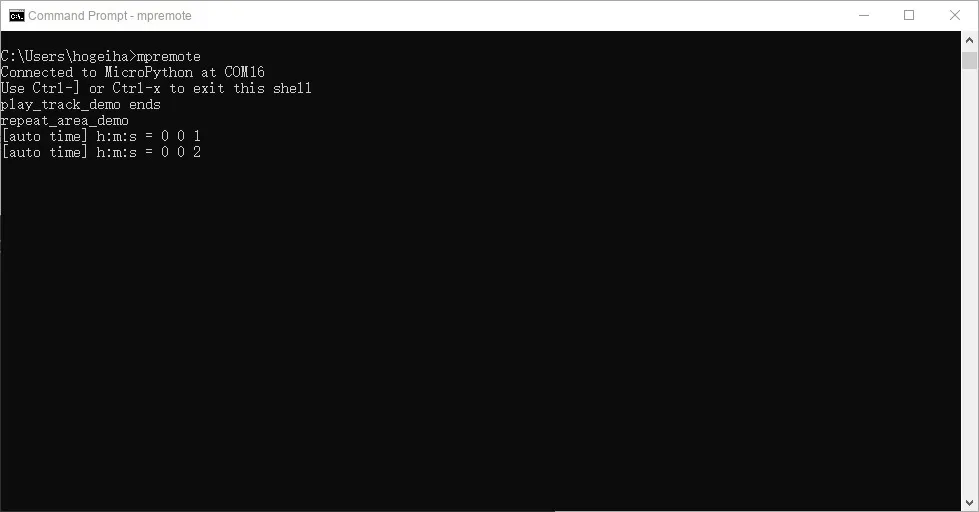
It can be seen that depending on the input audio, the output[auto time]will vary slightly.
It can be seen that the module can play songs normally, and here we use NetEase Cloud Music for identification.
IV. Drivers
dy-sv19t_driver.zip 19 KB
5. BOM & Recommended Alternative Parts
None.
VI. Revision History
Document Version | Date of Revision | Modifier | Modified Content |
v1.0 | 2025-11-22 | Li Zisheng | Initialize the document The BOM sheet has not been finally checked, the driver has not been re-verified, and the 3.3 application experiment Not yet specified. |
v1.1 | 2025-12-29 | Li Zisheng | Added application experiments and production files |
v1.2 | 2025-12-31 | Xin Ruili | Create an open version of the document based on the internal document version v1.1. |
v1.3 | 2026-03-29 | Xin Ruili | Modified the application experiment section |
VII. Relevant Materials
7.1 Chip Datasheet
SV19T-IO Trigger Mode Application Manual.pdf 498 KB
SV19T-UART Mode Application Manual.pdf 1.0 MB
SV19T-Standard MP3 Mode Application Manual.pdf 410 KB
SV19T-Storage and Path Format Description.pdf 478 KB
SV19T-One-Wire Oneline Mode Application Manual.pdf 491 KB
SV19T-Module Function Description.pdf 2.6 MB
7.2 Unique Icons for PCB Silkscreen
7.3 Hardware Packaging
SV19T Package Dimensions.PcbLib 44 KB
SV19T Schematic Symbol.SCHLIB 5 KB
7.4 Related Software
Dy Electronic Technology Co., Ltd. Voice Serial Port Debugging Software.zip 48.1 MB