Contents
- I. Module Introduction
- 2. Introduction to Main Chips
- 2.1 Chip Overview
- 2.2 Pin Definition
- 2.3 Functional Block Diagram
- 2.4 Performance Parameters
- 2.5 Reference Circuit
- 2.6 Chip Configuration
- 2.7 Communication Interfaces and Related Protocols
- 2.8 PCB Routing Precautions
- III. Instructions for Circuit Engineering and Module Usage
- 3.1 Circuit Source Engineering
- 3.2 Module Usage Instructions
- 3.3 Application Experiment
- 4. Drivers
- 5. BOM & Recommended Alternative Parts
- VI. Revision History
- VII. Relevant Materials
- 7.1 Chip Datasheet
- 7.2 Unique Icons for PCB Silk Screen
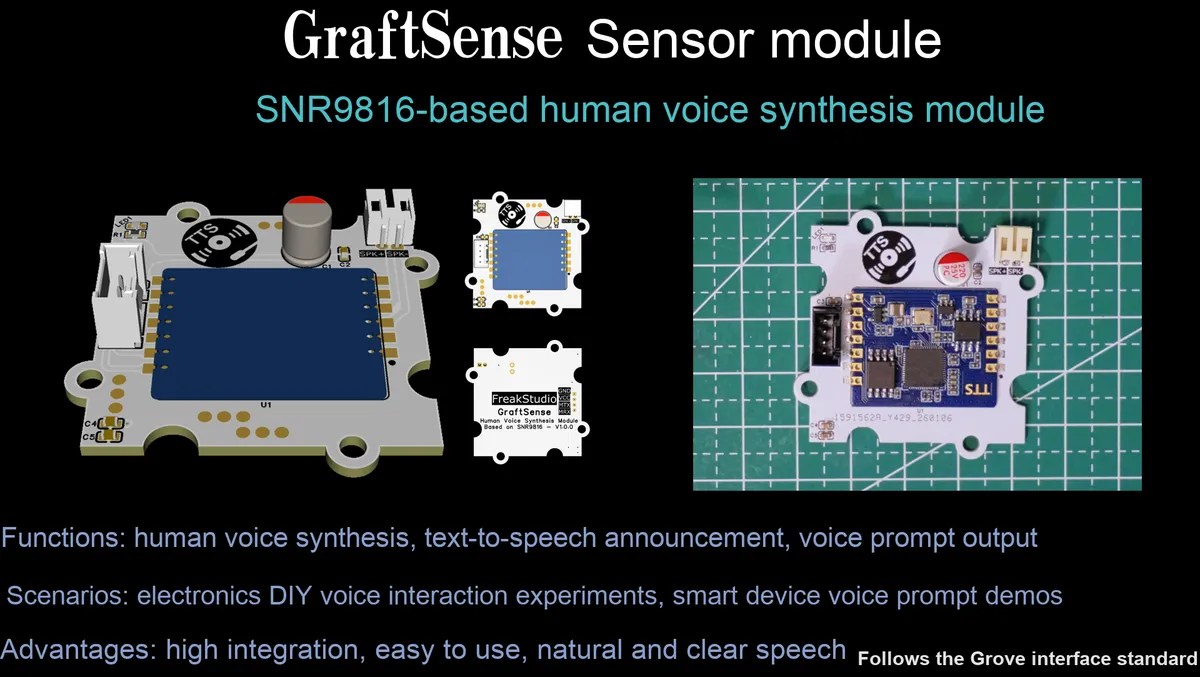
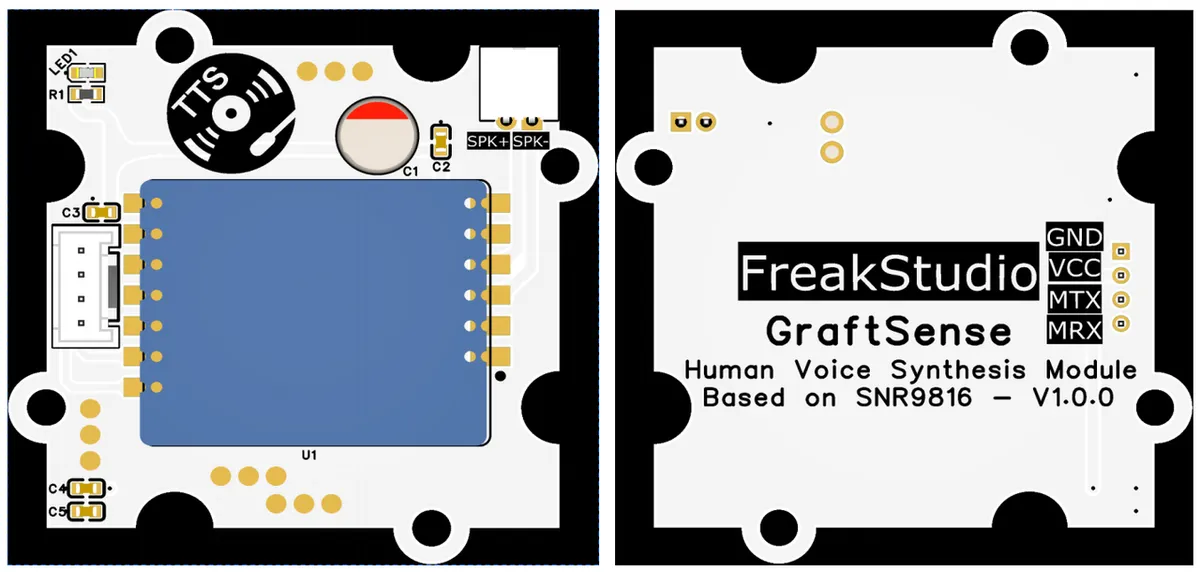
I. Module Introduction
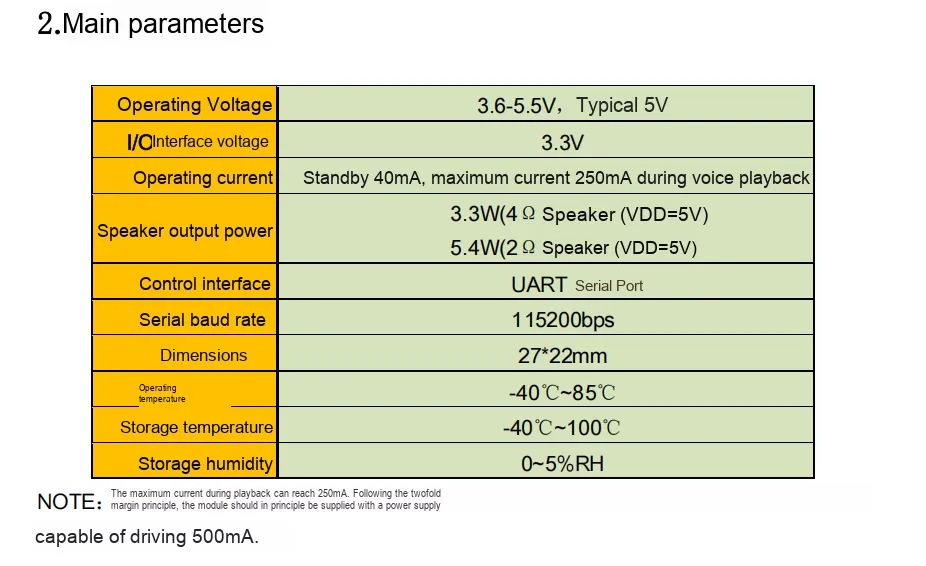
The human voice speech synthesis module based on SNR9816 is a SNR9816 -centered TTS speech synthesis module that adopts UART communication, operates at a voltage of 3.6~5V, and requires an input power supply with a peak current of over 500mA (the maximum current for voice playback is 250mA); the module integrates a sensor interface, a speaker interface, a power indicator and a filter circuit, which can realize human voice speech synthesis and playback, and is suitable for scenarios such as smart devices and alarm systems that require voice output.
2. Introduction to Main Chips
SNR9816 is commonly found in SNR9816TTS offline human voice speech synthesis modules and SNR9816VR voice control modules: The TTS version supports converting Chinese and English text into natural and smooth speech, communicates with embedded systems such as microcontrollers / ESP32 via a serial port with a default baud rate of 9600bps, can dynamically synthesize speech in real time and adjust speech rate and intonation, and is suitable for scenarios such as smart home appliances and voice interaction devices;VR version is designed for voice control applications, capable of recognizing and responding to voice commands for device status. Both versions feature simple integration and convenient usage, and are widely adopted in various embedded designs requiring voice interaction.
2.1 Chip Overview
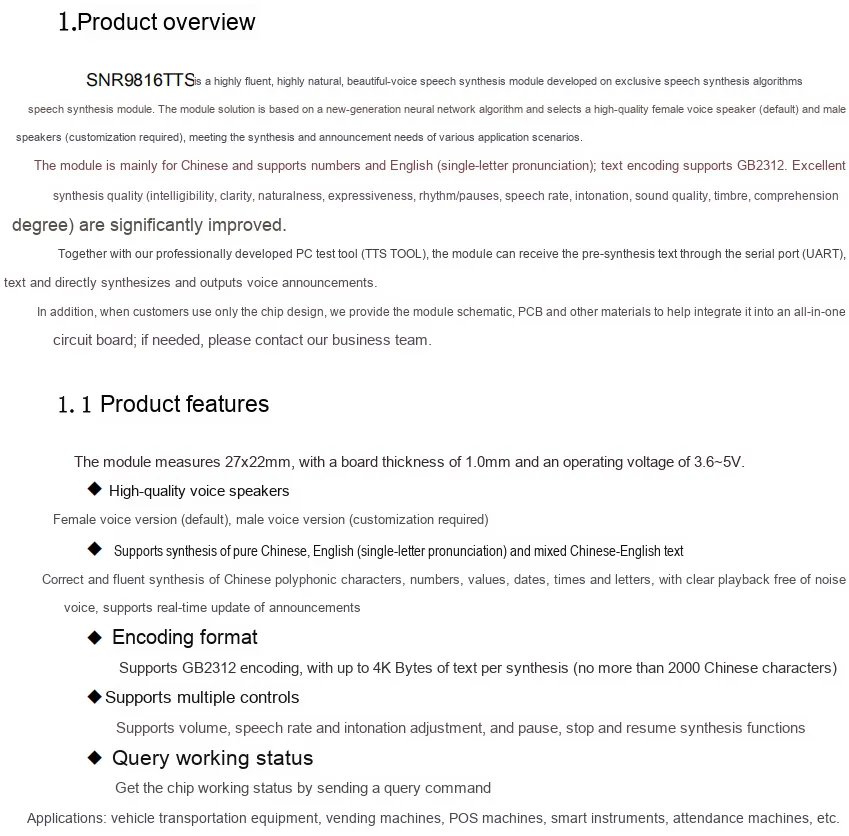
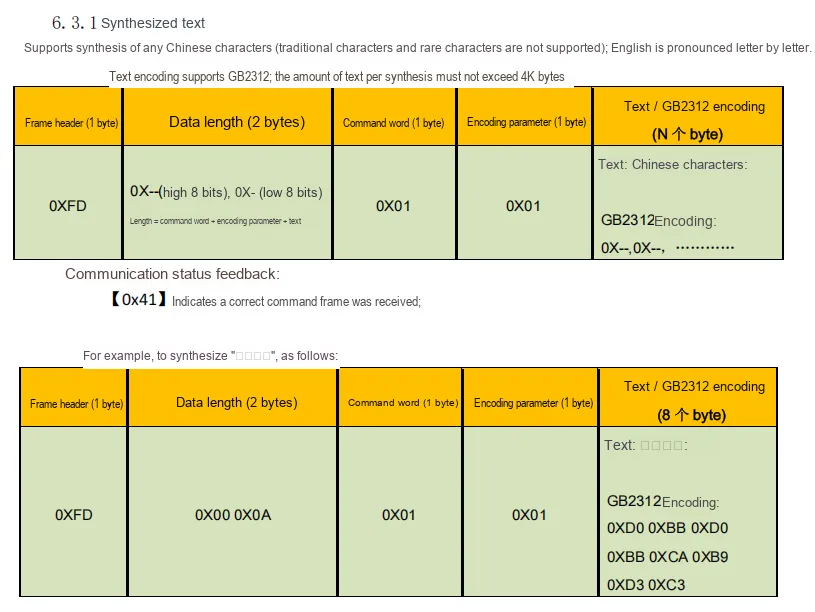
SNR9816TTS is a high-naturalness human voice TTS module based on neural network algorithms. It comes with a premium female voice speaker by default (male voice is customizable), supports mixed Chinese-English reading and GB2312 encoding. It can output clear and smooth voice announcements by receiving text via a serial port, and also features functions such as volume and speed adjustment as well as status query. With a compact size, it adapts to 3.6~5V power supply, can be integrated into various embedded devices, and is widely used for voice interaction requirements in scenarios like vehicles, vending machines, and smart instruments.
2.2 Pin Definition
2.3 Functional Block Diagram
None.
2.4 Performance Parameters
2.5 Reference Circuit
If you need to design the circuit directly on the circuit board instead of using a module, please refer to the following schematic diagram.
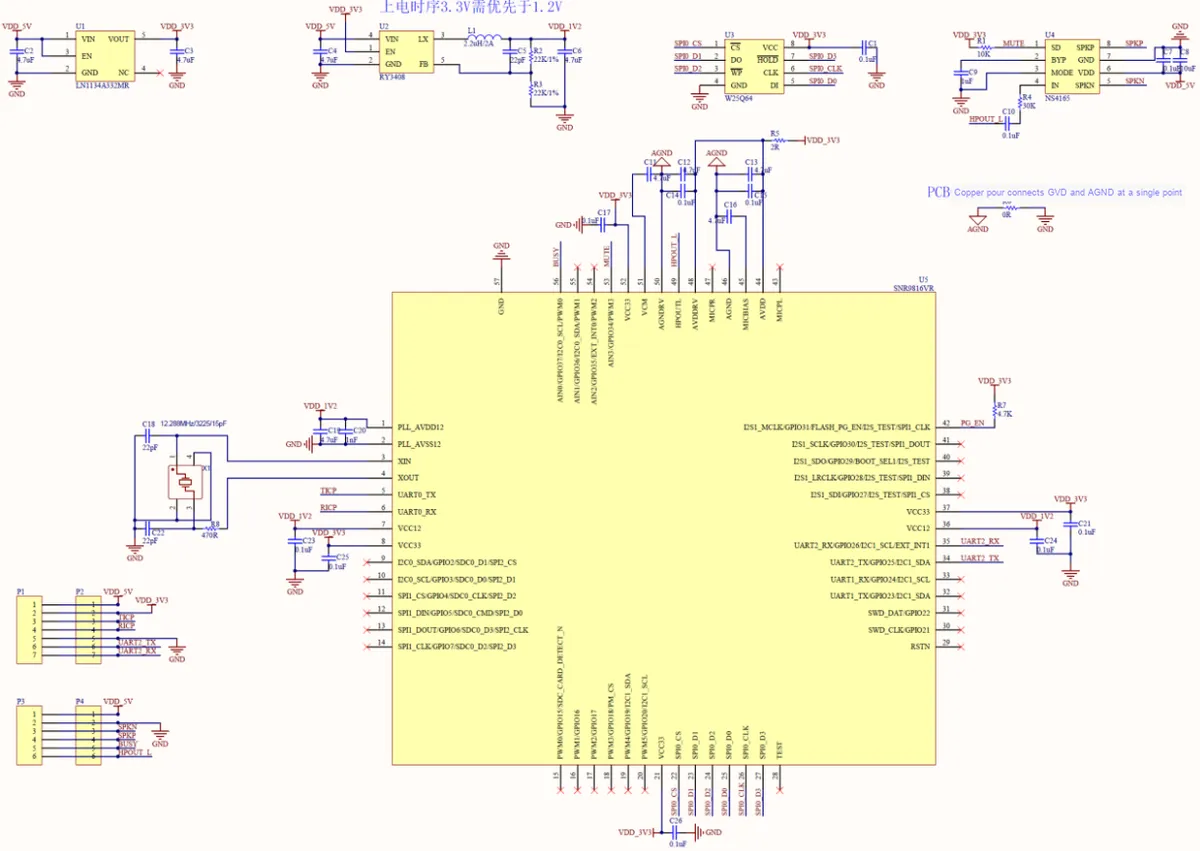
The above reference circuit takes SNR9816 as the core main chip, consisting of multiple sets of power supply units, a 12MHz crystal oscillator clock unit, SPI interface external FLASH storage unit, an audio output unit with amplification and mute functions, as well as UART serial port, SWD debug interface and other Control Units; meanwhile, it adopts single-point connection between GND and AGND and filtering via multiple sets of decoupling capacitors to ensure signal stability and reduce noise interference.
For the usage in the form of a module, please refer to the following schematic diagram:
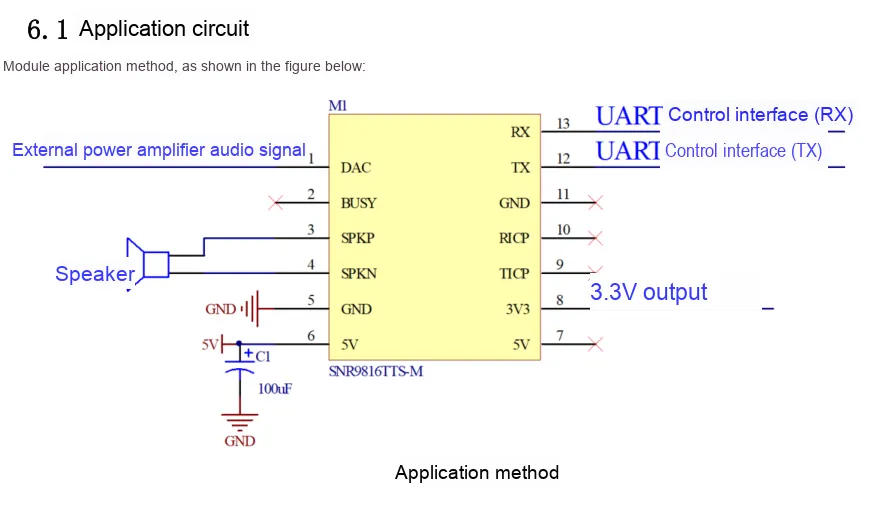
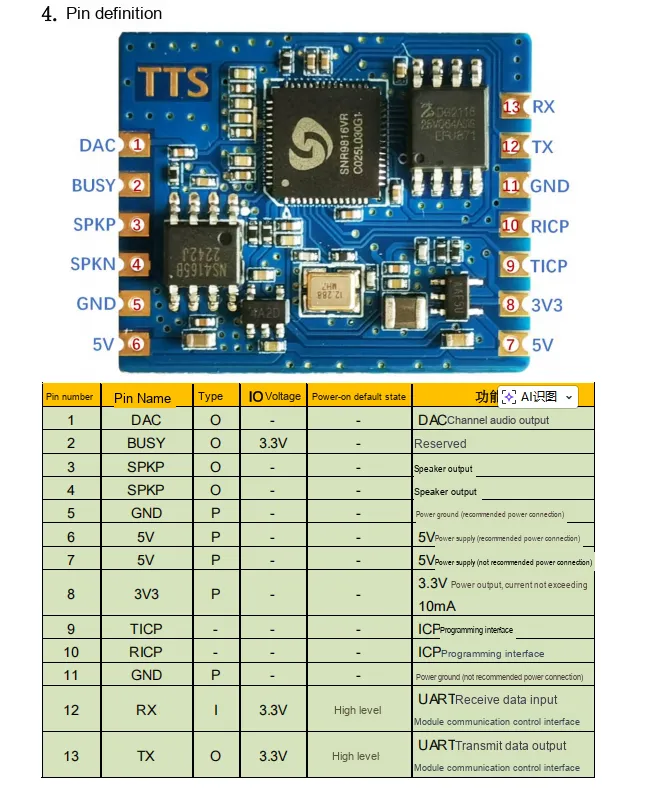
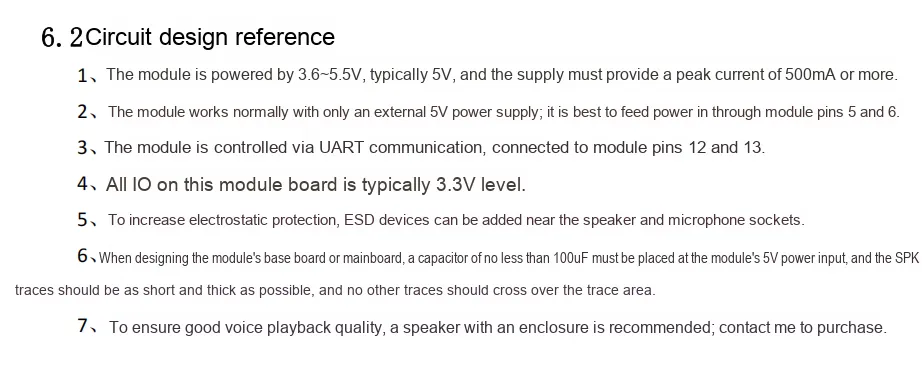
SNR9816TTS-M module features a simple application circuit: its core configuration involves the 6th pin connected to 5V power supply with a parallel 100nF capacitor for decoupling filtering; the 3rd and 4th pins, namely SPKP and SPKN, are directly connected to a speaker for voice playback; the 1st pin DAC can be externally connected to a power amplifier to expand audio output capability; the UART pins on the 12th and 13th pins, i. e. TX and RX, serve as a control interface to receive text commands from external devices to trigger speech synthesis.The 8th pin can also output 3.3V power externally. The whole device only needs to be connected to a power supply, a speaker and a serial port to realize basic voice broadcast, and it also supports an external power amplifier to increase the audio power.
2.6 Chip Configuration
This module is of Plug and Play type, requiring no hardware configuration or software register setup.
2.7 Communication Interfaces and Related Protocols
2.7.1 Synthetic Text
2.7.2 Control Commands
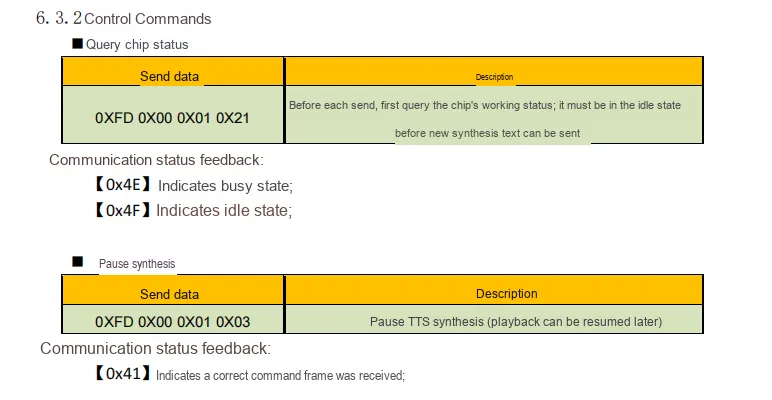
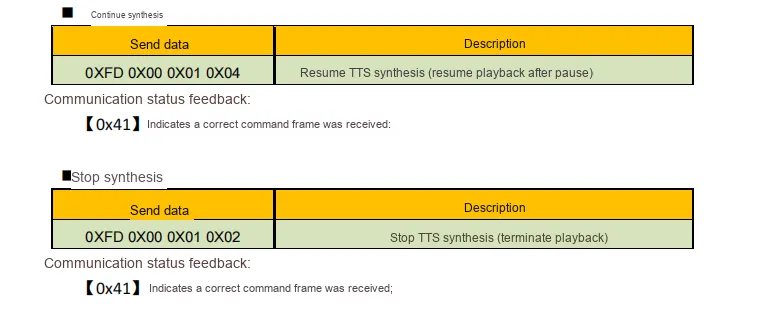
2.7.3 Volume, Speech Rate and Intonation Adjustment
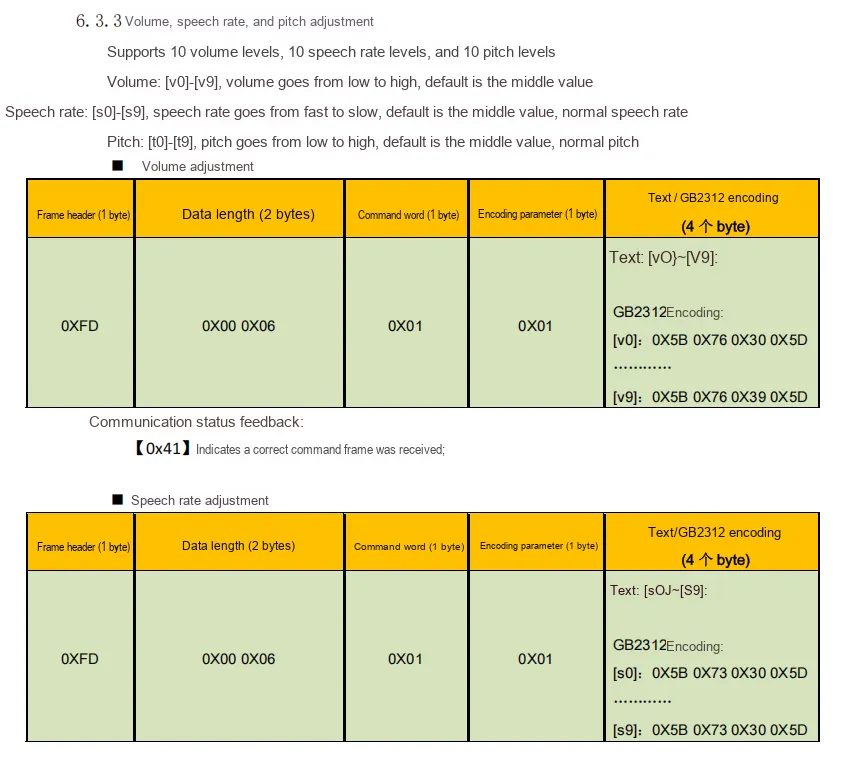
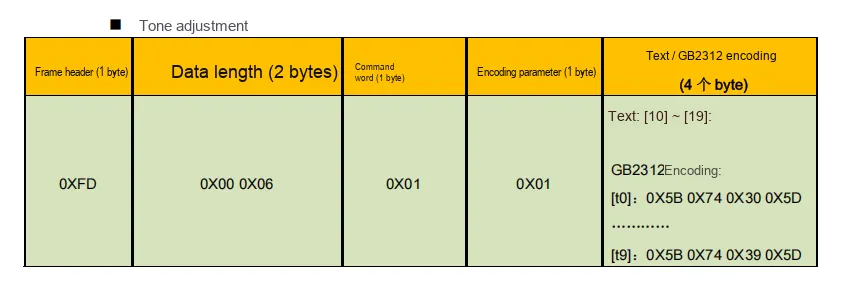
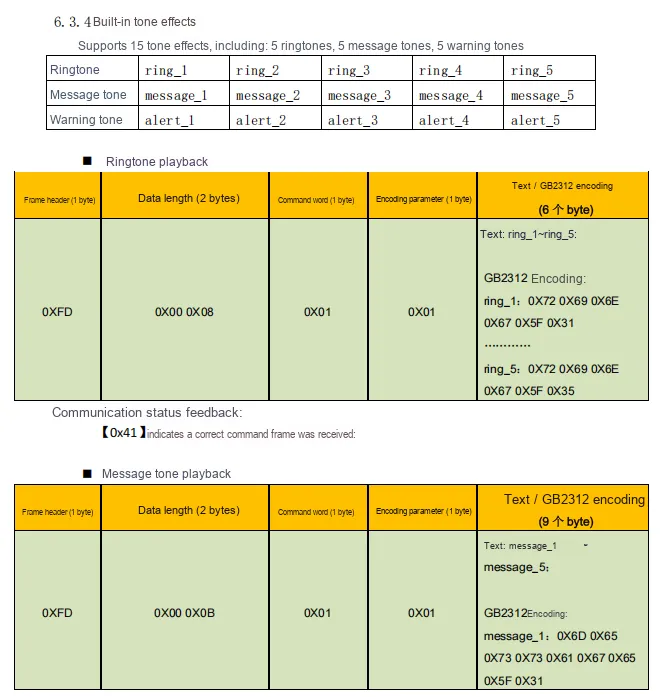
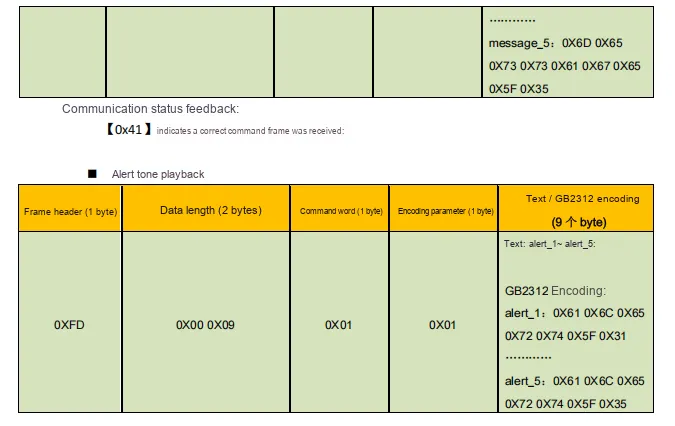
2.7.4 Built-in Prompt Sound Effects
2.8 PCB Routing Precautions
III. Instructions for Circuit Engineering and Module Usage
3.1 Circuit Source Engineering
To obtain the circuit source project, please follow the official account [Freak Embedded].
3.2 Module Usage Instructions
The schematic diagram of this module is shown below:
SCH_Human Voice Speech Synthesis Module Based on SNR9816-v1.0_2026-01-28.pdf 2.4 MB
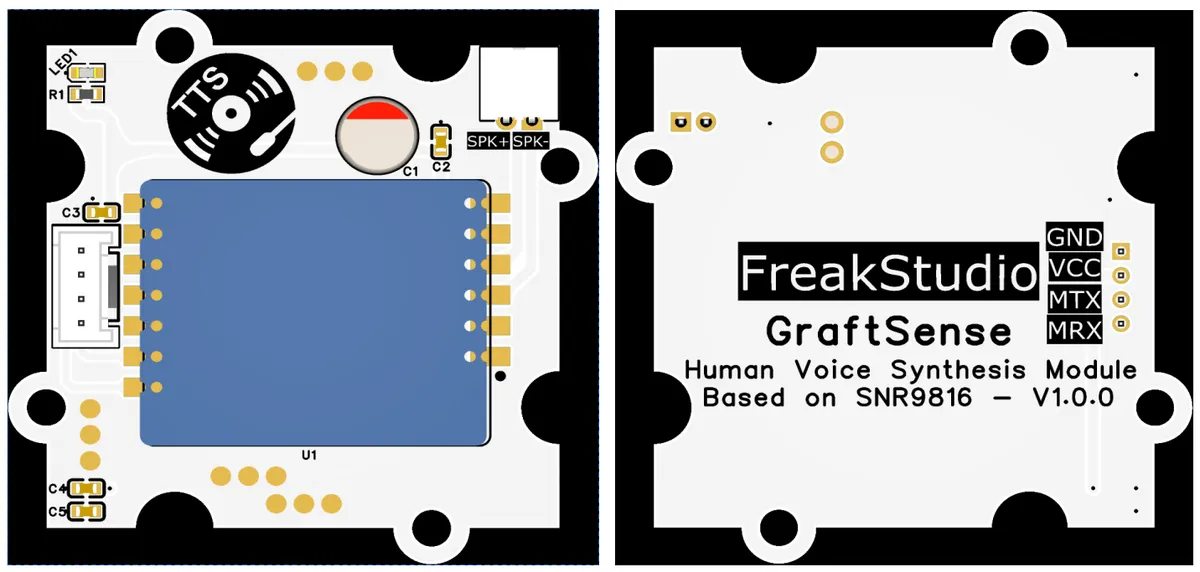
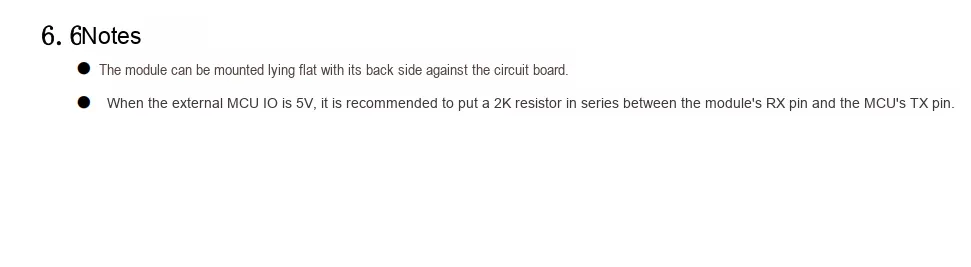
This module provides a serial port UART interface MRX and MTX: where M stands for master, meaning the MCU 's RX corresponds to the module' s TX.
There is a PH2.0-2P interface on the physical device, with the silkscreen labels SPK+ and SPK-. This interface is designed for connecting an external speaker; since different speakers consume different power levels, you can select one based on your actual power supply: 3.3W (4Ω speaker / VDD = 5V) is recommended, and 5.4W (2Ω speaker / VDD = 5V) is also optional.
Note: The module we use here only supports the Chinese version in UTF-8 encoding format! All text sent via the serial port that requires audio output must be in UTF-8 encoding.
3.3 Application Experiment
Here, we use the GraftPort-RP2040 development board for testing, and connect the human voice speech synthesis module based on SNR9816 to communicate with the main controller via the UART interface.
Here, we first use the HY2.0-4P cable to connect the module to the GraftPort-RP2040 development board's UART0 interface, and connect an external speaker to a small loudspeaker:
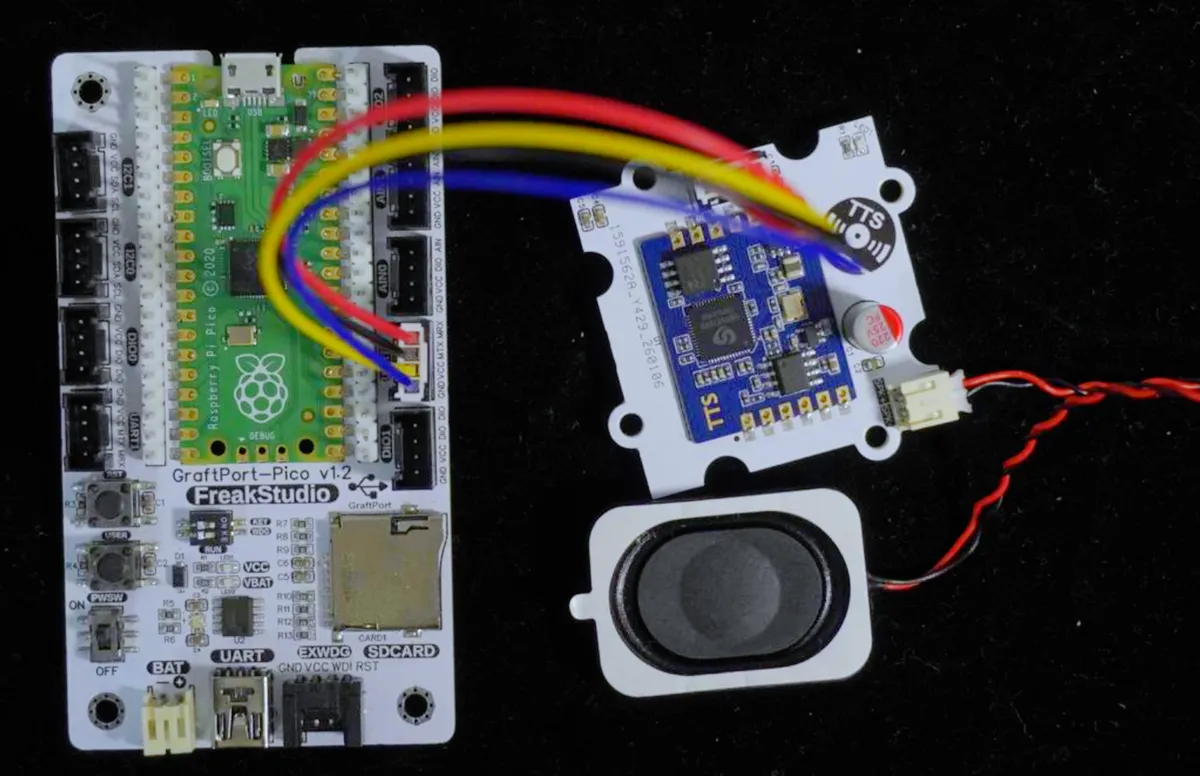
The module connections are shown in the following table:
Development Board Pins | Module Pins | Description |
Pin 16 |
|
|
Pin 17 |
|
|
Here, we can import the module driver library code via the mip tool. The following are the usage commands for the mpremote tool:
mpremote mip install github:FreakStudioCN/GraftSense-Drivers-MicroPython/misc/snr9816_tts_driverAfter importing the human voice speech synthesis module based on SNR9816 - MicroPython driver code, copy the following main.py code into our project:
# Python env   : MicroPython v1.23.0 on Raspberry Pi Pico
# -*- coding: utf-8 -*-
# @Time    : 2026/1/5 10:57
# @Author  : hogeiha
# @File    : main.py
# @Description : SNR9816 TTS example program

# ======================================== Import Modules =========================================

from snr9816_tts import SNR9816_TTS
from machine import Pin, UART
import time

# ======================================== Global Variables ============================================

# ======================================== Functions ============================================

# ======================================== Custom Classes ============================================

# ======================================== Initialization ==========================================

# Power-on delay of 3 s
time.sleep(3)
# Print debug message
print("FreakStudio: SNR9816 TTS Driver Example")

# Create UART object using UART0, baud rate 115200, 8 data bits, no parity, 1 stop bit, TX pin GPIO16, RX pin GPIO17
uart = UART(0, baudrate=115200, bits=8, parity=None, stop=1, tx=Pin(16), rx=Pin(17))
# Create TTS object (using UTF-8 encoding)
tts = SNR9816_TTS(uart)

# ========================================  Main Program  ===========================================

# Check TTS status
tts.query_status()

# Set parameters
# Set voice number 0=female, 1=male
while not tts.set_voice(1):
    continue
print("Voice set to male.")

# Set volume 0~9
while not tts.set_volume(9):
    time.sleep(1)
    continue
print("Volume set to 9.")

# Set speech rate 0~9
while not tts.set_speed(9):
    time.sleep(1)
    continue
print("Speed set to 9.")

# Set pitch 0~9
while not tts.set_tone(9):
    time.sleep(1)
    continue
print("Tone set to 9.")

# Play ringtone
for i in range(5):
    while not tts.play_ringtone(i+1):
        time.sleep(1)
        continue
    print(f"Playing ringtone {i+1}/5...")
print('Ringtone playback finished.')

# Play prompt tone
for i in range(5):
    while not tts.play_message_tone(i+1):
        time.sleep(1)
        continue
    print(f"Playing message tone {i+1}/5...")
print('Message tone playback finished.')

# Play alarm tone
for i in range(5):
    while not tts.play_alert_tone(i+1):
        time.sleep(1)
        continue
    print(f"Playing prompt tone {i+1}/5...")
print('Alert tone playback finished.')

# Synthesize text
while not tts.synthesize_text("欢迎使用我司的TTS语音合[w0]成测试模块。请注意以下发音细节:这个要[=yao1]求很重[=zhong4]要[=yao4]。(避免“要[yao]求”和“重[chong]要”的错误发音)本次会议共有[n1]25人参加。"):
    time.sleep(1)
    continue
print("Text synthesis started.")

# Press any key in the terminal to pause playback
input ("Press any key to pause")
# Pause synthesis
tts.pause_synthesis()
print("Synthesis paused.")

# Press any key in the terminal to resume synthesis playback
input ("Press any key to play")
# Resume synthesis
tts.resume_synthesis()
print("Synthesis resumed.")

# Press any key in the terminal to stop and cancel synthesis playback
input ("Press any key to stop")
# Stop synthesis
tts.stop_synthesis()
print("Synthesis stopped.")
The terminal output of the code flashing process is as follows:
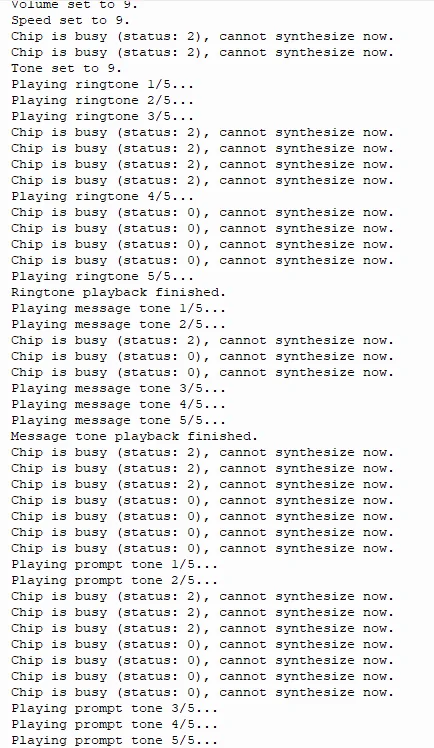
The example effect is as follows:
TTS Speech Synthesis Module.mp4 18.0 MB
4. Drivers
5. BOM & Recommended Alternative Parts
None.
VI. Revision History
Document Version | Date of Modification | Modifier | Revised Content |
v1.0 | 2026-01-28 | Zero Kōkō | Initialize Document |
v1.1 | 2026-02-12 | Xin Ruili | Create an open version of the document based on the internal document version v1.0. |
VII. Relevant Materials
7.1 Chip Datasheet
SNR9816 TTS Human Voice Speech Synthesis Module Hardware and Software Datasheet V1.0.pdf 2.1 MB
7.2 Unique Icons for PCB Silk Screen