Contents
- I. Module Introduction
- II. Introduction to Main Chips
- 2.1 Chip Overview
- 2.2 Pin Definition
- 2.3 Functional Block Diagram
- 2.4 Performance Parameters
- 2.5 Reference Circuit
- 2.6 Chip Configuration
- 2.7 Communication Interfaces and Related Protocols
- 2.8 PCB Routing Notes
- 3. Instructions for Circuit Engineering and Module Usage
- 3.1 Circuit Source Engineering
- 3.2 Module Usage Instructions
- 3.3 Application Experiment
- IV. Drivers
- 5. BOM & Recommended Alternative Parts
- VI. Revision History
- VII. Relevant Materials
- 7.1 Chip Datasheet
- 7.2 PCB Silkscreen Specific Icons
I. Module Introduction
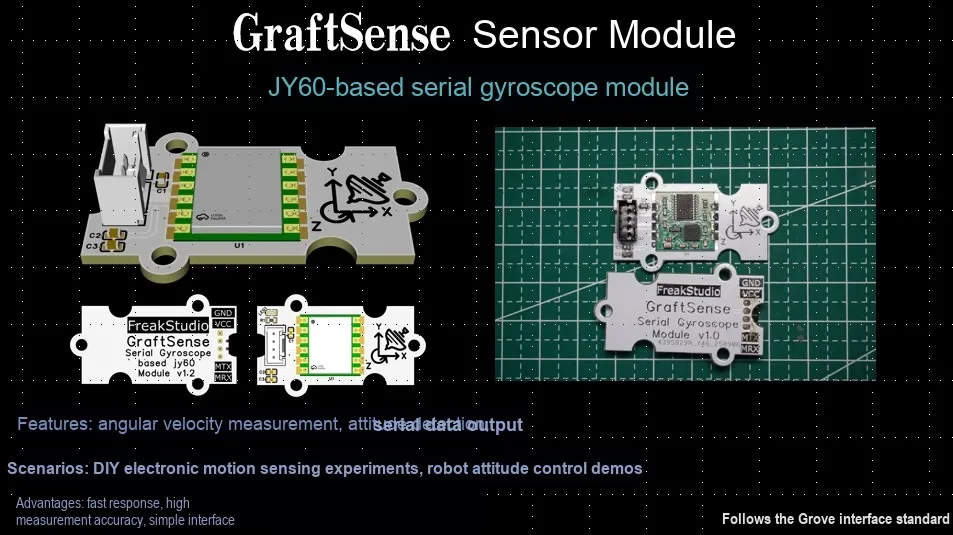
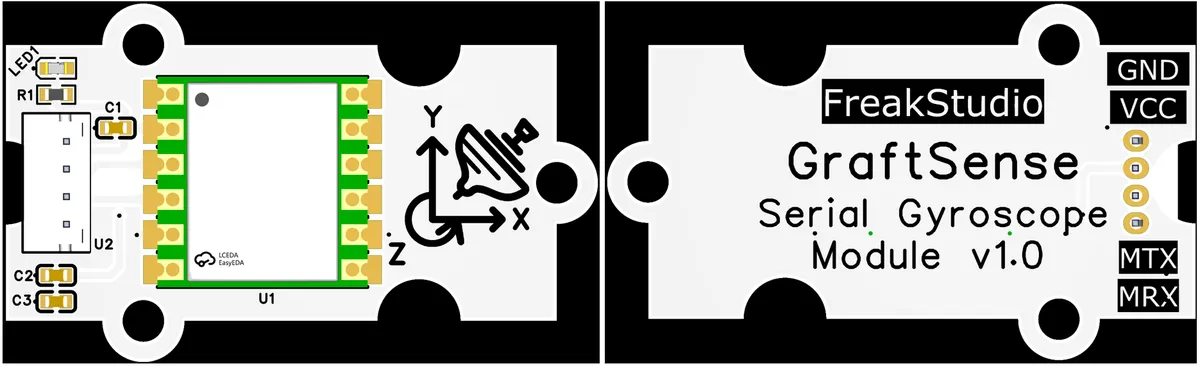
JY60-based Serial Port Gyroscope Module Designed based on the JY60 six-axis inclination sensor module, this product integrates a gyroscope circuit, filter capacitors, serial port terminals and a power indicator, and is equipped with GND, VCC, MTX, and MRX interfaces; it can output Euler angle data such as pitch, roll and yaw angles via the serial port, and is suitable for projects including attitude measurement, human motion tracking and drones, providing a precise 3D attitude sensing solution for devices.
II. Introduction to Main Chips
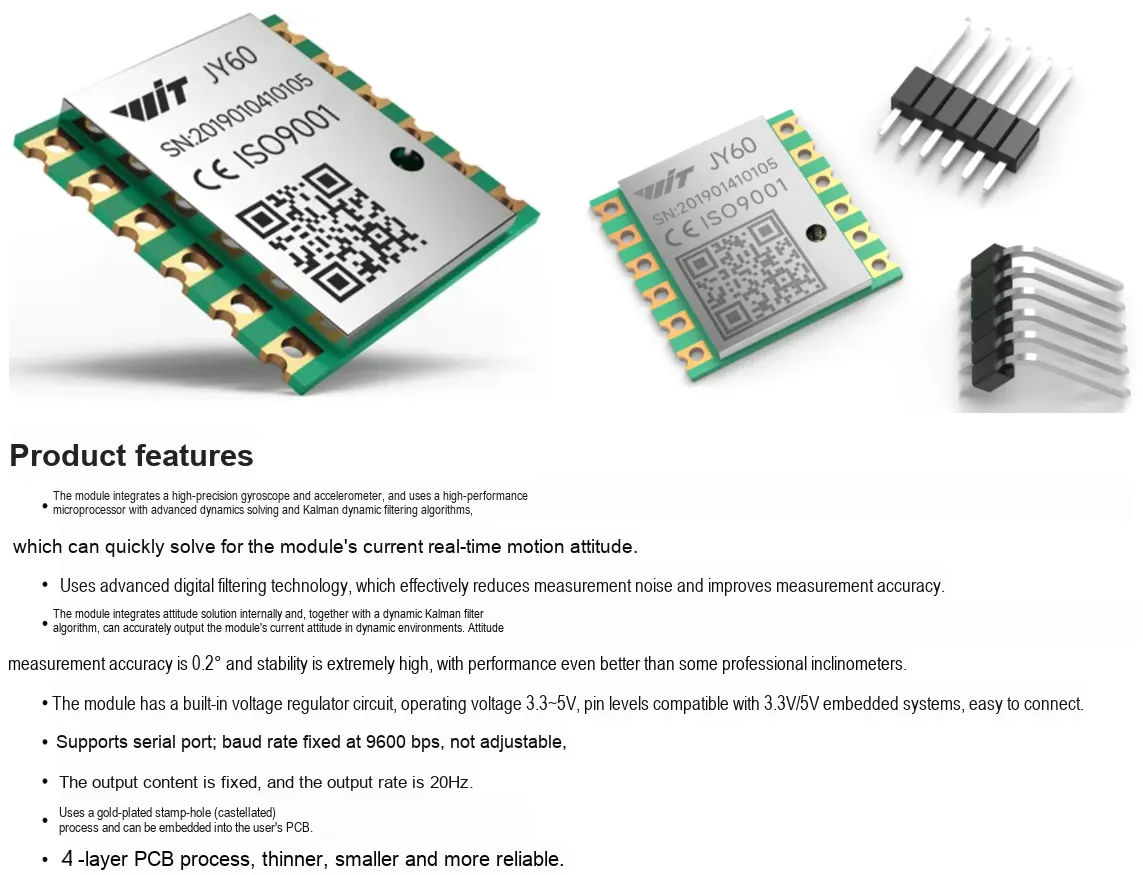
JY60 is a high-performance 3D motion attitude measurement system based on MEMS technology. It integrates a three-axis gyroscope and a three-axis accelerometer. Compared with the MPU6050 six-axis gyroscope module, JY60 performs quaternion calculation and Kalman filtering via its built-in microcontroller, and supports communication via UART and IIC interfaces. It adopts custom protocol frames during communication, and supports operations such as angle zeroing, calibration and sleep of the sensor by sending command packets through the serial port.
2.1 Chip Overview
2.2 Pin Definition
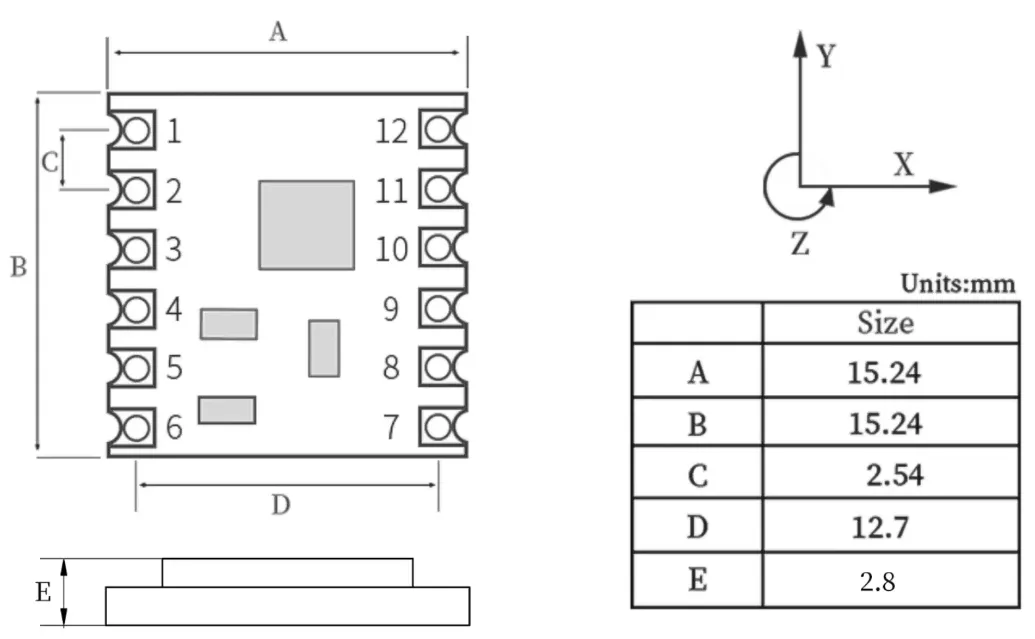
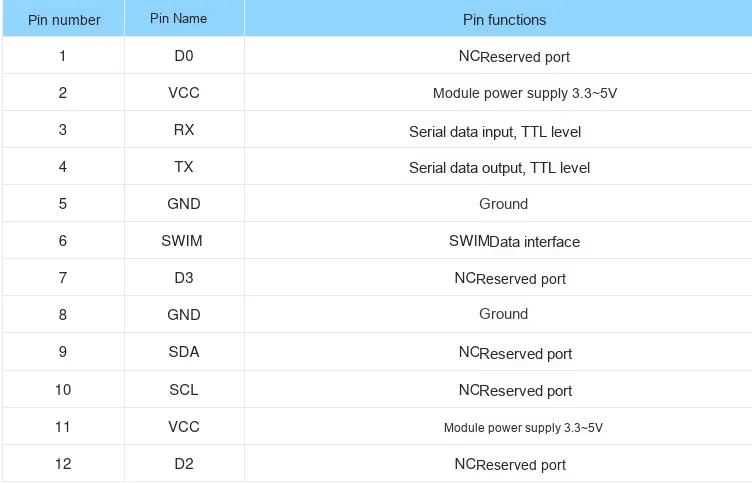
2.3 Functional Block Diagram
None.
2.4 Performance Parameters
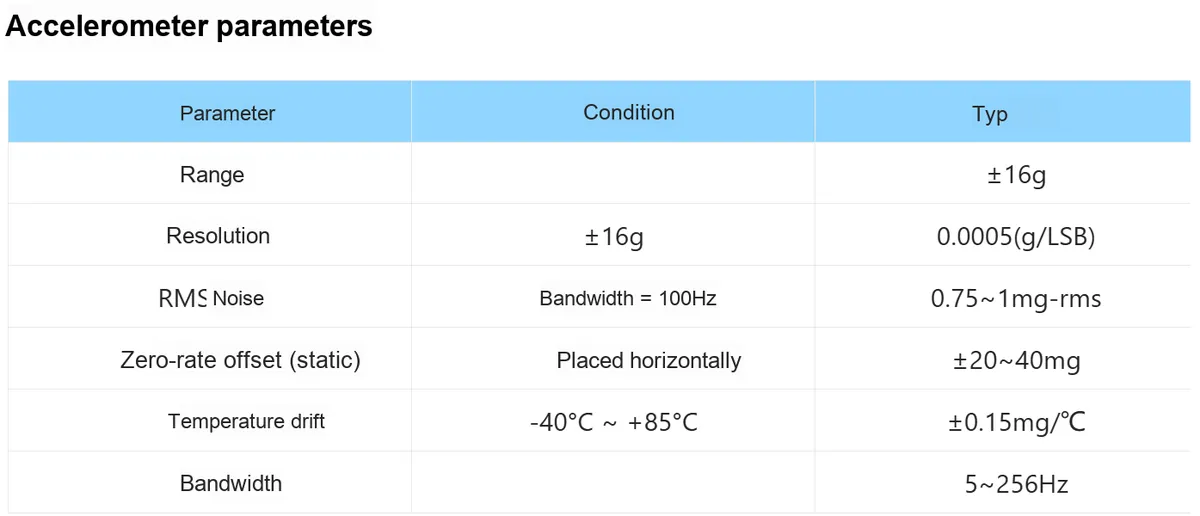
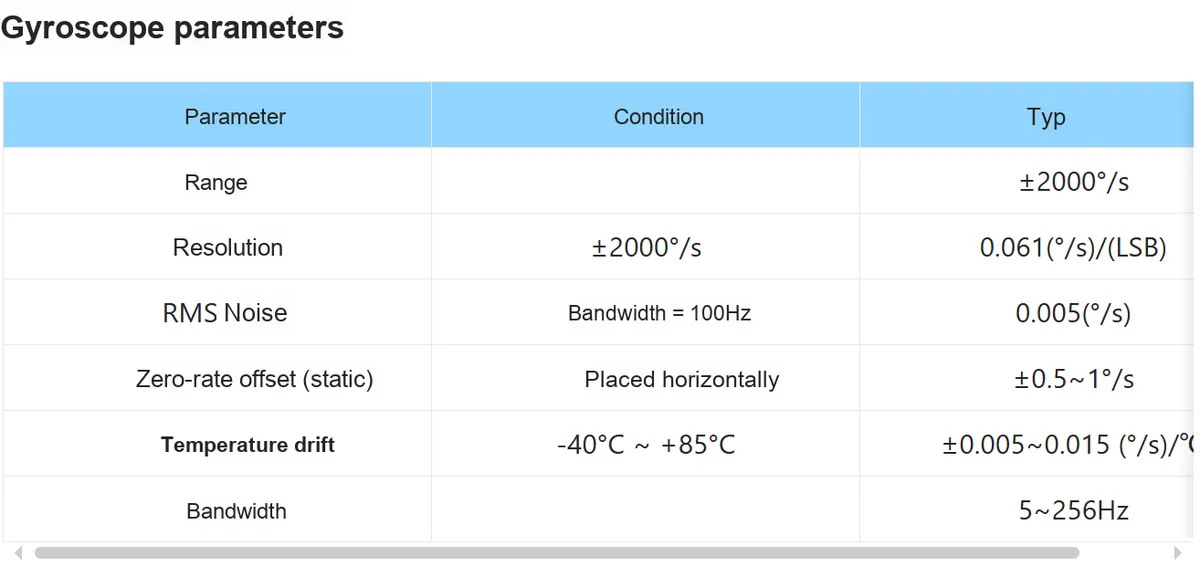
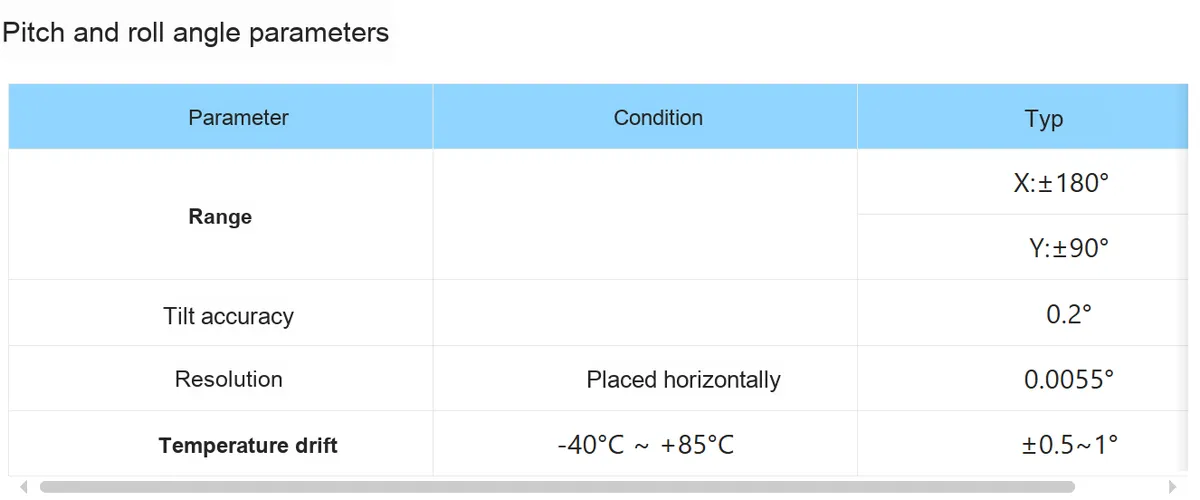
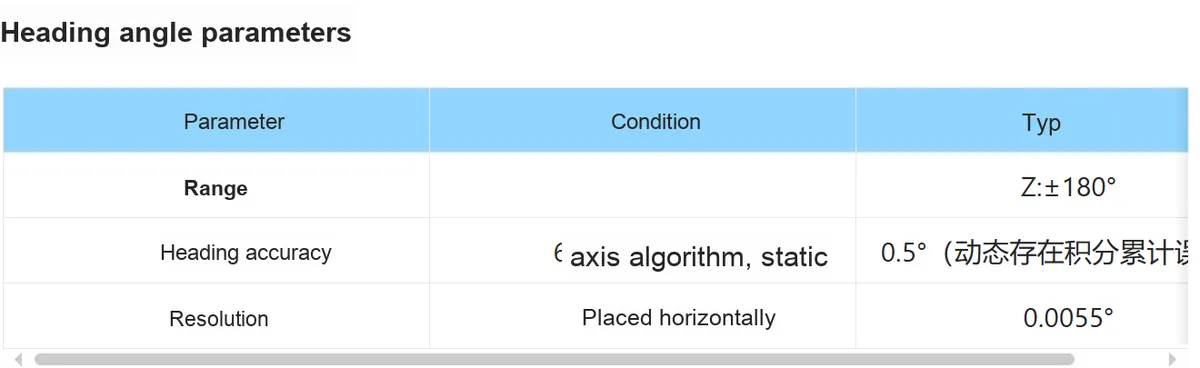
2.5 Reference Circuit
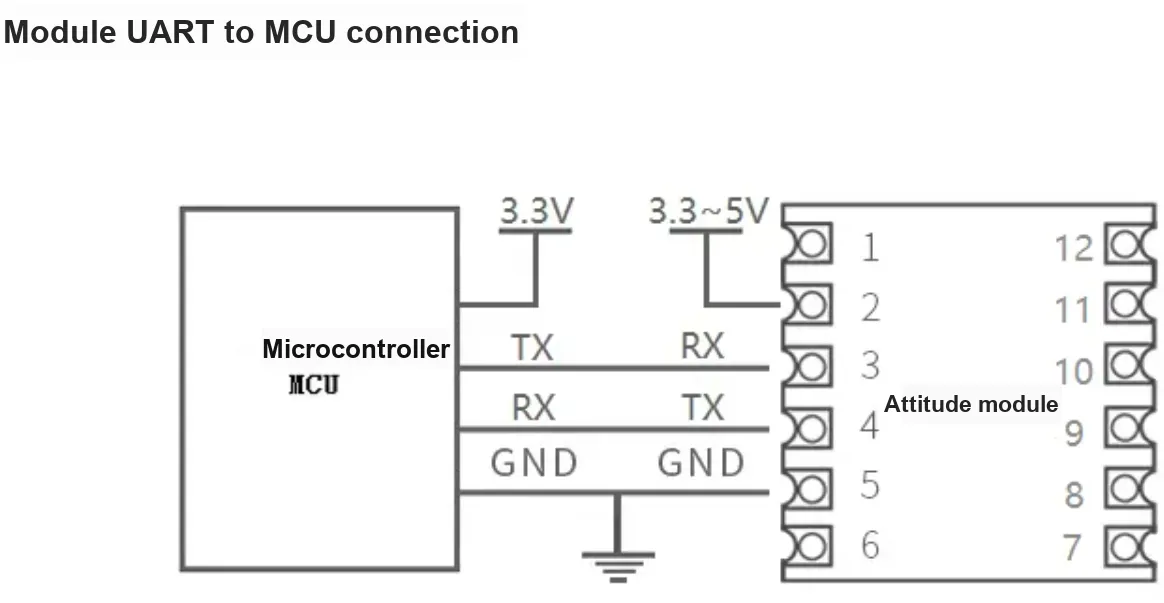
2.6 Chip Configuration
None.
2.7 Communication Interfaces and Related Protocols
Here, we only provide a detailed introduction to JY60 's serial port Communication Protocol. JY60 adopts the WT61 custom serial port Communication Protocol to communicate with the main controller.
2.7.1 Data Reading
It starts working immediately after power-on, and cyclically transmits 1 frame of data (which contains 11 data packets) via the serial port. The format of the data frame is as follows:
Protocol Header | Data Types | Data 0 lower 8 bits | Data 0 Upper 8 bits | Data 1 lower 8 bits | Data 1 Upper 8 bits | Data 2 lower 8 bits | Data 2 Upper 8 bits | Data 3 lower 8 bits | Data 3 Upper 8 bits | checksum |
HEADER 0x55 | TYPE[1] | DATA0L [7:0] | DATA0H [15:8] | DATA1L [7:0] | DATA1H [15:8] | DATA2L [7:0] | DATA2H [15:8] | DATA3L [7:0] | DATA3H [15:8] | SUMCRC[2] |
The parameters are defined as follows:
- Frame Header
HEADER- Value:0x55, used for data synchronization - Data Type
Type- indicates the data type, there are three in total:0x51,0x52and0x530x51- Indicates that acceleration data is to be sent0x52- indicates that angular velocity data is sent0x53- Indicates that angle data is to be transmitted
- Data bits
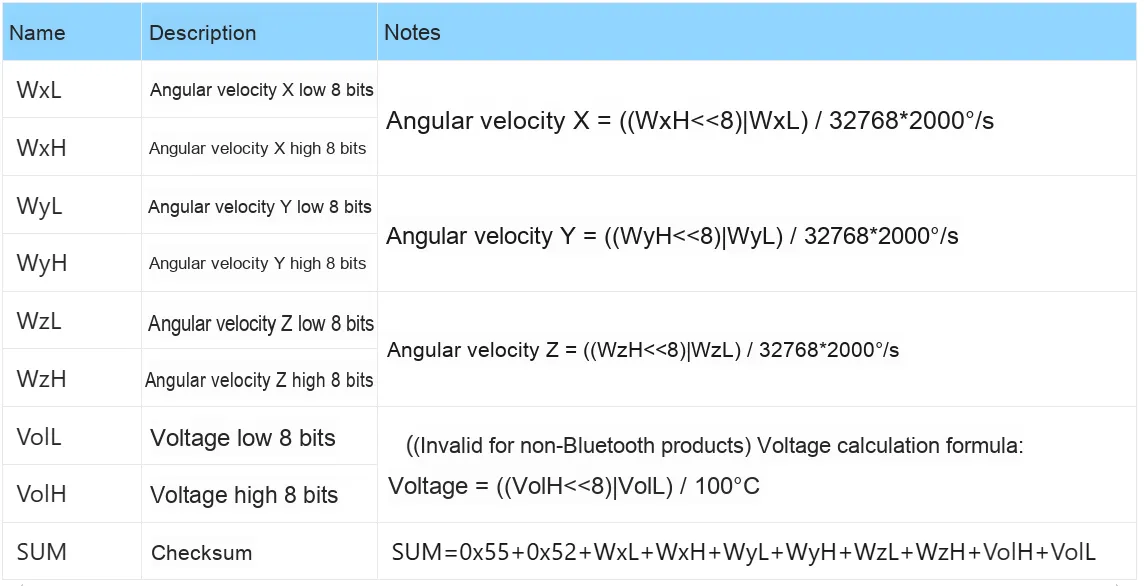
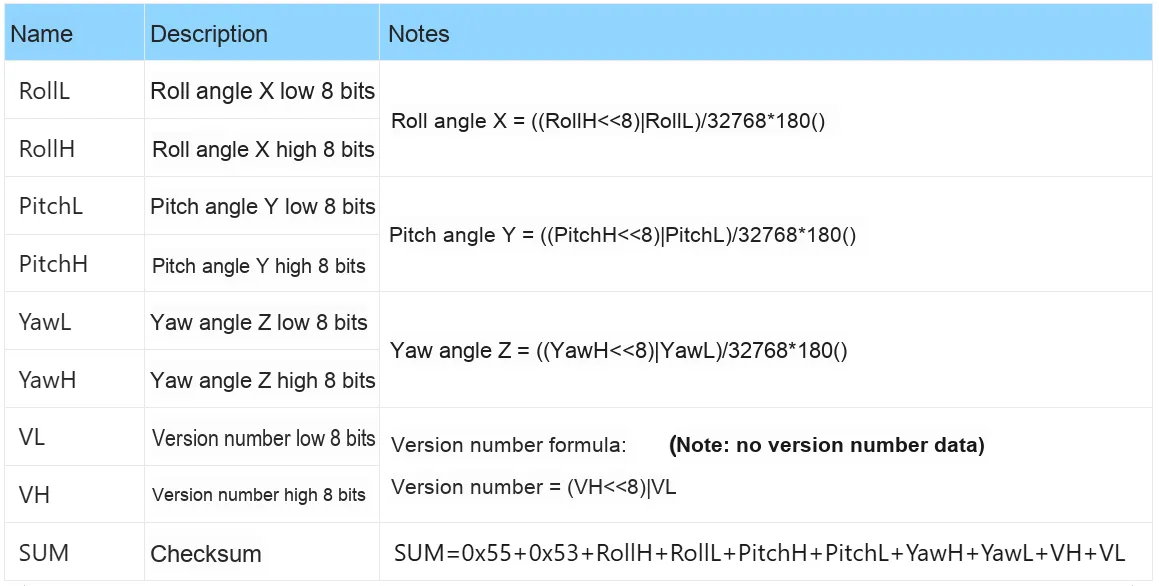
DATA- are transmitted in two parts: the upper 8 bitsDATAxHand the lower 8 bitsDATAxL.xranges from 0 to 3, and the meaning of each data bit varies depending on the data typeType.- When the data type is
0x51:
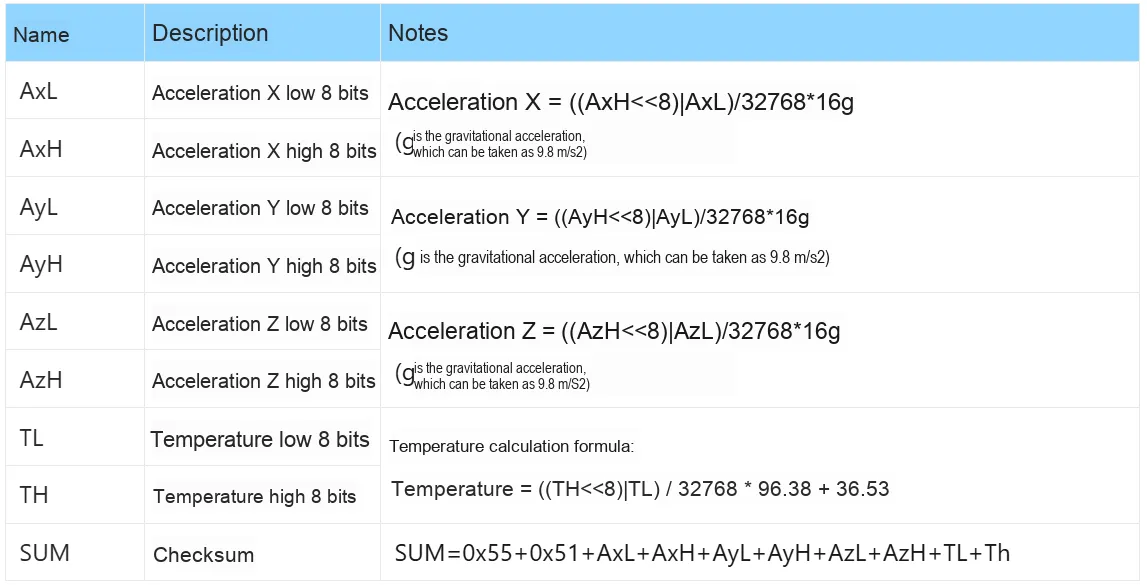
- When the data type is
0x52:
- When the data type is
0x53:
- When the data type is
- Checksum
SUMCRC-SUMCRC = 0x55 + TYPE + DATA1L + DATA1H + DATA2L + DATA2H + DATA3L + DATA3H + DATA4L + DATA4H
SUMCRC is of char type, taking the lower 8 bits of the checksum
It should be noted here that:
- The data is transmitted in hexadecimal format
- There are a total of 8 data bits: each data is transmitted sequentially as a low byte and a high byte, and the two combine to form a signed
shorttype data. For example, for the dataDATA1, whereDATA1Lis the low byte andDATA1His the high byte. The conversion method is as follows: assumingDATA1is the actual data,DATA1His its high byte part, andDATA1Lis its low byte part, then:DATA1=(short)((short)DATA1H<<8 | DATA1L)It must be noted here that
DATA1Hmust first be cast to a signedshorttype of data before being shifted, and the data type ofDATA1is also a signedshorttype, so that negative numbers can be represented.
2.7.2 Command Transmission
When sending commands, please transmit in accordance with the following protocol, and note that the data shall be sent in hexadecimal format:
Protocol Header | Protocol Header | command |
OxFF | 0xAA | CMD |
The following commands are available for sending:
- Z-axis angle zero reset
Note: When calibrating and zeroing the z-axis angle, the sensor must remain stationary in a horizontal/vertical position!

- Accelerometer Calibration
Note: When calibrating and zeroing the z-axis angle, the sensor must remain stationary in a horizontal/vertical position!

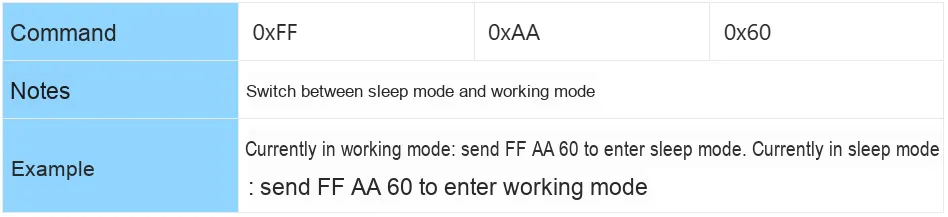
- Sleep and Wake-up
- Serial Port Transmission Mode Selection

- IIC Transmission Mode Selection

- Baud rate is set to 115200

- Set the baud rate to 9600

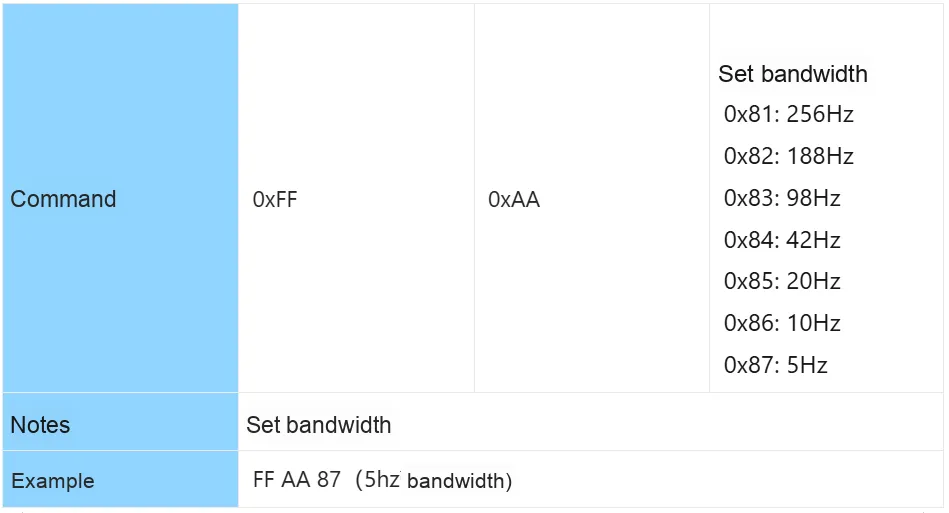
- Bandwidth Settings
- Horizontal Installation Initialization Settings

- Vertical Installation Initialization Settings

2.8 PCB Routing Notes
No special requirements.
3. Instructions for Circuit Engineering and Module Usage
3.1 Circuit Source Engineering
To obtain the circuit source project, please follow the official account [Freak Embedded]
3.2 Module Usage Instructions
The schematic diagram of this module is shown below:
SCH_JY60-Based Serial Gyroscope Module_v1.1_2025-11-04.pdf 2.1 MB
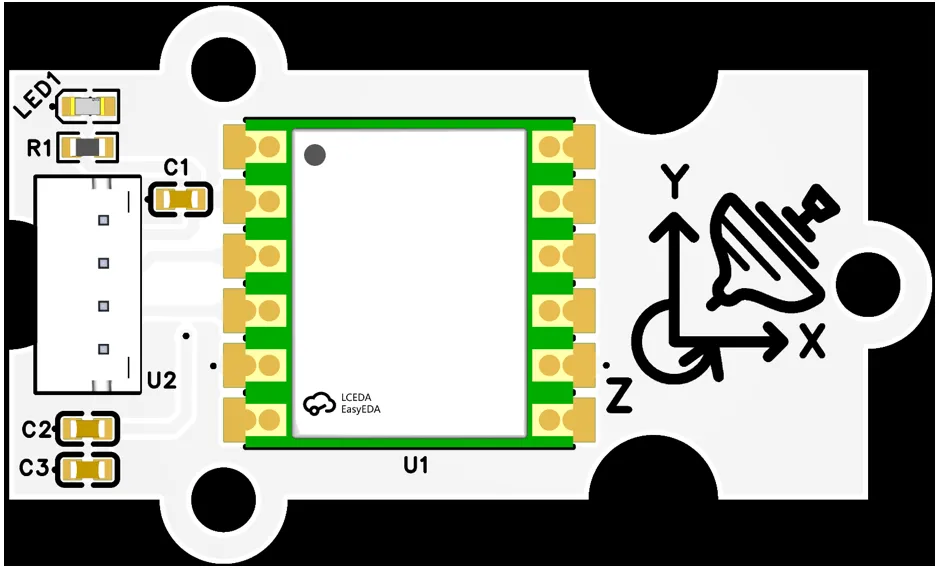
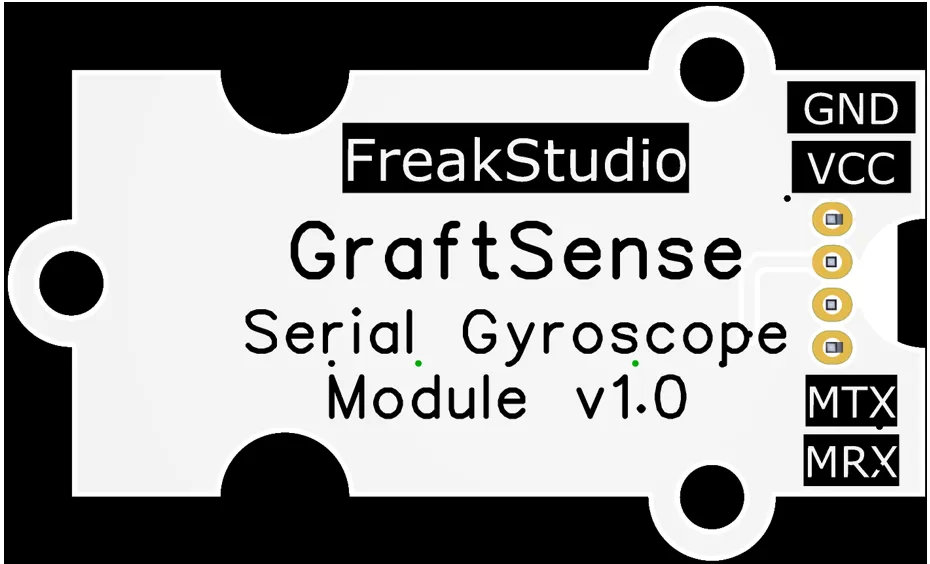
This module provides serial communication interfaces: MRX and MTX, in which MTX is actually SRX (the RX of the gyroscope module), while MRX is actually STX (the TX of the gyroscope module). In use, the TX pin of the main control chip needs to be connected to MTX, and the RX pin connected to MRX.
3.3 Application Experiment
Here, we use the GraftPort-RP2040 development board for testing, and the JY60-based serial port gyroscope module uses the UART interface to communicate with the main controller.
Here, we first use the HY2.0-4P connection cable to connect the module to the GraftPort-RP2040 development board's UART1 interface:
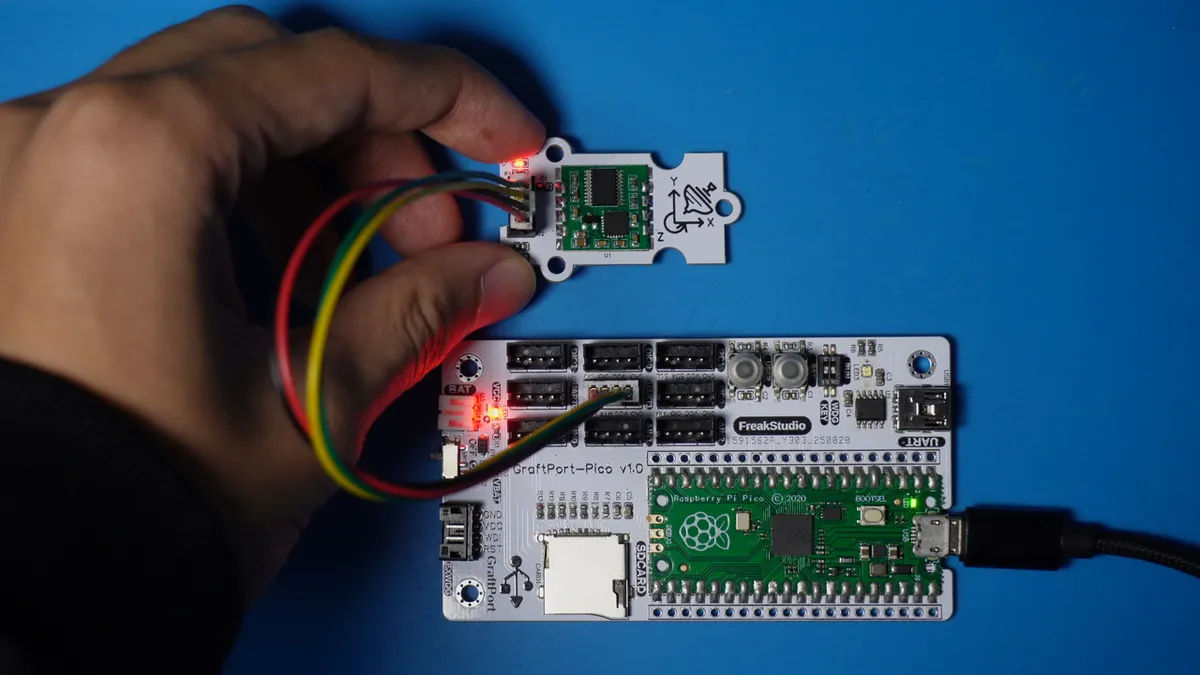
The module connections are shown in the following table:
Development Board Pins | Module Pins | Description |
Pin 8 |
|
|
Pin 9 |
|
|
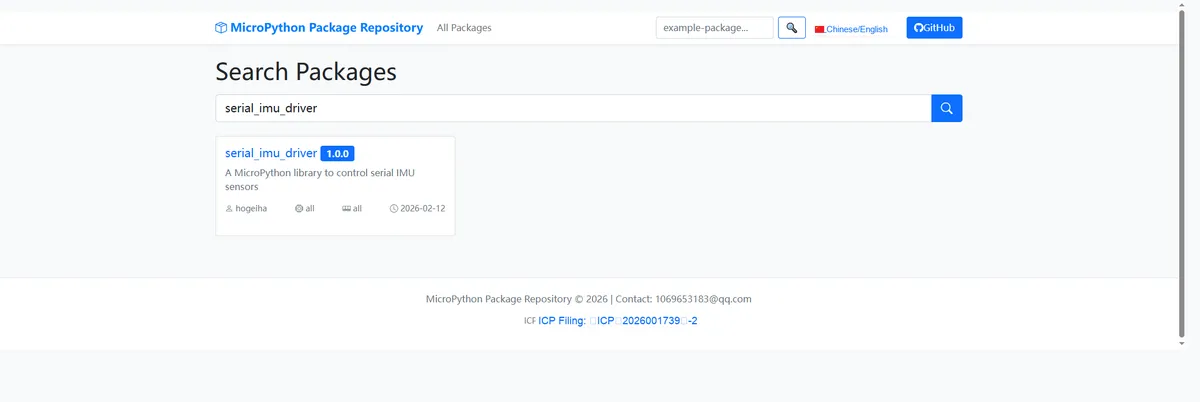
Here, we need to search for the relevant driver packages on uPyPI: https://upypi.net/zh/
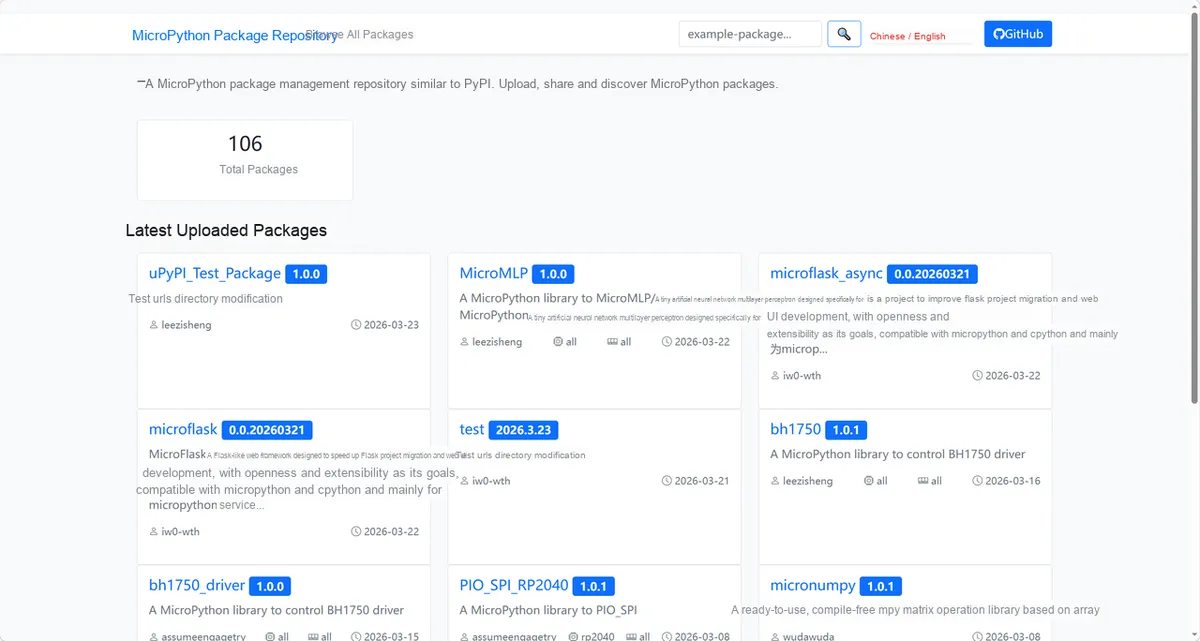
Enter serial_imu_driver to search, and the following will be displayed:
Click to copy the local installation command:
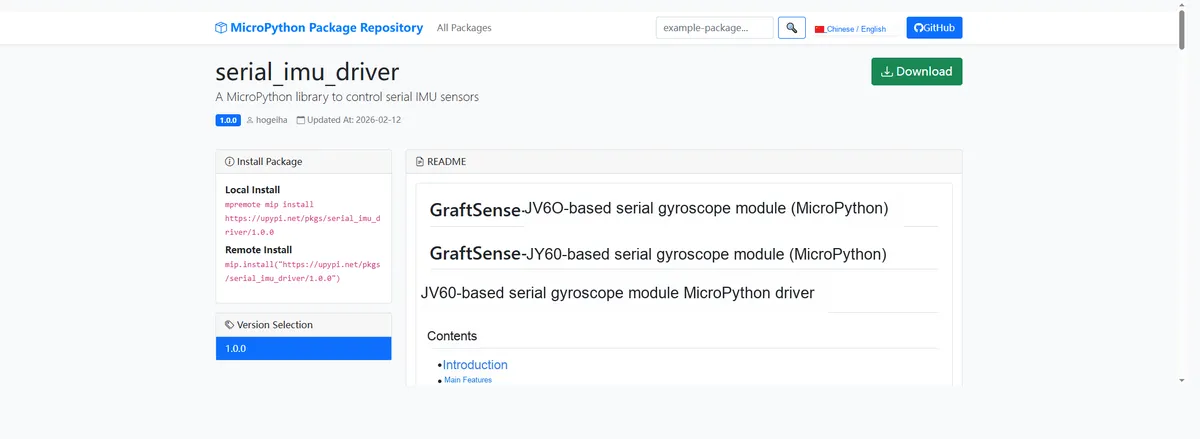
Here, we can use the mip tool to import module driver library code. Below are the usage commands for the mpremote tool:
mpremote mip install github:FreakStudioCN/GraftSense-Drivers-MicroPython/sensors/serial_imu_driverImport the MicroPython driver code for the JY60-based serial port gyroscope module, then copy the following main.py code into our project:
# Python env   : MicroPython v1.23.0
# -*- coding: utf-8 -*-
# @Time    : 2024/6/24 10:32 AM
# @Author  : Li Qingshui
# @File    : main.py
# @Description : Serial IMU experiment, mainly obtains JY61 IMU data over the serial port, then prints the data with the print function

# ======================================== Import Modules ========================================

# Hardware-related modules
from machine import UART, Pin
# Time-related modules
import time
# Garbage collection module
import gc
# IMU module
from imu import IMU

# ======================================== Global Variables ============================================

# Program run time variable
run_time: int = 0
# Program start time variable
start_time: int = 0
# Program end time variable
end_time: int = 0

# ======================================== Functions ============================================

# ======================================== Custom Classes ============================================

# ======================================== Initialization ==========================================

# Power-on delay of 3 s
time.sleep(3)
# Print debug information
print("FreakStudio : Using UART to communicate with IMU")

# Create the serial port object, set the baud rate to 115200
uart = UART(1, 115200)
# Initialize the uart object: 8 data bits, no parity bit, 1 stop bit
# Set the UART timeout to 5 ms
uart.init(bits=8,
          parity=None,
          stop=1,
          tx=8,
          rx=9,
          timeout=5)

# Create a UART object with a baud rate of 115200, used to send three-axis angle data to the host computer
uart_pc = UART(0, 115200)
# Initialize the uart object: 8 data bits, no parity bit, 1 stop bit, UART timeout set to 5 ms
uart_pc.init(bits=8,
             parity=None,
             stop=1,
             tx=0,
             rx=1,
             timeout=5)

# Set GPIO 25 as the LED output pin, pull-down resistor enabled
LED = Pin(25, Pin.OUT, Pin.PULL_DOWN)

# Initialize an IMU object
imu_obj = IMU(uart)

# ========================================  Main Program  ============================================
try:
    while True:
        # Turn on the LED
        LED.on()
        # Receive gyroscope data
        imu_obj.RecvData()
        # Turn off the LED
        LED.off()

        # Print the x-axis angle
        print(" X-axis angle : ", imu_obj.angle_x)
        # Print the y-axis angle
        print(" Y-axis angle : ", imu_obj.angle_y)
        # Print the z-axis angle
        print(" Z-axis angle : ", imu_obj.angle_z)
        # Return the number of bytes of available heap RAM
        print(" the number of RAM remaining is %d bytes ", gc.mem_free())

        # Format the three-axis angle data into a string
        angle_data = "{:.2f}, {:.2f}, {:.2f}\r\n".format(imu_obj.angle_x, imu_obj.angle_y, imu_obj.angle_z)
        # Send the angle data to the host computer via UART 0
        uart_pc.write(angle_data)

        # When the available heap RAM is less than 80000 bytes, manually trigger garbage collection
        if gc.mem_free() < 220000:
            # Manually trigger garbage collection
            gc.collect()
except KeyboardInterrupt:
    # Handling when a keyboard interrupt (Ctrl+C) is caught
    print("程序被用户中断")
finally:
    # This runs whether the program ends normally or is interrupted, ensuring the LED is turned off
    LED.off()
    print("LED已关闭,程序退出")
Burn the code, open a terminal, and use the mpremote tool to connect to the main controller; the output is as follows:
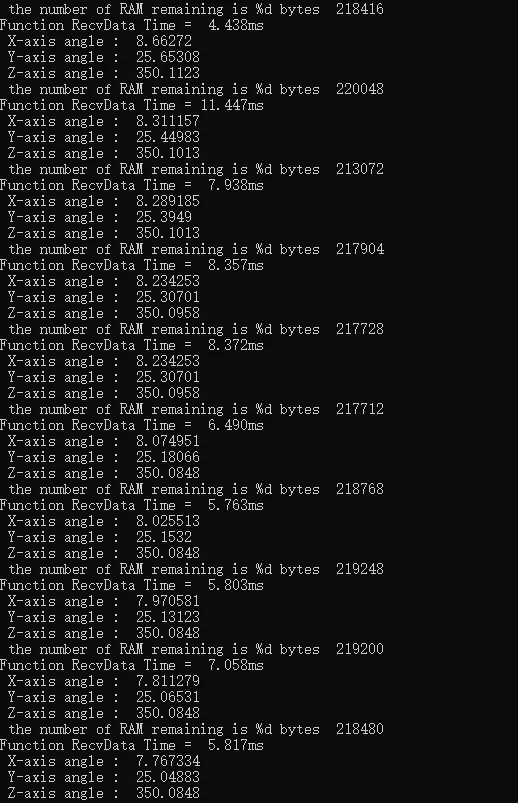
You can see that as we continuously shake the module, the angle value output in the terminal changes:
IV. Drivers
serial_imu_driver.zip 13 KB
5. BOM & Recommended Alternative Parts
None.
VI. Revision History
Document Version | Date of Revision | Modifier | Modify Content |
v1.0 | 2025-08-13 | ben0i0d | Initialize the document |
v1.1 | 2025-11-04 | Li Zisheng | Added 2.8 PCB routing precautions Revised Section 3, Circuit Source Project and Module Usage Instructions, and added a secondary heading: 3.1 Circuit Source Engineering, 3.2 Module Usage Instructions, 3.3 Application Experiments The BOM sheet has not been finally checked, the driver has not been re-verified, and the 3.3 application experiment is pending. Not yet specified. |
v1.2 | 2025-12-29 | Li Zisheng | Added application experiments and production files |
v1.3 | 2025-12-31 | Xin Ruili | Create an open version of the document based on the internal document version v1.2. |
v1.4 | 2026-03-29 | Xin Ruili | Modified the application experiment section |
VII. Relevant Materials
7.1 Chip Datasheet
JY60 Product Datasheet · Shenzhen WitMotion Technology Co., Ltd.
7.2 PCB Silkscreen Specific Icons