Contents
- I. Module Introduction
- II. Introduction to Major Chips
- 2.1 Chip Overview
- 2.2 Pin Definition
- 2.3 Functional Block Diagram
- 2.4 Performance Parameters
- 2.5 Reference Circuit
- 2.6 Chip Configuration
- 2.7 Communication Interfaces and Related Protocols
- 2.8 PCB Routing Precautions
- III. Circuit Engineering
- 3.1 Circuit Source Engineering
- 3.2 Module Usage Instructions
- 3.3 Application Experiment
- 4. Drivers
- 5. BOM & Recommended Alternative Parts
- VI. Revision History
- VII. Relevant Materials
- 7.1 Chip Datasheet
- 7.2 PCB Silkscreen Specific Icons
I. Module Introduction
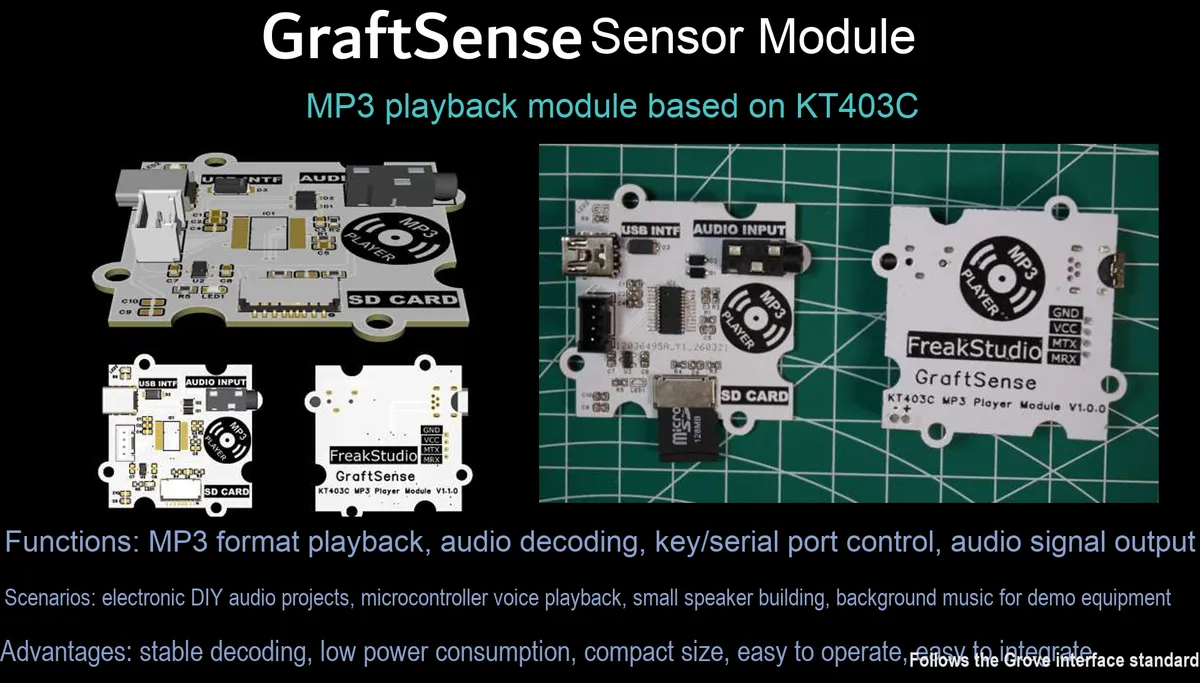
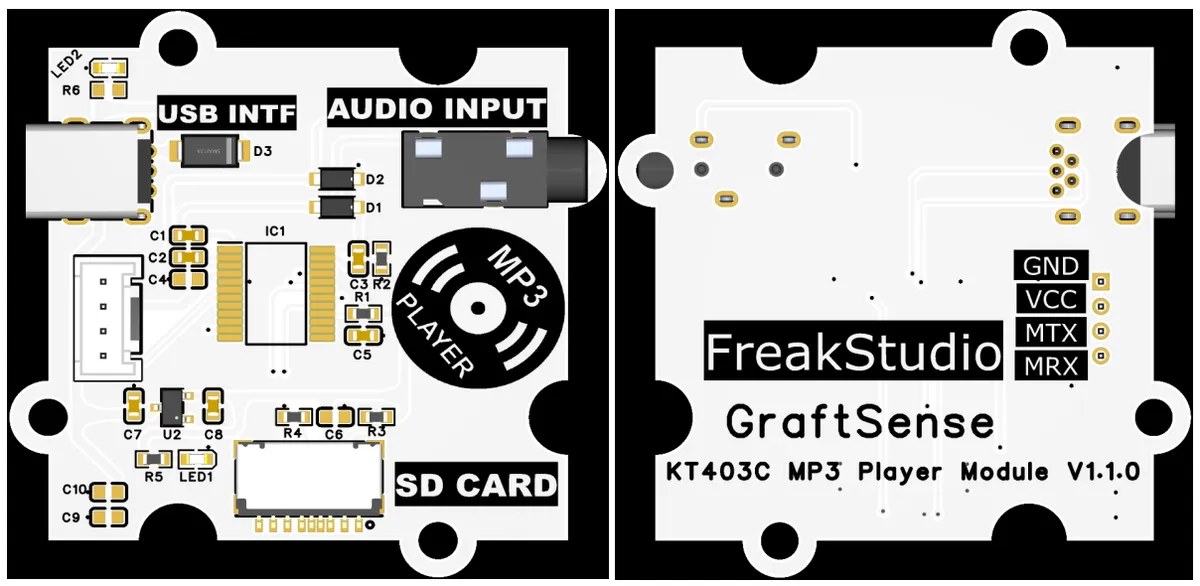
MP3 playback module based on KT403C, which adopts the KT403C audio decoding chip, supports communication via the USB interface, stores audio files on SD cards, has a built-in DAC to output left and right channel audio signals, is equipped with an audio input interface, operates on 5V power supply with an onboard 3.3V voltage regulator circuit, and integrates circuits including power filtering, a power indicator, and an MCU interface. It can realize MP3 audio decoding and playback functions, and is suitable for scenarios such as voice broadcast, music playback, and embedded audio applications.
II. Introduction to Major Chips
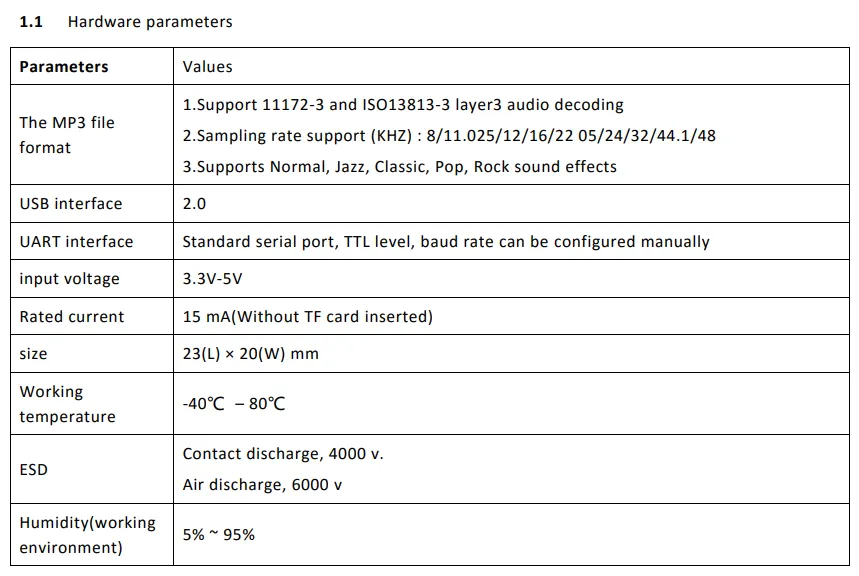
KT403C is an audio processing chip that supports MP3 and WAV format decoding. It has a built-in DAC output, supports playing audio files via SD card storage devices, and can be controlled through UART serial port or buttons.
2.1 Chip Overview
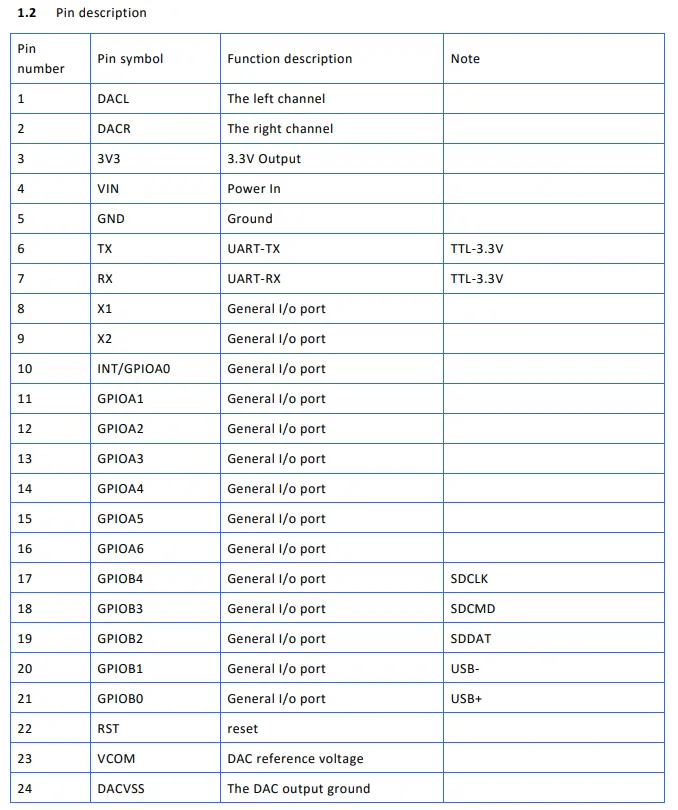
KT403C is a low-cost, serial-controlled MP3 decoding chip with a built-in MCU, MP3 / WAV / WMA hardware decoder and DAC. Simply send simple commands via the UART serial port to play audio stored in TF cards, USB flash drives or Flash memory. It features built-in volume adjustment, play/pause/track switching functions and requires minimal peripheral circuitry, making it ideal for embedded applications such as voice broadcast, prompt tone generators and compact MP3 players.
2.2 Pin Definition
2.3 Functional Block Diagram
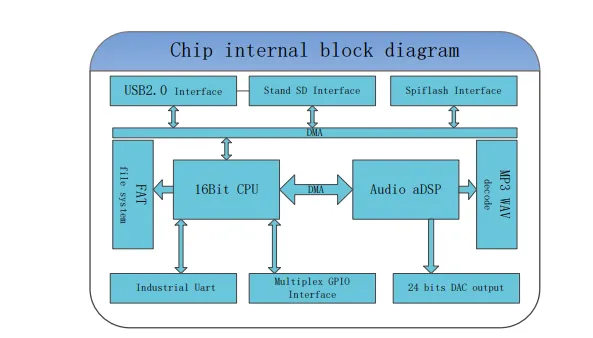
KT403C The internal functional block diagram of the chip mainly consists of a 16-bit CPU core, a DMA controller, an audio DSP and an MP3 / WAV decoder. Externally, it integrates a USB 2.0 interface, a standard SD card interface, an SPI Flash interface, an industrial-grade UART and multiplexed GPIO interfaces. Data is buffered via the FIFO system, and finally audio signals are output through a 24-bit DAC to realize complete audio decoding and playback control functions.
2.4 Performance Parameters
2.5 Reference Circuit
None.
2.6 Chip Configuration
None.
2.7 Communication Interfaces and Related Protocols
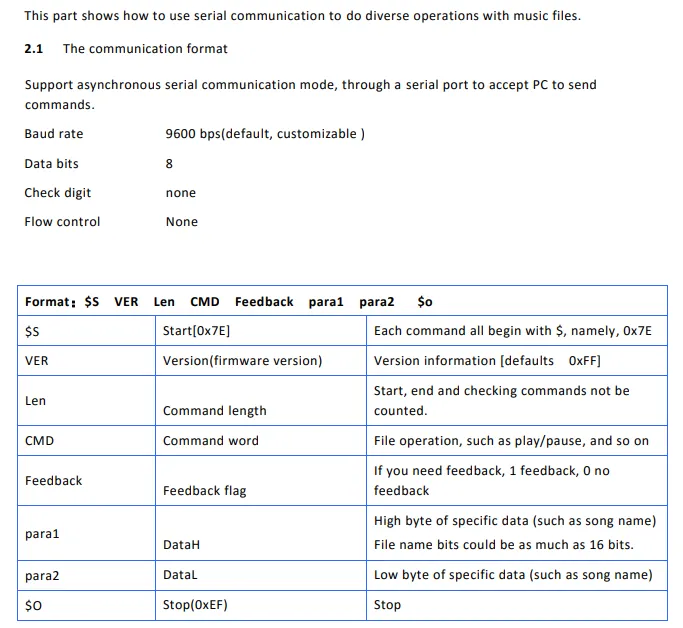
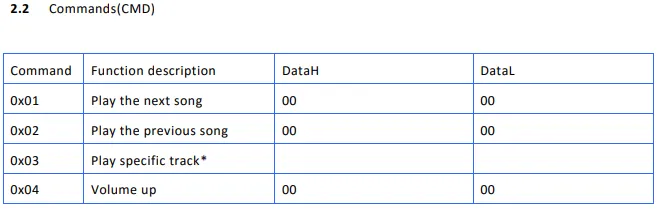
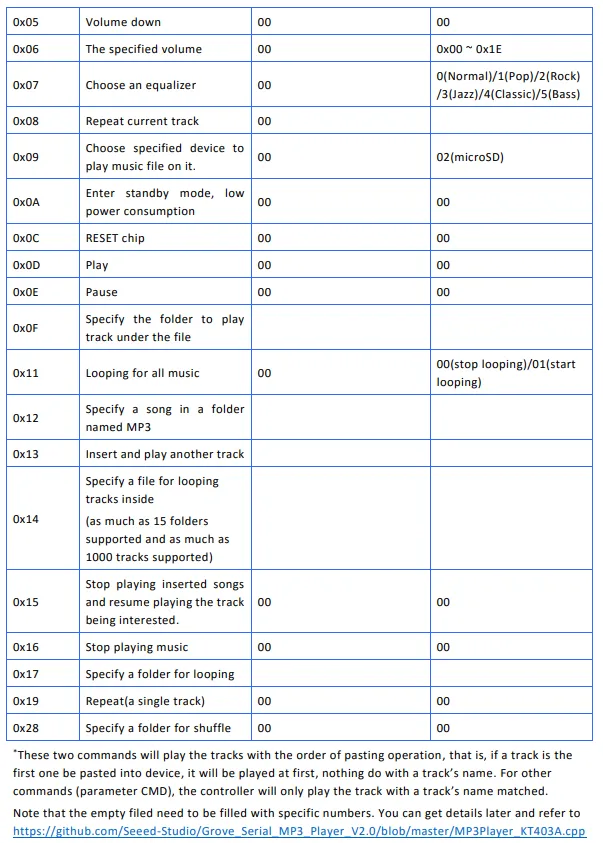
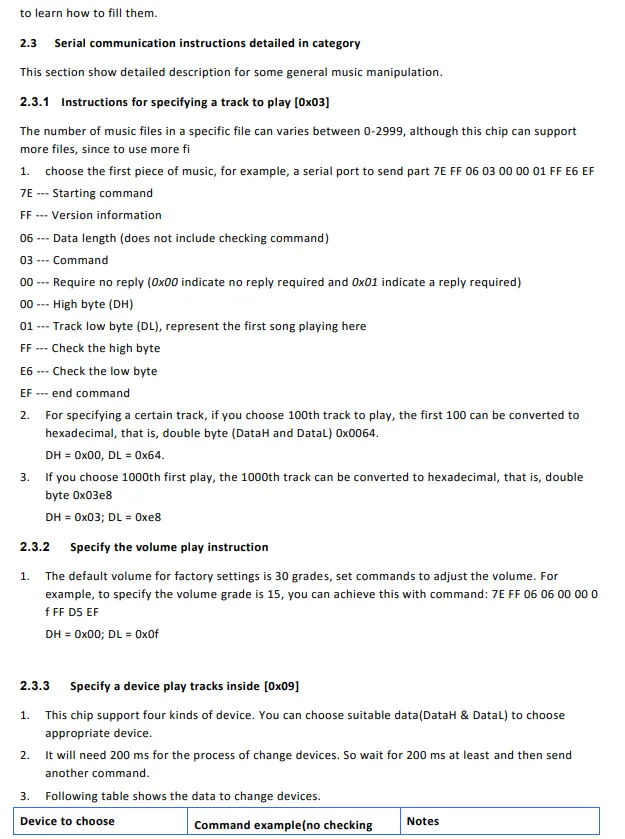
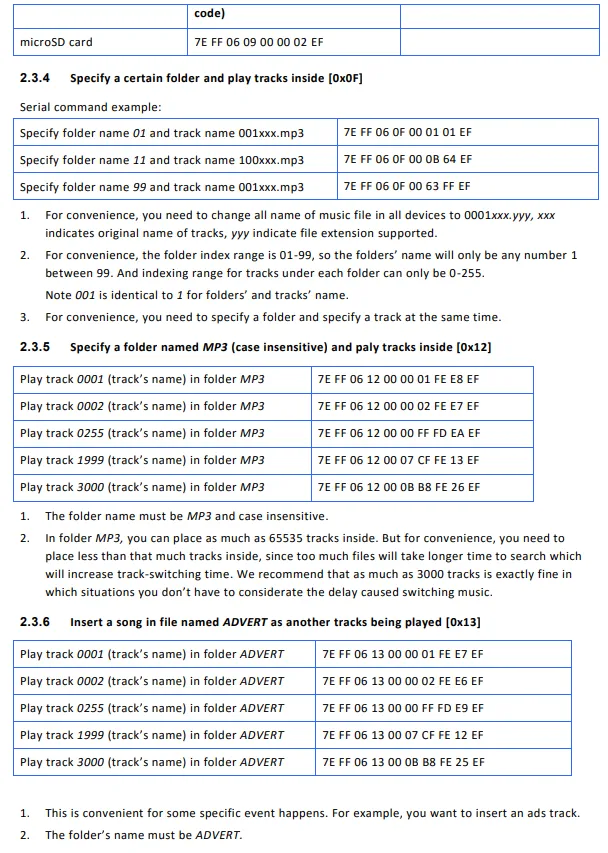
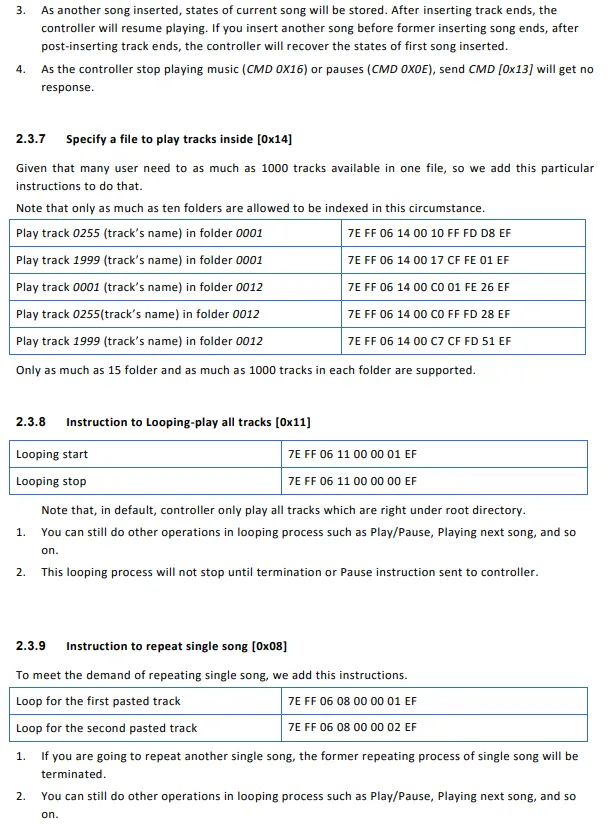
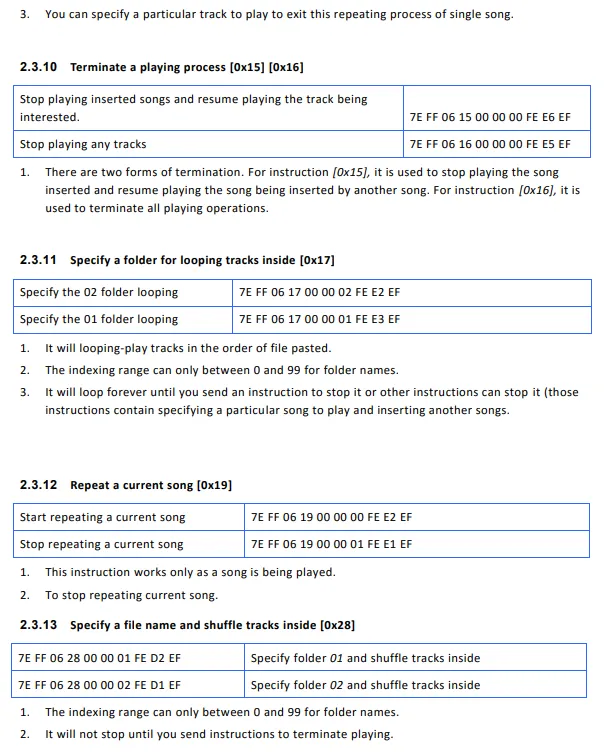
The KT403C chip adopts an asynchronous serial communication interface, with a default baud rate of 9600 bps (customizable), 8 data bits, no parity bit, and no flow control. Its Communication Protocol uses 0x7E as the start byte and 0xEF as the end byte. The command format includes version, data length, command word, feedback flag and double-byte parameters, and supports multiple control commands such as play/pause, previous/next track, volume adjustment, specified track, specified folder playback, loop playback, interstitial playback, and device selection. Users can send commands via the serial port to realize flexible playback control of audio files in SD cards or USB devices.
2.8 PCB Routing Precautions
None.
III. Circuit Engineering
3.1 Circuit Source Engineering
To obtain the circuit source project, please follow the official account [Freak Embedded].
3.2 Module Usage Instructions
The schematic diagram of this module is shown below:
SCH_MP3 Playback Module Based on KT403C-V1.1.0_2026-03-24.pdf 1.8 MB
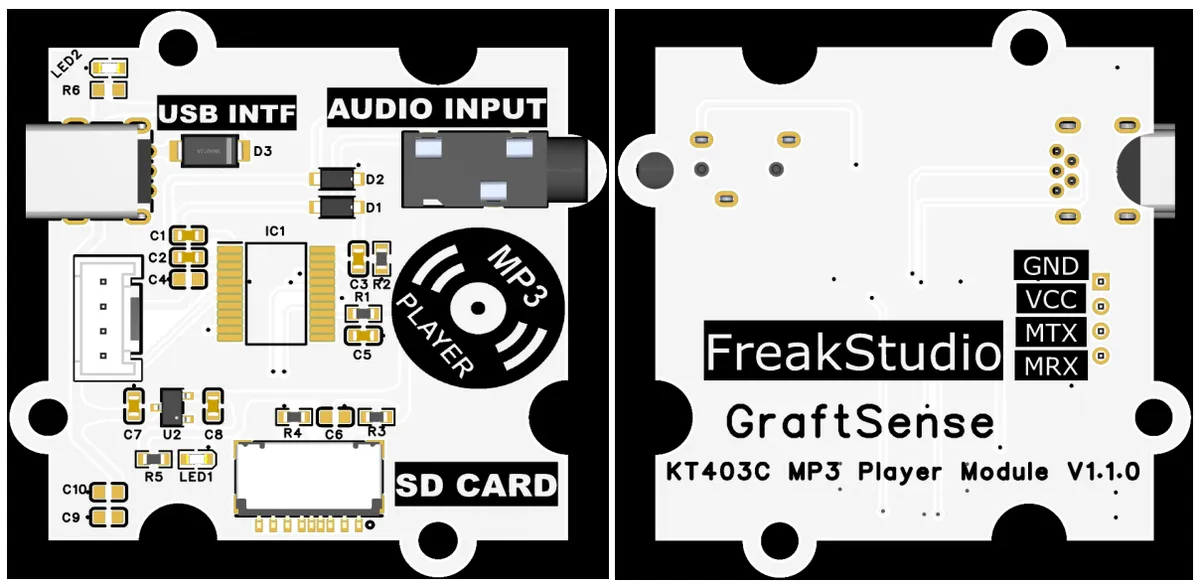
This module provides a serial port UART interface MRX and MTX: where M stands for master, meaning the MCU 's RX corresponds to the module' s TX.
Provided in the physical image USB interface, which is used for debugging and replacing the audio source files in the SD card.
Before use, please make sure to insert the SD card into the SD CARD slot, and plug the headphones into the AUDIO INPUT port.
3.3 Application Experiment
Here, we use the GraftPort-RP2040 development board for testing, and the KT403C-based MP3 playback module uses the UART interface to communicate with the main controller.
Here, we first use the HY2.0-4P connection cable to connect the module to the GraftPort-RP2040 development board's UART0 interface:
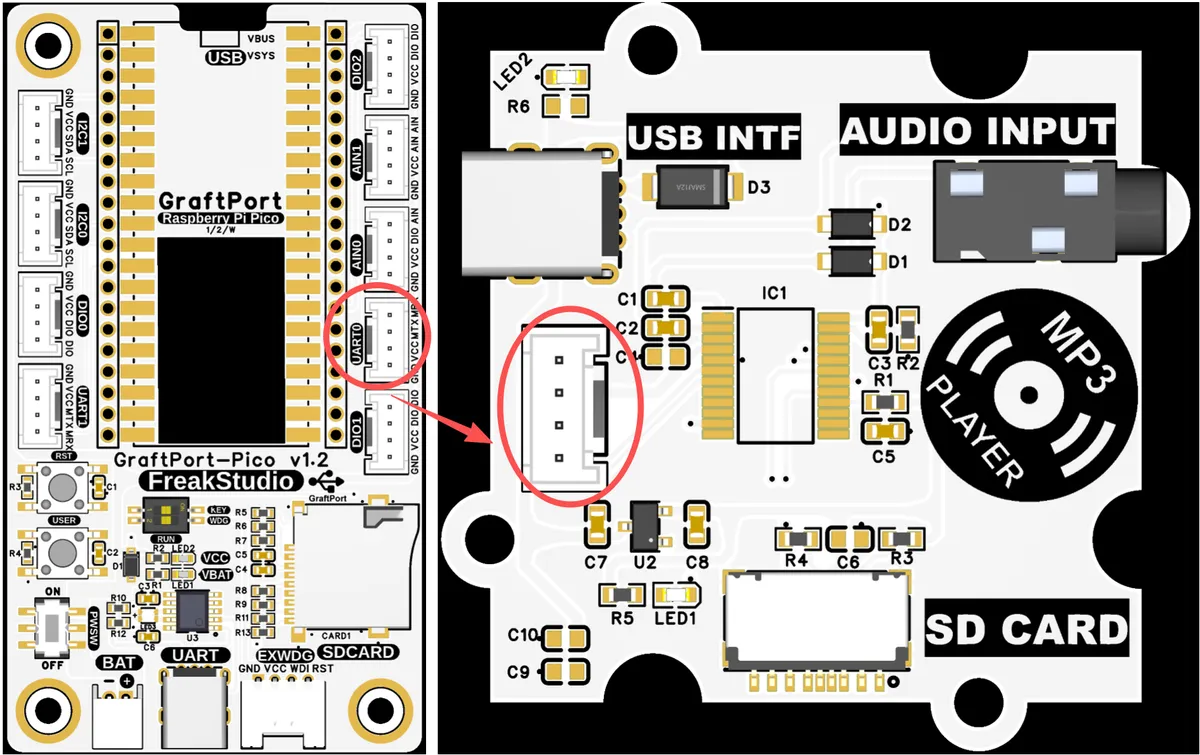
The module connections are shown in the following table:
Development Board Pins | Module Pins | Description |
Pin 16 |
|
|
Pin 17 |
|
|
Meanwhile, insert the SD card into the SD card interface of the module, connect the MiniUSB cable to the MP3 playback module based on KT403C via the USB INTF interface, then drag the following audio files into the SD card of the module:
001.mp3 29 KB
002.mp3 29 KB
000.mp3 29 KB
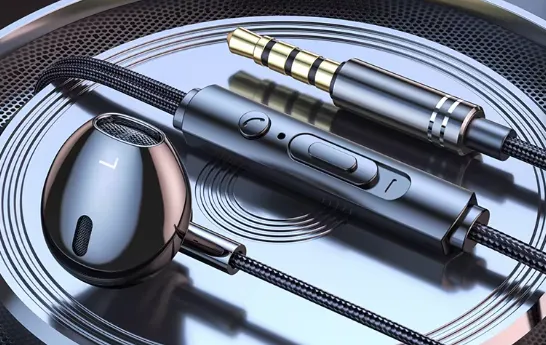
Then plug a wired headphone like the one shown below into the AUDIO INPUT port on the module:
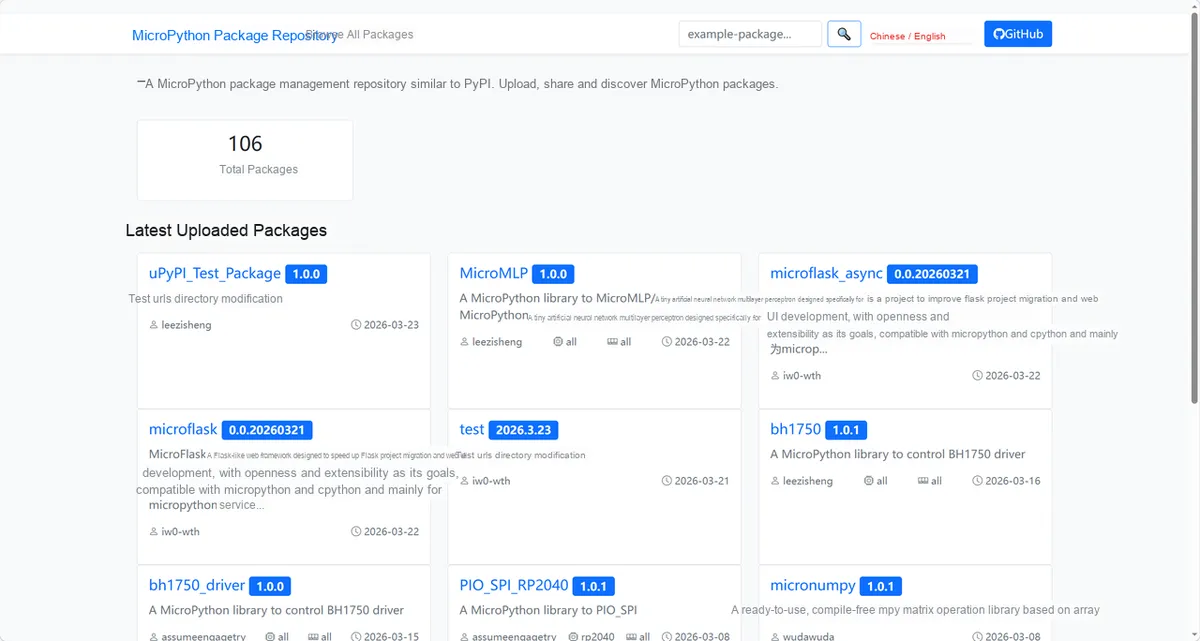
Here, we need to search for the relevant driver packages on uPyPI: https://upypi.net/zh/
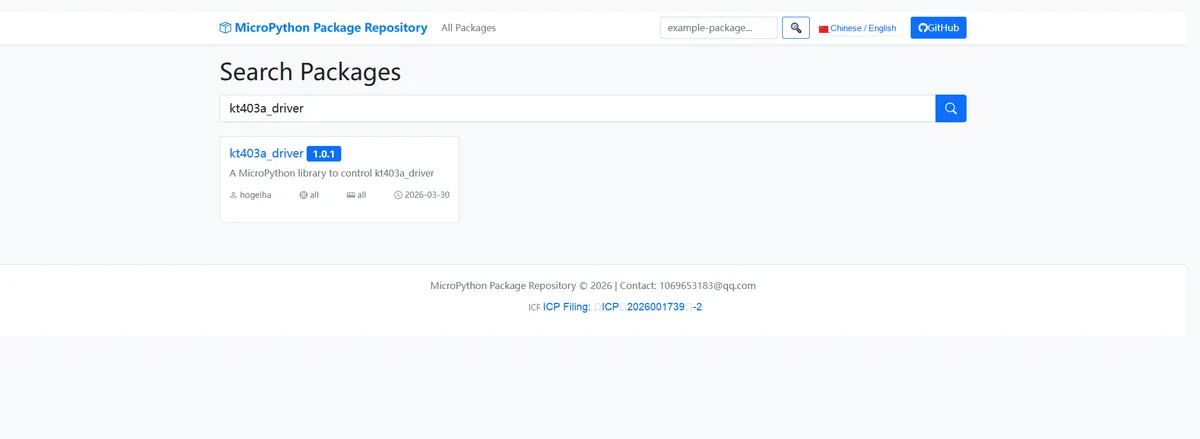
Enter kt403a_driver to search, and the following will be displayed:
Click to copy the local installation command:
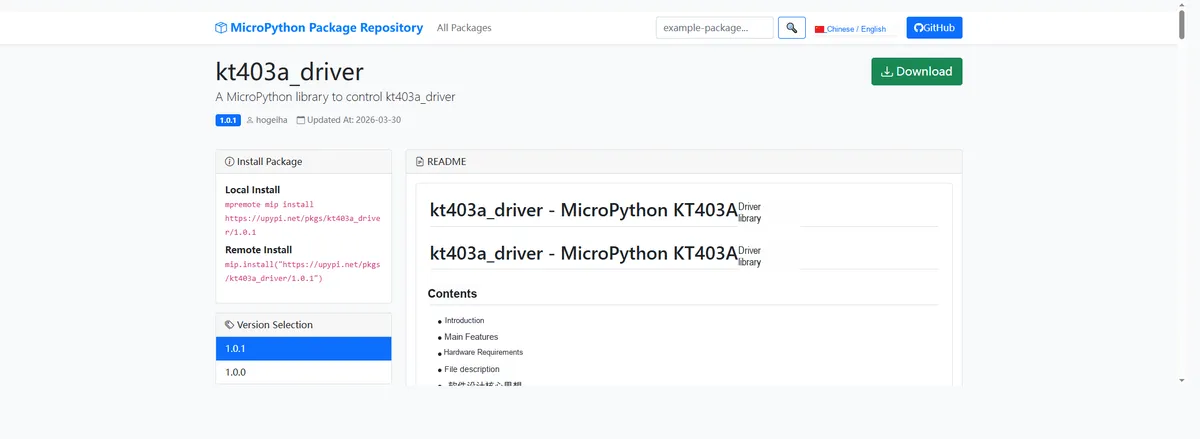
Import the module driver library code via the mip tool. Below are the usage commands for the mpremote tool:
mpremote mip install https://upypi.net/pkgs/kt403a_driver/1.0.0Import the MicroPython driver code for the KT403C-based MP3 playback module, then copy the following main.py code into our project:
# Python env   : MicroPython v1.23.0
# -*- coding: utf-8 -*-
# @Time    : 2026/3/20 4:52 PM
# @Author  : Author name
# @File    : main.py
# @Description : KT403A MP3 module function test, covering core functions such as volume control, EQ switching, playback control, and loop modes

# ======================================== Import Modules =========================================

# Import the KT403A module driver class
from kt403a import KT403A

# Import the UART, Pin, and Timer hardware control modules
from machine import UART, Pin

# Import the millisecond delay module
from utime import sleep_ms

# ======================================== Global Variables ============================================

# ======================================== Functions ============================================

# ======================================== Custom Classes ============================================

# ======================================== Initialization configuration ===========================================

# Program startup delay of 3 seconds to ensure hardware initialization is complete
sleep_ms(3)
# Print the initialization complete message
print("FreakStudio: KT403A MP3 module full function test")

# ========================================  Main Program  ============================================

# Print the test title separator line
print("-----------------")
# Print the test title
print(" Test KT403A MP3 ")
# Print the test title separator line
print("-----------------")

# Initialize UART communication, set the baud rate to 9600, TX pin 16, RX pin 17
uart = UART(0, baudrate=9600, tx=Pin(16), rx=Pin(17))
# Initialize the KT403A MP3 module instance
mp3 = KT403A(uart)

# ==================== Basic information query test ====================
# Print the basic information query test title
print("\n【Basic Information Query】")
# Get the current volume value
current_vol = mp3.GetVolume()
# Print the current volume
print(f"Current volume: {current_vol}%")

# Define the EQ mode mapping dictionary
eq_mapping = {mp3.EQ_NORMAL: "Normal", mp3.EQ_POP: "Pop", mp3.EQ_ROCK: "Rock", mp3.EQ_JAZZ: "Jazz", mp3.EQ_CLASSIC: "Classic", mp3.EQ_BASS: "Bass"}
# Get the current EQ mode value
current_eq = mp3.GetEqualizer()
# Print the current EQ mode
print(f"Current EQ mode: {eq_mapping.get(current_eq, 'Unknown')}")

# Get the number of audio files on the SD card (TF card)
file_count = mp3.GetFilesCount(mp3.DEVICE_SD)
# Print the number of files on the SD card
print(f"Number of audio files in SD card (TF card): {file_count}")

# Determine and print the current playback status
if mp3.IsPlaying():
    print("Current status: Playing")
elif mp3.IsPaused():
    print("Current status: Paused")
elif mp3.IsStopped():
    print("Current status: Stopped")

# Delay 1 second to ensure the module has finished responding
sleep_ms(1000)

# ==================== Volume control test ====================
# Print the volume control test title
print("\n【Volume Control Test】")
# Print the volume increase prompt
print("Increase volume (+2 levels)...")
# Increase the volume by one level
mp3.VolumeUp()
# Delay 500 milliseconds
sleep_ms(500)
# Increase the volume by one level again
mp3.VolumeUp()
# Delay 500 milliseconds
sleep_ms(500)
# Print the increased volume
print(f"Volume after increase: {mp3.GetVolume()}%")

# Print the volume decrease prompt
print("Decrease volume (-1 level)...")
# Decrease volume by one level
mp3.VolumeDown()
# Delay 500 milliseconds
sleep_ms(500)
# Print the decreased volume
print(f"Volume after decrease: {mp3.GetVolume()}%")

# Print the set volume prompt
print("Set volume to 50%...")
# Set volume to 50%
mp3.SetVolume(50)
# Delay 500 milliseconds
sleep_ms(500)
# Print the volume after setting
print(f"Volume after setting: {mp3.GetVolume()}%")

# Delay 1 second
sleep_ms(1000)

# ==================== EQ Effect Switch Test ====================
# Print EQ effect switch test title
print("\n【EQ Effect Switch Test】")
# Print the prompt for switching to rock mode
print("Switch to Rock mode...")
# Set the EQ to rock mode
mp3.SetEqualizer(mp3.EQ_ROCK)
# Delay 500 milliseconds
sleep_ms(500)
# Get the current EQ mode
current_eq = mp3.GetEqualizer()
# Print the current EQ mode
print(f"Current EQ mode: {eq_mapping.get(current_eq)}")

# Print the prompt for switching to heavy bass mode
print("Switch to Bass mode...")
# Set EQ to heavy bass mode
mp3.SetEqualizer(mp3.EQ_BASS)
# Delay 500 milliseconds
sleep_ms(500)
# Get the current EQ mode
current_eq = mp3.GetEqualizer()
# Print the current EQ mode
print(f"Current EQ mode: {eq_mapping.get(current_eq)}")

# Print the prompt for restoring normal mode
print("Restore to Normal mode...")
# Set EQ to normal mode
mp3.SetEqualizer(mp3.EQ_NORMAL)
# Delay 500 milliseconds
sleep_ms(500)
# Get the current EQ mode
current_eq = mp3.GetEqualizer()
# Print the current EQ mode
print(f"Current EQ mode: {eq_mapping.get(current_eq)}")

# Delay 1 second
sleep_ms(1000)

# ==================== Playback Control Test (for 4 audio files) ====================
# Print playback control test title
print("\n【Playback Control Test (for 4 audio files)】")
# Print the prompt for playing track 1
print("Play the 1st track...")
# Play track 1
mp3.PlaySpecific(1)
# Play for 3 seconds
sleep_ms(3000)

# Print the pause playback prompt
print("Pause playback...")
# Pause playback
mp3.Pause()
# Delay 1 second
sleep_ms(1000)
# Print the status after pausing
print(f"Status after pause: {'Paused' if mp3.IsPaused() else 'Not paused'}")

# Print the resume playback prompt
print("Resume playback...")
# Resume playback
mp3.Play()
# Continue playing for 2 seconds
sleep_ms(2000)

# Print the prompt for playing the next track
print("Play next track (2nd track)...")
# Play the next track
mp3.PlayNext()
# Play for 3 seconds
sleep_ms(3000)

# Print the prompt for playing the previous track
print("Play previous track (back to 1st track)...")
# Play the previous track
mp3.PlayPrevious()
# Play for 3 seconds
sleep_ms(3000)

# Print the prompt for playing track 4
print("Play the 4th track directly...")
# Play track 4
mp3.PlaySpecific(4)
# Play for 3 seconds
sleep_ms(3000)

# Delay 1 second
sleep_ms(1000)

# ==================== Loop Mode Test ====================
# Print loop mode test title
print("\n【Loop Mode Test】")
# Print the prompt for turning off all-track loop
print("Disable all tracks loop...")
# Turn off loop for all tracks
mp3.DisableLoopAll()
# Delay 500 milliseconds
sleep_ms(500)

# Print the prompt for turning on single-track loop
print("Enable single track loop (4th track)...")
# Turn on single-track loop for the current track
mp3.RepeatCurrent()
# Loop the single track for 3 seconds
sleep_ms(3000)

# Print the prompt for restoring all-track loop
print("Restore all tracks loop...")
# Turn on loop for all tracks
mp3.EnableLoopAll()
# Delay 500 milliseconds
sleep_ms(500)

# ==================== Random Play Test ====================
# Print random play test title
print("\n【Random Play Test】")
# Print the prompt for turning on random play
print("Enable random playback of all tracks...")
# Turn on random play for all tracks
mp3.RandomAll()
# Random play for 5 seconds
sleep_ms(5000)

# ==================== Stop Playback Test ====================
# Print stop playback test title
print("\n【Stop Playback Test】")
# Print the stop playback prompt
print("Stop playback...")
# Stop the current audio playback
mp3.Stop()
# Delay 500 milliseconds
sleep_ms(500)
# Print the status after stopping
print(f"Status after stop: {'Stopped' if mp3.IsStopped() else 'Not stopped'}")

# ==================== Reset Module ====================
# Print reset module test title
print("\n【Reset Module】")
# Print the soft reset prompt
print("Soft reset KT403A module...")
# Soft reset the KT403A chip
mp3.ResetChip()
# Delay 1 second
sleep_ms(1000)
# Print the test completion prompt
print("Test completed!")
Burn the code, open the terminal, and the output is as follows:
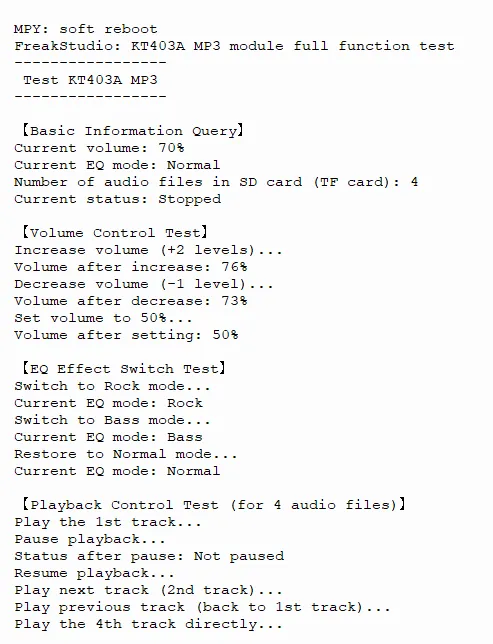
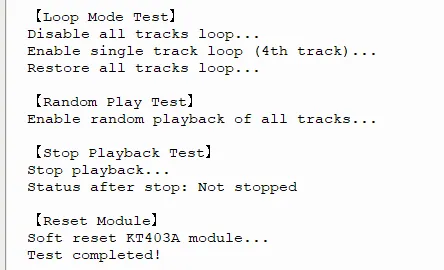
Perform volume, EQ, and playback control, print the operating status, and we hear music playing in the headphones.
4. Drivers
kt403a_driver-1.0.1.zip 16 KB
5. BOM & Recommended Alternative Parts
None.
VI. Revision History
Document Version | Date of Revision | Modifier | Modify Content |
v1.0 | 2026-03-24 | Ling Gaoxing | Initialize the document |
v1.0.1 | 2026-04-05 | Li Zisheng | No photos for the homepage have been taken, the production files have not been exported yet, and all other items have been sorted out. |
v1.0.2 | 2026-04-21 | Li Zisheng | The production documents have not been exported yet, while all the rest have been sorted out. |
v1.1 | 2026-04-23 | Xin Ruili | Create an open version of the document, based on the internal document version v1.0.2. |
VII. Relevant Materials
7.1 Chip Datasheet
KT403A_v1.3.pdf 793 KB
7.2 PCB Silkscreen Specific Icons