Contents
- I. Module Introduction
- II. Introduction to Major Chips
- 2.1 Chip Overview
- 2.2 Pin Definition
- 2.3 Functional Block Diagram
- 2.4 Performance Parameters
- 2.5 Reference Circuit
- 2.6 Chip Configuration
- 2.7 Communication Interfaces and Related Protocols
- 2.8 PCB Routing Precautions
- III. Circuit Engineering
- 3.1 Circuit Source Engineering
- 3.2 Module Usage Instructions
- 3.3 Application Experiment
- 4. Drivers
- 5. BOM & Recommended Alternative Parts
- VI. Revision History
- VII. Relevant Materials
- 7.1 Chip Datasheet
- 7.2 PCB Silkscreen Specific Icons
I. Module Introduction
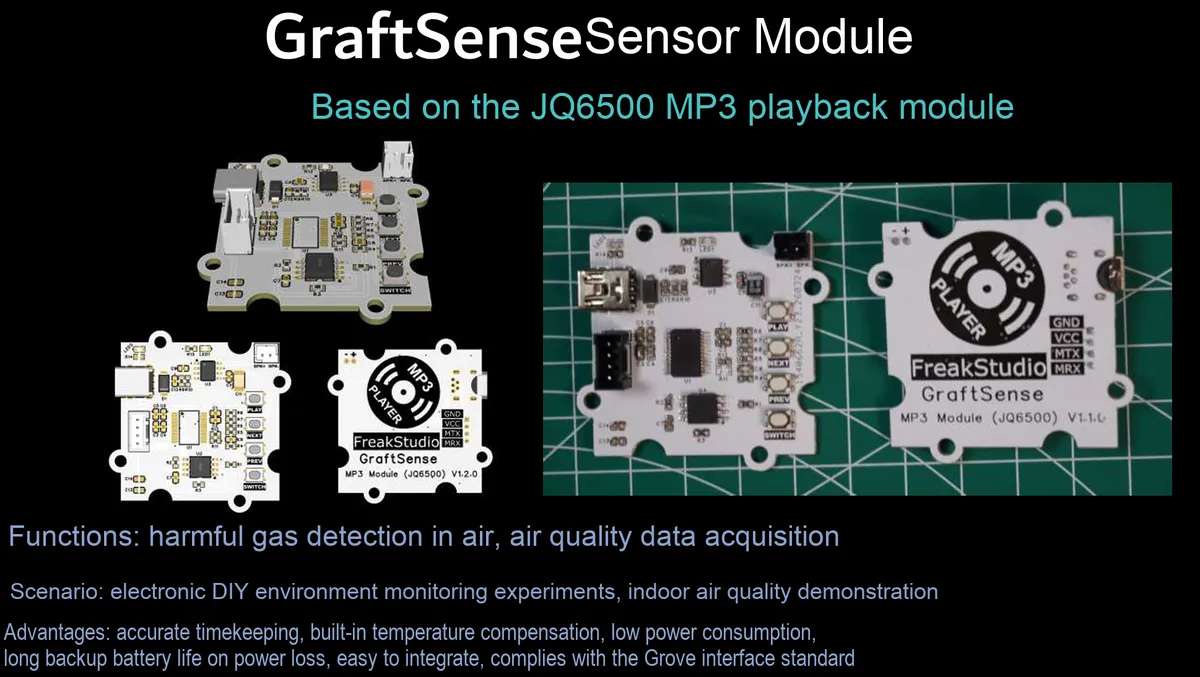
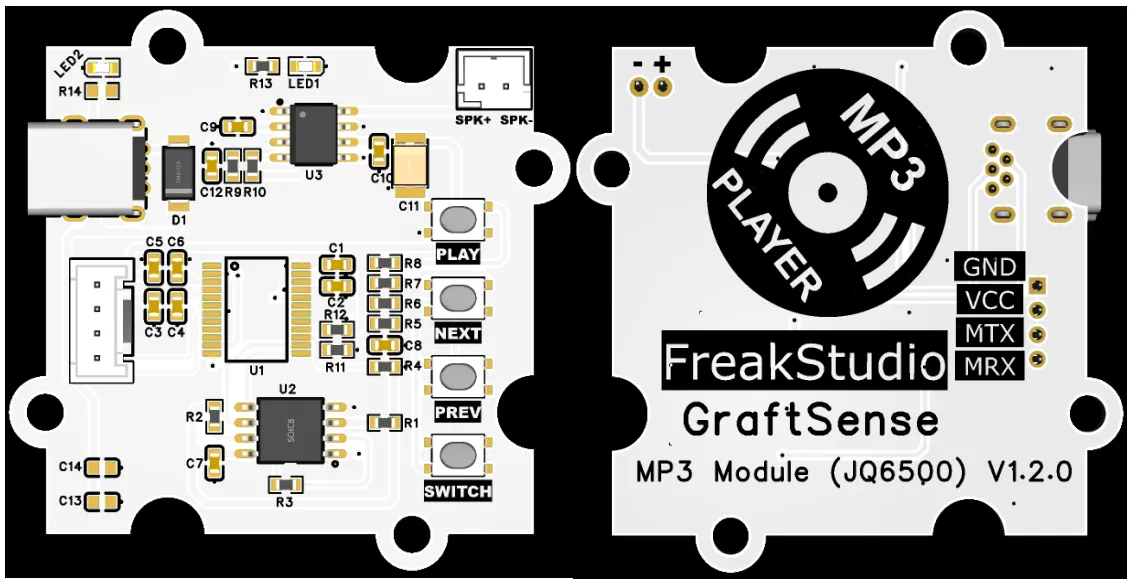
MP3 playback module based on JQ6500, which adopts the JQ6500 chip solution, is a highly integrated voice playback module with built-in 32MB Flash memory and audio power amplifier circuit, and supports audio playback in MP3 format;The module integrates USB update interface, physical control buttons (play/previous track/next track/power on/off) and power/status indicator lights, supports communication via UART serial port and SPI interface, is compatible with 3.3V level MCUs, and enables playback control via local buttons or serial port commands, making it suitable for audio playback scenarios such as smart voice announcements, children's toys, and access control prompt tones.
II. Introduction to Major Chips
JQ6500 is a highly integrated MP3 voice playback chip with built-in Flash memory and audio power amplifier, supporting UART / SPI communication and button control, which is applicable to scenarios such as voice broadcast and sound effect playback.
2.1 Chip Overview
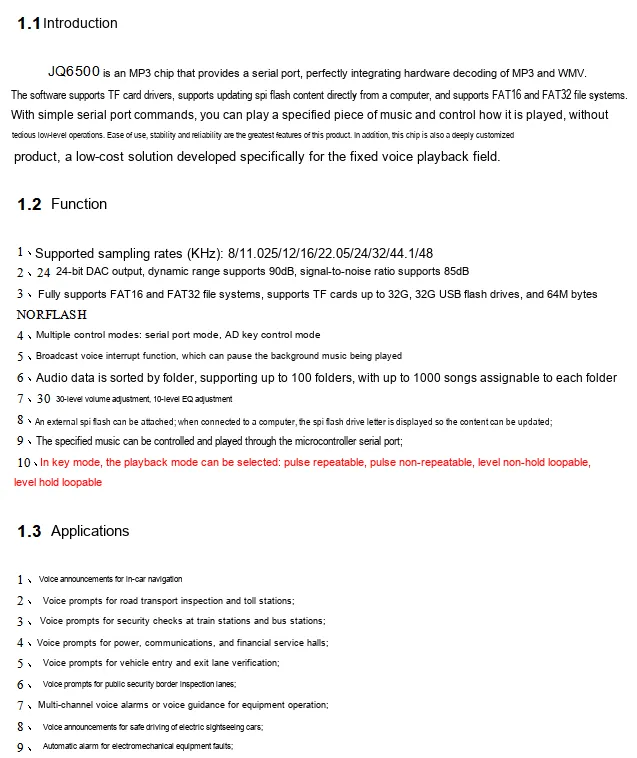
JQ6500 is a serial port type MP3 chip that integrates MP3 / WMV hardware decoding, supports FAT16 / FAT32 file systems, and can drive TF card / U disk / Flash storage; it features 24-bit DAC output, 30-level volume and 10-level EQ adjustment, supports multiple control modes such as serial port / AD button / broadcast insertion, and audio data can be managed by folder classification; it is designed specifically for fixed voice playback scenarios, and is suitable for low-cost voice broadcast scenarios such as vehicle navigation, station announcement, and device alarm.
2.2 Pin Definition
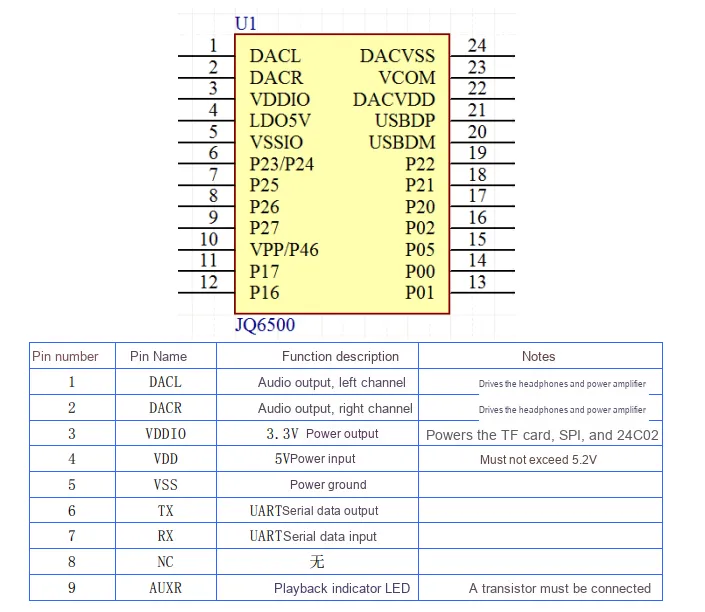
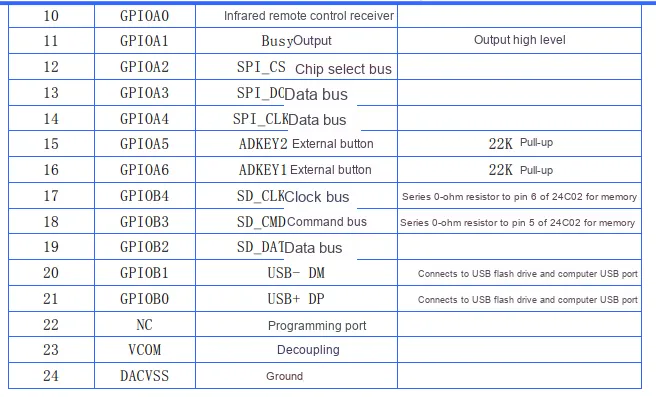
JQ6500 chip pins are categorized into power supply, audio, communication, control and storage interfaces. The power supply section supports 5V input and 3.3V output; the audio section provides left and right channel DAC output (DACL / DACR); the communication interfaces include UART (TX / RX), SPI, SD card and USB interfaces; the control pins support functions such as key input, infrared receiving, and Busy status output. Meanwhile, it specifies the multiplexing functions of each pin and hardware connection requirements, providing a complete pin definition basis for circuit design.
2.3 Functional Block Diagram
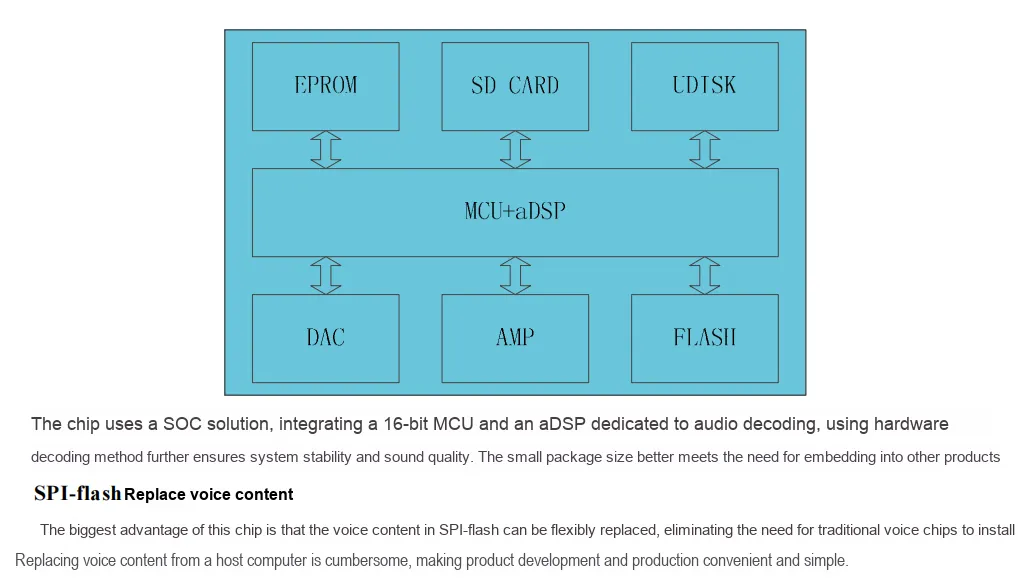
JQ6500 adopts a SOC architecture, with an integrated 16-bit MCU and dedicated audio decoding aDSP inside; it ensures sound quality and system stability through hardware decoding. It can be connected to multiple storage media such as EPROM, SD cards, and U disks. After being processed by the MCU+ aDSP, the audio data is converted into analog signals via the DAC, then amplified and driven for playback by the AMP. It also supports flexible replacement of the voice content stored in the SPI-Flash without the need for host computer operation, and its compact package facilitates embedded integration.
2.4 Performance Parameters
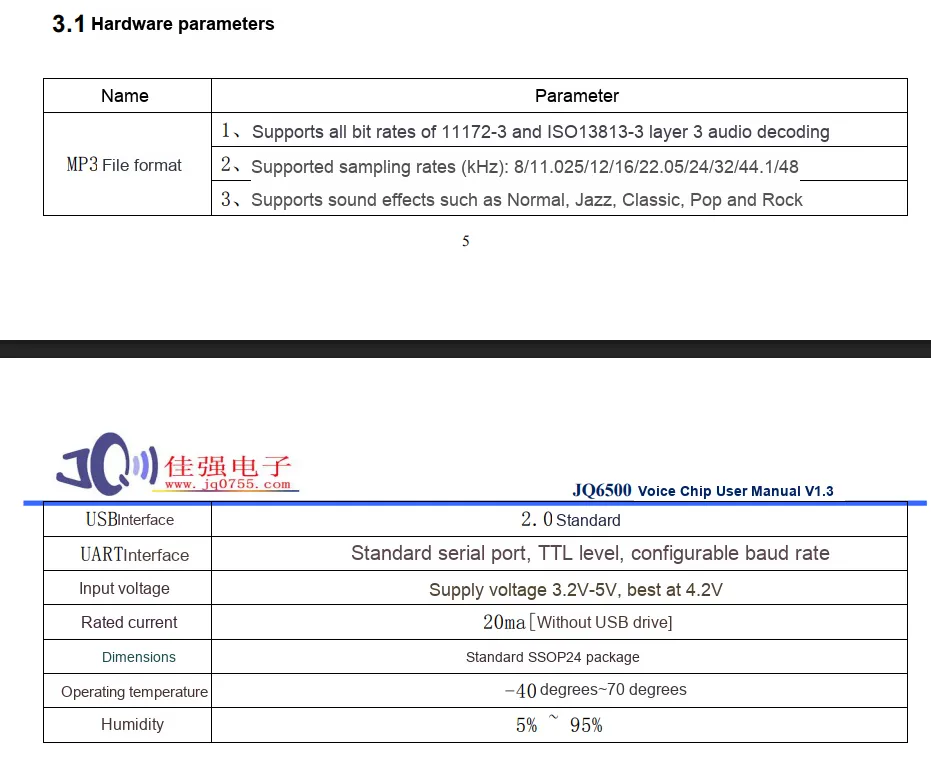
JQ6500 voice chip supports full-bitrate MP3 decoding in terms of audio, with a sampling rate covering 8~48kHz and multiple optional sound effects; it is compatible with USB 2.0 and TTL level UART serial port (baud rate configurable) in terms of interfaces; the recommended power supply voltage is 3.2V~5V (4.2V for optimal performance), the rated current is 20mA (without a USB flash drive attached), it adopts the SSOP24 package, with an operating temperature range of -40℃~70℃ and a humidity range of 5%~95%, which fully demonstrates the chip's audio capability, interface features and environmental adaptability.
2.5 Reference Circuit
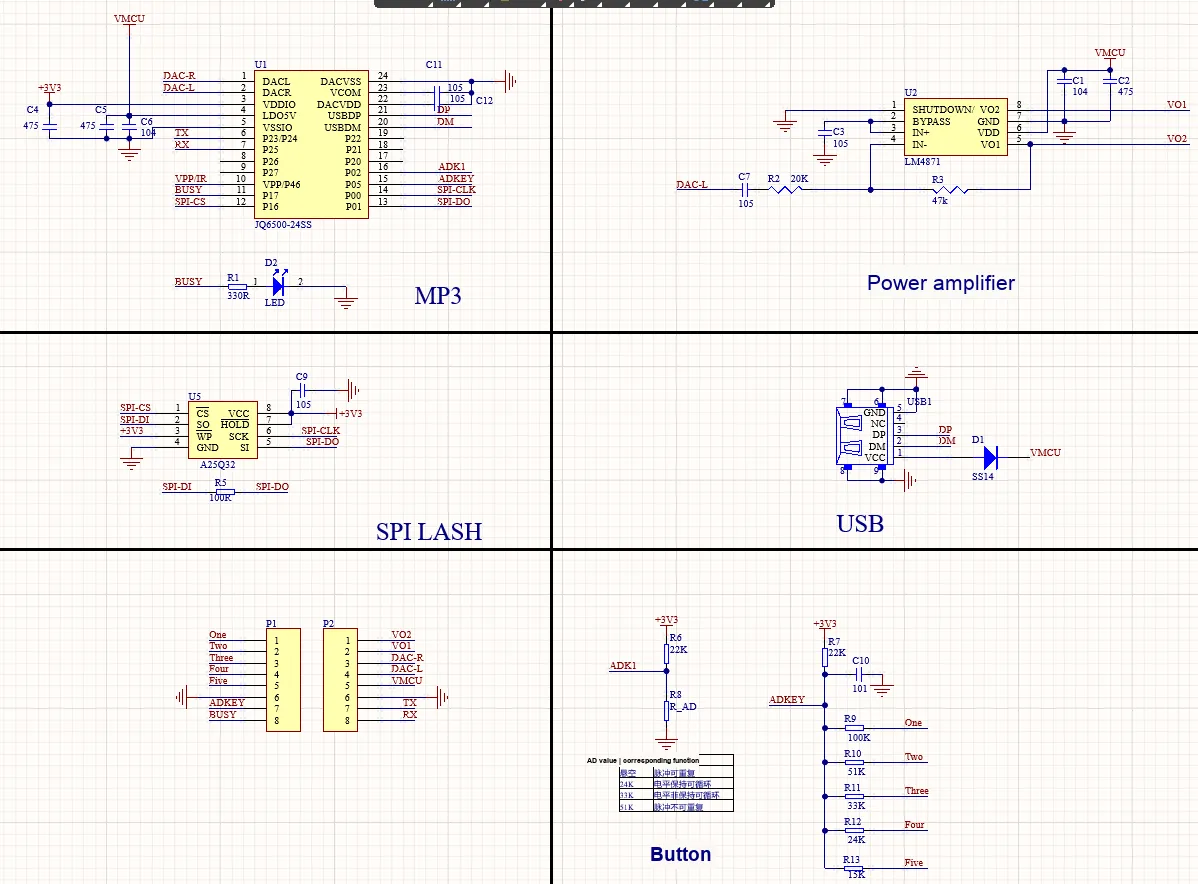
JQ6500 MP3 module complete circuit reference schematic, which is mainly divided into six functional units:
MP3Core:JQ6500chip is responsible for audio decoding, and providesUART/SPIcommunication interface and status indication;- Power amplifier circuit: Consists of
LM4871, which amplifies the left and right channel audio signals output byDACto drive the speaker for playback; - Storage expansion: external
SPI Flashchip, used for storingMP3audio files, supporting content update viaUSB; USBport: used to connect to a computer or aUdisk to update audio content and expand storage;- Key Control:
ADkey circuit realizes function control such as play/switch/loop mode through resistors with different resistances;
It is particularly important to note that the JQ6500 firmware has a built-in ID list compatible with Flash, and does not support automatic identification of new IDs.
Common compatible models (tested and confirmed to work):
- Winbond: W25Q32JV (32Mbit), W25Q16JV (16Mbit)
- GD (GigaDevice): GD25Q32, GD25Q16
- MXIC (Macronix): MX25L3206E, MX25L1606E
- ❌ Incompatible: W25Q64JV (ID: 0xEF4017), W25Q256JV (ID: 0xEF4019)
2.6 Chip Configuration
None.
2.7 Communication Interfaces and Related Protocols
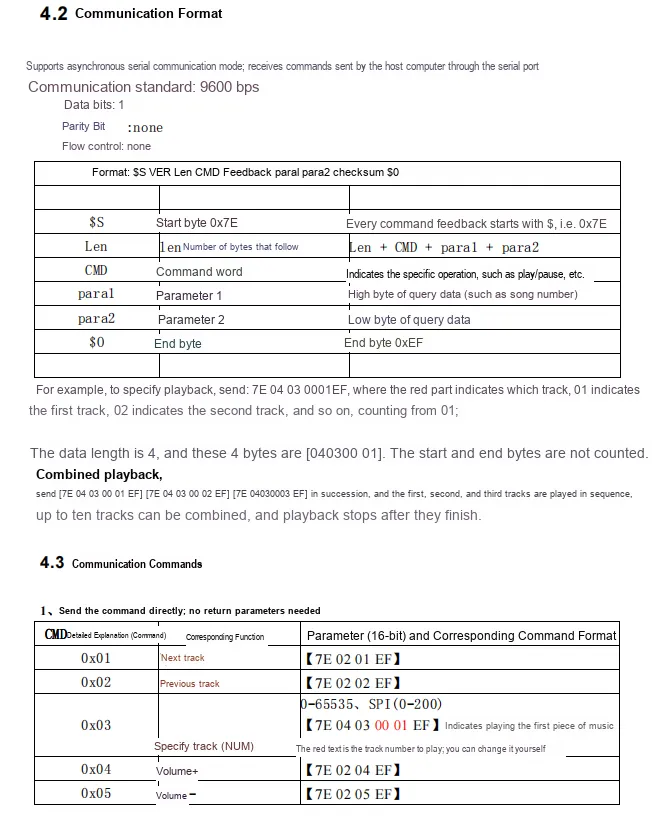
The JQ6500 chip adopts asynchronous serial communication with parameters of 9600bps baud rate, 1 data bit, no parity and no flow control. For the instruction format, please refer to the illustration above; it supports instructions including playback control, track designation and volume adjustment. For instance, the 0x03 instruction can designate the track to be played, and supports combined playback of up to 10 tracks. This chip standardizes the frame format and instruction set for serial port control as a whole, facilitating the MCU to realize convenient audio playback control.
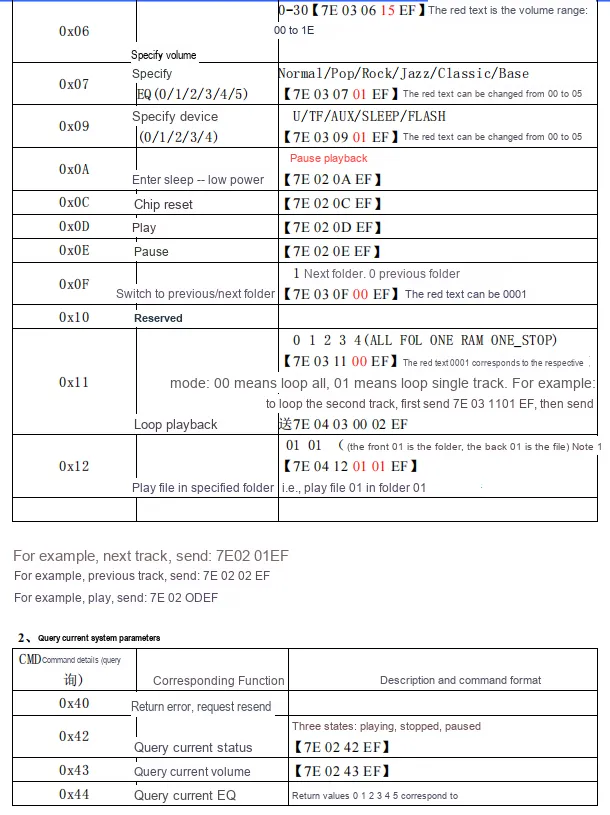
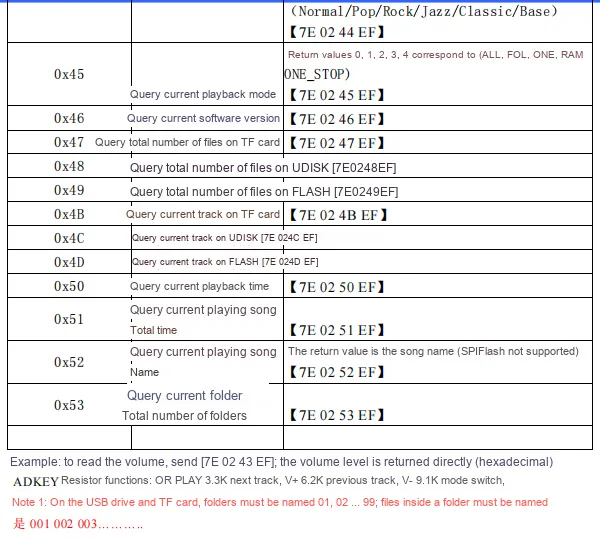
JQ6500 commands are divided into control commands and query commands two categories: control commands support operations such as volume / EQ adjustment, track / folder playback, loop mode, sleep / reset, etc. ; query commands can obtain system parameters such as playback status, volume, EQ, number of files, track information, etc. ; all commands follow the frame format starting with 0x7E and ending with + 0xEF, and the function of AD key resistance and file naming specification are also defined clearly, which facilitates MCU to implement complete audio playback control and status query.
2.8 PCB Routing Precautions
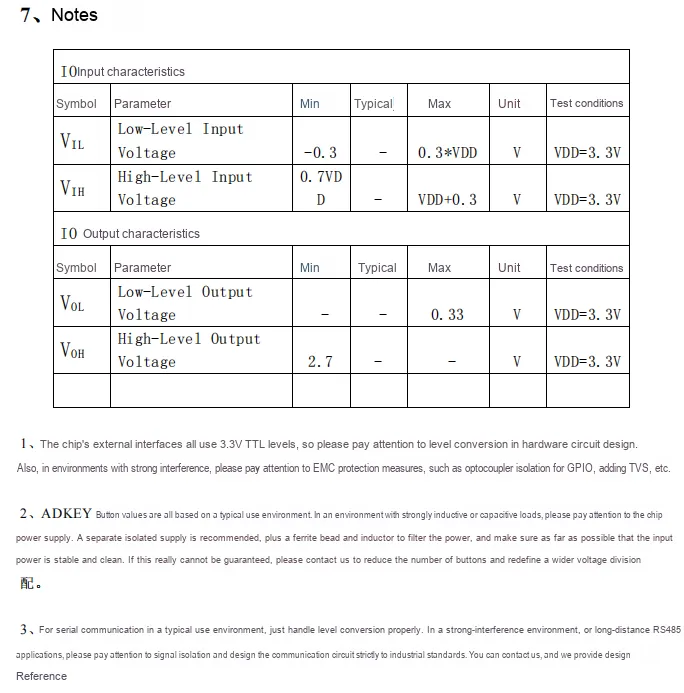
JQ6500 chip IO is 3.3V TTL level, which specifies the input high and low level range and output level characteristics; meanwhile, it provides hardware design suggestions, including level conversion, electromagnetic compatibility protection in strong interference environments, AD power stability requirements for buttons, as well as isolation design specifications for serial communication in different scenarios, providing a basis for reliable circuit design.
III. Circuit Engineering
3.1 Circuit Source Engineering
To obtain the circuit source project, please follow the official account [Freak Embedded].
3.2 Module Usage Instructions
The schematic diagram of this module is shown below:
SCH_MP3 Playback Module Based on JQ6500-V1.1.0_2026-03-31.pdf 2.5 MB
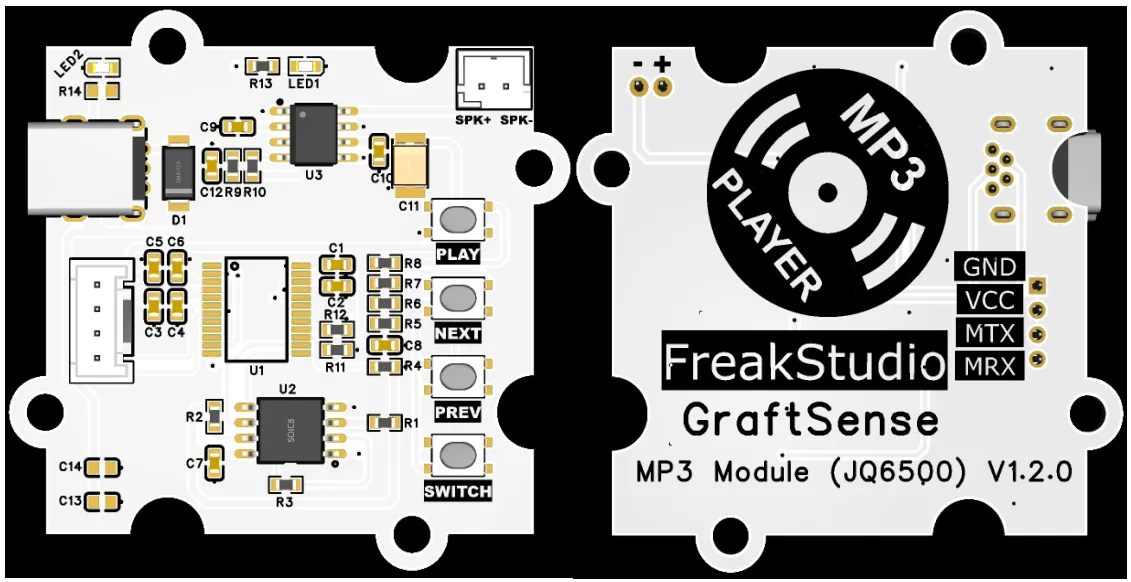
This module provides a serial port UART interface MRX and MTX: where M stands for master, meaning the MCU 's RX corresponds to the module' s TX.
In the physical diagram, there are multiple interfaces and buttons, and the functions of each interface and button will be explained next:
SPKInterface: Supports speaker connection to output audio via the speaker.USBinterface: Connect to a device such as a computer to update the flash content of the module.- 4 buttons: each button can be used for
MP3playback settings, among which thePLAYbutton is for play and pause, theNEXTbutton is for playing the next song, thePREVbutton is for playing the previous song, and theSWITCHbutton is for mode selection, to choose to play content fromSPI Flash,TFcard orUdisk (note that this module only provides internal Flash storage).
Meanwhile, it is equipped with USB ports, and we can use a Mini USB cable to transfer music to its internal Flash memory.
It should be noted that before using this module, we need to first use a MiniUSB cable to connect to the USB interface to flash the firmware to the onboard Flash chip. We need to select the corresponding firmware according to the Flash size:
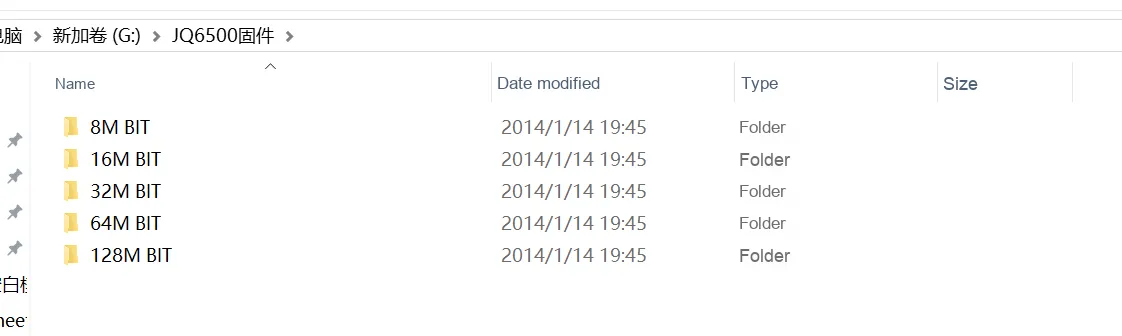
Here, the module we use adopts a 32M Flash chip:

- Open the "
JQ6500firmware file"; - Select the firmware corresponding to the
Flashsize; - Double-click to run
ISODown.exefile; - Just wait for the download to complete.
The addresses of the firmware and flashing software are as follows:
JQ6500 Firmware.rar 401 KB
3.3 Application Experiment
Here, we use the GraftPort-RP2040 development board for testing, and the JQ6500-based MP3 playback module uses the UART interface to communicate with the main controller.
Here, we first use the HY2.0-4P connection cable to connect the module to the GraftPort-RP2040 development board's UART0 interface, and at the same time connect an external 4W speaker unit to the SPK interface:
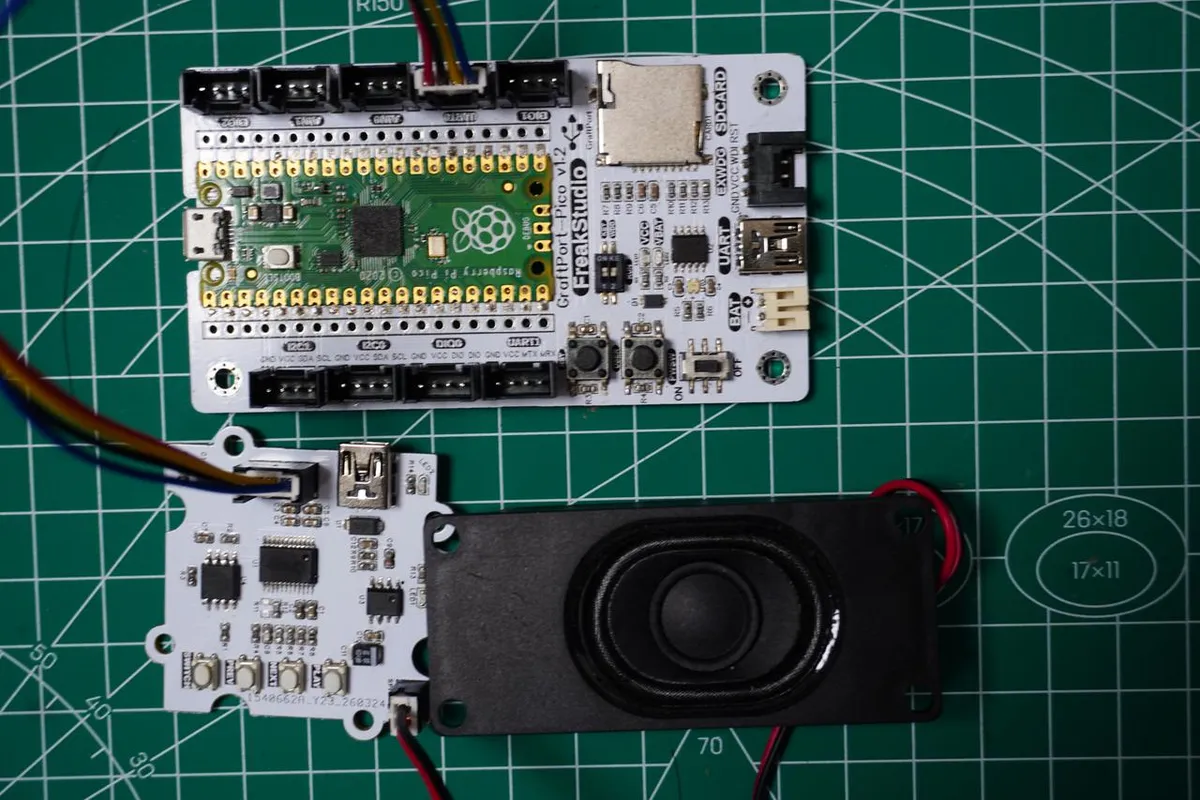
The module connections are shown in the following table:
Development Board Pins | Module Pins | Description |
Pin 16 |
|
|
Pin 17 |
|
|
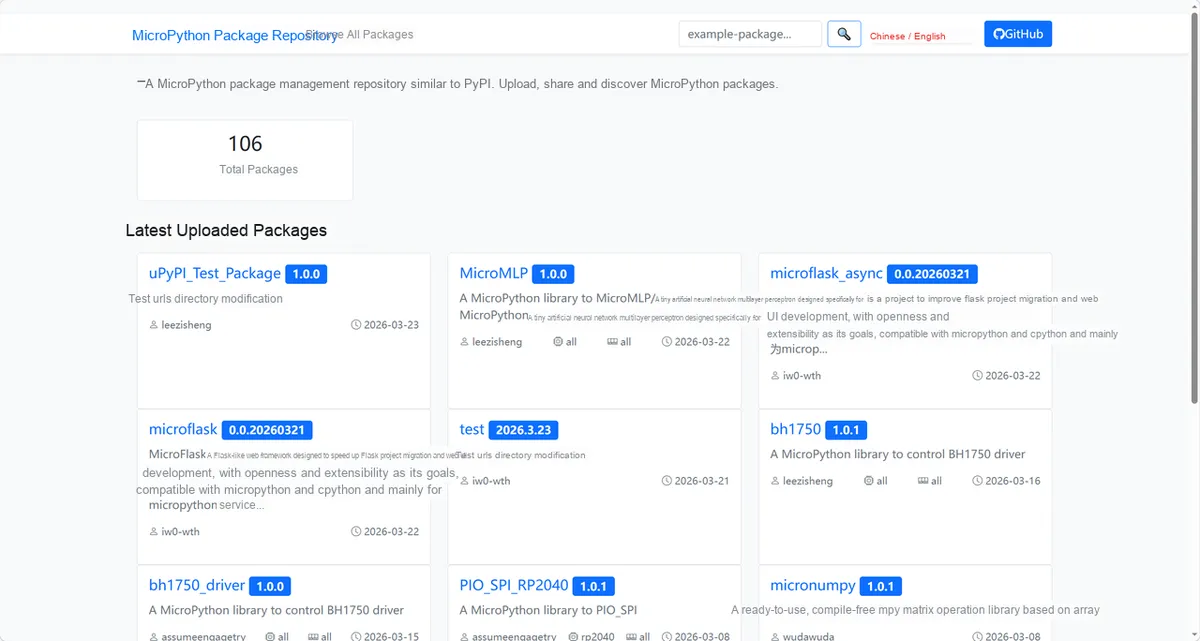
Here, we need to search for the relevant driver packages on uPyPI: https://upypi.net/zh/
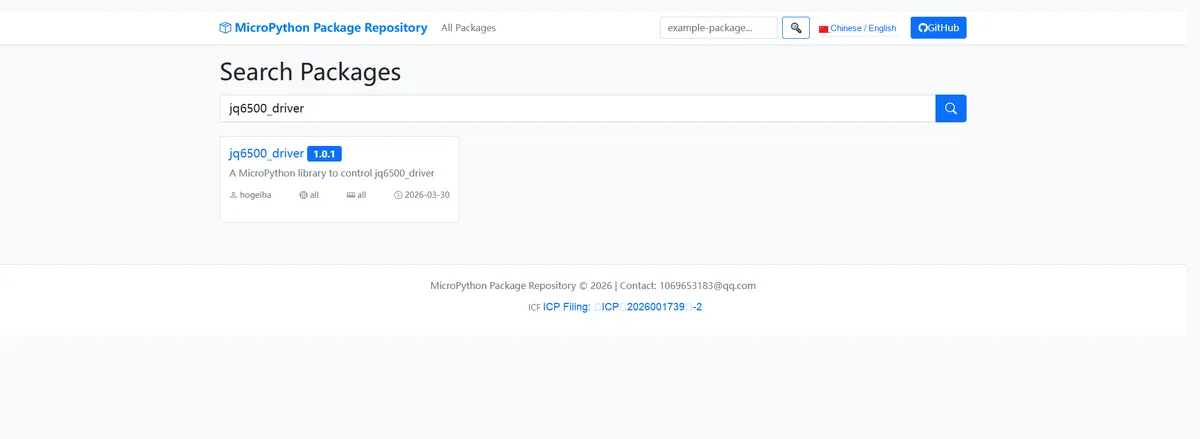
Enter jq6500_driver to search, and the following will be displayed:
Click to copy the local installation command:
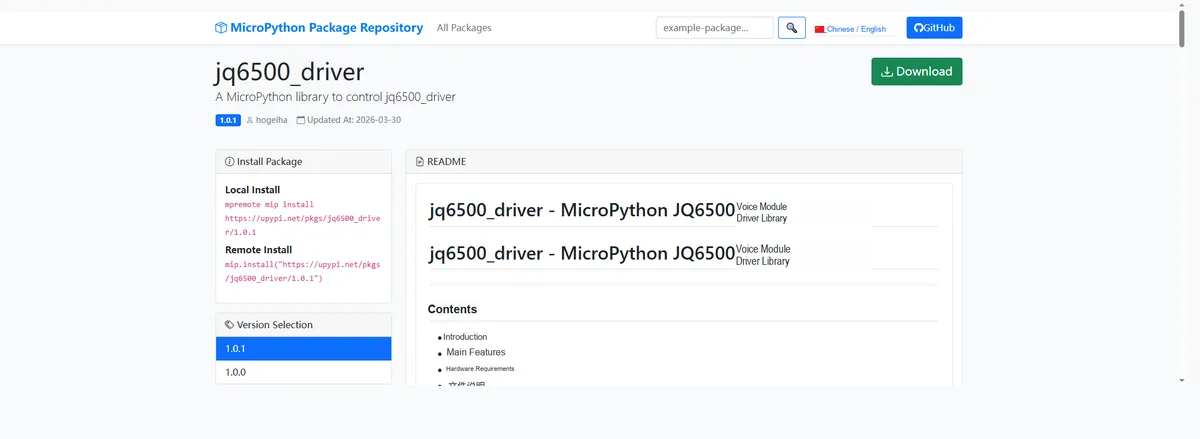
Import the module driver library code via the mip tool. Below are the usage commands for the mpremote tool:
mpremote mip install https://upypi.net/pkgs/jq6500_driver/1.0.0Import the MicroPython driver code for the JQ6500-based MP3 playback module, then copy the following main.py code into our project:
# Python env   : MicroPython v1.23.0
# -*- coding: utf-8 -*-
# @Time    : 2026/3/16 3:30 PM
# @Author  : rdagger
# @File    : main.py
# @Description : JQ6500 player internal FLASH mode feature demo (simplified version)

# ======================================== Import Modules =========================================

from machine import UART, Pin
from jq6500 import Player
import time

# ======================================== Global Variables ============================================


# ======================================== Functions ============================================


def demo_jq6500_flash():
    """
    Demo function for the core features of the JQ6500 internal FLASH mode (simplified version)
    Args: None

    Raises:
    Exception - Generic exception raised during the demo
    AttributeError - Exception raised when the SRC_FLASH constant is not defined in the Player class

    Notes:
    1. MP3 files must be burned into the JQ6500 internal FLASH in advance;
    2. The internal FLASH has no folder feature; files are numbered in the order they were burned;
    3. The play_by_number method has been removed; only playback by index is kept

    ==========================================
    Core function demonstration for JQ6500 internal FLASH mode (simplified version)
    Args:None

    Raises:
    Exception - General exceptions during demonstration
    AttributeError - Exception triggered when SRC_FLASH constant is not defined in Player class

    Notes:
    1. MP3 files must be burned to JQ6500 internal FLASH in advance;
    2. Internal FLASH has no folder function, files are numbered in burning order;
    3. Removed play_by_number method, only keep playback by index
    """
    try:
        print("===== JQ6500 internal FLASH mode demonstration started =====")

        # 1. Basic configuration (switch to the internal FLASH audio source)
        print("\n【1. Basic configuration】")
        # Set the EQ to rock mode
        player.set_equalizer(Player.EQ_ROCK)
        print(f"Current EQ mode: {player.get_equalizer()} (2=Rock mode)")

        # Set the loop mode to single-track repeat
        player.set_looping(Player.LOOP_ONE)
        print(f"Current looping mode: {player.get_looping()} (2=Single loop)")

        # Switch the audio source to internal FLASH (key change! Replace SD card with FLASH)
        player.set_source(Player.SRC_BUILTIN)  # SRC_BUILTIN is the internal FLASH constant (confirm it is defined in the class)
        print("Audio source switched to internal FLASH")

        # 2. Playback control
        print("\n【2. Playback control】")
        # Play the current file (by default starts from the first burned file)
        player.play()
        print("Start playback, current status:", player.get_status())  # 1=Playing
        time.sleep(3)  # Play for 3 seconds

        # Pause playback
        player.pause()
        print("Pause playback, current status:", player.get_status())  # 2=Paused
        time.sleep(2)

        # Resume playback
        player.play()
        time.sleep(3)

        # Volume adjustment (up twice, down once)
        player.volume_up()
        player.volume_up()
        player.volume_down()
        print(f"Current volume: {player.get_volume()} (Expected 16)")

        # Switch to the next track (internal FLASH switches in burn order)
        player.next()
        print("Switch to next track (Internal FLASH)")
        time.sleep(3)

        # Switch to the previous track
        player.prev()
        print("Switch to previous track (Internal FLASH)")
        time.sleep(3)

        # 3. Positioned playback (internal FLASH plays by file number)
        print("\n【3. Position playback】")

        # Play by index (consistent with the burn order)
        player.play_by_index(file_index=1)
        print("Play internal FLASH file by index 1")
        time.sleep(3)

        # 4. Information query (adapted for internal FLASH)
        print("\n【4. Device information query】")
        # Query the total number of files in the internal FLASH (replace SD card with FLASH)
        print(f"Total files in internal FLASH: {player.get_file_count(Player.SRC_BUILTIN)}")
        print(f"Current file playback progress: {player.get_position()} seconds")
        print(f"Current file total duration: {player.get_length()} seconds")
        print(f"Firmware version: {player.get_version()}")

        # 5. Loop mode switching
        print("\n【5. Looping mode switch】")
        player.set_looping(Player.LOOP_ALL)  # Repeat all
        print(f"Switched to all loop mode: {player.get_looping()} (0=All loop)")
        time.sleep(3)

        # 6. Reset and pause
        player.pause()
        player.reset()  # Soft reset
        print("\nDemonstration ended, device paused and reset")

    except Exception as e:
        print(f"Error during demonstration: {e}")
    # Compatibility handling: if SRC_FLASH is not defined in the Player class, use a numeric value instead (usually FLASH=1, SD card=2)
    except AttributeError:
        print("Tip: SRC_FLASH constant not defined, try replacing with value 1")
        player.set_source(1)  # 1=Internal FLASH, 2=SD card (General value definition)

    finally:
        # Clean up resources
        player.clean_up()
        uart.deinit()
        print("Resources cleaned up")


# ======================================== Custom Classes ============================================

# ======================================== Initialization configuration ===========================================

# Initialization delay to ensure the hardware is ready
time.sleep(3)
# Print the initialization complete message
print("FreakStudio: JQ6500 internal FLASH playback demo initialization completed")

# Initialize UART (UART0 of the Raspberry Pi Pico, TX=16, RX=17, baud rate fixed at 9600)
uart = UART(0, baudrate=9600, tx=Pin(16), rx=Pin(17), timeout=100)

# Initialize the JQ6500 player with an initial volume of 15 (volume range 0-30)
player = Player(uart, volume=15)

# ========================================  Main Program  ============================================

if __name__ == "__main__":
    demo_jq6500_flash()
while True:
    pass  # The main loop keeps running, waiting for user actions or other events
In the above code, after configuring the EQ mode and loop mode and switching the audio source to the built-in FLASH, we sequentially tested control operations such as play/pause, volume adjustment, track up/down switching, and index-based playback, while querying device information including the total number of FLASH files, playback progress, and firmware version. We also implemented exception compatibility handling for undefined constants, and finally performed device reset and resource cleanup, comprehensively verifying the audio playback and control capabilities of the JQ6500 in the internal FLASH storage mode.
Burn the code, open the terminal, and the output is as follows:
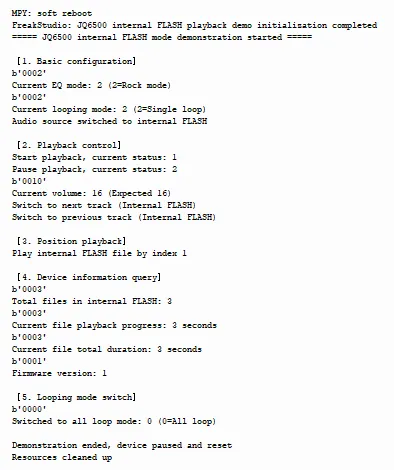
It can normally switch the internal FLASH sound source and perform playback control operations.
4. Drivers
jq6500_driver-1.0.1.zip 18 KB
5. BOM & Recommended Alternative Parts
None.
VI. Revision History
Document Version | Date of Revision | Modifier | Modify Content |
v1.0 | 2026-03-30 | Ling Gaoxing | Initialize the document |
v1.0.1 | 2026-04-05 | Li Zisheng | No photos for the homepage have been taken, the production files have not been exported yet, and all other items have been sorted out. |
v1.0.2 | 2026-04-05 | Li Zisheng | Add the JQ6500 firmware burning tutorial. |
v1.0.3 | 2026-04-21 | Li Zisheng | The production documents have not been exported yet, while all the rest have been sorted out. |
v1.1 | 2026-04-23 | Xin Ruili | Create an open version of the document, based on the internal document version v1.0.3. |
VII. Relevant Materials
7.1 Chip Datasheet
JQ6500-24SS-JQ.pdf 726 KB
7.2 PCB Silkscreen Specific Icons