Contents
- I. Module Introduction
- II. Introduction to Main Chips
- 2.1 Chip Overview
- 2.2 Pin Definition
- 2.3 Functional Block Diagram
- 2.4 Performance Parameters
- 2.5 Reference Circuit
- 2.6 Chip Configuration
- 2.7 Communication Interfaces and Related Protocols
- 2.8 PCB Routing Precautions
- III. Instructions for Circuit Engineering and Module Usage
- 3.1 Circuit Source Engineering
- 3.2 Module Usage Instructions
- 3.3 Application Experiment
- IV. Drivers
- 5. BOM & Recommended Alternative Parts
- VI. Revision History
- VII. Relevant Materials
- 7.1 Chip Datasheet
- 7.2 Unique Icons for PCB Silk Screen
I. Module Introduction
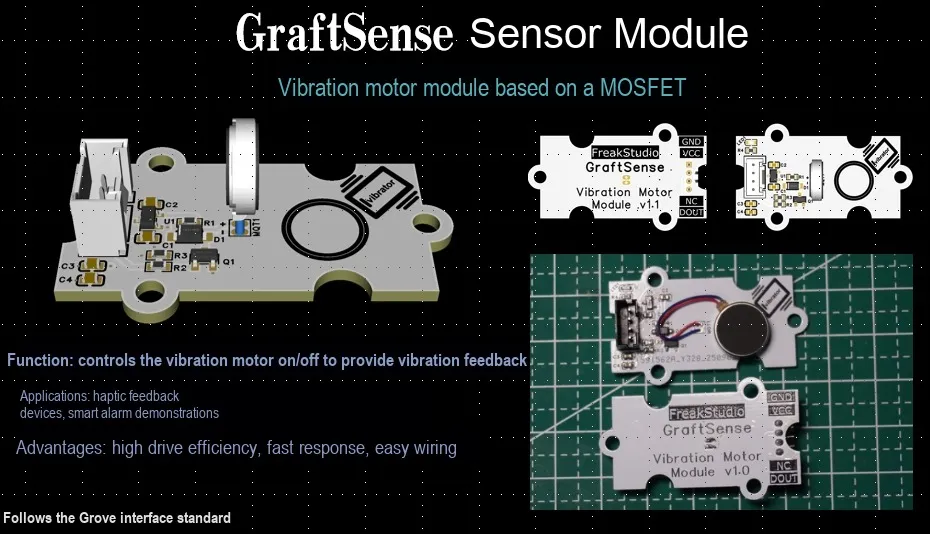
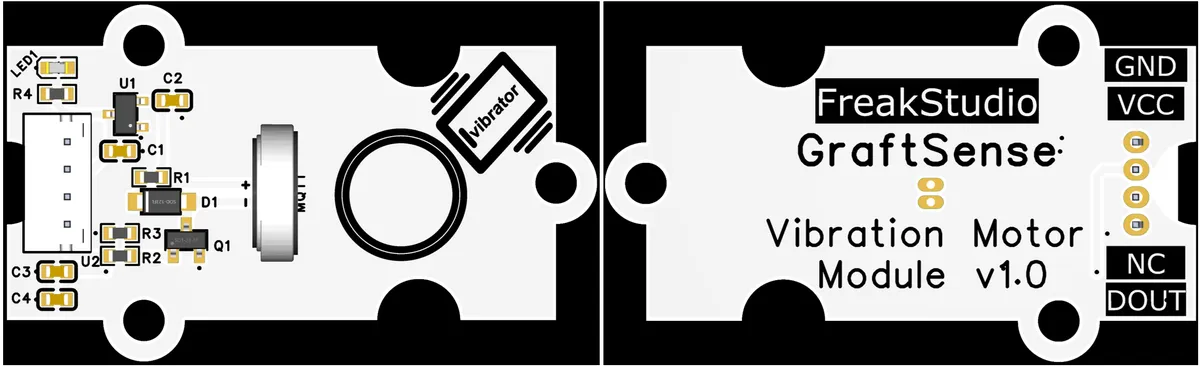
MOSFET-Based Vibration Motor Module Based on MOS FET AO3400A to drive the vibration motor LCM1234A3523F, equipped with a DC-DC circuit to achieve 5V to 3.3V power supply, integrated with a power indicator and sensor interface, and can control the motor vibration by receiving the main control signal through the DOUT digital interface. It is suitable for scenarios such as haptic feedback and device reminder, providing a reliable vibration output solution for embedded systems.
II. Introduction to Main Chips
A vibration motor is a device that converts electrical energy into mechanical energy, which generates vibration essentially through unbalanced rotation, electromagnetically driven mass movement, or deformation of piezoelectric materials. Common types include rotor motors featuring simple structure but relatively coarse vibration sensation, linear motors with fast response and precise control, and high-precision piezoelectric motors. They are widely used for tactile feedback in electronic devices such as mobile phones, smartwatches and game controllers, as well as for safety warning reminders in car seats and steering wheels.
2.1 Chip Overview
LCM1234A is a flat permanent magnet DC vibration motor. It belongs to the category of micro DC motors, adopts a permanent magnet excitation structure, and features compact size and obvious vibration output.
2.2 Pin Definition
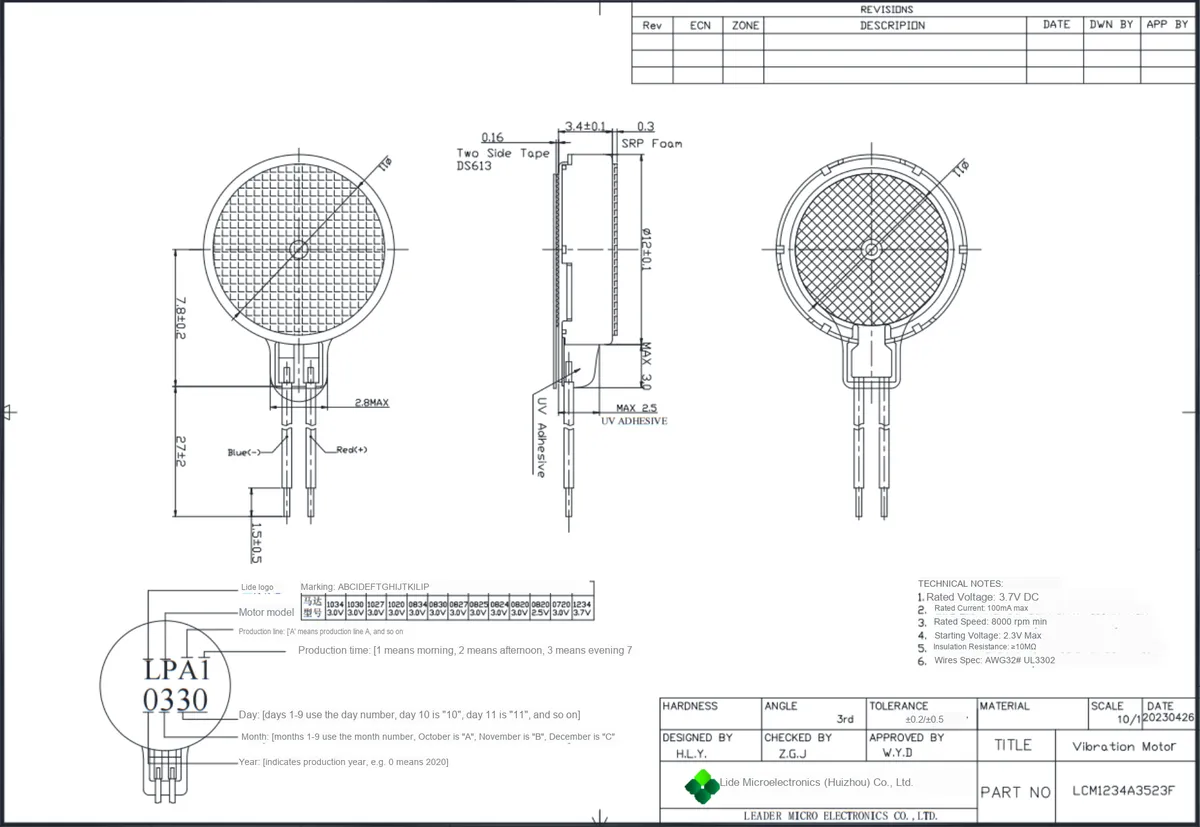
LCM1234A3523F flat permanent magnet DC vibration motor is equipped with two pins, which are Red (+)(red positive pole) and Blue (-)(blue negative pole). The Red (+) pin is the current inflow terminal, which needs to be connected to the high potential of the drive circuit;Blue (-) pin is the current outflow terminal, which needs to be connected to the low potential (or ground) of the drive circuit.
2.3 Functional Block Diagram
None.
2.4 Performance Parameters
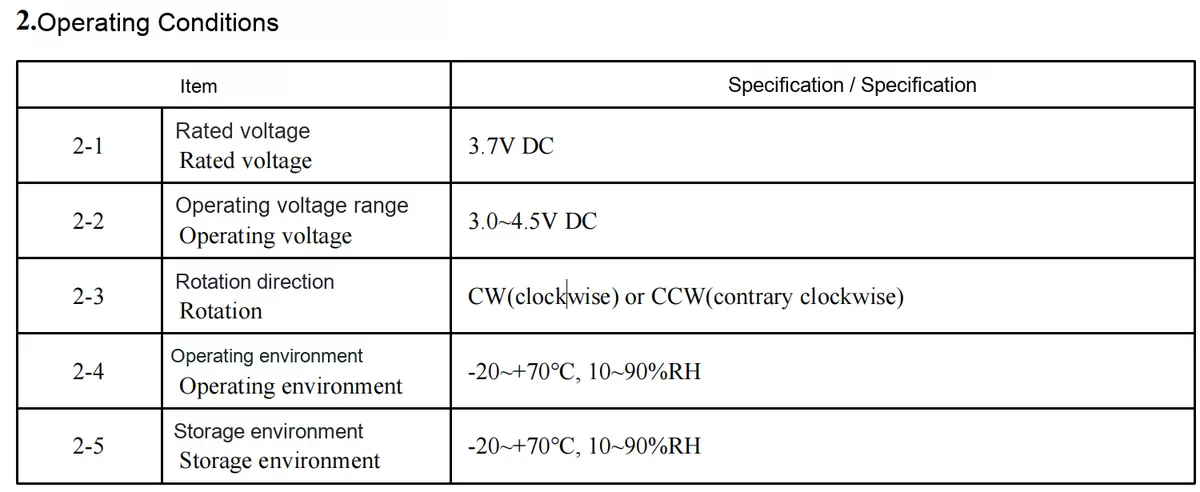
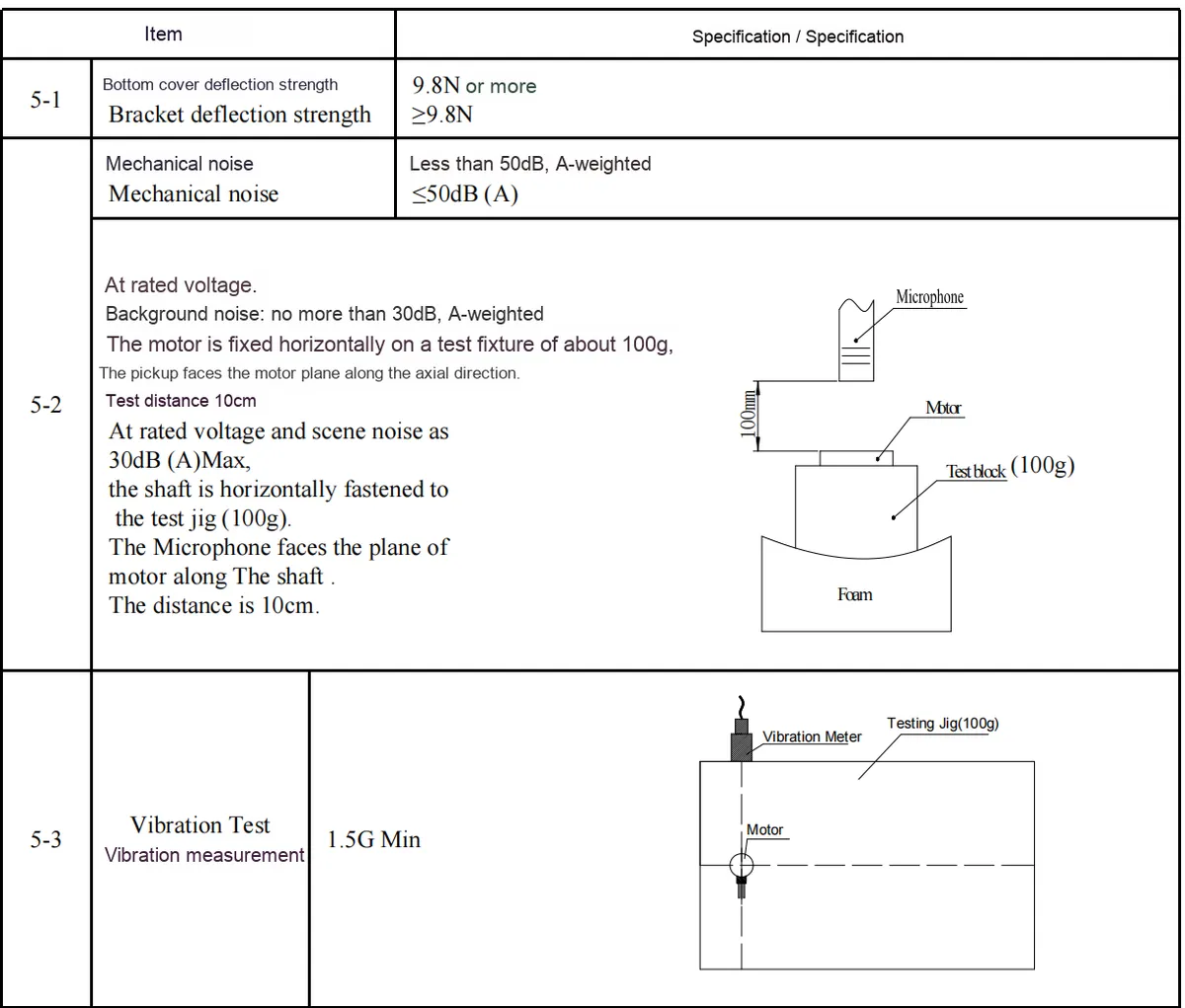
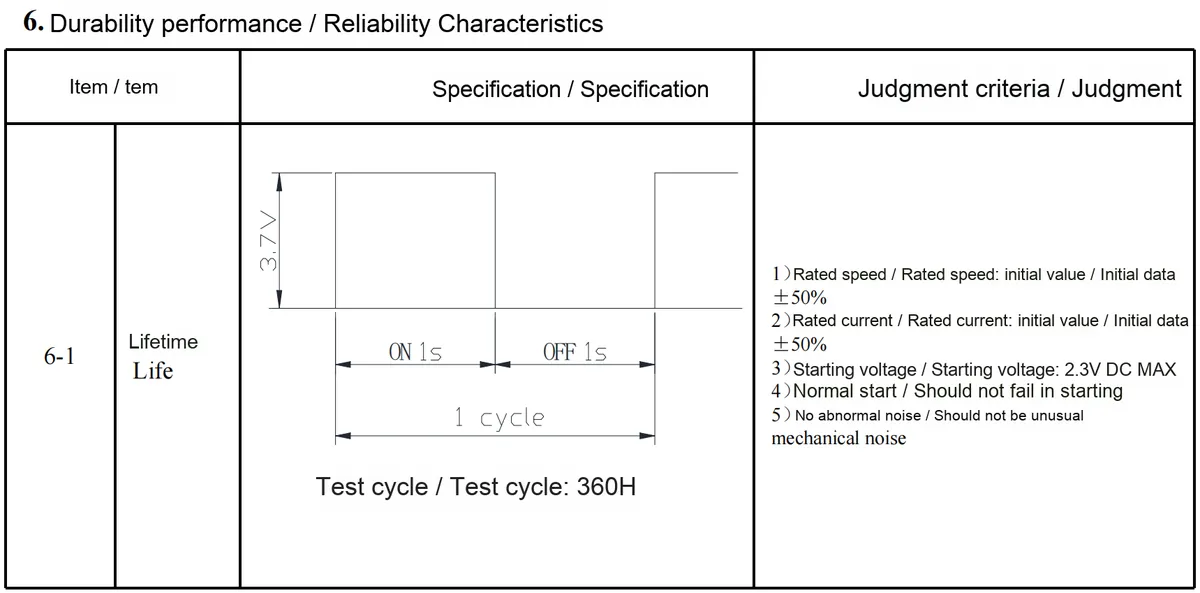
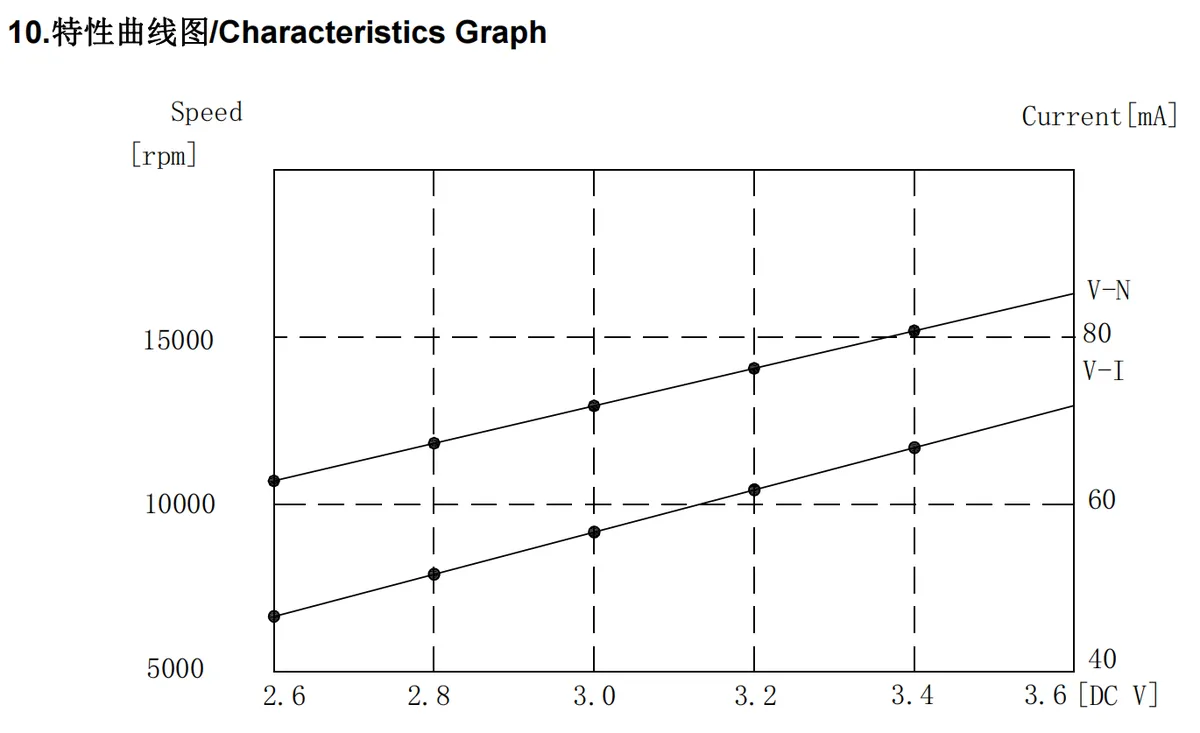
This graph illustrates the characteristic curves of the LCM1234A3523F vibration motor: the horizontal axis represents DC voltage (2.6~3.6V), the left vertical axis denotes rotational speed in rpm, and the right vertical axis indicates current in mA. The two curves show that both the motor's rotational speed and operating current increase linearly as the voltage rises (for instance, at 3.4V, the rotational speed is approximately 15000rpm and the current is around 80mA), intuitively reflecting the positive correlation between its rotational speed, current and supply voltage.
2.5 Reference Circuit
None.
2.6 Chip Configuration
None.
2.7 Communication Interfaces and Related Protocols
None.
2.8 PCB Routing Precautions
None.
III. Instructions for Circuit Engineering and Module Usage
3.1 Circuit Source Engineering
To obtain the source code of the circuit, please follow the official account [Freak Embedded]
3.2 Module Usage Instructions
The schematic diagram of this module is shown below:
SCH_MOSFET-Based Vibration Motor Module_v1.0_2025-10-24.pdf 2.1 MB
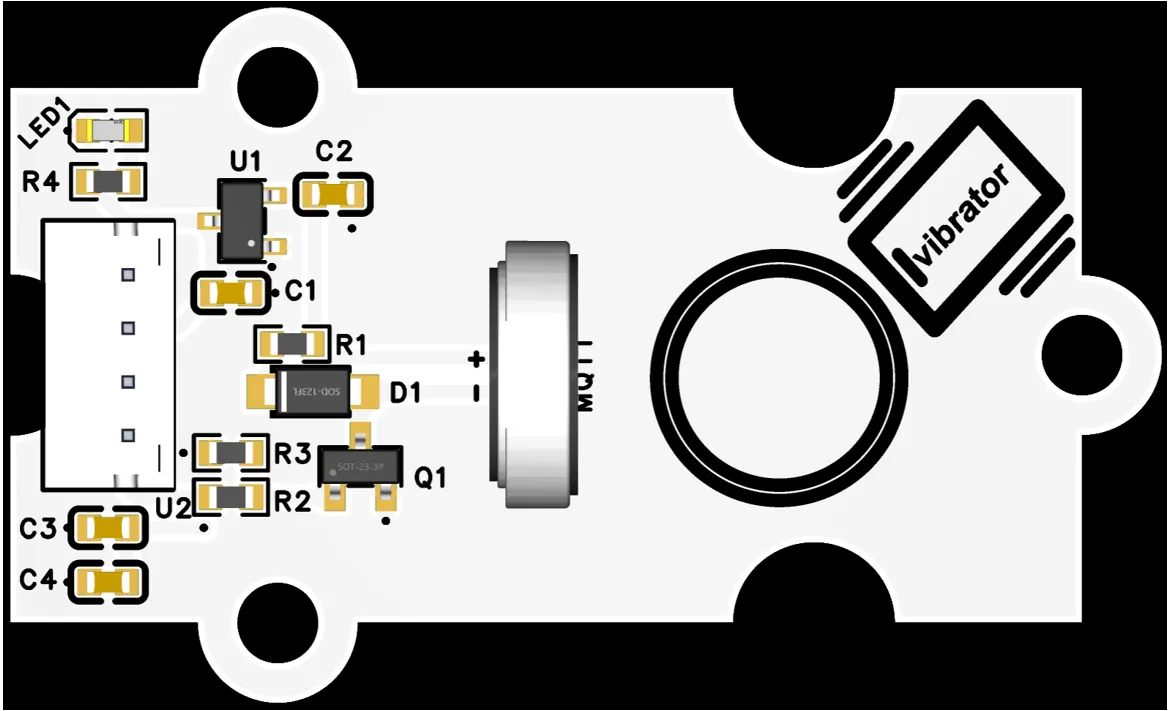
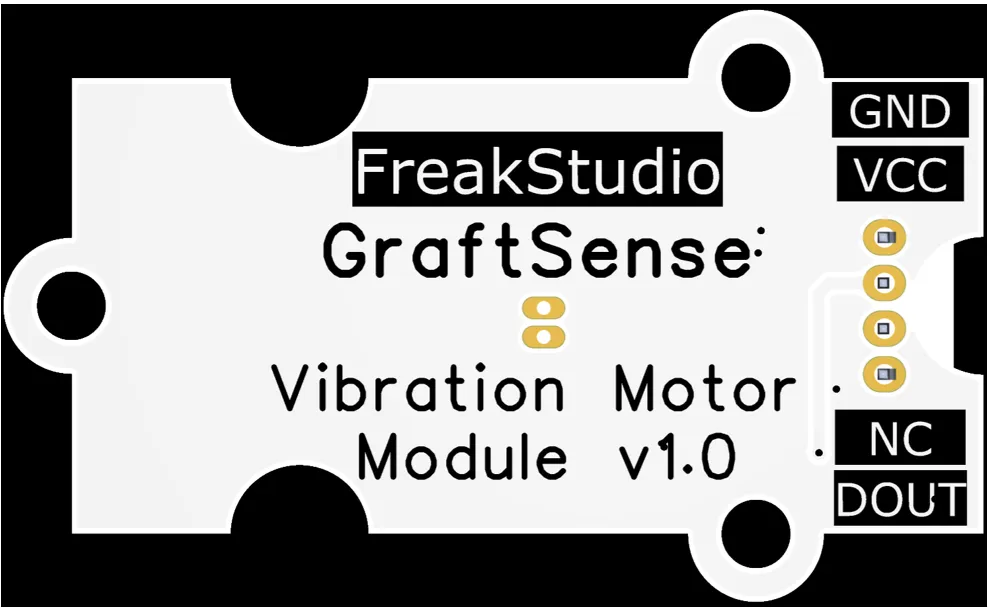
The control interface of this module is the DOUT pin: the MCU only needs to output a PWM signal to the DOUT pin to control the vibration of the motor, and adjusting the duty cycle can adjust the rotational speed of the vibration motor.
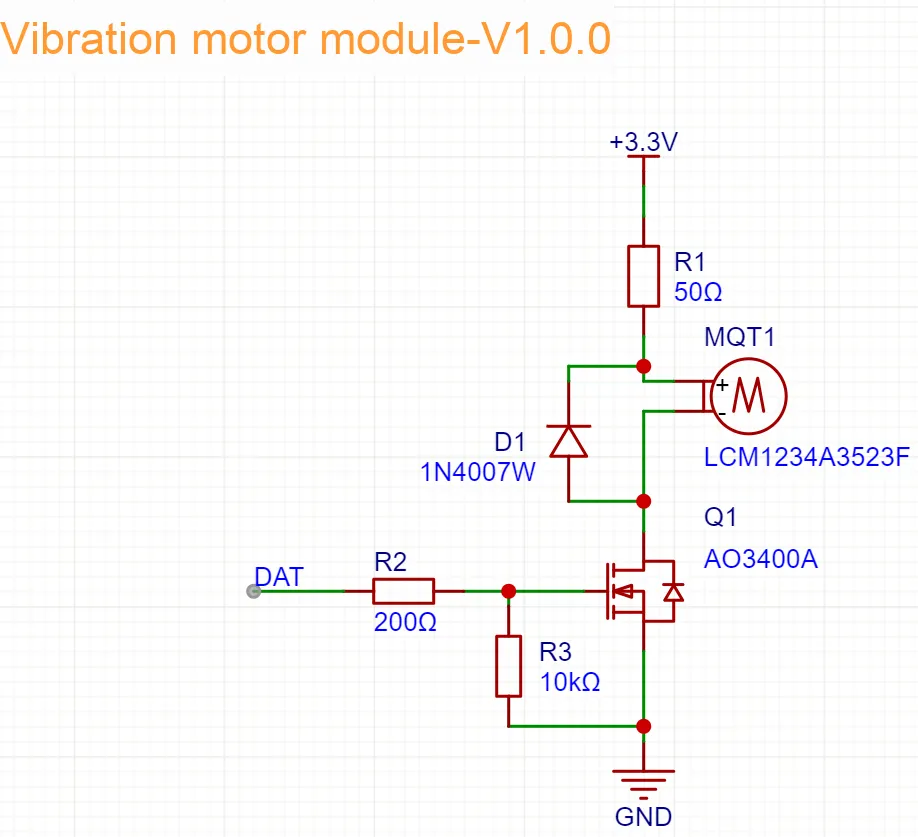
The control circuit takes MOS transistors as the core to realize electronic switch control over the LCM1234A3523F vibration motor: the DAT interface receives the main control signal, which drives the R2 / R3 voltage divider to turn on/off the MOS transistor, thereby controlling the power supply to the motor;1N4007 diode is used for freewheeling to suppress the back EMF when the motor is powered off to protect the MOS transistor, and R1 limits the current of the motor.This design is adopted because MOS transistors can efficiently realize the on-off control of the motor; the freewheeling diode and current-limiting resistor ensure the circuit safety, and the voltage divider circuit guarantees the stability of the gate voltage of MOS transistors. The overall solution takes into account driving capability, component protection and signal compatibility, can stably achieve precise control of the vibration motor, and is suitable for reliable driving requirements in scenarios such as haptic feedback and device reminders.
3.3 Application Experiment
Here, we use the GraftPort-RP2040 development board for testing, and the MOSFET-based vibration motor module uses the DIO interface to communicate with the main controller.
Here, we first use the HY2.0-4P cable to connect the module to the GraftPort-RP2040 development board's DIO0 interface:
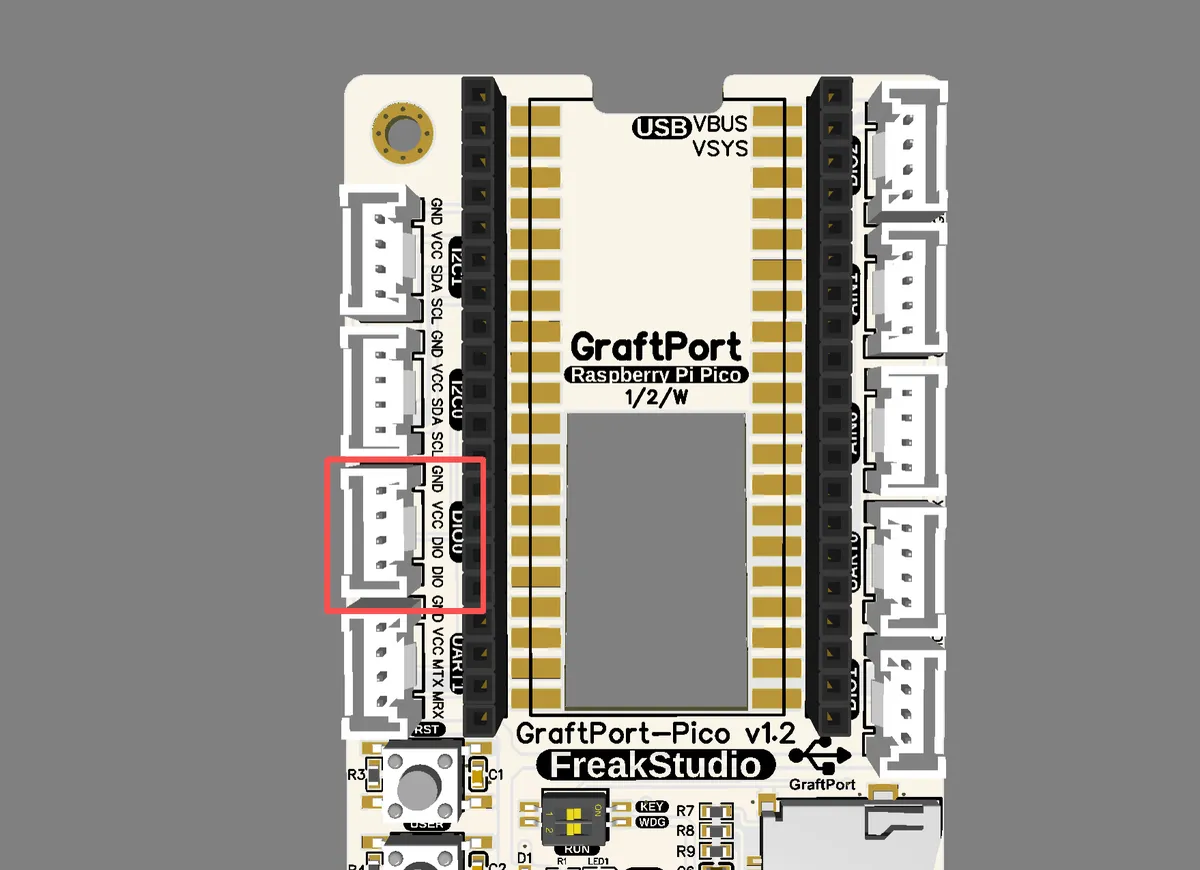
The module connections are shown in the following table:
Development Board Pins | Module Pins | Description |
Pin 6 |
| PWM signal output pin on MCU |
Pin 7 |
| - |
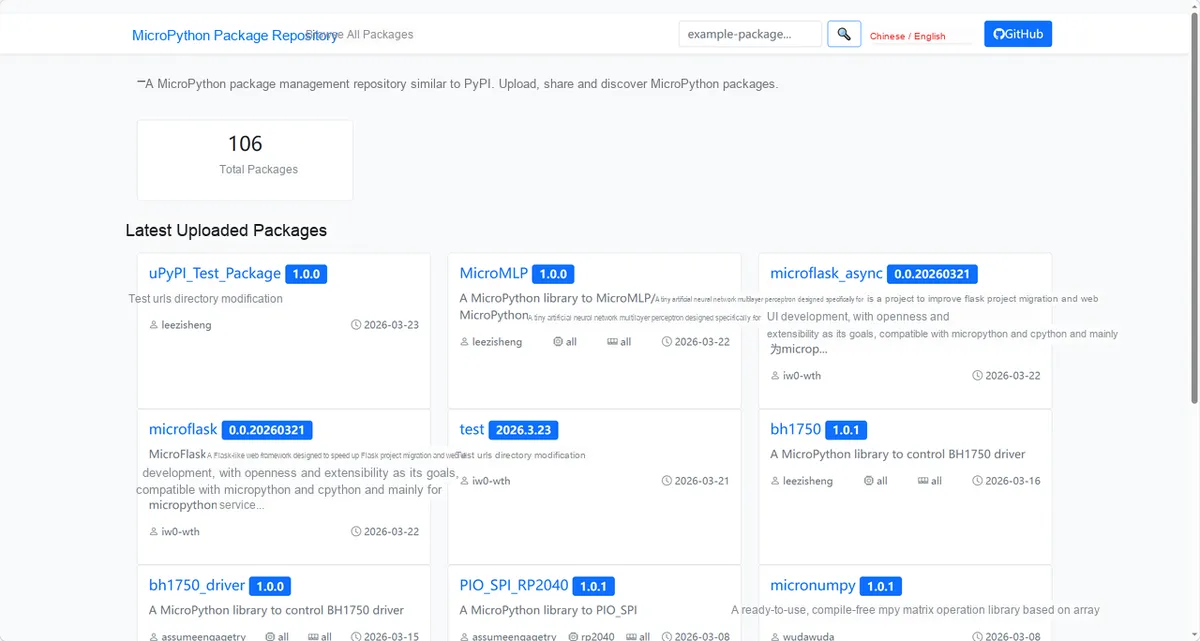
Here, we need to search for relevant driver packages on uPyPI: https://upypi.net/zh/
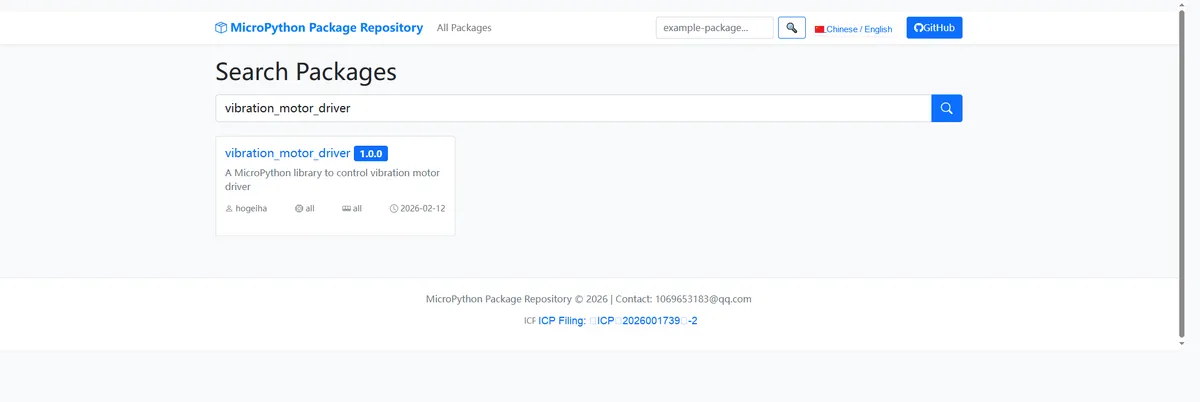
Enter vibration_motor_driver to search, and the following will be displayed:
Click to copy the local installation command:
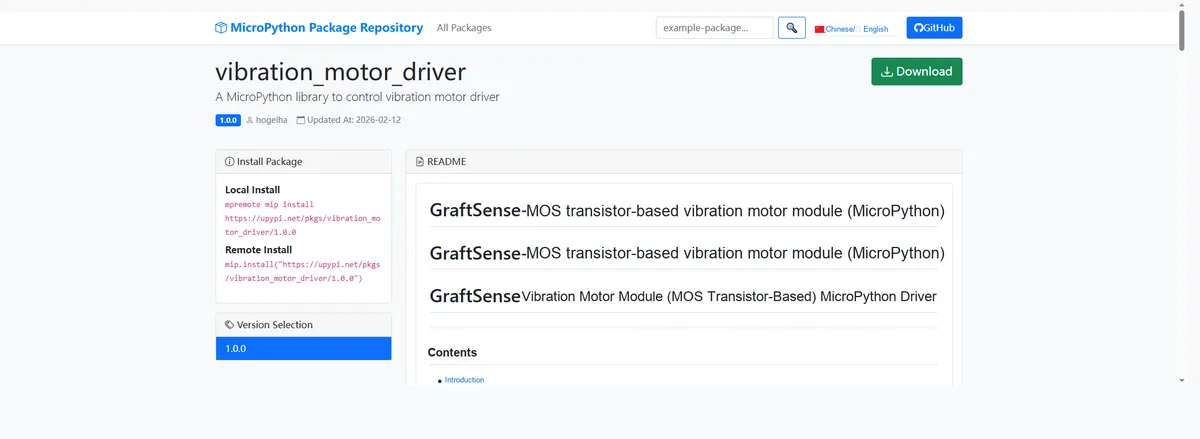
Here, we can use the mip tool to import module driver library code. Below are the usage commands for the mpremote tool:
mpremote mip install github:FreakStudioCN/GraftSense-Drivers-MicroPython/motor_drivers/vibration_motor_driverImport the vibration motor module based on MOSFET - MicroPython driver code, then copy the following main.py code into our project:
# MicroPython v1.23.0
# -*- coding: utf-8 -*-
# @Time    : 2025/8/26 11:41 AM
# @Author  : 缪贵成
# @File    : main.py
# @Description : Test file for the vibration motor driver

# ======================================== Import Modules =========================================

import time
from vibration_motor import VibrationMotor

# ======================================== Global Variables ============================================

# ======================================== Functions ============================================

def demo_full() -> None:
    """
    Vibration motor full-speed demo for 2 seconds.
    Notes:
        Calls motor.on() to turn on full speed, then turns it off after sleeping for 2 seconds.
        Can be used in the REPL to interactively test the motor at full speed.

    ==========================================

    Demonstrate vibration motor running at full speed for 2 seconds.
    Notes:
        Uses motor.on() to run at full speed, then stops after 2 seconds.
        Suitable for interactive REPL testing.
    """
    print(">>> Motor running at full speed for 2 seconds")
    motor.on()
    time.sleep(2)
    motor.off()
    print(">>> Motor stopped")

def demo_half() -> None:
    """
    Vibration motor half-speed demo for 2 seconds.

    Notes:
        Calls motor.set_brightness(512) to set half speed, then turns it off after sleeping for 2 seconds.
        Can be used in the REPL to interactively test the motor at medium speed.

    ==========================================

    Demonstrate vibration motor running at half speed for 2 seconds.

    Notes:
        Uses motor.set_brightness(512) for half speed, then stops after 2 seconds.
        Suitable for interactive REPL testing.
    """
    print(">>> Motor running at half speed for 2 seconds")
    motor.set_brightness(512)
    time.sleep(2)
    motor.off()
    print(">>> Motor stopped")

def demo_low() -> None:
    """
    Vibration motor low-speed demo for 2 seconds.

    Notes:
        Calls motor.set_brightness(400) to set low speed, then turns it off after sleeping for 2 seconds.
        Can be used in the REPL to interactively test the motor at low speed.

    ==========================================

    Demonstrate vibration motor running at low speed for 2 seconds.

    Notes:
        Uses motor.set_brightness(400) for low speed, then stops after 2 seconds.
        Suitable for interactive REPL testing.
    """
    print(">>> Motor running at low speed for 2 seconds")
    motor.set_brightness(400)
    time.sleep(2)
    motor.off()
    print(">>> Motor stopped")

def show_methods() -> None:
    """
    Print the list of operations available in the REPL.

    Notes:
        Show the methods of the motor object and the demo_* demo functions.
        Suitable for users to quickly learn the available operations in the REPL.

    ==========================================

    Print the list of available REPL methods.

    Notes:
        Shows motor object methods and demo_* functions.
        Useful for interactive REPL guidance.
    """
    print("Available methods:")
    print("motor.on()")
    print("motor.off()")
    print("motor.toggle()")
    print("motor.set_brightness(duty)")
    print("motor.get_state()")
    print("demo_full()")
    print("demo_half()")
    print("demo_low()")
    print("show_methods()")

# ======================================== Custom Classes ============================================

# ======================================== Initialization ==========================================

time.sleep(3)
print("FreakStudio:Vibration motor test")

# Default pin 12, PWM frequency 1000Hz
motor = VibrationMotor(pin=6, pwm_freq=1000)

# ========================================  Main Program  ===========================================

# Print the methods that can be used
show_methods()
# Operate the motor at different intensities
demo_full()
demo_half()
demo_low()
To flash the code, open a terminal and use the mpremote tool to connect to the main controller; the output is as follows:
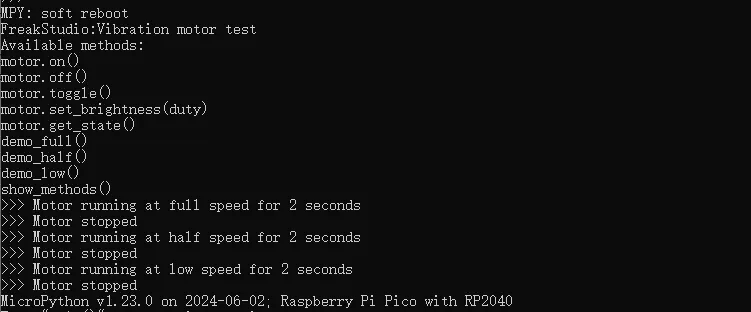
It can be seen that when the code runs, the motor vibrates with different intensities.
IV. Drivers
vibration_motor_driver.zip 11 KB
5. BOM & Recommended Alternative Parts
None.
VI. Revision History
Document Version | Date of Revision | Modifier | Revised Content |
v1.0 | 2025-08-13 | Hou Junhan Zero Kōkō | Initialize the document |
v1.1 | 2025-10-24 | Li Zisheng | Added PCB layout precautions for Version 2.8 Revised Section 3, Instructions for Circuit Source Project and Module Usage, and added a secondary heading: 3.1 Circuit Source Engineering, 3.2 Module Usage Instructions, 3.3 Application Experiments The BOM sheet has not been finally checked, the driver has not been re-verified, and the 3.3 application experiment Not yet specified. |
v1.2 | 2025-12-29 | Li Zisheng | Added application experiments and production files |
v1.3 | 2025-12-31 | Xin Ruili | Create an open-version document based on the internal document version v1.2. |
v1.4 | 2026-03-29 | Xin Ruili | Modified the application experiment section |
VII. Relevant Materials
7.1 Chip Datasheet
ao3400.pdf 5.5 MB
XHXDZ-1020 Motor Datasheet (1).pdf 375 KB
7.2 Unique Icons for PCB Silk Screen