
Contents
- Introduction
- I. Module Introduction
- II. Introduction to Major Chips
- 2.1 Chip Overview
- 2.2 Pin Definition
- 2.3 Functional Block Diagram
- 2.4 Performance Parameters
- 2.5 Reference Circuit
- 2.6 Chip Configuration
- 2.7 Communication Interfaces and Related Protocols
- 2.8 Register Definition
- III. Circuit Engineering
- 3.1 Circuit Source Engineering
- 3.2 Module Usage Instructions
- 3.3 Application Experiment
- 4. Drivers
- 5. BOM & Recommended Alternative Parts
- VI. Revision History
- VII. Relevant Materials
Introduction
In consumer scenarios such as the water tanks of steam ovens, robot vacuum bases, and coffee machines, or outdoor scenarios including urban waterlogging and industrial equipment, the stability and accuracy of liquid level detection directly affect the user experience and safety of the equipment. However, traditional float-type and photoelectric liquid level solutions have long been plagued by the pain points of "prone to jamming, misjudgment, and corrosion", which frequently cause the liquid level control of equipment to fail.
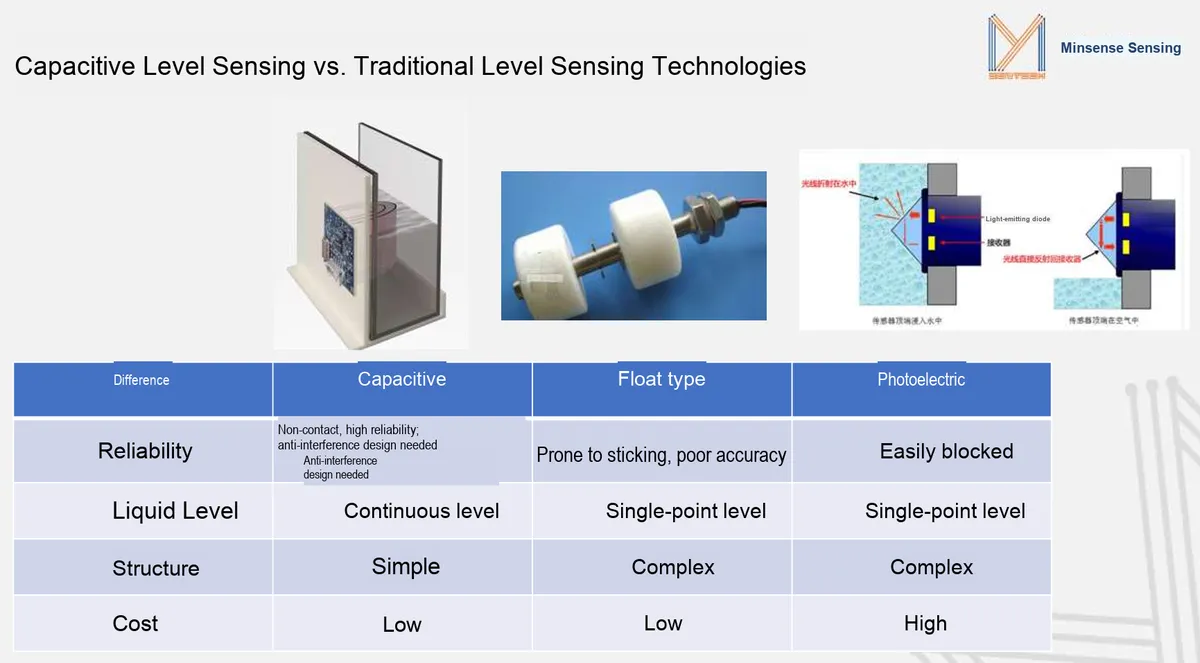
Traditional liquid level solutions all have their limitations: the float type is prone to sticking due to scale adhesion and only supports single-point liquid level detection; the photoelectric type is easily blocked by stains and water vapor, featuring a high error rate and relatively high cost; the contact electrode type is susceptible to water quality, with severe data drift after corrosion. In contrast, the capacitive solution, with the core advantages of non-contact design, continuous liquid level detection, simple structure and low cost, is perfectly adapted to various scenarios: it does not need to contact the liquid and will not be contaminated by scale; it can realize continuous liquid level monitoring from empty to full, supporting refined water volume control;With a simple structure, this module can be directly mounted on the outer wall of a container for easy installation, and its cost is far lower than that of optoelectronic solutions, making it an optimal choice for liquid level detection in both consumer and industrial scenarios.
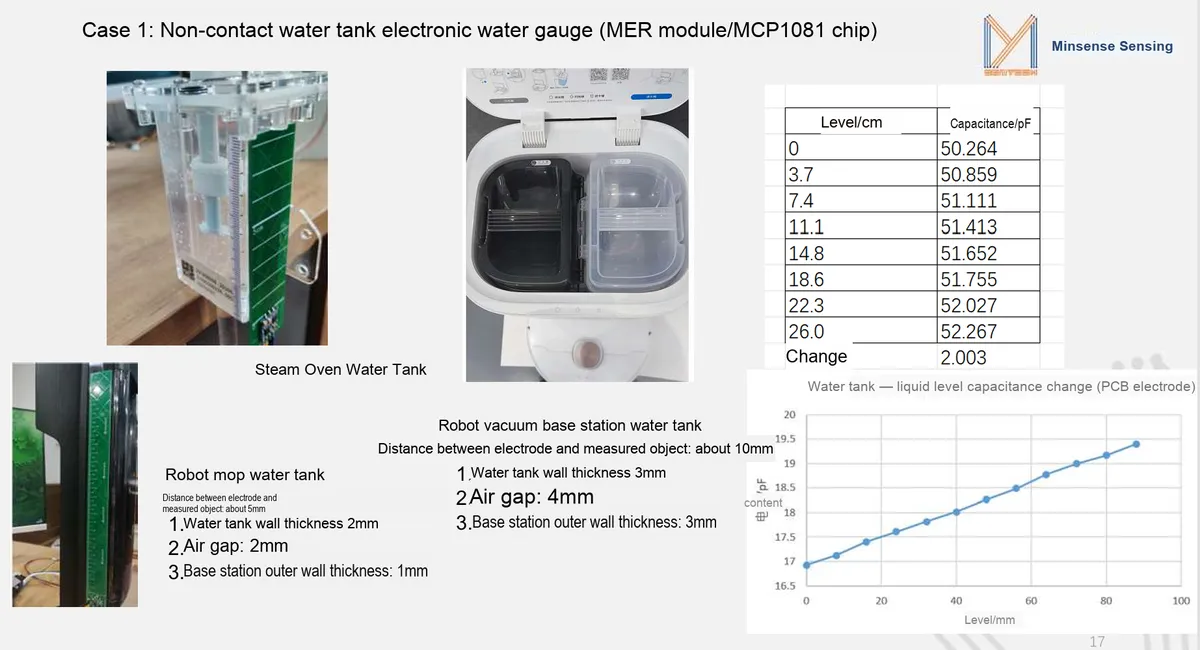
In outdoor scenarios such as urban waterlogging, tunnel ponding, and groundwater level monitoring, this module can serve as a non-contact liquid level detection unit, and work with rain gauges to realize the whole-process monitoring of rainfall, ponding and drainage. Unaffected by water impurities and light changes, it can operate stably in complex outdoor environments and output accurate liquid level data, providing reliable data support for urban waterlogging early warning and drainage scheduling, and helping to improve the intelligent level of urban flood control management.
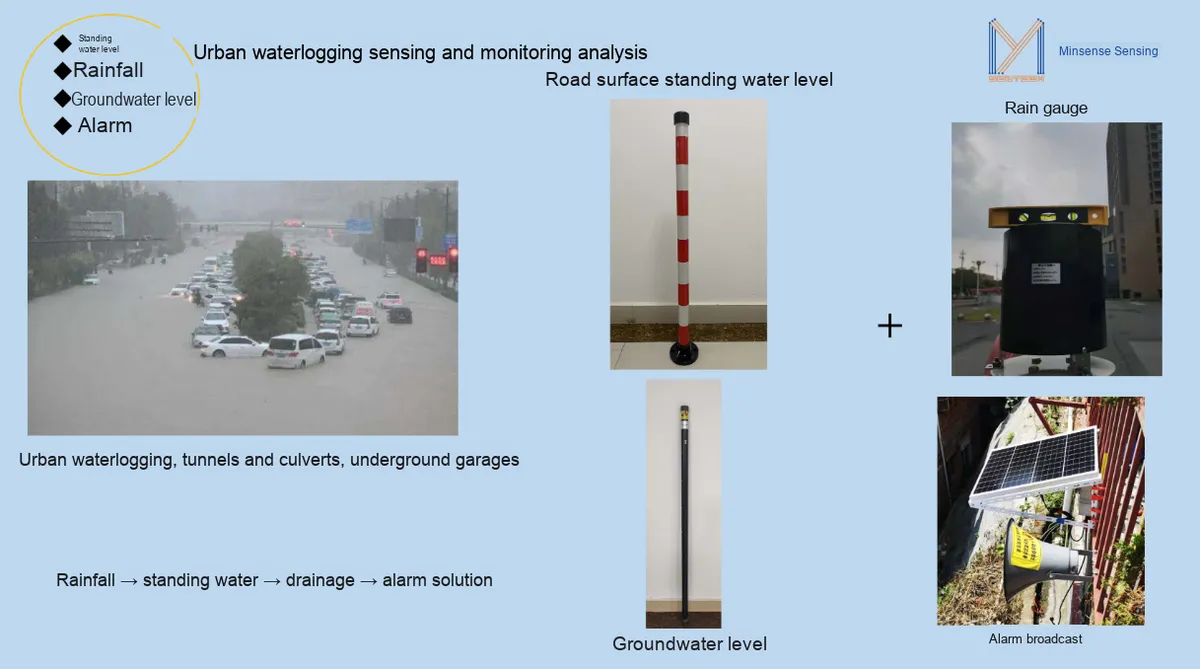
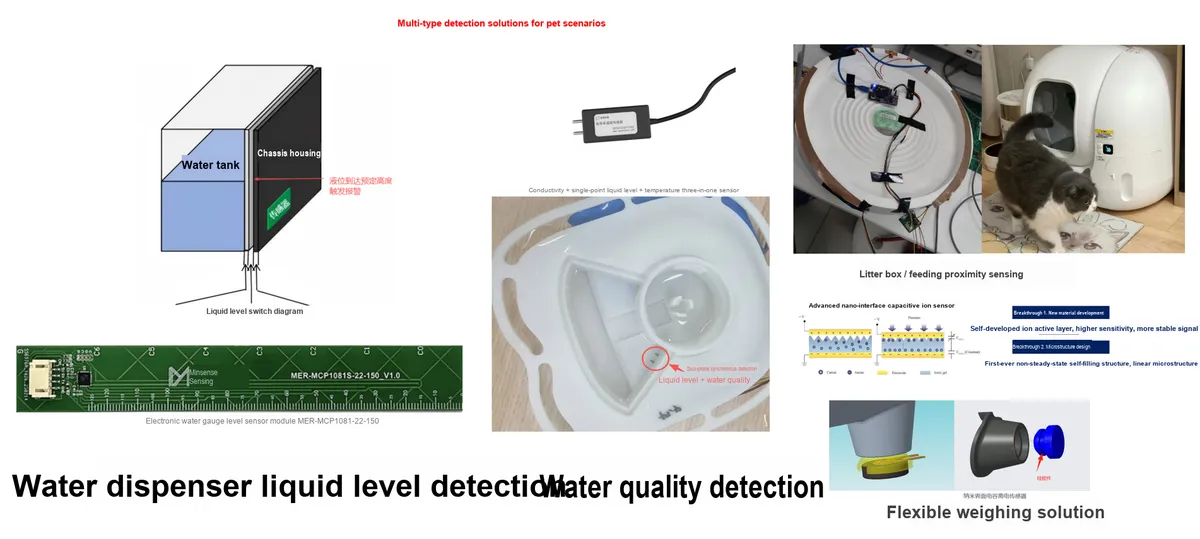
In the scenario of water tanks for home appliances, the sensor can be directly attached to the outer wall of the water tank to complete liquid level detection through the container wall without contacting the liquid, which completely avoids corrosion or adhesion of the sensor caused by scale and oil stains. In the water tanks of equipment such as steam ovens, robot vacuum cleaner bases, and coffee machines, it can stably output continuous liquid level data, enabling the equipment to accurately judge the water volume and avoid dry burning or water overflow; even through a container wall and air gap of about 3mm, it can maintain high sensitivity, perfectly adapting to the waterproof structure design of home appliances and providing a reliable basis for water volume control of the equipment.
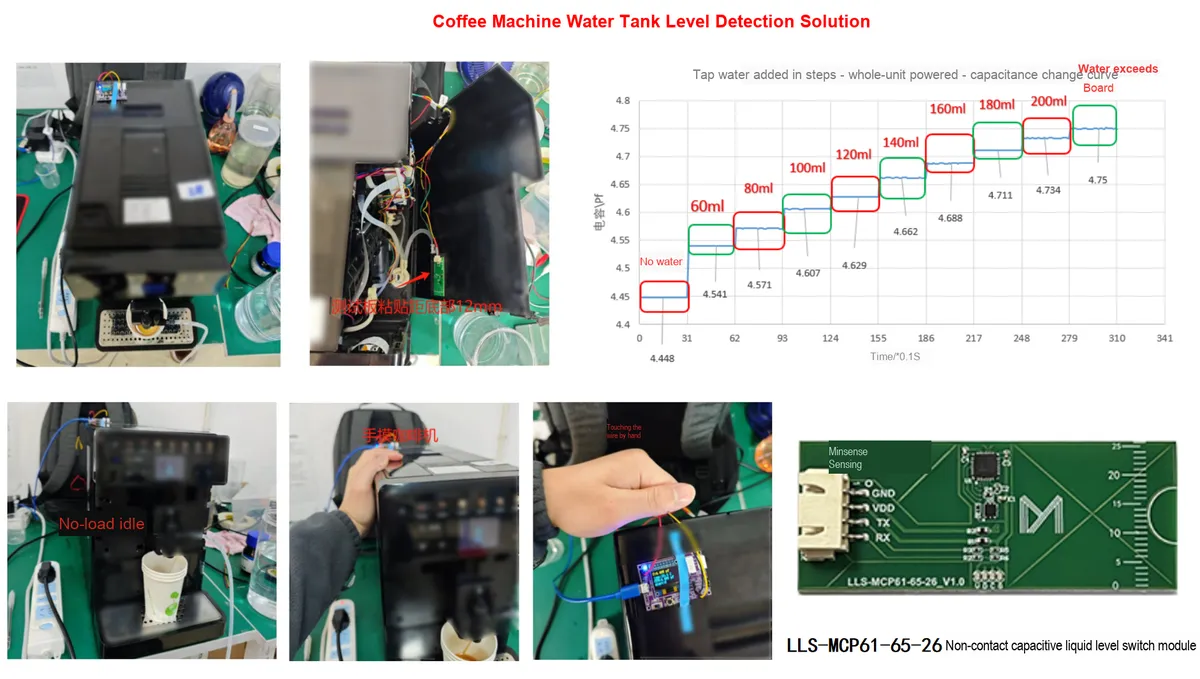
In the scenario of smart pet devices, it can not only be used for liquid level detection of the water tank in pet water fountains, but also be extended to proximity sensing for cat litter boxes and remaining amount detection for pet feeders. Its non-contact installation method will not be contaminated by stains from pets' drinking, the continuous liquid level detection can accurately feedback changes in water volume, and the low-power design also meets the long battery life requirements of pet devices, providing a stable and reliable sensing solution for smart pet devices and making pet drinking and feeding more intelligent.
I. Module Introduction
The Minyuan MER-MCP1081-260-26 electronic staff gauge liquid level sensor is an intelligent liquid level detection module based on the capacitive non-contact measurement principle. Equipped with the self-developed MCP1081S 10-channel multi-mode wideband digital capacitance processing chip, it realizes liquid level detection by sensing the change of liquid dielectric constant, which requires no direct contact with the liquid. It can even complete measurement through the walls of non-metallic containers such as plastic and glass, thoroughly solving the industry-wide problems that contact sensors are prone to corrosion, float-type sensors are prone to jamming, and photoelectric sensors are prone to obstruction.The built-in temperature compensation and anti-interference algorithm can effectively filter out the interference caused by limescale, water vapor and temperature difference, output stable continuous liquid level data, and provide reliable liquid level sensing solutions for various scenarios.
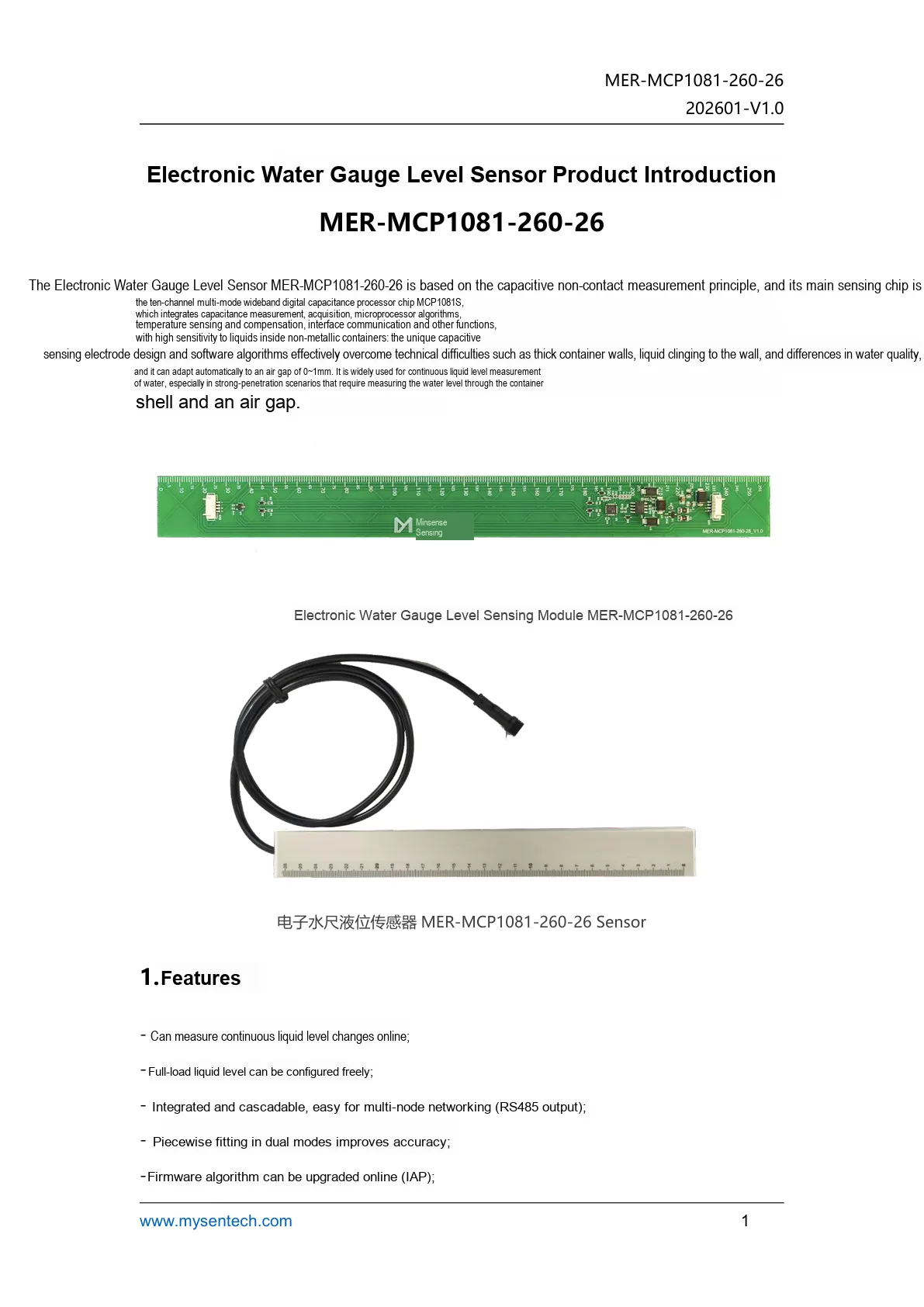
This figure presents the product introduction, appearance and core feature description of the MER electronic staff gauge liquid level sensor.
- It can measure continuous/segmented liquid level changes. The outer side of the sensor electrode surface is marked with scales, which can be compared with the actual measured values at any time;
- Add temperature compensation with a compensation range of 0℃ to + 50℃;
- Integrated and cascadeable, easy to form multi-node networks;
- Added calibration parameter registers to facilitate users' self-calibration;
- Easy to install and low in cost.
II. Introduction to Major Chips
2.1 Chip Overview
MER-MCP1081-260-26 adopts a 10-channel multi-mode wideband digital capacitance processor chip MCP1081S, which integrates capacitance measurement, acquisition, temperature sensing and compensation, microprocessor algorithm and interface communication into one, and is capable of non-contact continuous detection of the liquid level inside non-metallic containers.
2.2 Pin Definition
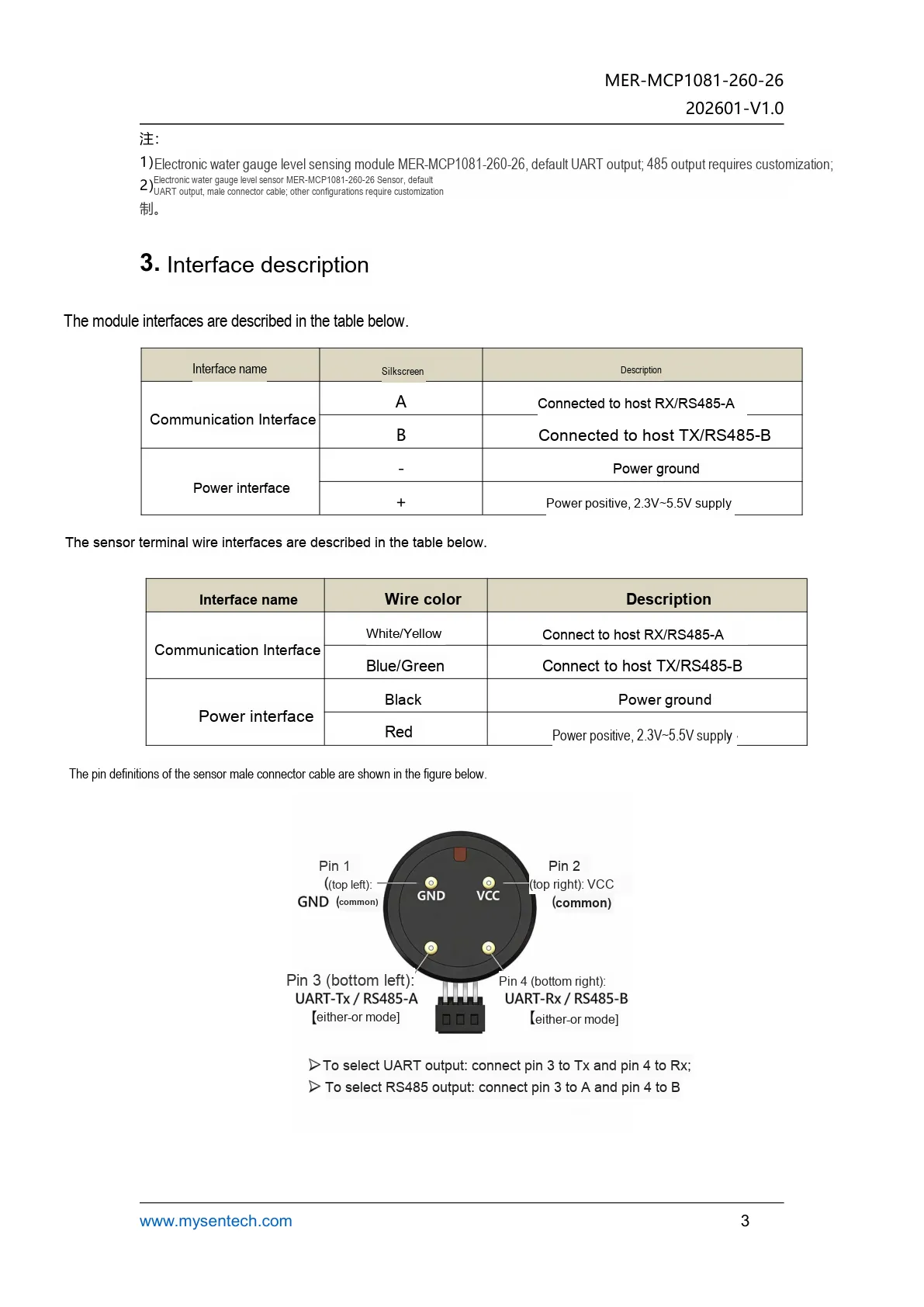
This figure presents the interface definition of the MER module and the sensor, which can be used to distinguish UART, RS485 and power pins.
2.3 Functional Block Diagram
None.
2.4 Performance Parameters
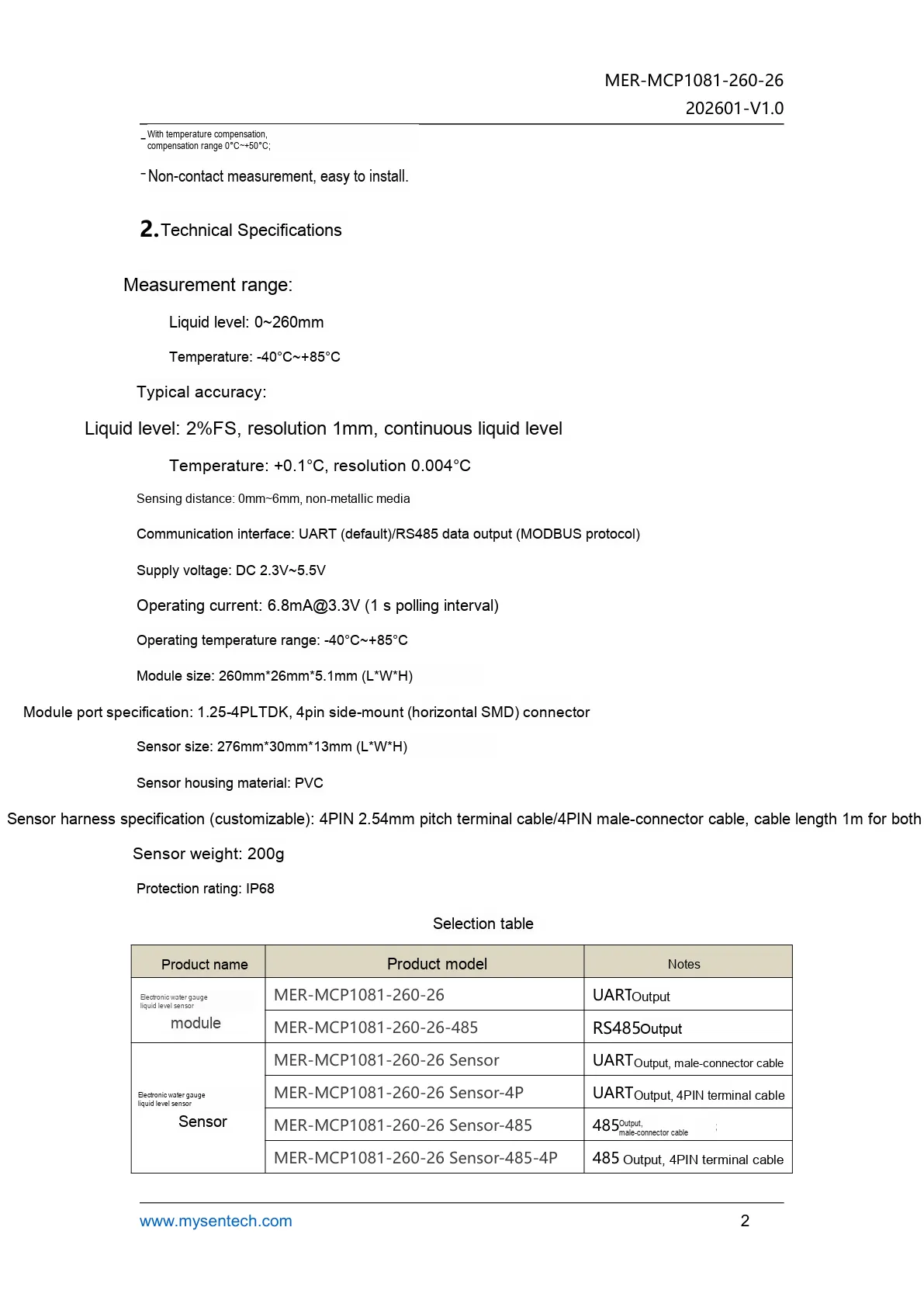
This figure lists the technical parameters of the MER module, including information such as measuring range, accuracy, power supply and interface type.
2.5 Reference Circuit
None.
2.6 Chip Configuration
None.
2.7 Communication Interfaces and Related Protocols
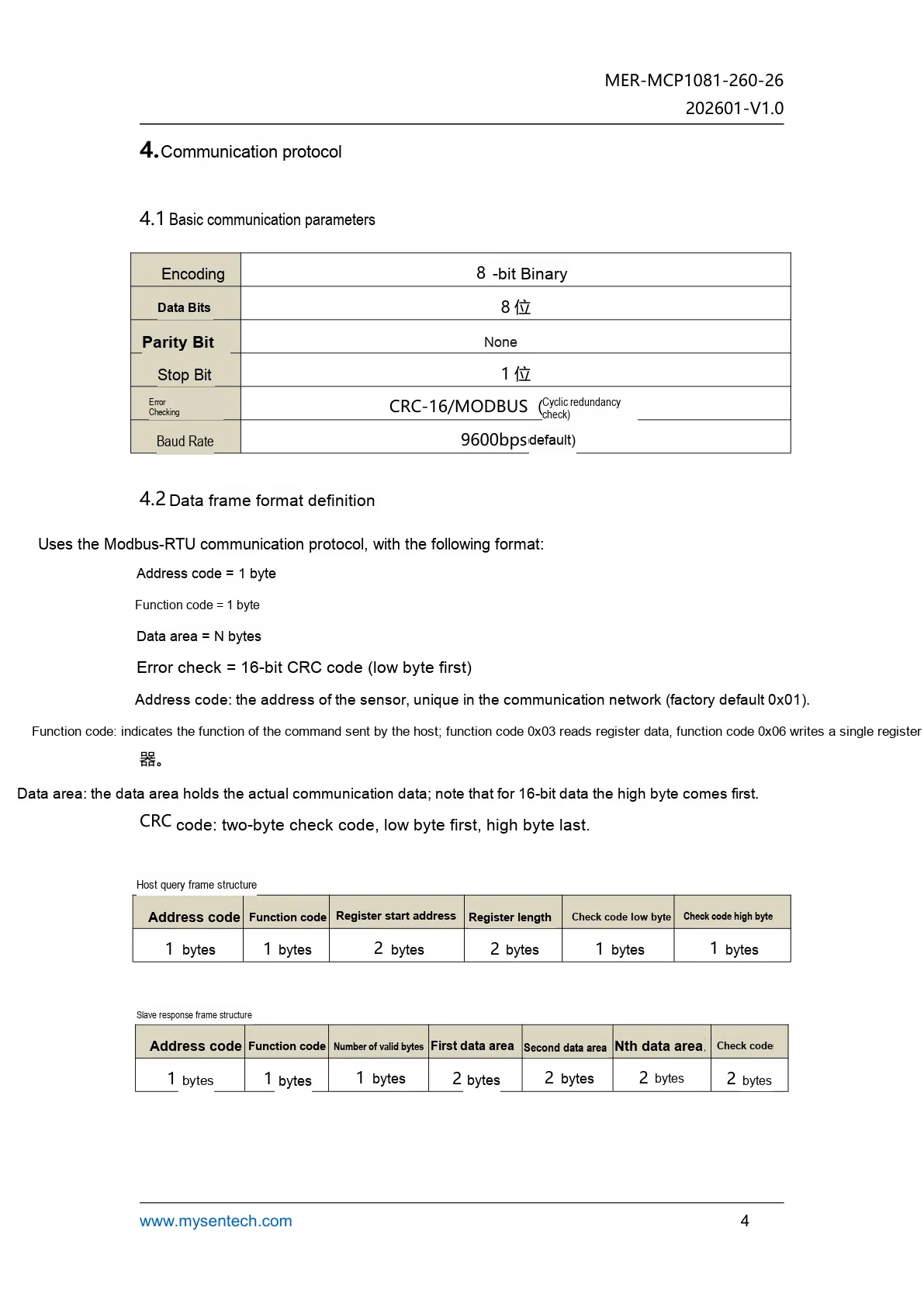
This diagram illustrates the Modbus-RTU Communication Protocol adopted by the MER module and the basic serial port parameters.
2.8 Register Definition
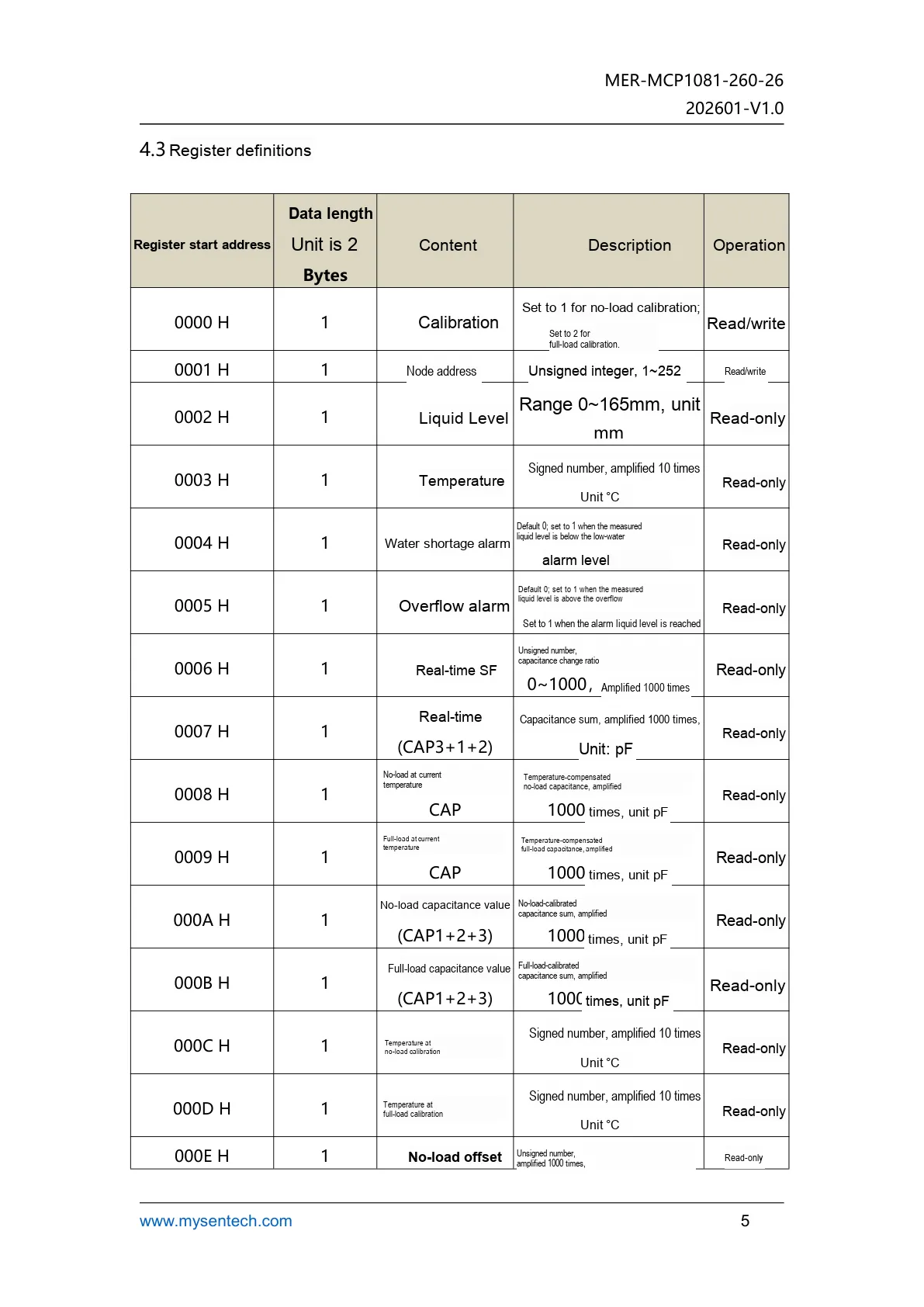
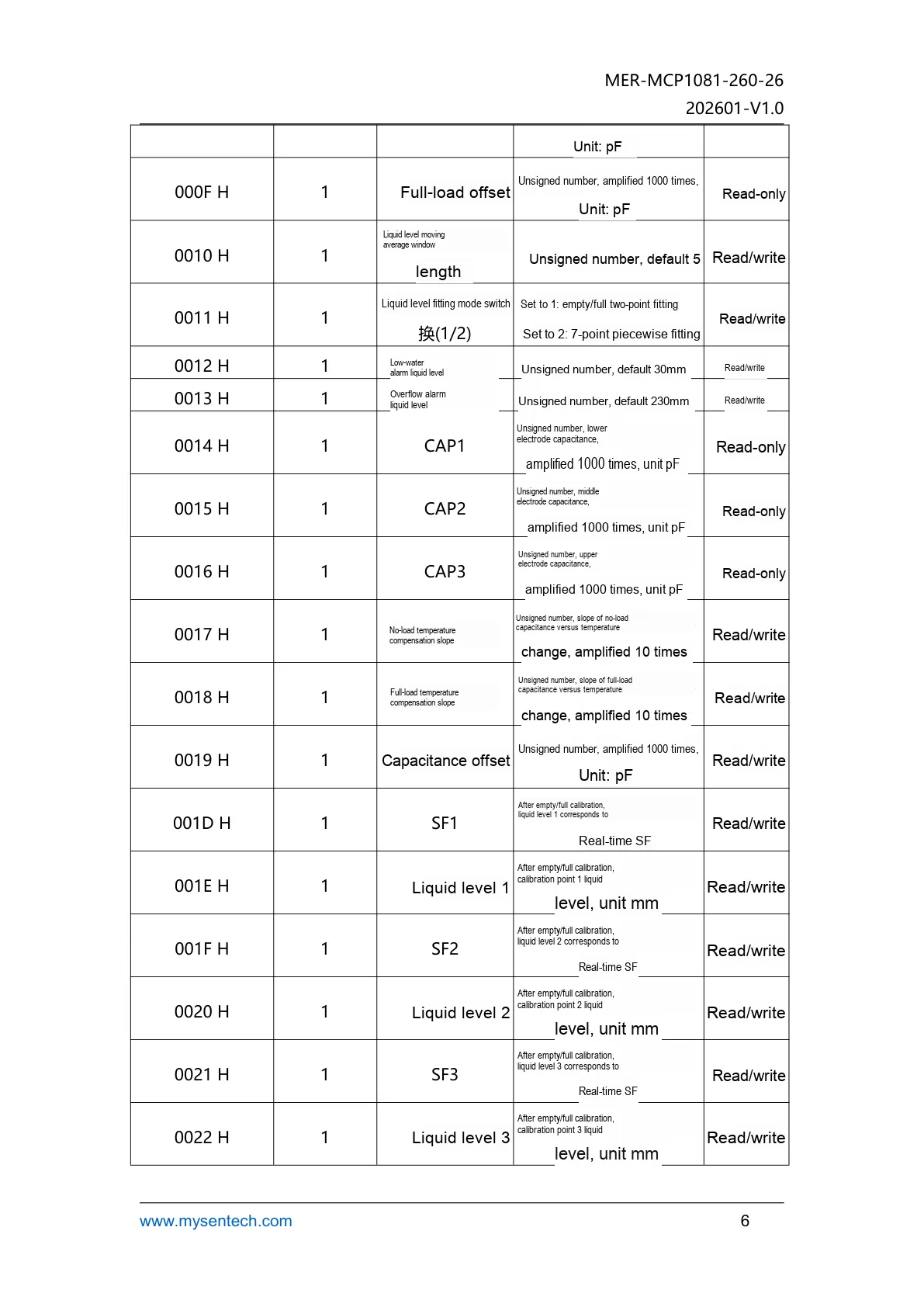
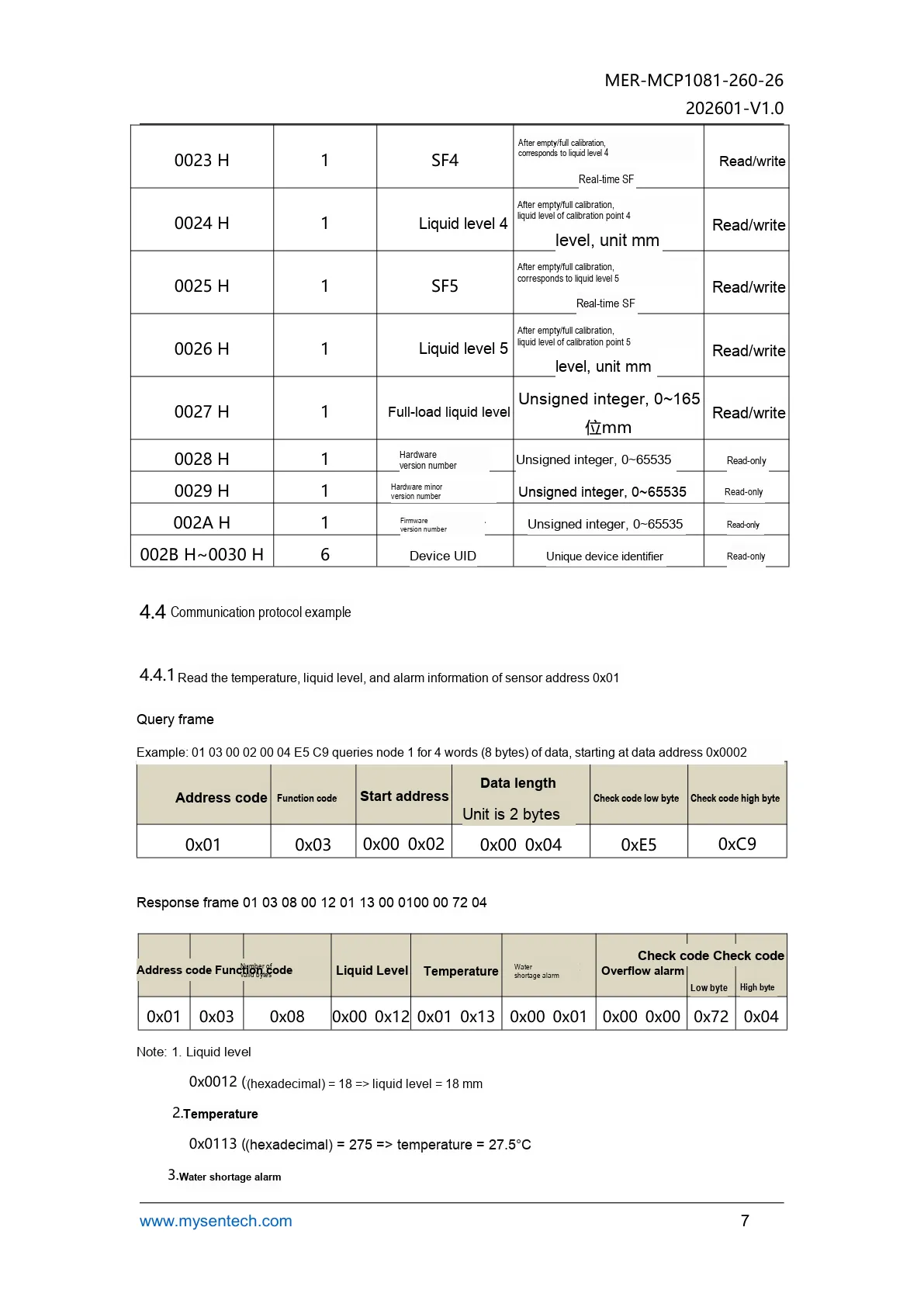
It displays the configuration content of registers and calibration points, which is suitable for reference during high-precision liquid level calibration.
III. Circuit Engineering
3.1 Circuit Source Engineering
To obtain the source project of the circuit, please refer to the link below:
https://mysentech.com/productinfo/162716.html
3.2 Module Usage Instructions
3.2.1 Module Test Environment Setup and Notes
When you receive the module, you first need to set up the test environment in accordance with the following requirements:
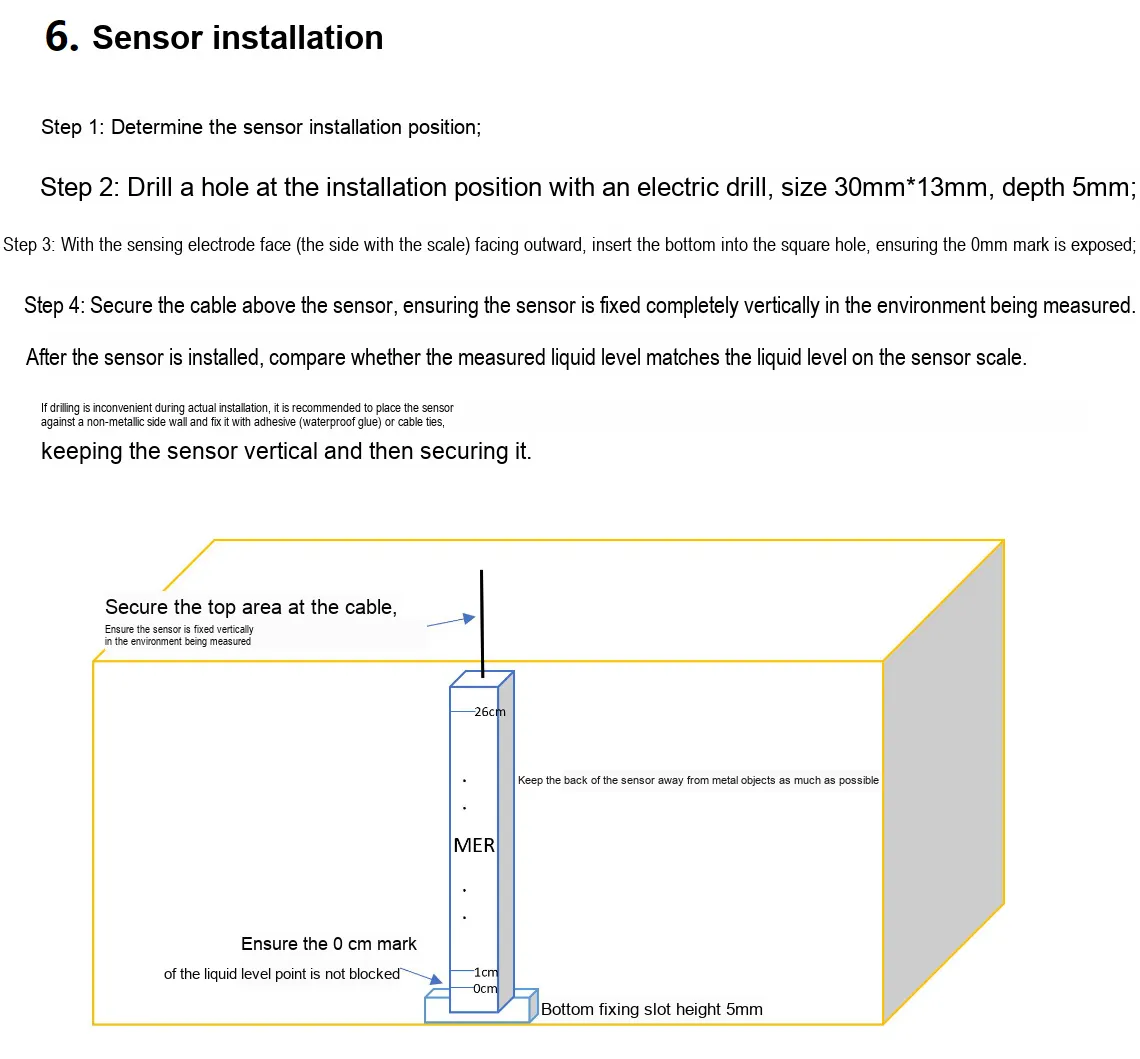
You can directly fill a transparent plastic cup with water to simulate a liquid level scenario, and verify its non-contact penetration capability at the same time.
Note that:
- The sensor must be installed vertically, with the zero scale aligned with the bottom of the container, and its back shall be kept away from metal objects;
- During installation, place it as close as possible to the non-metallic side wall; for waterproof models, ensure proper protection of cable connectors, and strictly prevent the supply voltage from exceeding 5.5V to avoid damaging the module.
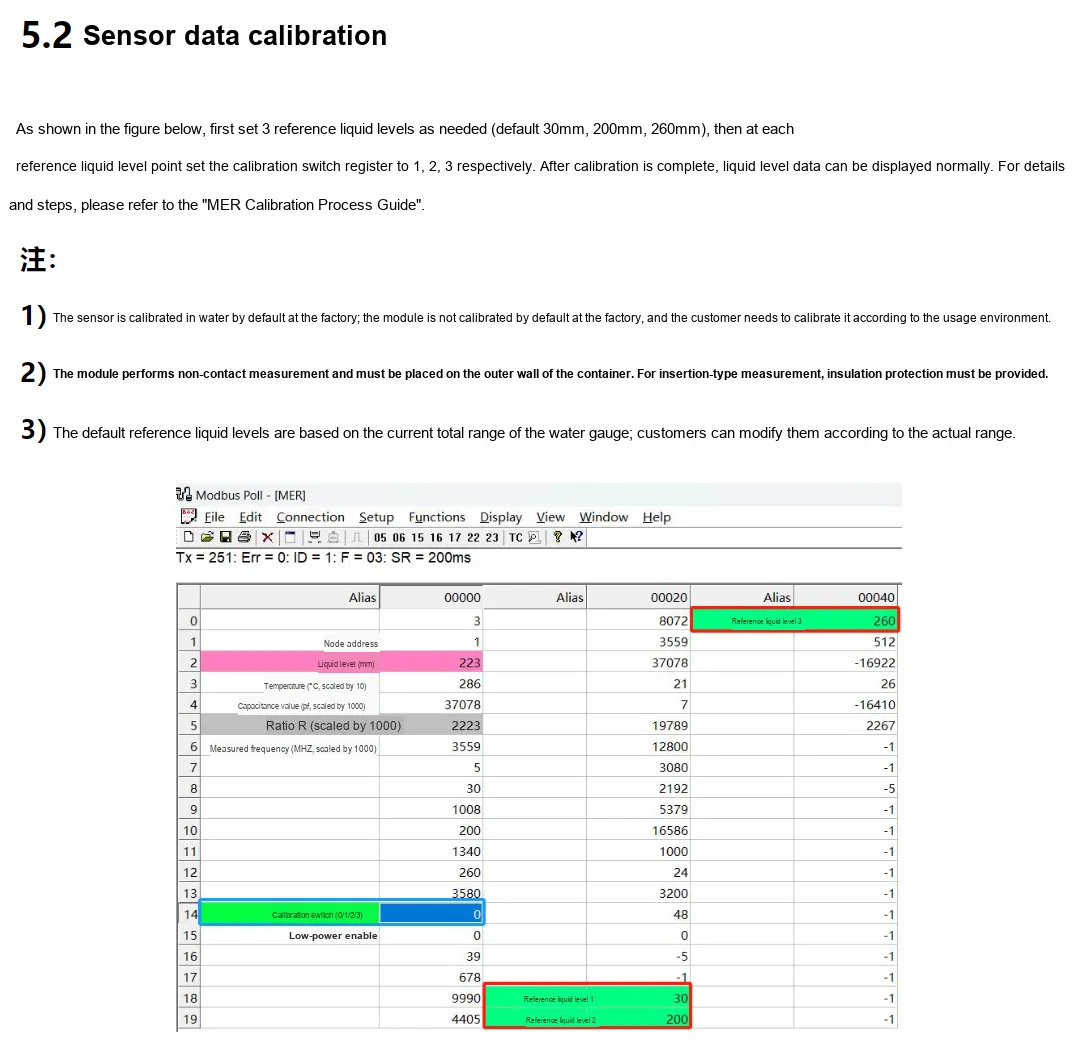
Next, perform the calibration by following the steps below:
3.2.2 Usage of Modbus Poll
Modbus Poll is a universal Modbus master debugging tool compatible with all capacitive sensors in this series that support the Modbus-RTU protocol. It enables quick serial communication debugging, real-time data reading and log export between sensors and computers, serving as a universal host computer tool for verifying sensor functions and collecting test data. The software supports Modbus RTU/ASCII/TCP/IP protocols, is compatible with multiple register types and data formats, and its operation process is universal for the entire series of sensors.
Before use, you need to complete the software installation and activation first. You can download the installation package through official channels; the first launch supports a 30-day trial, and you can also enter a registration code for permanent activation. After the hardware connects the sensor to the computer, open the software and click "Connection" - "Connect", then configure the serial port parameters (Port Number, baud rate, data bit/parity bit/stop bit; this series of sensors defaults to the 9600 Baud, 8N1 format, subject to the specification sheet of the corresponding specific model) in the pop-up window, and confirm to establish a communication connection.
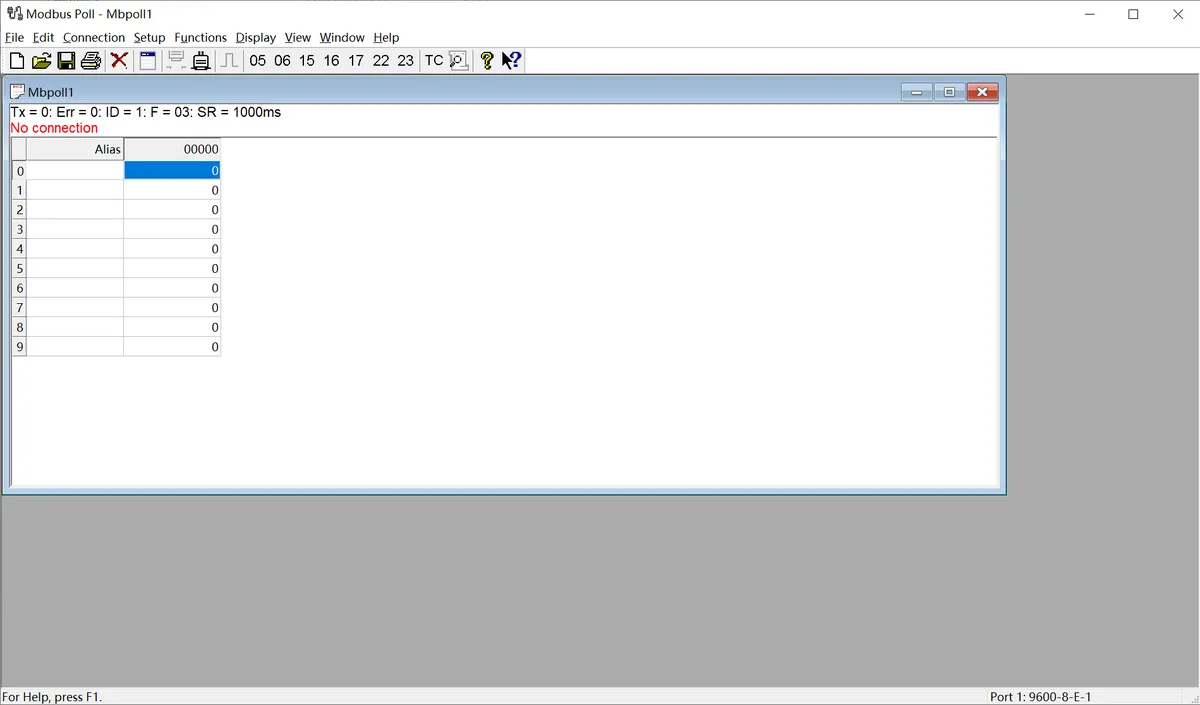
The following is a description of the general operation process:
- Serial Port Connection Configuration: After connecting the sensor to the computer via a USB-to-serial port module, launch the Modbus Poll software, click "Connection" - "Connect" on the menu bar, select the COM Port Number corresponding to the sensor in the pop-up window, and configure the serial port parameters matching the sensor (baud rate, data bits, parity check mode, stop bits; this series of sensors defaults to 9600 Baud, 8N1 format), then confirm to establish a communication connection.
- Import Sensor Configuration File: The software supports importing
. mbppre-configuration files corresponding to various sensor models. These files come with preset register addresses, data formats, and alias definitions, eliminating the need for manual register configuration. Simply open the. mbpfile for the corresponding sensor in the software to automatically load all parameters. Once the connection is established, real-time detection data of the sensor (such as dust/rain/frost thickness values, status flag bits, etc.) will be displayed directly. - Data Logging (Optional): If you need to save test data, you can configure logging rules via the "Setup" - "Excel Log" function. It supports logging data at fixed intervals or with every data update, and allows you to set a maximum number of log entries, facilitating subsequent analysis and verification of sensor data.
The above are the general basic operations of the host computer. For the. mbp preconfiguration files, specific register definitions and special configuration details of different sensor models, please refer to the content in "VII. Related Materials".
3.3 Application Experiment
Here, we use the GraftPort-RP2040 development board for testing, and the MER-MCP1081-260-26 electronic water gauge liquid level uses the UART interface to communicate with the main controller.
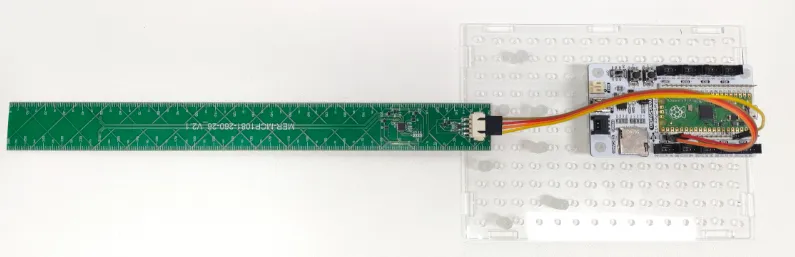
This diagram illustrates the wiring method between the MER module and GraftPort-RP2040 development board.
The module connections are shown in the following table:
Development Board Pins | Module Pins | Description |
Pin 16 |
|
|
Pin 17 |
|
|
Here, we need to search for the relevant driver packages on uPyPI: https://upypi.net/zh/
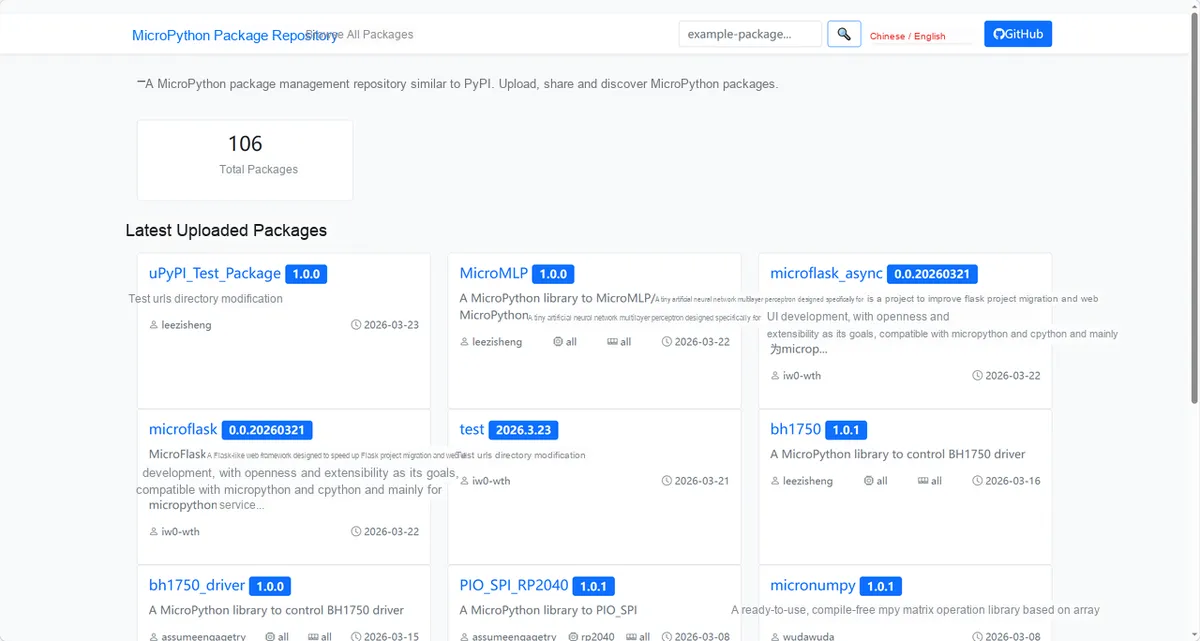
This diagram demonstrates the operation interface for searching for MER driver packages in uPyPI.
Enter mcp1081_driver to search, and the following will be displayed:
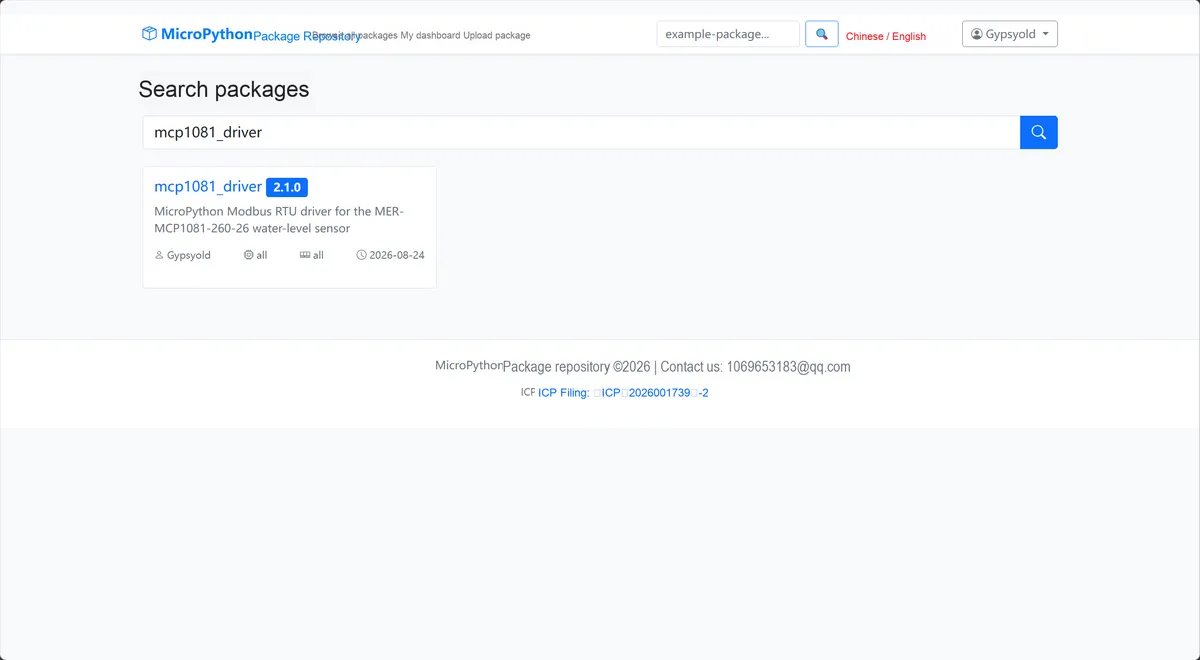
This figure shows the mcp_driver search results, which facilitates the confirmation of the target driver package to be installed.
Click to copy the local installation command:
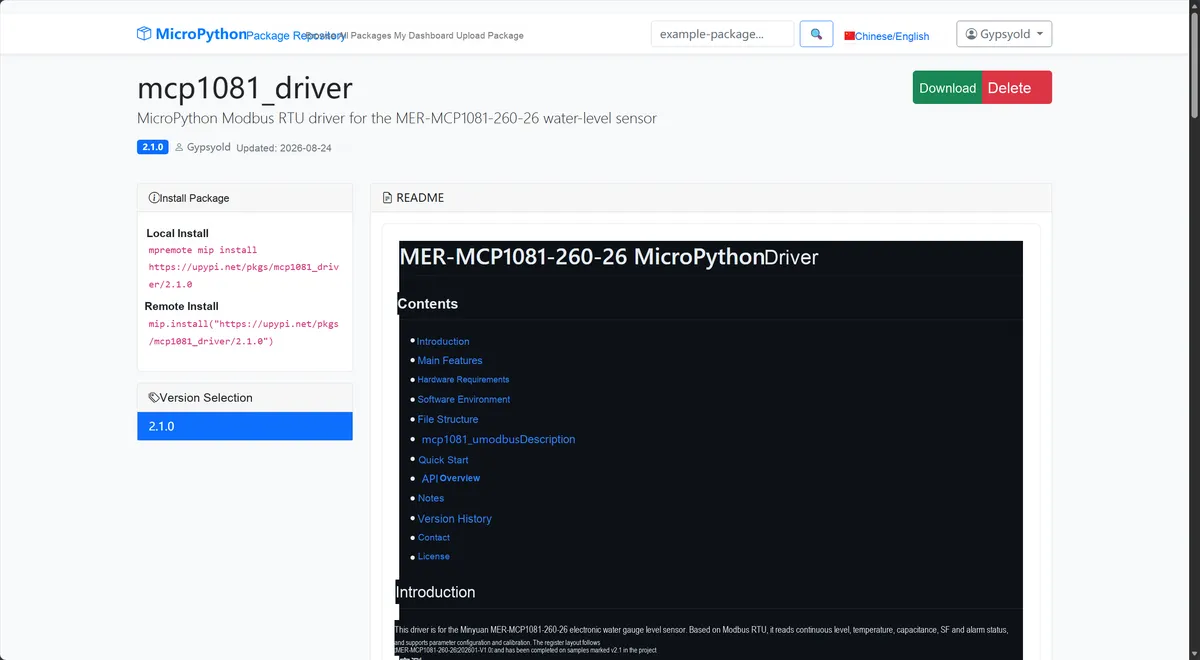
This figure shows the interface for copying the MER driver installation command, which facilitates the rapid deployment of the test environment.
Import the module driver library code via the mip tool. Below are the usage commands for the mpremote tool:
mpremote mip install https://upypi.net/pkgs/mcp1081_driver/2.1.0After importing the MER-MCP1081-260-26 electronic water gauge liquid level sensor - MicroPython driver code, copy the following main.py code into our project:
# Python env   : MicroPython v1.23.0
# -*- coding: utf-8 -*-
# @Time    : 2026/08/21
# @Author  : hogeiha
# @File    : main.py
# @Description : MER-MCP1081-260-26 electronic water-level sensor example
# @License : MIT

# ======================================== Import Modules =========================================

import time
from mer import MER
from umodbus.serial import Serial as ModbusRTUMaster

# ======================================== Global Variables ============================================

SLAVE_ADDR = 1
UART_ID = 0
TX_PIN = 16
RX_PIN = 17
BAUDRATE = 9600
PRINT_INTERVAL_MS = 1000
READ_ERROR_DELAY_MS = 500
STARTUP_RETRY_DELAY_MS = 1000

# ======================================== Functions ============================================

# ======================================== Custom Classes ============================================

# ======================================== Initialization configuration ===========================================

time.sleep(3)
print("FreakStudio: MER-MCP1081-260-26 water level sensor running")

host = ModbusRTUMaster(
    pins=(TX_PIN, RX_PIN),
    baudrate=BAUDRATE,
    data_bits=8,
    stop_bits=1,
    parity=None,
    uart_id=UART_ID,
)
sensor = MER(host, slave_addr=SLAVE_ADDR)

# ========================================  Main Program  ============================================

while True:
    try:
        node_address = sensor.read_node_address()
        break
    except RuntimeError as error:
        print("Sensor not responding: %s" % error)
        print("Retrying sensor startup...")
        time.sleep_ms(STARTUP_RETRY_DELAY_MS)

print("Node address: %d" % node_address)
print("Hardware version: %s" % sensor.read_hw_version())
print("Firmware version (raw): %d" % sensor.read_fw_version())
print("Device UID: %s" % sensor.read_device_uid())
print("Filter window: %d" % sensor.read_filter_count())
print("Fit mode: %d" % sensor.read_fit_mode())
print("Alarm levels (low, overflow): %s" % (sensor.read_alarm_levels(),))
print("Full level: %d mm" % sensor.read_full_level())
last_print_time = time.ticks_ms()

try:
    while True:
        current_time = time.ticks_ms()
        if time.ticks_diff(current_time, last_print_time) >= PRINT_INTERVAL_MS:
            try:
                data = sensor.read_measurements()
            except RuntimeError as error:
                print("Transient communication error: %s" % error)
                last_print_time = current_time
                time.sleep_ms(READ_ERROR_DELAY_MS)
                continue
            print(
                "Level: %(level_mm)d mm | Temperature: %(temperature_c).1f C | "
                "CAP: %(capacitance_pf).3f pF | SF: %(sf).3f | "
                "Low: %(low_alarm)s | Overflow: %(overflow_alarm)s" % data
            )
            last_print_time = current_time
        time.sleep_ms(10)
except KeyboardInterrupt:
    print("Program interrupted by user")
except OSError as error:
    print("Hardware communication error: %s" % error)
except RuntimeError as error:
    print("Driver error: %s" % error)
except Exception as error:
    print("Unknown error: %s" % error)
finally:
    print("Cleaning up resources...")
    sensor.deinit()
    if hasattr(host._uart, "deinit"):
        host._uart.deinit()
    del sensor
    del host
    print("Program exited")
Burn the code, open the terminal, and the output is as follows:
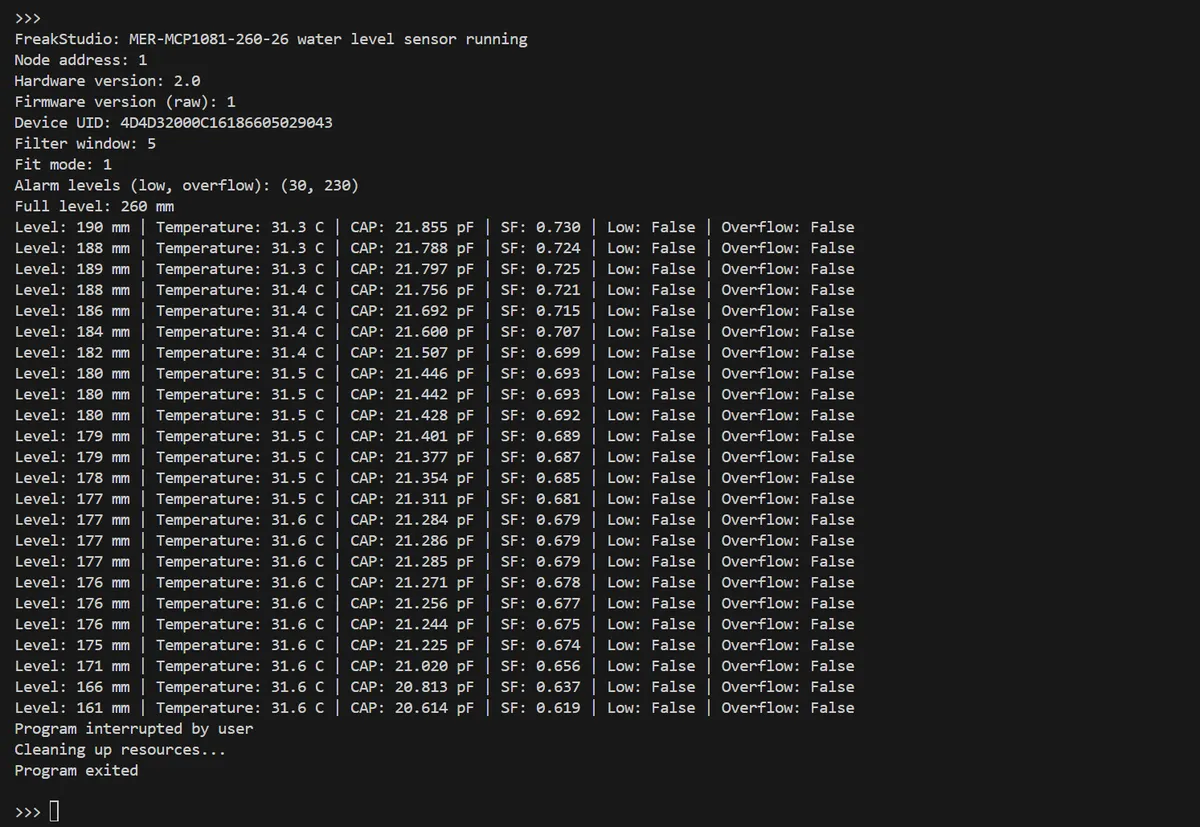
This figure shows the serial port output of the MER sample program, which verifies that parameters such as liquid level, temperature and capacitance are read correctly.
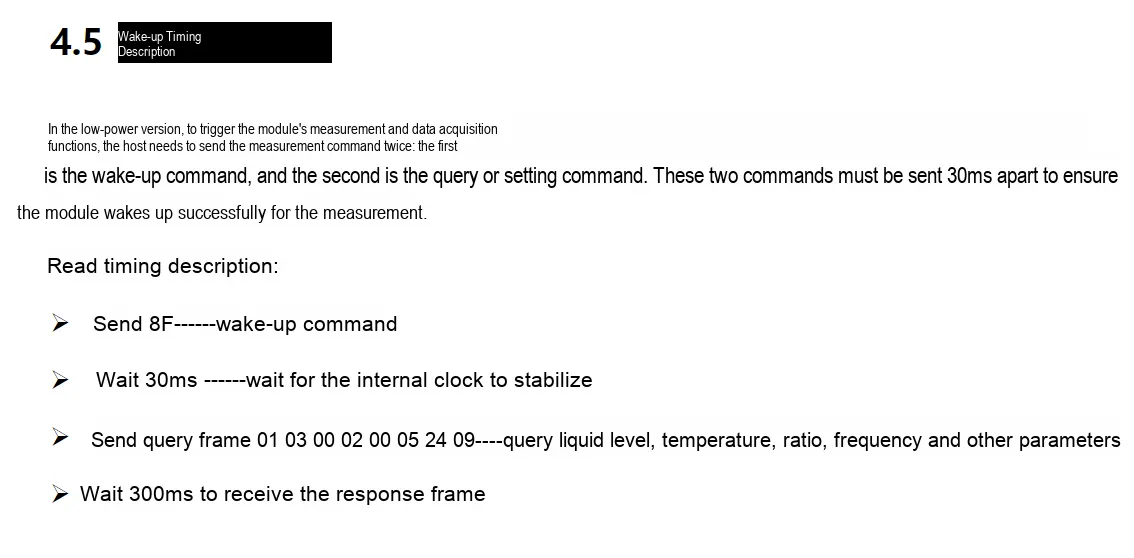
Note that the wake-up function is already built into our driver library, so developers do not need to perform additional operations.
4. Drivers
Subsequently add the audited drivers
5. BOM & Recommended Alternative Parts
None.
VI. Revision History
Document Version | Date of Revision | Modifier | Modify Content |
v1.0 | 2026-08-21 | Mi Ming Xuan | Initialize the document |
VII. Relevant Materials
MER Electronic Water Gauge Liquid Level Sensor Product Introduction-MSE202412.pdf 958 KB