Contents
- I. Module Introduction
- 2. Introduction to Main Chips
- 2.1 Chip Overview
- 2.2 Pin Definition
- 2.3 Functional Block Diagram
- 2.4 Performance Parameters
- 2.5 Reference Circuit
- 2.6 Chip Configuration
- 2.7 Communication Interfaces and Related Protocols
- 2.8 PCB Routing Precautions
- III. Instructions for Circuit Engineering and Module Usage
- 3.1 Circuit Source Engineering
- 3.2 Module Usage Instructions
- 3.3 Application Experiment
- 4. Drivers
- 5. BOM & Recommended Alternative Parts
- VI. Revision History
- VII. Relevant Materials
- 7.1 Chip Datasheet
- 7.2 Unique Icons for PCB Silk Screen
I. Module Introduction
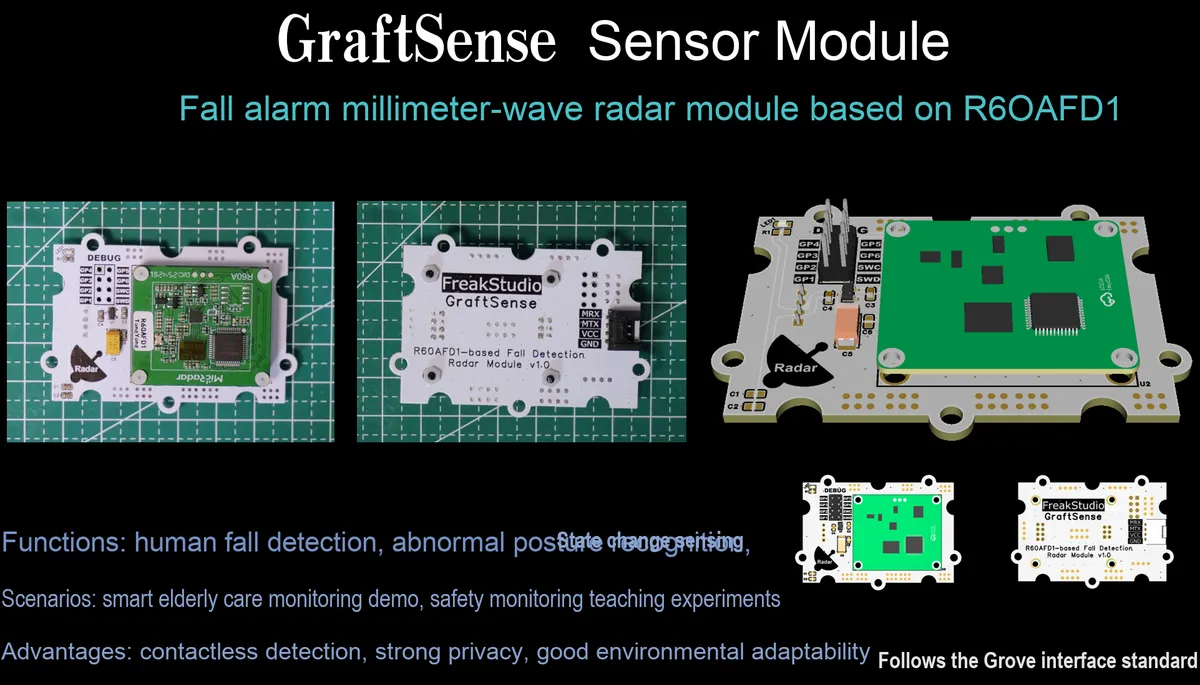
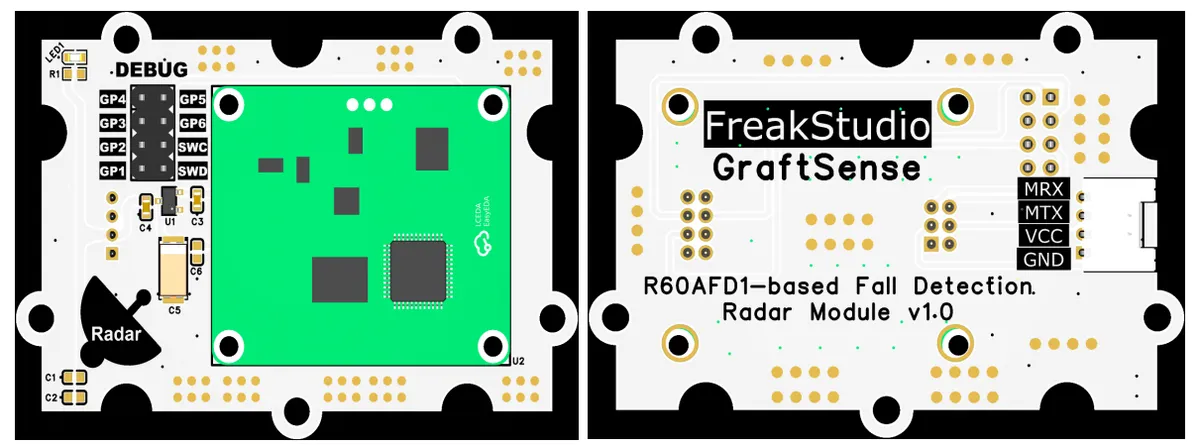
R60AFD1-based Fall Alarm Millimeter-wave Radar Module, with the R60AFD1 radar chip as the core, can realize synchronous perception of moving personnel and stationary personnel (sitting still) through millimeter-wave sensing technology, and meanwhile is equipped with precise fall detection function, capable of outputting the numerical status of personnel movement amplitude in real time.This module only detects personnel with biometric features, which can effectively eliminate the interference of inanimate objects in the environment. It adopts a universal UART communication interface and provides a universal protocol, and is also equipped with expansion interfaces and MCU interfaces. It is powered by a 5V-to-3.3V circuit, and integrates power filtering and a power indicator. With low output power, it is harmless to the human body, free from the influence of environmental factors such as temperature, light and dust, and features high sensitivity. It is suitable for scenarios such as elderly care monitoring and security early warning, and provides a reliable non-contact solution for personnel safety monitoring.
2. Introduction to Main Chips
The module adopts R60AFD1 fall detection millimeter-wave radar module.
2.1 Chip Overview
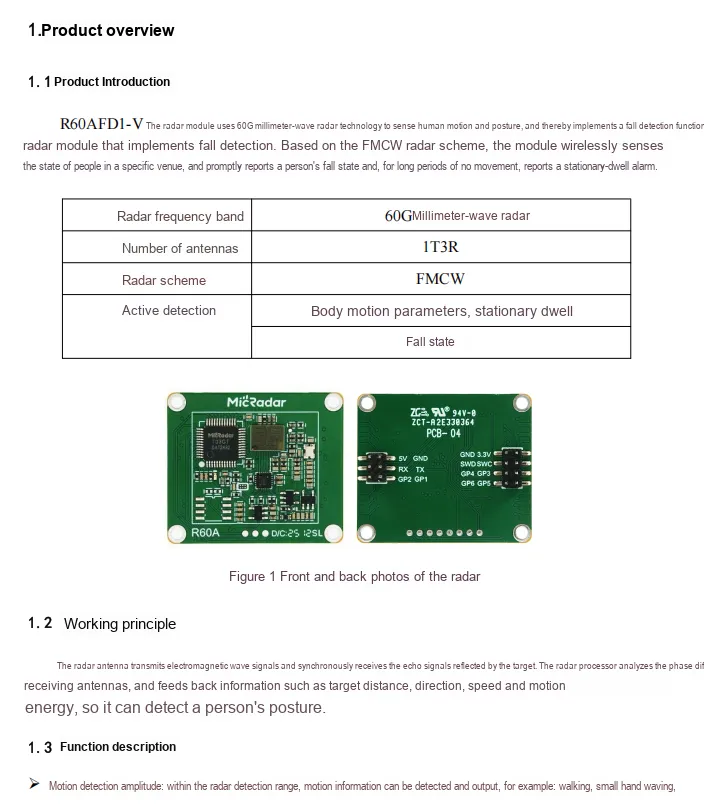
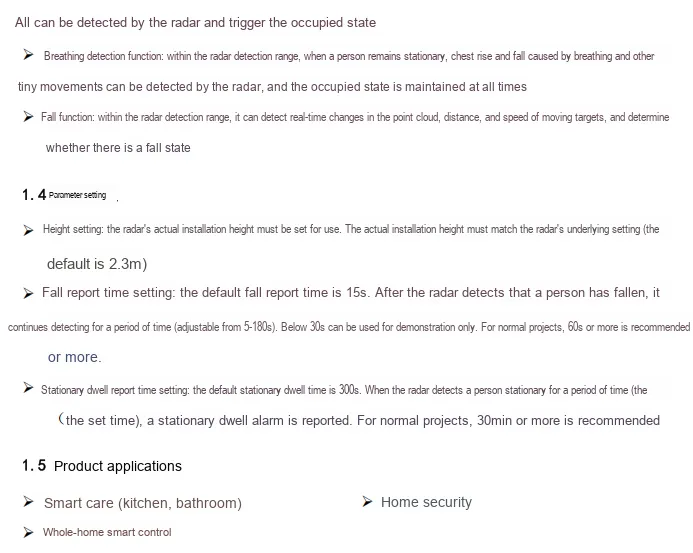
R60AFD1-V is a fall alarm radar module based on 60G millimeter-wave technology, adopting the FMCW system and 1T3R antenna. It transmits electromagnetic waves and analyzes the phase difference and energy changes of the echo to detect tiny movements such as human actions, postures and respiration, so as to realize functions of motion detection, respiration detection and fall judgment. It also supports parameter settings including installation height, fall reporting time and static resident alarm time, which can wirelessly monitor the fall and long-term static status of people in specific places and give an alarm in time. It is widely used in scenarios such as smart care, home security and whole-house intelligence.
2.2 Pin Definition
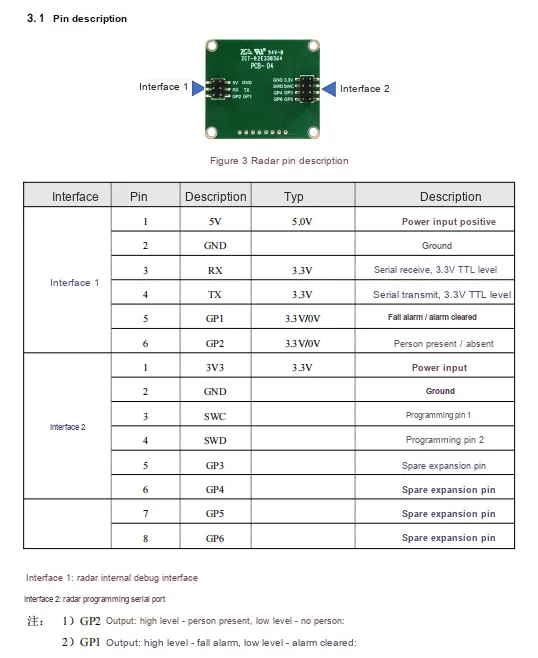
2.3 Functional Block Diagram
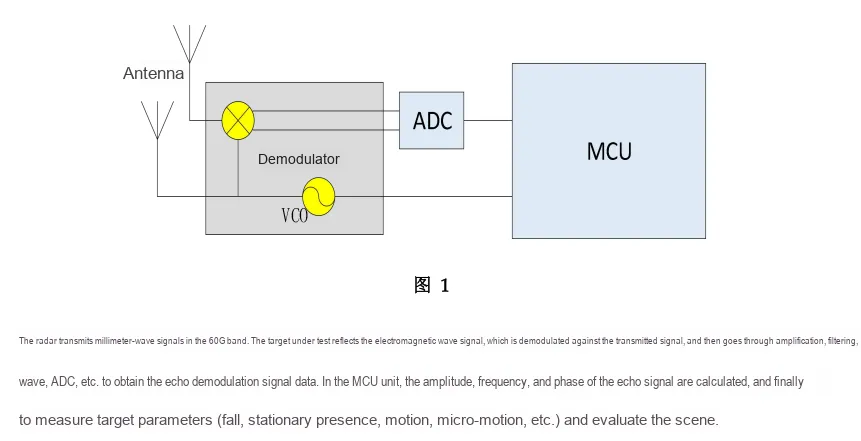
2.4 Performance Parameters
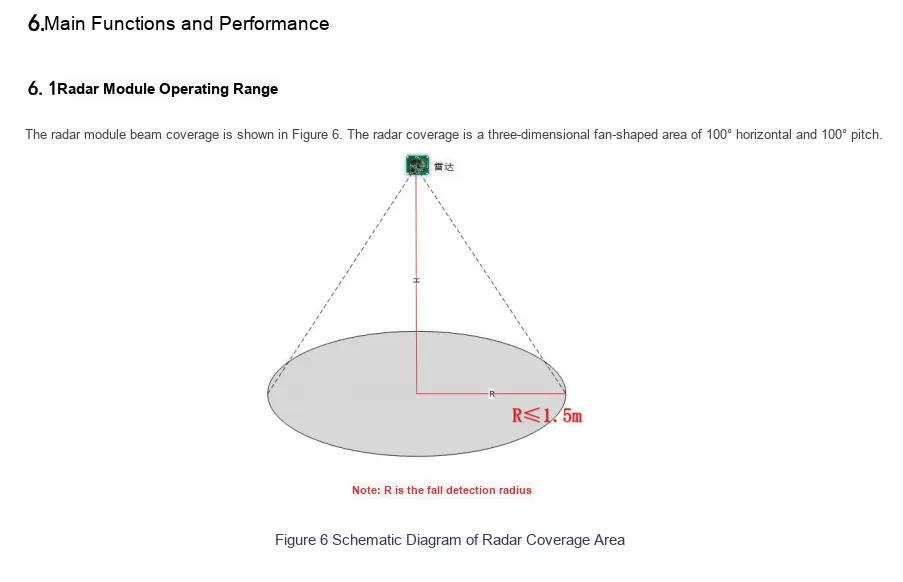

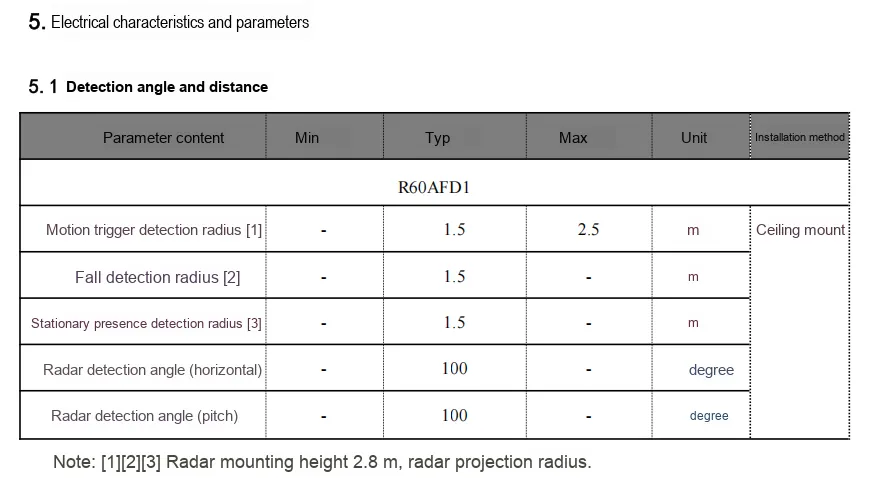
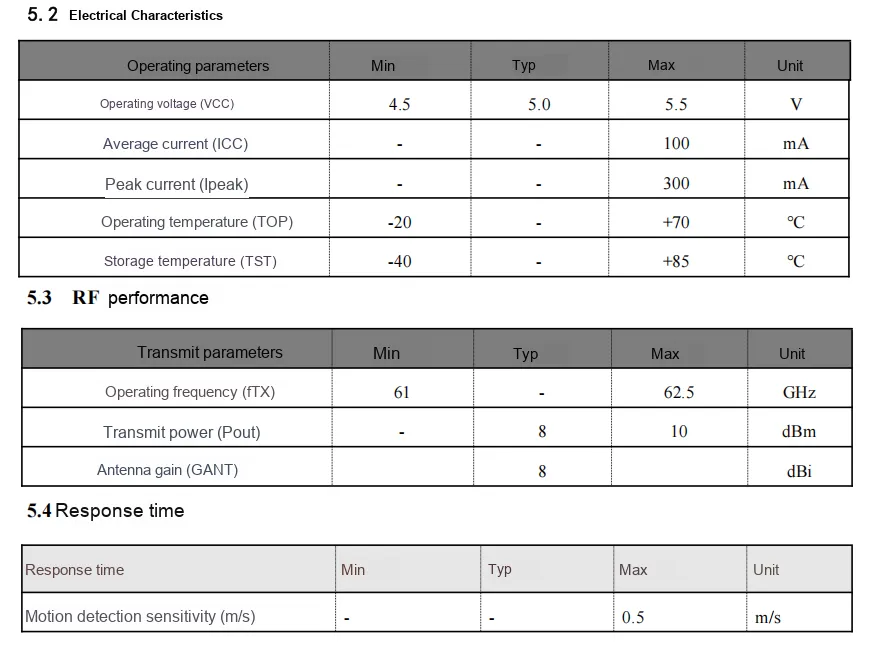

2.5 Reference Circuit
2.6 Chip Configuration
This module is of Plug and Play type, requiring no hardware configuration or software register setup.
2.7 Communication Interfaces and Related Protocols
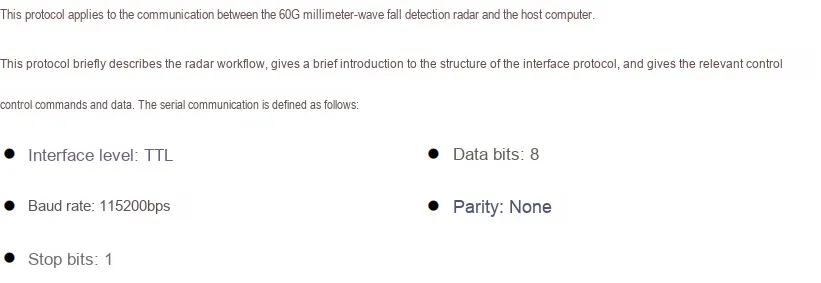
2.7.1 Description of Vital Sign Parameters Actively Posted Back by Radar
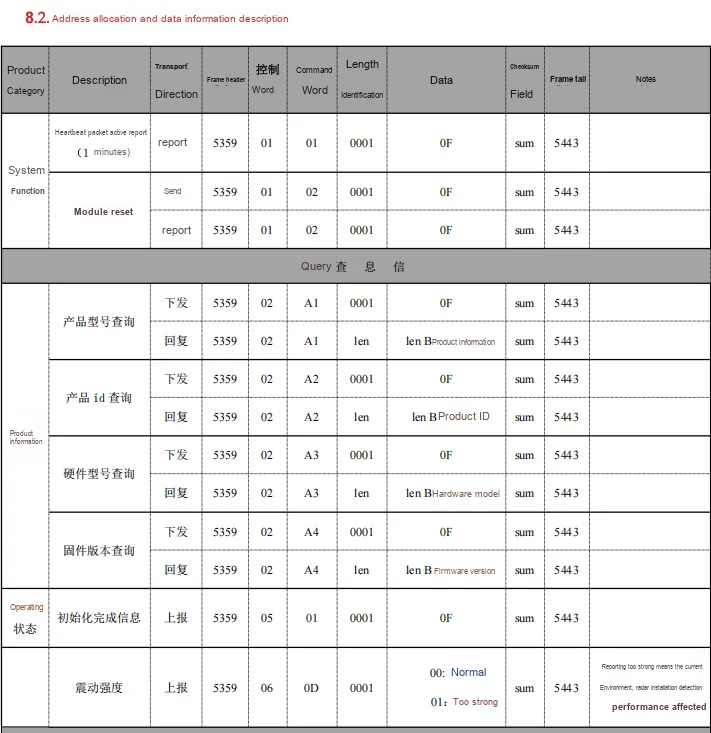
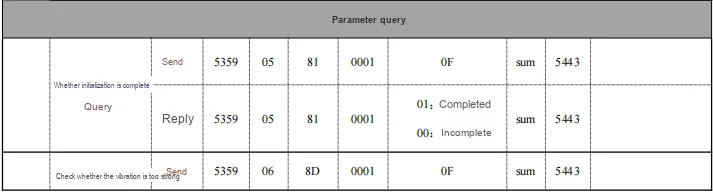

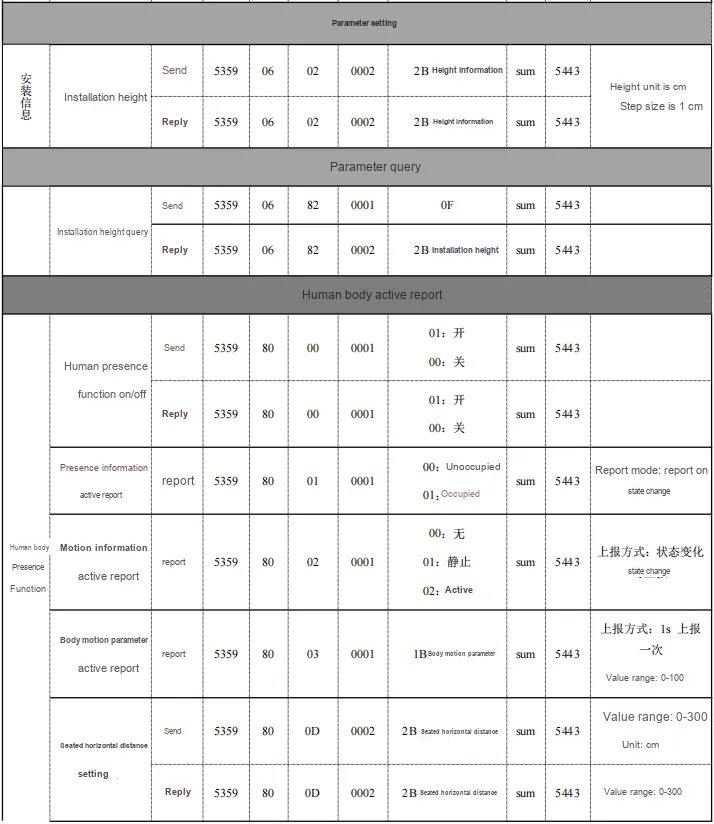
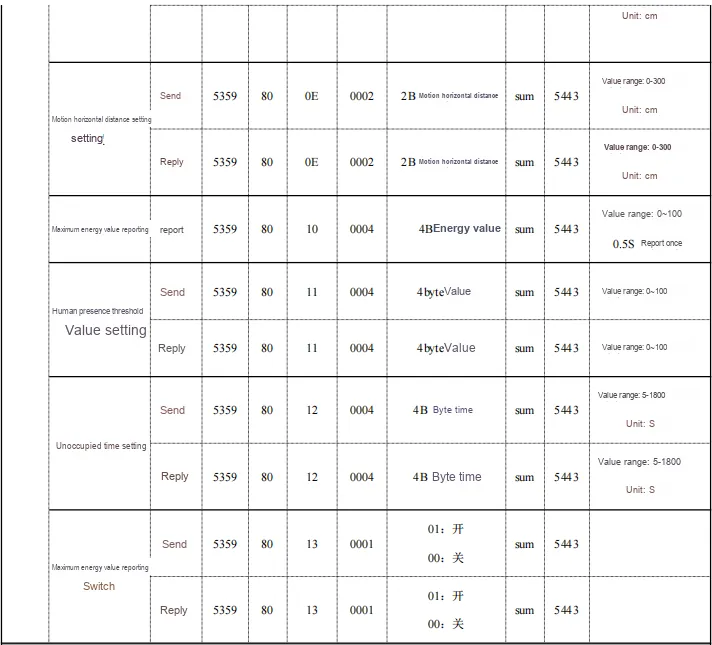



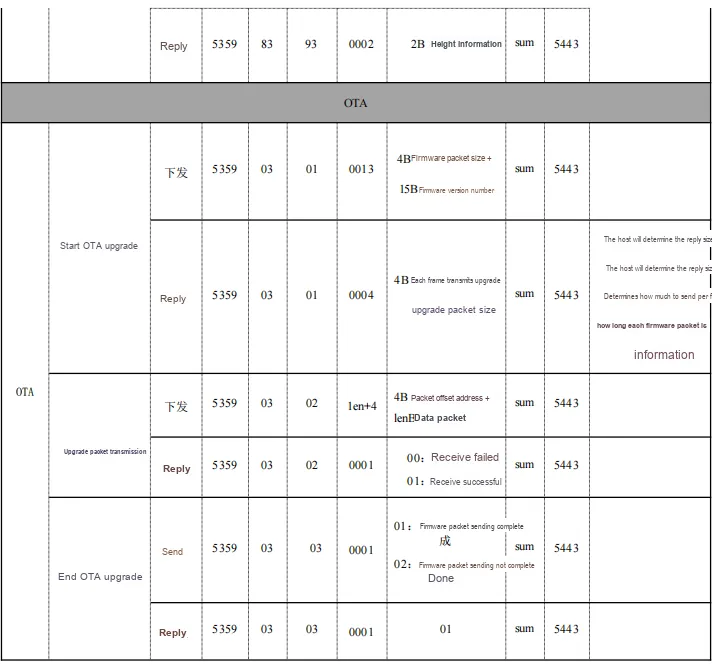
2.7.2 Custom Protocol Frame
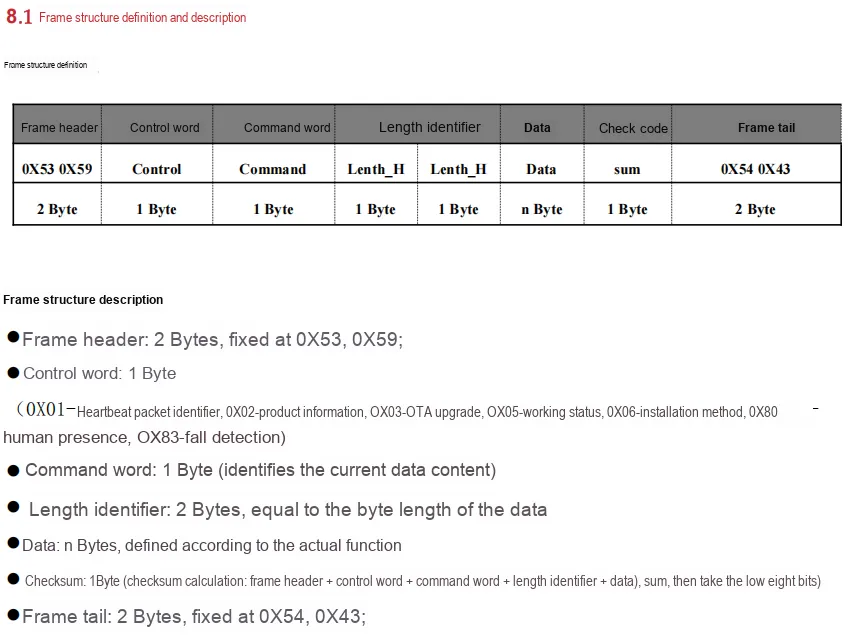
2.7.3 Instruction Summary, Practical Testing and Related Issues
2.7.3.1 Query and Setting of Basic Instruction Information
- Module Reset:
53 59 01 02 00 01 0F BF 54 43- Response example:
53 59 01 02 00 01 0F BF 54 43
- Response example:
- Product Model Inquiry:
53 59 02 A1 00 01 0F 5F 54 43- Sample response:
53 59 02 A1 00 08 52 36 30 41 46 44 31 00 0B 54 43 - R60AFD1
52 36 30 41 46 44 31 00
- Sample response:
- Product ID Query:
53 59 02 A2 00 01 0F 60 54 43- Response example:
53 59 02 A2 00 06 31 2E 30 2E 31 00 44 54 43 - 1.0.1
31 2E 30 2E 31 00
- Response example:
- Hardware Model Query:
53 59 02 A3 00 01 0F 61 54 43- Sample Reply:
53 59 02 A3 00 05 52 36 30 41 00 4F 54 43- R60A
52 36 30 41 00
- Firmware Version Query:
53 59 02 A4 00 01 0F 62 54 43- Sample response:
53 59 02 A4 00 10 53 46 44 31 2E 53 59 2D 30 31 2E 30 32 2E 31 33 FA 54 43 - SFD1.SY-01.02.13
53 46 44 31 2E 53 59 2D 30 31 2E 30 32 2E 31 33
- Sample response:
- Initialization completion query:
53 59 05 81 00 01 0F 42 54 43- Sample response:
53 59 05 81 00 01 01 34 54 43 01: Completed00: Incomplete
- Sample response:
2.7.3.2 Installation Parameter Settings
- Installation Angle Setting:
53 59 06 01 00 06 00 3C 00 3C 00 3C 6D 54 43- Response example:
53 59 06 01 00 06 00 3C 00 3C 00 3C 6D 54 43 - Set the x, y, and z angles all to
60°(0x3C)
- Response example:
- Installation height setting (unit: cm, step size: 1cm)
53 59 06 02 00 02 00 50 06 54 43- Response Example:
53 59 06 02 00 02 00 50 06 54 43 - Set the installation height to
80cm(0x50)
- Response Example:
- Automatic Altitude Measurement
53 59 83 90 00 01 0F CF 54 43- Sample Reply:
53 59 83 90 00 02 00 00 C1 54 43- The manual states that automatic height measurement is an auxiliary function that is susceptible to interference, resulting in inaccurate measurements (only the above commands are returned in actual tests)
- Installation Angle Query
53 59 06 81 00 01 0F 43 54 43- Sample Reply:
53 59 06 81 00 06 00 3C 00 3C 00 3C ED 54 43- The x, y, and z angles are all set to
60°(0x3C)
- Installation Height Query
53 59 06 82 00 01 0F 44 54 43- Sample Reply:
53 59 06 82 00 02 00 50 86 54 43- The detected height setting is
80cm(0x50)
2.7.3.3 Human Presence Function
- Human body presence switch setting (On)
53 59 80 00 00 01 01 2E 54 43- Sample Reply:
53 59 80 00 00 01 01 2E 54 43
- Human body presence switch setting (Off)
53 59 80 00 00 01 00 2D 54 43- Sample Reply:
53 59 80 00 00 01 00 2D 54 43
- Seated Horizontal Distance Setting (
0-300cm)53 59 80 0D 00 02 00 5C 97 54 43- Sample Reply:
53 59 80 0D 00 02 00 5C 97 54 43- The horizontal distance for sitting still is set to
92cm(0x5C)
- Motion Horizontal Distance Setting (
0-300cm)53 59 80 0E 00 02 00 5C 98 54 43- Sample Reply:
53 59 80 0E 00 02 00 5C 98 54 43- The horizontal movement distance is set to
92 cm(0x5C)
- Human presence judgment threshold setting (4 bytes)
53 59 80 11 00 04 00 00 01 00 42 54 43- Sample Reply:
53 59 80 11 00 04 00 00 01 00 42 54 43- The human presence determination threshold is set to
256(0x0100)
- Unattended Time Setting (5-1800 seconds)
53 59 80 12 00 04 00 00 00 0A 4C 54 43- Sample Reply:
53 59 80 12 00 04 00 00 00 0A 4C 54 43- Set the unattended time to 10s
- Maximum Energy Value Reporting Switch Setting (On)
53 59 80 13 00 01 01 41 54 43- Sample Reply:
53 59 80 13 00 01 01 41 54 43
- Setting of maximum energy value reporting switch (Off)
53 59 80 13 00 01 00 40 54 43- Sample Reply:
53 59 80 13 00 01 00 40 54 43
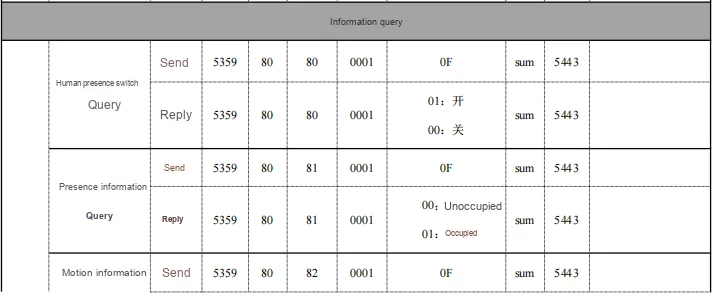
- Human presence switch query:
53 59 80 80 00 01 0F BC 54 43- Sample Reply:
53 59 80 80 00 01 01 AE 54 43
- Existence Information Query
53 59 80 81 00 01 0F BD 54 43- Sample Reply:
53 59 80 81 00 01 00 AE 54 4300: No person01: Person present
- Sports Information Query
53 59 80 82 00 01 0F BE 54 43- Sample Reply:
53 59 80 82 00 01 00 AF 54 4300: None01: Stationary02: Active
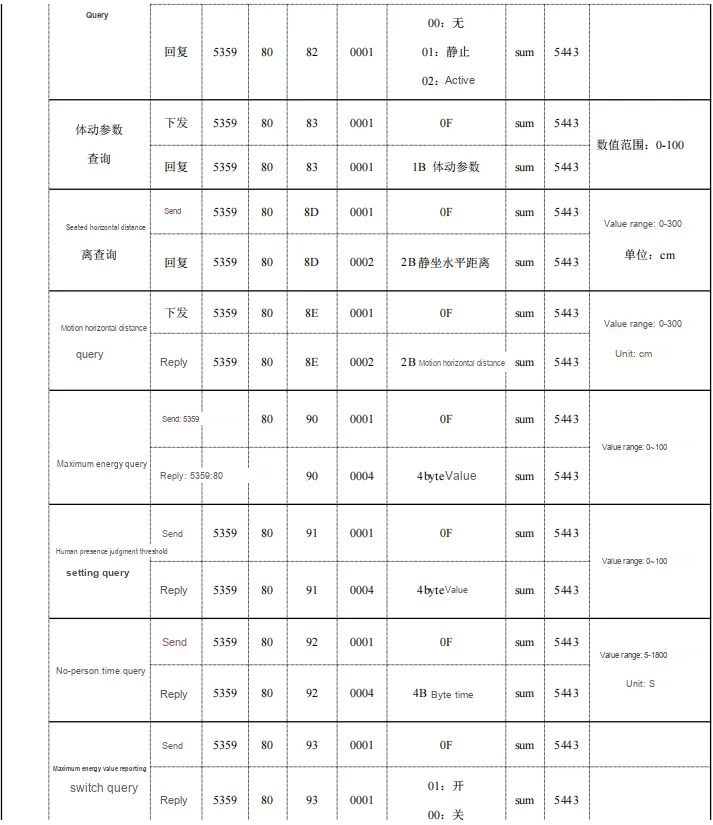
- Activity Parameter Query
53 59 80 83 00 01 0F BF 54 43- Sample Reply:
53 59 80 83 00 01 00 B0 54 43- Value range:
0-100
- Track Point Information Query
53 59 83 92 00 01 0F D1 54 43- Sample Reply:
53 59 83 92 00 04 00 00 00 00 C5 54 43- X(2B) Y(2B)
- Query of Track Point Information Reporting Frequency
53 59 83 93 00 01 0F D2 54 43- Sample Reply:
53 59 83 93 00 02 00 50 14 54 43- Unit: second (for discrepancies with the manual, see Summary of Related Issues)
- Query of Track Point Information Reporting Switch
53 59 83 94 00 01 0F D3 54 43- Sample Reply:
53 59 83 94 00 01 00 C4 54 4301: On00: Off
- Track Point Information Reporting Switch Setting
53 59 83 14 00 01 01 45 54 43- Sample Reply:
53 59 83 14 00 01 01 45 54 4300: Off01: On
- Static Horizontal Distance Query
53 59 80 8D 00 01 0F C9 54 43- Sample Reply:
53 59 80 8D 00 02 00 5C 17 54 43- The horizontal distance for sitting still is set to
92cm(0x5C)
- Motion Horizontal Distance Query
53 59 80 8E 00 01 0F CA 54 43- Sample Reply:
53 59 80 8E 00 02 00 5C 18 54 43- The horizontal movement distance is set to
92 cm(0x5C)
- Maximum Energy Query
53 59 80 90 00 01 0F CC 54 43- Sample Reply:
53 59 80 90 00 04 00 00 00 00 C0 54 43
- Human Presence Judgment Threshold Setting Query
53 59 80 91 00 01 0F CD 54 43- Sample Reply:
53 59 80 91 00 04 00 00 01 00 C2 54 43- The presence determination threshold of the human body is
256(0x0100)
- Unmanned Time Query
53 59 80 92 00 01 0F CE 54 43- Sample Reply:
53 59 80 92 00 04 00 00 00 0A CC 54 43- Unmanned time: 10s (0x0A)
- Query for maximum energy value reporting switch
53 59 80 93 00 01 0F CF 54 43- Sample Reply:
53 59 80 93 00 01 01 C1 54 4301: On00: Off
2.7.3.4 Fall Detection Function
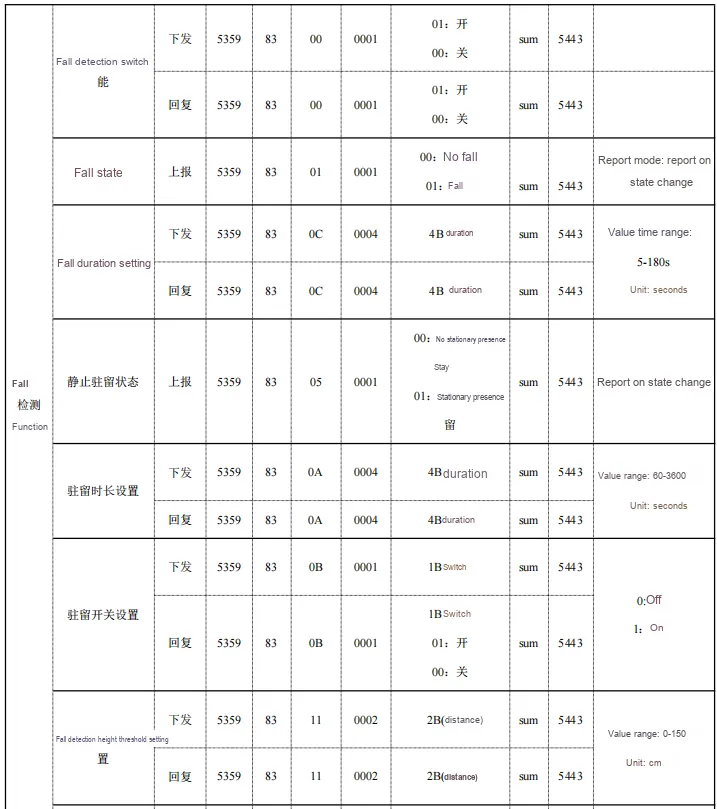
- Fall switch monitoring function
53 59 83 00 00 01 01 31 54 43- Sample Reply:
53 59 83 00 00 01 01 31 54 4301: On00: Off
- Fall duration setting:
53 59 83 0C 00 04 00 00 00 0A 49 54 43- Sample Reply:
53 59 83 0C 00 04 00 00 00 0A 49 54 43
- Dwell Time Setting:
53 59 83 0A 00 04 00 00 00 5C 99 54 43- Sample Reply:
53 59 83 0A 00 04 00 00 00 5C 99 54 43- The dwell time is set to 80s (0x5C)
- Dwell Switch Setting
53 59 83 0B 00 01 01 3C 54 43- Sample Reply:
53 59 83 0B 00 01 01 3C 54 4300: Off01: Open
- Fall Sensitivity Setting (0-3)
53 59 83 0D 00 01 01 3E 54 43- Sample Reply:
53 59 83 0D 00 01 01 3E 54 43- Set the sensitivity to 1
- Fall Break Height Setting (0-150)
53 59 83 11 00 02 00 1E 60 54 43- Sample Reply:
53 59 83 11 00 02 00 1E 60 54 43- Fall threshold height set to
30(0x1E) - Value range: 0-150 Unit: cm
- Height Ratio Switch Setting:
53 59 83 15 00 01 01 46 54 43- Sample Reply:
53 59 83 15 00 01 01 46 54 4300: Off01: Open
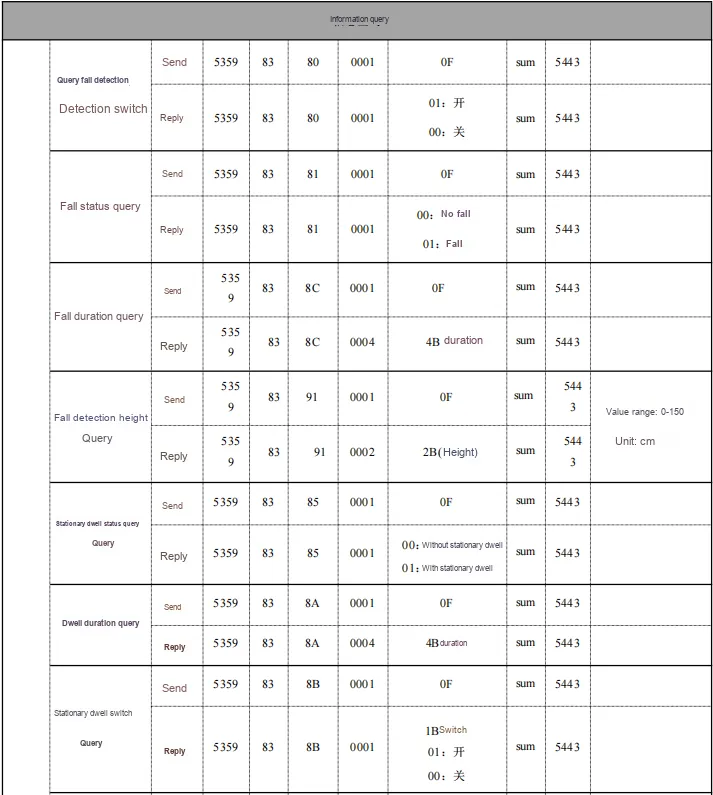
- Query fall detection switch
53 59 83 80 00 01 0F BF 54 43- Sample Reply:
53 59 83 80 00 01 01 B1 54 4301: On00: Off
- Fall Status Query
53 59 83 81 00 01 0F C0 54 43- Sample Reply:
53 59 83 81 00 01 00 B1 54 4300: No fall01: Falling
- Fall Duration Query
53 59 83 8C 00 01 0F CB 54 43- Sample Reply:
53 59 83 8C 00 04 00 00 00 0A C9 54 43
- Fall Break Height Query
53 59 83 91 00 01 0F D0 54 43- Sample Reply:
53 59 83 91 00 02 00 1E E0 54 43- Value range: 0-150 Unit: centimeter
- Height Ratio Switch Query
53 59 83 95 00 01 0F D4 54 43- Sample Reply:
53 59 83 95 00 01 01 C6 54 4301: On00: Off
- Static Resident Status Query
53 59 83 85 00 01 0F C4 54 43- Sample Reply:
53 59 83 85 00 01 00 B5 54 4300: No static dwell01: with static residence
- Dwell Time Query
53 59 83 8A 00 01 0F C9 54 43- Sample Reply:
53 59 83 8A 00 04 00 00 00 5C 19 54 43
- Static dwell switch query
53 59 83 8B 00 01 0F CA 54 43- Sample Reply:
53 59 83 8B 00 01 01 BC 54 43-
01: On00: Off
- Fall Sensitivity Query
53 59 83 8D 00 01 0F CC 54 43- Reply Example:
53 59 83 8D 00 01 01 BE 54 43- Numerical range: 0-3
- Time Period Occupancy Ratio Query
53 59 83 8E 00 01 0F CD 54 43- Sample Reply:
53 59 83 8E 00 06 00 00 00 00 00 00 C3 54 43- 1B: Upper 8 bits of the total height count
- 2B: Lower 8 bits of the total height count
- 3B: Proportion of height in the range 0-0.5m
- 4B: Proportion of 0.5-1m height
- 5B: Proportion of height in 1-1.5m
- 6B: Proportion at a height of 1.5-2 meters
- Altitude Accumulated Time Query
53 59 83 8F 00 01 0F CE 54 43- Sample Reply:
53 59 83 8F 00 04 00 00 00 0A CC 54 43
2.7.3.5 Summary of Related Issues
During the actual testing process, we have identified the following issues that require attention in the subsequent driver code development, and I have documented the details of these issues along with the specific version numbers here.
On the firmware version SFD1.SY-01.02.13, during the test of querying the reporting frequency of the module's track point information, the actual returned command does not match the user manual. The version information is as follows:
Product Model: R60AFD1
Hardware Model: R60AFD1
Firmware Version: G60TP1SYV010003

During the actual testing process, we have identified the following issues that require attention in the subsequent driver code development, and I have documented the details of these issues along with the specific version numbers here.
On the firmware version SFD1.SY-01.02.13, during the test of querying the reporting frequency of the module's track point information, the actual returned command does not match the user manual. The version information is as follows:
Product Model: R60AFD1
Hardware Model: R60AFD1
Firmware Version: G60TP1SYV010003

4B data should be returned, but 2B is actually returned
On the firmware version SFD1.SY-01.02.13, during the test on the module's trajectory point information reporting frequency setting, the actual returned command does not match the user manual. The version information is as follows:
Product Model: R60AFD1
Hardware Model: R60AFD1
Firmware Version: G60TP1SYV010003


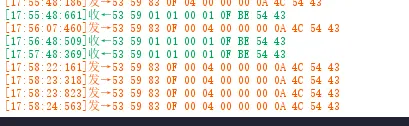
It does not match the manual, but after testing, there is a response when the data is set to be sent as 2B, though it is unknown whether this setting actually takes effect.
[18:11:49:465] Sent → 53 59 83 13 00 02 00 0A 4E 54 43
[18:11:49:548] RX ← 53 59 83 13 00 02 00 0A 4E 54 43
On the firmware version SFD1.SY-01.02.13, during the test of the module's height accumulation time setting, the actual command return does not conform to the user manual. The version information is as follows:
Product Model: R60AFD1
Hardware Model: R60AFD1
Firmware Version: G60TP1SYV010003
The command for setting the height accumulation time is invalid and will not be responded to.

2.8 PCB Routing Precautions
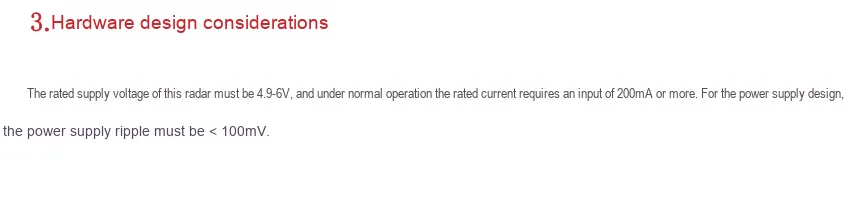
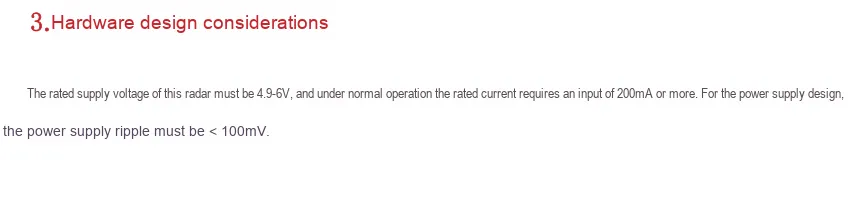
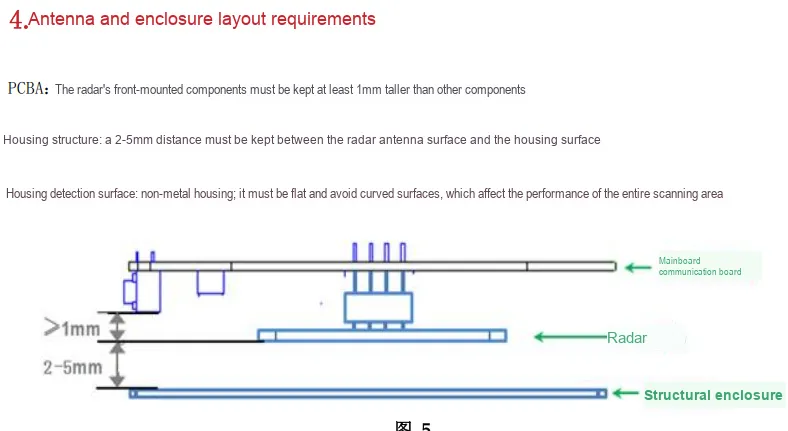
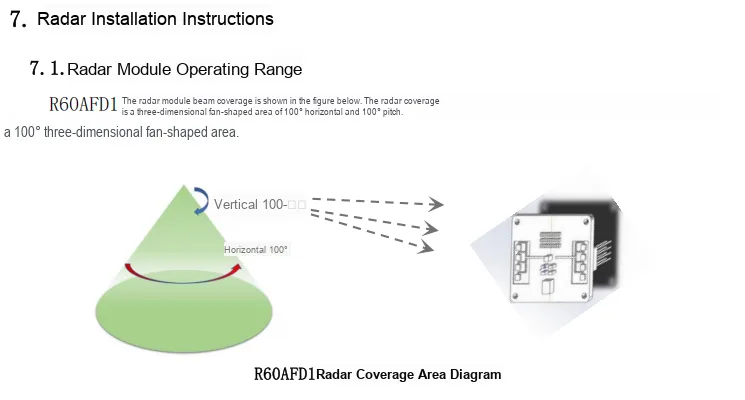
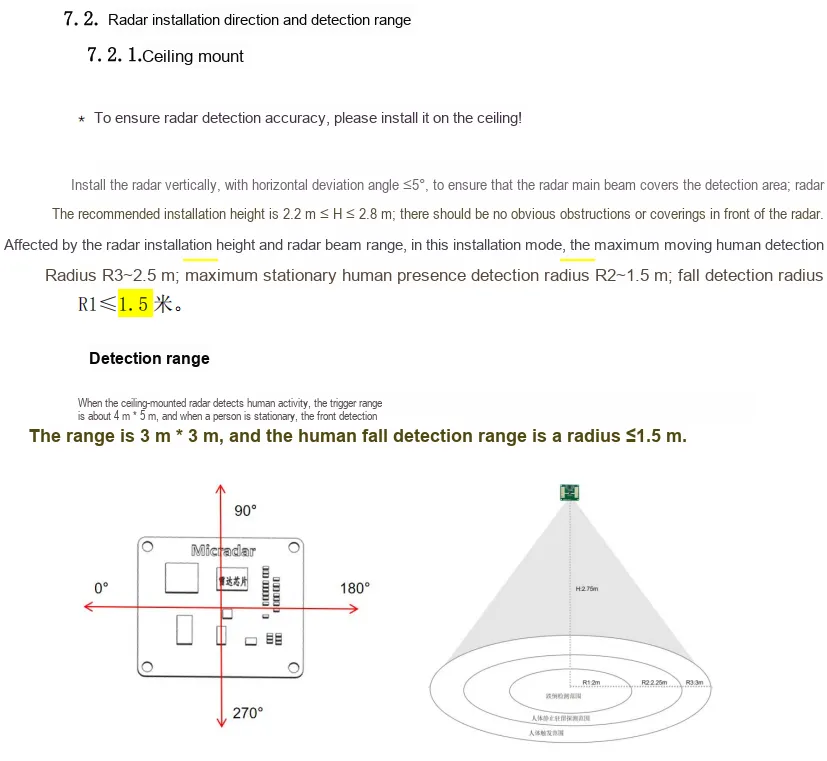
The "R60AFD1-V (Top-Mounting)_Datasheet_V2.0" describes the power supply section as follows:
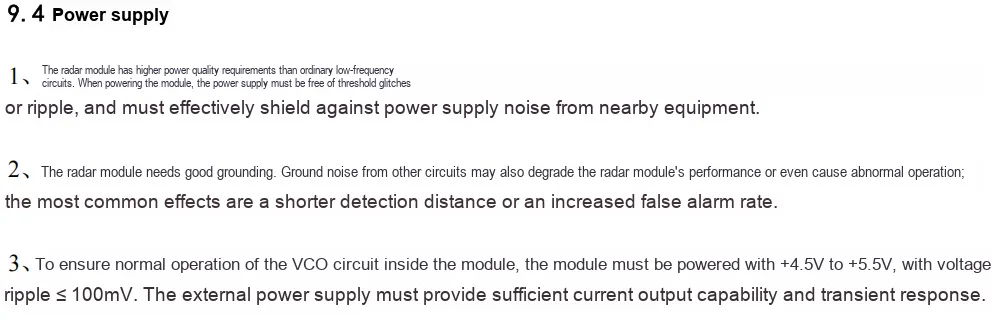
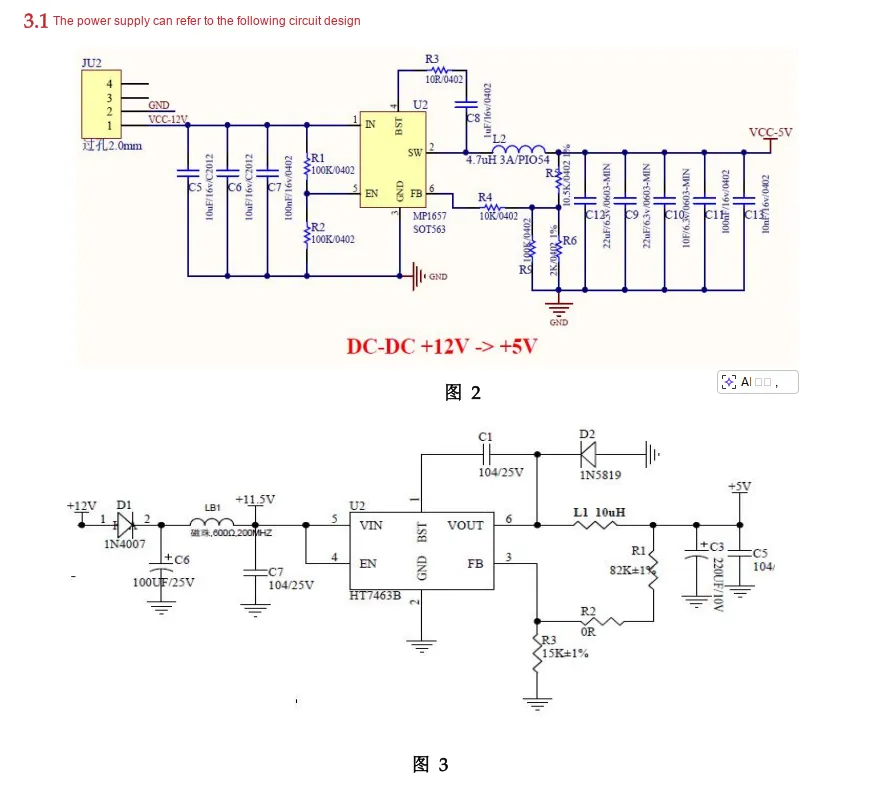
《R60AFD1_User Manual_V2.1 (New Version Algorithm)》 specifies the power supply section as follows:
III. Instructions for Circuit Engineering and Module Usage
3.1 Circuit Source Engineering
To obtain the circuit source project, please follow the official account [Freak Embedded].
3.2 Module Usage Instructions
The schematic diagram of this module is shown below:
SCH_R60AFD1-Based_Fall_Detection_Alarm_mmWave_Radar_Module-v1.0_2026-01-28.pdf 2.4 MB
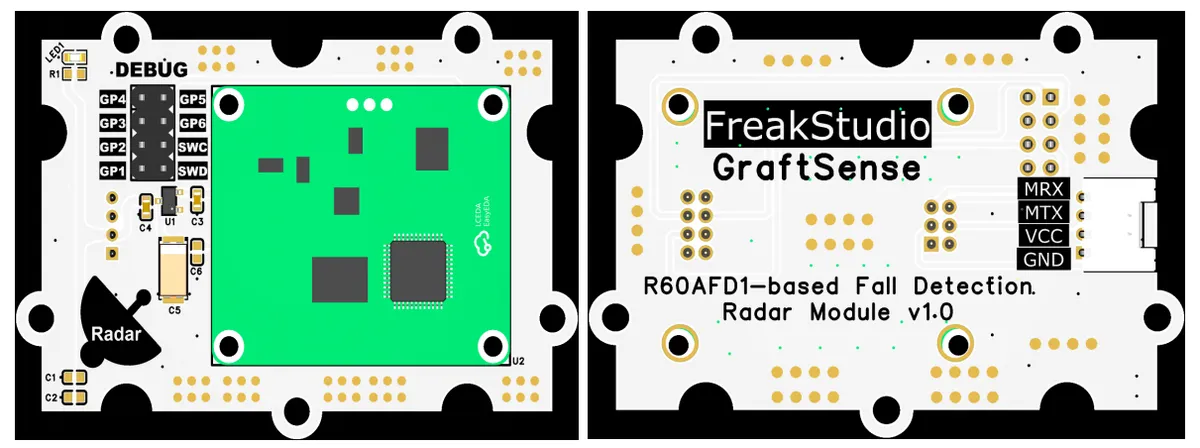
This module provides a serial port UART interface MRX and MTX: where M stands for master, meaning the MCU 's RX corresponds to the module' s TX.
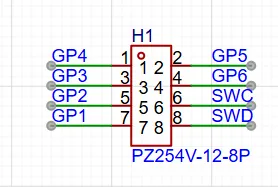
This module leads out external expansion interfaces GP1 - GP6, SWC and SWD to facilitate subsequent function development and firmware upgrade. It should be noted that when soldering 2.54 pin headers to the DEBUG interface, they need to be reversely connected to the back side to avoid interference with the radar module.
Also, please note the following when using it:
3.3 Application Experiment
Here, we use the GraftPort-RP2040 development board for testing. The fall-alert millimeter-wave radar module based on the R60AFD1 uses the UART1 interface to communicate with the main controller. To facilitate result viewing, data is transmitted via serial Bluetooth, and the UART0 interface is connected to the master-slave integrated BLE Bluetooth module based on HC-08.
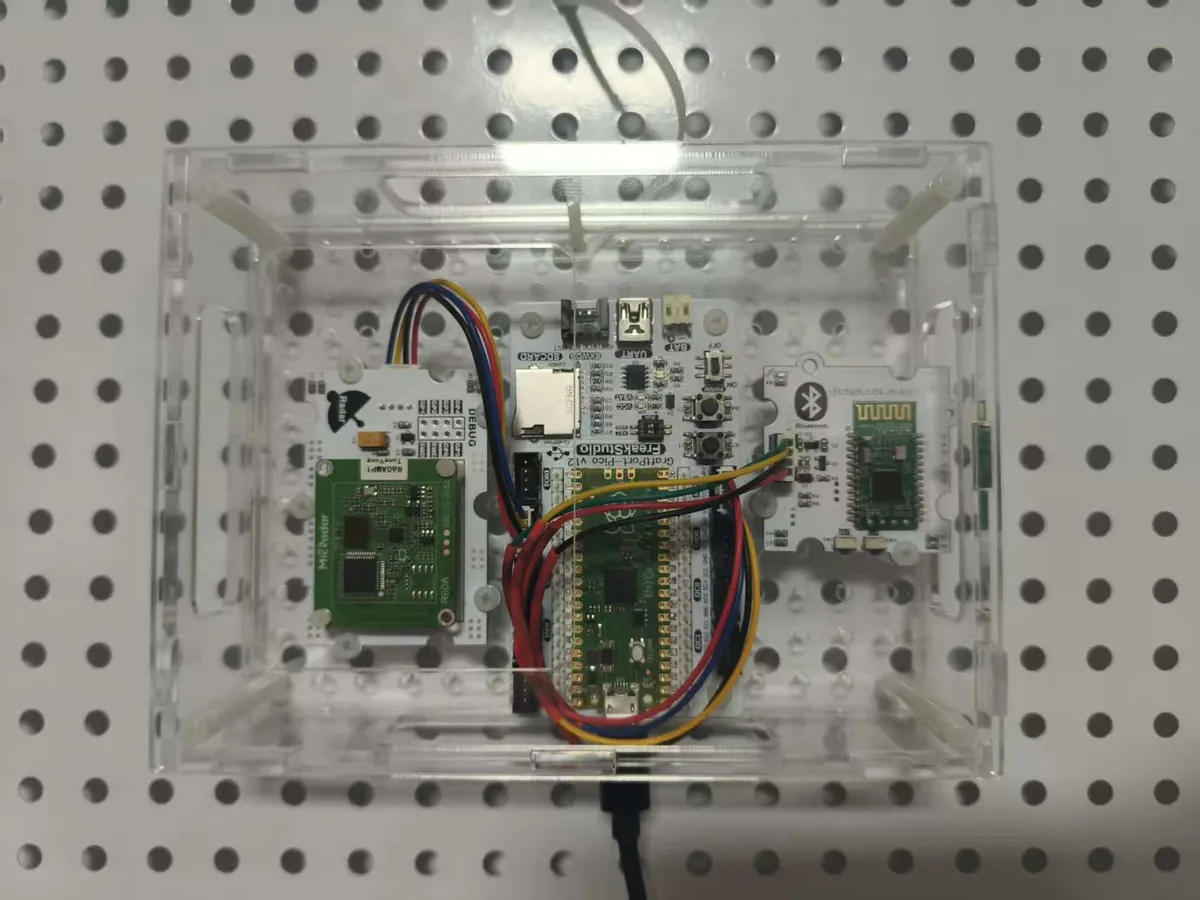
The module connections are shown in the following table:
Fall Detection Millimeter-Wave Radar Module Based on R60AFD1 :
Development Board Pins | Module Pins | Description |
Pin 8 |
|
|
Pin 9 |
|
|
HC-08 Based Master-Slave Integrated BLE Bluetooth Module:
Development Board Pins | Module Pins | Description |
Pin 16 |
|
|
Pin 17 |
|
|
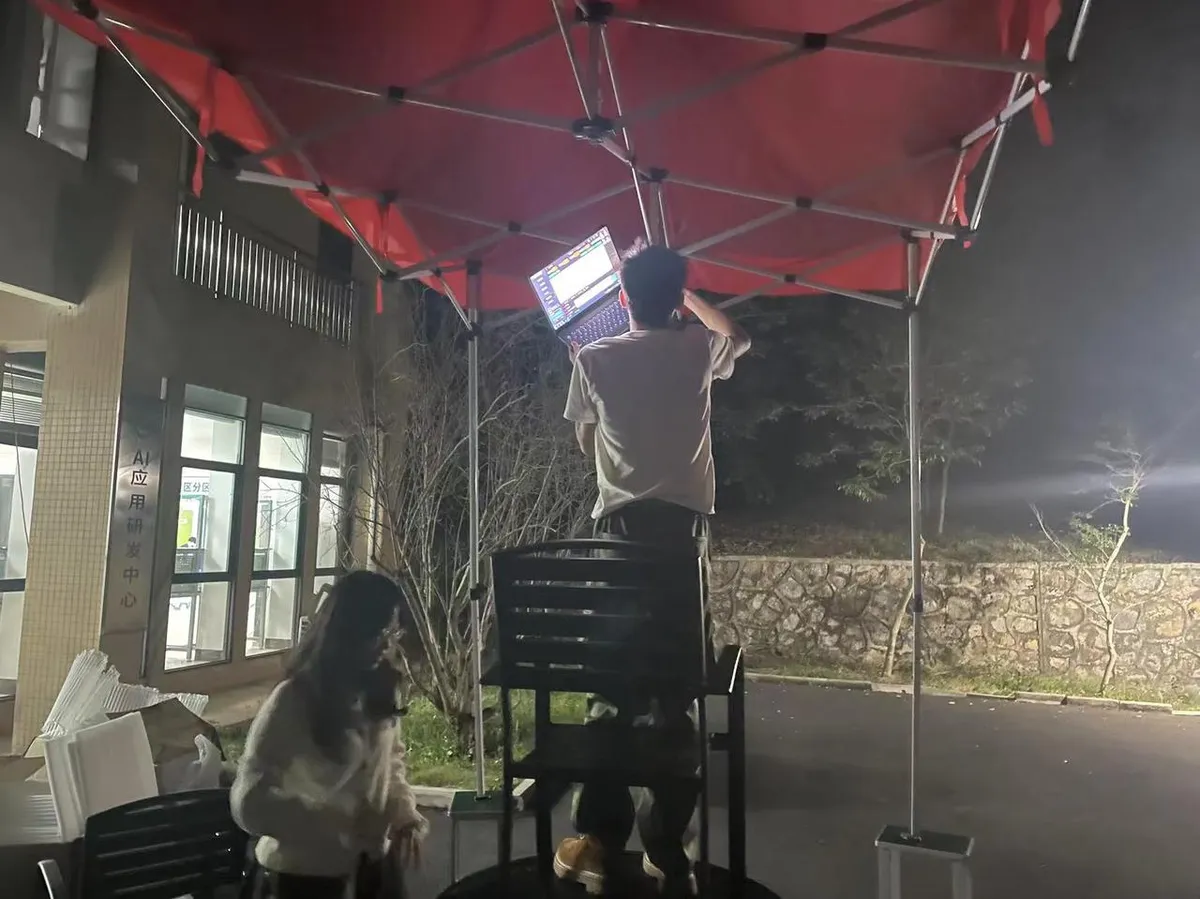
Adopt vertical installation during use, with the installation height being approximately 2.0m:
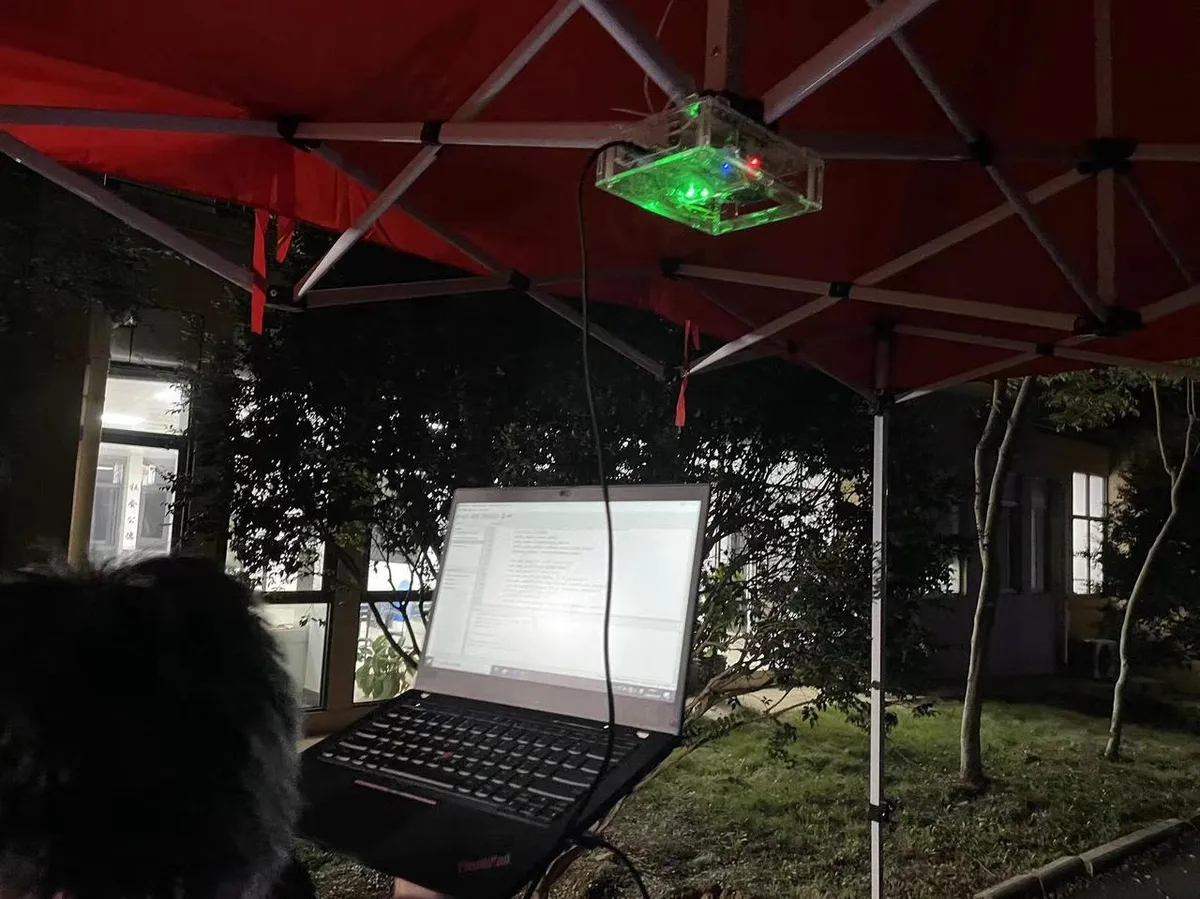
Here, we can import the module driver library code via the mip tool. The following are the usage commands for the mpremote tool:
mpremote mip install github:FreakStudioCN/GraftSense-Drivers-MicroPython/sensors/r60afd1_driverAfter importing the fall detection millimeter-wave radar module based on R60AFD1 - MicroPython driver code, copy the following main.py code into our project:
# Python env   : MicroPython v1.26.1
# -*- coding: utf-8 -*-
# @Time    : 2025/11/4 5:33 PM
# @Author  : hogeiha
# @File    : main.py
# @Description : Code for testing the R60AMP1 multi-person trajectory radar device driver class
# @License : CC BY-NC 4.0

# ======================================== Import Modules =========================================

from machine import UART, Pin, Timer
import time
from data_flow_processor import DataFlowProcessor
from r60amp1 import R60AMP1, format_time
from hc08 import HC08

# ======================================== Global Variables ============================================

# Enable debug mode (optional)
R60AMP1.DEBUG_ENABLED = True

# Last print time
last_print_time = time.ticks_ms()

# Periodic print interval: print once every 2 seconds
print_interval = 2000

# ======================================== Functions ============================================

def print_report_sensor_data():
    """
    Print the data reported by the sensor to the Thonny console.

    Note: This function prints data actively reported by the device, not query results.
    The data comes from the attribute values of the R60AMP1 class, which are updated automatically in the timer callback.

    ==========================================

    Print sensor reported data to Thonny console.

    Note: This function prints data actively reported by the device, not query results.
    Data comes from R60AMP1 class attributes, which are automatically updated in timer callbacks.
    """
    # Declare global variables
    global device

    print("=" * 50)
    print("%s Sensor Data" % format_time())
    print("=" * 50)

    # System-level information
    print("System Initialized: %s" % ("Yes" if device.system_initialized else "No"))
    print("Radar Fault Status: %s" % ["Normal", "Radar chip error", "Encryption error"][
        device.radar_fault_status] if device.radar_fault_status < 3 else "Unknown")
    print("Environment Mode: %s" % ["Default", "Living Room", "Bedroom", "Bathroom"][
        device.environment_mode] if device.environment_mode < 4 else "Unknown")

    # Product information
    print("Product Model: %s" % device.product_model)
    print("Product ID: %s" % device.product_id)
    print("Hardware Model: %s" % device.hardware_model)
    print("Firmware Version: %s" % device.firmware_version)

    # Human presence detection
    print("Presence Status: %s" % ("Someone" if device.presence_status == R60AMP1.PRESENCE_PERSON else "No one"))
    print("Motion Status: %s" % ["No motion", "Static", "Active"][
        device.motion_status] if device.motion_status < 3 else "Unknown")
    print("Body Motion Parameter: %d" % device.body_motion_param)
    print("Presence Function Enabled: %s" % ("ON" if device.presence_enabled else "OFF"))

    # Trajectory information
    if device.trajectory_targets:
        print("\nTrajectory Targets (%d):" % len(device.trajectory_targets))
        for i, target in enumerate(device.trajectory_targets):
            print("  Target %d:" % (i + 1))
            print("    Index: %d" % target['index'])
            print("    Size: %d" % target['size'])
            print("    Feature: %s" % ("Static" if target['feature'] == R60AMP1.TARGET_FEATURE_STATIC else "Moving"))
            print("    Position: X=%d cm, Y=%d cm" % (target['x'], target['y']))
            print("    Height: %d cm" % target['height'])
            print("    Speed: %d cm/s" % target['speed'])
    else:
        print("\nNo trajectory targets detected")

    print("=" * 50)

def print_active_query_data(timeout=200):
    """
    Actively query and print sensor data (blocking query).

    Args:
        timeout: Timeout for a single query, in milliseconds.

    Note:
        - This function performs blocking queries and queries all sensor data in turn.
        - There is a 200ms delay between queries to avoid overloading the device.
        - A failed query displays a failure message; a successful one displays the specific data.

    ==========================================

    Actively query and print sensor data (blocking queries).

    Args:
        timeout: Single query timeout time in milliseconds.

    Note:
        - This function performs blocking queries, sequentially querying all sensor data.
        - Each query has 200ms delay to avoid overwhelming the device.
        - Failed queries display failure information, successful ones display specific data.
    """
    # Declare global variables
    global device

    print("=" * 50)
    print("%s Active Query Sensor Data" % format_time())
    print("=" * 50)

    # Query heartbeat
    success, heartbeat_result = device.query_heartbeat(timeout)
    if success:
        print("Query Heartbeat: Success")
    else:
        print("Query Heartbeat: Failed")

    time.sleep(0.2)

    # Query product model
    success, product_model = device.query_product_model(timeout)
    if success:
        print("Query Product Model: %s" % product_model)
    else:
        print("Query Product Model: Failed")

    time.sleep(0.2)

    # Query product ID
    success, product_id = device.query_product_id(timeout)
    if success:
        print("Query Product ID: %s" % product_id)
    else:
        print("Query Product ID: Failed")

    time.sleep(0.2)

    # Query hardware model
    success, hardware_model = device.query_hardware_model(timeout)
    if success:
        print("Query Hardware Model: %s" % hardware_model)
    else:
        print("Query Hardware Model: Failed")

    time.sleep(0.2)

    # Query firmware version
    success, firmware_version = device.query_firmware_version(timeout)
    if success:
        print("Query Firmware Version: %s" % firmware_version)
    else:
        print("Query Firmware Version: Failed")

    time.sleep(0.2)

    # Query initialization status
    success, init_status = device.query_init_complete(timeout)
    if success:
        print("Query Init Status: %s" % ("Completed" if init_status else "Not completed"))
    else:
        print("Query Init Status: Failed")

    time.sleep(0.2)

    # Query human presence switch
    success, presence_switch = device.query_human_presence_switch(timeout)
    if success:
        print("Query Presence Switch: %s" % ("ON" if presence_switch else "OFF"))
    else:
        print("Query Presence Switch: Failed")

    time.sleep(0.2)

    # Query presence status
    success, presence_status = device.query_presence_status(timeout)
    if success:
        print("Query Presence Status: %s" % ("Someone" if presence_status == R60AMP1.PRESENCE_PERSON else "No one"))
    else:
        print("Query Presence Status: Failed")

    time.sleep(0.2)

    # Query motion status
    success, motion_status = device.query_motion_info(timeout)
    if success:
        status_text = ["No motion", "Static", "Active"][motion_status] if motion_status < 3 else "Unknown"
        print("Query Motion Status: %s" % status_text)
    else:
        print("Query Motion Status: Failed")

    time.sleep(0.2)

    # Query body movement parameters
    success, body_motion_param = device.query_body_motion_param(timeout)
    if success:
        print("Query Body Motion Parameter: %d" % body_motion_param)
    else:
        print("Query Body Motion Parameter: Failed")

    time.sleep(0.2)

    # Query trajectory information
    success, trajectory_targets = device.query_trajectory_info(timeout)
    if success:
        print("Query Trajectory Info: Success")
        if trajectory_targets:
            print("  Number of targets: %d" % len(trajectory_targets))
            for i, target in enumerate(trajectory_targets):
                print("  Target %d: Index=%d, Size=%d, Feature=%s, Position=(%d, %d), Height=%d, Speed=%d" %
                      (i + 1, target['index'], target['size'],
                       "Static" if target['feature'] == R60AMP1.TARGET_FEATURE_STATIC else "Moving",
                       target['x'], target['y'], target['height'], target['speed']))
        else:
            print("  No targets detected")
    else:
        print("Query Trajectory Info: Failed")

    print("=" * 50)

# ======================================== Custom Classes ============================================

# ======================================== Initialization ==========================================

# Power-on delay
time.sleep(3)
# Print debug information
print("FreakStudio: Using R60AMP1 Multi-person Trajectory Radar")

# Initialize UART0: TX=16, RX=17, baud rate 115200
uart = UART(0, baudrate=115200, tx=Pin(16), rx=Pin(17), timeout=0)
uart1 = UART(1, baudrate=9600, tx=Pin(8), rx=Pin(9), timeout=0)

# Bluetooth
hc0 = HC08(uart1)
# Create DataFlowProcessor instance
processor = DataFlowProcessor(uart)

# Create an R60AMP1 instance

device = R60AMP1(
    processor,
    parse_interval=200,  # Data parsing interval 200ms
    presence_enabled=True,  # Enable human presence detection
    max_retries=3,  # Maximum of 3 retries
    retry_delay=100,  # Retry delay 100ms
    init_timeout=5000  # Initialization timeout 5 seconds
)

# Print the configuration status
print("\nDevice Configuration Status:")
config_status = device.get_configuration_status()
print("Initialization Complete: %s" % config_status['initialization_complete'])
print("Configuration Errors: %d" % len(config_status['configuration_errors']))

if len(config_status['configuration_errors']) > 0:
    print("Configuration Error Details:")
    for error in config_status['configuration_errors']:
        print("  - %s" % error)

# Print the device information
device_info = config_status['device_info']
print("\nDevice Information:")
print("  Product Model: %s" % device_info['product_model'])
print("  Product ID: %s" % device_info['product_id'])
print("  Hardware Model: %s" % device_info['hardware_model'])
print("  Firmware Version: %s" % device_info['firmware_version'])

# Print the current settings
current_settings = config_status['current_settings']
print("\nCurrent Settings:")
print("  Presence Detection: %s" % ("ENABLED" if current_settings['presence_enabled'] else "DISABLED"))

time.sleep(1)

# ========================================  Main Program  ===========================================

try:
    print("\nStarting main loop...")
    print("Press Ctrl+C to stop the program\n")

    while True:
        current_time = time.ticks_ms()

        # Print sensor data periodically
        if time.ticks_diff(current_time, last_print_time) >= print_interval:
            # Print the actively reported data
            print_report_sensor_data()
            presence_status = device.presence_status
            motion_status = device.motion_status
            body_motion_param = device.body_motion_param
            trajectory_targets = device.trajectory_targets
            hc0.send_data("=== status ===\n")
            hc0.send_data(f"presence_status: {presence_status}\n")
            hc0.send_data(f"motion_status: {motion_status}\n")
            hc0.send_data(f"Body movement: {body_motion_param}\n")
            hc0.send_data(f"Target Quantity: {len(trajectory_targets)}\n")
            hc0.send_data("Trajectory Target:\n")
            for i, target in enumerate(trajectory_targets):
                hc0.send_data(f"  target{i + 1}: {target}\n")
            # Query and print the presence status
            success, presence_status = device.query_presence_status()
            if success:
                print("Active Query Presence Status: %s" % (
                    "Someone" if presence_status == R60AMP1.PRESENCE_PERSON else "No one"))
            else:
                print("Active Query Presence Status: Failed")

            last_print_time = current_time

        # Small delay to avoid using too much CPU
        time.sleep_ms(10)

except KeyboardInterrupt:
    print("%s Program interrupted by user" % format_time())

finally:
    # Clean up resources
    print("%s Cleaning up resources..." % format_time())
    # Stop the instance
    device.close()
    # Destroy the instance
    del device
    print("%s Program exited" % format_time())
Before running the aforementioned main program code, please note that the following core parameters need to be debugged and configured in combination with the actual usage scenarios:
- Mounting Height: refers to the vertical height from the ground to the installation position of the radar module (the sample configuration in the code is 200cm);
- Fall Break Height: The core height difference threshold used to determine a fall event; when the target height is lower than this value, the fall candidate process will be triggered (the example configuration in the code is 100cm);
- Fall duration: The continuous stationary time condition that triggers a formal fall determination, i. e., the minimum duration for which the target must remain stationary in a low-height state (the sample configuration in the code is 6 seconds).
# ========================================  Main Program  ===========================================

try:
    print("\nStarting main loop...")
    print("Press Ctrl+C to stop the program\n")
    # Fall detection settings
    # Set the installation height to 200cm
    device.set_install_height(height_cm=200)
    # Fall-breaking height
    device.set_fall_break_height(height_cm=100)
    # Fall sensitivity
    device.set_fall_sensitivity(sensitivity=3)
    # Fall duration
    device.set_fall_duration(seconds=6)

    # Dwell detection settings
    device.set_static_stay_duration(seconds=90)
The specific judgment logic for a fall incident is as follows: When the system detects that a target falls from a higher position to a lower one, its final height drops below the threshold of "fall detection height", and meanwhile the target remains stationary at this low-altitude state for the preset "fall duration", the system will automatically trigger a fall incident and complete the subsequent reporting operation.
Burn the code, open the terminal, and use the mpremote tool to connect to the main controller. The output is as follows:
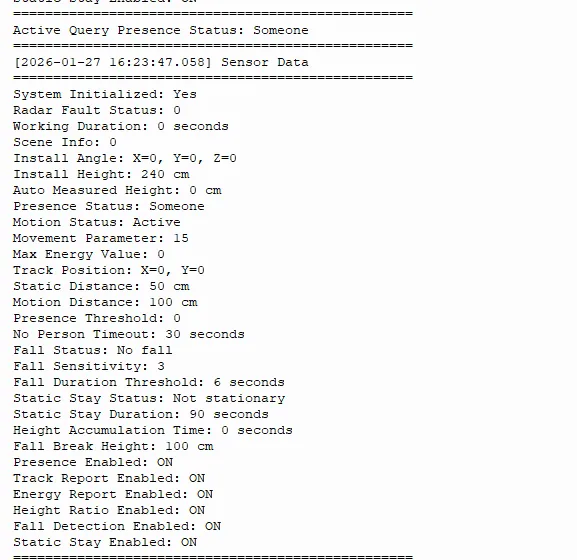
It includes the following:
The overall status group contains the device's current operating status, whether a person is detected, and the startup time.
The installation configuration group contains hardware installation parameters of the radar, such as installation height and angle.
The real-time detection group contains data detected in real time, such as the target's motion status, position, and distance.
The threshold settings group contains the trigger conditions used to judge events, such as fall sensitivity and no-person timeout.
The function switch group contains the enabled/disabled status of each function (such as fall detection and presence detection).
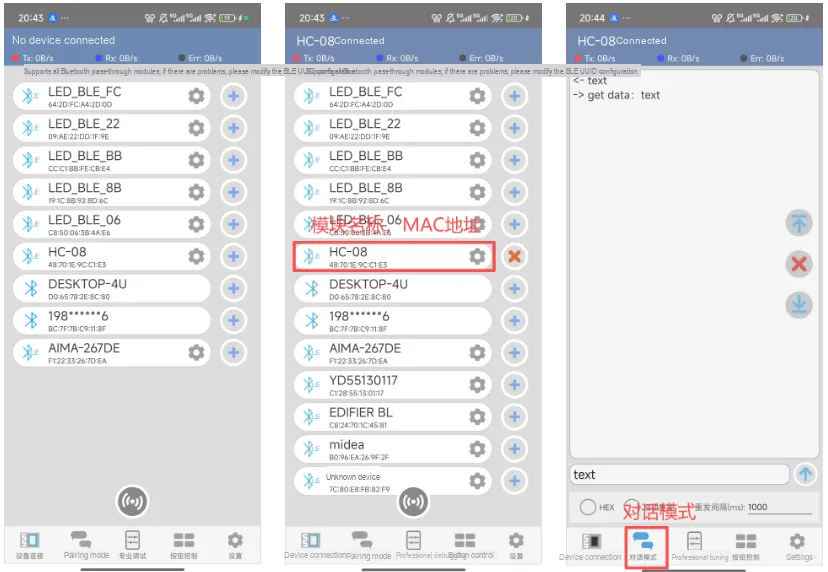
We need to install the mobile phone Bluetooth debugger APP, and the following will briefly demonstrate its basic functions.
Bluetooth_Debugger.apk 2.3 MB
- Enable the Bluetooth and location services on your mobile phone, open the APP, tap the scan button, and you will see the list of currently connectable Bluetooth devices.
- Based on the previously output module information from the terminal (the Bluetooth name is
HC-08, corresponding to theMACaddress), findHC-08in the device list, click the+sign on the right to select this device, and the connection will be completed. - After the connection is established, switch to the "Chat Mode", then you can type content in the input box and send it to realize communication and interaction with the Bluetooth module.
After Bluetooth connection is established successfully, the following content will be output: fall status, human presence status, and dwell status
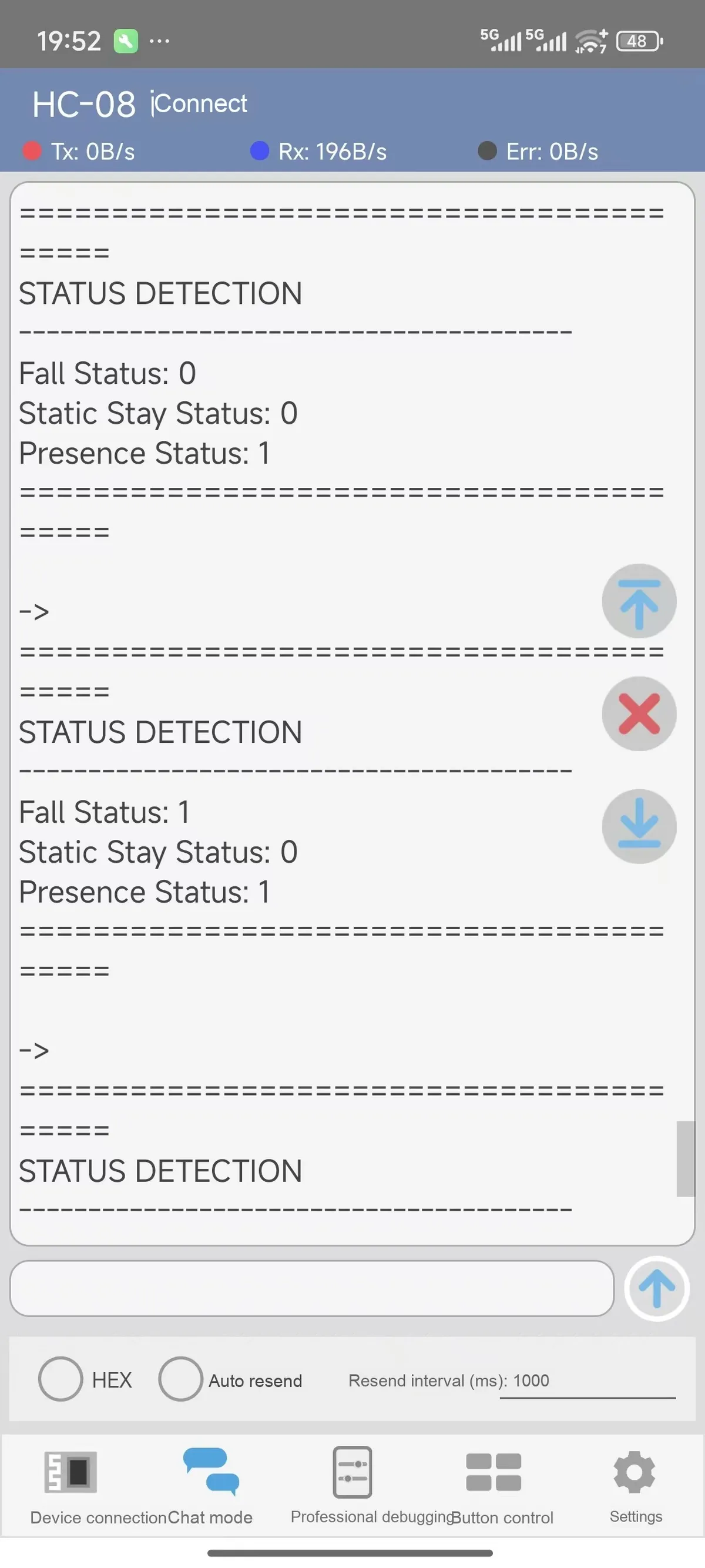
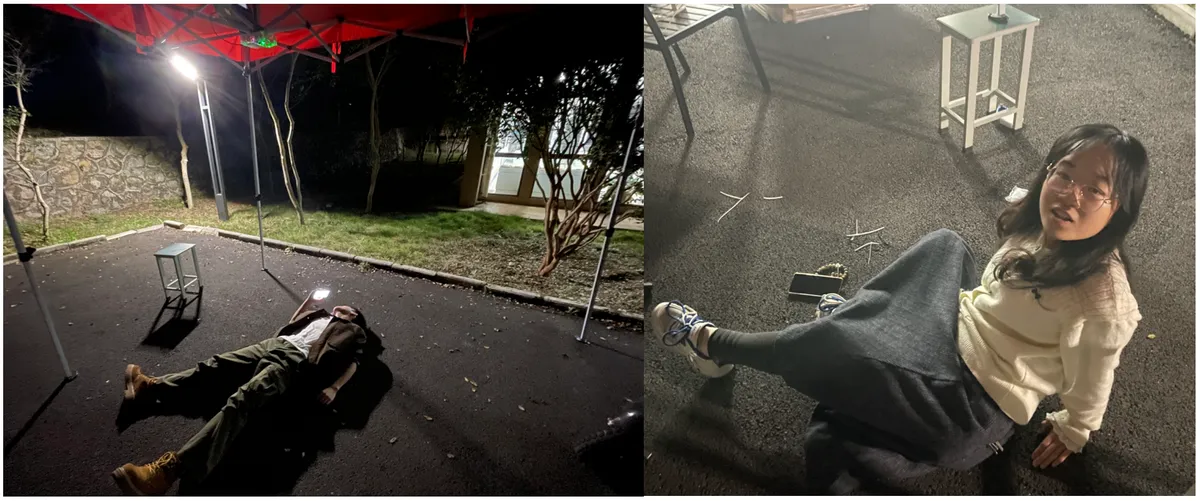
It can be seen that after our tester falls, the module detects the person's fall:
4. Drivers
r60afd1_driver.rar 32 KB
5. BOM & Recommended Alternative Parts
None.
VI. Revision History
Document Version | Date of Modification | Modifier | Revised Content |
v1.1 | 2026-01-28 | Zero Kōkō | Initialize Document |
v1.2 | 2026-02-13 | Li Zisheng | Modified the BOM sheet. |
v1.3 | 2026-02-14 | Xin Ruili | Create an open version of the document based on the internal document version v1.2. |
VII. Relevant Materials
7.1 Chip Datasheet
R60AFD1-V(Ceiling_Mount)_Datasheet_V2.0.pdf 1.2 MB
R60AFD1_Module_Getting_Started_Guide_V1.2.pdf 749 KB
R60AFD1_User_Manual_V2.1(New_Version_Algorithm).pdf 567 KB
Enclosure_Design_Recommendations_V1.1.pdf 646 KB
7.2 Unique Icons for PCB Silk Screen