Contents
- I. Module Introduction
- II. Introduction to Main Chips
- 2.1 Chip Overview
- 2.2 Pin Definition
- 2.3 Functional Block Diagram
- 2.4 Performance Parameters
- 2.5 Reference Circuit
- 2.6 Chip Configuration
- 2.7 Communication Interfaces and Related Protocols
- 2.8 PCB Routing Precautions
- III. Circuit Engineering
- 3.1 Circuit Source Engineering
- 3.2 Module Usage Instructions
- 3.3 Application Experiment
- IV. Drivers
- 5. BOM & Recommended Alternative Parts
- VI. Revision History
- 7. Relevant Materials
- 7.1 Chip Datasheet
- 7.2 Unique Icons for PCB Silk Screen
I. Module Introduction
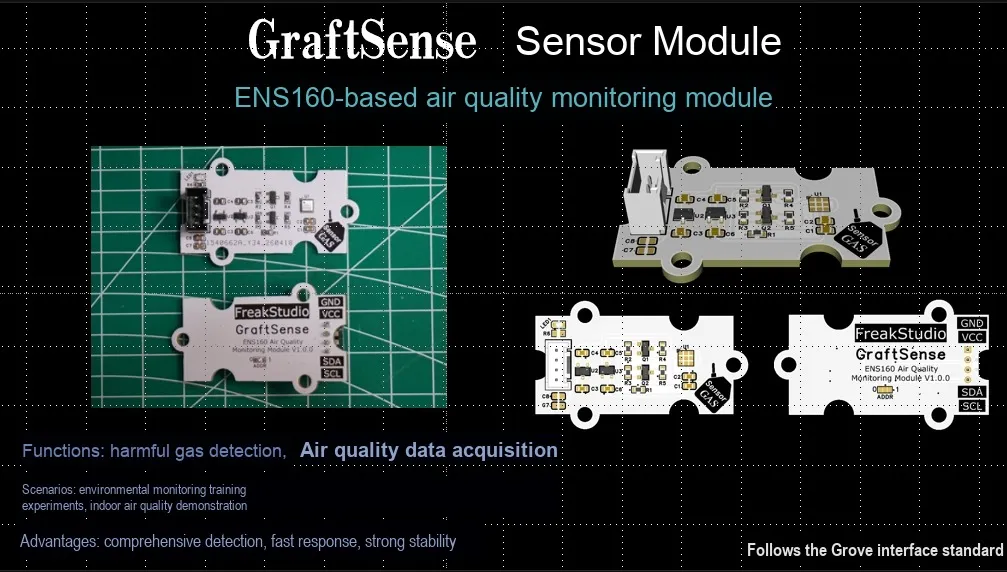
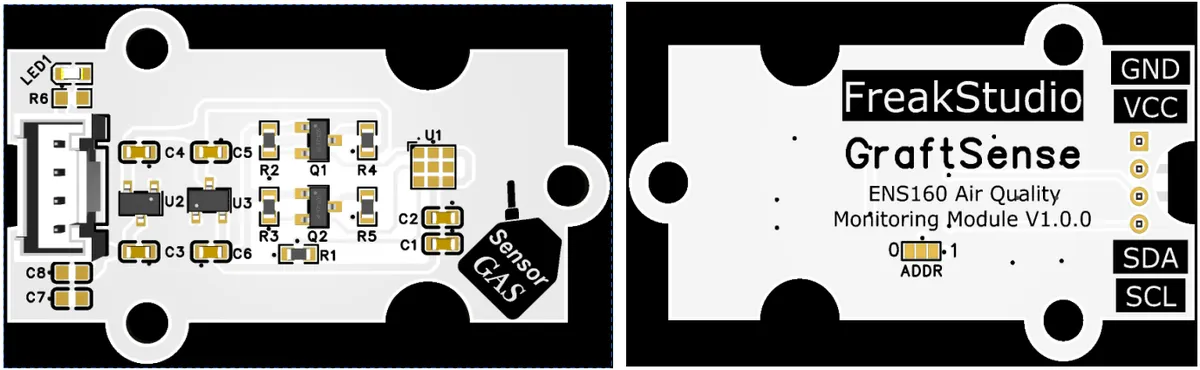
ENS160-based air quality monitoring module that adopts the ScioSense ENS160 multi-channel indoor air quality sensor solution. Built with a four-unit MOX sensing structure and intelligent algorithm, it can simultaneously output three core air quality parameters: TVOC, equivalent CO₂(eCO₂) and AQI.The module is equipped with a level conversion circuit, LDO voltage regulator circuit, power filtering and indicator circuit, powered by 3.3V/5V and communicating with the main control via I²C interface, which automatically completes temperature and humidity compensation and baseline calibration without complex operations, and is suitable for indoor air quality monitoring scenarios such as smart homes, fresh air systems, and air purifiers.
II. Introduction to Main Chips
ENS160 is a digital multi-channel indoor air quality sensor that integrates a four-unit MOX sensing structure. Built with intelligent algorithms, it can directly output three core parameters including TVOC, eCO₂ and AQI, supports I²C communication, and is purpose-built for IAQ monitoring applications.
2.1 Chip Overview
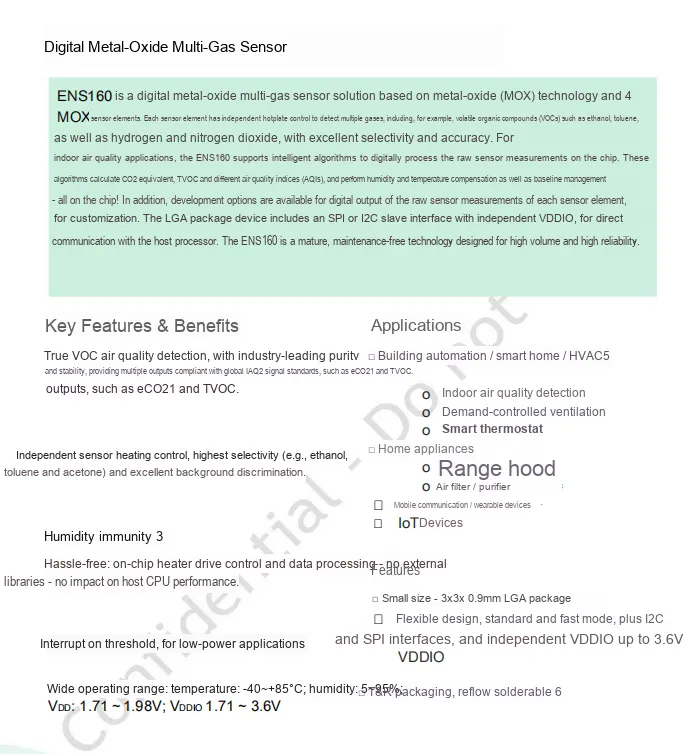
ENS160 is a digital metal oxide multi-gas sensor. Based on MOX technology and 4 independently controlled sensor units, it can accurately detect a variety of VOC gases. Equipped with built-in intelligent algorithms, it directly outputs parameters including eCO₂, TVOC, and AQI; it features humidity immunity, on-chip heating and data processing functions, supports I²C / SPI interfaces, adopts LGA packaging, and is suitable for indoor air quality monitoring scenarios such as smart homes, HVAC, home appliances and IoT devices.
2.2 Pin Definition
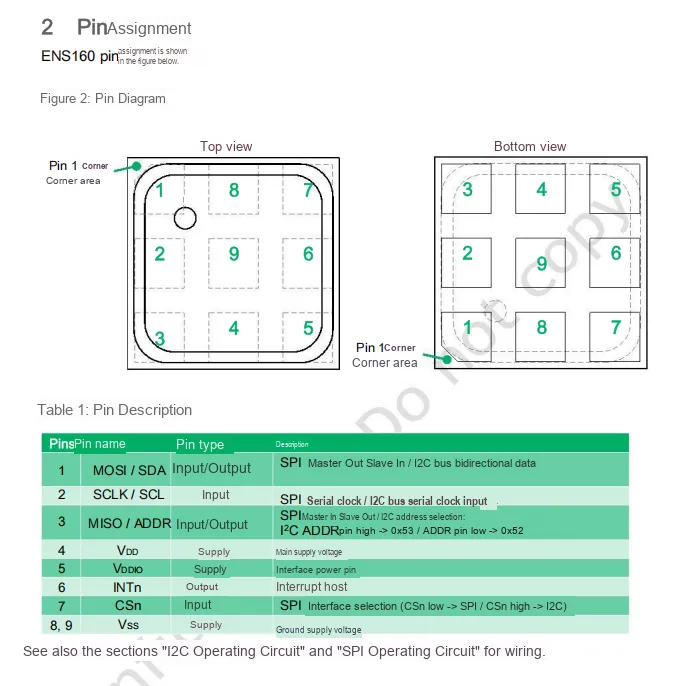
ENS160 features a 9-pin LGA package with straightforward and clearly defined pin functions: Pins 1 to 3 serve as communication interfaces supporting I²C / SPI multiplexing (SDA / SCL or MOSI / SCLK / MISO); Pin 4 is the main power supply VDD, Pin 5 is the interface power supply VDDIO; Pin 6 is the interrupt output INTn; Pin 7 is the interface selection pin (select SPI at low level, select I²C at high level); Pins 8 and 9 are ground Vss.
2.3 Functional Block Diagram
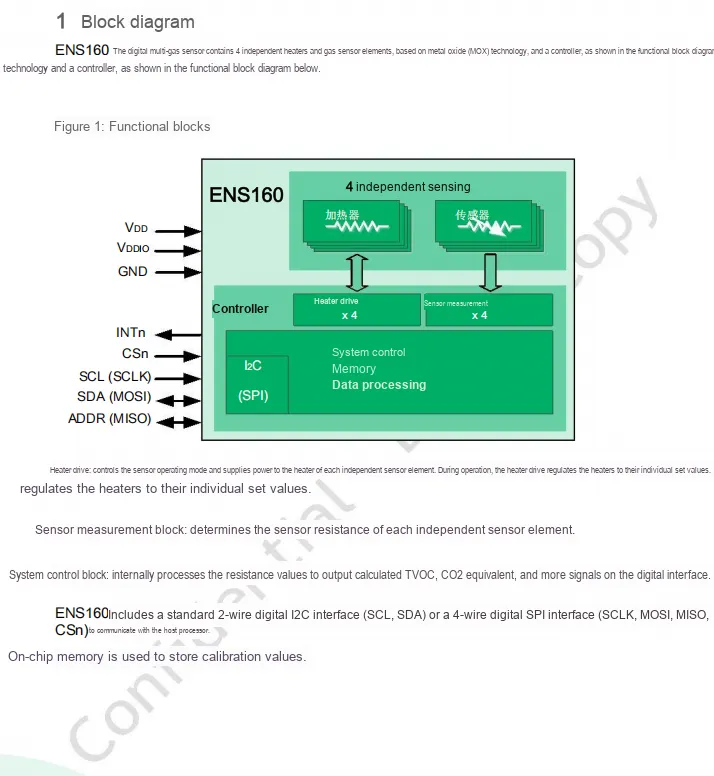
ENS160 digital multi-gas sensor is based on metal oxide technology, featuring 4 sets of independent heaters and sensing elements. The heating drive module of the controller provides precise heating for each element, the measurement module collects resistance changes, and the system control module processes the data to output TVOC, CO₂ equivalent and other data. It communicates with the main controller via I²C or SPI interface. Meanwhile, the on-chip memory can store calibration parameters to achieve stable and reliable gas detection.
2.4 Performance Parameters
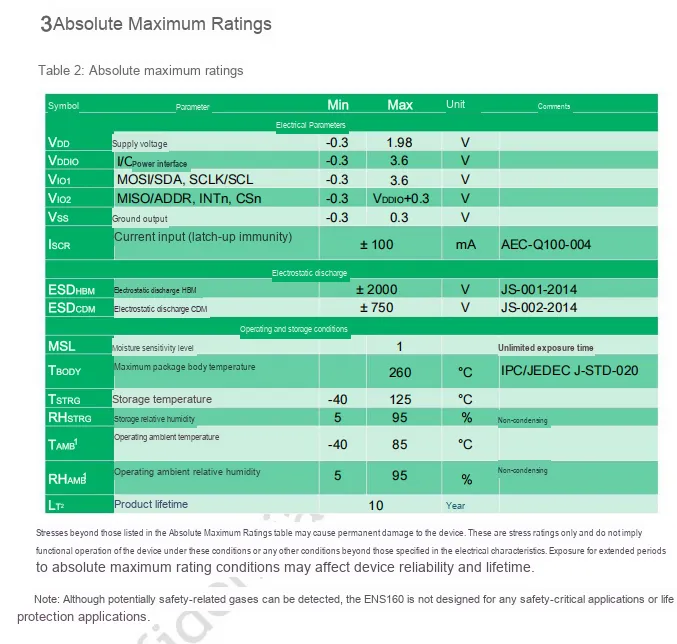
ENS160 has a maximum supply voltage of VDD 1.98V, IO supply VDDIO up to 3.6V;HBM ESD tolerance is ±2000V; operating temperature ranges from -40℃ to 85℃, humidity 5~95% RH, storage temperature from -40℃ to 125℃, and the product lifespan can reach up to 10 years. Exceeding these parameters may cause permanent damage to the device, and this sensor shall not be used in critical safety or life protection applications.
2.5 Reference Circuit
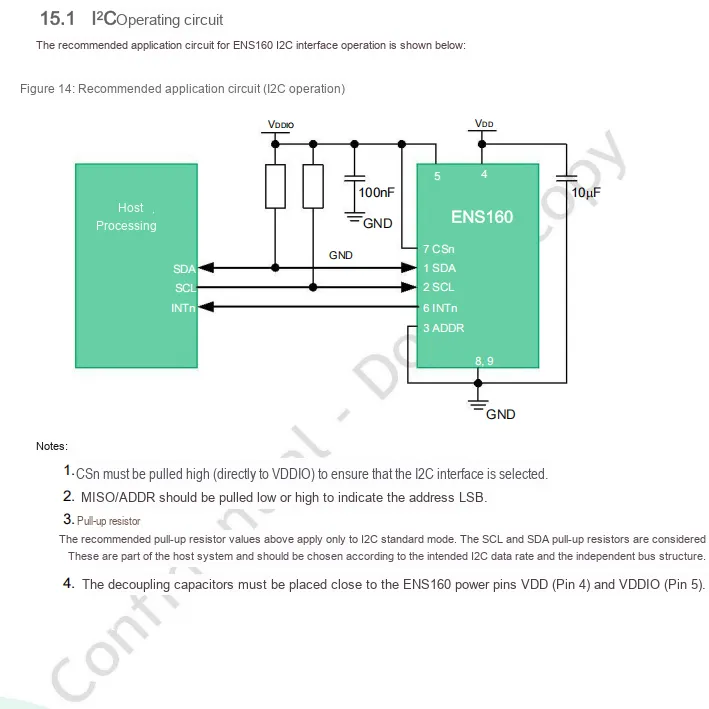
ENS160 's typical application circuit for the I²C interface: the host processor communicates with the sensor via the SDA / SCL bus. The CSn pin needs to be pulled high to VDDIO to enable the I²C mode, and the ADDR pin can be configured with high/low logic levels to set the I²C address' s LSB;In the circuit, VDD and VDDIO pins shall be accompanied by 10μF and 100nF decoupling capacitors placed nearby; meanwhile, external pull-up resistors connecting SDA / SCL to VDDIO are required to ensure stable bus level, and the INTn pin is used for the sensor to send a data-ready interrupt signal to the host.
2.6 Chip Configuration
None.
2.7 Communication Interfaces and Related Protocols
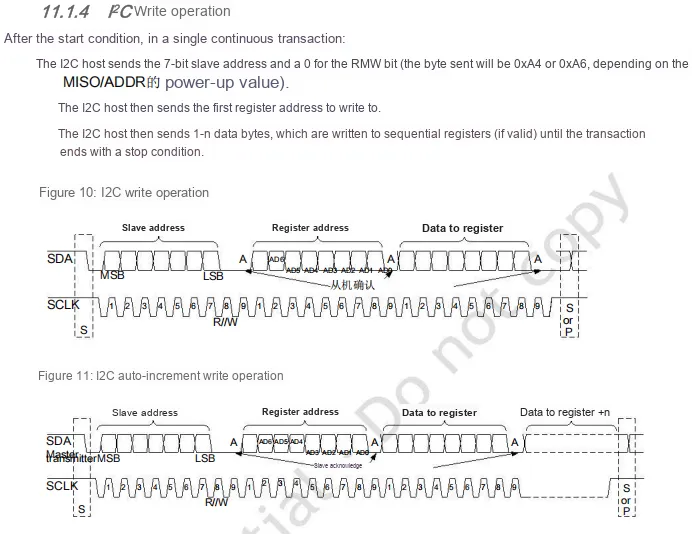
ENS160 I²C Write Operation Description: The master sends a consecutive transaction containing the device address (determined by the ADDR pin as 0xA4 or 0xA6), register address and data. It supports single-byte write and multi-byte write with automatic address increment, and the timing follows the standard sequence of start condition, address transmission, slave acknowledge, register address, data transmission and stop condition.
2.8 PCB Routing Precautions
None.
III. Circuit Engineering
3.1 Circuit Source Engineering
To obtain the source code of the circuit, please follow the official account [Freak Embedded]
3.2 Module Usage Instructions
The schematic diagram of this module is shown below:
SCH_Schematic1_ENS160-Based_Air_Quality_Monitoring_Module_v1.0.0_2026-05-11.pdf 2.4 MB
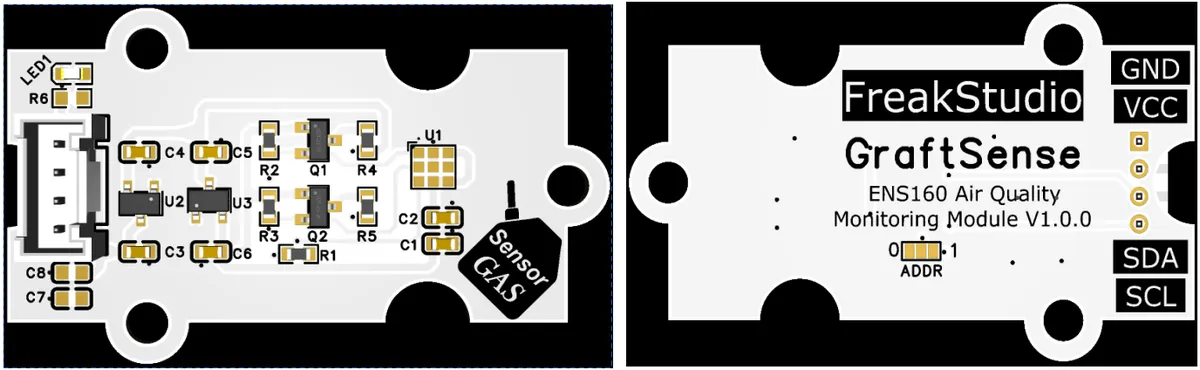
This module provides an IIC communication interface: it supports standard I2C communication rates, allows configuration of the ADDR pin to set the I2C address (e. g., 0xA4 or 0xA6), is compatible with 3.3V logic levels, and can stably read data including TVOC, CO₂ equivalent concentration and air quality index. It is suitable for indoor air quality monitoring scenarios such as smart homes, air purifiers and fresh air systems, providing the system with accurate and reliable gas detection data and interaction capabilities.
3.3 Application Experiment
Here, we use the GraftPort-RP2040 development board for testing, and the ENS160-based air quality monitoring module communicates with the main controller via the I2C interface.
Here, we first use the HY2.0-4P cable to connect the module to the GraftPort-RP2040 development board's I2C0 interface:
Development Board Pins | Module Pins | Description |
Pin 4 |
|
|
Pin 5 |
|
|
Here, we need to search for the relevant driver packages on uPyPI: https://upypi.net/zh/
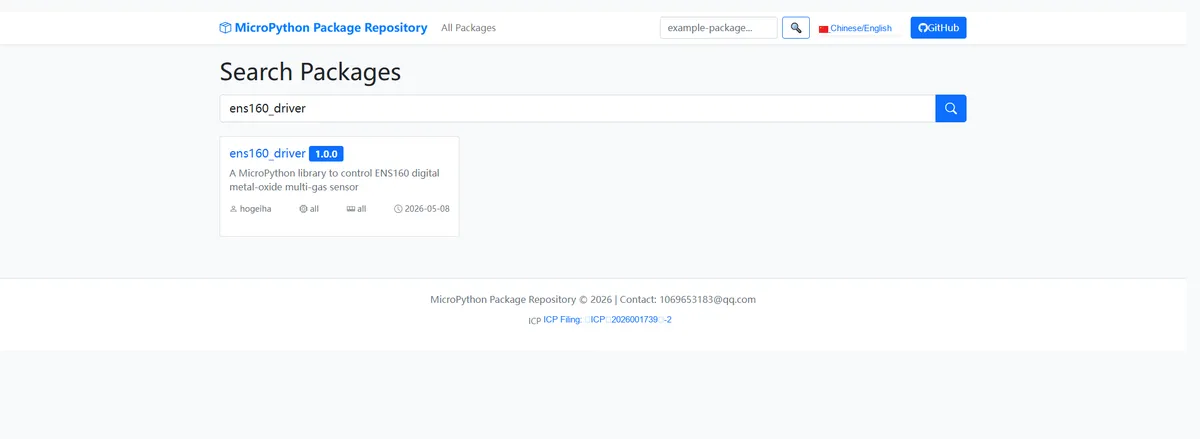
Enter ens160_driver to search, and the following will be displayed:
Click to copy the local installation command:
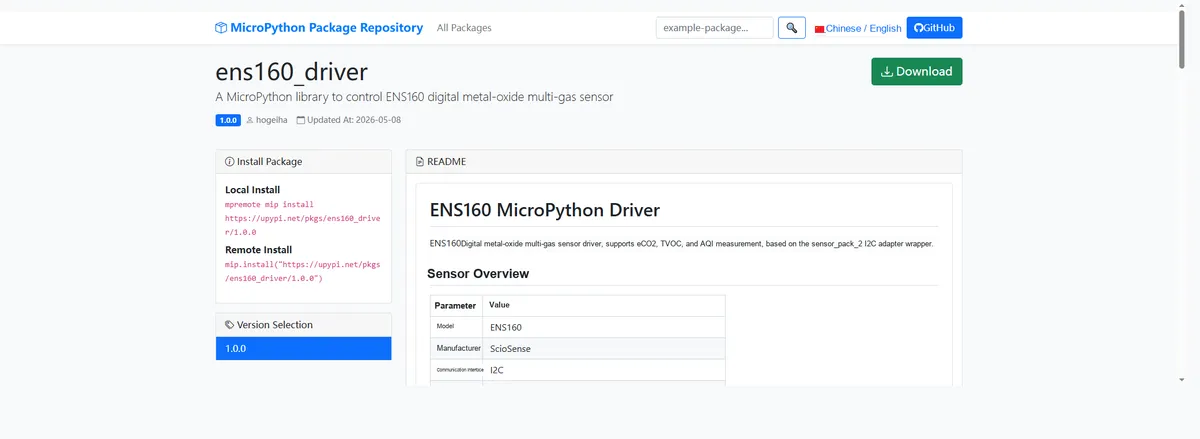
Import the module driver library code via the mip tool. Below are the usage commands for the mpremote tool:
mpremote mip install https://upypi.net/pkgs/ens160_driver/1.0.0Import the ENS160-based air quality monitoring module - MicroPython driver code, then copy the following main.py code into our project:
# Python env   : MicroPython v1.23.0
# -*- coding: utf-8 -*-
# @Time    : 2026/04/21 16:52
# @Author  : FreakStudio
# @File    : main.py
# @Description : Code for testing the ENS160 digital multi-gas sensor driver class
# @License : MIT

# ======================================== Import Modules =========================================

from machine import Pin, SoftI2C
import ens160sciosense
from sensor_pack_2.bus_service import I2cAdapter
import time

# ======================================== Global Variables ============================================

TARGET_SENSOR_ADDRS = [0x52, 0x53]
EXPECTED_PART_ID = 0x0160
PRINT_INTERVAL = 1000

# ======================================== Functions ============================================

# ======================================== Custom Classes ============================================

# ======================================== Initialization configuration ===========================================

time.sleep(3)
print("FreakStudio: ENS160 multi-gas sensor demo")

I2C_SDA_PIN = 4
I2C_SCL_PIN = 5
I2C_FREQ = 400_000
i2c_bus = SoftI2C(sda=Pin(I2C_SDA_PIN), scl=Pin(I2C_SCL_PIN), freq=I2C_FREQ)

print("START I2C SCANNER")
devices_list = i2c_bus.scan()
if len(devices_list) == 0:
    raise SystemExit("I2C scan found no devices, program exited")
print("I2C devices found:", len(devices_list))

sensor = None
for device in devices_list:
    if device in TARGET_SENSOR_ADDRS:
        print("I2C hexadecimal address:", hex(device))
        try:
            adaptor = I2cAdapter(i2c_bus)
            sensor = ens160sciosense.Ens160(adaptor, device)
            print("Sensor initialization successful")
            break
        except Exception as e:
            print("Sensor initialization failed:", e)
            continue
if sensor is None:
    raise SystemExit("No target sensor device found in I2C bus")

part_id = sensor.get_id()
print("Sensor Part ID: 0x%04X" % part_id)
if part_id != EXPECTED_PART_ID:
    raise SystemExit("Unexpected Part ID: 0x%04X, expected 0x%04X" % (part_id, EXPECTED_PART_ID))

fw = sensor.get_firmware_version()
print("Firmware version:", fw)
st_raw = sensor.get_data_status(raw=True)
print("Status (raw): 0x%02X" % st_raw)
st = sensor.get_data_status(raw=False)
print("Status:", st)

cfg_raw = sensor.get_config(raw=True)
cfg = sensor.get_config(raw=False)
print("Config (raw): 0x%02X" % cfg_raw)
print("Config:", cfg)

wt = sensor.get_conversion_cycle_time()
sensor.start_measurement(start=True)
time.sleep_ms(wt)

last_print_time = time.ticks_ms()

# ========================================  Main Program  ============================================

try:
    while True:
        current_time = time.ticks_ms()
        if time.ticks_diff(current_time, last_print_time) >= PRINT_INTERVAL:
            air_params = next(sensor)
            if air_params is not None:
                print("Air params:", air_params)
            else:
                print("No data available")
            last_print_time = current_time
        time.sleep_ms(10)

except KeyboardInterrupt:
    print("Program interrupted by user")
except OSError as e:
    print("Hardware communication error: %s" % str(e))
except Exception as e:
    print("Unknown error: %s" % str(e))
finally:
    print("Cleaning up resources...")
    sensor.start_measurement(start=False)
    del sensor
    print("Program exited")
Burn the code, open the terminal, and the output is as follows:
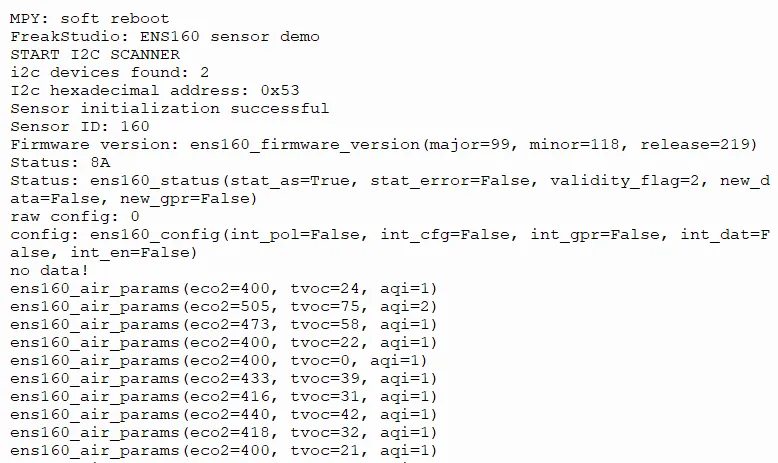
The ENS160 air sensor features normal I2C communication and initialization, and can stably output eCO2, TVOC and AQI data; the values fluctuate slightly with the environment, and the sensor works with normal response.
IV. Drivers
ens160_driver-1.0.0.zip 15 KB
5. BOM & Recommended Alternative Parts
None.
VI. Revision History
Document Version | Date Modified | Modifier | Modify Content |
v1.0 | 2026-05-11 | Ling Gaoxing | Initialize the document |
v1.1 | 2026-06-06 | Xin Ruili | Create an open version of the document based on the internal document version v1.0. |
7. Relevant Materials
7.1 Chip Datasheet
ENS160-cn .pdf 4.0 MB
7.2 Unique Icons for PCB Silk Screen