Contents
- I. Module Introduction
- II. Introduction to Major Chips
- 2.1 Chip Overview
- 2.2 Pin Definition
- 2.3 Functional Block Diagram
- 2.4 Performance Parameters
- 2.5 Reference Circuit
- 2.6 Chip Configuration
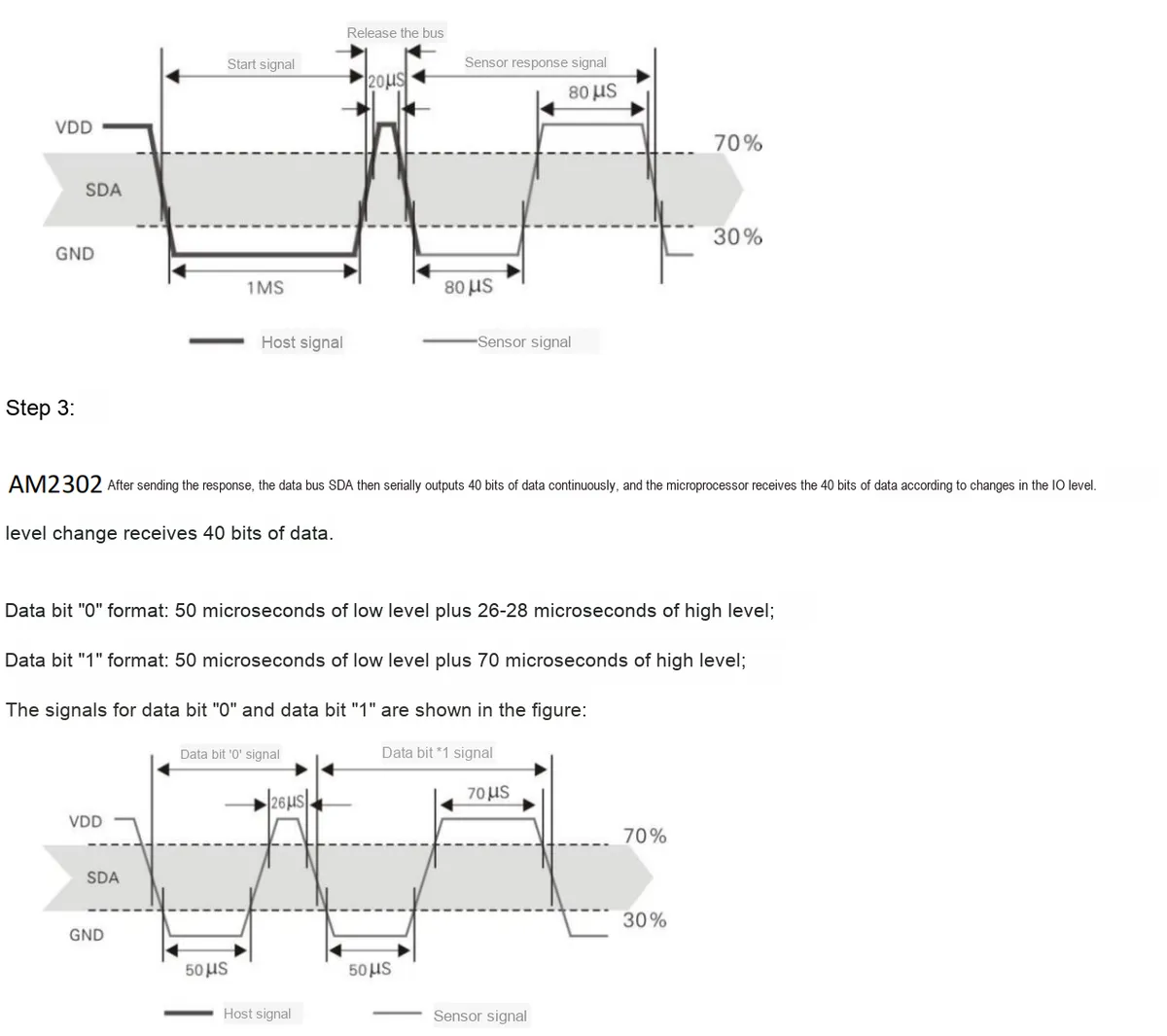
- 2.7 Communication Interfaces and Related Protocols
- 2.8 PCB Routing Precautions
- III. Circuit Engineering
- 3.1 Circuit Source Engineering
- 3.2 Module Usage Instructions
- 3.3 Application Experiment
- IV. Drivers
- 5. BOM & Recommended Alternative Parts
- VI. Revision History
- VII. Relevant Materials
- 7.1 Chip Datasheet
- 7.2 Unique Icons for PCB Silkscreen
I. Module Introduction
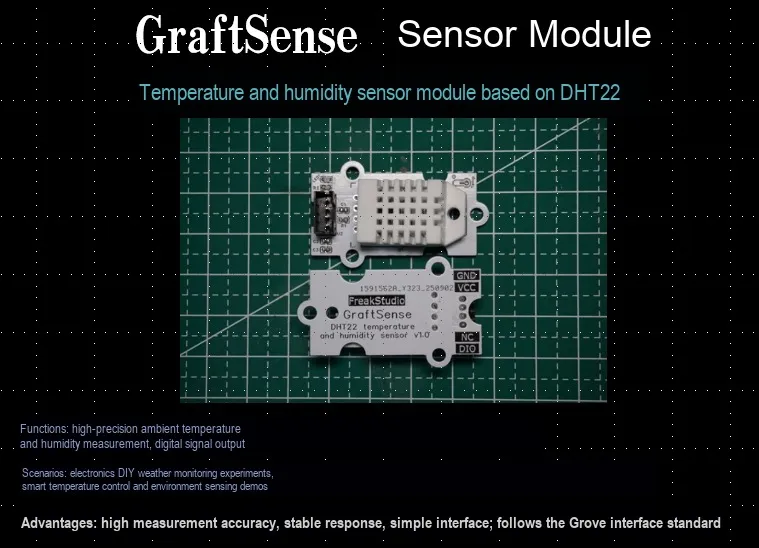
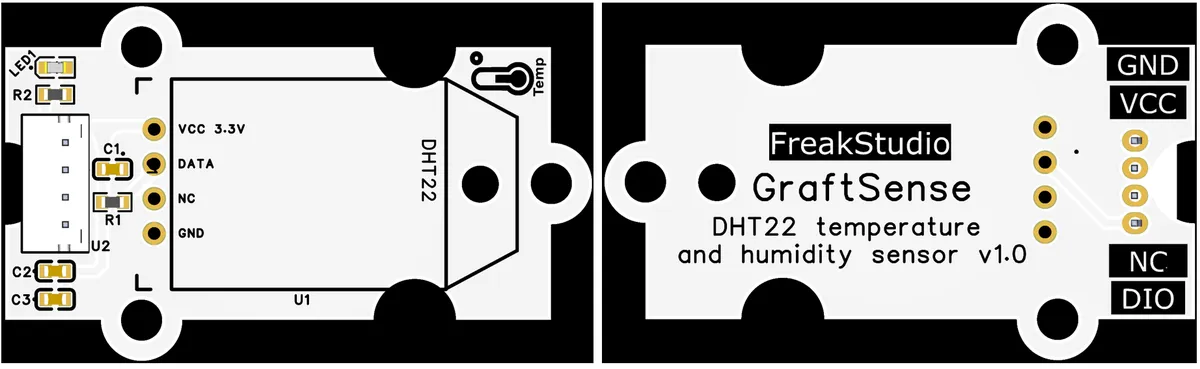
DHT22-based Temperature and Humidity Sensor Module takes the high-precision digital temperature and humidity sensor DHT22 as the core. In terms of hardware, it builds a stable one-wire communication circuit through a 4.7kΩ pull-up resistor and a 100nF filter capacitor, supports 3.3V/5V wide-voltage power supply, and realizes one-wire digital signal transmission via the DIO pin;Functionally, it can accurately collect ambient temperature and humidity (temperature: -40~80℃ ±0.5℃, humidity: 0~100% RH ±2% RH), with PCB-integrated VCC, and GND, and DIO interfaces. It features a compact layout and strong anti-interference capability, making it suitable for scenarios with high requirements for temperature and humidity accuracy such as smart homes and industrial environment monitoring.
II. Introduction to Major Chips
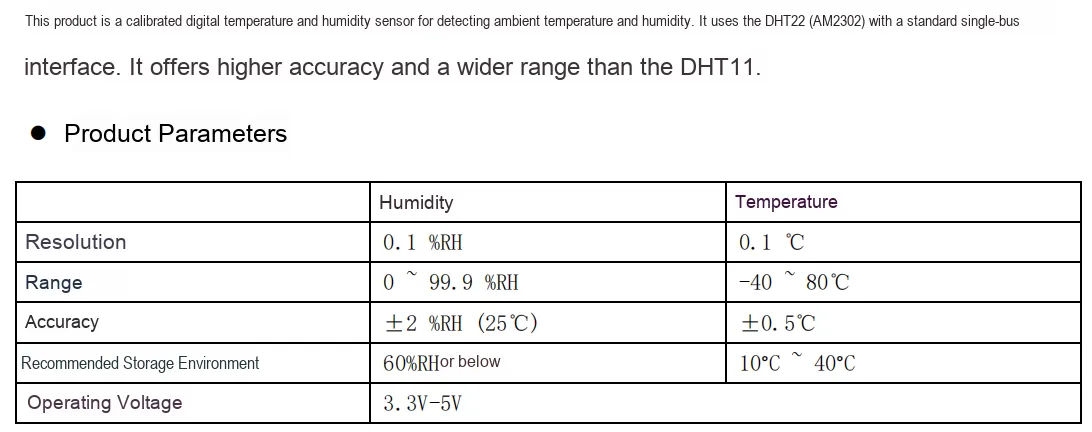
The core of this module adopts DHT22 (its domestic equivalent alternative is AM2302, whose related registers and communication interface are consistent with those of DHT22) digital temperature and humidity sensor. It integrates a calibrated digital signal output temperature and humidity sensor, temperature and humidity calibration, A/D conversion, data processing, one-wire communication and other functions into a single chip, which can directly output digital signals and eliminates the need for users to perform complex analog signal processing. Its main features are high precision, fast response and strong anti-interference capability.
2.1 Chip Overview
2.2 Pin Definition

2.3 Functional Block Diagram
Due to the DHT22 chip's complex internal structure and the absence of a detailed functional block diagram provided by the official, no functional block diagram is presented in this subsection.
2.4 Performance Parameters
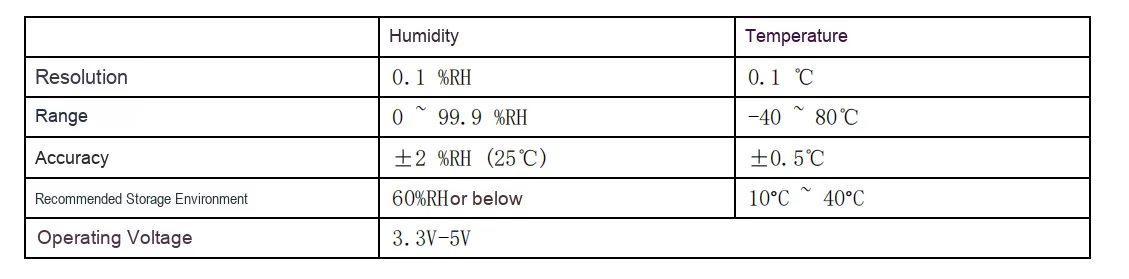
The following table lists the main performance parameters of the DHT22 chip:
2.5 Reference Circuit
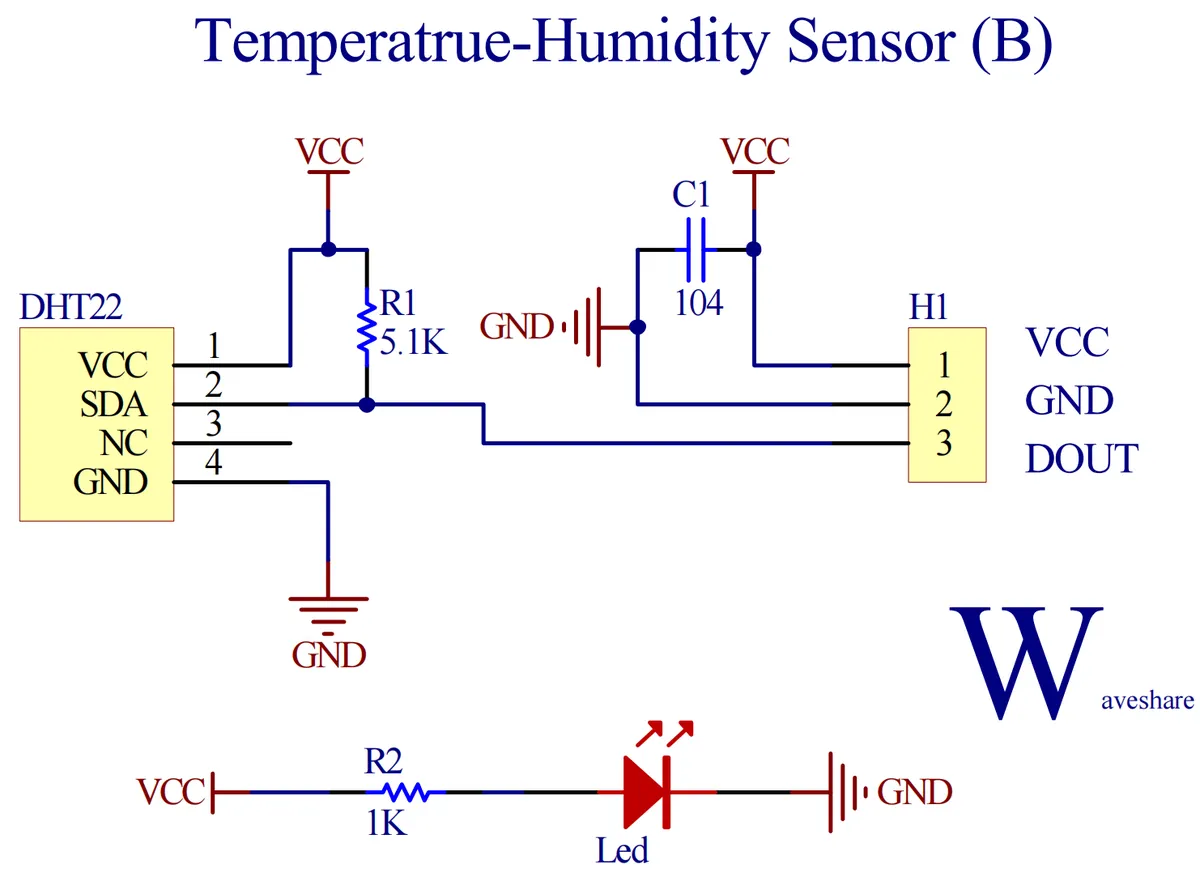
The AM2302 device adopts a simplified single-bus communication mode. The single-bus refers to a configuration with only one data line, through which all data exchange and control within the system are completed. A pull-up resistor of approximately 5.1kΩ is typically required for the single-bus, which ensures that the bus remains at a high level when idle.
2.6 Chip Configuration
This module is of Plug and Play type, requiring no hardware configuration or software register setup. The reading of temperature and humidity data entirely relies on the data interaction between the main control chip and the module via the 1-Wire Communication Protocol.
2.7 Communication Interfaces and Related Protocols
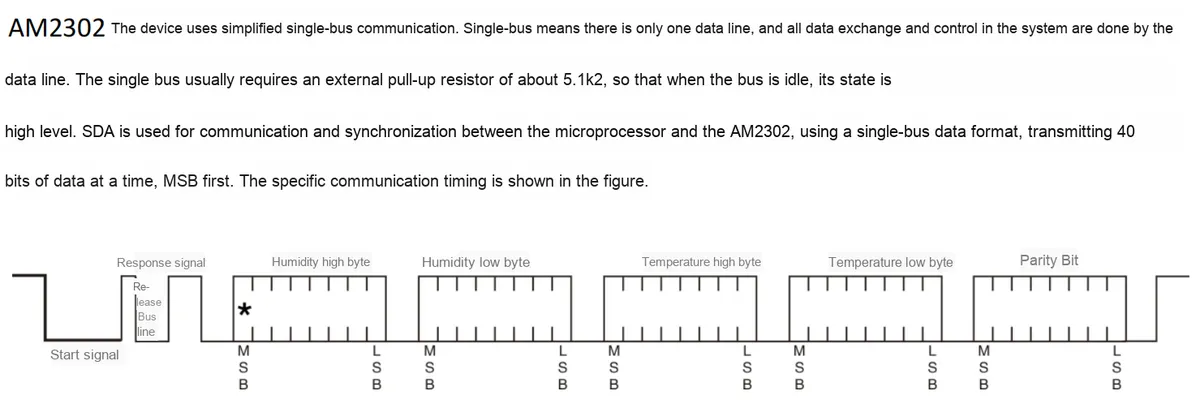
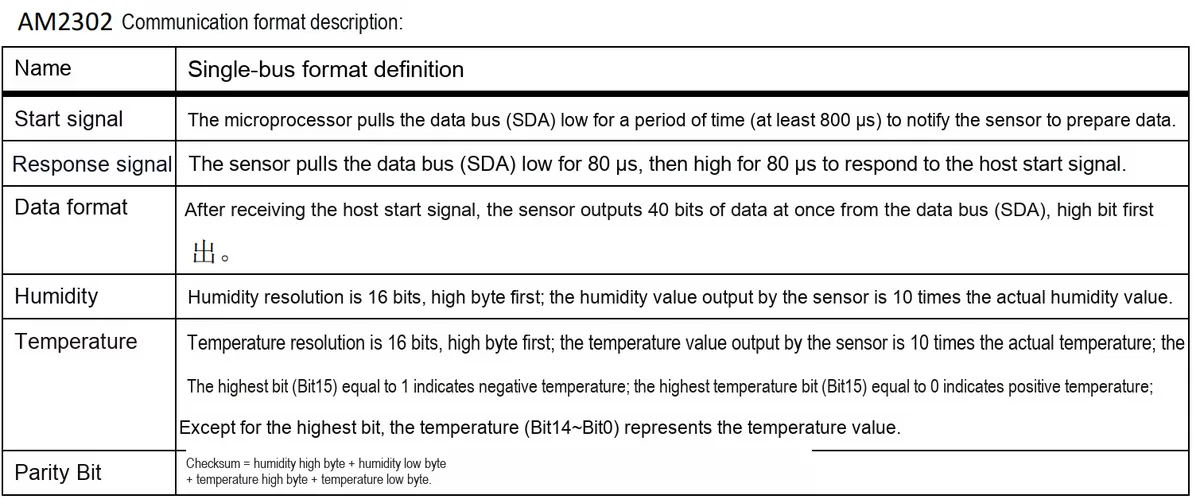
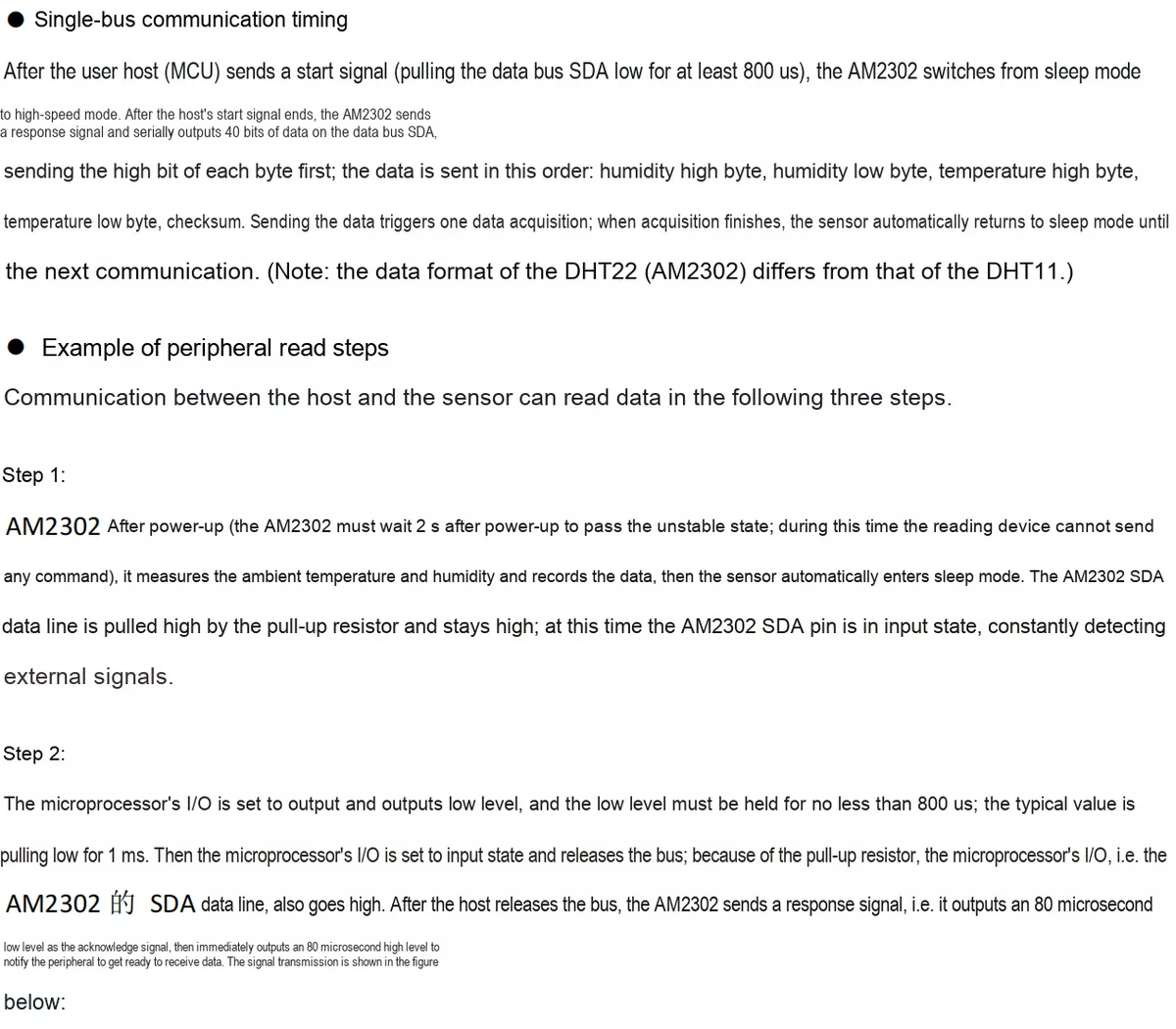

2.8 PCB Routing Precautions
None.
III. Circuit Engineering
3.1 Circuit Source Engineering
To obtain the source project of the circuit, please follow the official account [Freak Embedded]
3.2 Module Usage Instructions
The schematic diagram of this module is shown below:
SCH_Temperature and Humidity Sensor Module Based on DHT22_v1.1_2025-10-10.pdf 1.7 MB
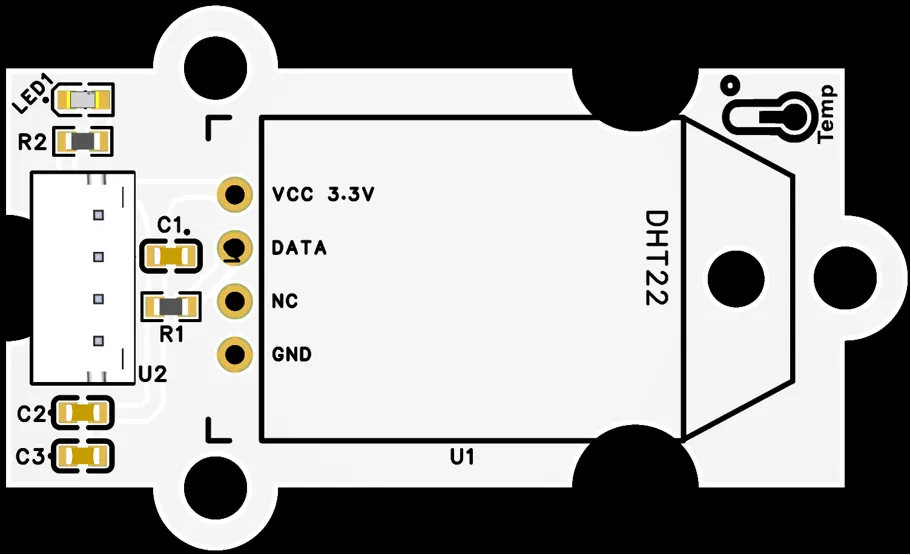
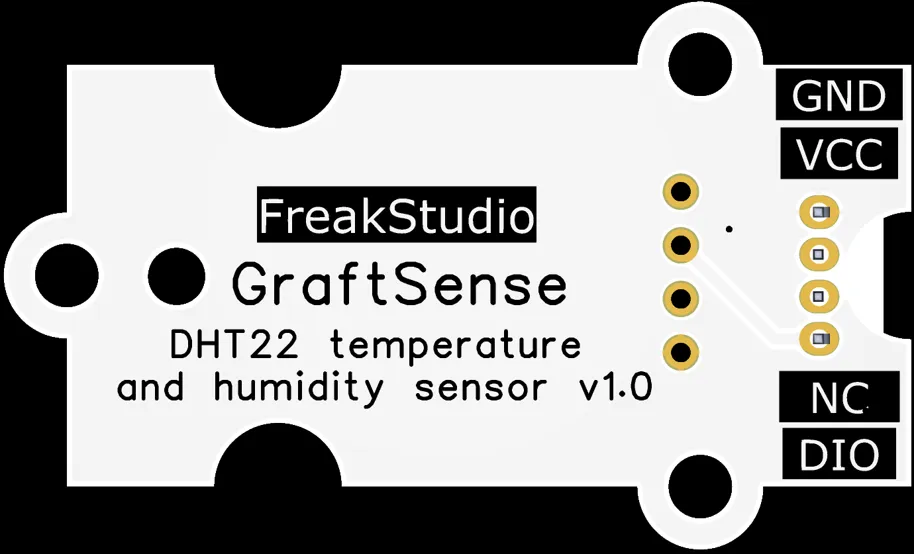
This module adopts single-bus signal output DIO: When the external main control device initiates communication, the module establishes a single-bus connection with the main control via the DIO pin, and completes the interaction of temperature and humidity data by virtue of the single-bus protocol of the DHT22 sensor. Specifically, the main control will first pull down the DIO pin to trigger data transmission, and the DHT22 sensor then feeds back the ambient temperature and humidity information in the form of a 40-bit digital signal (including humidity integer, humidity decimal, temperature integer, temperature decimal and checksum);Meanwhile, the 4.7kΩ pull-up resistor in the circuit ensures that DIO pin remains at a high level when idle, and the 100nF filter capacitor can effectively suppress signal interference, making one-wire communication more stable and reliable, thus realizing accurate and efficient collection of ambient temperature and humidity. In addition, this module supports 3.3V or 5V power supply to adapt to the power requirements of different main control systems, and the integrated auxiliary circuit can visually display the working status, further improving the practicability of the module in scenarios such as smart home and industrial monitoring.
3.3 Application Experiment
Here, we use the GraftPort-RP2040 development board for testing, and connect the DHT22-based temperature and humidity sensor module to communicate with the main controller via the DIO interface.
Here, we first use the HY2.0-4P connection cable to connect the module to the GraftPort-RP2040 development board's DIO0 interface:
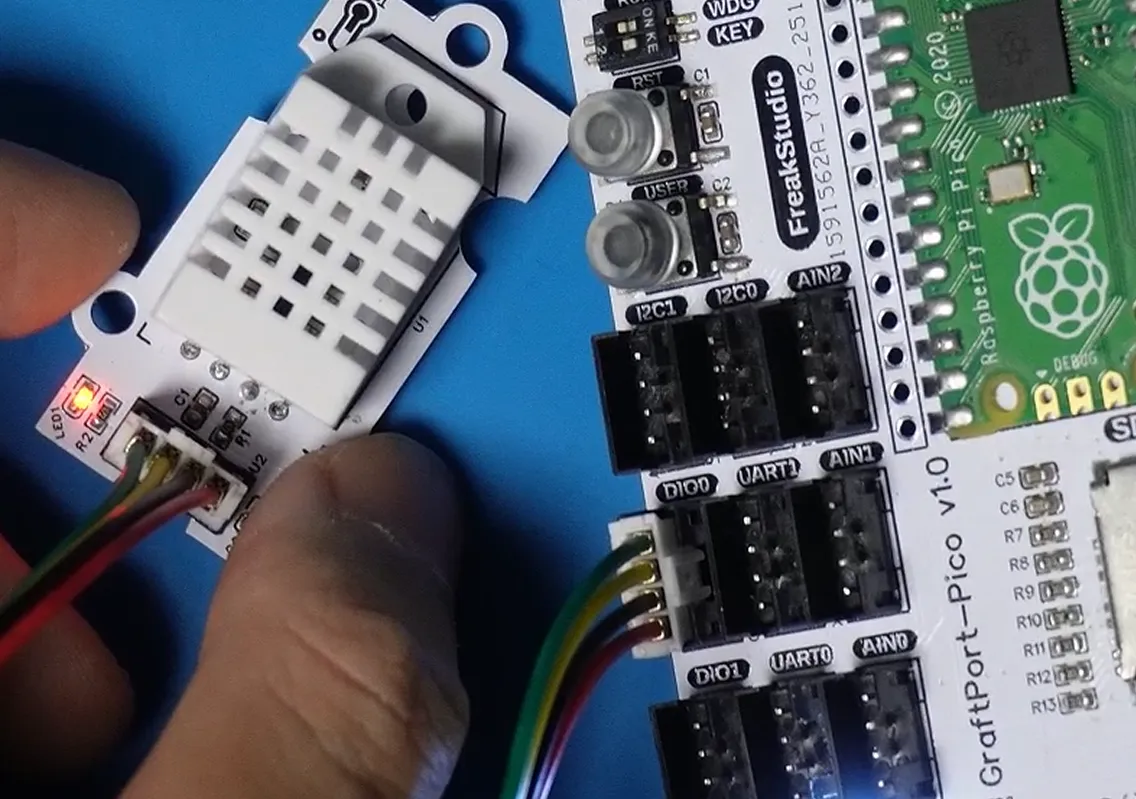
The module connections are shown in the following table:
Development Board Pins | Module Pins | Description |
Pin 6 |
| 1-Wire communication pin |
Pin 7 |
| - |
Here, we can import the module driver library code via the mip tool, and the following are the usage commands for the mpremote tool:
mpremote mip install github:FreakStudioCN/GraftSense-Drivers-MicroPython/sensors/dht22_driverAfter importing the DHT22 temperature and humidity sensor - MicroPython driver code, copy the following main.py code into our project:
# Python env   : MicroPython v1.23.0
# -*- coding: utf-8 -*-
# @Time    : 2025/9/1 11:22 AM
# @Author  : ben0i0d
# @File    : main.py
# @Description : dht22 driver test file, tests outputting temperature and humidity

# ======================================== Import Modules =========================================

import dht
from machine import Pin
import time

# ======================================== Global Variables ============================================

# ======================================== Functions ============================================

# ======================================== Custom Classes ============================================

# ======================================== Initialization configuration ===========================================

# Delay to wait for the device to initialize
time.sleep(3)
# Print debug information
print('FreakStudio : Using OneWire to read DHT22 sensor')

# Delay 1 s, wait for the DHT22 sensor to finish powering up
time.sleep(1)
# Assume the data pin is connected to GPIO6
d = dht.DHT22(Pin(6))

# ========================================  Main Program  ============================================

while True:
    try:
        d.measure()
        temp = d.temperature()
        hum = d.humidity()
        print("Temperature: %.1f C  Humidity: %.1f %%" % (temp, hum))
    except Exception as e:
        print("Read error:", e)
    time.sleep(2)
Burn the code, open a terminal, and use the mpremote tool to connect to the main controller; the output is as follows:
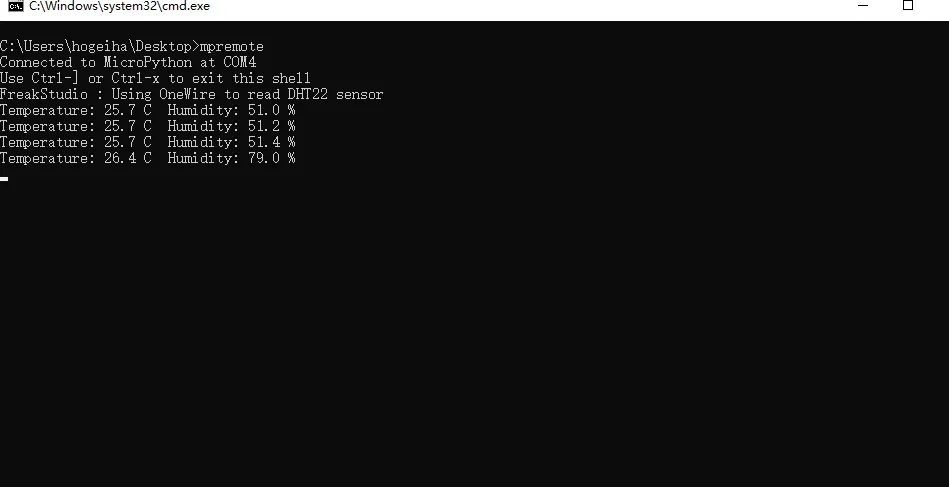
As you can see, the terminal prints the temperature and humidity collected by the sensor, and when our lighter is brought close, both the temperature and humidity change significantly:
IV. Drivers
dht22_driver.zip 7 KB
5. BOM & Recommended Alternative Parts
None.
VI. Revision History
Document Version | Date of Revision | Modifier | Modified Content |
v1.0 | 2025-08-3 | Ling Gaoxing | Initialize the document |
v1.1 | 2025-09-21 | Li Zisheng | Added Section 2.8 PCB Routing Notes Revised Section 3, Instructions for Circuit Source Engineering and Module Usage, and added a secondary heading: 3.1 Circuit Source Engineering, 3.2 Module Usage Instructions, 3.3 Application Experiments The BOM sheet has not been finally checked, the driver has not been re-verified, and the 3.3 application experiment Not yet specified. |
v1.2 | 2025-12-29 | Li Zisheng | Added application experiments and production files |
v1.3 | 2025-12-31 | Xin Ruili | Create an open version of the document based on the internal document version v1.2. |
VII. Relevant Materials
7.1 Chip Datasheet
DH22 Temperature and Humidity Module Datasheet.pdf 708 KB
7.2 Unique Icons for PCB Silkscreen