
Contents
- Introduction
- 1. Module Introduction
- 2. Introduction to Main Chips
- 2.1 Chip Overview
- 2.2 Pin Definitions
- 2.3 Functional Block Diagram
- 2.4 Performance Parameters
- 2.5 Reference Circuit
- 2.6 Chip Configuration
- 2.7 Communication Interfaces and Related Protocols
- 2.6 Register Definitions
- 2.8 PCB Wiring Precautions
- III. Circuit Engineering
- 3.1 Circuit Source Project
- 3.2 Module Usage Instructions
- 3.3 Application Experiment
- 4. Driver
- 5. BOM & Recommended Alternatives
- 6. Change History
- VII. Related Materials
Introduction
Have you ever had experiences like this: the intelligent irrigation system misjudges light rain and runs in vain, the automatic window closer malfunctions due to dust interference, and the rainfall data on food delivery platforms can only be judged by riders' naked eyes?
For a long time, "environmental perception" of outdoor intelligent devices has always been a persistent problem. Traditional rain drop solutions generally have obvious shortcomings:
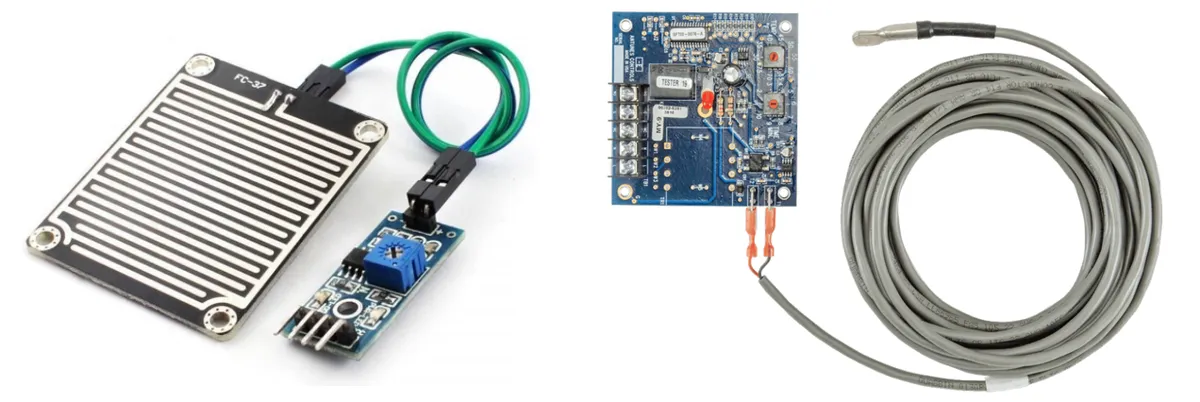
- The "delicate and easily damaged" resistive sensor : It relies on the conductivity of rainwater to determine "whether it is raining", but the metal electrodes are exposed to the outdoors for a long time and are extremely vulnerable to the effects of dust, corrosion, and condensation, and will malfunction after long-term use; moreover, it can only simply determine "rain / no rain", unable to distinguish the amount of rainfall, let alone detect dust and frost.
- The "high-cost" optical solution : Although it has slightly higher accuracy, it is complex to install, expensive, and easily interfered with by obstacles, making it difficult to popularize in consumer-grade devices.
- Weak general anti-interference ability: Temperature changes and electromagnetic interference can both lead to false triggering, causing the device to "misreport the weather".
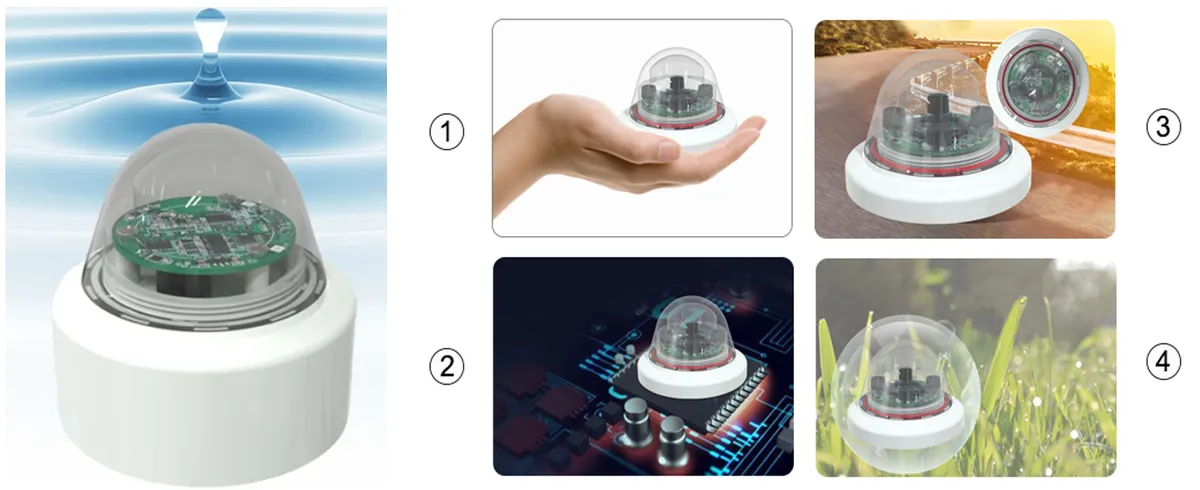
The Capacitive Dust, Rain and Frost Sensor CDS1081 launched by Minyuan is a "versatile sensing player" that comes to solve these pain points. It is an intelligent sensor based on capacitive sensing, equipped with the self-developed MCP1081S digital capacitive processing chip. In short, it senses the environment by "changes in the dielectric constant of matter": when dust, rain or frost covers the surface, different substances will change the capacitance value, and the sensor can accurately calculate the thickness of the dust, rain and frost through this change, which is equivalent to equipping the device with a pair of "thickness-sensing eyes".
Its core advantage lies in:
- ✅ One sensor detects three states: dust, rain, and frost, all-round perception: It can not only detect rainfall from 0 to 10mm in height but also accurately distinguish multiple levels of rainfall, including sporadic light rain, light rain, moderate rain, heavy rain, and torrential rain; at the same time, it can detect dust thickness from 0 to 5mm and even identify the frosting state, with one sensor meeting various environmental monitoring needs.
- ✅ High precision + strong anti-interference, bid farewell to "erroneous weather reporting": With a capacitance resolution as high as 0.001pF and paired with a built-in MCU processor, it can effectively filter out interference from temperature, condensation, electromagnetic fields, etc. Even in humid "returning southerly" weather or outdoor environments with large temperature differences, it can stably output data without false triggering of device actions.
- ✅ Penetrating installation + low cost, highly flexible integration:Supports penetrating installation through non-metallic media with a thickness of 0~3mm, eliminating the need for direct exposure outdoors, and can be used with a plastic housing, which not only protects the sensor but also reduces the difficulty of waterproof design; meanwhile, the module has low cost, a simple and easy-to-integrate UART interface, and can be easily adapted to both consumer products and industrial equipment.
- ✅ Low power consumption + wide temperature range, durable even in outdoor environments:Operating voltage ranges from 2V to 5.5V, with power consumption as low as 4mA at 5V, and it also supports a wide temperature Scope of Work from -40°C to +85°C, ensuring stable operation from hot outdoor areas to cold northern regions.
can be used in the following scenarios:
- 🏠 Smart Home: Making Control More "Weather-Savvy"
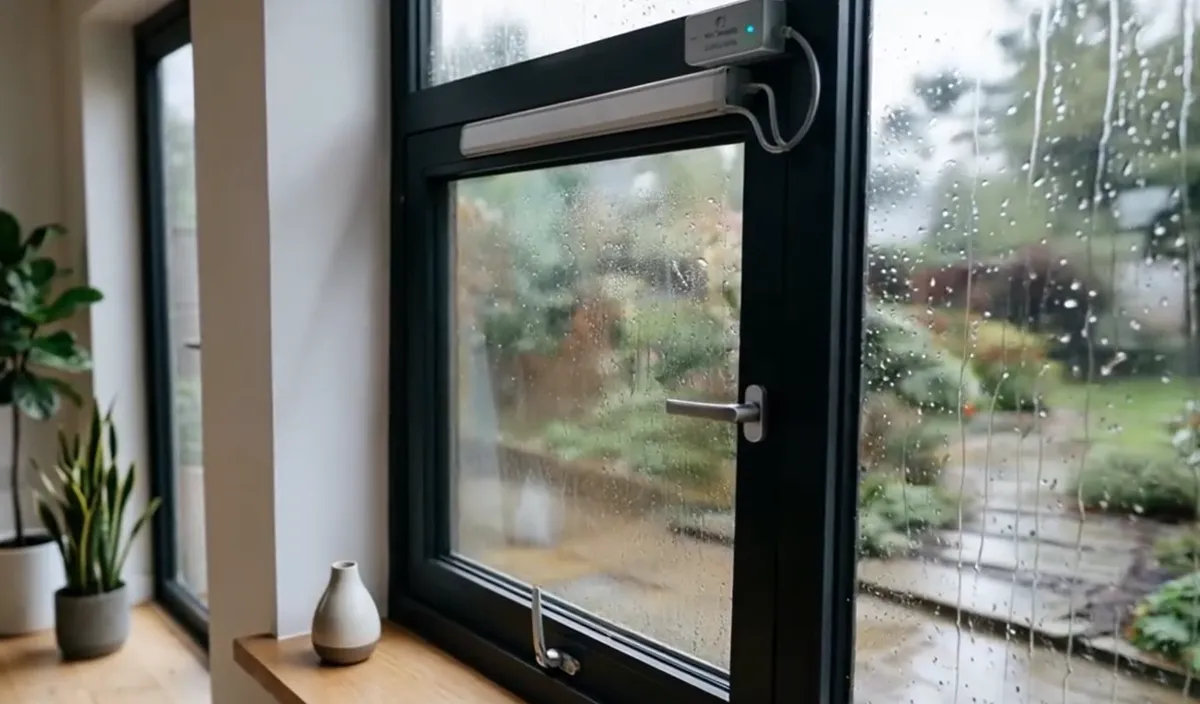
- Automatic Window Closer: No need to worry about forgetting to close windows when it rains while you're out. The sensor can automatically trigger window closing when it detects rainfall, and can also adjust its logic based on the amount of rainfall - for example, it won't trigger for light drizzle but will execute the action only for heavy rain.
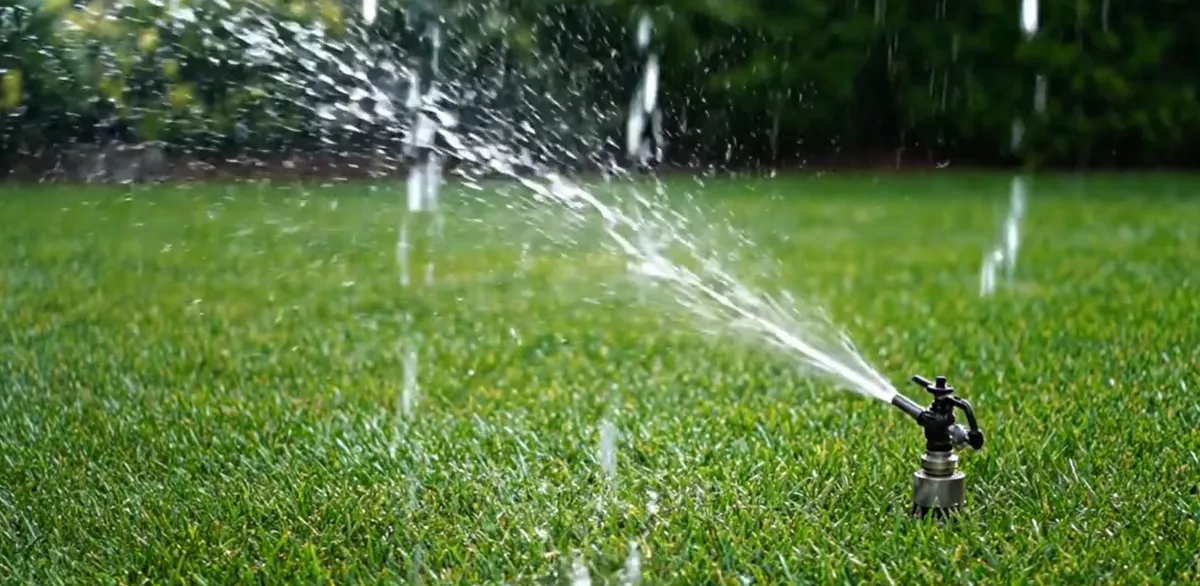
- Intelligent Irrigation System: Adjusts the irrigation plan based on real-time rainfall, automatically pauses on rainy days, and replenishes water as needed on sunny days, saving water and providing peace of mind, bidding farewell to the extensive "fixed-time watering" model.
- 🛵 Outdoor Travel: Making Scheduling Smarter
- Takeout / Delivery Electric Bicycles: After installing sensors, they can postback rainfall data from different regions. Based on this, the platform can optimize delivery scheduling, and riders can also anticipate road conditions in advance, reducing the risk of delivery in rainy weather.

- 🏭 Industry & Equipment: Make Maintenance More Worry-Free
- Outdoor industrial equipment / outdoor air conditioner unit: When the sensor detects that the dust thickness exceeds the standard, it can automatically trigger the cleaning mode, reducing the probability of equipment failure and lowering the cost of manual maintenance.
- Cleaning device dustbin: When paired with this sensor, the robotic vacuum cleaner can detect the dust thickness in real time, remind users to clean it in a timely manner, and even automatically adjust the cleaning mode to prevent the dustbin from clogging and affecting the cleaning effect.
From smart home devices to outdoor travel, from industrial equipment to cleaning appliances,the capacitive dust, rain, and frost sensor CDS1081uses a small capacitive sensor to solve the major challenge of "environmental perception" for outdoor equipment, enabling smart devices to stop relying on "guessing" and truly understand the changes in rain, dust, and frost, providing reliable intelligent control solutions for various scenarios.
1. Module Introduction
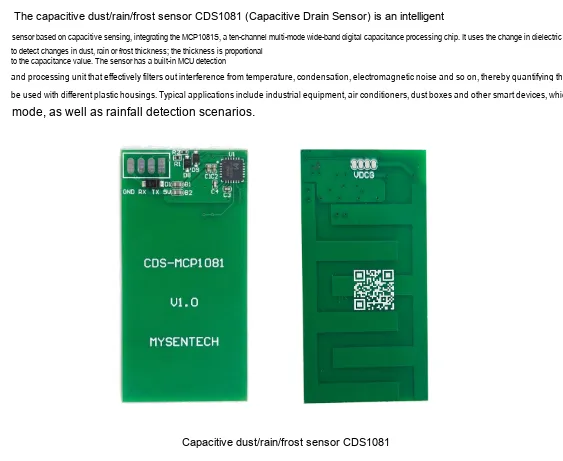
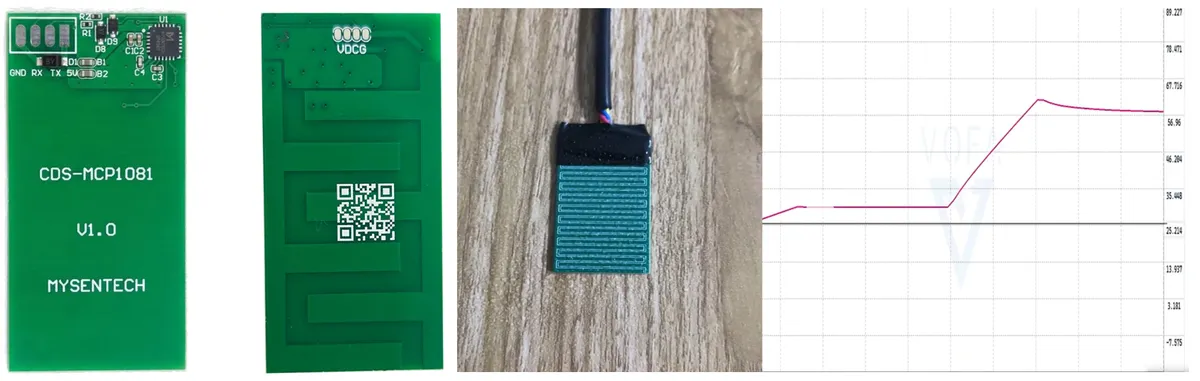
This figure shows the physical appearance of the CDS module, allowing for a direct view of the sensing area, plate shape dimensions, and overall structural form.
2. Introduction to Main Chips
2.1 Chip Overview
Minyuan Ten-channel Multi-mode Broadband Digital Capacitive Processor Chip MCP1081S detects changes in the thickness of dust, rain, and frost by utilizing the change in dielectric constant during the presence of dust, rain, or frost, where the thickness of dust, rain, and frost is proportional to the capacitance value.
2.2 Pin Definitions
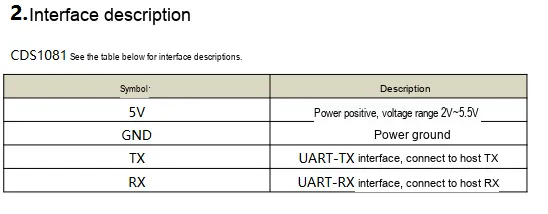
This diagram shows the module pin definitions, which can be used to confirm the connection relationship between the power supply and serial port signals.
2.3 Functional Block Diagram
None.
2.4 Performance Parameters
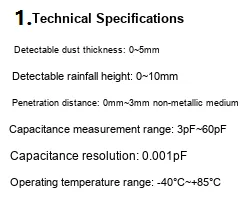
This figure shows the main performance parameters of CDS, including information such as power supply, power consumption, and basic measurement capabilities.
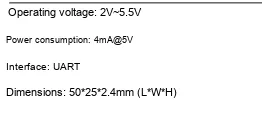
This diagram supplements the module's specifications and application parameters, facilitating reference during model selection and system design.
2.5 Reference Circuit
None
2.6 Chip Configuration
None.
2.7 Communication Interfaces and Related Protocols
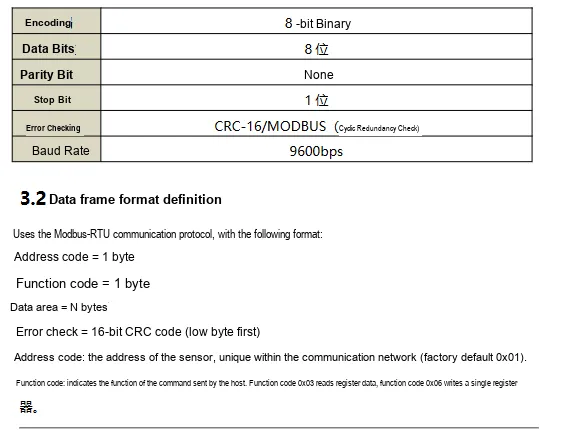
This figure illustrates the basic parameters and frame format of module communication, serving as the basis for the development of master-slave communication.
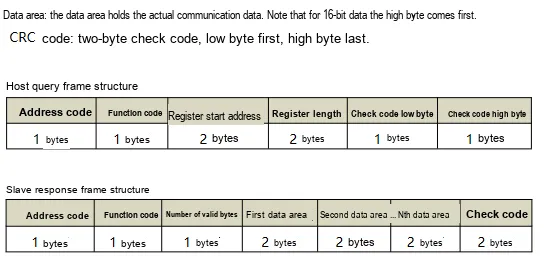
This diagram shows the communication example and data organization method, facilitating the understanding of the composition of specific read and write instructions.
2.6 Register Definitions
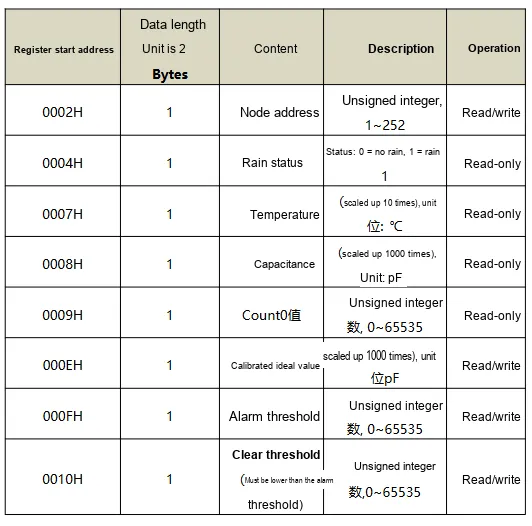
This figure lists the register definitions, which can be used to read measurement values or configure relevant threshold parameters.
2.8 PCB Wiring Precautions
None.
III. Circuit Engineering
3.1 Circuit Source Project
To obtain the circuit source project, please check the link below:
https://www.mysentech.com/productinfo/3168524.html
3.2 Module Usage Instructions
3.2.1 Module Test Environment Setup and Precautions
Before using this module, set up the test environment as needed:
- Routine Test: Indoor environment with room temperature 25℃±5℃, humidity 40%~60%, no strong electromagnetic interference, and no vibration
- Environmental Testing: High and Low Temperature Chamber, capable of simulating temperature environments from -40°C to +85°C
Here, during testing, we can simulate scenarios of dust, condensation, and rain using ordinary paper sheets and clean water: simply put, we cover the sensing surface with paper sheets of different thicknesses to simulate dust accumulation, add a small amount of clean water to simulate rain, frost, and condensation, and observe whether the values change smoothly and linearly with the degree of occlusion and the thickness of the water layer.
3.2.2 Usage of Modbus Poll
Modbus Poll is a general-purpose Modbus master station debugging tool that is compatible with all capacitive sensors in this series that support the Modbus-RTU protocol. It can quickly achieve serial communication debugging between sensors and computers, real-time data reading, and log export, and is a general-purpose upper computer tool for verifying sensor functions and collecting test data. The software supports Modbus RTU/ASCII/TCP/IP protocols, is compatible with various register types and data formats, and its operation process is universal for all sensors in the series.
Before use, you need to complete the software installation and activation first. You can download the installation package through official channels. When opening it for the first time, you can try it for 30 days, or you can enter the registration code to activate it permanently. After connecting the sensor to the computer via hardware, open the software and click "Connection" - "Connect". In the pop-up window, configure the serial port parameters (Port Number, Baud Rate, Data Bits / Parity Bits / Stop Bits; sensors in this series default to 9600 Baud, 8N1 format, with the specific details subject to the corresponding model specification). After confirmation, you can establish a communication connection.
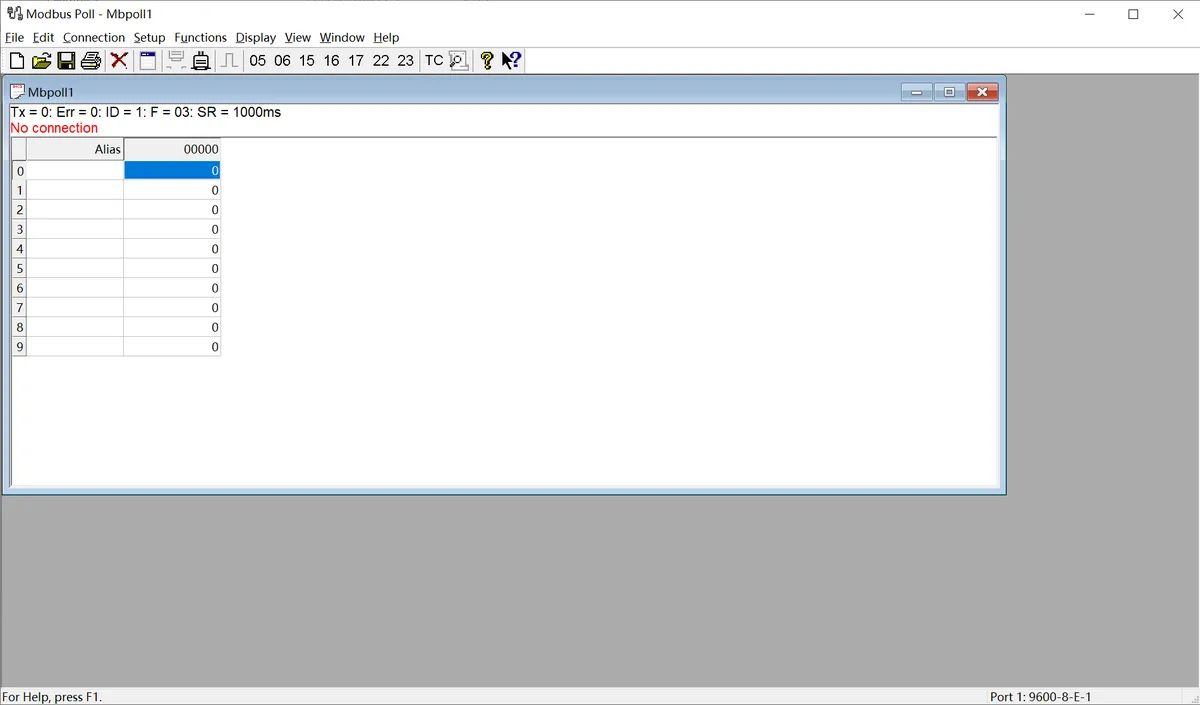
The following is a description of the general operating procedure:
- Serial Connection Configuration: After connecting the sensor to the computer via a USB-to-serial module, open the Modbus Poll software, click on the menu bar "Connection" - "Connect", select the COM Port Number corresponding to the sensor in the pop-up window, and configure the serial port parameters that match the sensor (Baud Rate, Data Bits, Parity, Stop Bits; sensors in this series default to 9600 Baud, 8N1 format). After confirmation, the communication connection can be established.
- Import Sensor Configuration File: The software supports importing the corresponding
.mbppre-configured files for each sensor model. The register address, data format, and alias definition have been pre-set in the file, eliminating the need for manual register configuration. Simply open the corresponding sensor's.mbpfile in the software, and all parameters will be automatically loaded. After a successful connection, the real-time detection data of the sensor (such as dust/rain/frost thickness values, status flags, etc.) will be directly displayed. - Data Logging (Optional): If you need to save test data, you can configure logging rules through the "Setup" - "Excel Log" function, which supports logging data at fixed intervals or every time data is updated, and allows you to set an upper limit on the number of records, facilitating subsequent analysis and verification of sensor data.
The above are the general basic operations of the host computer. For the pre-configured files, specific register definitions, and special configuration details of the .mbp of different sensor models, please refer to the content in "VII. Related Materials".
3.3 Application Experiment
Here, we use the GraftPort-RP2040 development board for testing, the capacitive dust, rain, and frost sensor CDS uses the UART interface to communicate with the main controller.
Here, we first use the HY2.0-4P connection cable to connect the capacitive dust, rain, and frost sensor CDS via the XH2.54-4P to HY2.0-4P interface module to the GraftPort-RP2040 development board's UART0 interface:
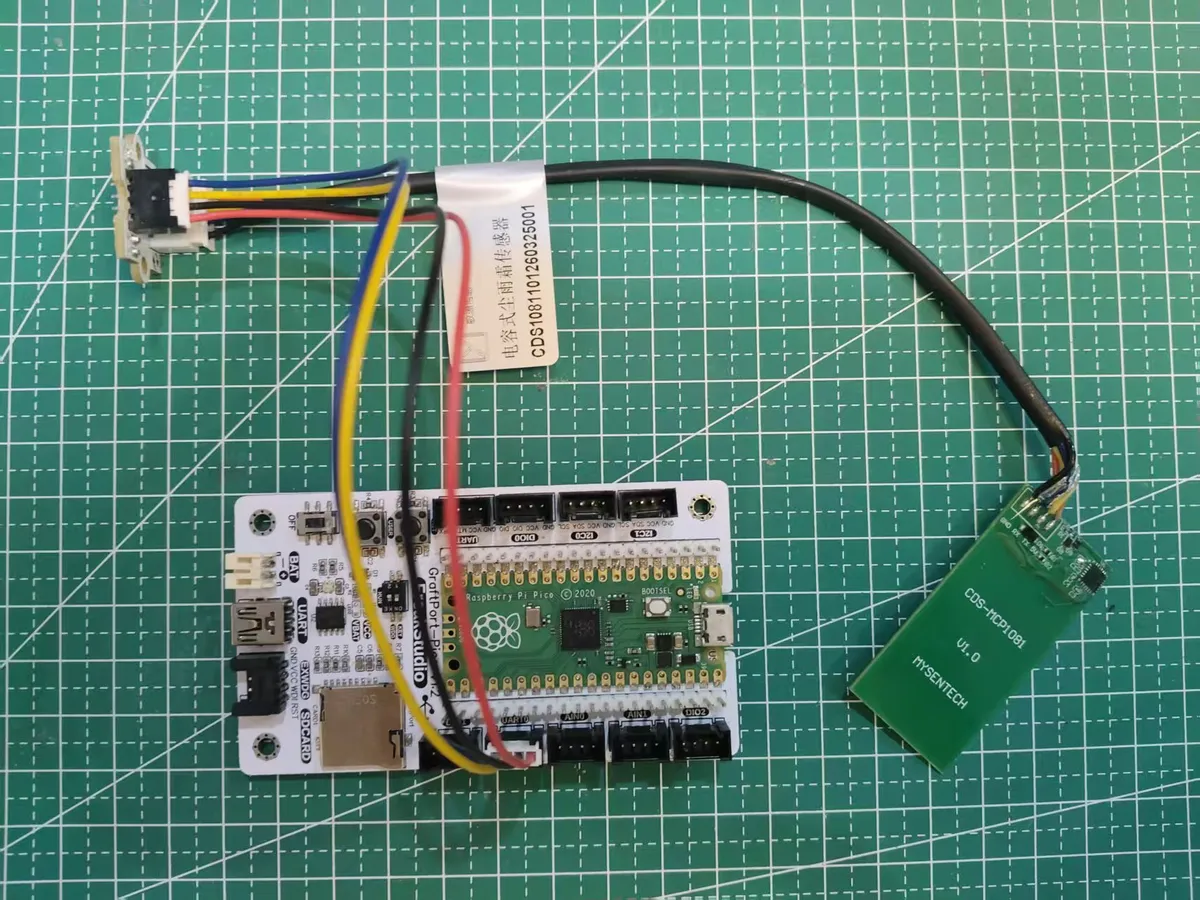
This diagram shows the actual wiring method between the CDS module and GraftPort-RP2040 development board.
The module connections are shown in the following table:
Development Board Pins | Module Pin | Description |
Pin 16 |
|
|
Pin 17 |
|
|
Here, we need to search for relevant driver packages on uPyPI: https://upypi.net/zh/
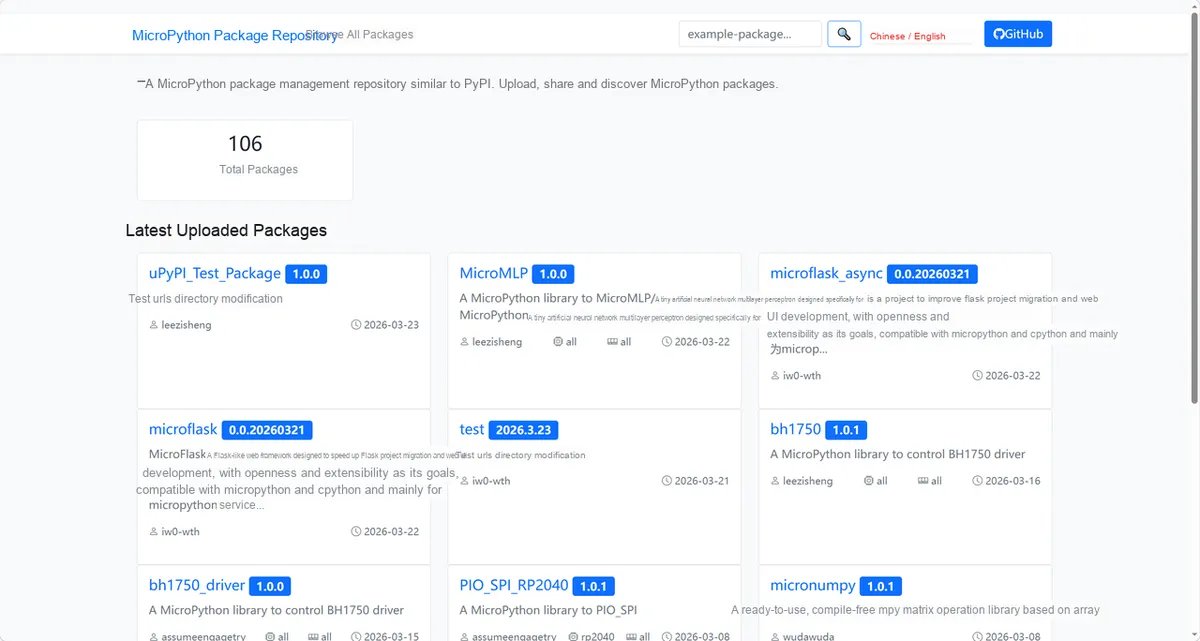
This figure demonstrates the operation entry for finding sensor driver packages in the uPyPI platform.
Enter cds1081_driver to search, and the display is as follows:
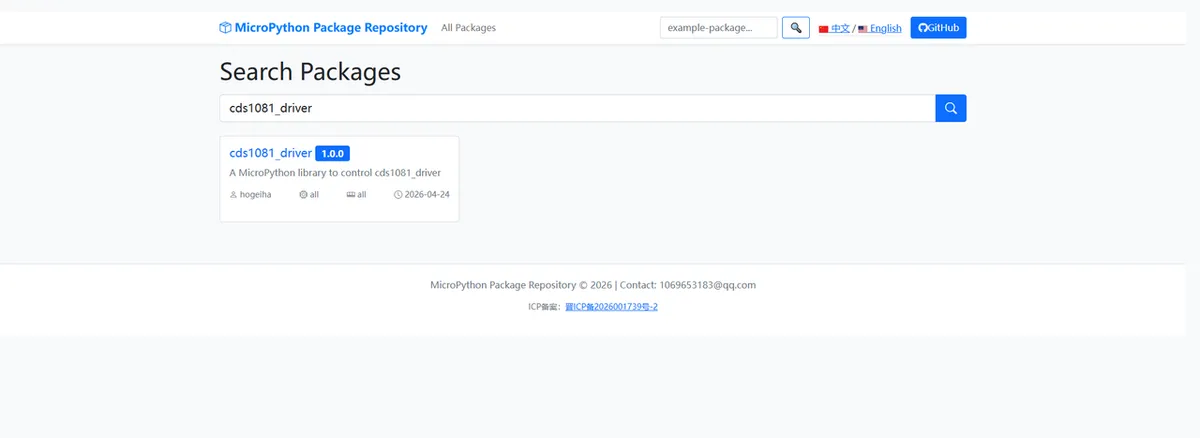
This figure shows the search results for cds1081_driver , used to confirm the driver package name and version.
Click to copy the local installation command:
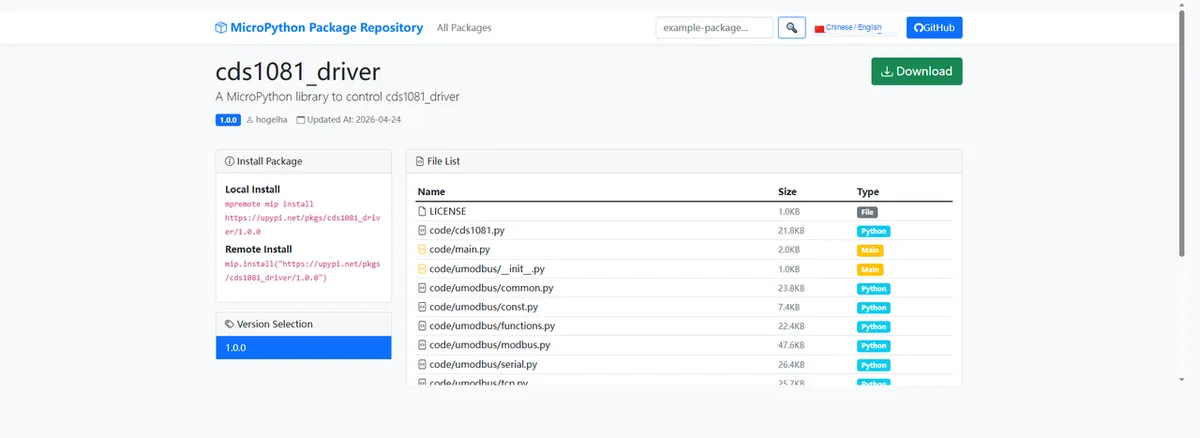
This diagram shows the interface for copying the local installation command, facilitating the quick completion of driver deployment.
Import module driver library code via mip tool, the following are the usage instructions for mpremote tool:
mpremote mip install https://upypi.net/pkgs/cds1081_driver/1.0.0After importing the capacitive dust, rain, and frost sensor CDS-MicroPython driver code , copy the following main.py code into our project:
# Python env   : MicroPython v1.23.0
# -*- coding: utf-8 -*-
# @Time    : 2025/9/8 4:52 PM
# @Author  : hogeiha
# @File    : main.py
# @Description : CDS1081 rain sensor data reading and threshold configuration

# ======================================== Import Modules =========================================

import time
from cds1081 import CDS1081

# ======================================== Global Variables ============================================

# ======================================== Functions ============================================

# ======================================== Custom Classes ============================================

# ======================================== Initialization configuration ===========================================

# Wait for the system to stabilize
time.sleep(3)
# Output initialization complete message
print("FreakStudio: CDS1081 sensor initialized")

# Create CDS1081 sensor object, specifying slave address, UART ID, TX pin and RX pin
sensor = CDS1081(slave_addr=1, uart_id=0, tx_pin=16, rx_pin=17)

# Set capacitance calibration value, scaled up 1000 times, corresponding to 6pF
sensor.set_calibration(6000)
# Set alarm threshold
sensor.set_alarm_threshold(40000)
# Set clear threshold
sensor.set_clear_threshold(20000)

# ========================================  Main Program  ============================================

# Read sensor data in an infinite loop
while True :
    # Print node address
    print("Node address:", sensor.get_node_address())
    # Print rain status
    print("Rain status:", sensor.get_rain_status())
    # Print temperature value
    print("Temperature:", sensor.get_temperature(), "C")
    # Print capacitance value
    print("Capacitance:", sensor.get_capacitance(), "pF")
    # Print Count0 value
    print("Count0 value:", sensor.get_count0())
    # Print calibration ideal value
    print("Calibration ideal value:", sensor.get_calibration_value(), "pF")
    # Print alarm threshold
    print("Alarm threshold:", sensor.get_alarm_threshold())
    # Print clear threshold
    print("Clear threshold:", sensor.get_clear_threshold())
Burn the code, open the terminal, and the output is as follows:
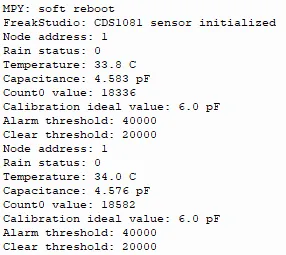
This figure shows the serial port output results after the program runs, where information such as node address, status, and temperature can be seen.
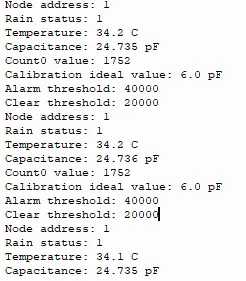
We can see that after multiple water sprays on CDS , the state gradient shows a significant change:
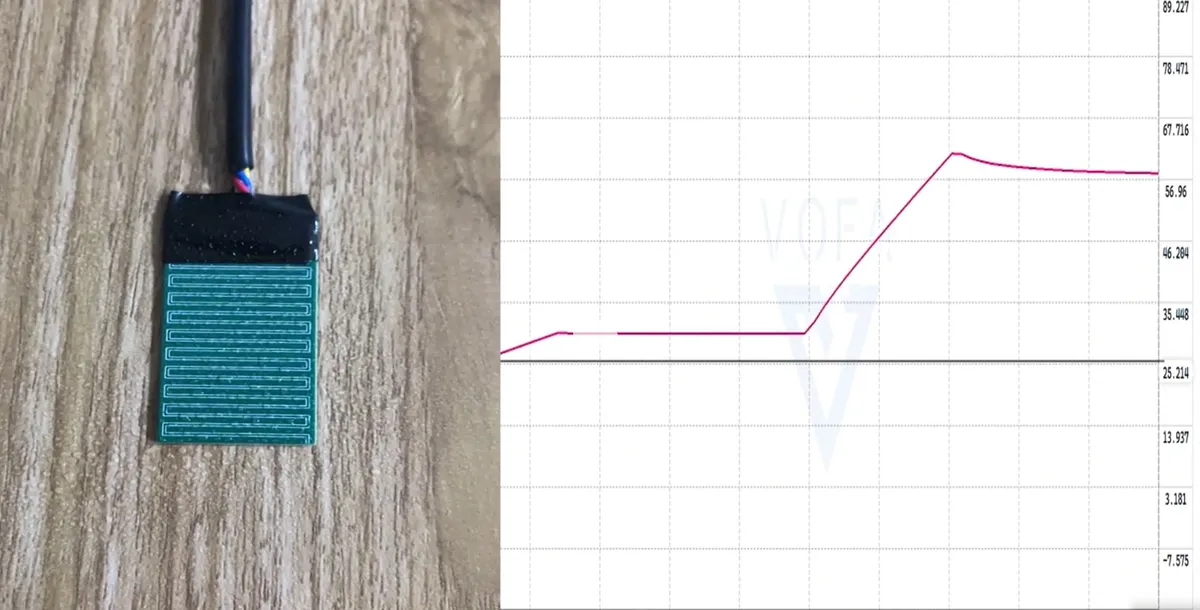
4. Driver
cds1081_driver.zip 45 KB
5. BOM & Recommended Alternatives
None.
6. Change History
Document Version | Modification Date | Modifier | Modified Content |
v1.0 | 2026-04-24 | Hou Junhan | Initialize Document |
v1.1 | 2026-05-20 | Li Zisheng | Add Introduction, 3.2.2 Usage of Modbus Poll |
VII. Related Materials
CDS1081 Capacitive Dust, Rain and Frost Sensor Product Introduction-Minyuan 202603-2.pdf 765 KB
Modbus+Poll Host Software User Guide-Minyuan 20250102(1).pdf 355 KB
CDS Host Software Modbus+Poll Query Configuration File.mbp 1 KB
Modbus+Poll.rar 1.8 MB