
Contents
I. Introduction
openai is a Python Client officially launched by OpenAI. It encapsulates the RESTful API calls of OpenAI series models (such as GPT, DALL-E, Whisper, etc.), allowing developers to quickly integrate AI capabilities into Python applications without manually handling HTTP requests, authentication and data parsing.
Its core capabilities cover:
- Text Generation: Implementing functions including dialogue, code generation, content creation and intelligent question answering based on the GPT series models;
- Image Generation and Understanding: Generate images via DALL-E, or implement visual question answering in combination with GPT-4V;
- Speech Processing: The Whisper model enables speech-to-text and text to speech;
- Vector embedding: Converts text into vector representations, supporting scenarios such as semantic search and Recommender system;
- Model Fine-tuning and Assistant Application: supports custom Model Training, and enables the construction of intelligent assistants with context memory and tool invocation capabilities.
Developers only need a few lines of code to call models such as GPT, DeepSeek, and Doubao to complete tasks including text dialogue, visual understanding, speech synthesis, and image generation. As the interface has become an industry standard, domestic vendors including DeepSeek, ByteDance Doubao, Moonshot, and Zhipu AI all provide OpenAI -compatible interfaces, and seamless switching can be achieved simply by replacing the base_url and model:
  from openai import OpenAI

  client = OpenAI(api_key="sk-...", base_url="https://api.openai.com/v1")
  resp = client.chat.completions.create(
      model="gpt-4o",
      messages=[{"role": "user", "content": "Hello!"}],
  )
  print(resp.choices[0].message.content)
On the PC or server side, the OpenAI library relies on a complete Python standard library, sufficient memory and computing power, and can easily handle synchronous/asynchronous requests, streaming responses and complex data parsing. However, when we want to bring AI capabilities to embedded devices, these advantages instead become a "burden".
On resource-constrained embedded devices such as the Raspberry Pi Pico W and ESP32, when running MicroPython, it is almost impossible to directly use the PC-side openai library:
- Extremely limited memory: The Pico 2W has only around 150 KB of available heap memory, while the PC-side OpenAI SDK relies on heavyweight libraries such as httpx and pydantic, making it completely unrunnable on the device;
- No standard HTTPS Client: It is required to manually implement TLS handshake, HTTP/1.1 request construction and response parsing based on native socket + ssl.
- Difference in asynchronous model: the
asyncioof MicroPython does not support the timeout feature ofasyncio.wait_for (),socketmust be set to non-blocking mode, and all I/O loops require manual insertion ofawait asyncio.sleep_ms ()to yield the CPU. - Large
payloadtransmission issue: With non-blockingsocketbuffers having limited capacity, when transmitting largebase64images and similar content in aJSON body, chunked writing is mandatory; otherwise, data truncation will cause parsing failures on the server side. - No file object: On PC, audio files are uploaded via
file= open (. ..), which is not supported byMicroPython— you need to use file path string for streaming upload instead.
uopenai is a lightweight asynchronous MicroPython -designed, OpenAI -compatible Client. It relies on the self-developed aiohttps library and has no other external dependencies. Its design goal is to call OpenAI-compatible cloud LLM APIs on embedded devices such as the Pico 2W with an interface almost identical to that of the PC-side openai SDK:
  # Written almost identically to the PC side
  from uopenai import OpenAI

  client = OpenAI(api_key="...", base_url="https://ark.cn-beijing.volces.com/api/v3")

  resp = await client.chat.completions.create(
      model="deepseek-v3-2-251201",
      messages=[{"role": "user", "content": "你好!"}],
  )
  print(resp.choices[0].message.content)
II. uopenai Interface Description
2.1 Basic Introduction
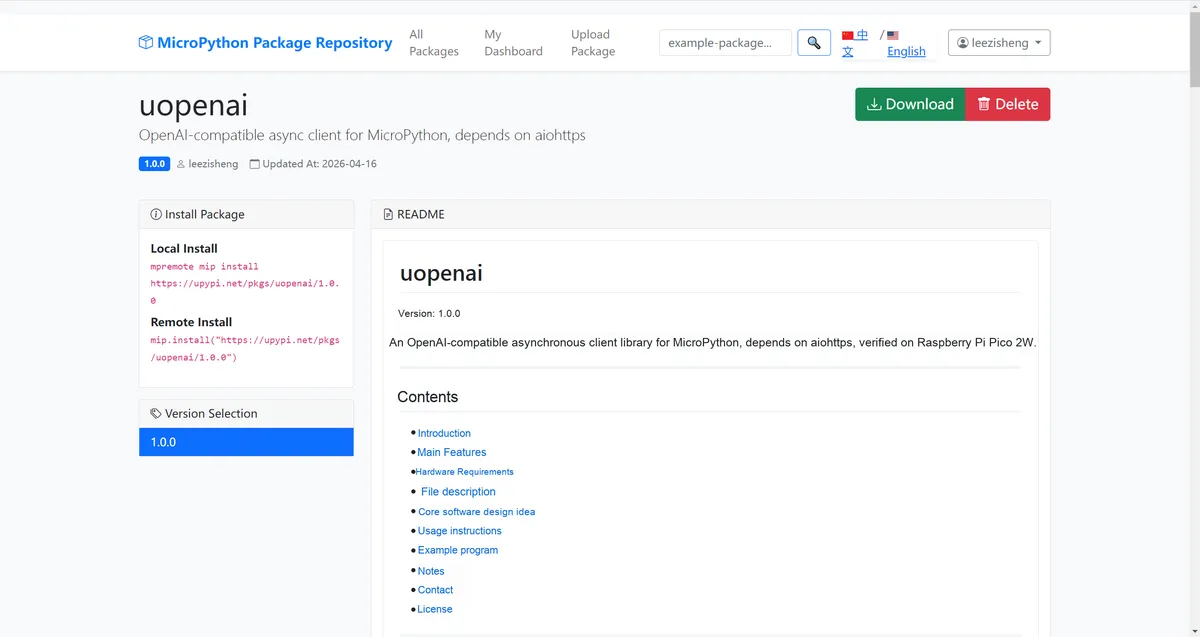
The address of the library is: https://upypi.net/en/pkgs/uopenai
uopenai is a lightweight OpenAI-compatible asynchronous Client library specifically designed for MicroPython. It is built on aiohttps implementation, with no additional external dependencies, supporting both non-streaming and streaming (SSE) text chat, image input for vision models, and base64 image encoding. It is particularly suitable for memory-constrained embedded devices (such as the Pico 2W) to interface with OpenAI-compatible cloud APIs including DeepSeek, Doubao, and Moonshot.
The main functions include:
- Text dialogue (non-streaming):
chat.completions.create ()returns a complete response object, includingid,model,usage, andchoices - Text chat (streaming SSE):
stream= Truereturnsaiohttp. Response, which is read in chunks viaiter_lines (). - Visual Model: Supports
contentin list format, withimage_url(base64 data URI) passed in - Image Encoding :
OpenAI.encode_image (filepath)A static method that encodes a local image into a base64 string - Request timed out:
create (timeout_ms= 30000)supports custom timeout configuration to avoid permanent blocking when the server is unresponsive - Interface Compatibility: Maintains maximum interface compatibility with the PC-side
OpenAISDK, and thebase_urlcan be replaced with any OpenAI-compatible service.
The included files are as follows:
uopenai/
├── code/
│   ├── uopenai.py      # Core driver implementation
│   ├── main.py         # Usage example / test code
│   └── test_4kb.jpg    # Image for vision testing (3516 bytes, 128x128)
├── package.json        # mip package configuration (includes the aiohttps dependency)
├── README.md           # Usage documentation
└── LICENSE             # MIT open-source license
2.2 Core Idea of Software Design
Maintain maximum interface compatibility with the PC-side OpenAI SDK:
# PC-side openai SDK
from openai import OpenAI
client = OpenAI(api_key="...", base_url="...")
resp = client.chat.completions.create(model="...", messages=[...])

# uopenai (MicroPython)
from uopenai import OpenAI
client = OpenAI(api_key="...", base_url="...")
resp = await client.chat.completions.create(model="...", messages=[...])
The only difference: all create () methods are async and need to be called in the asyncio event loop.
Streaming SSE Reading
stream= True, the underlying aiohttp. Response is returned directly. The caller can read SSE data line by line via iter_lines (), so the memory peak only reaches the size of a single line:
stream_resp = await client.chat.completions.create(
    model="...", messages=[...], stream=True
)
async for line in stream_resp.iter_lines():
    if line.startswith(b"data: ") and line != b"data: [DONE]":
        delta = json.loads(line[6:])["choices"][0]["delta"]
        print(delta.get("content", ""), end="")
Visual Models and Base64 Limitations
encode_image () reads the entire image file into memory before encoding, making it suitable for small images (original size < 6 KB). The available RAM on the Pico 2W is approximately 150 KB, and the size after base64 encoding is about 1.37 times that of the original image. The total JSON payload must be kept under 12 KB to ensure normal response from the server.
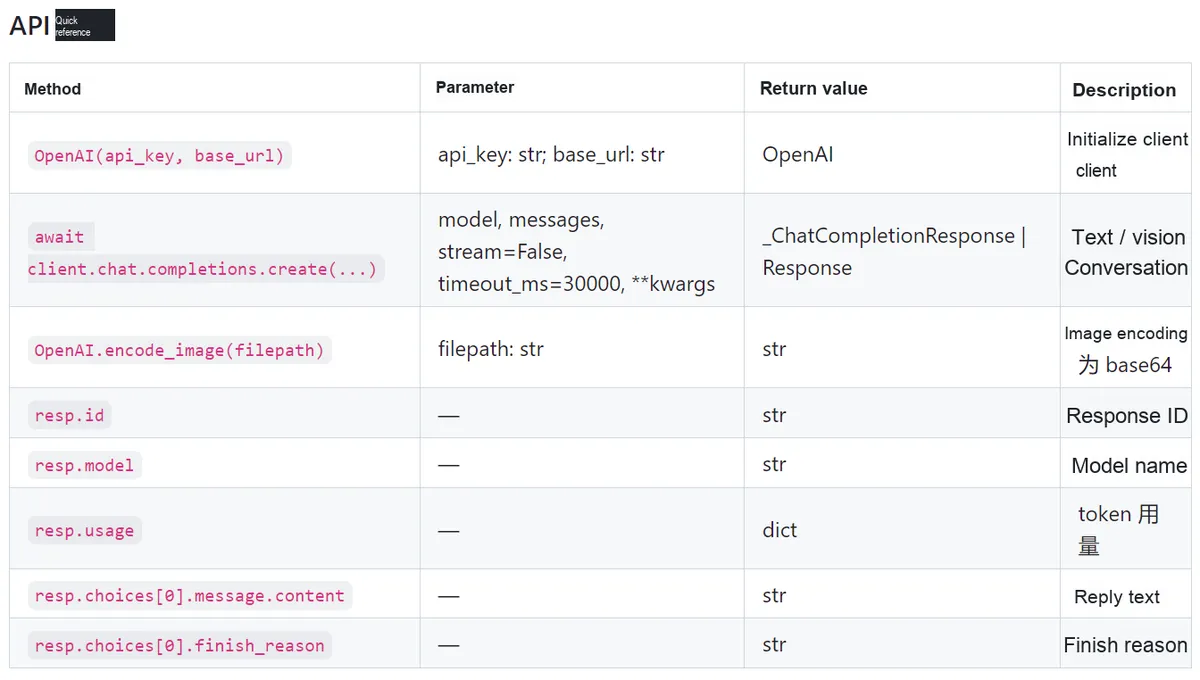
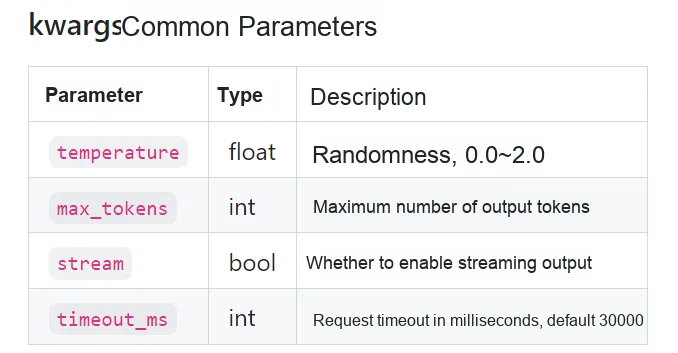
2.3 API Quick Reference and Common Parameters
2.4 Usage Notes
- Dependency on aiohttps: You must first upload
aiohttps.py(v1.1.3 or later) to the root directory of the device before use, and the dependency will be automatically handled during mip installation. - All create () methods are async: they must be called within an
asyncioevent loop, and synchronous invocation is not supported. - Not supported
file= open (. ..)Parameter passing: MicroPython does not have a standardfileobject; use thefilepath=string instead (audio.transcriptionsto be implemented). - Image size limit for visual model:
encode_image ()reads the entire file into memory. It is recommended that the original image be smaller than 6 KB (less than 8 KB after base64 encoding), and the total JSON payload be controlled within 12 KB. Exceeding this limit may result in server rejection or response timeout. - Timeout setting: Default
timeout_ms= 30000(30 seconds). Since the visual model has a relatively slow response, it is recommended to settimeout_ms= 60000. - thinking model compatibility: Some models (e. g. doubao-seed) return
"content": null, which the library has automatically processed into an empty string. - Interfaces to be implemented:
audio.transcriptions.create (),audio.speech.create (),images.generations.create ()are currently marked as TODO, and will returnNoneupon invocation. For embedded TTS/ASR implementation, it is recommended to use WebSocket streaming connection, refer toxfyun_tts/xfyun_asr.
III. Text Chat and Image Understanding Test
Here, we first need to create on Volcano Engine an API Key, which is the core credential for calling large language models:
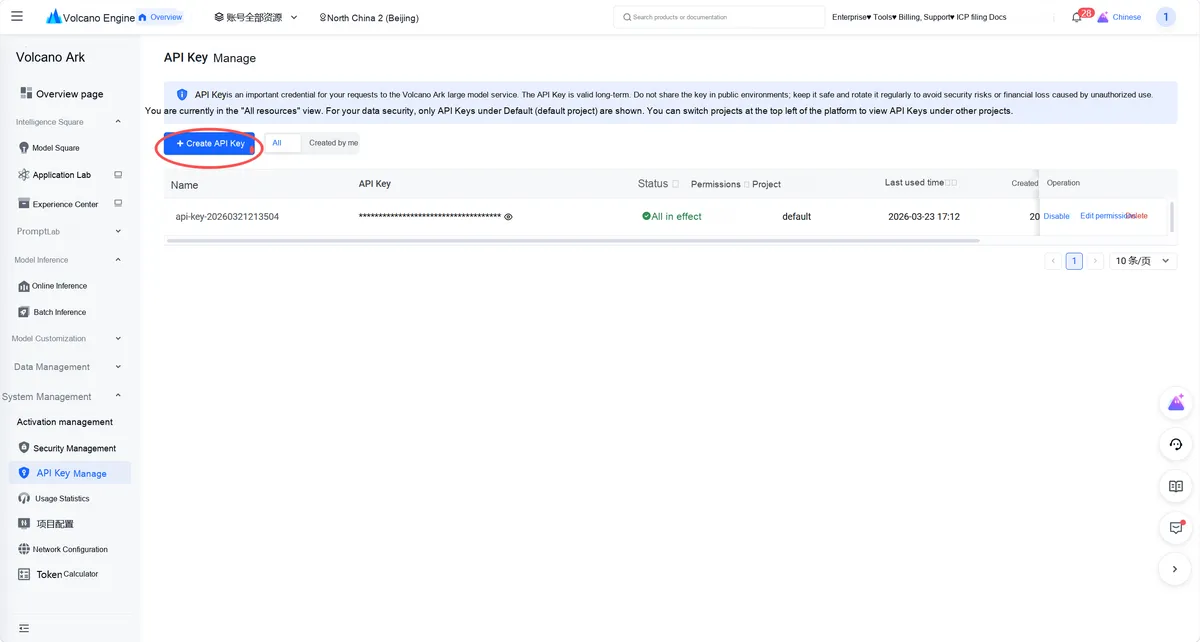
After logging in to Volcano Ark, locate and enter the "API Key Management" page from the left navigation bar, where all access keys for large model services are centrally managed, to get ready to start the key creation process.
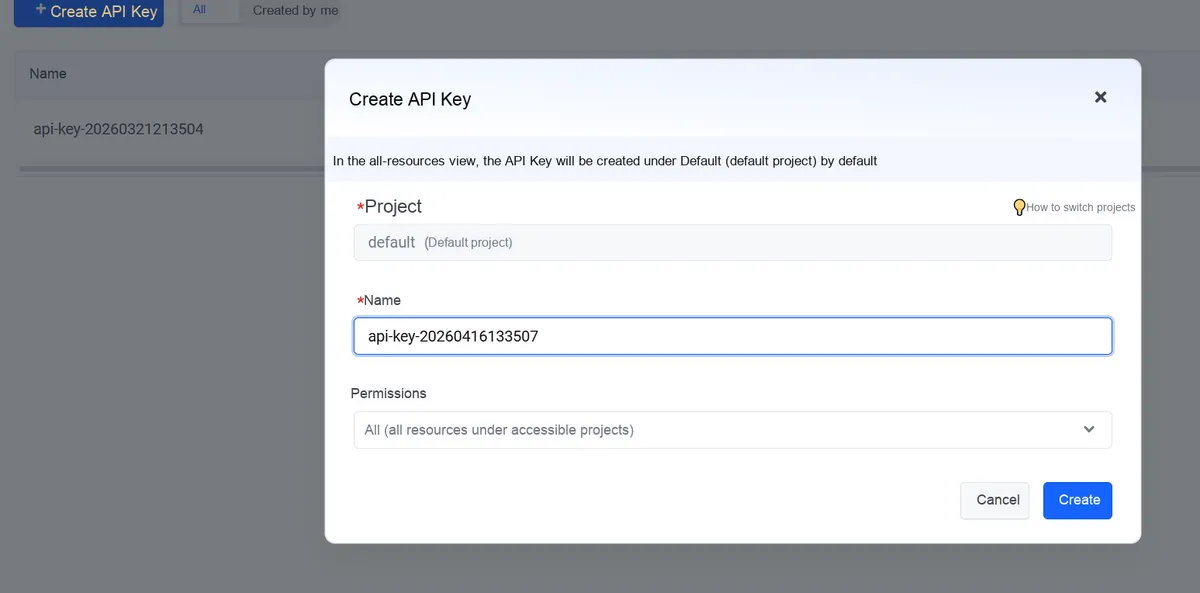
In the pop-up "Create API Key" window, the affiliated project is selected as default (the default project) by default. You can customize the name (or use the automatically generated timestamp as the name), keep the permission as "All (accessible to all resources under the project)", and click "Create" after confirming the configuration.
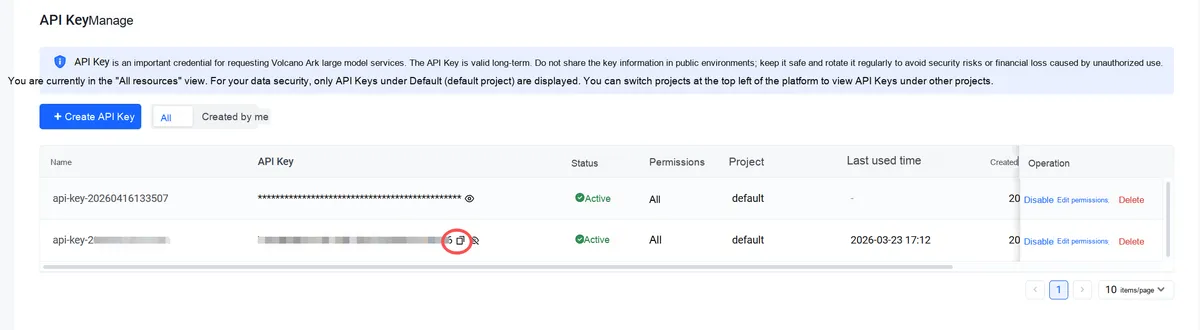
Once created, the API Key will appear in the list. Click the copy icon next to the key to save the full key (⚠️ The full key is only visible at the time of creation. Please keep it properly to avoid security and financial risks caused by leakage).
Here, we select the following two models for testing:
- a multimodal understanding-enabled
Doubao-Seed-2.0-minimodel — it supports both text and image inputs, and can simultaneously meet the needs of text chat and image understanding; DeepSeek-V3.2model, which strikes a balance between reasoning capability and response efficiency, is suitable for plain-text interaction scenarios such as general question-answering.
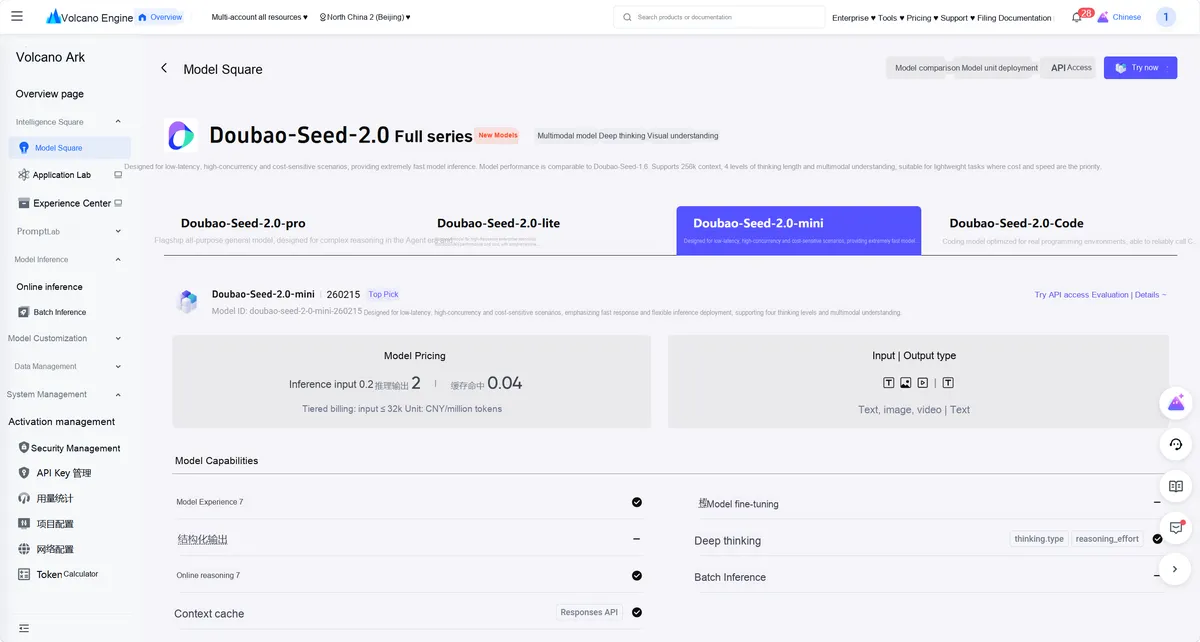
Model Address: https://console.volcengine.com/ark/region:ark+ cn-beijing/model/detail? Id= doubao-seed-2-0-mini
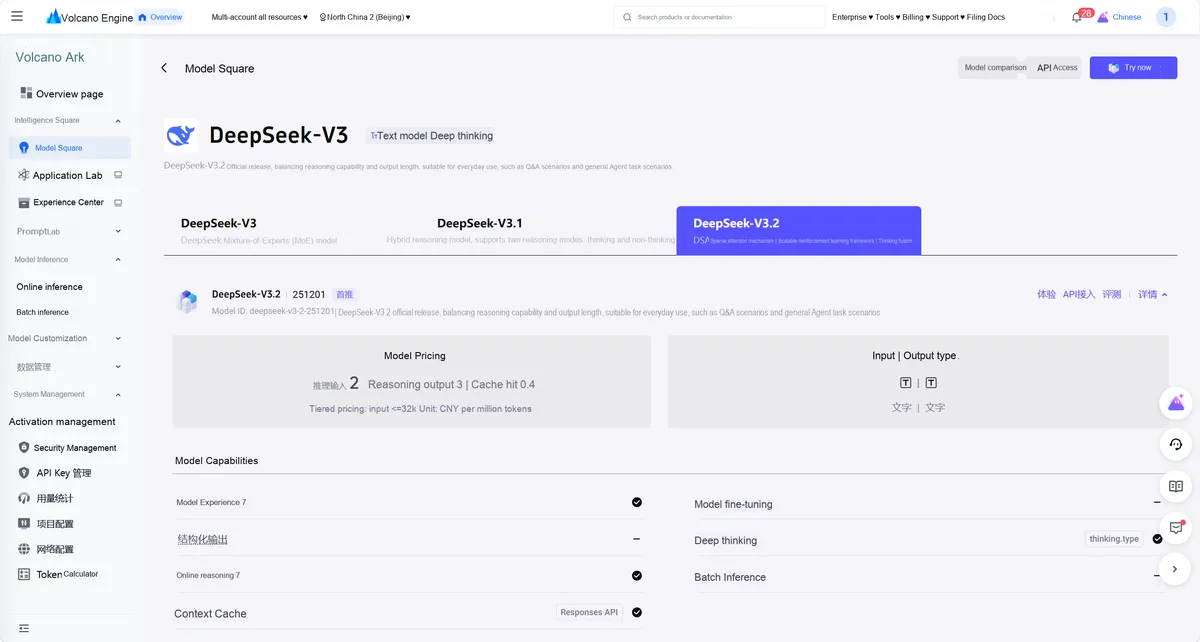
Model Address: https://console.volcengine.com/ark/region:ark+ cn-beijing/model/detail? Id= deepseek-v3-2
Note that we need to remember the base_url and model names of the model:
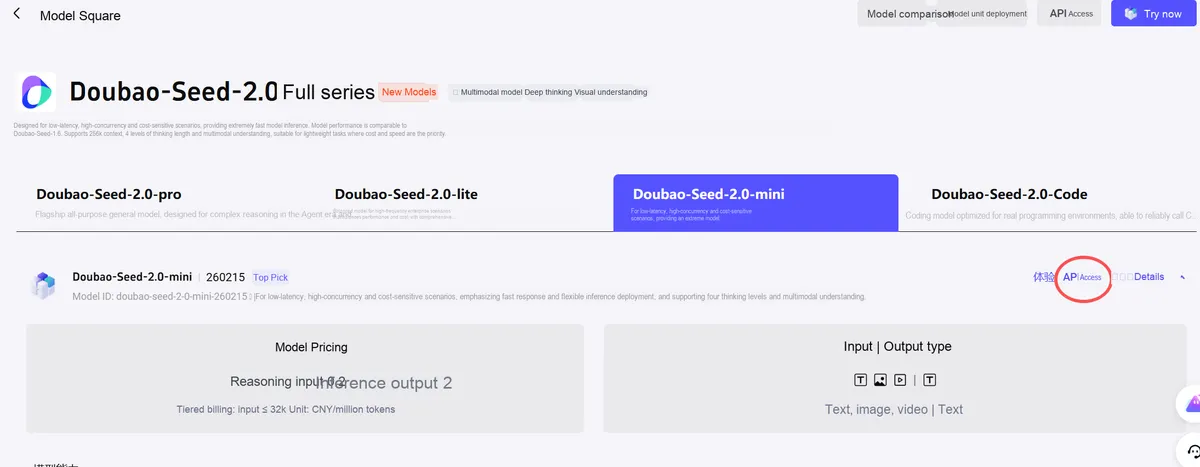
Open Doubao-Seed-2.0-mini model details page, and click the "API Access" button on the right. This is the key entry from "model experience" to "actual development invocation", and all subsequent access configurations will be carried out from here.
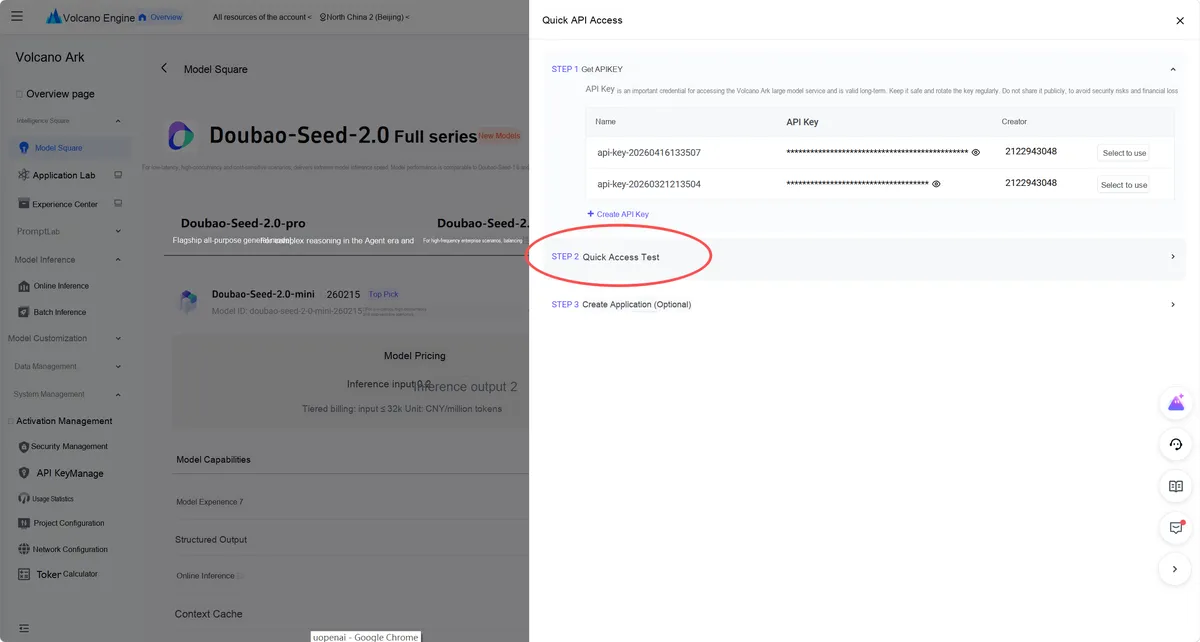
In the pop-up "Quick API Access" window, after completing the API Key selection, click "STEP 2 Quick Access Test". This step will help us verify the validity of the API Key and obtain the officially provided call sample code.
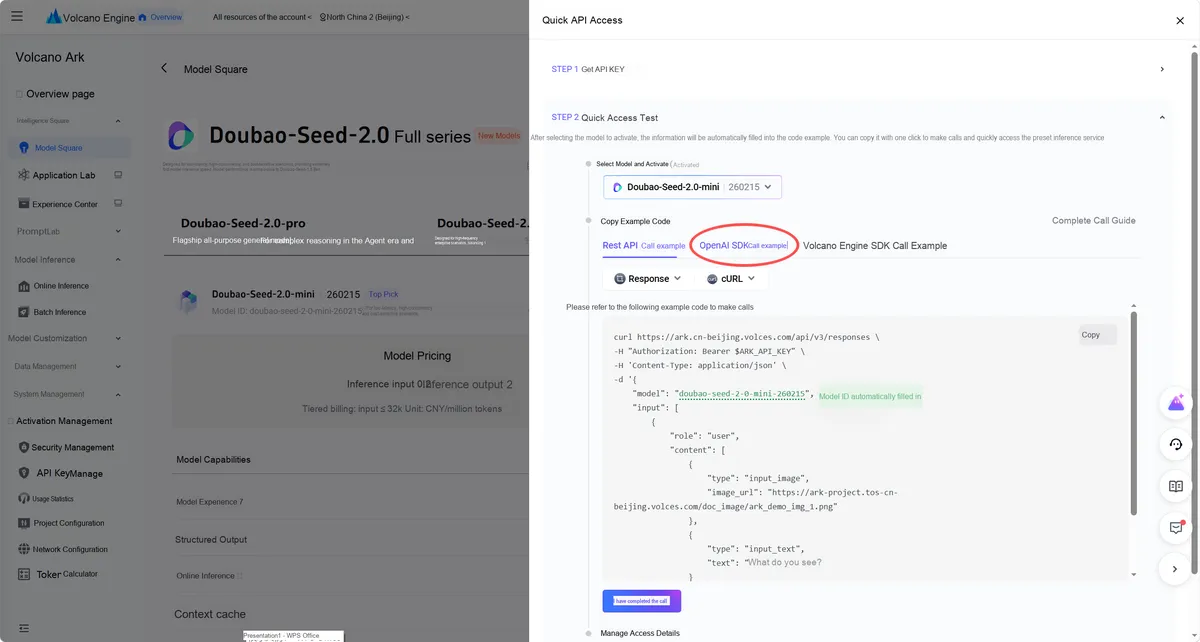
In the quick access test interface, switch to the "OpenAI SDK Call Example" tab.
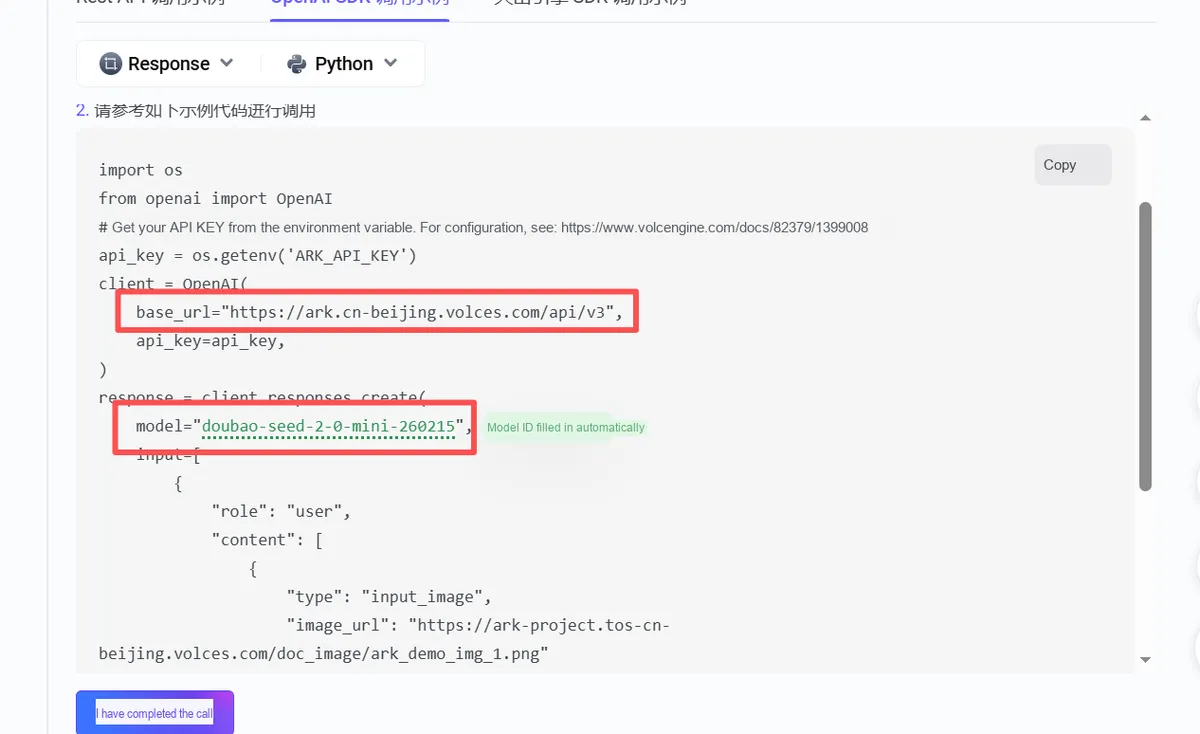
From the example, extract the two key parameters that must be configured:
base_url:https://ark.cn-beijing.volces.com/api/v3(the OpenAI-compatible interface address of Volcengine Ark);model:doubao-seed-2-0-mini-260215(the currently selected multimodal model ID).
These two parameters will be directly used in the MicroPython code as the core configuration for connecting to the Volcano Engine Ark API.
Next, we search for upypi for uopenai:
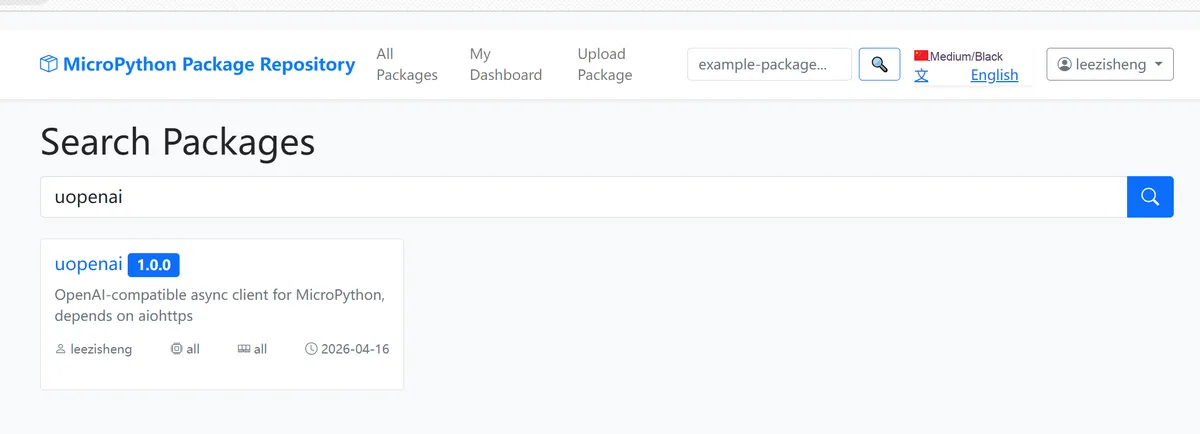
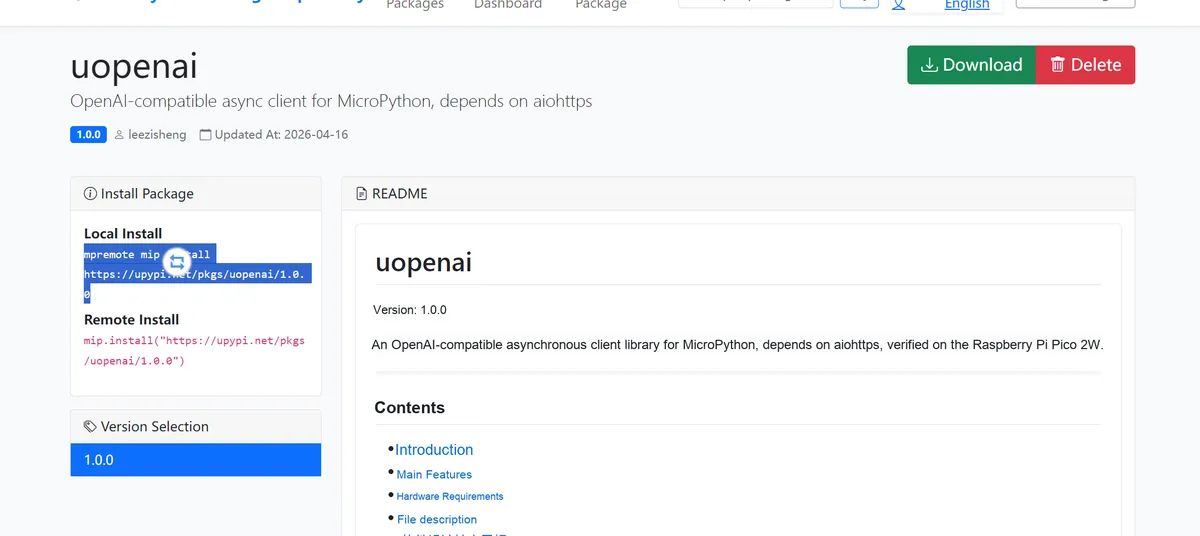
Copy the installation command and run it in the terminal:
mpremote mip install https://upypi.net/pkgs/uopenai/1.0.0
Next, we will name the following image test_4kb.jpg and flash it into the test microcontroller:

Meanwhile, put the following test main.py file into the microcontroller, and remember to replace it with your API-Key:
# Python env   : MicroPython v1.23.0
# -*- coding: utf-8 -*-
# @Time    : 2026/04/16
# @Author  : leeqingsui
# @File    : main.py
# @Description : uopenai async OpenAI client test for MicroPython on Raspberry Pi Pico 2W

# ======================================== Import Modules =========================================

import network
import asyncio
import time
import json
import ntptime
import os
from uopenai import OpenAI

# ======================================== Global Variables ============================================

WIFI_SSID     = "your_wifi_ssid"
WIFI_PASSWORD = "your_wifi_password"

# OpenAI-compatible interface configuration (replace with your actual key and base_url)
API_KEY  = "your_api_key"
BASE_URL = "https://api.openai.com/v1"
MODEL_CHAT   = "your_chat_model"
MODEL_VISION = "your_vision_model"

# Small image file for testing (must be uploaded to the device beforehand, recommended < 50 KB)
TEST_IMAGE_FILE = "test_image.jpg"

# ~5KB image for testing (for base64 vision testing, recommended < 6 KB)
TEST_20KB_IMAGE = "test_5kb.jpg"

# ======================================== Functions ============================================

def connect_wifi():
    """
    Connect to WiFi and return the network object.

    Returns:
        network.WLAN: the connected WLAN object; returns None if the connection fails.

    ==========================================

    Connect to WiFi and return the network object.

    Returns:
        network.WLAN: Connected WLAN object; None if connection fails.
    """
    wlan = network.WLAN(network.STA_IF)
    wlan.active(True)

    if not wlan.isconnected():
        print("Connecting to WiFi: {}".format(WIFI_SSID))
        wlan.connect(WIFI_SSID, WIFI_PASSWORD)

        timeout = 15
        while not wlan.isconnected() and timeout > 0:
            time.sleep(1)
            timeout -= 1
            print("Connecting... {}s remaining".format(timeout))

        if wlan.isconnected():
            print("WiFi connected, IP: {}".format(wlan.ifconfig()[0]))
        else:
            print("WiFi connection failed")
            return None
    else:
        print("WiFi already connected")

    return wlan


def sync_ntp():
    """
    Synchronize the system time via NTP.

    ==========================================

    Sync system time via NTP.
    """
    for host in ("ntp.aliyun.com", "ntp.tencent.com", "pool.ntp.org"):
        try:
            ntptime.host = host
            ntptime.settime()
            t = time.gmtime()
            print("NTP synced via {}: {}-{:02d}-{:02d} {:02d}:{:02d}:{:02d} UTC".format(
                host, t[0], t[1], t[2], t[3], t[4], t[5]))
            return
        except Exception as e:
            print("NTP failed ({}): {}".format(host, e))
    print("NTP sync unavailable.")


def prepare_test_image():
    """
    Generate a tiny valid JPEG file (1x1 white pixel) for testing encode_image().
    If test_image.jpg already exists on the device, skip generation.

    ==========================================

    Generate a minimal valid JPEG (1x1 white pixel) for encode_image() testing.
    Skipped if file already exists.
    """
    try:
        os.stat(TEST_IMAGE_FILE)
        print("  image file already exists, skip generation")
    except OSError:
        # Minimal valid JPEG (1x1 white pixel), fixed byte sequence
        minimal_jpeg = (
            b"\xff\xd8\xff\xe0\x00\x10JFIF\x00\x01\x01\x00\x00\x01\x00\x01\x00\x00"
            b"\xff\xdb\x00C\x00\x08\x06\x06\x07\x06\x05\x08\x07\x07\x07\t\t"
            b"\x08\n\x0c\x14\r\x0c\x0b\x0b\x0c\x19\x12\x13\x0f\x14\x1d\x1a"
            b"\x1f\x1e\x1d\x1a\x1c\x1c $.' \",#\x1c\x1c(7),01444\x1f'9=82<.342\x1b"
            b"\xff\xc0\x00\x0b\x08\x00\x01\x00\x01\x01\x01\x11\x00"
            b"\xff\xc4\x00\x1f\x00\x00\x01\x05\x01\x01\x01\x01\x01\x01\x00\x00"
            b"\x00\x00\x00\x00\x00\x00\x01\x02\x03\x04\x05\x06\x07\x08\t\n\x0b"
            b"\xff\xc4\x00\xb5\x10\x00\x02\x01\x03\x03\x02\x04\x03\x05\x05\x04"
            b"\x04\x00\x00\x01}\x01\x02\x03\x00\x04\x11\x05\x12!1A\x06\x13Qa"
            b"\x07\"q\x142\x81\x91\xa1\x08#B\xb1\xc1\x15R\xd1\xf0$3br"
            b"\x82\t\n\x16\x17\x18\x19\x1a%&'()*456789:CDEFGHIJ"
            b"STUVWXYZ\xff\xda\x00\x08\x01\x01\x00\x00?\x00\xfb\xd4P\x00\x00\x00\xff\xd9"
        )
        with open(TEST_IMAGE_FILE, "wb") as f:
            f.write(minimal_jpeg)
        print("  generated minimal JPEG: {} ({} bytes)".format(TEST_IMAGE_FILE, len(minimal_jpeg)))


async def test_uopenai():
    """
    Full test of the uopenai library.

    Test 1:  OpenAI() initialization + invalid parameter validation
    Test 2:  chat.completions.create() non-streaming, single-turn conversation
    Test 3:  chat.completions.create() non-streaming, with temperature/max_tokens kwargs
    Test 4:  chat.completions.create() non-streaming, multi-turn conversation (system + user)
    Test 5:  chat.completions.create() streaming (stream=True), reading SSE with iter_lines()
    Test 6:  encode_image() static method, base64 encoding
    Test 7:  max_tokens=2048 non-streaming text
    Test 8:  max_tokens=2048 streaming text
    Test 9:  ~6KB base64 image non-streaming vision
    Test 10: base_url trailing slash is automatically removed
    Test 11: Full coverage of invalid parameters (ValueError / TypeError)
    Test 12: Response object attribute completeness + doubao text conversation
    Test 13: audio.speech.create() — SKIP (TODO)
    Test 14: images.generations.create() — SKIP (TODO)

    ==========================================

    Full test suite for uopenai library.
    """
    # 1. Connect to WiFi
    if not connect_wifi():
        return

    # 2. Synchronize NTP
    sync_ntp()

    print("--- uopenai Test Start ---")

    # ------------------------------------------------------------------ #
    # Test 1: Initialization + invalid parameter validation
    # ------------------------------------------------------------------ #
    print("[1/14] OpenAI() init + invalid param guard")
    try:
        # Normal initialization
        client = OpenAI(api_key=API_KEY, base_url=BASE_URL)
        ok = hasattr(client, "chat") and hasattr(client, "audio")

        # An empty api_key should raise ValueError
        caught = False
        try:
            OpenAI(api_key="")
        except ValueError:
            caught = True

        print("  [1/14] PASS" if ok and caught else "  [1/14] FAIL")
    except Exception as e:
        print("  [1/14] ERROR:", e)

    # ------------------------------------------------------------------ #
    # Test 2: Non-streaming single-turn conversation
    # ------------------------------------------------------------------ #
    print("[2/14] chat.completions.create() non-stream single turn")
    try:
        resp = await client.chat.completions.create(
            model=MODEL_CHAT,
            messages=[{"role": "user", "content": "Reply with the single word: OK"}],
        )
        content = resp.choices[0].message.content
        print("  reply:", content)
        print("  [2/14] PASS" if len(content) > 0 else "  [2/14] FAIL (empty content)")
    except Exception as e:
        print("  [2/14] ERROR:", e)

    # ------------------------------------------------------------------ #
    # Test 3: Non-streaming, with kwargs (temperature / max_tokens)
    # ------------------------------------------------------------------ #
    print("[3/14] chat.completions.create() with temperature + max_tokens")
    try:
        resp = await client.chat.completions.create(
            model=MODEL_CHAT,
            messages=[{"role": "user", "content": "Say hello in one word."}],
            temperature=0.0,
            max_tokens=10,
        )
        content = resp.choices[0].message.content
        print("  reply:", content)
        print("  [3/14] PASS" if len(content) > 0 else "  [3/14] FAIL")
    except Exception as e:
        print("  [3/14] ERROR:", e)

    # ------------------------------------------------------------------ #
    # Test 4: Non-streaming, multi-turn conversation (system + user)
    # ------------------------------------------------------------------ #
    print("[4/14] chat.completions.create() multi-turn (system + user)")
    try:
        resp = await client.chat.completions.create(
            model=MODEL_CHAT,
            messages=[
                {"role": "system",    "content": "You are a helpful assistant. Reply concisely."},
                {"role": "user",      "content": "What is 1+1?"},
            ],
        )
        content = resp.choices[0].message.content
        print("  reply:", content)
        # The answer should contain "2"
        print("  [4/14] PASS" if "2" in content else "  [4/14] FAIL (no '2' in reply)")
    except Exception as e:
        print("  [4/14] ERROR:", e)

    # ------------------------------------------------------------------ #
    # Test 5: streaming chat (stream=True), read SSE with iter_lines()
    # ------------------------------------------------------------------ #
    print("[5/14] chat.completions.create() stream=True + iter_lines()")
    try:
        stream_resp = await client.chat.completions.create(
            model=MODEL_CHAT,
            messages=[{"role": "user", "content": "Count from 1 to 3, one number per line."}],
            stream=True,
            max_tokens=50,
        )
        chunks_received = 0
        full_text = ""
        async for line in stream_resp.iter_lines():
            line = line.strip()
            if not line:
                continue
            if line == b"data: [DONE]":
                break
            # SSE format: b"data: {...}"
            if line.startswith(b"data: "):
                raw = line[6:]
                try:
                    obj   = json.loads(raw)
                    delta = obj.get("choices", [{}])[0].get("delta", {})
                    piece = delta.get("content", "")
                    if piece:
                        full_text += piece
                        chunks_received += 1
                except Exception:
                    pass
        print("  chunks received:", chunks_received)
        print("  assembled text:", full_text)
        print("  [5/14] PASS" if chunks_received > 0 else "  [5/14] FAIL (no chunks)")
    except Exception as e:
        print("  [5/14] ERROR:", e)

    # ------------------------------------------------------------------ #
    # Test 6: encode_image() static method
    # ------------------------------------------------------------------ #
    print("[6/14] OpenAI.encode_image()")
    try:
        prepare_test_image()
        b64 = OpenAI.encode_image(TEST_IMAGE_FILE)
        print("  base64 length:", len(b64))
        # base64 characters only contain A-Z a-z 0-9 + / =
        valid = all(c in "ABCDEFGHIJKLMNOPQRSTUVWXYZabcdefghijklmnopqrstuvwxyz0123456789+/=" for c in b64)
        print("  [6/14] PASS" if len(b64) > 0 and valid else "  [6/14] FAIL (invalid base64)")
    except Exception as e:
        print("  [6/14] ERROR:", e)

    # ------------------------------------------------------------------ #
    # Test 7: max_tokens=2048 non-streaming text
    # ------------------------------------------------------------------ #
    print("[7/14] max_tokens=2048 non-stream text")
    try:
        resp = await client.chat.completions.create(
            model=MODEL_CHAT,
            messages=[{"role": "user", "content": "Write a short poem about the ocean in 3 lines."}],
            max_tokens=2048,
        )
        content = resp.choices[0].message.content
        finish  = resp.choices[0].finish_reason
        print("  reply:", content)
        print("  finish_reason:", finish)
        print("  [7/14] PASS" if len(content) > 0 and finish == "stop" else "  [7/14] FAIL")
    except Exception as e:
        print("  [7/14] ERROR:", e)

    # ------------------------------------------------------------------ #
    # Test 12: max_tokens=2048 streaming text
    # ------------------------------------------------------------------ #
    print("[8/14] max_tokens=2048 stream text")
    try:
        stream_resp = await client.chat.completions.create(
            model=MODEL_CHAT,
            messages=[{"role": "user", "content": "Write a short poem about the ocean in 3 lines."}],
            stream=True,
            max_tokens=2048,
        )
        full_text = ""
        async for line in stream_resp.iter_lines():
            line = line.strip()
            if not line or line == b"data: [DONE]":
                continue
            if line.startswith(b"data: "):
                try:
                    delta = json.loads(line[6:]).get("choices", [{}])[0].get("delta", {})
                    full_text += delta.get("content", "")
                except Exception:
                    pass
        print("  assembled:", full_text)
        print("  [8/14] PASS" if len(full_text) > 0 else "  [8/14] FAIL")
    except Exception as e:
        print("  [8/14] ERROR:", e)

    # ------------------------------------------------------------------ #
    # Test 9: ~5KB base64 image non-streaming vision
    # ------------------------------------------------------------------ #
    print("[9/14] ~5KB base64 image non-stream vision")
    try:
        import gc
        gc.collect()
        print("  free RAM before encode:", gc.mem_free())
        b64 = OpenAI.encode_image("test_4kb.jpg")
        gc.collect()
        print("  base64 length:", len(b64), "free RAM after encode:", gc.mem_free())
        resp = await client.chat.completions.create(
            model=MODEL_VISION,
            messages=[{"role": "user", "content": [
                {"type": "image_url", "image_url": {"url": "data:image/jpeg;base64," + b64}},
                {"type": "text", "text": "What colors do you see? Reply in one sentence."},
            ]}],
            max_tokens=100,
            timeout_ms=60000,
        )
        gc.collect()
        print("  free RAM after request:", gc.mem_free())
        content = resp.choices[0].message.content
        print("  reply:", content)
        print("  [9/14] PASS" if len(content) > 0 else "  [9/14] FAIL (empty reply)")
    except Exception as e:
        print("  [9/14] ERROR:", e)

    # ------------------------------------------------------------------ #
    # Test 12: trailing slash of base_url is stripped automatically
    # ------------------------------------------------------------------ #
    print("[10/14] base_url trailing slash strip")
    try:
        c2 = OpenAI(api_key="dummy", base_url="https://api.openai.com/v1/")
        ok = not c2._base_url.endswith("/")
        print("  _base_url:", c2._base_url)
        print("  [10/14] PASS" if ok else "  [10/14] FAIL (slash not stripped)")
    except Exception as e:
        print("  [10/14] ERROR:", e)

    # ------------------------------------------------------------------ #
    # Test 11: invalid parameter validation (api_key / model / messages / filepath)
    # ------------------------------------------------------------------ #
    print("[11/14] invalid param guards (ValueError / TypeError)")
    try:
        results = []

        # api_key is None
        try:
            OpenAI(api_key=None)
            results.append(False)
        except ValueError:
            results.append(True)

        # model is empty
        try:
            await client.chat.completions.create(model="", messages=[{"role": "user", "content": "hi"}])
            results.append(False)
        except ValueError:
            results.append(True)

        # messages is an empty list
        try:
            await client.chat.completions.create(model=MODEL_CHAT, messages=[])
            results.append(False)
        except ValueError:
            results.append(True)

        # transcriptions filepath is empty
        try:
            await client.audio.transcriptions.create(model="whisper-1", filepath="")
            results.append(False)
        except ValueError:
            results.append(True)

        # encode_image filepath is None
        try:
            OpenAI.encode_image(None)
            results.append(False)
        except ValueError:
            results.append(True)

        all_ok = all(results)
        print("  guard results:", results)
        print("  [11/14] PASS" if all_ok else "  [11/14] FAIL")
    except Exception as e:
        print("  [11/14] ERROR:", e)

    # ------------------------------------------------------------------ #
    # Test 12: response object attribute completeness + doubao vision model text chat
    # ------------------------------------------------------------------ #
    print("[12/14] response attributes check + vision model text chat")
    try:
        resp = await client.chat.completions.create(
            model=MODEL_VISION,
            messages=[{"role": "user", "content": "Say yes."}],
        )
        has_id     = isinstance(resp.id, str)
        has_model  = isinstance(resp.model, str)
        has_usage  = isinstance(resp.usage, dict)
        has_choice = len(resp.choices) > 0
        has_role   = resp.choices[0].message.role == "assistant"
        has_reason = isinstance(resp.choices[0].finish_reason, str)

        print("  id:", resp.id)
        print("  model:", resp.model)
        print("  usage:", resp.usage)
        print("  finish_reason:", resp.choices[0].finish_reason)
        print("  role:", resp.choices[0].message.role)

        ok = has_id and has_model and has_usage and has_choice and has_role and has_reason
        print("  [12/14] PASS" if ok else "  [12/14] FAIL")
    except Exception as e:
        print("  [12/14] ERROR:", e)

    print("--- uopenai Test Done ---")

    # ------------------------------------------------------------------ #
    # Test 13: audio.speech.create() — SKIP (TODO)
    # ------------------------------------------------------------------ #
    print("[13/14] audio.speech.create() -- SKIP (TODO: WebSocket streaming TTS)")

    # ------------------------------------------------------------------ #
    # Test 14: images.generations.create() — SKIP (TODO)
    # ------------------------------------------------------------------ #
    print("[14/14] images.generations.create() -- SKIP (TODO: low-res image gen model)")

# ======================================== Custom Classes ============================================

# ======================================== Initialization configuration ===========================================

time.sleep(3)
print("FreakStudio: uopenai async OpenAI client test")

# ========================================  Main Program  ===========================================

if __name__ == "__main__":
    asyncio.run(test_uopenai())
In the code above, after completing network time synchronization and connecting to WIFI, the following tests are carried out:
- Test 1: Client Initialization + Invalid Parameter Validation
- Normal initialization
OpenAIClient; - Test whether an empty API key will throw an error (robustness test).
- Normal initialization
- Test 2~4: Basic Text Conversation (Non-Streaming)
- single-turn dialogue, parameter-enabled dialogue (temperature / max tokens), multi-turn dialogue (system prompt + user query);
- Verify that the plain text chat function works properly.
- Test 5: Streaming Dialogue (Core Function)
- Enable
stream= Trueto receive model output in real time (return character by character); - Parse the SSE data stream and assemble the complete response;
- Simulate the real chat real-time output effect.
- Enable
- Test 6: Image
Base64Encoding- Call
OpenAI.encode_image ()to convert the image into a Base64 string; - Prerequisite for multimodal vision (large models can only receive images in Base64 format).
- Call
- Test 7~8: Long-text Dialogue
- Set
max_tokens= 2048to test the streaming / non-streaming output of long text; - The validation library can handle long text responses.
- Set
- Test 9: Multimodal Image Understanding
- Embedded devices upload images, and the large language model analyzes the image content and responds;
- Test 10: Interface address compatibility processing
- Automatically remove
the trailing slash of base_urlto avoid errors in interface calls.
- Automatically remove
- Test 11: Full Invalid Parameter Validation
- Test invalid inputs such as empty model, empty message, and empty file path;
- Ensure that the library can catch invalid parameters without crashing.
- Test 12: Response Data Integrity Check
- Verify that the fields
such as id, model, usage, and choicesreturned by the model are complete; - Ensure that the data format complies with the standards.
- Verify that the fields
To program the code, run the following command:
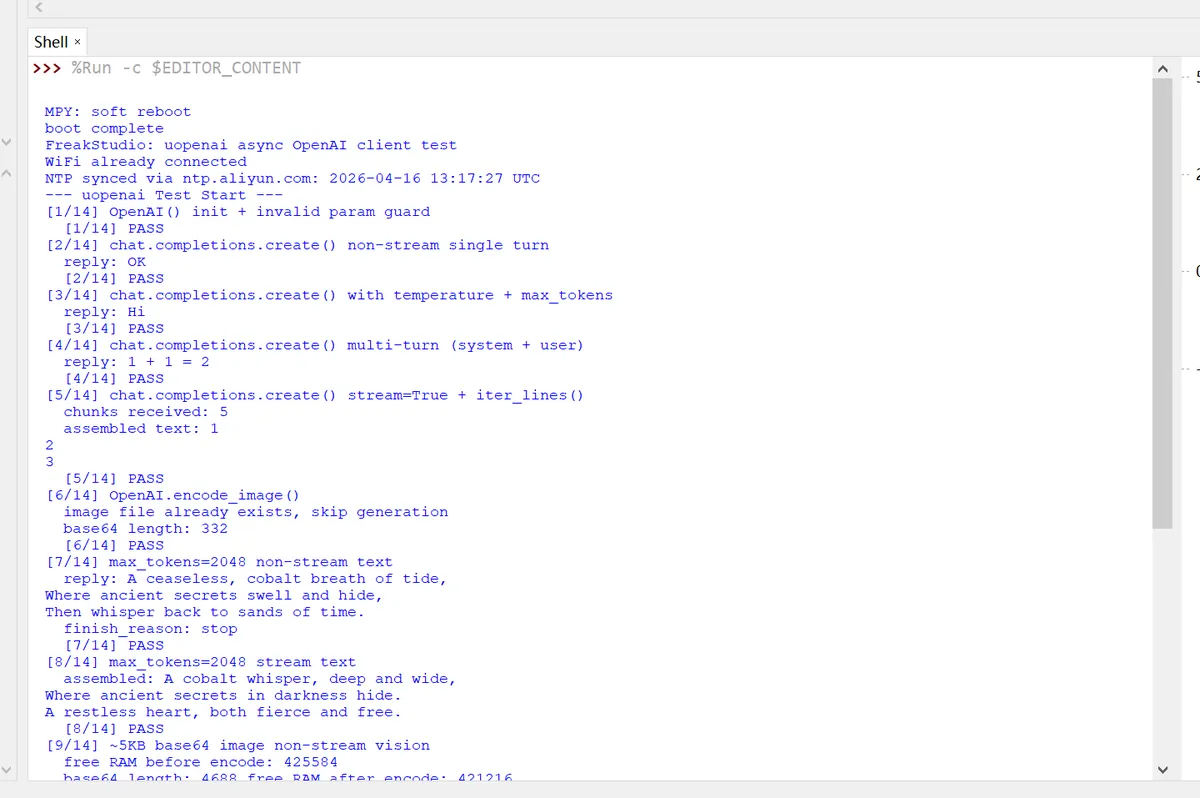
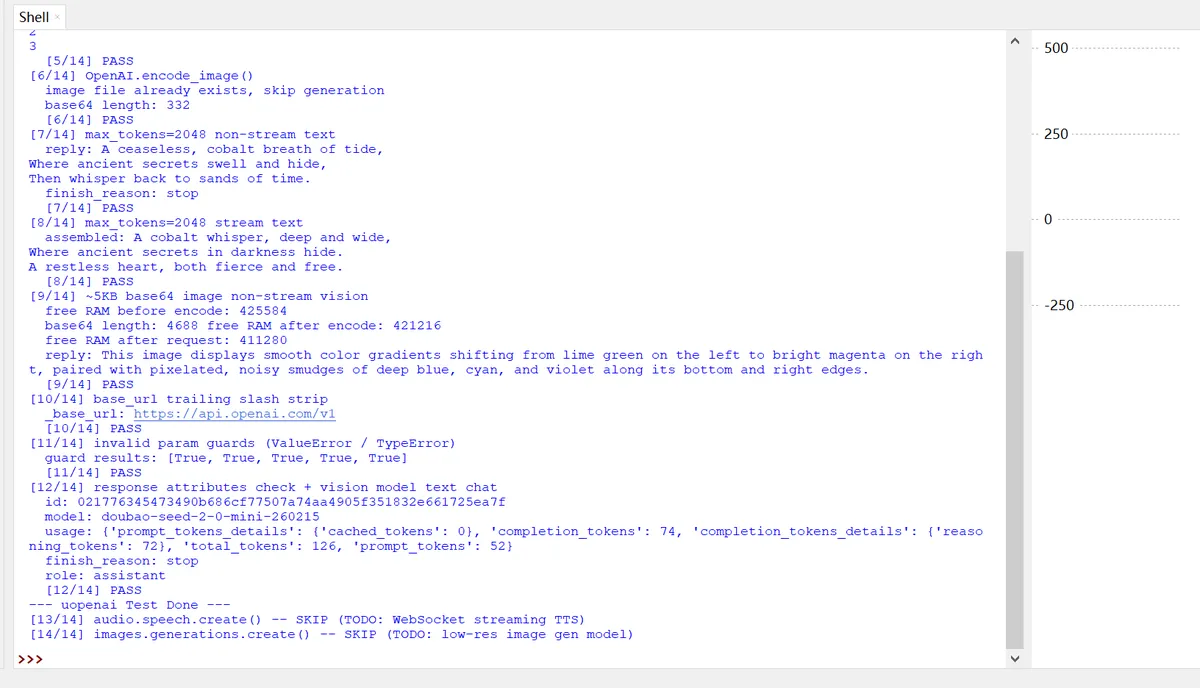
As can be seen from the figure above:
- ✅ All 12 core tests have been passed (PASS), and 2 features pending development (audio/image generation) have been skipped as planned.
- ✅ From WiFi networking → time synchronization → API calls → text dialogue → multimodal image understanding, the entire embedded LLM pipeline is 100% fully functional, with extremely low memory usage and maximum stability.
Now, let's break down the key information step by step in the order of the test serial numbers:
[1/14] Client Initialization + Invalid Parameter Validation
[1/14] OpenAI() init + invalid param guard
[1/14] PASS- Client
OpenAI (api_key=. .., base_url=. ..)initialized successfully; - The validation logic for invalid parameters such as empty API Key takes effect, and the library has normal robustness, which will not crash due to incorrect input.
[2/14] Single-turn non-streaming dialogue
[2/14] chat.completions.create() non-stream single turn
reply: OK
[2/14] PASS
The model returned as required OK, which indicates that the basic plaintext API call is completely normal: there are no bugs in network requests, JSON parsing, or response processing.
[3/14] Dialogue with Parameters (Temperature + Max Tokens)
[3/14] chat.completions.create() with temperature + max_tokens
reply: Hi
[3/14] PASS
The passed temperature= 0.0 and max_tokens= 10 parameters have taken effect, and the model returned the short Hi as required, which verifies that the parameter passing logic is correct.
[4/14] Multi-turn Conversation (with System Prompt)
[4/14] chat.completions.create() multi-turn (system + user)
reply: 1 + 1 = 2
[4/14] PASS
The model correctly understood "What is 1+ 1? " and returned the correct result, indicating that the context transfer in multi-turn conversations and the processing of the System role are both functioning properly.
[5/14] Streaming Dialogue (Real-time Chunk-by-Chunk Output)
[5/14] chat.completions.create() stream=True + iter_lines()
chunks received: 5
assembled text: 1
2
3
[5/14] PASS- Streaming received
5 data blocks, which form a complete sequence when concatenated: 1 2 3; - Description SSE streaming parsing, block-by-block processing, and text concatenation are all fully functional, and embedded devices can also smoothly handle the real-time output of the model.
[6/14] Image Base64 Encoding
[6/14] OpenAI.encode_image()
image file already exists, skip generation
base64 length: 332
[6/14] PASS- Test images already exist in the device, so the auto-generation step has been skipped;
- The encoded Base64 has a length of 332, indicating that the
encode_imagemethod works properly, the generated string is valid, which lays a solid foundation for the subsequent image understanding tests.
[7/14] Long-text non-streaming dialogue (max_tokens= 2048)
[7/14] max_tokens=2048 non-stream text
reply: A ceaseless, cobalt breath of tide,
Where ancient secrets swell and hide,
Then whisper back to sands of time.
finish_reason: stop
[7/14] PASS- The model generated a complete three-line poem,
finish_reason: stopindicating that the generation process ended normally for the model without being truncated. - It verifies that the library can handle responses of large length without timeout or truncation issues.
[8/14] Long-Text Streaming Dialogue (max_tokens= 2048)
[8/14] max_tokens=2048 stream text
assembled: A cobalt whisper, deep and wide,
Where ancient secrets in darkness hide.
A restless heart, both fierce and free.
[8/14] PASS- Even in streaming mode, three-line poems can be fully generated, which correspond to the non-streaming results;
- This demonstrates that the streaming of both short and long texts is stable, with no issues of block loss or out-of-order delivery.
[9/14] Multimodal Image Understanding
[9/14] ~5KB base64 image non-stream vision
free RAM before encode: 425584
base64 length: 4688 free RAM after encode: 421216
free RAM after request: 411280
reply: This image displays smooth color gradients shifting from lime green on the left to bright magenta on the right, paired with pixelated, noisy smudges of deep blue, cyan, and violet along its bottom and right edges.
[9/14] PASS
Let's take a look:
- Memory Performance: Free memory before encoding: 425KB, after encoding: 421KB, and after request: 411KB. The memory usage throughout the entire process is extremely low, which is fully bearable for embedded devices with no risk of overflow;
- Image encoding: A 5KB image converted to Base64 results in 4688 bytes, with a valid format;
- Model Response: The model accurately describes the colors, gradients and noise of the image, indicating that the image has been uploaded successfully and the Model Parser is working properly.
uopenaiThe multimodal interface of the library is perfectly adapted to the visual model of Volcano Engine Ark.
Subsequent tests will mainly focus on the compatibility and verification functions of the library:
- The library automatically removes the trailing slash from the BaseURL, thus preventing interface errors.
- When testing invalid inputs such as empty API Key, empty model name, empty message list, and empty file path, the library correctly throws exceptions.
- and the integrity of the response object:
[12/14] response attributes check + vision model text chat
id: 021776345473490b686cf77507a74aa4905f351832e661725ea7f
model: doubao-seed-2-0-mini-260215
usage: {'prompt_tokens_details': {'cached_tokens': 0}, 'completion_tokens': 74, 'completion_tokens_details': {'reasoning_tokens': 72}, 'total_tokens': 126, 'prompt_tokens': 52}
finish_reason: stop
role: assistant
[12/14] PASS
Version Record
Version Number | Revision Date | Modifier | Modify Content |
v1.0 | 2026-04-16 | Lee Eryong | Initialization version. |