
Contents
- 1. Introduction
- 2. Main Functions
- 3. Hardware Requirements
- 4. Software Environment
- 5. File Structure
- 6. Description of Key Documents
- 7. Core Idea of Software Design
- 8. Instructions for Use
- 9. Sample Program
- 10. Notes
- 11. Version Record
- 12. Contact the Developer
- 13. Licensing Agreement
- Appendix I: Project Source Code Download
- Appendix II: Hardware Module Reference Materials
- Version Record
1. Introduction
1.1 Project Background
Traditional LED display devices mostly support static or simple animation display, lacking the real-time interaction capability with users' postures. This project is based on the GraftPort-RP2040 development board, and integrates the serial gyroscope module based on JY60 and the 8×8 WS2812 matrix module to implement a "posture sensing - dynamic display" interactive system, which addresses the problem of insufficient interactivity of traditional display devices. Meanwhile, it incorporates MicroPython ' s lightweight task scheduling and interrupt handling mechanism to ensure the stable operation of the system.
1.2 Overview of Main Functions of the Project
This project is developed based on MicroPython. Its core function is to use a serial gyroscope module based on JY60 to detect the device's attitude (roll angle and pitch angle) in real time, and dynamically adjust the position of the pattern on the LED matrix according to attitude changes; it supports on-board key interrupt to switch task start/stop, has built-in automatic garbage collection (GC) to avoid memory leaks, and is equipped with exception capture and rate-limited printing for convenient problem locating.
1.3 Applicable Scenarios or Application Area
- Interactive Entertainment: As a motion-sensing gaming device, it controls the movement of on-screen elements by tilting the device;
- Teaching Demo: for
MicroPythontask scheduling,UARTcommunication, attitude detection,LEDcontrol and other knowledge points in practical teaching; - Smart Devices: Integrated into wearable devices to provide intuitive posture feedback display;
- Prototype Development: Serves as a rapid prototype verification platform for gesture-sensing interactive interfaces.
2. Main Functions
- Real-time posture detection: by the serial gyroscope module based on JY60 collecting the device's posture data (roll angle, pitch angle) every 50ms;
- Dynamic LED Display: An 8×8 WS2812 matrix module is adopted to display movable patterns in real time, and the position of the patterns can be adjusted according to changes in posture;
- Key Interrupt Interaction: The onboard key triggers a falling-edge interrupt, which can switch the core task between "run/pause"; when paused, Data Acquisition and display update will be stopped.
- Automatic memory management: Detects memory when idle and automatically triggers
GCif the memory usage is below the threshold, preventingMicroPythonfrom crashing due to memory leaks; - Exception Fault Tolerance Mechanism: When an exception is thrown during task execution, the stack trace will be fully printed with rate limiting enabled to avoid log spamming;
- Flexible board-level adaptation: based on
board.py, it decouples pin mapping and supports subsequent expansion to otherRP2040development boards.
3. Hardware Requirements
3.1 Hardware Required
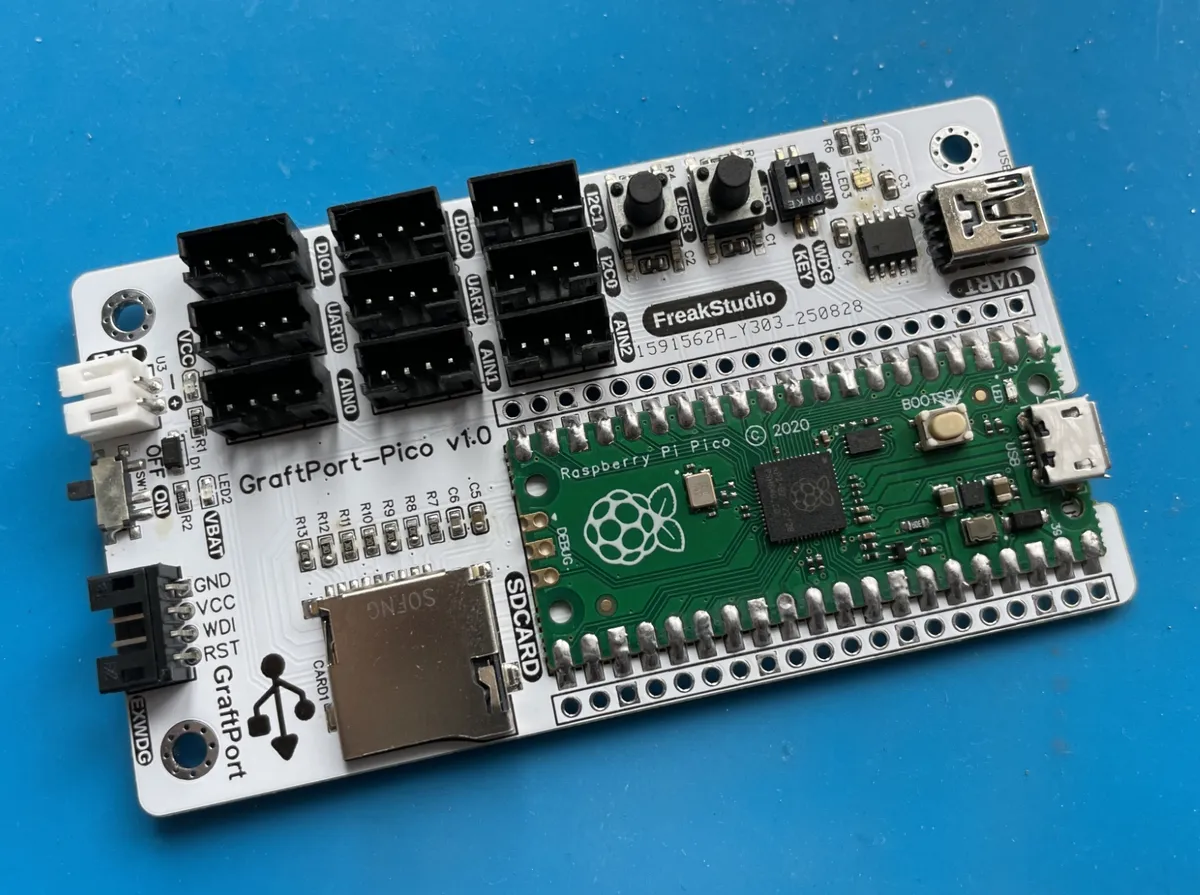
The project is based on the GraftPort-RP2040 development board as the main controller:
Other required modules include:
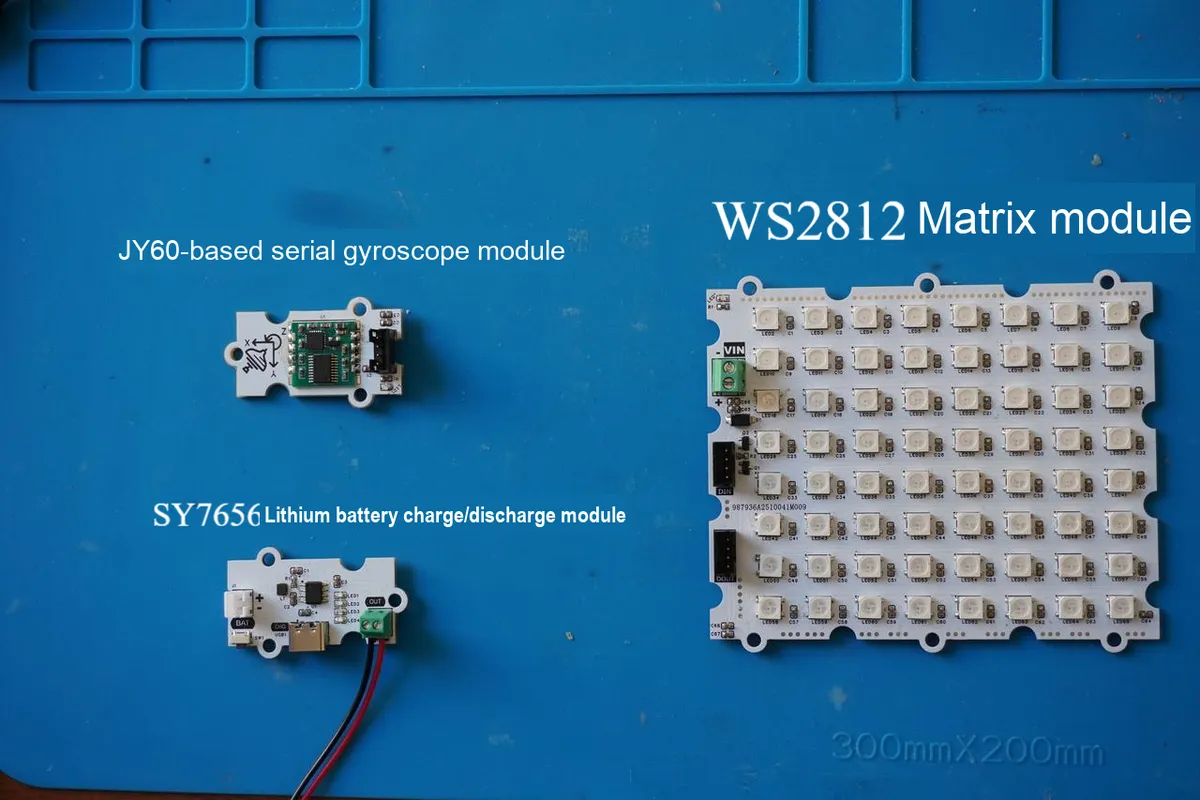
- JY60-based serial port gyroscope module (
UARTcommunication, default baud rate 115200); - WS2812 matrix module (digital output, connected to
DIOpin); - SY7656 Lithium Battery Charge-Discharge Module (compatible with polymer lithium batteries, outputs 5V voltage, equipped with
Type-Ccharging port); - Onboard buttons: By default, the fixed pins of the development board (Pin 18, pull-up input) are used, and no additional wiring is required;
- Onboard LED: By default, it uses the fixed pin (Pin 25) of the development board, and no additional wiring is required.
3.2 Hardware Connection
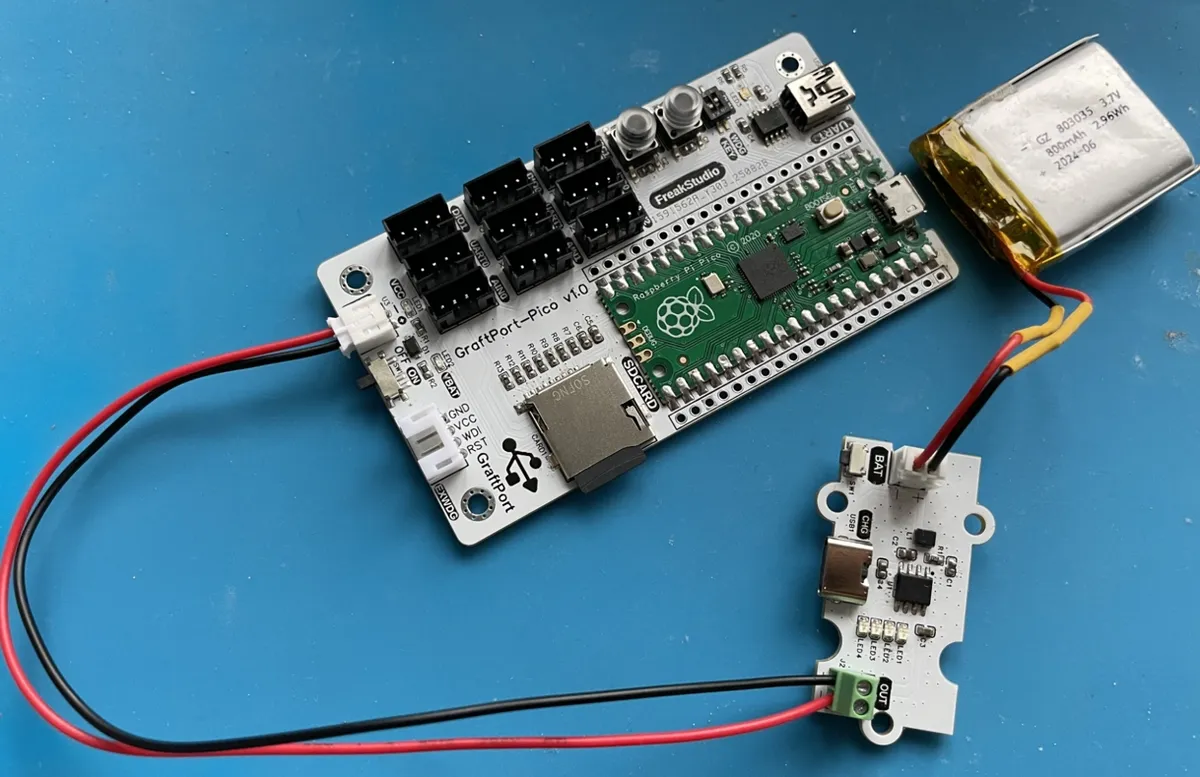
JY60-based serial port gyroscope module: connected via PH2.0 connecting cable to the UART0 interface;
WS2812 Matrix Module: Connected via PH2.0 connecting cable to DIO0 interface;
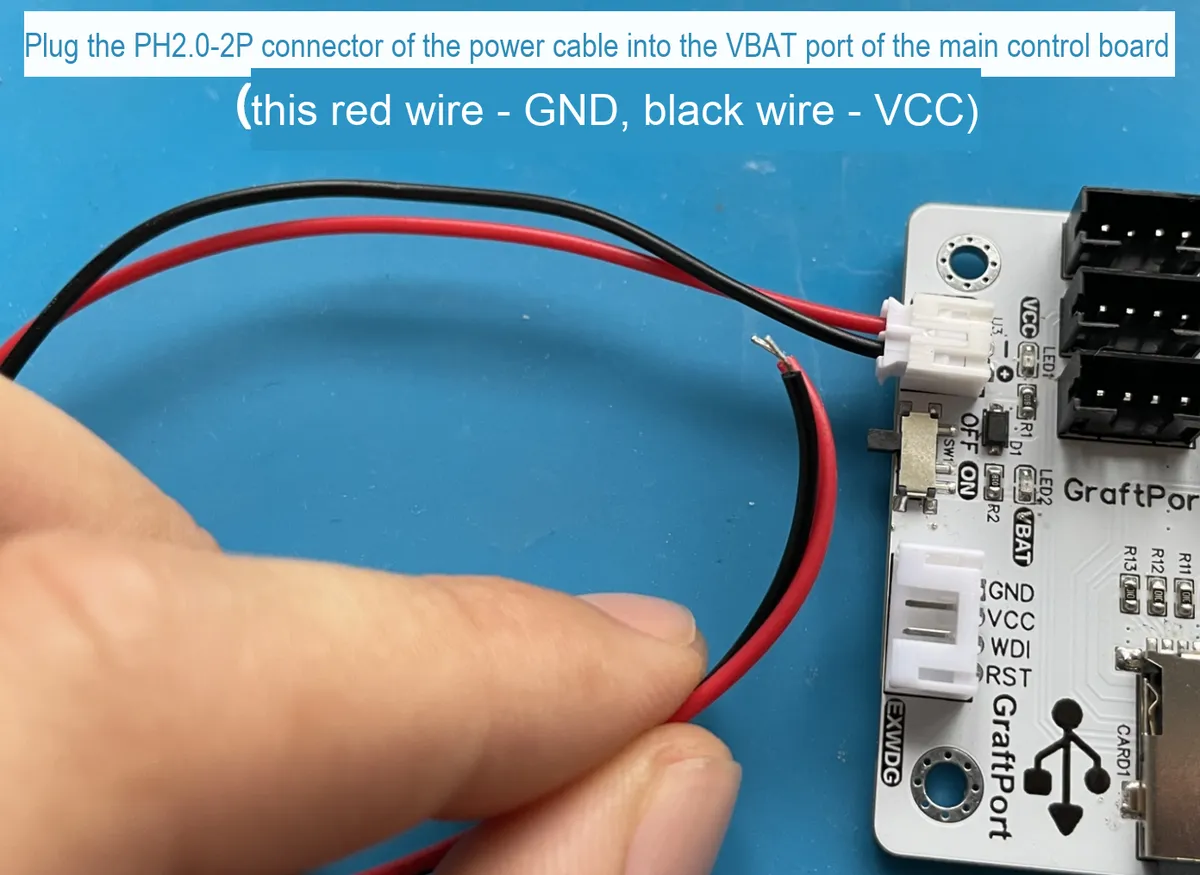
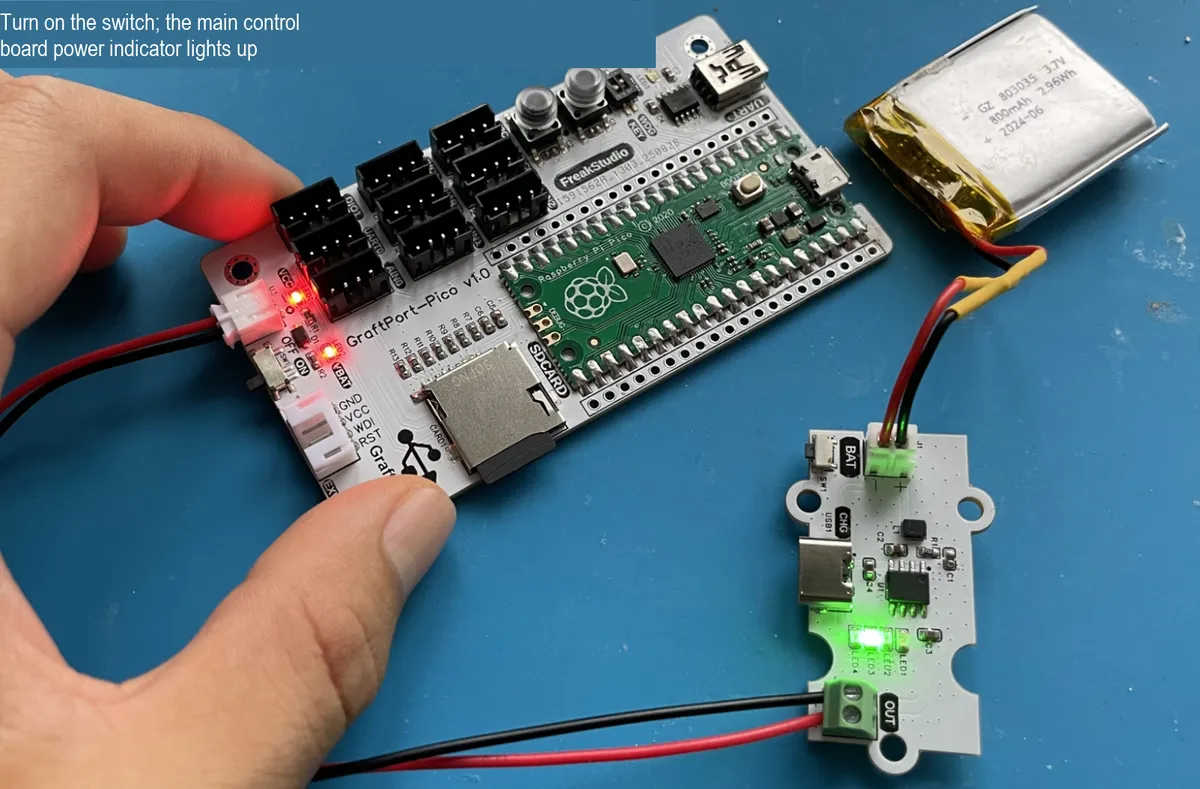
Lithium battery charge-discharge module: BAT interface connects to the lithium battery, and the OUT interface supplies power to the main control board via a PH2.0-2P connection cable.
3.3 Structural Assembly
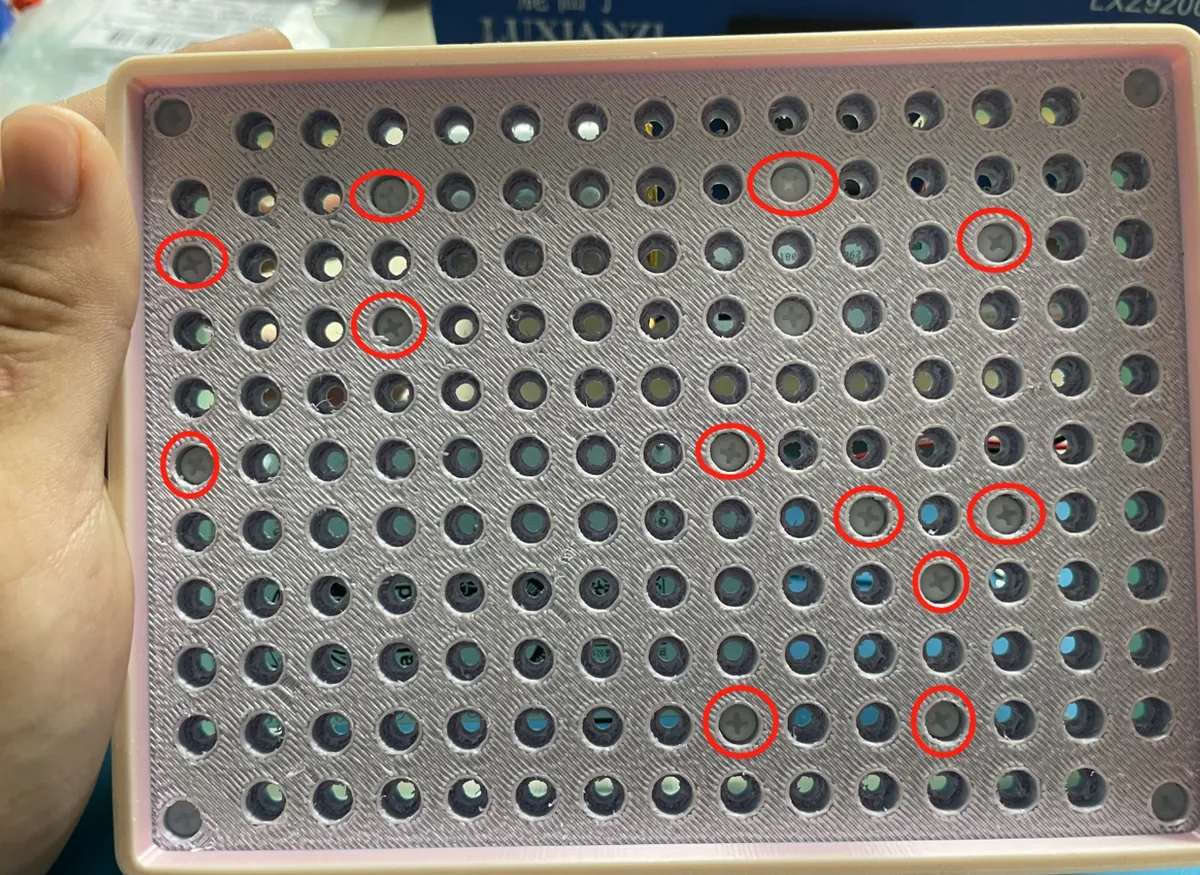
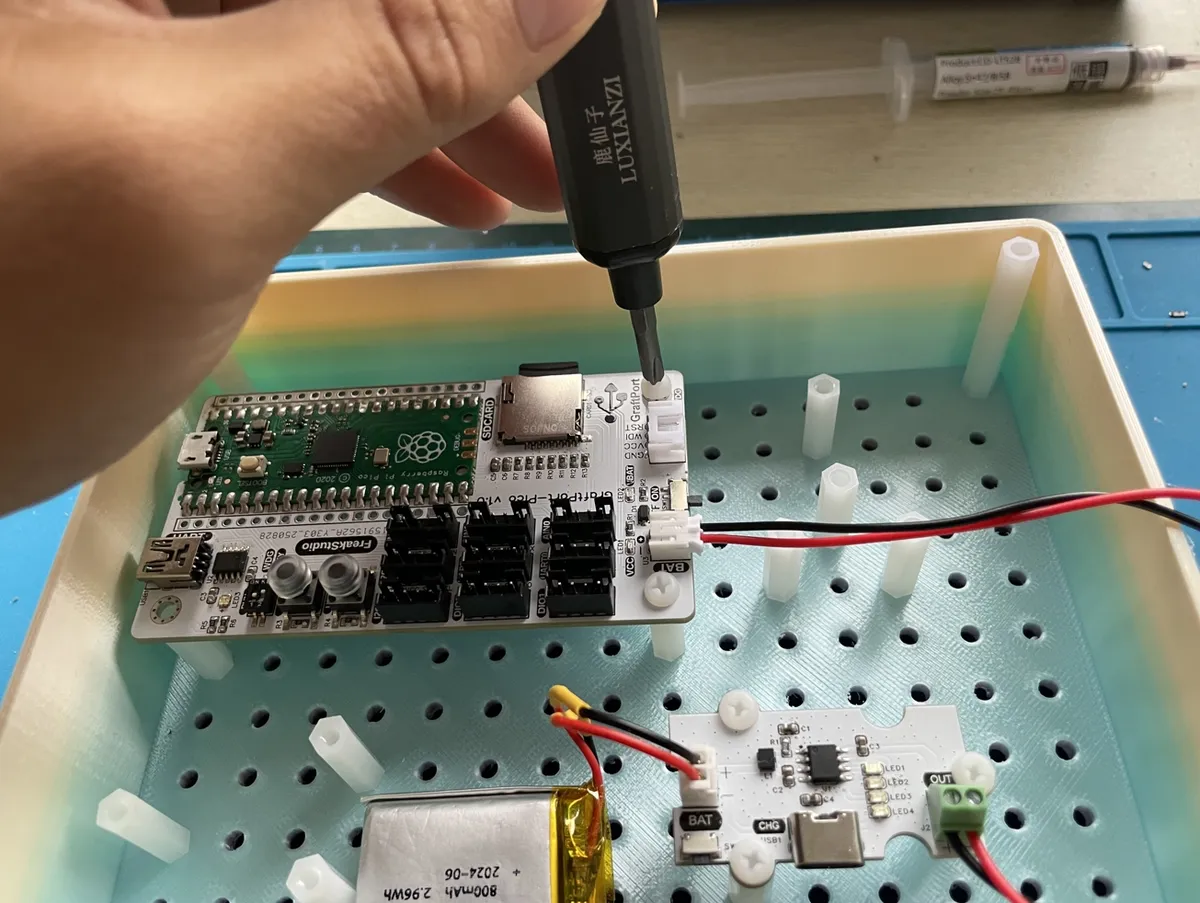
First, use M3 plastic pillars to fix each module and the main control board to the bottom plate of the casing (M3 screw holes are pre-reserved on both the main control board and the casing):
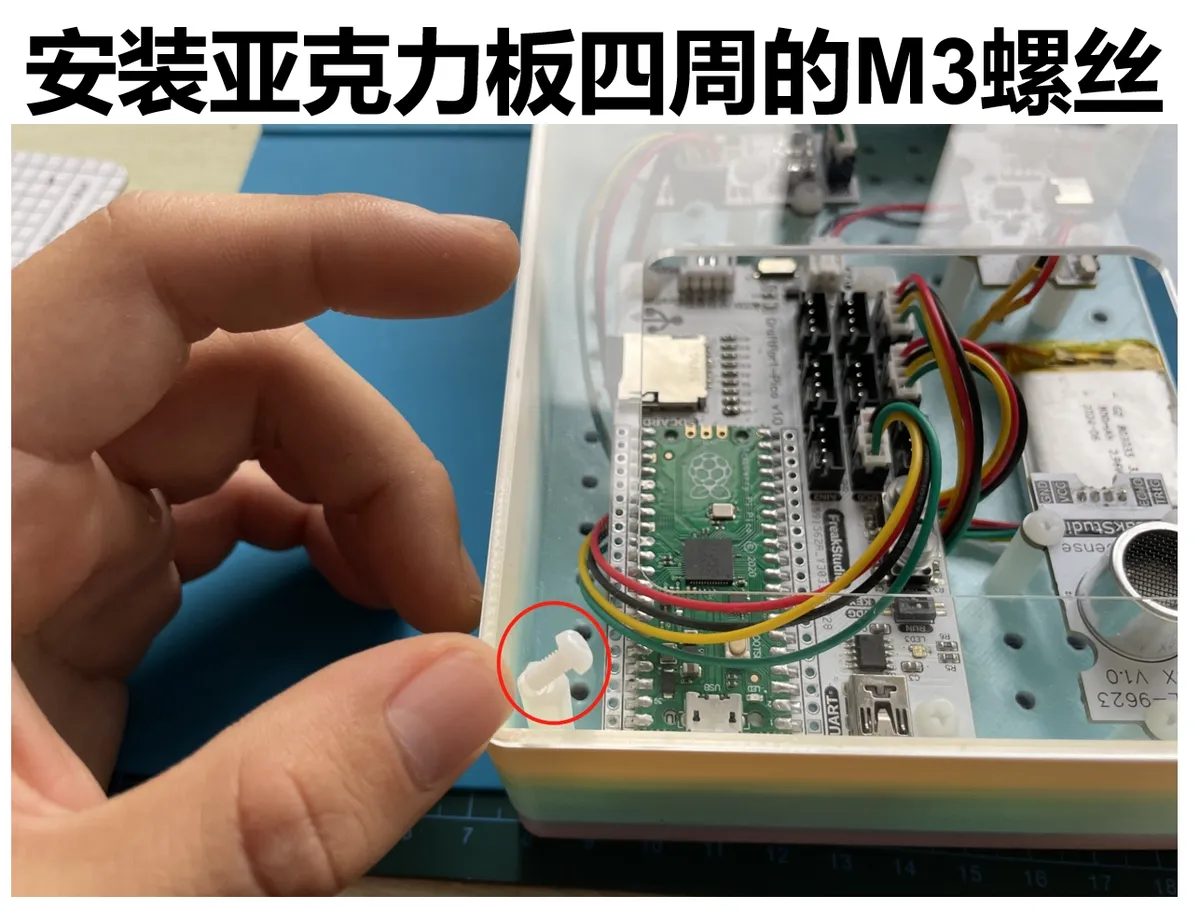
Next, secure the periphery of the housing with M3 plastic pillars, then fasten M3 screws at the corresponding positions to complete the assembly:
3.4 Notes
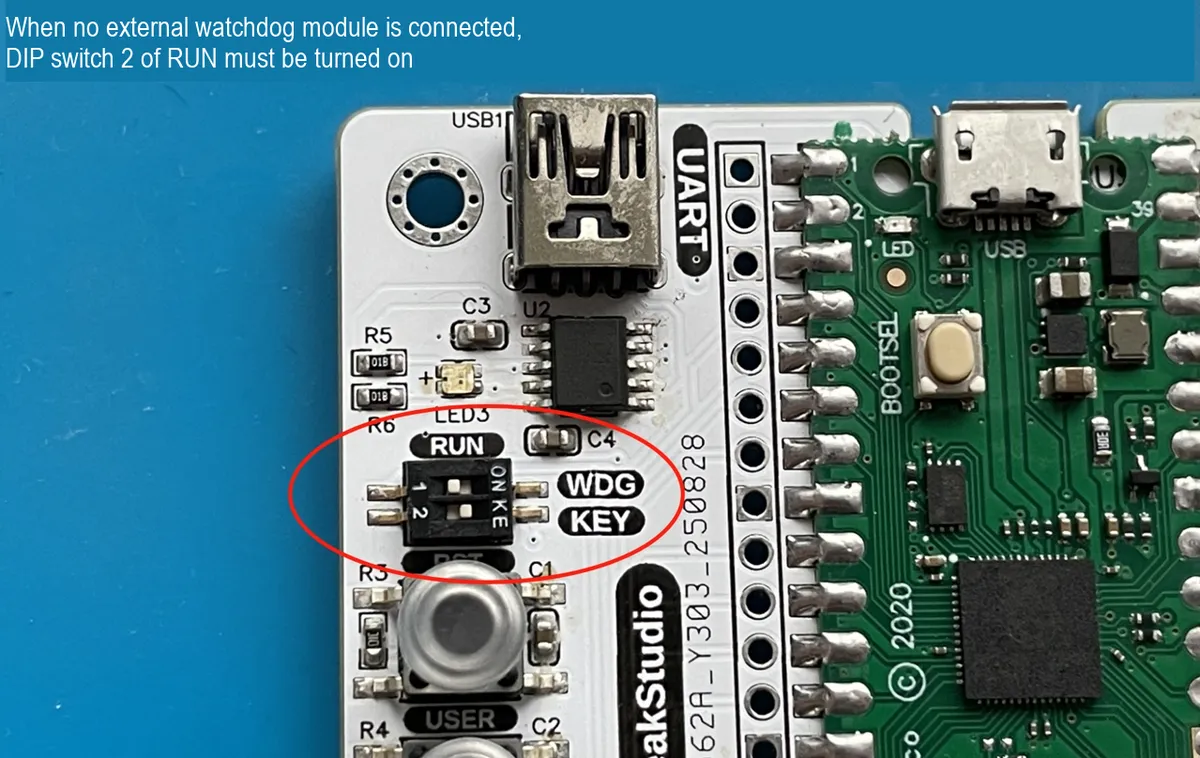
When the main control board is not connected to an external watchdog module, the RUN DIP switch 2 must be turned on:
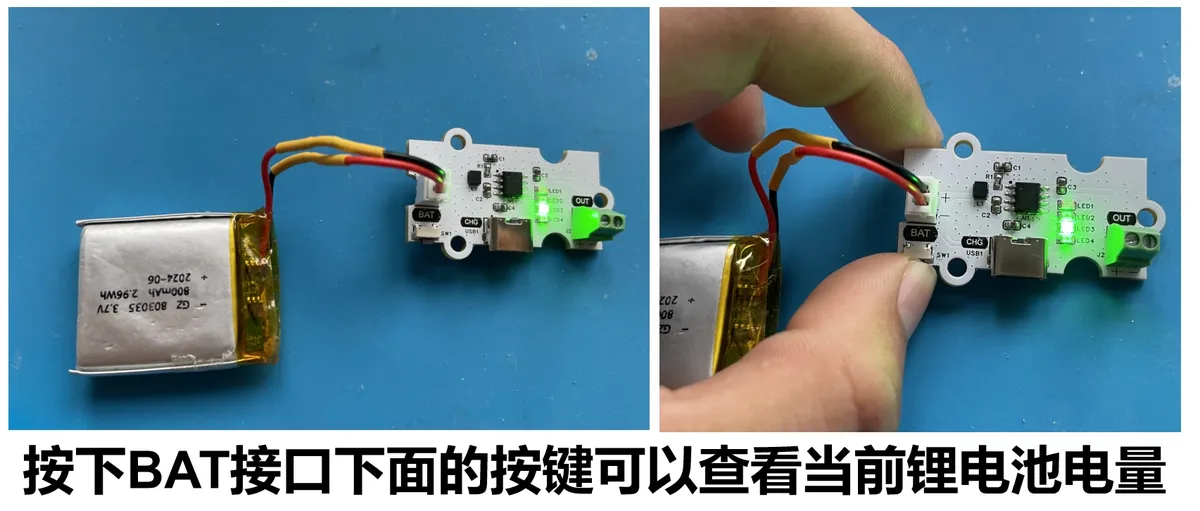
The lithium battery charge-discharge module supports power level display, and you can charge it via the Type-C interface below:
4. Software Environment
- Core firmware:
MicroPython v1.23.0(need to adapt toGraftPort-RP2040, supportmachine.Pin/I2C/Timermodule, soft timer scheduling); - Development IDE:
PyCharm(for code writing, uploading and debugging, supportsMicroPython REPLinteraction, and requires the installation of theMicroPythonplugin); - Supporting Tools:
Python 3.12+(optional, for running local helper scripts such as firmware flashing scripts);mpy-cross v1.23.0(used to. pyfiles compile into. mpyto reduce the memory usage of the development board, optional);mpremote v0.11.0+(replacesThonnyfor file upload, supports command-line operations, optional);
- Dependency Modules: No additional third-party libraries are required, and all drivers (including
passive_buzzer_driver.pyand others) are custom-implemented and provided along with the project files.
5. File Structure
ws2812_imu_hourglass
├─ LICENSE
├─ tools
│  ├─ dependency_analyzer.py
│  ├─ mpy_compiler.py
│  ├─ mpy_uploader.py
│  └─ README.md
├─ firmware
│  ├─ board.py
│  ├─ boot.py
│  ├─ conf.py
│  ├─ main.py
│  ├─ tasks
│  │  ├─ imu_task.py
│  │  ├─ maintenance.py
│  │  └─ __init__.py
│  ├─ libs
│  │  ├─ __init__.py
│  │  └─ scheduler
│  └─ drivers
│     ├─ __init__.py
│     ├─ serial_imu_driver
│     └─ neopixel_matrix_driver
├─ examples
│  └─ README.md
├─ docs
   └─ docs_here
6. Description of Key Documents
main.py: Project entry point, with core logic including:- Power on and delay for 3 seconds (wait for hardware to stabilize), then initialize the onboard
LED,IMUgyroscope,LEDmatrix, and buttons (including interrupt registration); - Hardware initialization:
IMUgyroscope (UART communication),LEDmatrix (NeoPixelcontrol); - Create
an ImuTaskinstance (pass in the hardware driver and configuration parameters), and encapsulate it as a scheduler task with a period of 50ms; - Initialize
Scheduler(software timer with a scheduling period of 10ms), add tasks, start scheduling, and enter an infinite loop; - Define
button_handlerinterrupt callback (for toggling task start/stop), fatal_hang blocking function (for critical error handling).
- Power on and delay for 3 seconds (wait for hardware to stabilize), then initialize the onboard
tasks/imu_task.py: Core business task. Key logic of theImuTaskclass:__init__: Initialize the hardware instance, create the initial pattern, and set the initial position;tick: Executed once every 50ms, the process is "readIMUdata → calculate new position → updateLEDdisplay";_make_pattern: Create a 2×2 red square pattern;_draw_pattern: Draws the current pattern onto the LED matrix.
tasks/maintenance.py: System maintenance module, key functions:task_idle_callback: Triggered when the scheduler is idle; if it detects that the memory usage is lower thanGC_THRESHOLD_BYTES(100000 bytes by default), it will executegc.collect ();task_err_callback: Triggered when an exception is thrown by a task, prints the full traceback (preferentially usessys.print_exception), then delays forERROR_REPEAT_DELAY_S(1 second by default) to prevent screen flooding;- Supports reading configurations from conf.py, and uses default values when no configuration is available to ensure compatibility.
drivers/xxx_driver: A hardware driver module, which all adopts the "instantiation + method invocation" mode, only exposes hardware-related control interfaces and shields underlying details:neopixel_matrix_driver:The NeopixelMatrixclass controls an LED matrix via a digital pin, and provides methods includingfill,pixel,show, etc.serial_imu_driver:The IMUclass performs serial communication viaUART, reads attitude data through theRecvDatamethod, and returns the roll angle and pitch angle via theangle_x/angle_yattributes.
board.py: A board-level pin mapping module that defines the BOARDS dictionary (containing fixed pins for GraftPort-RP2040 and UART/DIO interface mappings), and provides interfaces includingget_fixed_pin,get_uart_pins,get_dio_pins, which realizes the decoupling of board-level configuration and service logic; to expand support for other development boards later, you only need to add sub-entries toBOARDS.conf.py: user configuration file. The parameters that require manual definition by the user include:ENABLE_DEBUG(debug print switch),AUTO_START(whether the task starts automatically). If not defined, the system will use the default value.
7. Core Idea of Software Design
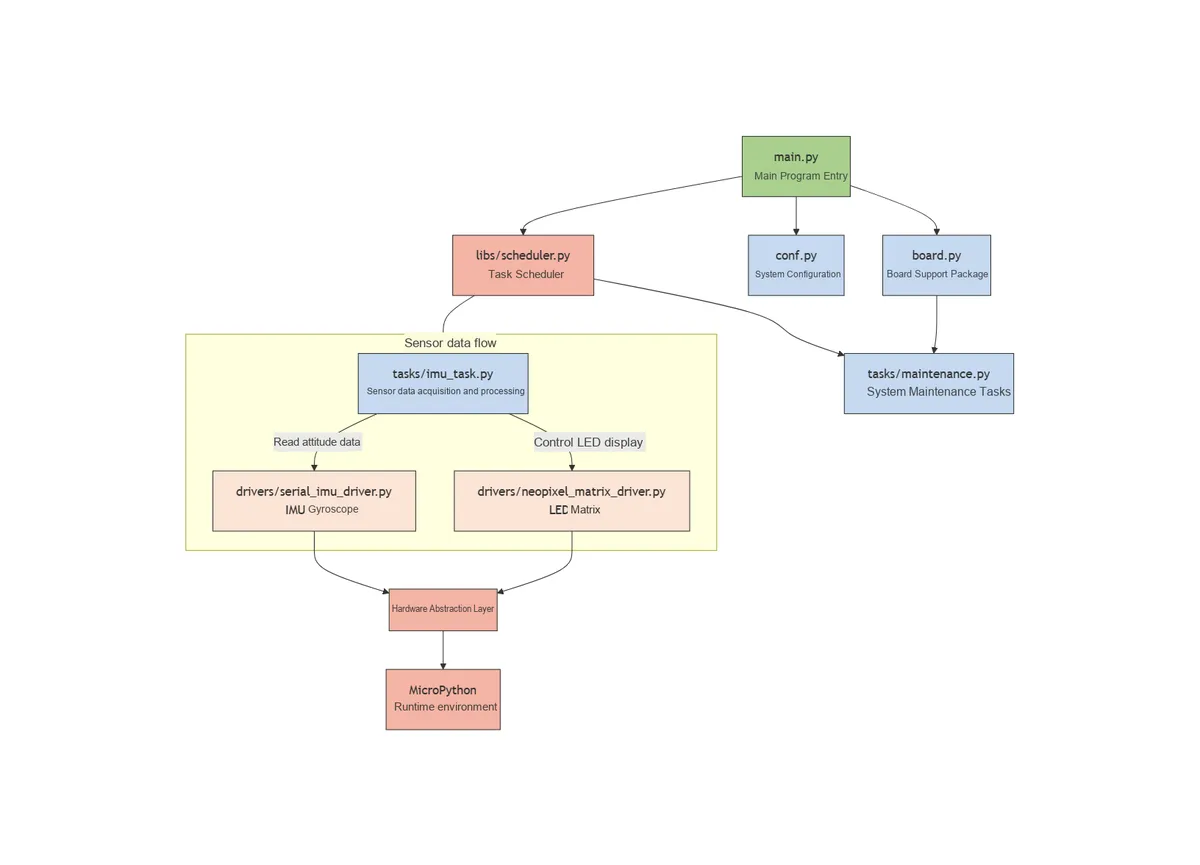
- System layering concept: Adopt a "four-layer architecture" to achieve decoupling and reuse
- Hardware Driver Layer (
drivers/): It is only responsible for the low-level control of hardware and contains no business logic. For example,the IMUdriver only focuses on "how to acquire attitude data" and does not care about "how to display";the LEDmatrix driver only cares about "how to controlLEDs" and does not concern itself with "what content to display". - Task Logic Layer (
tasks/): Implements business logic based on the interfaces provided by the driver layer. For example,ImuTaskonly calls the driver'sRecvDatamethod to obtain data, without concerning itself with theIMU'sUARTconfiguration; it only calls thepixelandshowmethods to display content, without concerning itself with the pin configuration of theLEDmatrix. - Scheduling Control Layer (
libs/scheduler.py): It provides general task management capabilities, supports task addition/pause/resume, idle/exception callbacks, and is independent of specific services; it uniformly manages the execution timing of all tasks through a soft timer to ensure reasonable allocation of system resources. - Entry layer (
main.py): responsible for "assembling" all layers, initializing hardware → creating tasks → starting scheduling; it acts as the "glue" of the system and contains no core business logic; it handles hardware exceptions and user interactions to ensure the stable startup and operation of the system.
- Hardware Driver Layer (
- Principles of Module Division: high cohesion, low coupling, and ease of maintenance and expansion
- High Cohesion: Each module is only responsible for the Single Responsibility Principle, for example
maintenance.pyonly handles system maintenance (GC, exceptions) and does not involve attitude detection;imu_task.pyonly handles attitude Data Acquisition and display logic, and does not care about hardware initialization; each driver module only encapsulates the control methods of the corresponding hardware. - Low coupling: Modules interact through "interfaces" instead of directly manipulating internal variables, for example,
ImuTaskobtains data viaIMU.RecvData ()without directly operating theUARThardware; it displays content viaNeopixelMatrix.pixel ()without directly controlling theNeoPixelCommunication Protocol. - Scalability: when adding new hardware (such as other sensors), you only need to
add the corresponding driver under drivers/and create a new task under tasks/, without modifying existing code; when expanding the development board, you only need toadd the pin mapping in board.pywithout affecting the business logic; when adding new interaction logic, you only need to modify the pose mapping algorithm ofImuTaskwithout involving changes at the hardware layer.
- High Cohesion: Each module is only responsible for the Single Responsibility Principle, for example
- Core Mechanism: Ensuring System Stability and User Experience
- Task scheduling mechanism: implemented based on a soft timer
(Timer (-1)), with a scheduling cycle of 10ms and a core task cycle of 50ms. It judges whether a task is due for execution through "counter accumulation" to avoid timer nesting conflicts; it supports dynamic task pause and resume to respond to user operations. - Posture Mapping Mechanism: It adopts the "angle threshold" strategy, which only moves the pattern when the posture angle exceeds the 180-degree threshold, thus reducing unnecessary display updates while ensuring real-time interactive responsiveness, and avoiding system load and visual flicker caused by frequent updates.
- Interactive feedback mechanism: Key interrupt callbacks take "immediate effect": when paused, Data Acquisition and display updates stop immediately to prevent unresponsive user operations; when hardware initialization fails, it will "report errors explicitly"(
LEDblinking + terminal messages) to facilitate troubleshooting of hardware connection issues. - Fault-tolerant mechanism: All key operations (such as hardware control, data reading) are wrapped with
try-exceptto prevent the failure of a single module from causing the entire system to crash. For example,IMUreading failure will not affect the operation of task scheduling;LEDcontrol exception will not affect attitude detection; the automatic memory recovery mechanism prevents memory leakage during long-time operation.
- Task scheduling mechanism: implemented based on a soft timer
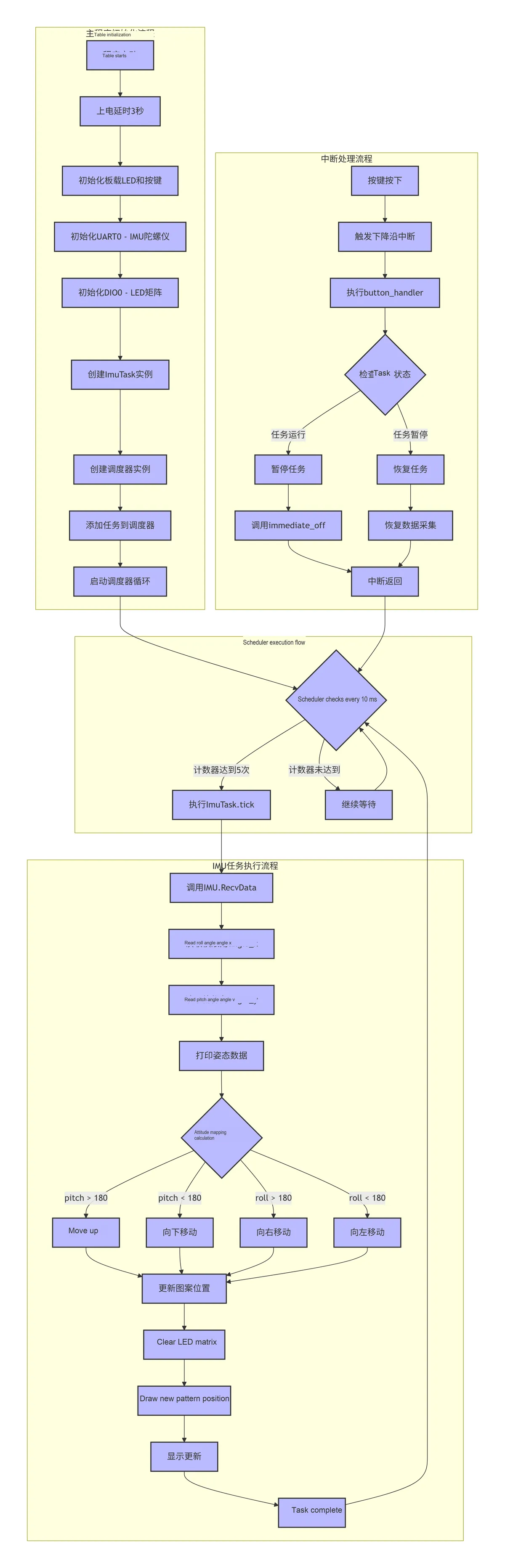
- Task Execution Process: The task execution process is as follows:
8. Instructions for Use
8.1 Hardware Connection
Connect the main control board, each sensor module and the battery according to the connection method specified in the "hardware requirements";
8.2 Run the Project (Using PyCharm + MicroPython Plugin)
Open PyCharm and install the corresponding MicroPython plugin.
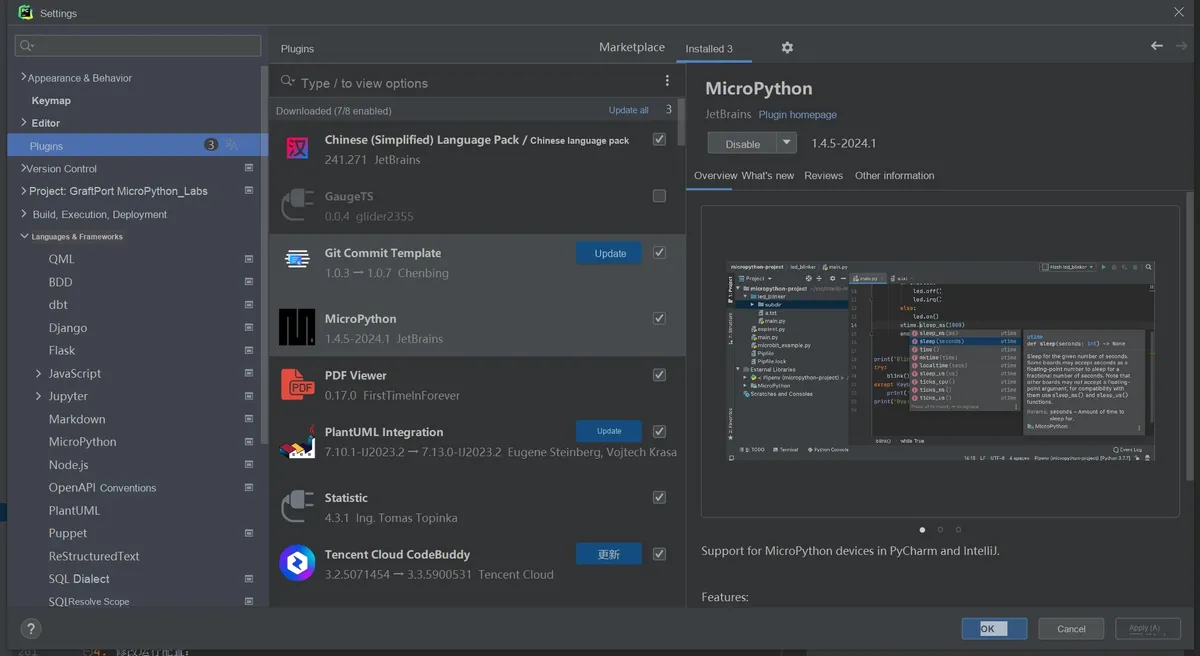
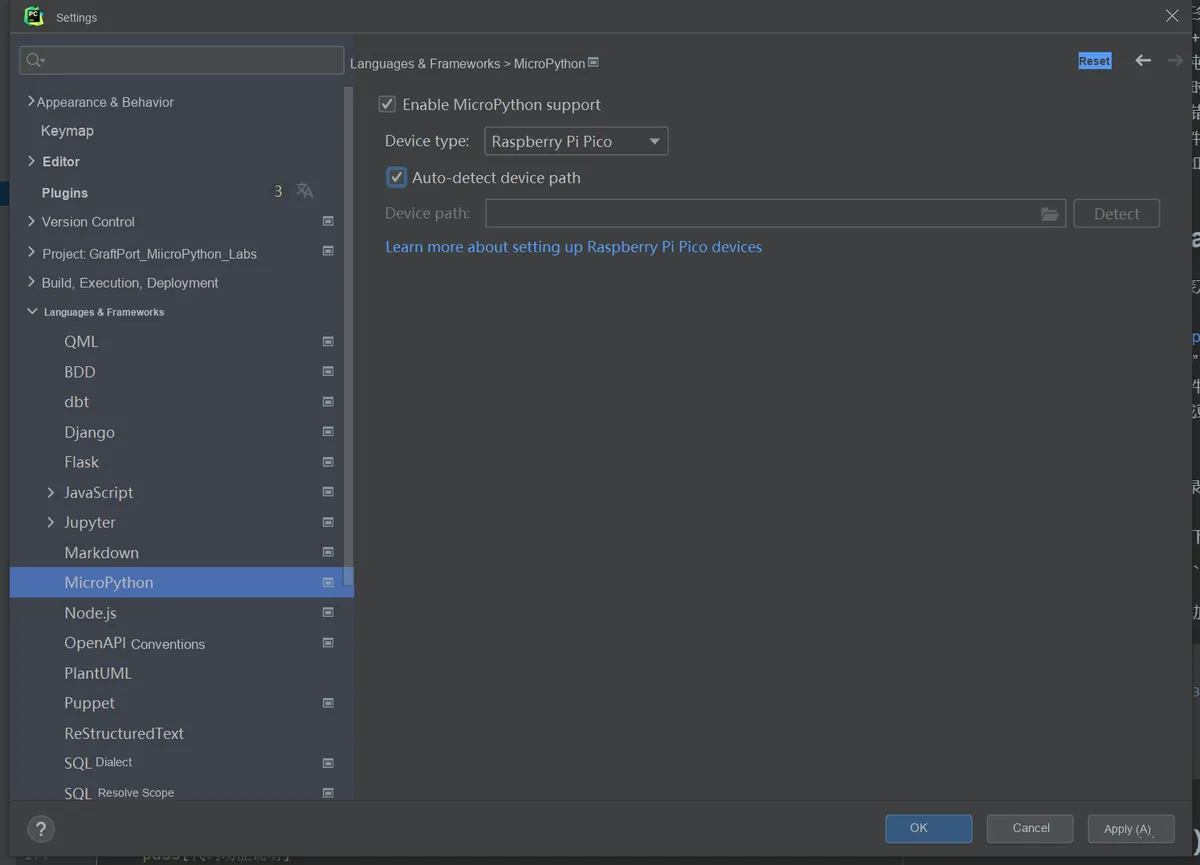
In the plugin, select Target Device as RP2040, and enable Auto-detect device path.
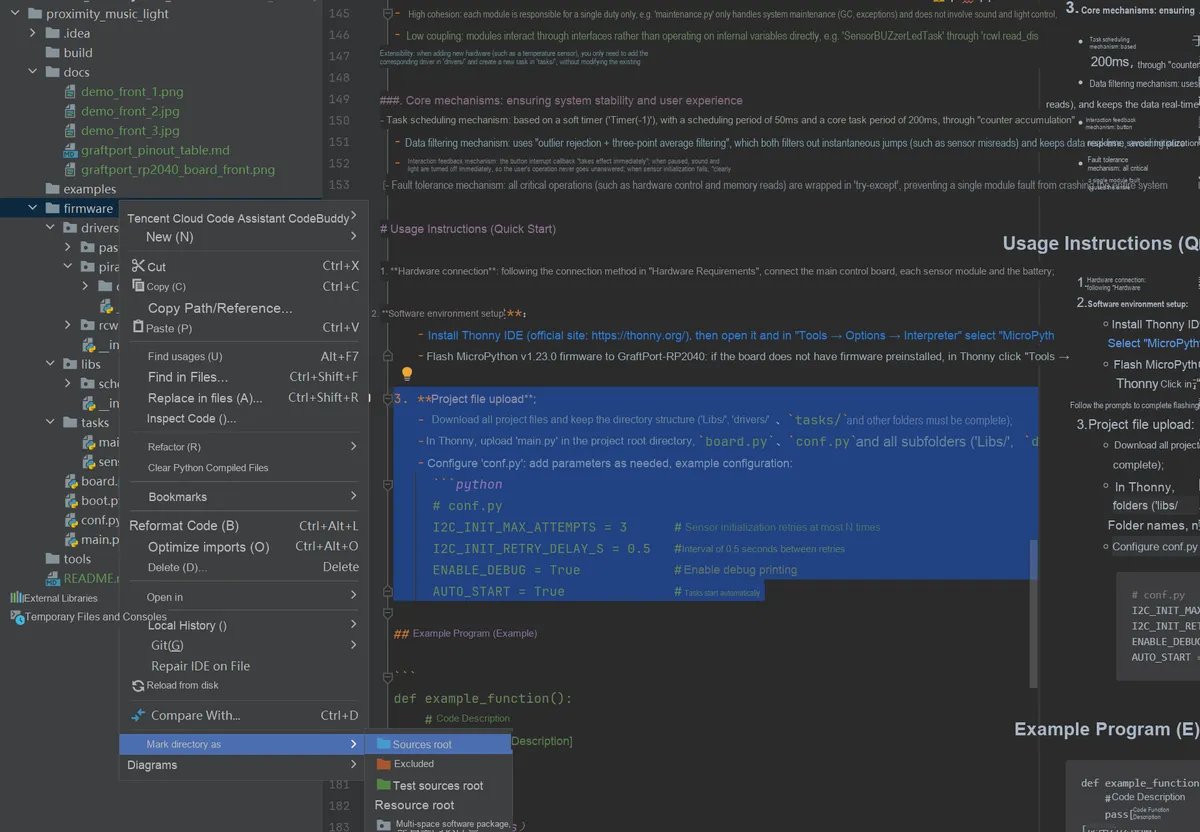
Set Project/firmware as the project root directory.
Modify Run Configuration:
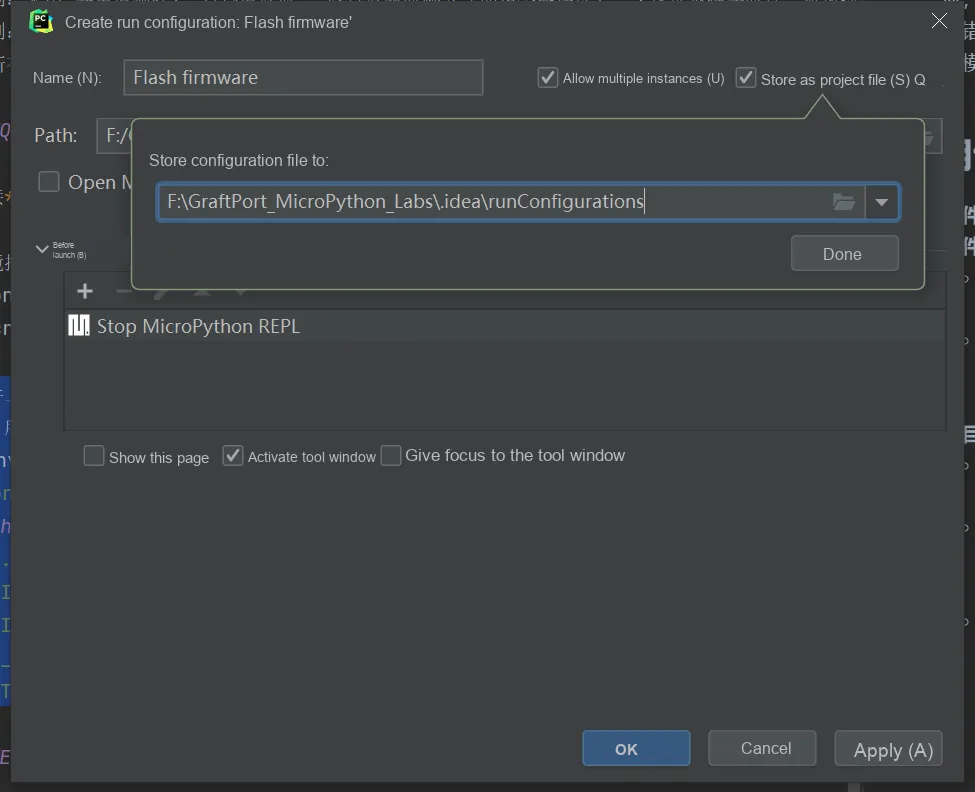
- Check
Allow multiple instances - Select
Store as project file - Click
OKto save the configuration.
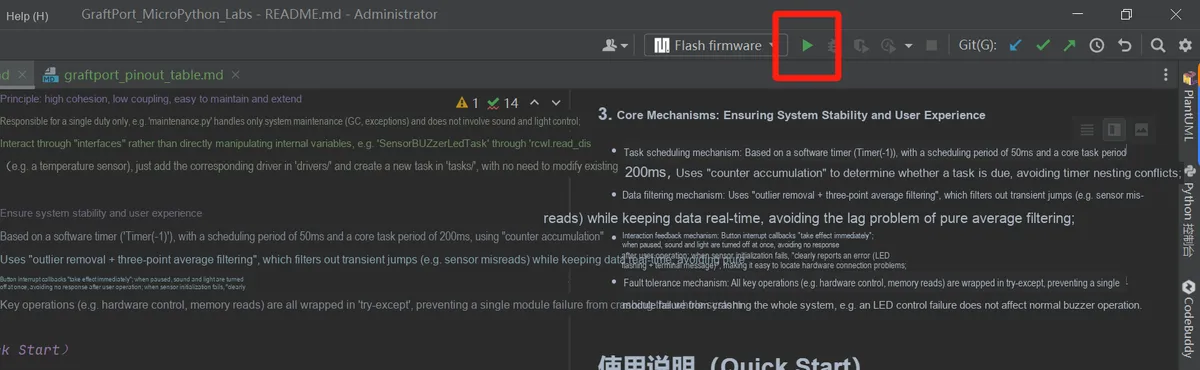
Click the IDE green triangle button in the upper right corner to run, and you can start uploading the firmware and executing the project.
8.3 Modification of Running Configuration
You can configure conf.py to modify or add parameters as needed, for example:
# conf.py example configuration
ENABLE_DEBUG = True            # Whether to enable debug printing
AUTO_START = True              # Whether to run tasks automatically at startup
8.4 Functional Testing
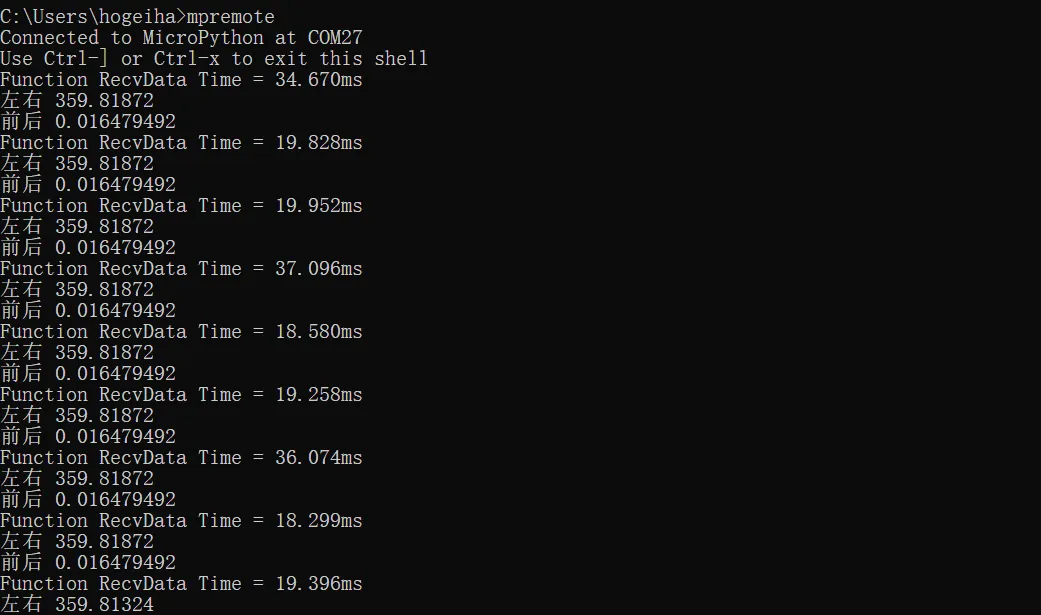
- Attitude Detection: Tilt the device and observe whether the roll angle and pitch angle data output by the terminal change accordingly;
- LED Display: Tilt the device and observe
themovement of the red squares on the LED matrix to see if it matches the attitude change; - Button Switch: Press the onboard button to pause the task (stop Data Acquisition and display update), and press it again to resume.
The terminal output is as follows:
8.5 Debugging and Problem Localization
- If a functional abnormality occurs, ensure that
ENABLE_DEBUG = True, then check the debug information (such as the "left-right" and "front-back" angle values) in the terminal to determine whether the data is normal; - If
IMUinitialization fails, check the hardware connection, power supply, andUARTpin configuration; - If
the LEDmatrix does not display, check the digital pin connections andNeoPixeldriver initialization; - If the pose mapping is inaccurate, check the angle threshold setting and the mapping algorithm.
9. Sample Program
There are no other reference sample codes for this project, you can directly firmware make modifications in the folder.
10. Notes
- Sensor-related:
- The serial port gyroscope module based on JY60 requires a stable power supply to prevent voltage fluctuations from affecting data accuracy;
IMUmodules should be protected from severe vibration and high-temperature environments to avoid compromising the service life and accuracy of the sensors.
- Hardware Connection Related:
- The UART communication baud rate of the serial port gyroscope module based on JY60 must be set to 115200;
- WS2812 Matrix Module requires sufficient current supply. It is recommended to use an external power supply or ensure that the lithium battery has sufficient power.
- Software Version Related:
MicroPython v1.23.0 or later versions must be used;- Debug printing will occupy a certain amount of memory, so it is recommended to turn it off during official use.
- Function Usage Notes:
- The task cycle (50ms) is not recommended to be set too small, otherwise it may increase the system load;
- The posture mapping threshold can be adjusted according to the actual usage scenario, and 180 degrees is currently used as the threshold;
- Automatic
GCthreshold adjustment is recommended based on actual memory usage.
11. Version Record
12. Contact the Developer
If you have any questions or need assistance, please contact the developer via the following channels:
📧 Email: 10696531183@qq.com
💻 GitHub: https://github.com/FreakStudioCN
13. Licensing Agreement
In this project, except for machine and other MicroPython official modules (MIT License), all driver and extension codes written by the author are released under the Creative Commons Attribution-NonCommercial 4.0 International (CC BY-NC 4.0) Licensing Agreement.
You are free to:
- Share — to copy, distribute the work in any medium or in any form
- Derivative Works — modify, transform, or create based on this Work
Only the following conditions shall be complied with:
- Attribution — You must give appropriate credit, provide a link to the Licensing Agreement, and indicate if changes were made. You may do so in any reasonable manner, but not in any way that suggests the licensor endorses you or your use.
- Non-commercial Use — You may not use this work for commercial purposes.
- Proper Citation Method — You may clearly indicate the source in code comments, documentation, demo videos, or project descriptions.
Copyright belongs to FreakStudio.
Appendix I: Project Source Code Download
https://github.com/FreakStudioCN/GraftPort_MicroPython_Labs/tree/main/ws2812_imu_hourglass
Appendix II: Hardware Module Reference Materials
JY60-based Serial Port Gyroscope Module
SY7656 Lithium Battery Charge-Discharge Module
GraftPort - Raspberry Pi Pico Expansion Board (Open Edition Template Files)
Version Record
Document Version | Date of Modification | Modifier | Modified Content |
V1.0.0 | 2025-11-05 | Hou Junhan | Draft the initial version of the document. |
V1.1.0 | 2026-01-04 | Li Zisheng | Final version. |