
The summary table of core APIs for lv.image is as follows:
| API name | Meaning | Input arguments (count + type + description) | Return value (type + description) |
|---|---|---|---|
| set_rotation | Set the image rotation angle | 1, int type (rotation angle, e.g. 90/180/270) | None, no return value |
| get_rotation | Get the current image rotation angle | 0, no input arguments | int type (current rotation angle value) |
| set_src | Set the image source (file / symbol / binary data) | 1, str type (image path such as "test.png" or an LVGL built-in symbol) | None, no return value |
| set_offset_x | Set the image X-axis offset (horizontal position adjustment) | 1, int type (offset in pixels; positive shifts right, negative shifts left) | None, no return value |
| get_offset_x | Get the current image X-axis offset | 0, no input arguments | int type (current X-axis offset in pixels) |
| set_offset_y | Set the image Y-axis offset (vertical position adjustment) | 1, int type (offset in pixels; positive shifts down, negative shifts up) | None, no return value |
| get_offset_y | Get the current image Y-axis offset | 0, no input arguments | int type (current Y-axis offset in pixels) |
| set_scale | Set the overall image zoom ratio (proportional scaling) | 1, int type (zoom ratio, 100=100%, 200=200%) | None, no return value |
| get_scale | Get the current overall image zoom ratio | 0, no input arguments | int type (current overall zoom ratio value) |
| set_scale_x | Set the image X-axis zoom ratio separately (width scaling only) | 1, int type (X-axis zoom ratio) | None, no return value |
| get_scale_x | Get the current image X-axis zoom ratio | 0, no input arguments | int type (current X-axis zoom ratio value) |
| set_scale_y | Set the image Y-axis zoom ratio separately (height scaling only) | 1, int type (Y-axis zoom ratio) | None, no return value |
| get_scale_y | Get the current image Y-axis zoom ratio | 0, no input arguments | int type (current Y-axis zoom ratio value) |
| set_antialias | Enable / disable image anti-aliasing (smooths scaled / rotated edges) | 1, bool type (True to enable, False to disable) | None, no return value |
| get_antialias | Check whether image anti-aliasing is enabled | 0, no input arguments | bool type (True = enabled, False = disabled) |
| set_blend_mode | Set the image blend mode (transparency / overlay effects, etc.) | 1, lv.blend_mode_t enum (e.g. lv.BLEND_MODE.NORMAL) | None, no return value |
| get_blend_mode | Get the current image blend mode | 0, no input arguments | lv.blend_mode_t enum (current blend mode) |
| set_pivot | Set the image rotation pivot point | 2, int type (x: pivot X coordinate, y: pivot Y coordinate) | None, no return value |
| get_pivot | Get the image rotation pivot point | 1, lv.point_t object (used to receive the pivot coordinates) | None, the result is stored in the passed-in lv.point_t object |
The summary table of core APIs for lv.image is as follows:
| API name | Meaning | Input parameters | Return value | Typical exception messages in the SDL environment |
|---|---|---|---|---|
| set_src | Set the GIF source (file / binary data) | Count: 1 Type: str/bytes Description: str = GIF file path (e.g. "anim.gif"); bytes = GIF binary data | Count: 0 Type: None Description: No return value | 1. Wrong argument count: argument num/types mismatch 2. Wrong type (int passed): Cannot convert 'int' to pointer! |
| restart | Restart GIF playback (play from the beginning) | Count: 0 Type: None Description: No arguments needed | Count: 0 Type: None Description: No return value | Passing any argument: argument num/types mismatch |
| pause | Pause GIF playback | Count: 0 Type: None Description: No arguments needed | Count: 0 Type: None Description: No return value | Passing any argument: argument num/types mismatch |
| resume | Resume GIF playback (continue after pause) | Count: 0 Type: None Description: No arguments needed | Count: 0 Type: None Description: No return value | Passing any argument: argument num/types mismatch |
The summary table of LVGL built-in symbols (SYMBOL) is shown below, which organizes the name, meaning, type and typical usage scenarios of LVGL built-in symbols (lv.SYMBOL) by function to adapt to the development requirements of SDL LVGL/MicroPython environment, and all symbol types are int (can be directly passed to interfaces such as lv.image.set_src / button text):
| Category | Symbol name | Meaning | Type | Typical Use Case |
|---|---|---|---|---|
| Basic identifiers | SYMBOL.BULLET | Dot / bullet | int | List item prefix, marker dot |
| Basic identifiers | SYMBOL.LIST | List | int | List menu entry, list view icon |
| Basic identifiers | SYMBOL.OK | Confirm / checkmark | int | Submit button, operation success indicator |
| Basic identifiers | SYMBOL.CLOSE | Close / cross | int | Close button, cancel operation, popup close |
| Basic identifiers | SYMBOL.WARNING | Warning / exclamation mark | int | Error indication, risky operation reminder |
| Multimedia | SYMBOL.AUDIO | Audio / sound | int | Audio playback entry, sound settings |
| Multimedia | SYMBOL.VIDEO | Video | int | Video playback entry, video settings |
| Multimedia | SYMBOL.MUTE | Mute | int | Mute button, volume off |
| Multimedia | SYMBOL.VOLUME_MID | Medium volume | int | Volume adjustment (medium) |
| Multimedia | SYMBOL.VOLUME_MAX | Maximum volume | int | Volume adjustment (maximum) |
| Multimedia | SYMBOL.PREV | Previous track / previous frame | int | Media playback control (previous) |
| Multimedia | SYMBOL.PLAY | Play | int | Play button, start animation |
| Multimedia | SYMBOL.PAUSE | Pause | int | Pause button, pause animation |
| Multimedia | SYMBOL.STOP | Stop | int | Stop button, stop playback |
| Multimedia | SYMBOL.NEXT | Next track / next frame | int | Media playback control (next) |
| Multimedia | SYMBOL.EJECT | Eject / exit | int | Disc eject, device exit |
| Multimedia | SYMBOL.SHUFFLE | Shuffle | int | Media shuffle mode |
| Multimedia | SYMBOL.LOOP | Repeat | int | Media repeat mode |
| Navigation / direction | SYMBOL.LEFT | Left arrow | int | Back, move left, previous step |
| Navigation / direction | SYMBOL.RIGHT | Right arrow | int | Forward, move right, next step |
| Navigation / direction | SYMBOL.UP | Up arrow | int | Move up, scroll up, increase |
| Navigation / direction | SYMBOL.DOWN | Down arrow | int | Move down, scroll down, decrease |
| Operation / control | SYMBOL.POWER | Power supply | int | Power on / off button, power status |
| Operation / control | SYMBOL.SETTINGS | Settings | int | Settings entry, configuration menu |
| Operation / control | SYMBOL.HOME | Home | int | Return to home button |
| Operation / control | SYMBOL.REFRESH | Refresh / reload | int | Refresh data, reload page |
| Operation / control | SYMBOL.PLUS | Plus sign | int | Increase, add, create new |
| Operation / control | SYMBOL.MINUS | Minus sign | int | Decrease, delete, remove |
| Operation / control | SYMBOL.EYE_OPEN | Eye (open) | int | Show password, show hidden content |
| Operation / control | SYMBOL.EYE_CLOSE | Eye (closed) | int | Hide password, hide sensitive content |
| Operation / control | SYMBOL.CUT | Cut | int | Text / file cut operation |
| Operation / control | SYMBOL.COPY | Copy | int | Text / file copy operation |
| Operation / control | SYMBOL.PASTE | Paste | int | Text / file paste operation |
| Operation / control | SYMBOL.SAVE | Save | int | Save file, save configuration |
| Operation / control | SYMBOL.EDIT | Edit | int | Edit text, modify content |
| Operation / control | SYMBOL.BACKSPACE | Backspace / delete | int | Keyboard backspace, delete character |
| Operation / control | SYMBOL.NEW_LINE | Newline | int | Keyboard newline, text line break |
| File / storage | SYMBOL.DOWNLOAD | Download | int | File download, data import |
| File / storage | SYMBOL.UPLOAD | Upload | int | File upload, data export |
| File / storage | SYMBOL.DRIVE | Drive / disk | int | Disk / drive entry |
| File / storage | SYMBOL.DIRECTORY | Folder / directory | int | Folder entry, directory browsing |
| File / storage | SYMBOL.FILE | File | int | File icon, file list item |
| File / storage | SYMBOL.TRASH | Recycle bin / delete | int | Delete file, empty recycle bin |
| File / storage | SYMBOL.SD_CARD | SD card | int | SD card storage, external storage entry |
| Device / connection | SYMBOL.CALL | Phone / call | int | Make a call, call log |
| Device / connection | SYMBOL.WIFI | WIFI | int | WIFI status, network settings |
| Device / connection | SYMBOL.BLUETOOTH | Bluetooth | int | Bluetooth status, Bluetooth settings |
| Device / connection | SYMBOL.USB | USB | int | USB connection, USB storage |
| Device / connection | SYMBOL.GPS | Positioning / GPS | int | Location service, map navigation |
| Status / prompt | SYMBOL.BARS | Progress bar / bar chart | int | Progress display, data statistics |
| Status / prompt | SYMBOL.ENVELOPE | Envelope / mail | int | Mail notification, message center |
| Status / prompt | SYMBOL.CHARGE | Charging | int | Device charging status, charging prompt |
| Status / prompt | SYMBOL.BELL | Bell / notification | int | Message notification, reminder settings |
| Status / prompt | SYMBOL.BATTERY_FULL | Battery (full) | int | Battery full status |
| Status / prompt | SYMBOL.BATTERY_3 | Battery (3/4) | int | Battery 75% charge status |
| Status / prompt | SYMBOL.BATTERY_2 | Battery (2/4) | int | Battery 50% charge status |
| Status / prompt | SYMBOL.BATTERY_1 | Battery (1/4) | int | Battery 25% charge status |
| Status / prompt | SYMBOL.BATTERY_EMPTY | Battery (empty) | int | Battery low / dead status |
| Image / edit | SYMBOL.IMAGE | Picture / image | int | Image viewing, gallery entry |
| Image / edit | SYMBOL.TINT | Color adjustment / coloring | int | Image color adjustment, color settings |
| Input / interaction | SYMBOL.KEYBOARD | Keyboard | int | Virtual keyboard, input entry |
| Placeholder / test | SYMBOL.DUMMY | Placeholder / test | int | UI placeholder, function test |
LVGL Blend Mode lv.BLEND_MODE Names, descriptions, blending effects and typical use cases of all enumeration values:
| Symbol name | Meaning | Type | Blend effect description | Typical Use Case |
|---|---|---|---|---|
| BLEND_MODE.NORMAL | Normal blend | int | Default mode, foreground pixels cover background pixels (background shows only in transparent areas), no color overlay / modification | Normal display (icons, text, regular images, buttons) |
| BLEND_MODE.ADDITIVE | Additive blend | int | Foreground color + background color (brightness adds up, colors get brighter as they mix, white + any color = white) | Glow effect (button highlight, notification prompt, light animation, gradient glow) |
| BLEND_MODE.SUBTRACTIVE | Subtractive blend | int | Background color - foreground color (brightness decreases, colors get darker as they mix, black - any color = black) | Shadow effects, mask overlays, vignette processing, reducing local brightness |
| BLEND_MODE.MULTIPLY | Multiply | int | Foreground color × background color (colors darken, contrast increases, white × any color = original background color) | Image overlay, texture blending, dark watermarks, retro filters |
| BLEND_MODE.DIFFERENCE | Difference blend | int | Difference between the pixel values of the foreground and background colors (colors invert, strong contrast, same color = black) | Color inversion effects, difference marking, warning alerts, contrast highlighting |
22.1 Basic Display of Images and GIFs
import display_driver
import lvgl as lv
import fs_driver

# Initialize the LVGL environment
lv.init()
scr = lv.screen_active()
scr.set_style_bg_color(lv.color_hex(0xFFFFFF), 0)

fs_drv = lv.fs_drv_t()
fs_driver.fs_register(fs_drv, 'S')

'''Display LVGL built-in symbols'''
# Create image
img_symbol = lv.image(scr)
# Display an LVGL built-in symbol ("AUDIO" icon); for more icons see the "class SYMBOL" section of api.py
img_symbol.set_src(lv.SYMBOL.AUDIO)
#Center it
img_symbol.align(lv.ALIGN.CENTER, 0, 0)

# The code below cannot be displayed in the simulator!!!

# '''Display images from storage'''
# img_symbol2 = lv.image(scr)
# # Display png
# img_symbol2.set_src('S:001.png')
# # Display jpg
# #img_symbol2.set_src('S:001.jpg')
# img_symbol2.align(lv.ALIGN.RIGHT_MID, 0, 0)  # Display on the right

# '''Display gif'''
# img_symbol3 = lv.gif(scr)
# img_symbol3.set_src('S:001.gif')
# img_symbol3.align(lv.ALIGN.LEFT_MID, 0, 0)  # Display on the left

# Load the screen
lv.screen_load(scr)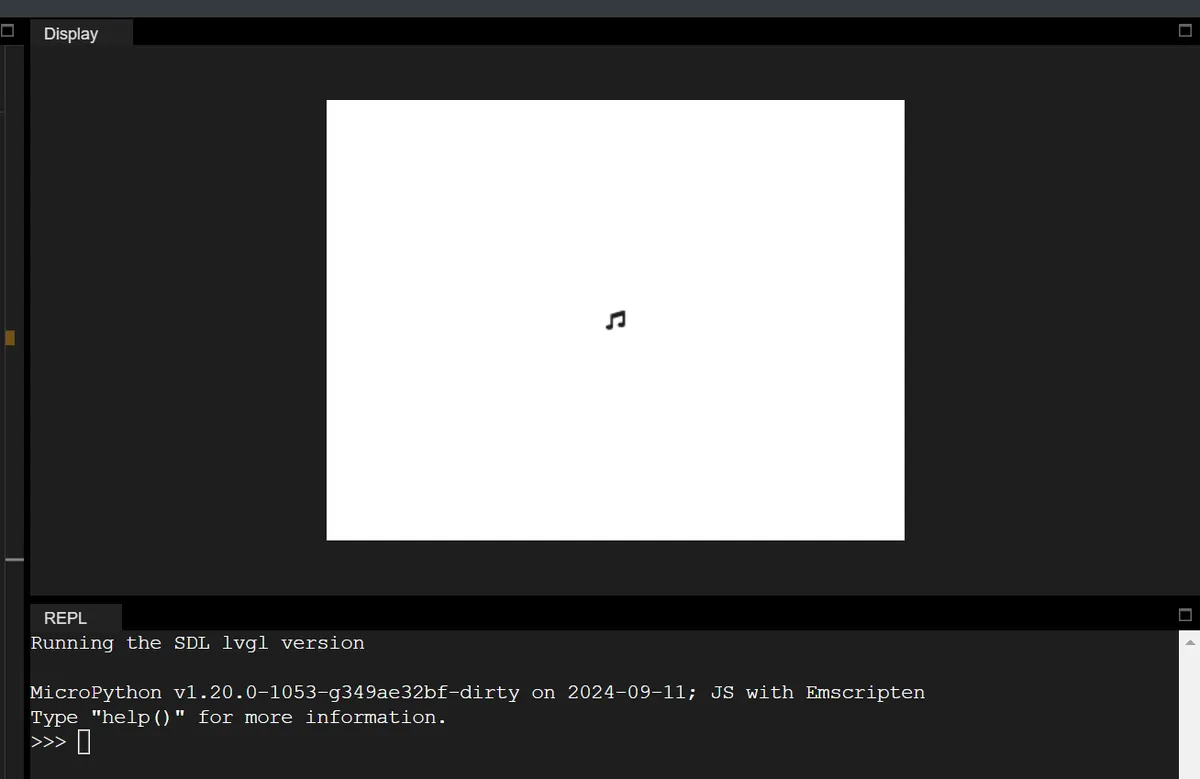
22.2 Internal Icon Display
The code is as follows:
import display_driver
import lvgl as lv

# Initialize the LVGL environment
lv.init()
scr = lv.screen_active()
scr.set_style_bg_color(lv.color_hex(0xFFFFFF), 0)  # White background

# ========== 1. Core parameter configuration (adjustable, controls density/size) ==========
ICON_SIZE = 24          # Size of a single icon (width = height; smaller shows more)
ICON_GAP = 8            # Spacing between icons (horizontal/vertical)
SCREEN_PADDING = 8      # Padding at screen edges (keeps icons from touching the edge)

# ========== 2. Get all built-in SYMBOL icons ==========
symbol_list = [
    getattr(lv.SYMBOL, name)
    for name in dir(lv.SYMBOL)
    if not name.startswith("__") and name.isupper()
]
total_icons = len(symbol_list)
print(f"Total icons: {total_icons}")

# ========== 3. Dynamically calculate layout (adapts to any screen size) ==========
# Get actual screen size (automatically adapted in the SDL environment)
screen_w = scr.get_width()
screen_h = scr.get_height()

# Calculate the number of icons that fit per row/column
icons_per_row = (screen_w - 2 * SCREEN_PADDING) // (ICON_SIZE + ICON_GAP)
icons_per_col = (screen_h - 2 * SCREEN_PADDING) // (ICON_SIZE + ICON_GAP)
max_icons_per_screen = icons_per_row * icons_per_col
print(f"Screen size: {screen_w}x{screen_h}")
print(f"Icons per row: {icons_per_row}, per column: {icons_per_col}")
print(f"Max icons per screen: {max_icons_per_screen}")

# ========== 4. Manual layout: create icons one by one and set coordinates ==========
for idx, sym in enumerate(symbol_list):
    # Skip the part beyond one screen (to show all, add scrolling; see the extension below)
    if idx >= max_icons_per_screen:
        break

    # Calculate the row/column of the current icon
    row = idx // icons_per_row
    col = idx % icons_per_row

    # Calculate icon coordinates (core formula for even distribution)
    x = SCREEN_PADDING + col * (ICON_SIZE + ICON_GAP)
    y = SCREEN_PADDING + row * (ICON_SIZE + ICON_GAP)

    # Create icon (directly as a child of the screen, no container)
    img = lv.image(scr)
    img.set_size(ICON_SIZE, ICON_SIZE)  # Fixed size
    img.set_src(sym)                    # Set SYMBOL icon
    img.set_pos(x, y)                   # Set coordinates manually

# ========== 5. Load screen ==========
lv.screen_load(scr)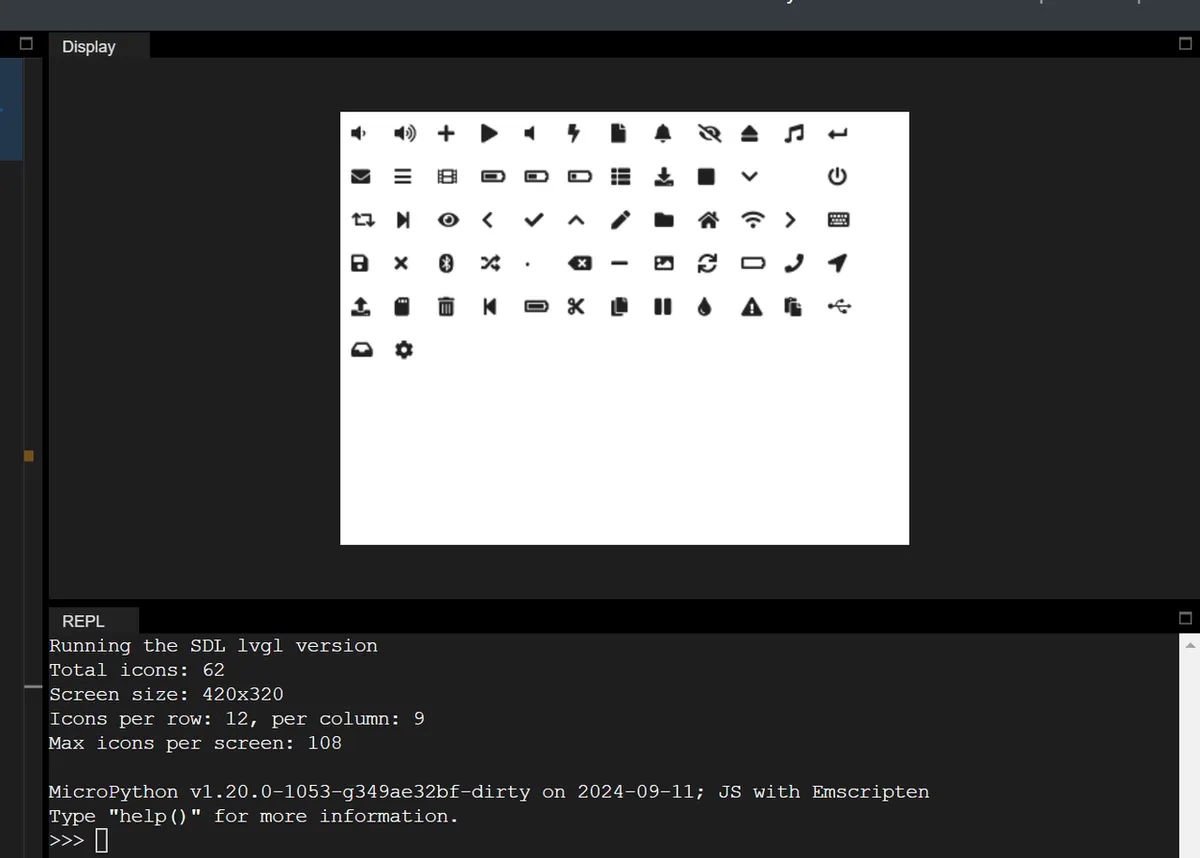
Version Record
Version Number | Modifier | Time | Content |
v1.0 | Li Zisheng | 2026/03/23 | Initialize the document. |