
Contents
| API name | Core function | Input parameters | Return value | Notes (SDL environment behavior) |
|---|---|---|---|---|
| set_cell_value | Set the text content of the specified cell | row: row number (int), col: column number (int), txt: cell text (str) | No return value (NoneType) | Numeric arguments accept only int; str triggers a type error |
| set_row_count | Set the total number of rows of the table | count: total number of rows (int) | No return value (NoneType) | Passing too few / too many arguments triggers an argument count error |
| set_column_count | Set the total number of columns of the table | count: total number of columns (int) | No return value (NoneType) | A float argument triggers a type error |
| set_column_width | Set the width of the specified column | col_id: column index (int), w: column width (int) | No return value (NoneType) | Width must be a positive integer |
| add_cell_ctrl | Set control attributes for the specified cell (replaces set_cell_ctrl) | row: row number (int), col: column number (int), ctrl: control attribute (int, e.g. CELL_CTRL.TEXT_CROP) | No return value (NoneType) | ctrl must be a CELL_CTRL enum value (int type) |
| clear_cell_ctrl | Clear the control attributes of the specified cell | row: row number (int), col: column number (int), ctrl: control attribute (int) | No return value (NoneType) | Passing extra arguments triggers an argument count error |
| set_cell_user_data | Bind a custom user data object to the specified cell | row: row number (int), col: column number (int), obj: user data object (lv.obj) | No return value (NoneType) | SDL allows passing str, but it has no effect |
| get_cell_value | Get the text content of the specified cell | row: row number (int), col: column number (int) | cell_text: cell text (str) | Returns an empty string if not set |
| get_row_count | Get the total number of rows of the table | None | row_count: total number of rows (int) | Returns the default value (e.g. 0) if not set |
| get_column_count | Get the total number of columns of the table | None | col_count: total number of columns (int) | Returns the default value (e.g. 0) if not set |
| get_column_width | Get the width of the specified column | col: column index (int) | col_width: column width (int) | Returns the default width if not set |
| has_cell_ctrl | Check whether the specified cell has the target control attribute | row: row number (int), col: column number (int), ctrl: control attribute (int) | is_has: whether the cell has the attribute (bool) | Returning False means the attribute is not set |
| get_selected_cell | Get the currently selected cell position (the result is stored in the passed-in lists) | row_list: list that receives the selected row number (list), col_list: list that receives the selected column number (list) | No return value (NoneType); the result is stored in the passed-in lists | SDL allows passing str, but it cannot receive the result |
| get_cell_user_data | Get the user data object bound to the specified cell | row: row number (int), col: column number (int) | user_data: user data object (Blob/lv.obj) | Displayed as Blob type in the SDL environment |
21.1 Basic Table
import display_driver
import lvgl as lv

# Initialize the LVGL environment
lv.init()
scr = lv.screen_active()
scr.set_style_bg_color(lv.color_hex(0x000000), 0)

# 1. Create table instance
table = lv.table(scr)
table.set_size(300, 200)  # Set table size
table.align(lv.ALIGN.CENTER, 0, 0)  # Center on screen
# Set number of table rows and columns
table.set_row_count(4)
table.set_column_count(3)
# Set column width
table.set_column_width(0, 80)
table.set_column_width(1, 100)

# Fill table data
table.set_cell_value(0, 0, "ID")
table.set_cell_value(0, 1, "NAME")
table.set_cell_value(0, 2, "STATE")

table.set_cell_value(1, 0, "001")
table.set_cell_value(1, 1, "Device A")
table.set_cell_value(1, 2, "ON")

table.set_cell_value(2, 0, "002")
table.set_cell_value(2, 1, "Device B")
table.set_cell_value(2, 2, "OFF")

table.set_cell_value(3, 0, "003")
table.set_cell_value(3, 1, "Device C")
table.set_cell_value(3, 2, "ON")

# Load the screen
lv.screen_load(scr)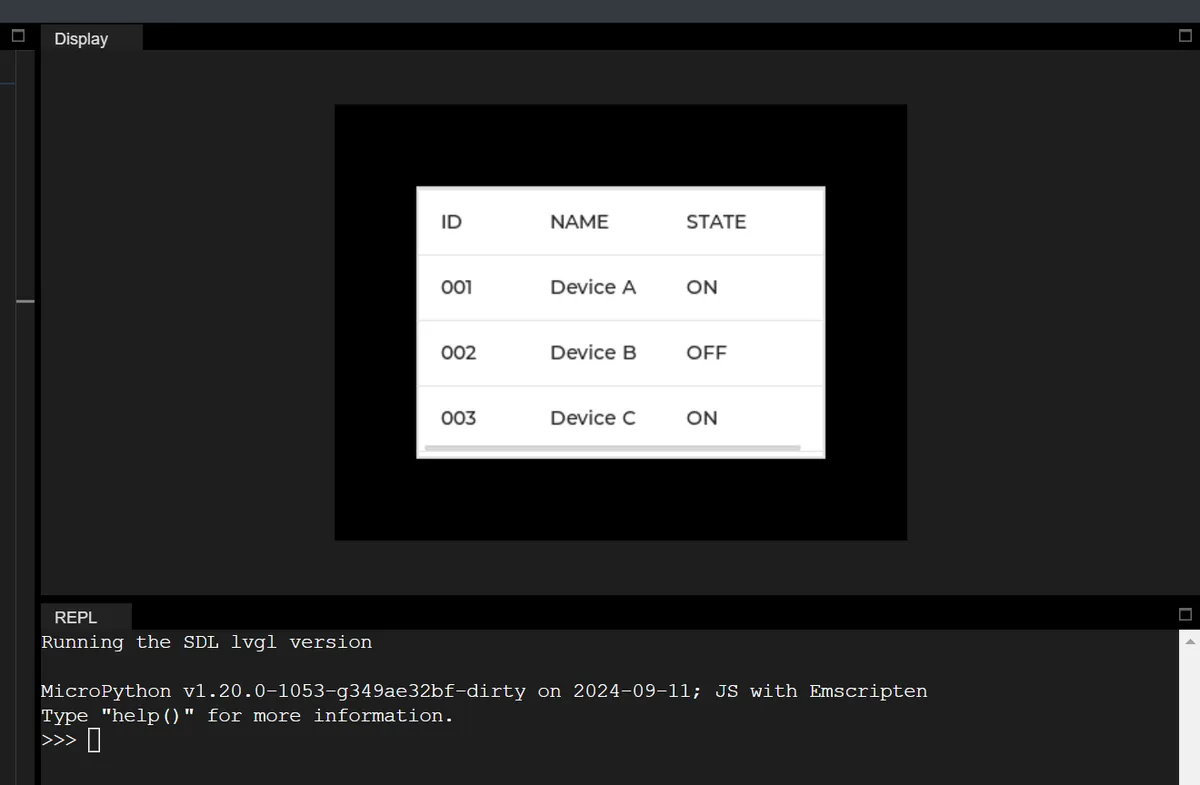
21.2 Get the total number of rows in a table and the width of a specified column
# get_row_count: query total number of table rows
current_row_count = table.get_row_count()
print(f"get_row_count() → Current total rows: {current_row_count}, return value type: {type(current_row_count).__name__}")

# get_column_width: query width of specified column
query_col_width = 1
current_col_width = table.get_column_width(query_col_width)
print(f"get_column_width({query_col_width}) → Width of column {query_col_width}: {current_col_width}, return value type: {type(current_col_width).__name__}")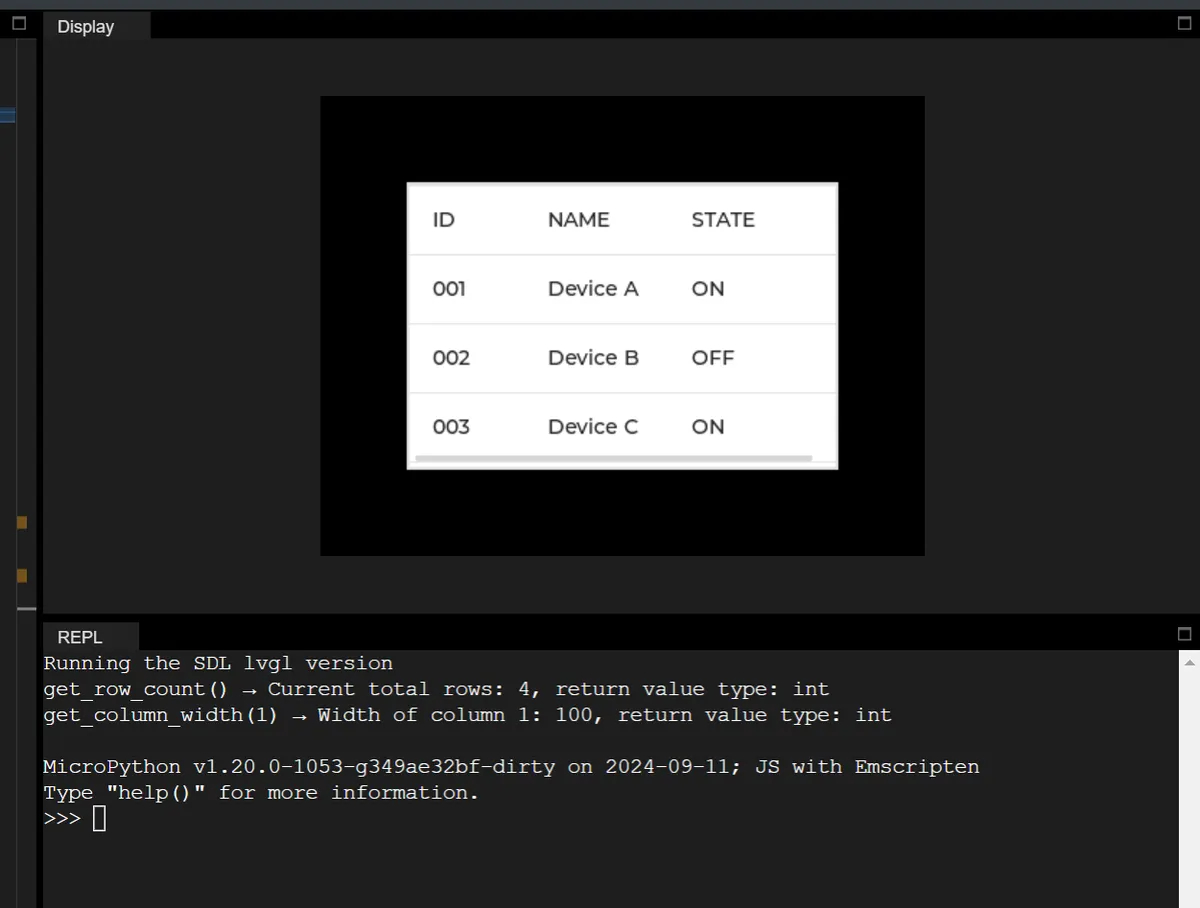
21.3 Adding Cell Control Properties
Cell control attributes (CELL_CTRL) are the display and behavior rules provided by LVGL for table cells, defined via enumeration values (such as text clipping, cell merging, custom markers, etc.), which are used to control the rendering logic and interaction behavior of cells.
In the following code, the following operations are performed:
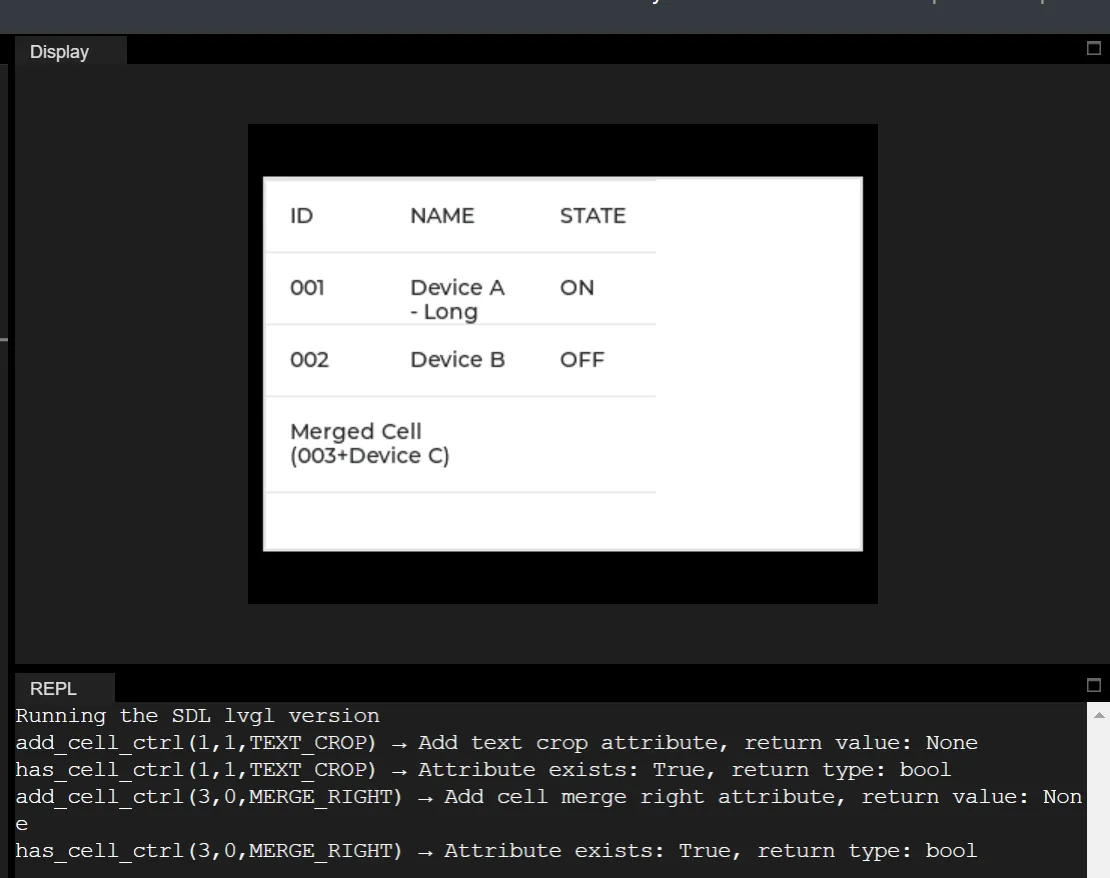
- Add the "text truncation" attribute to the extra-long text cell in row 1, column 1, so that the text exceeding the column width (100px) will be hidden to prevent the cell from being expanded due to text line wrapping;
- Add the "merge right" attribute to the cell at row 3, column 0 to merge it with the cell at row 3, column 1 on its right, so as to achieve the effect of spanning columns for display;
import display_driver
import lvgl as lv

# Initialize the LVGL environment
lv.init()
scr = lv.screen_active()
scr.set_style_bg_color(lv.color_hex(0x000000), 0)

# Create table instance and initialize basic configuration
table = lv.table(scr)
table.set_size(400, 250)  # Enlarge table size to make merge/crop effects easier to show
table.align(lv.ALIGN.CENTER, 0, 0)
table.set_row_count(4)
table.set_column_count(3)
table.set_column_width(0, 80)
table.set_column_width(1, 100)
table.set_column_width(2, 80)

# Purpose: disable vertical scrolling of the table and let height adapt automatically, avoiding an initial scrollbar
table.set_scroll_dir(lv.DIR.NONE)

# Fill test data (includes long text to demonstrate the TEXT_CROP effect)
table.set_cell_value(0, 0, "ID")
table.set_cell_value(0, 1, "NAME")
table.set_cell_value(0, 2, "STATE")
table.set_cell_value(1, 0, "001")
table.set_cell_value(1, 1, "Device A - Long Text For Crop Test")  # Very long text
table.set_cell_value(1, 2, "ON")
table.set_cell_value(2, 0, "002")
table.set_cell_value(2, 1, "Device B")
table.set_cell_value(2, 2, "OFF")

# Control attribute 1: TEXT_CROP - crop text when too long (the part beyond the column width is hidden)
# Purpose: prevent very long text from stretching the cell, showing only content within the column width
crop_row, crop_col = 1, 1
crop_ctrl = lv.table.CELL_CTRL.TEXT_CROP
# Add TEXT_CROP attribute
table.add_cell_ctrl(crop_row, crop_col, crop_ctrl)
print(f"add_cell_ctrl({crop_row},{crop_col},TEXT_CROP) → Add text crop attribute, return value: None")
# Check whether it was added successfully
is_has_crop = table.has_cell_ctrl(crop_row, crop_col, crop_ctrl)
print(f"has_cell_ctrl({crop_row},{crop_col},TEXT_CROP) → Attribute exists: {is_has_crop}, return type: {type(is_has_crop).__name__}")

# Control attribute 2: MERGE_RIGHT - merge cell to the right (the current cell merges with the column to its right)
# Purpose: merge adjacent cells to achieve a column-spanning display
merge_row, merge_col = 3, 0
merge_ctrl = lv.table.CELL_CTRL.MERGE_RIGHT
# First fill in the text of the merged cell
table.set_cell_value(merge_row, merge_col, "Merged Cell (003+Device C)")
# Add MERGE_RIGHT attribute (merge columns 0 and 1 of row 3)
table.add_cell_ctrl(merge_row, merge_col, merge_ctrl)
print(f"add_cell_ctrl({merge_row},{merge_col},MERGE_RIGHT) → Add cell merge right attribute, return value: None")
# Check whether it was added successfully
is_has_merge = table.has_cell_ctrl(merge_row, merge_col, merge_ctrl)
print(f"has_cell_ctrl({merge_row},{merge_col},MERGE_RIGHT) → Attribute exists: {is_has_merge}, return type: {type(is_has_merge).__name__}")

# Purpose: force LVGL to recalculate the table layout, avoiding an initial scrollbar/line-wrap anomalies
table.update_layout()

# Load screen (shows the effect of TEXT_CROP cropping long text and MERGE_RIGHT merging cells)
lv.screen_load(scr)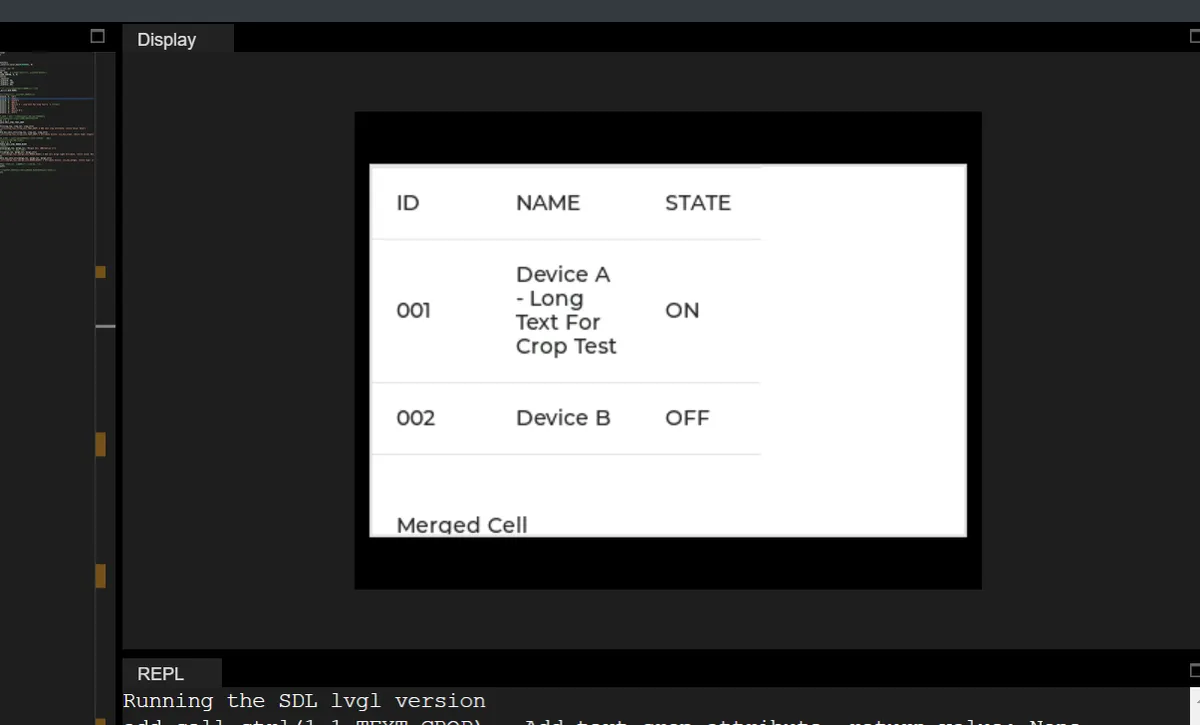
Version Record
Version Number | Modifier | Time | Content |
v1.0 | Li Zisheng | 2026/03/23 | Initialize the document. |