
Contents
| API name | Purpose | Input parameters | Return value |
|---|---|---|---|
| set_options | Set the roller options (separated by newline characters) and scroll mode (normal / infinite loop) | 1st parameter: str (roller options, separated by \n); 2nd parameter: int (scroll mode, lv.roller.MODE.NORMAL=0/INFINITE=1) | None |
| set_selected | Set the roller's selected item by index, and control whether animation is enabled | 1st parameter: int (selected item index, starting from 0); 2nd parameter: int (animation switch, lv.ANIM.OFF=0/ON=1) | None |
| set_visible_row_count | Set the number of visible rows of the roller to control the visual display | int (number of visible rows, 3-5 rows recommended) | None |
| get_selected | Get the index of the roller's currently selected item (core read method) | No parameters | int (index of the selected item) |
| get_selected_str | Write the text of the roller's currently selected item into the specified buffer | 1st parameter: str (buffer to receive the selected text); 2nd parameter: int (buffer size) | None |
| get_options | Get the string of all roller options (separated by \n) | No parameters | str (all options, separated by \n) |
| get_option_count | Get the total number of roller options | No parameters | int (total number of options) |
| bind_value | Bind an observer for value changes (advanced feature, beginners can ignore) | NoneType (actually subject_t type, just pass None when testing) | None |
set_selected (sel_opt: int, anim: int) the second parameter of anim (animation switch) controls whether the scroll wheel performs the "smooth scroll to target item" animation when the selected item is set via code. The core difference lies between "instant switch" and "smooth scroll switch":
| Parameter value | Actual Meaning | Visual Effect Example |
|---|---|---|
| lv.ANIM.OFF | Animation off (value 0) | The selected item jumps instantly to the target index (e.g., from index 0 straight to index 5, with no transition); switching is extremely fast |
| lv.ANIM.ON | Animation on (value 1) | The selected item scrolls smoothly from its current position to the target index (e.g., from 0 to 5, with the intermediate options visibly passing by one after another); the transition is more user-friendly |
The core differences between the two scrolling modes of the Roller control are shown in the following table:
| Comparison | Normal mode (MODE.NORMAL) | Infinite loop mode (MODE.INFINITE) |
|---|---|---|
| Constant value (SDL environment) | lv.roller.MODE.NORMAL = 0 | lv.roller.MODE.INFINITE = 1 |
| Core Behavior | The roller has clear "first/last boundaries"; once it reaches a boundary, it cannot scroll further in that direction | The roller has no boundaries; scrolling past the last item wraps back to the first item, and scrolling past the first item wraps back to the last item |
| Scroll Boundary Example | After the weekday roller reaches Sunday (index 6), scrolling down has no effect; after it reaches Monday (index 0), scrolling up has no effect | After the month roller reaches December (index 11), scrolling down jumps to January (index 0); after reaching January, scrolling up jumps to December |
| Visual Experience | Gives clear "reached the bottom/top" feedback, so the user knows the boundary has been reached | No sense of a boundary; scrolling loops smoothly, suitable for options with no clear first/last (such as months, numbers, years) |
| Applicable scenarios | Options with a fixed first and last (weekdays, day of the week, days of the week) | Options with no fixed first/last, or that need cyclic selection (months, years, hours, minutes) |
17.1 Examples of Week Selection (Normal Mode) and Month Selection (Infinite Loop Mode)
In the following code, two side-by-side scroll wheels will be displayed on the screen: the left one is a "weekday scroll wheel" that can only scroll to the start and end, while the right one is a "month scroll wheel" that supports infinite looping scrolling:
import display_driver
import lvgl as lv

# Initialize the LVGL environment
lv.init()
scr = lv.screen_active()
scr.set_style_bg_color(lv.color_hex(0x000000), 0)

#Create a normal-mode roller widget (weekday selection)
roller_normal = lv.roller(scr)
roller_normal.set_pos(20, 20)
roller_normal.set_size(200, 150)
#Set the options and normal mode
# Define a string containing Monday to Sunday (options separated by newline \n)
# Set it as the roller options, and set the roller to normal mode (MODE.NORMAL)
days = "Monday\nTuesday\nWednesday\nThursday\nFriday\nSaturday\nSunday"
roller_normal.set_options(days, roller_normal.MODE.NORMAL)
#Set the number of visible rows: the roller area shows at most 5 options at the same time
roller_normal.set_visible_row_count(5)

#Create an infinite-mode roller (month selection)
roller_infinite = lv.roller(scr)
roller_infinite.set_pos(240, 20)
roller_infinite.set_size(200, 150)
#Set the options and infinite mode
months = "January\nFebruary\nMarch\nApril\nMay\nJune\nJuly\nAugust\nSeptember\nOctober\nNovember\nDecember"
# Set the roller to infinite loop mode (MODE.INFINITE)
# In this mode the roller has no first/last limit; after scrolling to the last option (December), scrolling further jumps back to the first option (January)
roller_infinite.set_options(months, roller_normal.MODE.INFINITE)
#Set the number of visible rows
roller_infinite.set_visible_row_count(5)

# Load the screen
lv.screen_load(scr)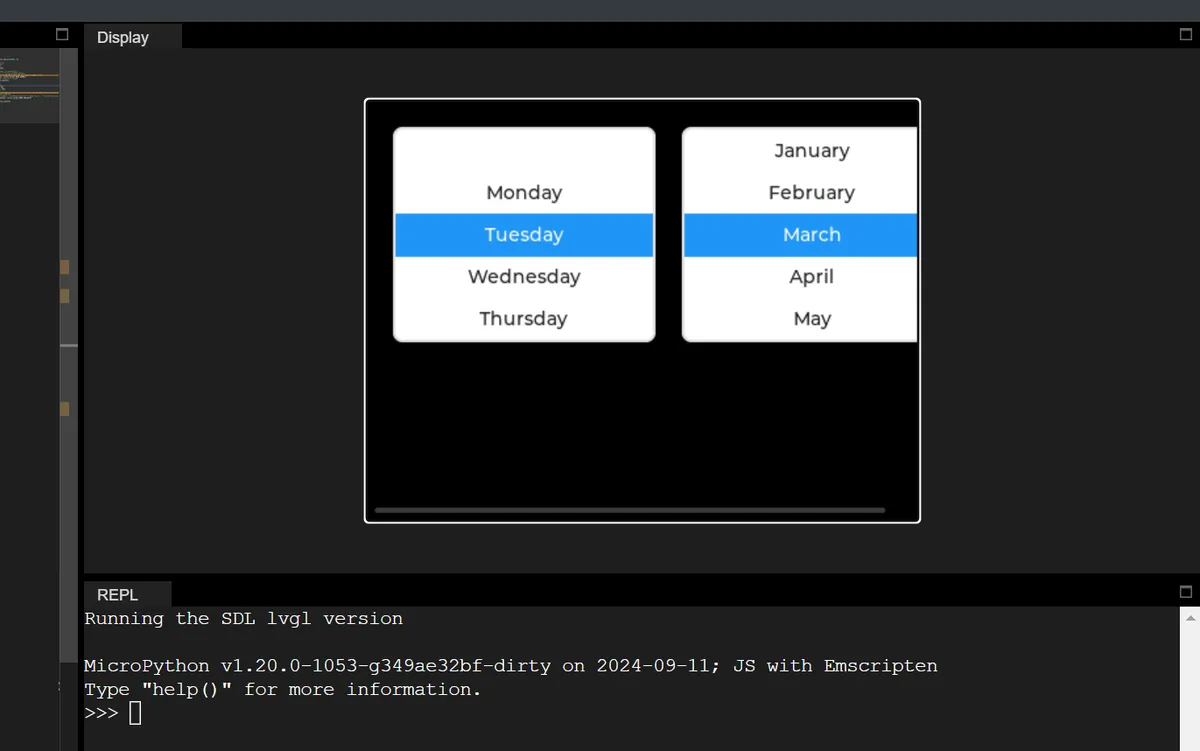
17.2 Change the Number of Visible Rows
#Set the number of visible rows: the roller area shows at most 6 options at the same time
roller_normal.set_visible_row_count(6)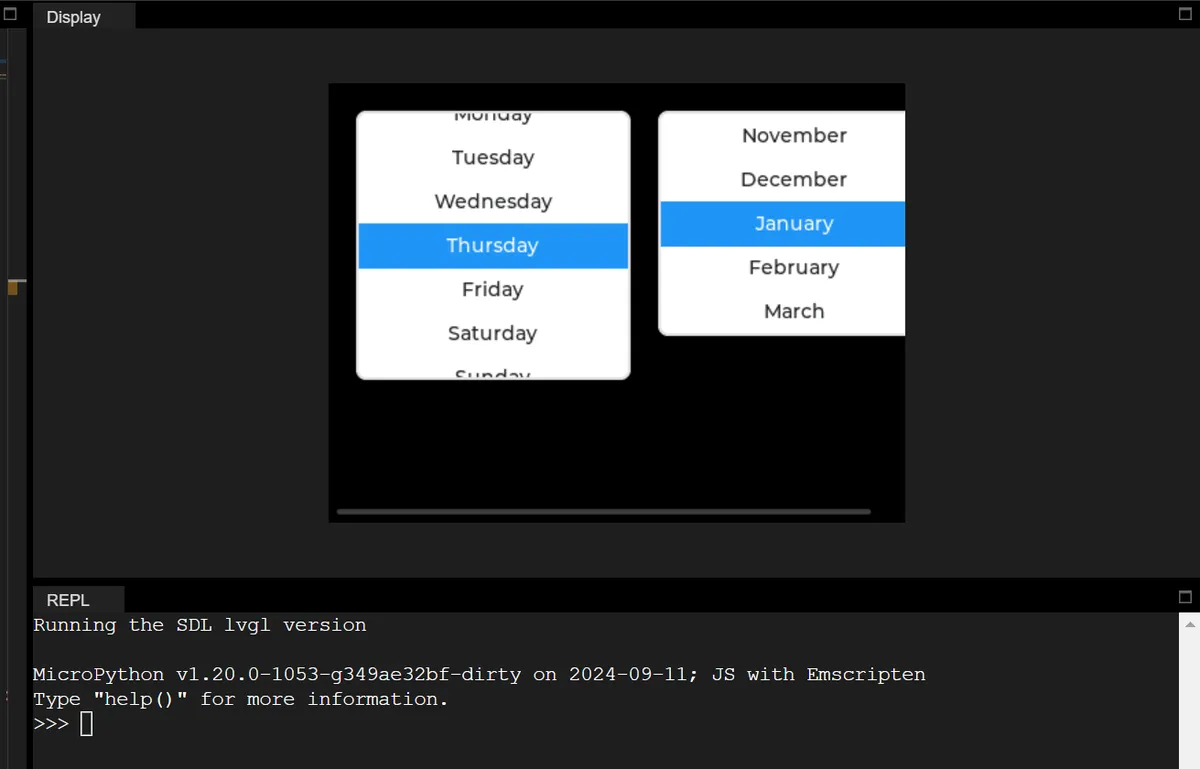
17.3 Read All Selections and Current Selection
import display_driver
import lvgl as lv

# Initialize the LVGL environment
lv.init()
scr = lv.screen_active()
scr.set_style_bg_color(lv.color_hex(0x000000), 0)

# ===================== 1. Normal-mode roller (weekday selection) =====================
roller_normal = lv.roller(scr)
roller_normal.set_pos(20, 20)
roller_normal.set_size(200, 150)
# Configure the weekday options + normal mode
days = "Monday\nTuesday\nWednesday\nThursday\nFriday\nSaturday\nSunday"
roller_normal.set_options(days, lv.roller.MODE.NORMAL)
roller_normal.set_visible_row_count(5)
# Demonstrate set_selected: initially select index 2 (Wednesday) by default, with animation off
roller_normal.set_selected(2, lv.ANIM.OFF)
print(f"[Week Roller] Default selected index: {roller_normal.get_selected()}")

# ===================== 2. Infinite-loop-mode roller (month selection) =====================
roller_infinite = lv.roller(scr)
roller_infinite.set_pos(240, 20)
roller_infinite.set_size(200, 150)
# Configure the month options + infinite loop mode
months = "January\nFebruary\nMarch\nApril\nMay\nJune\nJuly\nAugust\nSeptember\nOctober\nNovember\nDecember"
roller_infinite.set_options(months, lv.roller.MODE.INFINITE)
roller_infinite.set_visible_row_count(5)

# ===================== 3. Dedicated callback functions (separated, core approach) =====================
# ---------- Callback 1: dedicated to the weekday roller (demonstrates get_options / get_selected_str) ----------
def roller_week_cb(e):
    # Operate directly on the global roller_normal, no need to get the target object
    print("\n=== [Week Roller] Value Changed ===")

    # 🔍 Demonstrate get_options: get all options (a newline-separated string)
    all_options = roller_normal.get_options()
    option_count = roller_normal.get_option_count()
    print(f"Total options: {option_count}")
    print(f"All options string: {all_options}")

    # 🔍 Demonstrate get_selected_str: get the selected text through a buffer (core API)
    buf = ""  # Define an empty buffer to receive the selected text
    buf_size = 30  # Buffer size (must be larger than the longest selected text)
    roller_normal.get_selected_str(buf, buf_size)  # Core call: write into the buffer
    print(f"Selected text (by get_selected_str): {buf}")

    # 🔍 Auxiliary verification: get the text through get_selected + splitting get_options
    selected_idx = roller_normal.get_selected()
    selected_text_split = all_options.split("\n")[selected_idx]
    print(f"Selected index: {selected_idx} | Text (split): {selected_text_split}")

# ---------- Callback 2: dedicated to the month roller (demonstrates infinite mode + the same API) ----------
def roller_month_cb(e):
    # Operate directly on the global roller_infinite
    print("\n=== [Month Roller] Value Changed ===")

    # 🔍 Demonstrate get_options: get all options (also works in infinite mode)
    all_options = roller_infinite.get_options()
    option_count = roller_infinite.get_option_count()
    print(f"Total options: {option_count}")

    # 🔍 Demonstrate get_selected_str: read the selected text in infinite mode
    buf = ""
    buf_size = 30
    roller_infinite.get_selected_str(buf, buf_size)
    print(f"Selected text: {buf}")

    # 🔍 Auxiliary verification: index splitting method
    selected_idx = roller_infinite.get_selected()
    selected_text_split = all_options.split("\n")[selected_idx]
    print(f"Selected index: {selected_idx} | Text: {selected_text_split}")

# ===================== 4. Bind the dedicated callbacks (no user_data, no errors) =====================
roller_normal.add_event_cb(roller_week_cb, lv.EVENT.VALUE_CHANGED, None)
roller_infinite.add_event_cb(roller_month_cb, lv.EVENT.VALUE_CHANGED, None)

# Load the screen
lv.screen_load(scr)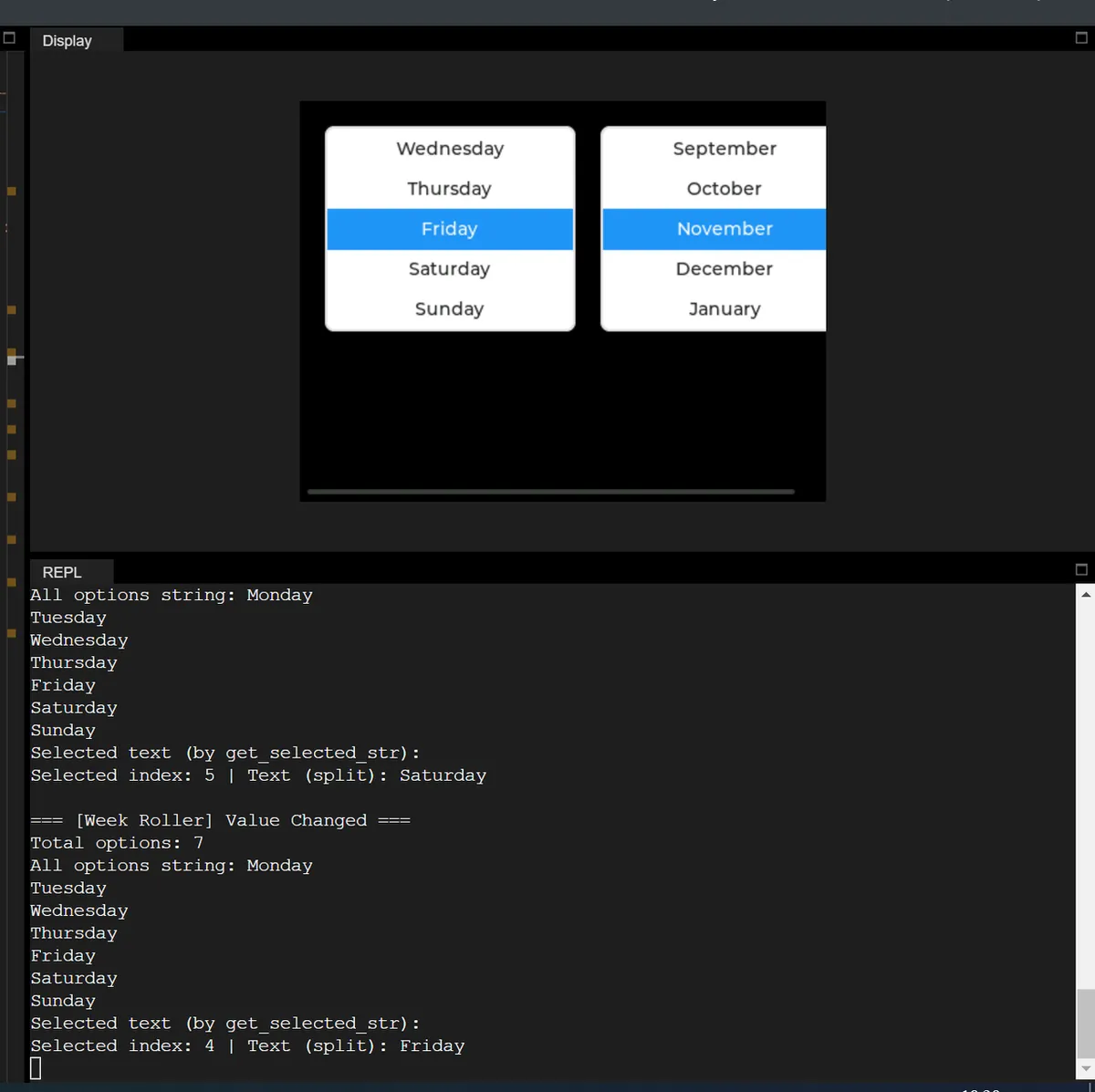
Version Record
Version Number | Modifier | Time | Content |
v1.0 | Li Zisheng | 2026/03/23 | Initialize the document. |