
Contents
- I. What is MicroPython?
- II. Core Highlights of MicroPython
- III. Why Choose "MicroPython + LVGL"?
- IV. Advantages of Using "LVGL in MicroPython"
- 5. Application Scenarios of "MicroPython + LVGL"
- 6. Code Example: Hello World
- VII. How to use "MicroPython + LVGL"?
- 7.1 Online Simulator
- 7.2 PC Simulator
- 7.3 Embedded Platform
- VIII. Advanced Features: Auto-Generated Bindings
- IX. Memory Management (Key Notes)
- 9.1 Problem Scenario
- 9.2 Solutions
- X. Callback Mechanism (Core of Interaction)
- 10.1 Core Principles
- 10.2 Three Callback Definition Methods
- XI. lvgl-micropython Project Introduction
- 11.1 Core Concepts and Positioning
- 11.2 Key Architectures and Features
- 11.3 Support and Features
- 11.4 Precautions for Use
- Additional Notes: Parent-Child Object Model in Embedded GUI Design
- Q&A: Why Not Use Attribute Assignment Binding?
- References
- Version Record
I. What is MicroPython?
MicroPython is a Python language designed for microcontrollers. With MicroPython, you can write Python3 code and even run it on resource-constrained bare-metal architectures.
💡 Basic Knowledge Supplement:
- Bare-metal architecture: refers to an environment without an operating system (OS) where programs run directly on hardware, with extremely limited resources (RAM, Flash storage), such as microcontrollers like ESP32 and STM32.
- Python 3 Compatibility: MicroPython is highly compatible with Python 3 in terms of syntax, which significantly lowers the learning threshold for embedded development and enables developers familiar with Python to get started with hardware development quickly.
II. Core Highlights of MicroPython
- Compact and efficient: It only requires 256k code space and 16k RAM to run, and does not depend on an operating system (it can also be used with an OS).
- High Compatibility: Strive to be as compatible as possible with the syntax and libraries of standard Python (i. e., CPython).
- Cross-architecture support: Supports mainstream embedded CPU architectures such as x86, x86-64, ARM, ARM Thumb, and Xtensa (adopted by ESP32).
- Interactive development: without the tedious process of "compile - flash - restart", via REPL (Read-Eval-Print Loop), you can directly enter commands and execute them immediately to debug code in real time.
- Ecosystem Popularity: It supports numerous hardware platforms, with a continuously expanding user base, and its well-known branches include CircuitPython (for education) and MicroPython_ESP32_psRAM_LoBo (ESP32 optimized version).
- Embedded-oriented: Built-in modules specifically for hardware, such as the
machinemodule, which can directly operate low-level hardware such as I/O pins, ADC, UART, SPI, I2C, RTC, timers, etc.
💡 Basic Knowledge Supplement:
- REPL : Read-Eval-Print Loop, which is similar to the interactive terminal of Python, can verify code in real time and serves as a core tool for rapid embedded debugging.
- machine module: The core hardware operation module of MicroPython, which encapsulates the operation interfaces of all low-level hardware peripherals and serves as the fundamental entry point for embedded development.
III. Why Choose "MicroPython + LVGL"?
MicroPython itself does not have a mature native high-level GUI library, whereas LVGL (Light and Versatile Graphics Library) is a component-based, Object Oriented high-level GUI library that is extremely well-suited for being mapped to high-level languages such as Python. LVGL is implemented in C, and its API also follows C language conventions.
💡 Basic Knowledge Supplement:
- LVGL: One of the most popular open-source GUI libraries in the embedded field, designed specifically for resource-constrained microcontrollers, it provides rich UI components such as buttons, labels, lists and charts, and supports modern GUI features including animations and touch interaction.
- Object Oriented + Component-based: LVGL allows users to create complex interfaces by combining basic components (such as buttons and labels), featuring high code reusability and easier maintenance.
IV. Advantages of Using "LVGL in MicroPython"
- GUI development with Python language: By leveraging features of Python such as Object Oriented and concise syntax, it reduces the complexity of GUI development.
- Extremely short iteration cycle:
- Developing GUIs with the C language: every modification requires going through the process of "modifying code → compile → flashing → running", which is a cumbersome and time-consuming workflow.
- MicroPython GUI development: Simply follow the "modify code → run" workflow, and you can also perform interactive debugging via REPL, which significantly boosts iteration efficiency.
- Abstract GUI Modeling: You can leverage Python's language features such as inheritance, closure, and list comprehensions to build more flexible and reusable interface logic.
- Lowering the barrier to entry: It enables developers to build embedded GUIs without mastering the C language, which aligns perfectly with CircuitPython's "education-first" vision and makes it easier for beginners to get started with embedded development.
- Tool ecosystem expansion: Higher-level tools can be developed based on this, such as a drag-and-drop GUI designer.
5. Application Scenarios of "MicroPython + LVGL"
- Rapid GUI Prototyping Development: Quickly build interface prototypes to verify interaction logic.
- Interface fine-tuning iteration: Adjust interface styles and interaction logic in real time without compile and flashing.
- Modularization interface design: Build complex GUIs by defining reusable composite objects.
- Education and Popularization of Science: Enables zero-base developers to quickly get hands-on with embedded GUI development.
- Tool Development: Develop visual design tools, debugging tools, etc. for LVGL.
6. Code Example: Hello World
import lvgl as lv
lv.init()
scr = lv.obj()
btn = lv.btn(scr)
btn.align(lv.ALIGN.CENTER, 0, 0)
label = lv.label(btn)
label.set_text("Hello World!")
lv.screen_load(scr)
import lvgl as lv: Import the LVGL library with the alias lv (to simplify subsequent calls).
lv.init (): Initializes the LVGL graphics library (must be executed as the first step).
scr = lv.obj (): creates the screen root object (the parent container for all UI components).
btn = lv.btn (scr): Creates a button component on the screen.
btn.align (lv.ALIGN.CENTER, 0,0): Aligns the button to the center, and the last two parameters represent the offsets in the X and Y directions (here set to 0, meaning fully centered).
label = lv.label (btn): Creates a label component on the button (as a child element of the button).
label.set_text ("Hello World!"): Set the display text of the label.
lv.screen_load (scr): Load and display the specified screen.
💡 Basic Knowledge Supplement:
- LVGL adopts a parent-child object model: all UI elements are subclasses of
lv.obj, and the interface hierarchy (screen → button → label) is constructed through parent-child relationships.align ()Method: Used to precisely control the position of a component.lv.ALIGN.CENTERis the most commonly used center alignment mode.
VII. How to use "MicroPython + LVGL"?
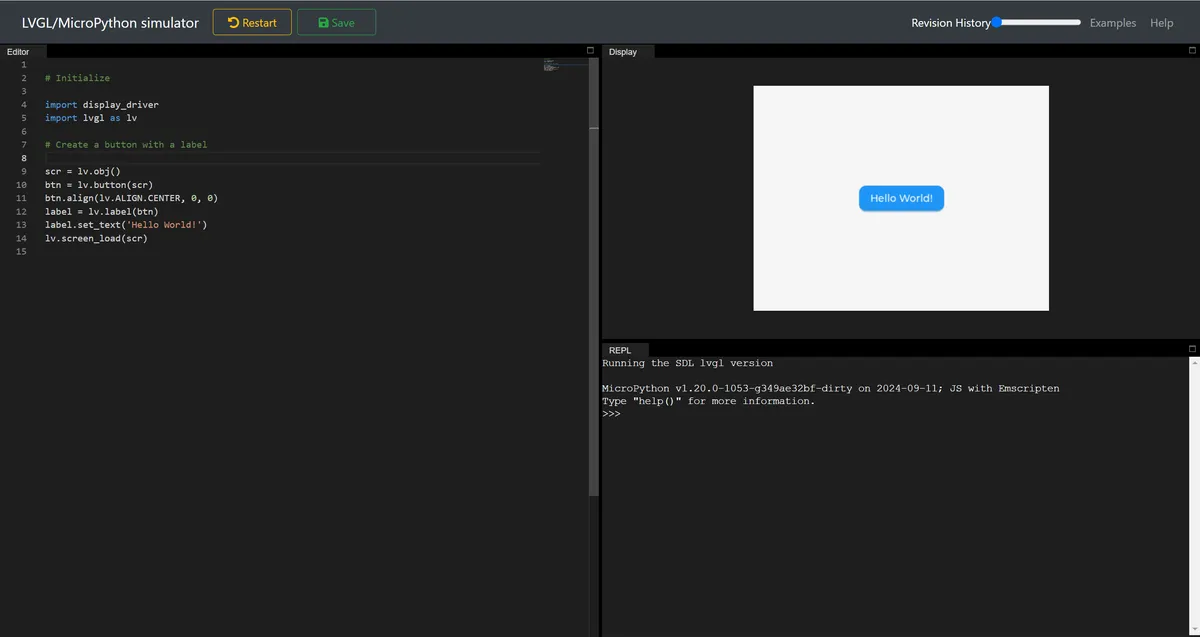
7.1 Online Simulator
Link Address: https://sim.lvgl.io/v9.0/micropython/ports/webassembly/index.html
7.2 PC Simulator
The "unix" port of MicroPython enables building and running LVGL + MicroPython on Linux machines; Windows users can simulate a Linux environment via tools such as WSL or VirtualBox.
7.3 Embedded Platform
The ultimate goal is to run on real hardware, lv_micropython (a fork of MicroPython + LVGL) already supports:
- Platforms: Linux, ESP32, STM32, RP2 (Raspberry Pi Pico)
- Display Drivers: SDL (Linux), X11 (Linux), ILI9341/ILI9488/GC9A01/ST7789/ST7735 (ESP32 / Generic)
- Input Drivers: SDL (Linux), X11 (Linux), XPT2046/FT6X36 (Touch), ESP32 ADC (Resistive Touch)
💡 Basic Knowledge Supplement:
- Drivers: Embedded GUI requires a "display driver"(to control screen display) and an "input driver"(to handle touch/button inputs),
lv_micropythonhas packaged mainstream hardware drivers to reduce the difficulty of porting.- RP2: The RP2040 chip for the Raspberry Pi Pico series is a low-cost, high-performance entry-level microcontroller.
VIII. Advanced Features: Auto-Generated Bindings
- LVGL is
lv_micropython's git submodule (which facilitates separate maintenance of the core library and binding code). - When building
lv_micropython, the tool will automatically scan the LVGL C API and generate the corresponding Python API. - Advantages: No need to manually write binding code, ensures that the API is updated synchronously with the LVGL core library, and supports any LVGL version.
IX. Memory Management (Key Notes)
When LVGL runs in MicroPython, all dynamic memory allocation (lv_malloc ()) is handled by MicroPython's garbage collection (GC) manager.
9.1 Problem Scenario
GC cannot perceive the pointers in the Data Segment:
- Global variable pointer
- static global variable pointer
- Static local variable pointer
If such pointers only store the address returned by lv_malloc (), they will be mistakenly recognized as "having no references" by the GC and reclaimed prematurely, resulting in a memory crash.
9.2 Solutions
- Replace global / static local variables with
(LV_GLOBAL_DEFAULT ()->_var) - Include
lv_global.h in the file where this variable is used. - In
lv_global.h, add thelv_global_tstruct member_var.
💡 Basic Knowledge Supplement:
- Garbage Collection (GC): Automatically reclaims memory that is no longer referenced to avoid memory leaks, but static/global pointers are not within the scope of GC tracking.
- Data Segment: A memory area that stores global variables and Static Variables, with a lifecycle consistent with that of the program.
X. Callback Mechanism (Core of Interaction)
In C, a callback is a function pointer; but in MicroPython, it is necessary to register both a function pointer and a Python callable for each callback simultaneously, so a set of callback specifications has been defined:
10.1 Core Principles
Using the void * user_data field, the MicroPython "glue code" automatically saves the Python object corresponding to the callback:
- When registering a callback, the glue code stores the Python object in
user_data - When the callback is triggered, the glue code retrieves the Python object from
user_dataand executes it.
10.2 Three Callback Definition Methods
user_datais placed in a struct: the struct containsuser_dataas the first parameter of the registration function and the callback function.user_dataas a function parameter:user_dataserves as the last parameter for both registration functions and callback functions.- Callback and
user_dataare both struct members: the struct contains both a function pointer anduser_data, and the function pointer receives the struct itself as a parameter.
💡 Basic Knowledge Supplement:
- Callback function: The core of GUI interaction, which refers to the logic triggered when events such as "button click" or "animation completion" occur.
- Glue code: Intermediate code that connects C and Python, responsible for data type conversion and function call mapping, enabling Python to call the C-implemented LVGL API.
XI. lvgl-micropython Project Introduction
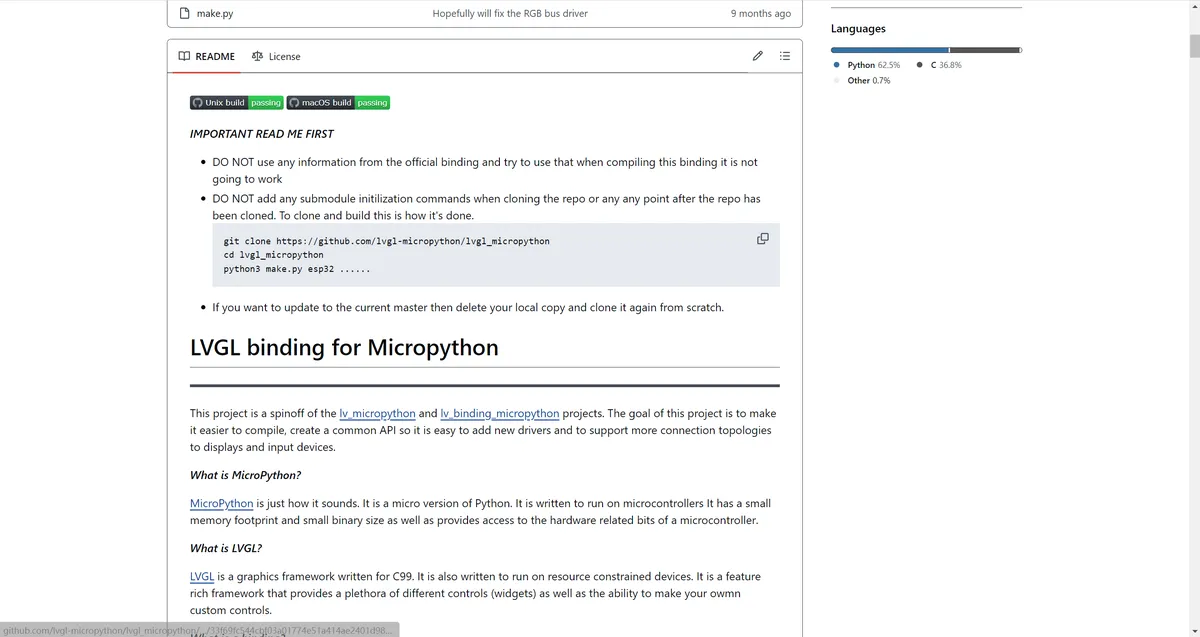
This is an open-source project that binds the LVGL embedded GUI library to MicroPython, and it is a derivative of lv_micropython and lv_binding_micropython. Its core goal is to enable developers to develop graphical interfaces on microcontrollers using Python, while simplifying the compile process, unifying APIs, and expanding hardware support.
11.1 Core Concepts and Positioning
- Binding can be analogized to a "language translator": LVGL is an embedded GUI framework written in C, and this project encapsulates the C-language LVGL API into Python-callable interfaces via "glue code", enabling MicroPython developers to directly operate all features of LVGL with Python without writing low-level C code.
- MicroPython: A streamlined version of the Python language, designed specifically for resource-constrained Microcontroller Units (MCUs) with extremely low memory footprint, while retaining Python's concise and user-friendly syntax as well as hardware access capabilities.
- LVGL: It is one of the most popular open-source GUI frameworks in the embedded field. Implemented in C99 and optimized specifically for low-resource devices, it provides a rich set of UI components such as buttons, labels, lists and animations, and supports touch interaction as well as complex interface layouts.
The objective of its project is as follows:
- Simplify the compile process of LVGL + MicroPython to lower the barrier to entry.
- Unified API specifications to facilitate developers in adding new display/input device drivers.
- Supports more hardware connection topologies to adapt to different embedded Product Form.
- Performance optimization: Underlying optimizations have been implemented for scenarios such as the RGB bus to increase the GUI rendering frame rate while reducing memory usage.
11.2 Key Architectures and Features
The project has refactored its dependency logic: it is no longer an auxiliary component of MicroPython, but instead makes MicroPython a dependency of this project. This change greatly simplifies the adaptation work for MicroPython version upgrades — only a small number of modifications are required to support new versions of MicroPython, eliminating the previous hassle of frequently refactoring binding code.
The project provides make.py Python scripts to uniformly handle compile, supporting mainstream embedded platforms:
- Target platforms: ESP32, STM32, RP2 (Raspberry Pi Pico), Renesas RA, nRF, i.MX RT, SAMD, etc. , with simultaneous support for Unix/macOS desktop-side emulation (for convenient debugging).
- Build dependencies: Python ≥ 3.10 and a C compiler (gcc/clang/msvc) are required, and the corresponding toolchain needs to be installed for different platforms (e. g., for ESP32,
build-essential,cmakeand other tools are required). - Note: Not supported on Windows for the time being; the macOS/Unix version needs to be run directly after being compiled locally.
11.3 Support and Features
Supports the vast majority of mainstream LCD driver chips, including:
- Common models: GC9A01, ILI9341, ILI9488, ST7789, ST7796, etc.
- Compatibility Solution: Unlisted ICs can be adapted via the generic
rgb_displaydriver.
Covers mainstream capacitive/resistive touch chips:
- Capacitive touch: CST816S, FT6x36, GT911, etc.
- Resistive touch: XPT2046, STMPE610, etc.
Special Driver:
- SDL2: Only for Unix/macOS desktops, it can simulate LCD display and input on a computer, allowing you to debug GUI code without flashing it to hardware.
Critical optimizations have been made for RGB bus display scenarios:
- Move the full-frame buffer to Layer C, so users only need to allocate a partial buffer, which reduces memory usage.
- By leveraging the second core of the ESP32 to asynchronously handle buffer copying and screen rotation, it prevents blocking the user's Python code and improves the rendering frame rate.
- The tradeoff is that it additionally occupies several hundred KB of memory, which is suitable for ESP32 models with PSRAM.
The core value lies in:
- Lowering the threshold for embedded GUI development: Python developers can rapidly develop embedded interfaces without learning C language, and improve efficiency by leveraging Python's syntax advantages (Object Oriented, iterative debugging).
- Maintain embedded performance: The underlying layer still relies on the C language implementation of LVGL, which ensures the operating efficiency on resource-constrained devices, while the thin wrapper of the Python layer adds almost no additional overhead.
- Ecosystem Expansion: Supports massive hardware platforms and drivers, and adapts to multiple embedded Product Forms ranging from consumer electronics to industrial control.
11.4 Precautions for Use
- When cloning the repository, do not initialize submodules manually; clone it following the commands specified by the project.
- When updating the code, you need to delete the local copy and re-clone it to avoid submodule conflicts.
- Do not use the compile information of the official LVGL-MicroPython bindings, otherwise the compilation will fail.
- Hardware variants (Variant) can only be configured after a specific development board (Board) is designated; otherwise, an error will be reported.
Additional Notes: Parent-Child Object Model in Embedded GUI Design
As we mentioned above, LVGL adopts a parent-child object model: all UI elements are subclasses of lv.obj, and the interface hierarchy (screen → button → label) is constructed through parent-child relationships, which are the two concepts of "parent-child / subclass" that are most confusing for beginners.
First, it should be clarified that the "parent-child object model" in LVGL and the "inheritance (subclass)" of Python classes are designs at completely different dimensions, which correspond to the two core relationships of OOP (Object Oriented Programming):
| Concept | Essential Relationship | Purpose | Example |
|---|---|---|---|
| Python Class Inheritance (Subclass) | is-a | Functionality reuse / extension at the type level | Dog inherits Animal (a dog is an animal); lv.Button inherits lv.obj (a button is a basic object) |
| LVGL Parent-Child Objects | has-a | Hierarchy / container management at the instance level | A screen contains a button, and a button contains a label (the button has a label inside) |
The so-called "generating instances of different controls" precisely embodies the has-a composition logic of LVGL; whereas Python class inheritance follows the is-a type extension logic — LVGL does not abandon inheritance (control types themselves inherit from lv.obj), yet the core of interface organization lies in "composition (parent-child instances)" rather than "inheritance (subclasses)".
For embedded GUI, the core requirement lies in spatial hierarchy management: since the LCD screen is a two-dimensional plane, controls need to have clear spatial affiliation and overlapping relationships.
- The tag must be "attached" to the button, and the button must be "placed" on the screen;
- During rendering, drawing must follow the "parent-to-child" order (draw the screen first, then the button, and finally the label, so that the label will overlay the button);
- When hiding or moving a parent control, its child controls must be hidden or moved along with it (for example, if you move a button to the right side of the screen, the label on the button should also move accordingly).
Furthermore, there is a constraint relationship between the lifecycles of controls: when a parent control is destroyed, all its child controls will be automatically destroyed (for example, when a window is closed, the buttons and labels inside the window are released together), which helps avoid memory leaks.
Meanwhile, GUI interactions (click, swipe, long press) require "event bubbling":
- For example, when you tap the label on a button, the event is first dispatched to the label, then to the button, and finally to the screen;
- Event passing between such instances can only be implemented through the parent-child hierarchy — inheritance is a type relationship, and there are no associations between two
LabeledButtoninstances, making event passing impossible.
Q&A: Why Not Use Attribute Assignment Binding?
When you see the code below, it will feel completely different from the commonly used ones:
import lvgl as lv
lv.init()
scr = lv.obj()
btn = lv.btn(scr)
btn.align(lv.ALIGN.CENTER, 0, 0)
label = lv.label(btn)
label.set_text("Hello World!")
lv.screen_load(scr)
Shouldn't it be:
import lvgl as lv

# 1. Initialize LVGL (this step is correct)
lv.init()

# 2. Create the screen instance (parent widget)
scr = lv.obj()

# [Core error]: trying to bind child widgets via Python attribute assignment
# Only adds a btn attribute to scr at the Python level; there is no parent-child association at the C level
scr.btn = lv.btn()
# Even if alignment is set, it has no effect because there is no parent widget as a reference frame
scr.btn.align(lv.ALIGN.CENTER, 0, 0)

# Add a label to the button (same incorrect approach)
scr.btn.label = lv.label()
scr.btn.label.set_text("Hello World!")

# Load the screen
lv.screen_load(scr)
lv.btn (scr) This syntax is different from regular Python code, and the core reason is that LVGL is an embedded GUI library implemented in C, and its Python bindings prioritize adapting to the underlying hardware logic rather than simply pursuing the "elegance" of Python syntax.
The core logic of LVGL is written in C language, and all widgets correspond to the lv_obj_t struct in the C layer; the hierarchical relationship of widgets essentially means that "child structs are mounted via the child node linked list of the parent struct".When you write btn = lv.btn (scr), it is not a simple Python code call, but passes the scr — the C-layer lv_obj_t address corresponding to this Python instance — to the lv_btn_create () function of LVGL, so that the underlying engine mounts it to the child node linked list of the screen the moment the button is created.
Conversely, if you use attribute assignment like scr.btn = lv.btn (), you are only adding a new attribute to the scr instance at the Python level, while the parent control linked list at the C layer remains completely unchanged. This button will become a "detached instance": it will not be traversed and drawn by the LVGL rendering engine (the engine only processes controls with parent nodes), cannot inherit the screen's coordinate and style rules, and furthermore cannot implement the core logic of "moving the screen to drive the button" or "destroying the screen to release the button".
Furthermore, since MicroPython runs on microcontrollers such as the ESP32 and STM32, which often only have tens of kilobytes of RAM, the Python bindings for LVGL adopt a "thin wrapper" design — minimizing the additional overhead at the Python layer as much as possible.If encapsulated as scr.btn = lv.xxx, a mapping table of "attribute name ↔ C-layer control address" needs to be maintained at the Python layer, and each assignment will trigger an additional function, which will increase memory usage and runtime overhead. For resource-constrained embedded devices, this kind of overhead is unacceptable. In contrast, the syntax of lv.btn (scr) directly interfaces with the C-layer API without any additional encapsulation overhead, making it the inevitable "performance-first" choice for embedded scenarios.
Furthermore, in embedded GUIs, a parent control usually has multiple child controls of the same type (e. g., 3 buttons on the screen). If you use property assignments like scr.btn1 = lv.btn (), scr.btn2 = lv.btn (), this not only leads to redundant code but also makes dynamic management of child controls impossible. In contrast, lv.btn (scr) can be used flexibly in conjunction with Python lists to handle this scenario:
# Dynamically create 3 buttons and attach them to the screen; the underlying C-level linked list is updated in sync
scr = lv.obj()
buttons = [lv.btn(scr) for _ in range(3)]
# Adjust button positions in batch
for i, btn in enumerate(buttons):
    btn.align(lv.ALIGN.CENTER, 0, i*50)  # Arrange the 3 buttons vertically
This coding style not only conforms to Python's container management logic, but also enables the underlying layer of LVGL to correctly record the hierarchical relationship of all child controls, balancing flexibility and underlying controllability.
For example, the Python GUI libraries we are familiar with (such as tkinter) essentially follow a similar logic:
import tkinter as tk
root = tk.Tk()  # Screen instance
btn = tk.Button(root)  # Button is attached to the screen, exactly the same as lv.btn(scr)
However, tkinter is implemented purely in Python, and it automatically handles parent widget associations at the underlying layer, making you barely notice the existence of "explicit parameter passing"; whereas LVGL, constrained by its C-layer underlying architecture, directly exposes such "association" in the form of parameter-passing syntax, yet their essential logic is completely identical.
References
- Official Documentation: https://docs.lvgl.io/9.0/integration/bindings/micropython.html
- lvgl_micropython source code: https://github.com/lvgl-micropython/lvgl_micropython
Version Record
Version Number | Modifier | Time | Content |
v1.0 | Li Zisheng | 2026/03/13 | Initialize the document. |
v1.1 | Li Zisheng | 2026/03/18 | Modify the title and some of the content. |