
Contents
Young makers, now let's unlock the super fun "path-tracking magic tool" – the single-line tracking module ✨! It acts as the "eyes" of your car, capable of accurately distinguishing between black and white lines, so your smart car can follow the black line obediently without manual control. Isn't that totally cool?
1. Module Introduction
When playing with a smart car, have you ever wanted it to automatically follow a pre-drawn route? The single-channel tracking module is exactly the "little expert" for this job!
A single-channel tracking module is a infrared reflective sensor module: it continuously emits infrared light outwards, and when the infrared light hits the ground of different colors, the intensity of the reflected light varies completely — black absorbs most of the infrared light and reflects very little, while white reflects most of the infrared light. After detecting the intensity difference of the reflected light, the module will output different level signals to inform the development board "I've spotted a black line" or "I've spotted a white line"!
Compared with manually controlled trolleys, it boasts these extremely practical features:
- ✨ Auto line recognition: No need for constant control, the robot car can follow the line on its own;
- ✨ Fast response speed: It can detect the change immediately once there is a variation in the lines;
- ✨ Easy to install: Simply connect it to the development board and pair it with the robot car chassis to get started.
In graphical programming, the single-channel line-tracking module mainly uses these blocks:
- Set pin mode (input) block: enables the development board to read the tracking detection signal;
- Read digital input block: Judge whether the currently detected line is a black line or a white line;
- Conditional (if. .. then. ..) block: Performs different actions (e. g., making the car turn left or right) based on whether a black line or a white line is detected.
- Loop block: It enables the program to continuously detect the route, so that the car keeps "watching the road" all the time.
In practical projects, it is often used for the following purposes:
- The Tracking "Eye" of the Smart Car
- Path Identification and Navigation Device
- Mini-game Game Prop triggered by black and white lines
Quick Science Pop
Why do black and white surfaces produce different reflection effects? The reason is that black objects have a relatively rough surface and can absorb light of all wavelengths, including infrared light; in contrast, the surface of white objects reflects most incoming light. When infrared light hits a white object, it is reflected back to the receiving end of the module, which allows the module to distinguish between these two colors!
2. Wiring Instructions
To make the line-tracking module help the car "see the road", the first step is still to connect the wires correctly!
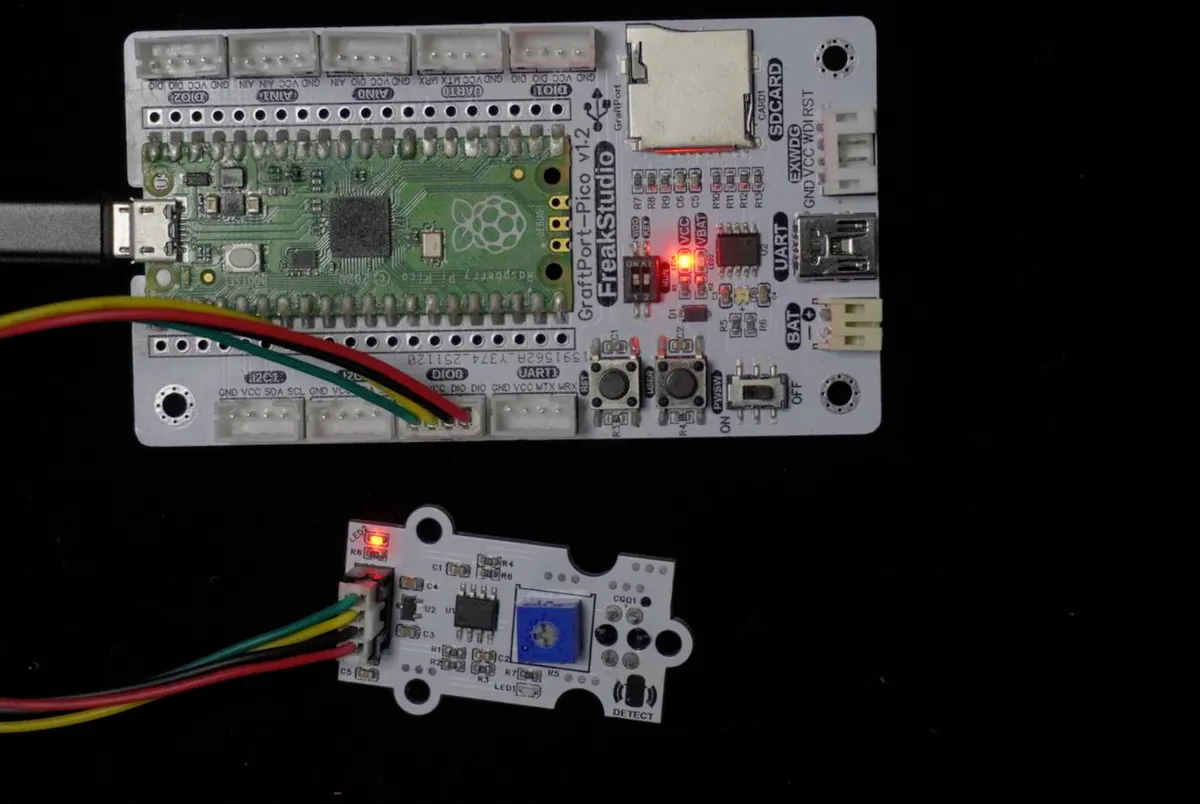
We connect the single-channel tracking module to the DIO0 interface of the development board, and the corresponding relationship is as follows:
Development Board Pins | Module Pins | Description |
Pin 6 |
| Tracking probe digital signal input pin |
Pin 7 |
| - |
📌 Note
- When a white line is detected, the DOUT output will be at high level;
- When a black line is detected, DOUT will turn to a low level; the development board only needs to read this level change to determine whether the car has deviated from its course!
3. Calibration Instructions
Before using the single-channel tracking module based on TCR5000L, you need to perform calibration first:
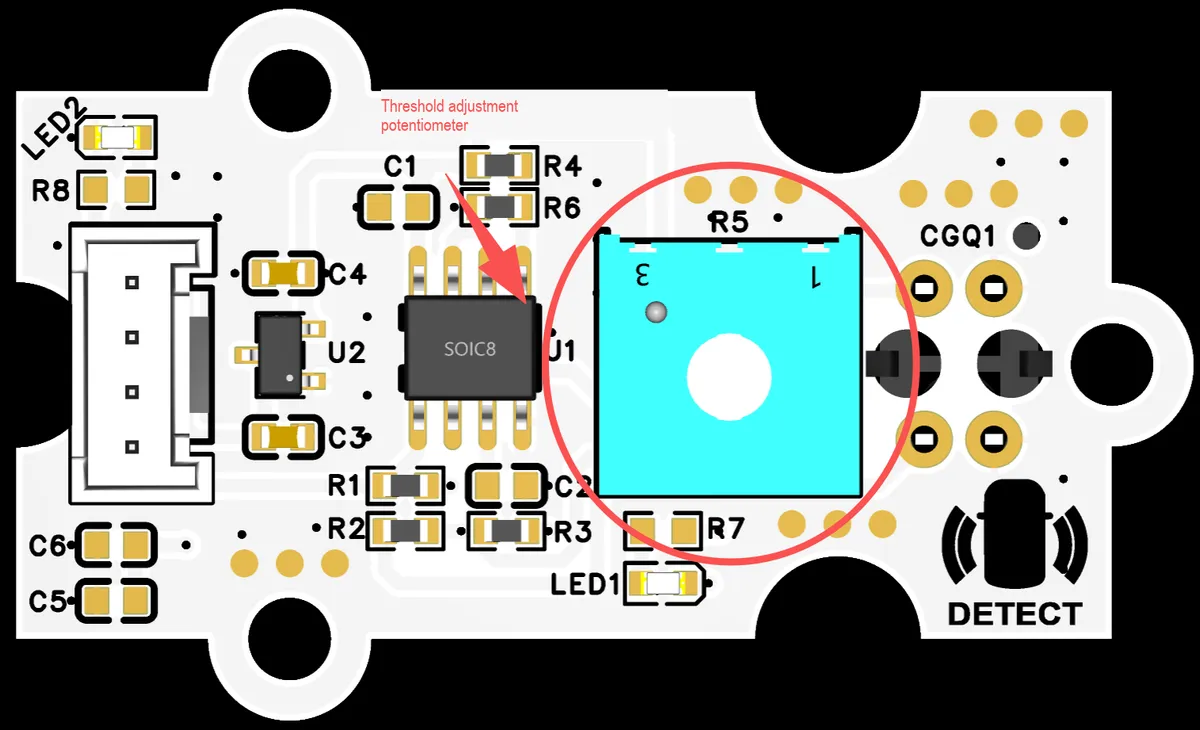
- White background calibration: Aim the probe at a pure white background and observe
DOindicator and output; adjust theR5potentiometer to turn on the indicator. - Black line calibration: Align the probe with the center of the black line, and keep adjusting the potentiometer until the indicator light goes out;
- Boundary verification: Slowly move the module, it should switch quickly at the black-and-white boundary without prolonged jitter; if the switching is blurry, fine-tune the potentiometer until the boundary is clear.
4. Example: Detect black and white lines and print a prompt
Experiment Objective: To implement the most basic line-tracking detection function: when the single-channel line-tracking module is aligned with a black line, the terminal will print "Black line detected"; when it is aligned with a white line, the terminal will print "White line detected", so that you can intuitively observe the detection effect of the module.
Fun Little Thought: The reason why robot vacuums can automatically avoid stairs and clean along the edges of walls is that they rely on similar sensors to detect changes in the ground surface. Now, let's make a "tiny detector that can tell black lines apart from white ones"!
The graphical program is as follows:
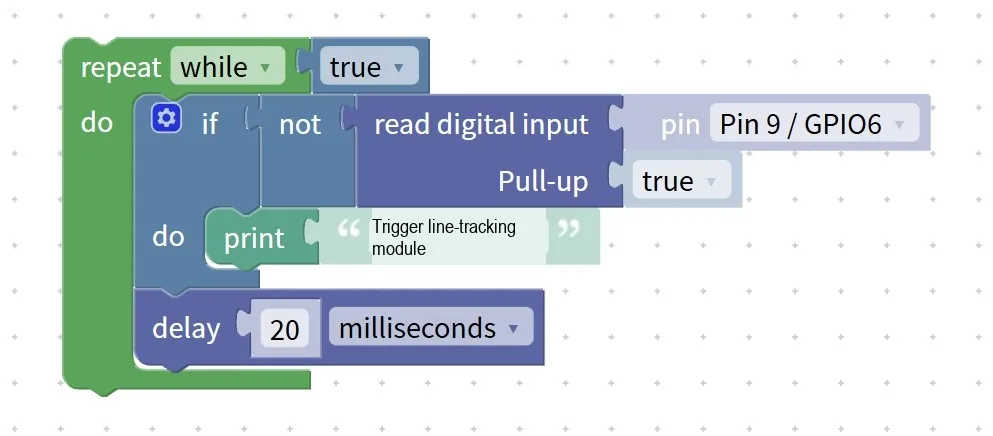
Building Block Assembly Steps:
- infinite loop
- Select the
repeat while trueblock to make the program continuously detect the line color;
- Read the tracking status
- Use the
read digital inputblock; - Select Pin 13 / GPIO10 (corresponding to the DIO1 interface) for the pin;
- conditional judgment
- Use the
if not read digital inputblock; - When the read result is false (low level), it indicates that a black line is currently detected;
- In the
ifblock, add theprint "Black line detected"block; - Add another
elsebranch, and place theprint "White line detected"block inside it;
- Add delay (optional)
- Add a
delay 200 millisecondsblock in the loop to prevent the printed messages from scrolling too fast.
Experimental Effect:
- When the module is aligned with the white line, the terminal continuously prints "White line detected";
- When the module is aligned with the black line, the terminal immediately switches to print "Black line detected";
- Move the module back and forth, and the printed content will change along with the line color.
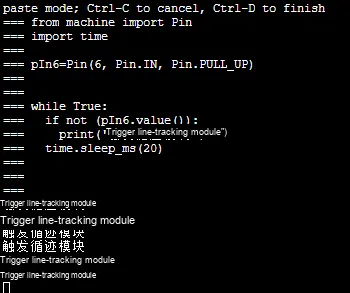
Graphical blocks will be automatically converted into MicroPython code for execution on the development board:
Directly importable building blocks:
Tips
- If there is no response from the test:
- Check whether the pins are selected correctly;
- Adjust the height of the module from the ground; the optimal height is generally 2 to 5 millimeters.
- Ambient light will affect the detection result:
- Under direct strong light, the module may make misjudgments, so it is recommended to conduct the experiment under indoor natural light as much as possible;
- For more accurate detection:
- You can attach a black light shield to the bottom of the module to reduce interference from external light.
✨ Interactive Mini Quiz
- Think about it: If the installation height of the module is adjusted to 10 mm, will the detection effect become better or worse? And why?
- Try it out: Replace the black and white lines with red and blue paper, and see if the module can detect them. What does this indicate – does the line-tracking module recognize colors or light reflectance?
Summary
- The single-channel tracking module is a infrared reflective sensor that distinguishes between black and white lines by detecting the intensity of reflected light;
- Compared with manual control, it enables the trolley to automatically recognize the route and realize tracking navigation;
- The basic function is to detect black and white lines, and the advanced usage is to control the car to follow the track in coordination with the motor module;
- The installation height and ambient light will affect the detection accuracy, so patient adjustment is required.