
Young makers, let's unlock a "more sensitive vibration catcher" 🚨 now!
We've played with ball-type vibration sensors before, which can detect obvious shaking. But today, this spring-type vibration sensor based on the SW-18010P can catch even the tiniest vibrations without missing a thing — it's like fitting a "vibration stethoscope" to the development board ✨, letting the board know that even the slightest wobble or bump can be accurately picked up!
1. Module Introduction
Sometimes, when we need to detect extremely subtle vibrations — for example, a light nudge to a table — ball-type sensors may not be sensitive enough to pick them up, and that’s when spring-type vibration sensors come into play!
It is a high-sensitivity switch-type vibration sensor: there is a tiny spring inside the module. When the module perceives vibration, the spring will bend due to the vibration and come into contact with the electrode, and the module will output a trigger signal; when stationary, the spring returns to its original position and the signal is cut off. Compared with the ball type, it is more sensitive to slight vibrations.
Compared with ball-type vibration sensors, it has the following characteristics:
- 🚨 Higher sensitivity: capable of detecting even minor vibrations, such as tapping on a desk or slight shaking;
- 🎯 Stable Trigger: The spring has a larger contact area, making the vibration-triggered signal more stable;
- 🧩 Wide range of application scenarios: suitable for precision vibration detection, such as anti-theft alarms and minor collision reminders.
In graphical programming, these blocks are commonly used with spring vibration sensors:
- Read the digital input block: Get whether vibration is currently detected;
- Conditional (if-then) block: checks whether "vibration is triggered";
- Forever block: Continuously detect the vibration status;
- Delay block: Filters high-frequency jitter to avoid repeated triggering;
- Print / LED Building Block: Output trigger feedback.
In practical projects, it is often used for the following purposes:
- Minor vibration alarm (e. g., triggers a prompt when a drawer is gently pulled open)
- Collision detection (e. g., triggering an alarm when a small vehicle slightly brushes against an obstacle)
- Interactive installations (e. g., tapping a tabletop to trigger lighting effects)
Quick Science: Spring Type vs Ball Type
- Ball type: Triggered by the rolling of metal balls, suitable for detecting obvious shaking and collisions;
- Spring type: Triggered by spring bending contact, suitable for detecting slight vibrations and touches; it’s like listening to sounds with different "ears" — one picks up "loud noises" and the other catches "faint sounds"!
2. Wiring Instructions
To make the development board "detect" slight vibrations, the first step is still —— connect the module correctly!
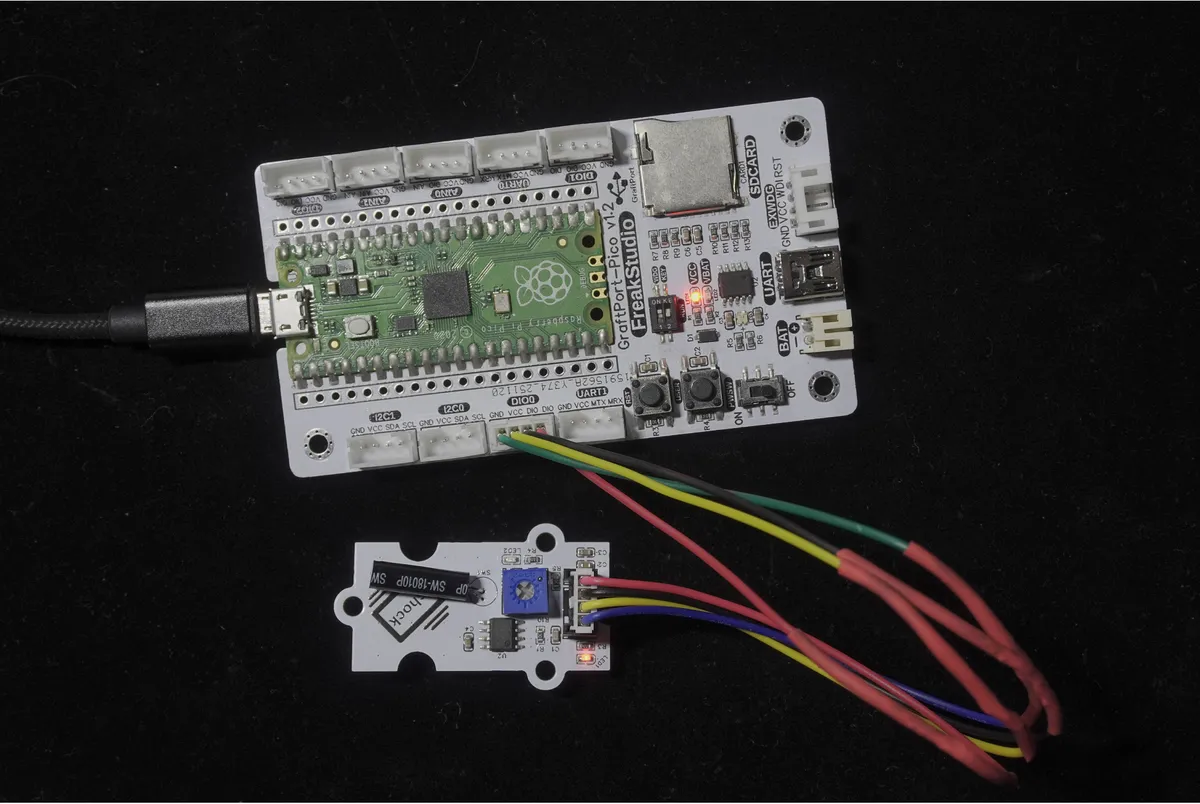
We will connect the spring-type vibration sensor module based on SW-18010P to the digital interface DIO0 of the development board, and the corresponding relationship is as follows:
Development Board Pins | Module Pins | Description |
Pin 6 |
| Sensor level signal input pin |
Pin 7 |
| - |
📌 Note
- When the module is stationary, the DOUT output is at a high level;
- When the module vibrates, the DOUT will switch to low level; the development board can determine whether a vibration has occurred by reading this level change!
3. Example: Detect vibration and print a prompt
Experimental Objective: Detect vibrations in the environment in real time. Even a slight touch will trigger the terminal to print "Spring Triggered", allowing you to intuitively experience the high sensitivity of the spring-type sensor.
Everyday Life Insight: The burglar alarm in your home relies on a highly sensitive sensor similar to this to detect even minor vibrations — now let’s build our very own "mini vibration detector"!
The graphical program is as follows:
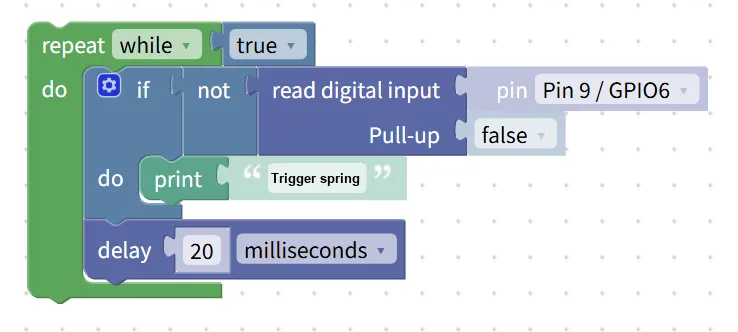
Building Block Assembly Steps:
- infinite loop
- Use the
repeat while trueblock to make the program continuously detect vibration;
- Use the
- Read vibration status
- Use the
read digital inputblock; - Select the pin connected to the sensor:
Pin 9 / GPIO6; - Set the
Pull-uptofalse(to match the module's level output);
- Use the
- conditional judgment
- Use the
if not read digital inputblock (since it outputs a low level when vibrating, andnotis used to identify the trigger state);
- Use the
- Trigger Feedback
- Add the
print "Trigger spring"block when the condition is satisfied; - Add the
delay 20 millisecondsblock to filter high-frequency jitter and avoid duplicate printing.
- Add the
Experimental Effect:
- When the module is stationary, the terminal outputs nothing;
- Gently tap the table or touch the module, and the terminal will immediately print "Trigger Spring" continuously;
- Printing will stop automatically once the vibration ceases.
📌 Give it a try: Tap the module with different levels of force to experience its high sensitivity!
Graphical blocks will be automatically converted into MicroPython code, and the running result will be output:
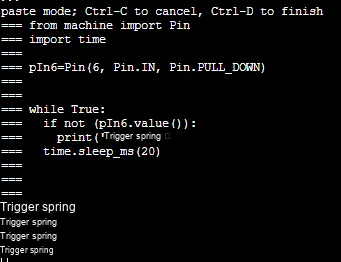
Directly importable building blocks:
Spring.xml 2 KB
Tips
- If no vibration is detected:
- Check whether the correct pins are selected (
Pin 9 / GPIO6) and whether the wiring is secure; - Try tapping the module or the desktop gently, as it is more sensitive to slight vibrations;
- Avoid frequent triggering:
- You can increase the delay time (e. g., 50 milliseconds) to reduce repeated printing;
- Advanced Gameplay:
- Pair it with LED building blocks, and the LED will light up when shaken, making a "high-sensitivity vibration alarm light".
✨ Interactive Mini Quiz
- Think about it: Why do we need to add
time.sleep_ms (20)in the code? What will happen in the terminal if we remove this delay? - Try this: Place the spring-loaded sensor and the ball-type sensor together, tap the tabletop gently with the same force, and see which sensor triggers first!
Summary
- The spring-type vibration sensor based on SW-18010P is a high-sensitivity switch-type module;
- It detects slight vibrations through the bending contact of its internal spring, which is more sensitive than the ball type.
- Outputs a low level when vibrating, and a high level when stationary;
- Through conditional judgment, functions such as highly sensitive vibration alarm and minor collision detection can be realized.