
Young makers, let's unlock a fun module that "reacts the moment you touch it" 🎮!
The vibration bracelets we usually use, the collision alarms of remote-controlled cars, and even the vibration alerts on mobile phones all rely on tiny devices capable of detecting vibrations behind the scenes.
Today, we’re going to get to know the module that can "capture the instant of vibration" — the ball-type vibration sensor module based on the SW-520D ✨ It enables the development board to detect: 👉 Is there any vibration right now? Is it being shaken?
1. Module Introduction
When we shake an object by hand, we can feel the vibration, but how does the development board "sense" it? That's exactly the job of the SW-520D ball-type vibration sensor module.
It is a switch-type vibration sensor: there is a metal ball inside the module. When the module is shaken or vibrated, the ball will roll and contact the internal electrodes, and the module will output a trigger signal; when stationary, the ball returns to its original position and the signal is cut off. Simply put, it is just like a "small switch triggered by vibration".
Compared with analog sensors, it has the following characteristics:
- 🔍 Clear trigger mechanism: It does not respond to "vibration intensity", but rather to "the presence or absence of vibration", functioning like a sensitive vibration switch;
- 🔧 Flexible installation: Can be attached to the surface of an object to detect actions such as collision, shaking, and dropping;
- 🎮 Highly interactive: Suitable for fun interactive projects, such as vibration alarms and collision-triggered toys.
In graphical programming, these blocks are commonly used with ball tilt sensors:
- Read the digital input block: Get whether vibration is currently detected;
- Conditional block: Judge "whether vibration is triggered";
- Loop block: Continuously detect the vibration status;
- Delay block: Filters minor vibrations to prevent false triggers;
- Print / LED Building Block: Output trigger feedback.
In practical projects, it is often used for the following purposes:
- Vibration alarm device (e. g., triggers LED flashing when a drawer is pulled open)
- Interactive toys (e. g., those that trigger sound effects when shaken)
- Collision detection (e. g., the car stops when hitting an obstacle)
Quick Science: What is a ball-type vibration sensor?
Inside the module, there is a metal ball and two electrodes. When stationary, the ball does not come into contact with the electrodes, and the module outputs a high level; when vibration occurs, the ball rolls and touches the electrodes, the circuit is connected, and the module outputs a low level. It is just like a "small switch controlled by the rolling of a ball" — simple yet sensitive!
2. Wiring Instructions
To make the development board "sense" vibrations, the first step remains the same — connect the module correctly!
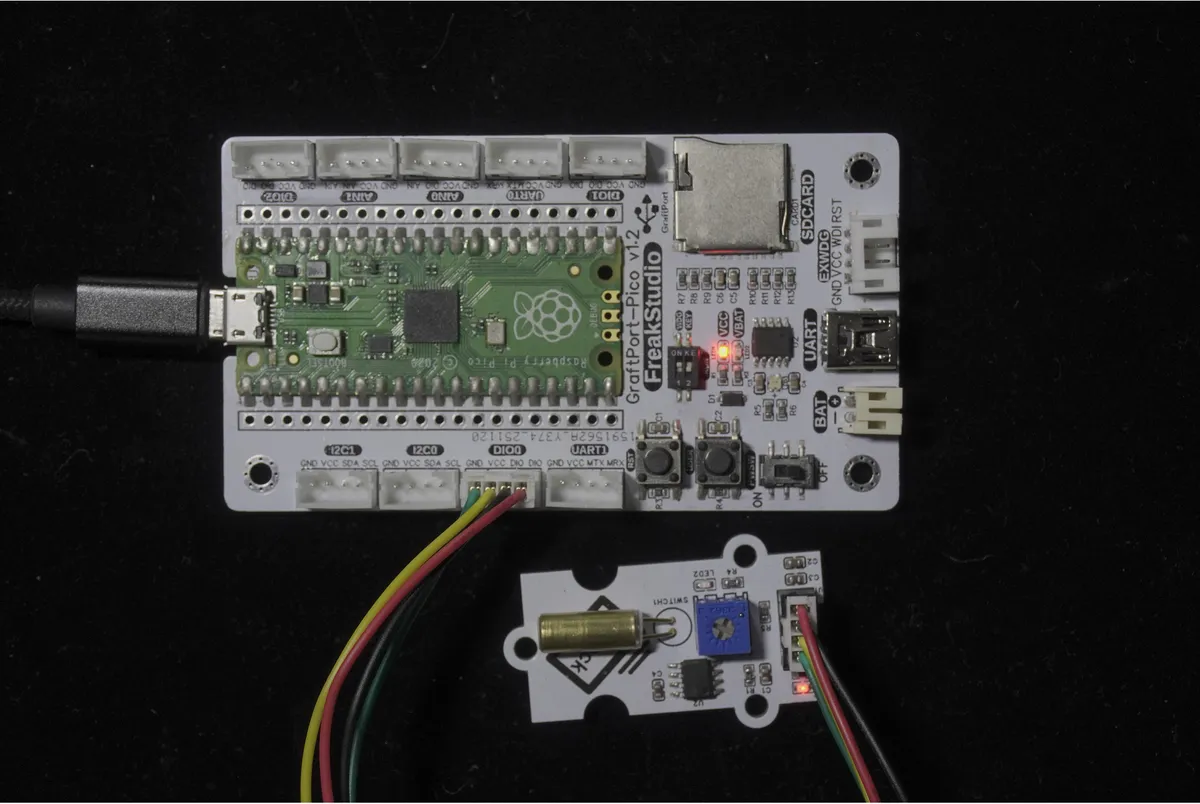
We will connect the ball-type vibration sensor module based on SW-520D to the digital interface DIO0 of the development board, and the corresponding relationship is as follows:
Development Board Pins | Module Pins | Description |
Pin 6 |
| Sensor level signal input pin |
Pin 7 |
| - |
📌 Note
- When the module is stationary, the DOUT output is at a high level;
- When the module vibrates, the DOUT will switch to low level; the development board can determine whether a vibration has occurred by reading this level change!
3. Example: Detect vibration and print a prompt
Experiment Objective: Detect vibrations in the environment in real time; print "Vibration detected!" on the terminal when the module is shaken or collided, and do not print anything when it is stationary.
Little Life Inspiration: The motion-sensing game controllers we use rely on similar sensors to detect shaking movements, so now let's make a tiny "shake-sensing detector" ourselves!
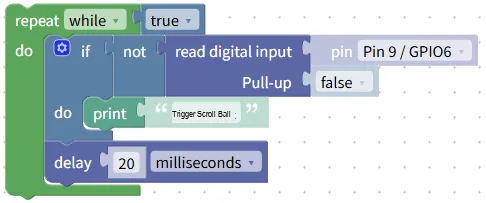
The graphical program is as follows:
Building Block Assembly Steps:
- infinite loop
- Use the
repeat while trueblock to make the program continuously detect the vibration status;
- Use the
- Read vibration status
- Use the
read digital inputblock; - Select the pin connected to the sensor:
Pin 14 / GPIO11;
- Use the
- conditional judgment
- Use the
if not read digital inputblock (since it outputs a low level when vibrating, andnotis used to identify the trigger state);
- Use the
- Trigger Feedback
- Add the
print "Launch the ball"block when the condition is true; - Add
delay 20 millisecondsblock to avoid duplicate printing caused by slight vibration.
- Add the
Experimental Effect:
- When the module is stationary, the terminal outputs nothing;
- Shake or tap the module, and the terminal will immediately print "Vibration detected!";
- Printing will stop automatically once the vibration ceases.
📌 You can try: Stick the module to the table, tap the table with your hand, and see if it gets triggered!
Graphical blocks will be automatically converted into MicroPython code, and the running results will be displayed:
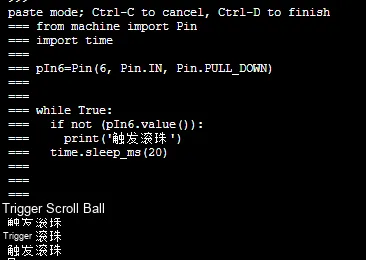
Directly importable building blocks:
Rolling ball vibration sensor module.xml 2 KB
Tips
- If no vibration is detected:
- Check if the correct pins are selected (
Pin 14 / GPIO11) and if the wiring is secure; - Try increasing the vibration amplitude, for example, shake the module vigorously;
- False trigger prevention:
- You can increase the delay time (e. g., 300 milliseconds) to filter out minor jitter.
- Advanced Gameplay:
- Pair it with LED building blocks, which will light up when shaken, to make a "vibration alarm light".
✨ Interactive Mini Quiz
- Think about it: Why do we use
if not read digital inputto detect vibration? What will happen to the program if we remove thenot? - Try this: Fix the module to a small cart, push the cart to let it hit an obstacle, and see if it can trigger the vibration detection!
Summary
- The ball-type vibration sensor based on SW-520D is a switch-type trigger module;
- It detects "whether there is vibration" through the rolling of internal ball bearings, rather than the intensity of the vibration;
- Outputs a low level when vibrating, and a high level when stationary;
- Through conditional judgment, interesting functions such as vibration alarm and interactive triggering can be realized.