
Young makers, following the light sensor that "detects brightness" and the flame sensor that "spots fire", today we’re adding a magical tool that "senses life" to your development board — PIR (Passive Infrared) Human Proximity Sensor! It acts as the development board’s "sixth sense", accurately detecting the heat and movement of humans/animals, and instantly "notices" when someone approaches. It’s perfect for making "welcome" induction lamps, anti-theft alarms and more~
1. Module Introduction
The core capability of this sensor is to "recognize heat and distinguish movement", and its working principle is extremely interesting:
Nature of operation: The pyroelectric element inside the sensor is highly sensitive to the infrared thermal radiation emitted by humans and animals ——
- No people / no moving heat source → sensor output low level;
- When someone approaches or moves (e. g., reaches a hand nearby) → the sensor detects a change in infrared thermal radiation and outputs a high level.
Common uses: corridor sensor lights (turn on when someone approaches, turn off when no one is around), burglar alarms (trigger an alarm when someone gets close), and automatic door sensors, serving as the "core component" of smart home projects.
To enable a sensor to "detect" people, it mainly relies on the coordination of the following types of building blocks:
- Pin Mode Block: Set the pin connected to the sensor to "input mode" to read the voltage level;
- Read digital input block: Core function: Determine "whether someone is approaching"(high/low level);
- Conditional judgment blocks: for example, "If a person is detected, turn on the LED and activate the buzzer";
- Delay block: Prevents signal jitter and avoids the issue of "repeated triggering when someone briefly passes by".
Mini Science: Why only "living creatures" are recognized?
Human bodies and animals continuously emit infrared thermal radiation of specific wavelengths, whereas inanimate objects like tables and walls do not, so the sensor will not trigger falsely and boasts excellent accuracy~
2. Wiring Instructions
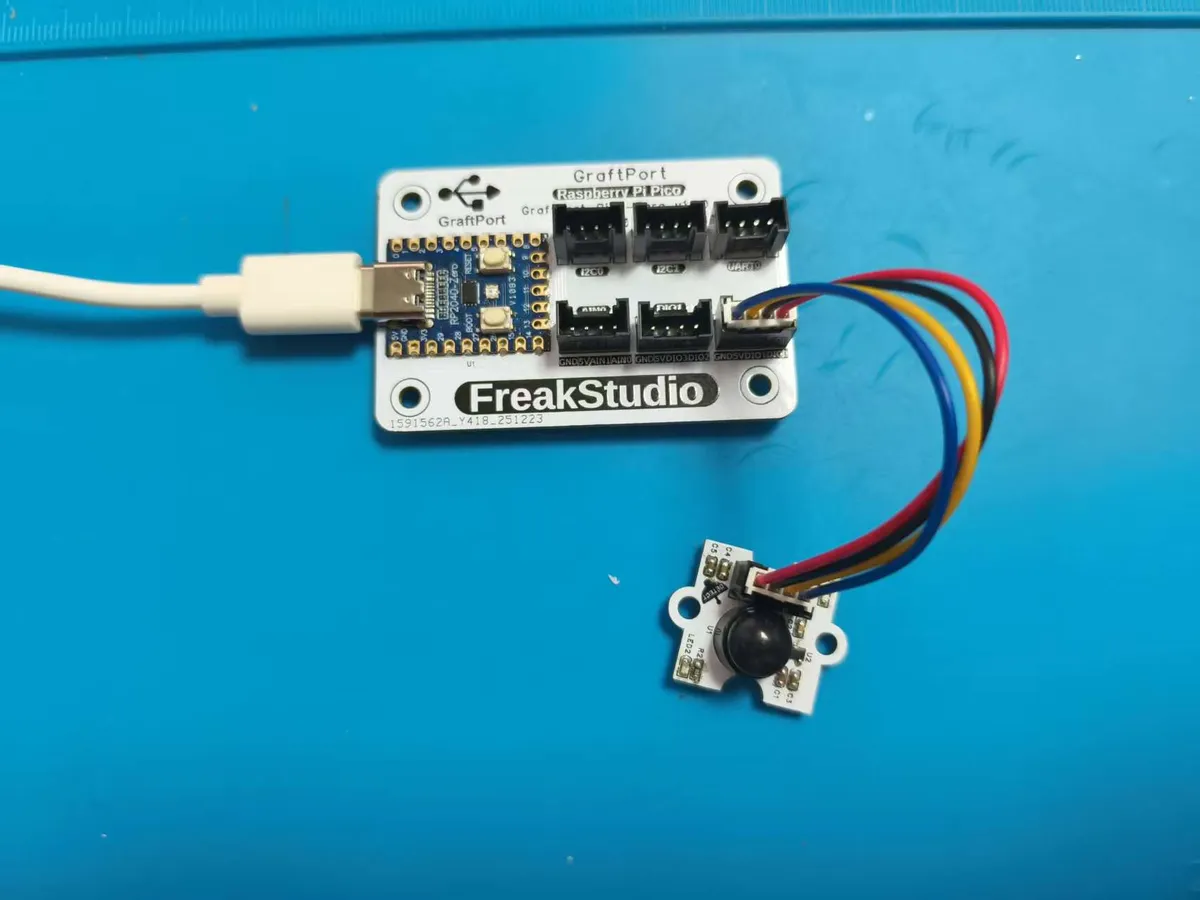
To make the sensor "detect" a person, first connect the wires correctly! We will connect the PIR motion sensor module to the DIO0 interface of the development board, and please keep the specific pin correspondence in mind:
Development Board Pins | Module Pins | Description |
Pin 8 |
| - |
Pin 7 |
| - |
3. Example: Human Body Proximity Infrared Alarm
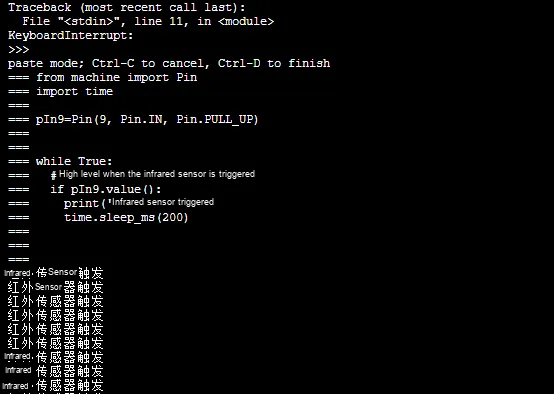
Experiment Objective: Make the development board continuously detect whether there is anyone approaching the surrounding area. Once a human body is detected (for example, a hand reaching close to the sensor), immediately print the prompt "Infrared sensor triggered" on the terminal, and it can also avoid repeated prompts caused by signal jitter~
Core Principle: The level characteristics of the DIN pin of the infrared sensor are different from those of previous sensors; please bear this in mind:
- No object / person detected: DIN pin output low level;
- Human body / moving heat source detected: DIN pin outputs high level; so there is no need to
notinvert the signal, just useread digital inputto judge the high level, and you can accurately identify the state of "someone approaching"!
Building Block Assembly Steps (Step-by-Step Guide for You):
- Infinite Loop: Select the
repeat while trueblock → continuously monitor the status of the infrared sensor; - Infrared inspection judgment:
- Select
the if read digital inputblock,setthePin 12/GPIO9,set Pull-uptotrue→ detect the high level output by the sensor (corresponding to "object detected");
- Select
- Trigger Prompt:
- Add inside the loop
print "Infrared sensor triggered"Blocks → When an object is detected, the terminal prints a prompt; - Add
a delay of 200 millisecondsblock → to prevent duplicate printing caused by signal jitter.
- Add inside the loop
After running the program:
- When no one is nearby, the terminal stays completely silent with no output at all.
- Slowly move your hand closer to the sensor (at a distance of 5~10 cm), and the terminal will immediately print "Infrared sensor triggered";
- Move your hand away, and the system will prompt to stop printing; even if your hand shakes slightly, there will be no repeated prompts~
XML files can be directly imported into the building blocks:
Infrared sensor.xml 2 KB
Tips
- Failed to detect a person? ① Adjust the sensitivity of the sensor (turn it clockwise by one notch to increase the sensitivity); ② Make sure your hand approaches while "moving"(the sensor is not sensitive to static heat sources, so move your hand slightly);
- Want to make an "induction light"? Replace the
printblock with "set LED pin to high level", then add a "turn off after 5 seconds delay" command — the light turns on when someone approaches, and turns off after 5 seconds of no activity; - False trigger? Move the sensor away from heat sources such as air conditioners and table lamps, as these heat sources may be misidentified as "human bodies".
✨ Interactive Mini Quiz
- Think about it: Why do sensors gradually stop triggering for "static people"(e. g., someone standing still)? (Answer: Sensors are only sensitive to "changes in thermal radiation"; when there is no movement, the heat remains constant, so they cannot detect it~)
- Try this: Bring a hot water bag close to the sensor, and it can also trigger the prompt. This is because the hot water bag emits thermal radiation, and the sensor will recognize it as a "heat source"~