
Young makers, now let's unlock a much cooler touch version — the touch key module based on TTP223 ✨! It doesn't have the "press-down" tactile feel of mechanical keys; just a light tap of your finger, and the development board will respond instantly (like lighting up an LED or triggering a motor), just like using a touchscreen phone — totally high-tech and awesome~
1. Module Introduction
Mechanical buttons require being pressed down, so is there a method that can be triggered with just a light touch without pressing? This is exactly what the TTP223 touch button module excels at!
The TTP223 touch key module is a capacitive touch input module: when a finger approaches or touches the sensing area, the module detects the tiny capacitance change caused by the human body and immediately outputs a level signal to inform the development board that "someone has touched me!"
Compared with ordinary mechanical keys, it has these obvious features:
- ✨ No need to press hard: simply tap to activate, delivering an experience just like a smartphone screen;
- ✨ No mechanical wear: no shrapnel structure, making it more durable;
- ✨ Responsive: Suitable for Interaction Design such as touch switches and sensor panels.
In graphical programming, these blocks are mainly used for the TTP223 touch button:
- Set pin mode (input) block: enables the development board to read touch signals;
- Read digital input block: Determine whether it is currently being touched;
- Conditional (if. .. then. ..) block: performs different actions based on whether the touch sensor is "touched / not touched";
- Delay block (optional): Prevents continuous accidental triggers or touch jitter.
In practical projects, it is often used for the following purposes:
- Touch switch (replacing mechanical buttons)
- Mode Switch Button
- The "Sensing Control Zone" of Smart Devices
Quick Science Pop
What exactly is "capacitive sensing"? Our fingers inherently carry a weak capacitance (which can be simply understood as a "tiny electric charge"). When a finger touches the sensing area of the module, it alters the capacitance value of the module's internal circuit. Once the TTP223 chip detects this change, it outputs a trigger signal — this is the core principle behind touchscreen smartphones and touch-controlled table lamps!
2. Wiring Instructions
To make the development board "sense" your fingers, the first step is still —— connect the wires correctly!
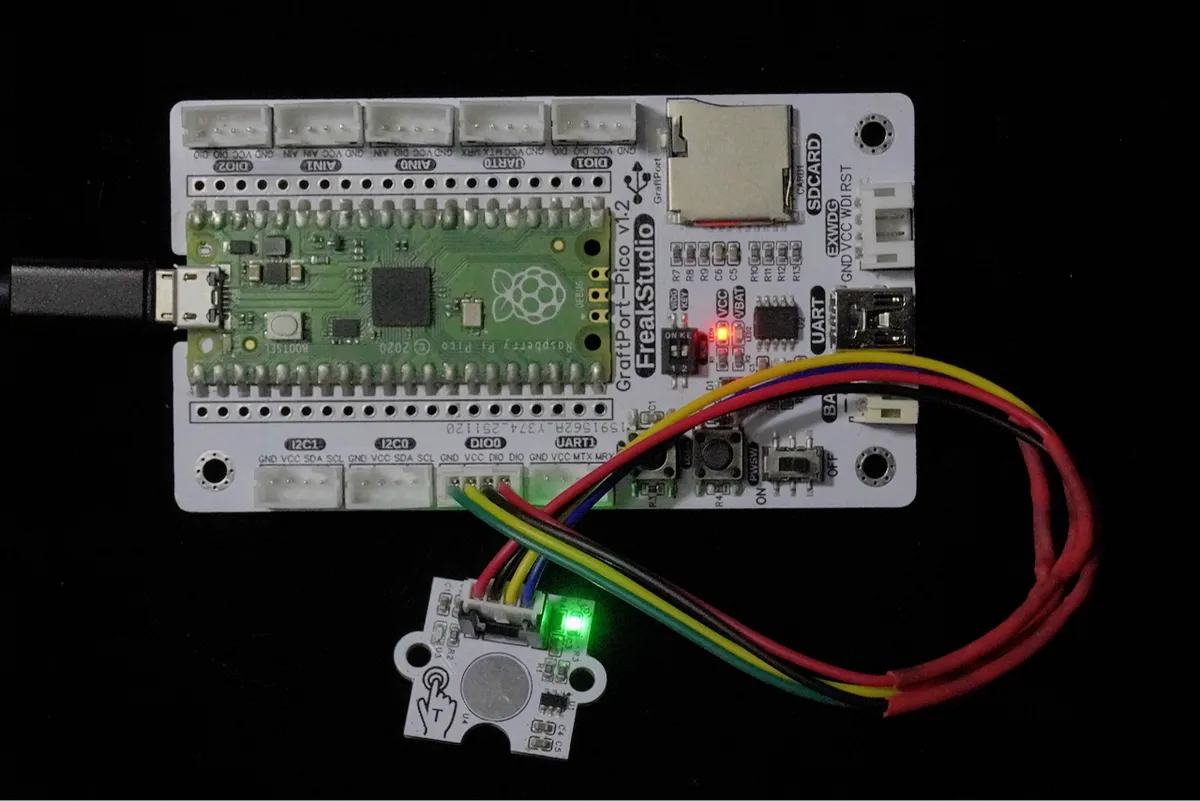
We connect the TTP223 touch key module to the DIO0 interface of the development board, and the corresponding relationship is as follows:
Development Board Pins | Module Pins | Description |
Pin 6 | DOUT | Digital signal output after touch detection |
Pin 7 | NC | Do not use |
📌 Note
- When no touch is detected, the DOUT output is low;
- When a finger touches the sensing area, DOUT will turn into a high level;
the development board can determine whether a touch has occurred as long as it reads this level change.
3. Example: Detect whether it is touched
Experiment Objective: To implement the most basic touch detection function: when we touch the TTP223 module with a finger, a prompt message will be printed on the terminal, and the printing will stop after the finger is released.
Everyday Life Insight: The reason why a mobile phone screen can detect whether you have "tapped it" relies on a principle similar to that of this module. Now, let's make a small device that "can sense touch"!
The graphical program is as follows:
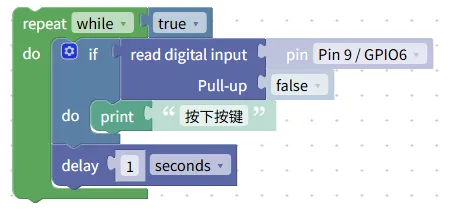
Building Block Assembly Steps:
- infinite loop
- Select the
repeat while trueblock to make the program continuously detect the touch status;
- Select the
- Read touch status
- Use the
read digital inputblock; - Pin Selection:
Pin 12 / GPIO9(corresponding to the DIO1 interface);
- Use the
- conditional judgment
- Use the
if read digital inputblock; - When the read result is
true(high level), it indicates that the current position is being touched;
- Use the
- Touch Response
- Add the
print "Touch detected"block when the condition is true;
- Add the
Experimental Effect:
- When the module is not touched, the terminal outputs nothing;
- When a finger touches the sensing area, the terminal immediately prints "Touch detected";
- Printing stops when you release your finger.
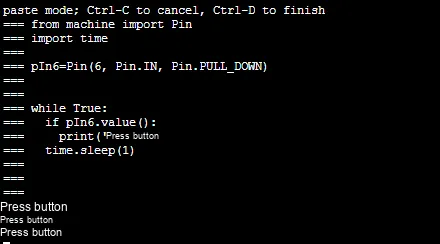
Graphical blocks will be automatically converted into MicroPython code for execution on the development board:
XML file (can be directly imported into building blocks):
TTP223-based touch button module.xml 2 KB
Tips
- If there is no response to touch:
- Check whether the correct pins are selected (GPIO9 / Pin12);
- Make sure your finger directly touches the sensor area; being separated by overly thick materials may affect the performance.
- The touch module is relatively sensitive to the environment:
- When there is a large amount of metal on the desktop, it may be triggered more easily;
- For a more stable effect:
- Add a delay of 200~500 ms after the touch trigger.
✨ Interactive Mini Quiz
- Think about it:
Why doesn't TTP223 need to handle "key shake" like mechanical buttons? - Try it out:
Change the delay time from 300 ms to 50 ms, what will happen?
Then change it to 1000 ms to experience the change in the feel~
Summary
- The TTP223 touch key module is a capacitive input device that triggers signals by sensing finger touches;
- Compared with mechanical buttons, it requires no force to operate, is more durable, and enables more natural interaction;
- The basic usage is to detect "whether it is being touched", and the advanced usage is touch to switch states;
- Adding an appropriate delay can prevent consecutive accidental touches and make the program perform more stably.