
Contents
Young makers, let’s unlock an extremely cool module of "installing a laser ruler on the development board" 📏 right now!
Normally we use a ruler to measure things, and today this laser ranging module based on the VL53L0X can emit laser just like a laser pointer, accurately measure the distance of the object in front, enabling the development board to "perceive" the distance of the world, and it is indispensable for making obstacle avoidance cars and automatic doors✨!
1. Module Introduction
Want to let your development board know "how far the object in front of me is"? The VL53L0X laser ranging module is exactly designed for this purpose!
It is a Time-of-Flight (ToF) laser ranging sensor: the module emits a laser beam, which reflects back after hitting an object; the chip calculates the time it takes for the laser to "go out → come back" to work out the distance to the object (in millimeters), with an accuracy of up to ±3mm, which is far more precise than ordinary infrared ranging sensors!
Compared with the infrared ranging module, it has the following features:
- 🎯 High-precision measurement: The laser rangefinder features low error and is unaffected by the color of the target object;
- 🚀 Fast response: It can perform dozens of measurements per second, making it suitable for objects in high-speed motion (such as obstacle avoidance for small vehicles);
- 📏 Appropriate measurement range: capable of measuring distances from 30 millimeters to 2 meters, which just meets the needs of small and medium-sized projects;
- 🔍 Non-contact: Enables measurement without touching the object, thus avoiding wear and tear.
In graphical programming, these blocks are commonly used for the laser ranging module:
Init VL53L0XBlock: Initialize the sensor and configure the I2C communication pins;Time of FlightBlocks: Read the currently measured distance value;- Infinite loop block: continuously measure the distance;
printblock: Output the distance value to the terminal;- Delay block: Controls the measurement frequency.
In practical projects, it is often used for the following purposes:
- Obstacle avoidance sensor of the smart car (for detecting the distance of obstacles ahead)
- Automatic door sensor switch (for detecting personnel distance)
- Object distance measurement tool (e. g., for measuring the length of a table)
Quick Science: What is Time of Flight (ToF)?
Just like when you shout into a valley, you can calculate the distance to the valley based on the time it takes for the echo to reach you. After the VL53L0X emits a laser, it calculates the round-trip time of the laser, multiplies that by the speed of light, and then obtains the distance (distance = time × speed of light ÷ 2). Because the speed of light is extremely fast, it can accurately measure distances down to the millimeter level!
2. Usage of Basic Building Blocks
2.1 Initialization Block (Init VL53L0X: I2C. .., SCL. .., SDA. ..)
Once the sensor finishes initialization, it’s time to use this block to “fetch the parcel” — that is, read out the distance data measured by the VL53L0X for use in the program!
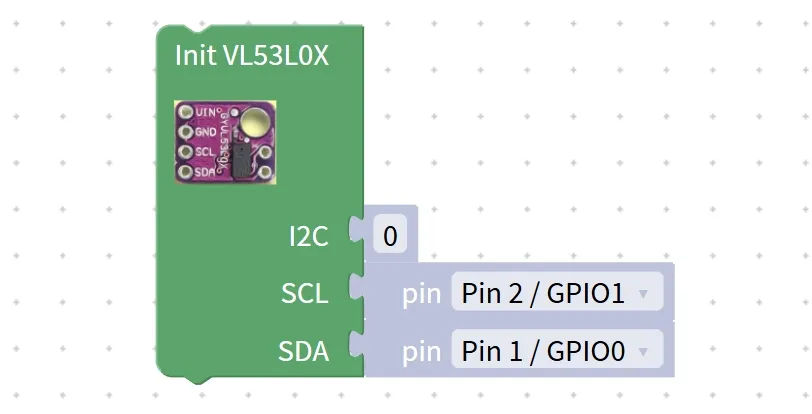
First, figure out: How do reading blocks fetch data?
VL53L0X is a "Time-of-Flight" ranging sensor. After initialization, it automatically emits laser pulses in real time, calculates the time elapsed from the laser being transmitted to its return, then converts this into a distance value and temporarily stores it in its internal buffer. This building block acts like a "courier" for the development board, specifically tasked with retrieving the "distance package" from the sensor's buffer, and reads the latest distance measurement from the sensor, with the unit being millimeter (mm).
Chinese Meaning: Read the time-of-flight ranging value of the VL53L0X (Time of Flight) sensor, and return the currently detected target distance (in millimeters).
When the program runs to this block, it will retrieve the distance data from the VL53L0X cache and return a specific number (e. g., 50,200,1000): the smaller the value, the closer the target is to the sensor; the larger the value, the farther the target is from the sensor. This number can be directly used for printing, displaying on the screen, or making conditional judgments (e. g., "trigger an alarm when the distance is less than 100mm").
Tips
- Do not reverse the order! If you read the distance first and then initialize the sensor, you will get invalid data (such as 0);
- Avoid blocking the laser port! The laser transmitting/receiving window of the sensor must not be blocked by dust or fingers, otherwise it will result in inaccurate ranging or complete failure;
- Reference for the measurement range! The VL53L0X can measure distances from 0 to 2000 mm, making it suitable for high-precision short-range distance measurement (e. g., obstacle avoidance for robotic cars, object positioning).
✨ Interactive Quiz: Quick Response Challenge
Slowly move your hand closer to the laser opening of the VL53L0X sensor. Will the read distance value increase or decrease? (Answer: Decrease! As the distance between your hand and the sensor gets shorter, the laser time-of-flight becomes shorter, so the converted distance value will also be smaller~)
2.2 ToF Ranging Read Block (Time of Flight)
After the sensor completes initialization, it's time to use this block to "pick up the parcel" — that is, read out the distance data measured by the VL53L0X for use in the program!

First, let's figure out: How do reading blocks get data?
VL53L0X is a "time-of-flight" ranging sensor. After initialization, it automatically and continuously emits laser pulses in real time, calculates the time elapsed from the laser being transmitted to its return, then converts this time into a distance value and temporarily stores it in its internal buffer. This building block acts like a "courier" for the development board, specifically retrieving the "distance package" from the sensor's buffer, and reads the latest distance measurement from the sensor, with the unit being millimeters (mm).
Chinese meaning: Read the time-of-flight ranging value of the (Time of Flight) VL53L0X sensor, and return the currently detected target distance (in millimeters).
When the program runs to this block, it will retrieve the distance data from the VL53L0X cache and return a specific number (e. g., 50,200,1000): the smaller the value, the closer the target is to the sensor; the larger the value, the farther the target is from the sensor. This number can be directly used for printing, displaying on the screen, or making conditional judgments (e. g., "trigger an alarm when the distance is less than 100mm").
Tips
- Do not reverse the order! If you read the distance first and then initialize the sensor, you will get invalid data (such as 0);
- Avoid blocking the laser port! The laser transmitting/receiving window of the sensor must not be blocked by dust or fingers, otherwise it will result in inaccurate ranging or complete failure;
- Reference for the measurement range! The VL53L0X can measure distances from 0 to 2000 mm, making it suitable for high-precision short-range distance measurement (e. g., obstacle avoidance for robotic cars, object positioning).
✨ Interactive Quick Quiz
When you slowly move your hand closer to the laser aperture of the VL53L0X sensor, will the read distance value increase or decrease? (Answer: Decrease! Because the distance between your hand and the sensor gets shorter, the laser time-of-flight becomes shorter, and the converted distance value will be smaller~)
3. Wiring Instructions
For the laser ranging module to "perceive" distances correctly, the first step remains the same: connect the module properly!
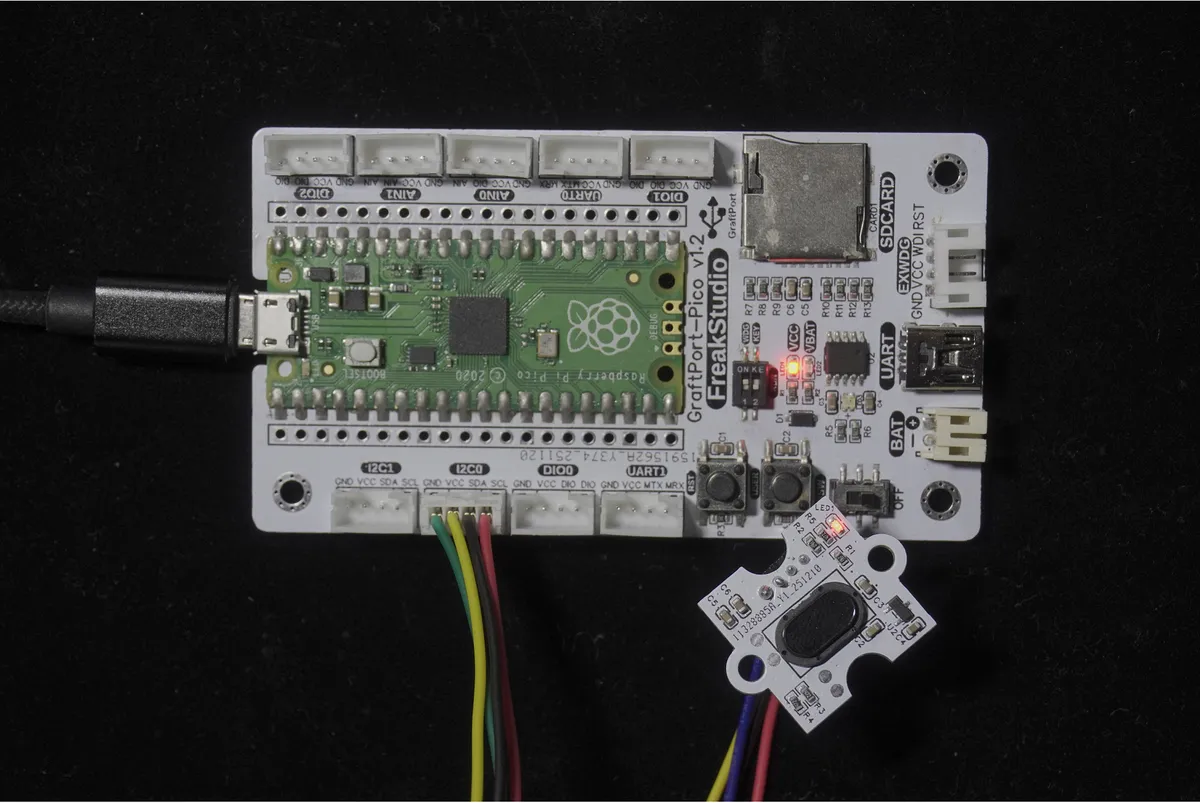
We will connect the VL53L0X-based laser ranging module to the I2C0 interface of the development board, and the corresponding relationship is as follows:
Development Board Pins | Module Pins | Description |
Pin 4 |
|
|
Pin 5 |
|
|
📌 Note
- The VL53L0X communicates via I2C, and the SCL and SDA pins must be connected correctly; otherwise, data cannot be read.
- The default I2C address of the module is
0x29, no additional configuration is required.
4. Install the VL53L0X library function
Before using graphical building blocks, you need to install the driver library for VL53L0X first:
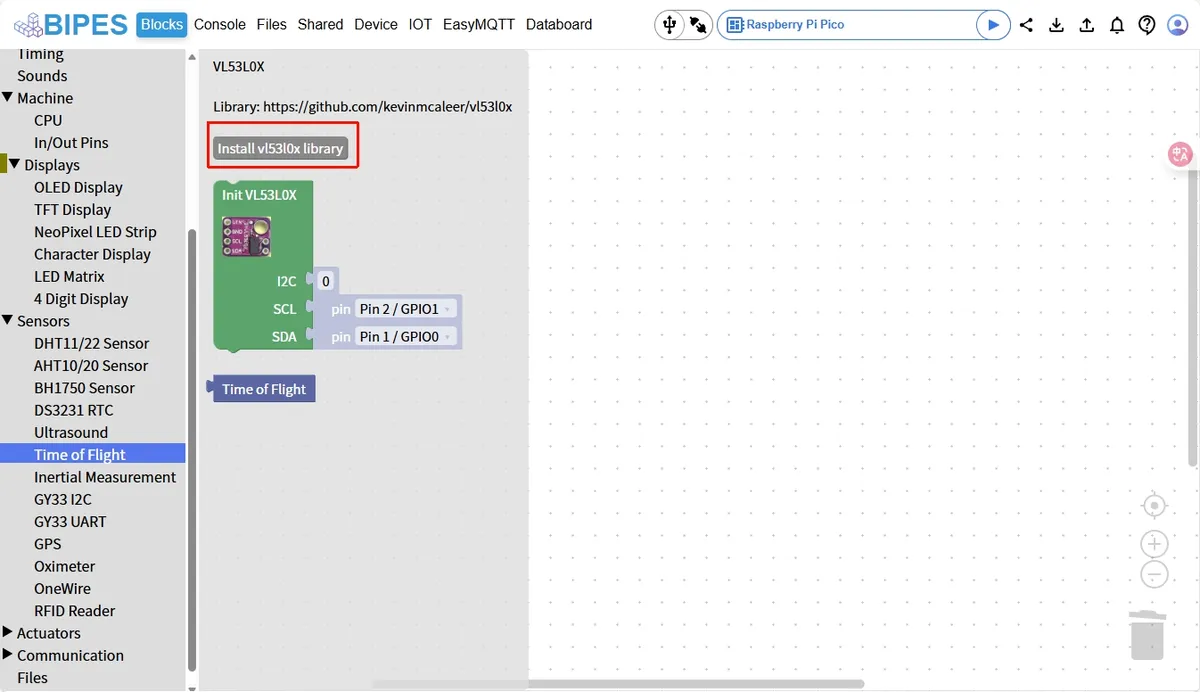
- Click the "Install vl53l0x library" button to complete the installation;
- After the installation is complete, restart the editor and you will see
Init VL53L0Xand other exclusive blocks.
5. Example: Measure the distance in real time and print it out
Experimental Objective: Continuously measure the distance of the object in front, print the value to the terminal in real time, and intuitively experience the accuracy of laser ranging.
Everyday Thought: Robot vacuums rely on similar laser ranging sensors to avoid furniture, so let’s build our own tiny laser tape measure right now!
The graphical program is as follows:
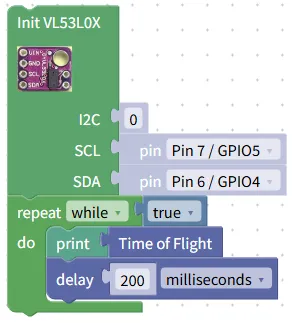
Building Block Assembly Steps:
- Initialize the sensor
- Drag in the
Init VL53L0Xblock; - Set
I2Cto0(corresponding to the I2C0 interface); SCLselectsPin 7 / GPIO5,SDAselectsPin 6 / GPIO4, which matches the wiring.
- Drag in the
- Infinite Loop Measurement
- Drag in the
repeat while trueblock to keep the program running continuously.
- Drag in the
- Read and print the distance
- Drag the
printblock into the loop, select theTime of Flightblock as its content, and the current distance value (unit: millimeter) will be output directly;
- Drag the
- Add Delay
- Drag a
delayblock to the end of the loop and set it to200milliseconds → this controls the measurement frequency and prevents the terminal from being flooded with messages.
- Drag a
Experimental Effect:
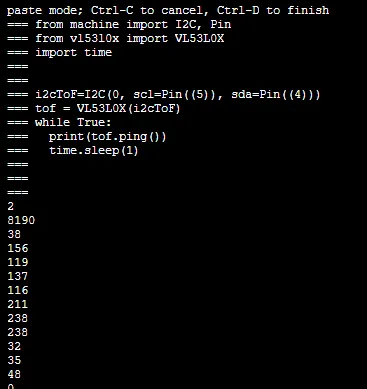
- After the program runs, the terminal will print the distance value every 200 milliseconds, for example,
2,8190,38,156and other precise values; - Bring your hand close to the module, and the value will decrease; move your hand away, and the value will increase (the maximum display of
8190indicates out of range); - When measuring objects of different colors, such as black paper and white paper, the values remain almost unchanged, which reflects the stability of laser ranging.
The graphical blocks will be automatically converted into MicroPython code adapted for VL53L0X, and the running result will be displayed:
Directly importable building blocks:
Tips
- If the distance value cannot be read:
- Check whether the SCL and SDA pins are connected correctly (Pin7/GPIO5, Pin6/GPIO4) and whether the wiring is secure;
- Confirm that the VL53L0X library has been installed correctly, then restart the editor and try again;
- Avoid exposing the module to direct strong light, and keep the laser window clean.
- Numerical display
8190What should I do?- This indicates that the object is beyond the measurement range (>2 meters) or no object is detected. Simply move the object to a position within the range of 30 mm to 2 meters.
- Advanced Gameplay:
- Pair it with the TM1637 digital tube module to display the distance value on the digital tube, creating a "visual laser ruler";
- Add conditional judgment: when the distance is less than 100 millimeters, turn on the LED to simulate the obstacle avoidance function of the car.
✨ Interactive Mini Quiz
- Think about it: Why is laser ranging more accurate than infrared ranging? Will the readings be inaccurate if you use infrared ranging to measure a black object?
- Try it: Change the delay time from 200 milliseconds to 100 milliseconds and see if the measurement speed becomes faster. Then change it to 500 milliseconds to experience different measurement frequencies.
Summary
- The laser ranging module based on VL53L0X is a Time-of-Flight (ToF) sensor that calculates distance based on the round-trip time of laser.
- Before use, please complete the I2C wiring and library installation as two preparatory steps to ensure normal communication;
- It boasts the advantages of high precision, fast response, and immunity to color interference, making it the top choice for obstacle avoidance and distance measurement projects.
- The basic usage is to "read + print" the distance value, while the advanced usage is to cooperate with peripherals to realize automatic control.